
1.源码
新建窗口工程
修改如下mainwindow.h
#ifndef MAINWINDOW_H
#define MAINWINDOW_H
#pragma execution_character_set("utf-8")
#include <QMainWindow>

//网络相关头文件
#include <QtNetwork/QNetworkAccessManager>
#include <QtNetwork/QNetworkRequest>
#include <QtNetwork/QNetworkReply>
//JSON相关头文件
#include <QJsonDocument>
#include <QJsonObject>
#include <QJsonArray>
#include <QMessageBox>
#include <QDesktopServices>

QT_BEGIN_NAMESPACE
namespace Ui { class MainWindow; }
QT_END_NAMESPACE

class MainWindow : public QMainWindow
{
    Q_OBJECT

public:
    MainWindow(QWidget *parent = nullptr);
    ~MainWindow();

    QNetworkAccessManager *manager;     //定义网络请求对象
    int parse_UpdateJSON(QString str);  //解析数据函数的声明
    QString CurVerison = "B1.0.0";      //定义当前软件的版本号

private slots:
    void on_btn_chkUpdate_clicked();
    void replyFinished(QNetworkReply *reply);    //网络数据接收完成槽函数的声明

private:
    Ui::MainWindow *ui;
};
#endif // MAINWINDOW_H
mainwindow.cpp
#include "mainwindow.h"
#include "ui_mainwindow.h"

MainWindow::MainWindow(QWidget *parent)
    : QMainWindow(parent)
    , ui(new Ui::MainWindow)
{
    ui->setupUi(this);

    manager = new QNetworkAccessManager(this);          //新建QNetworkAccessManager对象
    connect(manager, SIGNAL(finished(QNetworkReply*)), this, SLOT(replyFinished(QNetworkReply*)));//关联信号和槽
}

MainWindow::~MainWindow()
{
    QApplication* app;
    app->exit(0);
    delete ui;
}


void MainWindow::on_btn_chkUpdate_clicked()
{
    QNetworkRequest quest;
    quest.setUrl(QUrl("http://114.117.234.248/updata.json")); //包含最新版本软件的下载地址
    quest.setHeader(QNetworkRequest::UserAgentHeader,"updata");
    manager->get(quest);    //发送get网络请求
}

void MainWindow::replyFinished(QNetworkReply *reply)
{
    QString str = reply->readAll();//读取接收到的数据
    parse_UpdateJSON(str);
    reply->deleteLater();               //销毁请求对象
}

int MainWindow::parse_UpdateJSON(QString str)
{
    QJsonParseError err_rpt;
    QJsonDocument  root_Doc = QJsonDocument::fromJson(str.toUtf8(),&err_rpt);//字符串格式化为JSON
    if(err_rpt.error != QJsonParseError::NoError)
    {
        QMessageBox::critical(this, "检查失败", "服务器地址错误或JSON格式错误!");
        return -1;
    }
    if(root_Doc.isObject())
    {
        QJsonObject  root_Obj = root_Doc.object();   //创建JSON对象,不是字符串
        QJsonObject custom = root_Obj.value("xczx_custom_software").toObject();
        QString Verison = custom.value("LatestVerison").toString();  //V1.0
        QString Url = custom.value("Url").toString();
        QString UpdateTime = custom.value("UpdateTime").toString();
        QString ReleaseNote = custom.value("ReleaseNote").toString();
        if(Verison > CurVerison)
        {
            QString warningStr =  "检测到新版本!\n版本号:" + Verison + "\n" + "更新时间:" + UpdateTime + "\n" + "更新说明:" + ReleaseNote;
            int ret = QMessageBox::warning(this, "检查更新",  warningStr, "去下载", "不更新");
            if(ret == 0)    //点击更新
            {
                QDesktopServices::openUrl(QUrl(Url));
            }
        }
        else
            QMessageBox::information(this, "检查更新", "当前已经是最新版本!");
    }
    return 0;
}
ui
<?xml version="1.0" encoding="UTF-8"?>
<ui version="4.0">
 <class>MainWindow</class>
 <widget class="QMainWindow" name="MainWindow">
  <property name="geometry">
   <rect>
    <x>0</x>
    <y>0</y>
    <width>800</width>
    <height>600</height>
   </rect>
  </property>
  <property name="windowTitle">
   <string>MainWindow</string>
  </property>
  <widget class="QWidget" name="centralwidget">
   <widget class="QPushButton" name="btn_chkUpdate">
    <property name="geometry">
     <rect>
      <x>330</x>
      <y>130</y>
      <width>75</width>
      <height>24</height>
     </rect>
    </property>
    <property name="text">
     <string>PushButton</string>
    </property>
   </widget>
  </widget>
  <widget class="QMenuBar" name="menubar">
   <property name="geometry">
    <rect>
     <x>0</x>
     <y>0</y>
     <width>800</width>
     <height>22</height>
    </rect>
   </property>
  </widget>
  <widget class="QStatusBar" name="statusbar"/>
 </widget>
 <resources/>
 <connections/>
</ui>
2.服务器部署
ubuntu http文件服务器
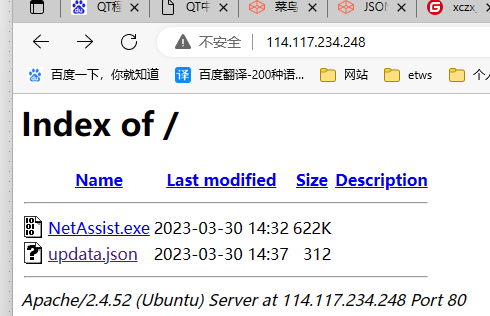
其中updata.json内容
{
"software":
    {
        "LatestVerison":"B1.1.18",
        "Url":"http://1.117.24.232:1172/software_boxed.exe",
        "UpdateTime":"2023-04-24",
            "ReleaseNote":"\n1.测试版本,没什么用的"
    }
}
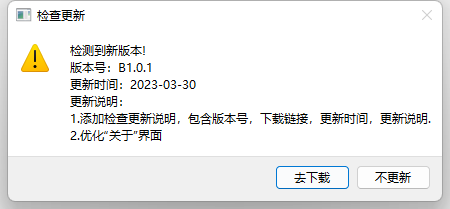
3.测试
4.问题
实际使用的时候,发现打包之后,有的电脑无法连接服务
查明是DHCP的问题,所以打包文件要做修改,将DHCP内容删除
xcopy C:\Windows\System32\dhcpcsvc.dll E:\program\oftware\release\
xcopy C:\Windows\System32\dhcpcsvc6.dll E:\program\software\release\
#xcopy C:\Windows\System32\dnsapi.dll E:\program\software\release\