效果图
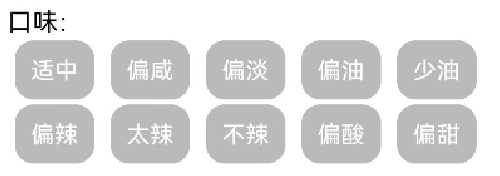
1.自定义View
Kotlin
import android.content.Context
import android.util.AttributeSet
import android.view.View
import android.widget.RadioGroup

class FlowRadioGroup @JvmOverloads constructor(
    context: Context, attrs: AttributeSet? = null
) : RadioGroup(context, attrs) {

    override fun onMeasure(widthMeasureSpec: Int, heightMeasureSpec: Int) {
        val widthSize = MeasureSpec.getSize(widthMeasureSpec)
        val widthMode = MeasureSpec.getMode(widthMeasureSpec)
        val heightSize = MeasureSpec.getSize(heightMeasureSpec)
        val heightMode = MeasureSpec.getMode(heightMeasureSpec)

        measureChildren(widthMeasureSpec, heightMeasureSpec)

        var maxWidth = 0
        var totalHeight = 0
        var lineWidth = 0
        var maxLineHeight = 0
        var oldHeight: Int
        var oldWidth: Int
        val count = childCount

        for (i in 0 until count) {
            val child = getChildAt(i)
            val params = child.layoutParams as MarginLayoutParams
            oldHeight = maxLineHeight
            oldWidth = maxWidth

            val deltaX = child.measuredWidth + params.leftMargin + params.rightMargin
            if (lineWidth + deltaX + paddingLeft + paddingRight > widthSize) {
                // 触发换行
                maxWidth = Math.max(lineWidth, oldWidth)
                lineWidth = deltaX
                totalHeight += oldHeight
                maxLineHeight = child.measuredHeight + params.topMargin + params.bottomMargin
            } else {
                // 不换行,累加宽度
                lineWidth += deltaX
                val deltaY = child.measuredHeight + params.topMargin + params.bottomMargin
                maxLineHeight = Math.max(maxLineHeight, deltaY)
            }
            if (i == count - 1) {
                totalHeight += maxLineHeight
                maxWidth = Math.max(lineWidth, oldWidth)
            }
        }

        maxWidth += paddingLeft + paddingRight
        totalHeight += paddingTop + paddingBottom

        setMeasuredDimension(
            if (widthMode == MeasureSpec.EXACTLY) widthSize else maxWidth,
            if (heightMode == MeasureSpec.EXACTLY) heightSize else totalHeight
        )
    }

    override fun onLayout(changed: Boolean, l: Int, t: Int, r: Int, b: Int) {
        val count = childCount
        var preLeft = paddingLeft
        var preTop = paddingTop
        var maxHeight = 0

        for (i in 0 until count) {
            val child = getChildAt(i)
            val params = child.layoutParams as MarginLayoutParams

            if (preLeft + params.leftMargin + child.measuredWidth + params.rightMargin + paddingRight > (r - l)) {
                // 换行重置
                preLeft = paddingLeft
                preTop += maxHeight
                maxHeight = child.measuredHeight + params.topMargin + params.bottomMargin
            } else {
                maxHeight = Math.max(maxHeight, child.measuredHeight + params.topMargin + params.bottomMargin)
            }

            val left = preLeft + params.leftMargin
            val top = preTop + params.topMargin
            val right = left + child.measuredWidth
            val bottom = top + child.measuredHeight

            child.layout(left, top, right, bottom)
            preLeft += params.leftMargin + child.measuredWidth + params.rightMargin
        }
    }
}
2.xml中使用
XML
            <FlowRadioGroup
                android:id="@+id/rg_dishevaluation_dialog_pucka"
                android:layout_width="match_parent"
                android:layout_height="wrap_content"/>
3.res下drawable文件中
yuanjiao_bg_gray.xml未选择状态
XML
<?xml version="1.0" encoding="utf-8"?>
<selector xmlns:android="http://schemas.android.com/apk/res/android">
    <item android:width="339dp" android:height="137dp">
        <shape android:shape="rectangle">
            <solid android:color="#BBBBBB" />
            <corners android:topLeftRadius="11dp" android:topRightRadius="11dp" android:bottomLeftRadius="11dp" android:bottomRightRadius="11dp" />
        </shape>
    </item>
</selector>
yuanjiao_bg_blue.xml选中状态
XML
<?xml version="1.0" encoding="utf-8"?>
<selector xmlns:android="http://schemas.android.com/apk/res/android">
    <item android:width="339dp" android:height="137dp">
        <shape android:shape="rectangle">
            <solid android:color="#ff4a8dff" />
            <corners android:topLeftRadius="11dp" android:topRightRadius="11dp" android:bottomLeftRadius="11dp" android:bottomRightRadius="11dp" />
        </shape>
    </item>
</selector>
check_radio_button.xml选中状态切换
XML
<?xml version="1.0" encoding="utf-8"?>
<selector xmlns:android="http://schemas.android.com/apk/res/android">
    <item android:drawable="@drawable/yuanjiao_bg_blue" android:state_checked="true"/>
    <item android:drawable="@drawable/yuanjiao_bg_blue" android:state_pressed="true"/>
    <item android:drawable="@drawable/yuanjiao_bg_gray" android:state_checked="false"/>
    <item android:drawable="@drawable/yuanjiao_bg_gray" android:state_pressed="false"/>
</selector>
4.代码中使用
Kotlin
list.forEach { it ->
            val radioButton = RadioButton(context).apply {
                id = View.generateViewId()
                layoutParams = RadioGroup.LayoutParams(
                    RadioGroup.LayoutParams.WRAP_CONTENT,
                    TypedValue.applyDimension(
                        TypedValue.COMPLEX_UNIT_DIP,
                        35f,
                        resources.displayMetrics
                    ).toInt()
                )
                setButtonDrawable(android.R.color.transparent)
                gravity = Gravity.CENTER
                setBackgroundResource(R.drawable.check_radio_button)
                setTextColor(ContextCompat.getColor(context, R.color.white))
                text = it.label//RadioButton中显示的文字
                val margin = TypedValue.applyDimension(TypedValue.COMPLEX_UNIT_DIP, 5f, resources.displayMetrics).toInt()
                (layoutParams as ViewGroup.MarginLayoutParams).setMargins(margin, 5, margin, 5)
                val paddingH = TypedValue.applyDimension(
                    TypedValue.COMPLEX_UNIT_DIP,
                    10f,
                    resources.displayMetrics
                ).toInt()
                setPadding(paddingH, 0, paddingH, 0)//设置padding
            }
            radioButton.setOnCheckedChangeListener { _, b ->
                it.check = b//list中存储对应RadioButton当前选择状态
            }
            binding.rgDishevaluationDialogTaste.addView(radioButton)
        }