前面我们简介了一下STL,接下来开始真正的学习,刚开始你可以理解为这就C++的数据结构
一. 为什么学习string类?
C语言中,字符串是以'\0'结尾的一些字符的集合,为了操作方便,C标准库中提供了一些str系列的库函数,但是这些库函数与字符串是分离开的,不太符合OOP的思想,而且底层空间需要用户自己管理,稍不留神可能还会越界访问。
C++ STL 中的
string是对字符串进行管理的类,底层其实就是一块连续的内存,用来存放字符数组。在OJ中,有关字符串的题目基本以string类的形式出现,而且在常规工作中,为了简单、方便、快捷,基本都使用string类,很少有人去使用C库中的字符串操作函数。string自动管理内存,成员函数也丰富,既安全又高效。唯一需要回头用 C 风格字符串的时候,就是调用 C 库函数或系统接口,通过c_str()临时转一下就行。
二. 标准库中的string类
2.1 string类(了解)
供参考阅读:
http://www.cplusplus.com/reference/string/string/?kw=string
在使用string类时,必须包含#include头文件以及using namespace std;
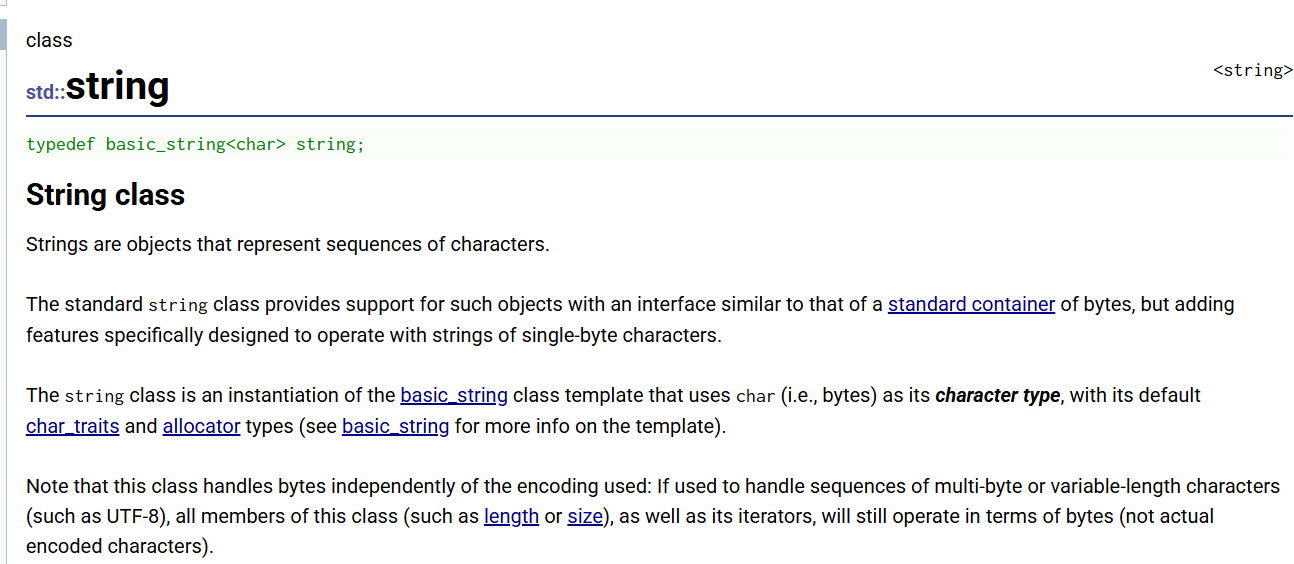
std::string 是 C++ 标准库中用于表示字符序列的类。
它提供了对字符串对象的完整支持,接口设计与标准容器类似,同时额外添加了专门针对单字节字符字符串的操作方法。
string 实际上是一个模板类的实例化结果------它是 basic_string<char> 的别名,使用 char 作为字符类型,并默认使用 char_traits<char> 和 allocator<char> 作为模板参数。
需要注意的是,string 类本身不关心编码问题,它只按字节处理数据。如果你用它存储 UTF-8 等多字节或变长编码的文本,那么 size()、length() 等成员函数返回的是字节数,而不是实际编码后的字符个数,迭代器遍历的也是逐个字节。
basic_string 的完整定义:
cpp
template <class charT,
          class traits = char_traits<charT>,
          class Allocator = allocator<charT> >
class basic_string;
它接受三个模板参数:
charT:字符类型,比如char、wchar_t、char16_t等
traits:字符特性类,定义了字符的比较、复制等操作,默认是char_traits<charT>
Allocator:内存分配器,默认是allocator<charT>
常见字符串都是它的"别名"平时用的 string、wstring 等,其实都是 basic_string 的具体实例化版本. std::string 实际上是 std::basic_string<char> 的别名(typedef)。标准库里有个定义:
cpp
typedef basic_string<char> string;
typedef basic_string<wchar_t> wstring;
basic_string :它集合了容器 和字符串两方面的能力:
作为容器:
支持随机访问迭代器(
begin()、end()等)符合序列容器(SequenceContainer)的要求
元素连续存储(C++11 起标准规定)
作为字符串:
查找(
find、rfind、find_first_of...)替换(
replace)截取子串(
substr)比较(
compare)追加/插入/删除(
append、insert、erase)
string 的底层就是一个自动管理容量、以 \0 结尾的动态字符数组。
代码如下:
cpp
class string {
    char* _str;        // 指向堆上动态开辟的字符数组
    size_t _size;      // 当前有效字符个数
    size_t _capacity;  // 当前最大容量(不包含 '\0')
};
2.2编码(补充)
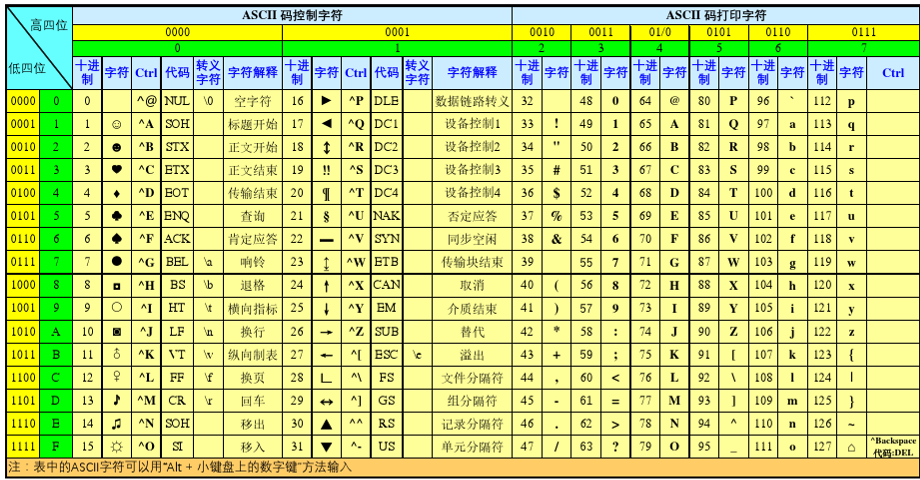
1.ASCII码
ASCII 是 American Standard Code for Information Interchange (美国信息交换标准代码)的缩写。简单说,ASCII 就是一套将英文字母、数字、标点符号等字符映射到 0~127 这 128 个整数的编码规则。
为什么是128个?
因为 2⁷ = 128。早期计算机用 7 位 二进制就能表示所有 ASCII 字符,省下的 1 位(第 8 位)可以用来做别的用途(比如奇偶校验)。后来扩展 ASCII 把 128~255 也利用起来,加了一些制表符、画线符号、带重音的外文字母等,但那不是标准 ASCII 的内容。
ASCII 是一张 0~127 数字与常见字符的对照表,是计算机处理英文文本的基础编码标准。
2.UTF-8
UTF-8 的全名叫 Unicode Transformation Format - 8-bit,说白了就是一种变长的编码方式,用来表示 Unicode 里面的所有字符。
简单讲就是:ASCII 只能搞定英文和几个符号,一共就 128 个,根本不顶用。UTF-8 就是为了让全世界所有文字都能统一编码而搞出来的,而且还得跟 ASCII 兼容。
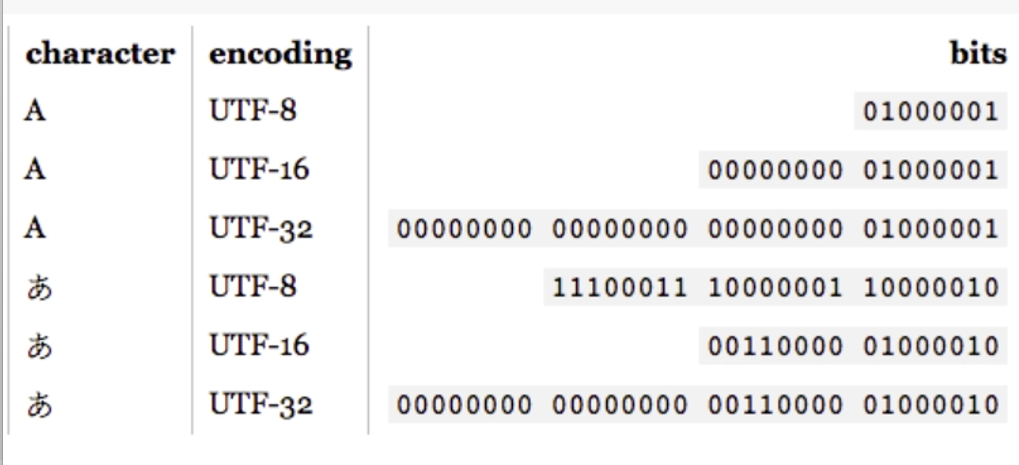
UTF-8:英文1字节,中文3字节。省空间,互联网主流。
UTF-16:英文2字节,中文2字节。对中文友好,Windows内部在用。
UTF-32:不管啥字符都是4字节。最浪费,基本不用来存文件。
同一个字,不同编码存的二进制不一样,占的字节数也不一样。
特点
1. 变长编码 :UTF-8 用 1 到 4 个字节 表示一个字符:ASCII 字符(U+0000 ~ U+007F)是1 个字节,和 ASCII 完全一样其他字符 是2、3 或 4 个字节
2. 兼容 ASCII:ASCII 本身就是一个合法的 UTF-8 文本。所有 ASCII 文件直接用 UTF-8 打开不会乱码。这是 UTF-8 能广泛普及的重要原因。
3. 自同步:可以通过字节的高位判断当前位置是一个字符的开头还是中间部分,即使从中间开始读也能快速定位到下一个字符的边界。
3.UTF-16
UTF-16 是 Unicode Transformation Format - 16-bit 的缩写,是一种可变长度 的字符编码方式,用 2 个字节或 4 个字节来表示一个 Unicode 字符。简单说:UTF-8 按字节来,UTF-16 按"字"(16 位,也就是 2 个字节)来作为基本单位。
特点
1. 变长编码,但基础是 2 个字节
常用字符(U+0000 ~ U+FFFF)是 2 个字节, 极少用的字符(U+10000 ~ U+10FFFF)是4 个字节
2. 不兼容 ASCII
ASCII 字符在 UTF-16 里也占 2 个字节(高 8 位补 0)。比如
'A'(ASCII 是 0x41)在 UTF-16 里是 0x00 0x41。这导致纯英文文本用 UTF-16 会比 UTF-8 多占一倍空间。3. 有大端小端问题
因为 UTF-16 以 2 字节为单位,就涉及到字节顺序:是存
0x00 0x41还是0x41 0x00?所以 UTF-16 文件开头通常有 BOM(Byte Order Mark)来标明大小端,也就是0xFEFF或0xFFFE。
UTF-16 用 2 字节或 4 字节表示一个 Unicode 字符,Windows、Java、C# 内部都在用,但互联网上不如 UTF-8 流行。
2.3.auot和范围for
auto关键字
在早期C/C++中auto 的含义是:使用auto修饰的变量,是具有自动存储器的局部变量 ,后来这个不重要了。C++11中 ,标准委员会变废为宝赋予了auto全新的含义即:auto不再是一个存储类型指示符,而是作为一个新的类型指示符来指示编译器 ,auto声明的变量必须由编译器在编译时期推导而得。
用auto声明指针类型时,用auto和auto*没有任何区别 ,但用auto声明引用类型时则必须加&
当在同一行声明多个变量时,这些变量必须是相同的类型,否则编译器将会报错,因为编译器实际只对第一个类型进行推导,然后用推导出来的类型定义其他变量。
auto不能作为函数的参数,可以做返回值,但是建议谨慎使用
auto不能直接用来声明数组
cpp
include<iostream>
using namespace std;
int func1()
{
    return 10;
}
    // 不能做参数
void func2(auto a)
{}
// 可以做返回值
auto func3()
{
    return 3;
}
int main()
{
	int a = 10;
	auto b = a;
	auto c = 'a';
	auto d = func1();
	// 编译报错:类型包含"auto"的符号必须具有初始值设定项
	auto e;
	cout << typeid(b).name() << endl;
	cout << typeid(c).name() << endl;
	cout << typeid(d).name() << endl;
	int x = 10;
	auto y = &x;
	auto* z = &x;
	auto& m = x;
	cout << typeid(x).name() << endl;
	cout << typeid(y).name() << endl;
	cout << typeid(z).name() << endl;
	auto aa = 1, bb = 2;
	// 编译报错:在声明符列表中,"auto"必须始终推导为同一类型
	auto cc = 3, dd = 4.0;
	// 编译报错: "auto []": 数组不能具有其中包含"auto"的元素类型
	auto array[] = { 4, 5, 6 };
	return 0;
}
auto最明显用的地方是map那一块自动推导:
cpp
#include<iostream>
#include <string>
#include <map>
using namespace std;
int main()
{
	std::map<std::string, std::string> dict = { { "apple", "苹果" },{ "orange",
	"橙子" }, {"pear","梨"} };
	// auto最方便的用法
	//std::map<std::string, std::string>::iterator it = dict.begin();
	auto it = dict.begin();
	while (it != dict.end())
	{
		cout << it->first << ":" << it->second << endl;
		++it;
	}
        return 0;
}
范围for
- 对于一个有范围的集合而言 ,由程序员来说明循环的范围是多余的,有时候还会容易犯错误。因此C++11中引入了基于范围的for循环 。for循环后的括号由冒号" :"分为两部分:第一部分 是范围内用于迭代的变量,第二部分 则表示被迭代的范围,自动迭代,自动取数据,自动判断结束。
- 范围for可以作用到数组和容器对象上进行遍历
- 范围for的底层很简单,容器遍历实际就是替换为迭代器,这个从汇编层也可以看到。
cpp
#include<iostream>
#include <string>
#include <map>
using namespace std;
int main()
{
   int array[] = { 1, 2, 3, 4, 5 };
   // C++98的遍历
   for (int i = 0; i < sizeof(array) / sizeof(array[0]); ++i)
  {
       array[i] *= 2;
  }
   for (int i = 0; i < sizeof(array) / sizeof(array[0]); ++i)
  {
       cout << array[i] << endl;
  }
   // C++11的遍历
   for (auto& e : array)// 引用,可以修改原数组
       e *= 2;
   for (auto e : array)// 拷贝,不能修改原数组
       cout << e << " " << endl;
   string str("hello world");
   for (auto ch : str)
  {
       cout << ch << " ";
  }
   cout << endl;
return 0;
}
范围 for 的本质
范围 for 是 C++11 引入的语法糖(编程语言中让代码写起来更方便、读起来更舒服的语法设计),编译器会把它展开成传统的迭代器循环。
你写的:
cpp
for (auto& e : array)
    e *= 2;
编译器中的它:
cpp
for (auto it = begin(array); it != end(array); ++it) {
    auto& e = *it;
    e *= 2;
}
注意:添加或删除元素会导致迭代器失效,范围
for底层用的是迭代器,所以会崩。要修改就用
auto&,只读就用auto或const auto&
2.4. string类的常用接口说明(最常用的接口)
string类对象的常见构造
参考资料:
https://cplusplus.com/reference/string/string/string/
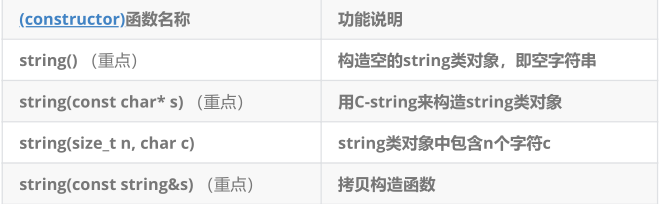
1. string() ------ 默认构造函数:
**作用:**创建一个空字符串,里面什么都没有。
cpp
string s1;           // s1 = ""
cout << s1.empty();  // 输出 1(真),因为是空的
用的话:先声明一个字符串变量,后面再给它赋值。
2. string(const char* s) ------ 用 C 字符串构造
作用:用一个双引号括起来的字符串(C 风格字符串)来初始化。
cpp
string s2("hello");  // s2 = "hello"
string s3("world");  // s3 = "world"
注意 :这里的参数是 const char*,就是 C 语言里那种以 \0 结尾的字符数组。你把 "hello" 传进去,string 会自己复制一份存起来。最常见的方式,直接用字面量初始化。
3. string(size_t n, char c) ------ 重复字符构造
作用 :创建由 n 个字符 c 重复组成的字符串。
cpp
string s3(5, '*');   // s3 = "*****"
string s4(3, 'A');   // s4 = "AAA"
4. string(const string& s) ------ 拷贝构造函数
作用:用一个已有的 string 对象去初始化另一个新的 string 对象(复制一个已有的字符串时)。
cpp
string s2("hello");
string s4(s2);       // s4 是 s2 的一份拷贝,也是 "hello"
用完整的例子代码如下以及运行结果: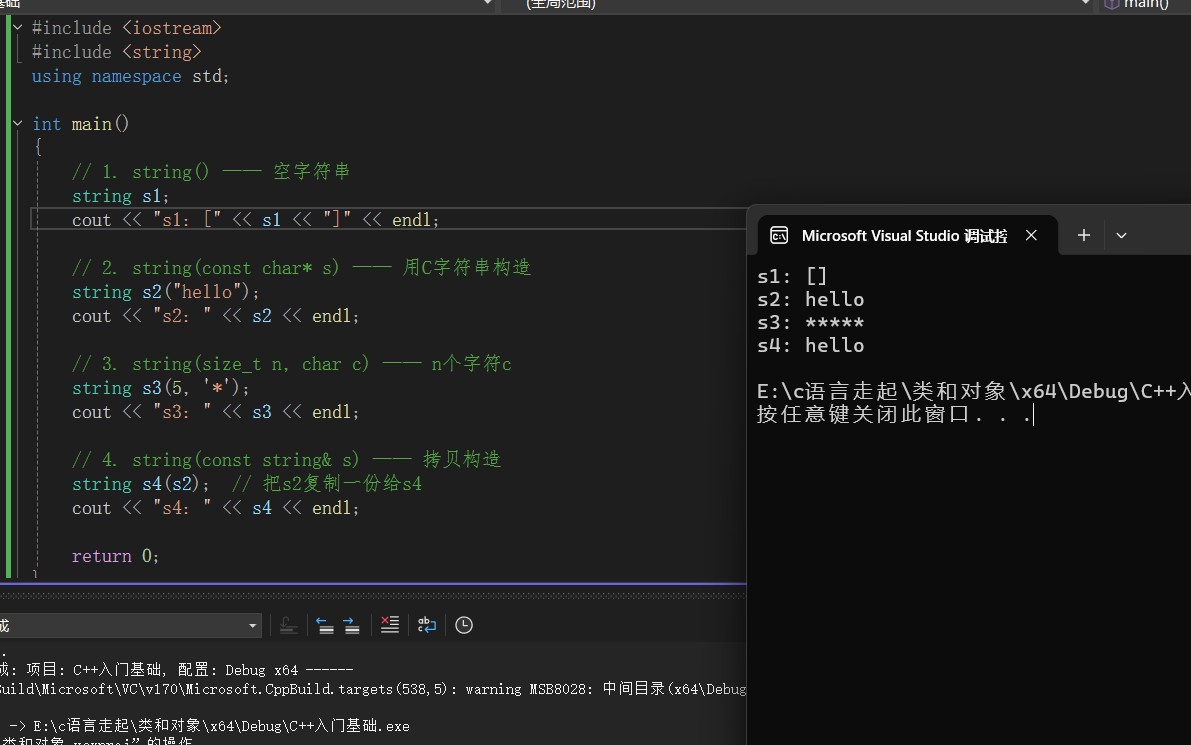
问题来空串真的是啥都没有吗?
不一定是。从有效字符个数看,确实为 0,但从内存角度看,底层仍然存了一个
\0作为结尾标记。
那又问为什么要存一个 \0?
其实是: 为了兼容 C 语言。
c_str()返回的指针要能直接当 C 字符串用,而 C 字符串靠\0判断结束。所以即使空串,也得保证有个\0在那。
string类对象的容量操作
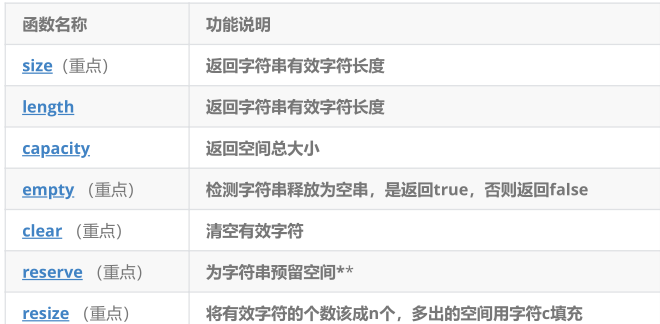
函数解析:
1.size() / length() / capacity()
cpp
string s2("hello world");
cout << s2.length() << endl;  // 11
cout << s2.size() << endl;    // 11
cout << s2.capacity() << endl; // 一般是>= size,这个要取决于编译器
size()和length()完全等价,都返回字符串有效字符数;capacity()返回当前已分配的内存空间大小(容量)。
reserve()
cpp
string s2("hello worldxxxxxxxxxxxxx");
cout << s2.capacity() << endl;

s2.reserve(20);   // 如果 20 <= 当前容量,不改变
s2.reserve(28);   // 如果 28 > 当前容量,会扩容到至少 28
s2.reserve(40);   // 扩容到至少 40
reserve(n)只影响容量(capacity),不影响有效字符个数(size),用于提前开空间,避免频繁扩容。
clear()
cpp
s2.clear();
cout << s2.size() << endl;      // 0
cout << s2.capacity() << endl; // 容量不变(40)清空有效字符,但不释放内存
empty()
cpp
if (s.empty()) {
    cout << "字符串为空" << endl;
}
resize()
cpp
string s = "hello";
s.resize(10, '!');
cout << s;  //结果输出: hello!!!!!,一直到10个字节
若
n < size截断;若n > size填充指定字符(默认\0)
扩容代码:
cpp
void TestPushBack()
{
    // reverse 反转  逆置
    // reserve 保留、预留
    string s;

    // 提前开空间,避免扩容,提高效率
    s.reserve(100);// 预先分配 100 字节空间
    size_t sz = s.capacity();
    cout << "capacity changed: " << sz << '\n';

    cout << "making s grow:\n";
    for (int i = 0; i < 100; ++i)
    {
        s.push_back('c');
        if (sz != s.capacity())
        {
            sz = s.capacity();
            cout << "capacity changed: " << sz << '\n';
        }
    }
}

//代码分析
size_t sz = s.capacity();  // 记录当前容量

for (int i = 0; i < 100; ++i) {
    s.push_back('c');
    if (sz != s.capacity()) {  // 容量发生变化时
        sz = s.capacity();      // 更新记录
        cout << "capacity changed: " << sz << '\n';  // 打印新容量
    }
}
我在演示的时候发现一定要注释reserve才可以看见扩容的演示为什么呢?
cpp
void TestPushBack()
{
    string s;
    s.reserve(100);  //这行让容量直接变成 >=100

    size_t sz = s.capacity();  // 输出 >=100
    for (int i = 0; i < 100; ++i) {
        s.push_back('c');  // 容量始终够用,永不扩容
    }
}

///////////////////////////////////////////////////////////////////
// 注释掉 reserve(100)
string s;  // 容量 = 15
for (int i = 0; i < 100; ++i) {
    s.push_back('c');  // 会触发多次扩容
}


//不注释
s.reserve(100);  // 预先分配 100 空间
for (int i = 0; i < 100; ++i) {
    s.push_back('c');  // 全程不扩容
}
注释掉
reserve(100)是为了演示 string 的自动扩容过程(15,31,47,70,105),让你看到容量变化的完整序列;而保留reserve(100)会直接预分配足够空间(≥100),虽然性能更高(零次扩容),但就看不到扩容过程了------理解话就是:前者用于学习理解,后者用于实际开发提效。
结果运行扩容演示:
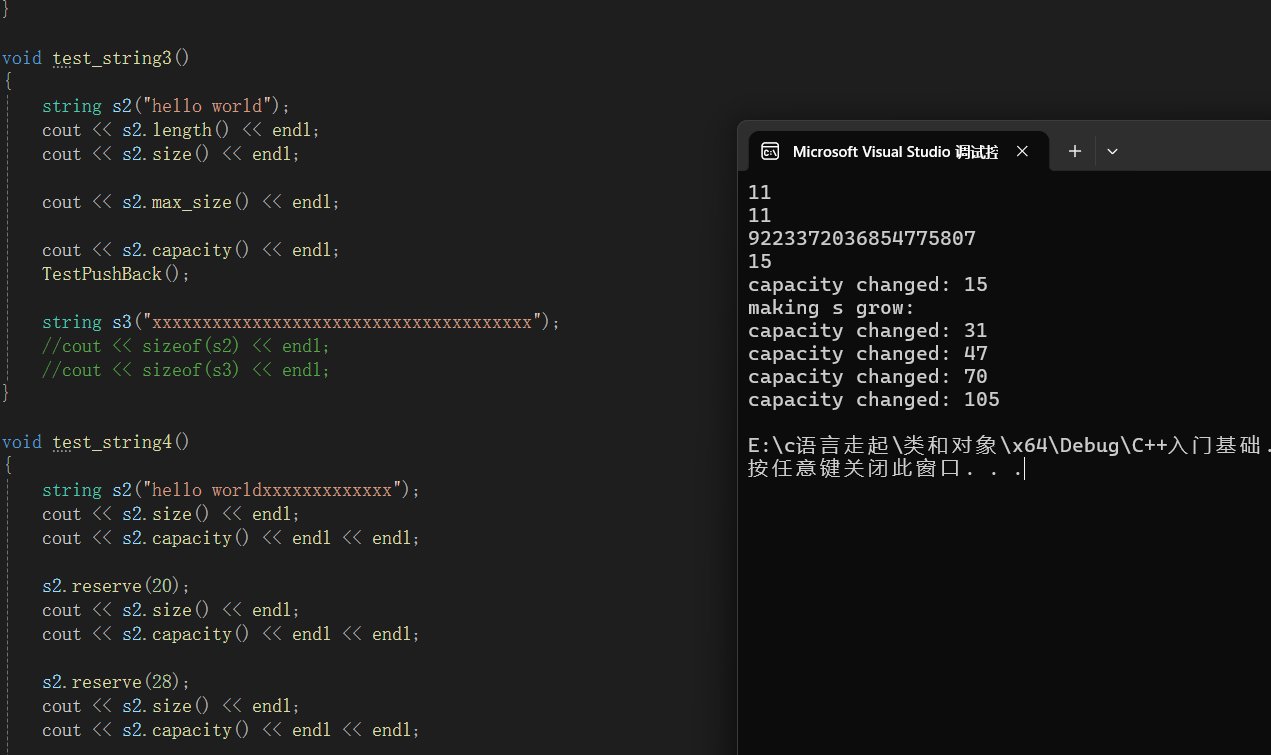
这个在VS的环境下,那如果话成G++/GCC呢?会是这个结果吗?
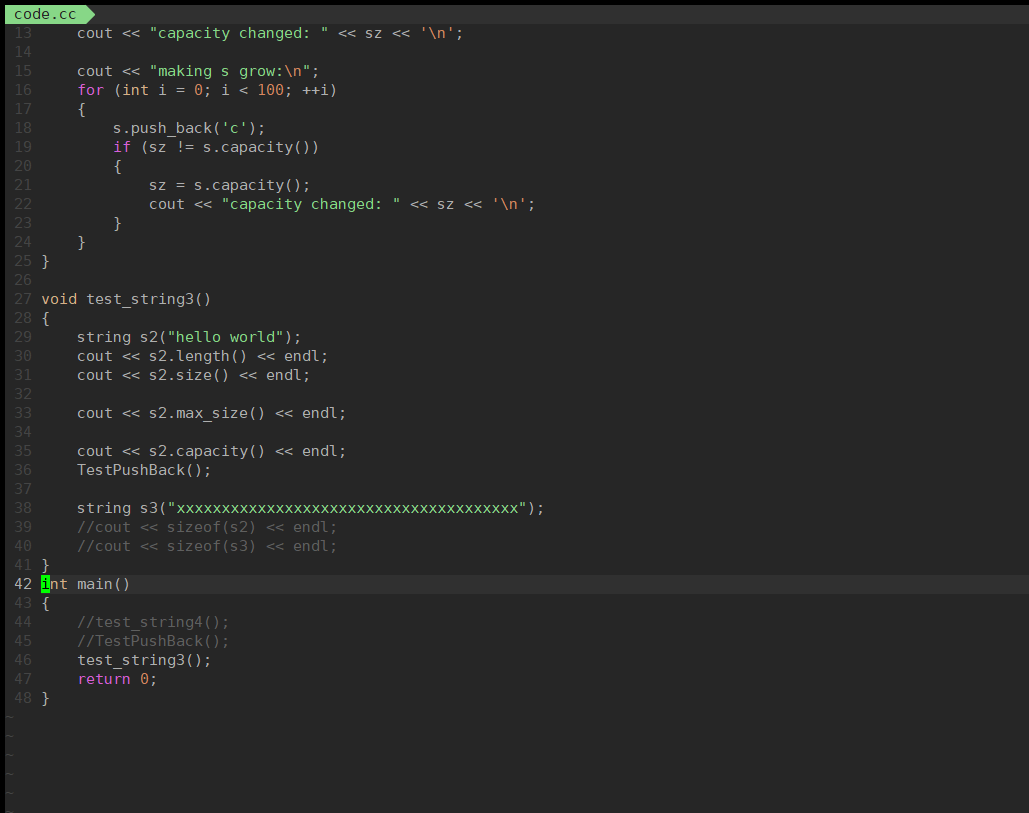
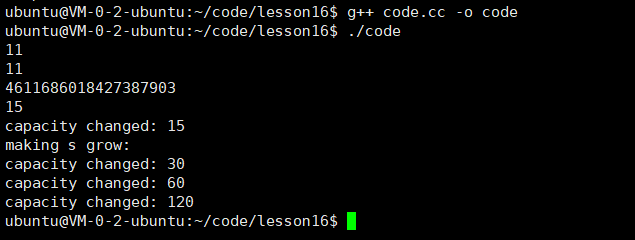
VS:1.5 倍(内存利用率更高,减少浪费)
GCC:2 倍(扩容次数更少,插入更快)
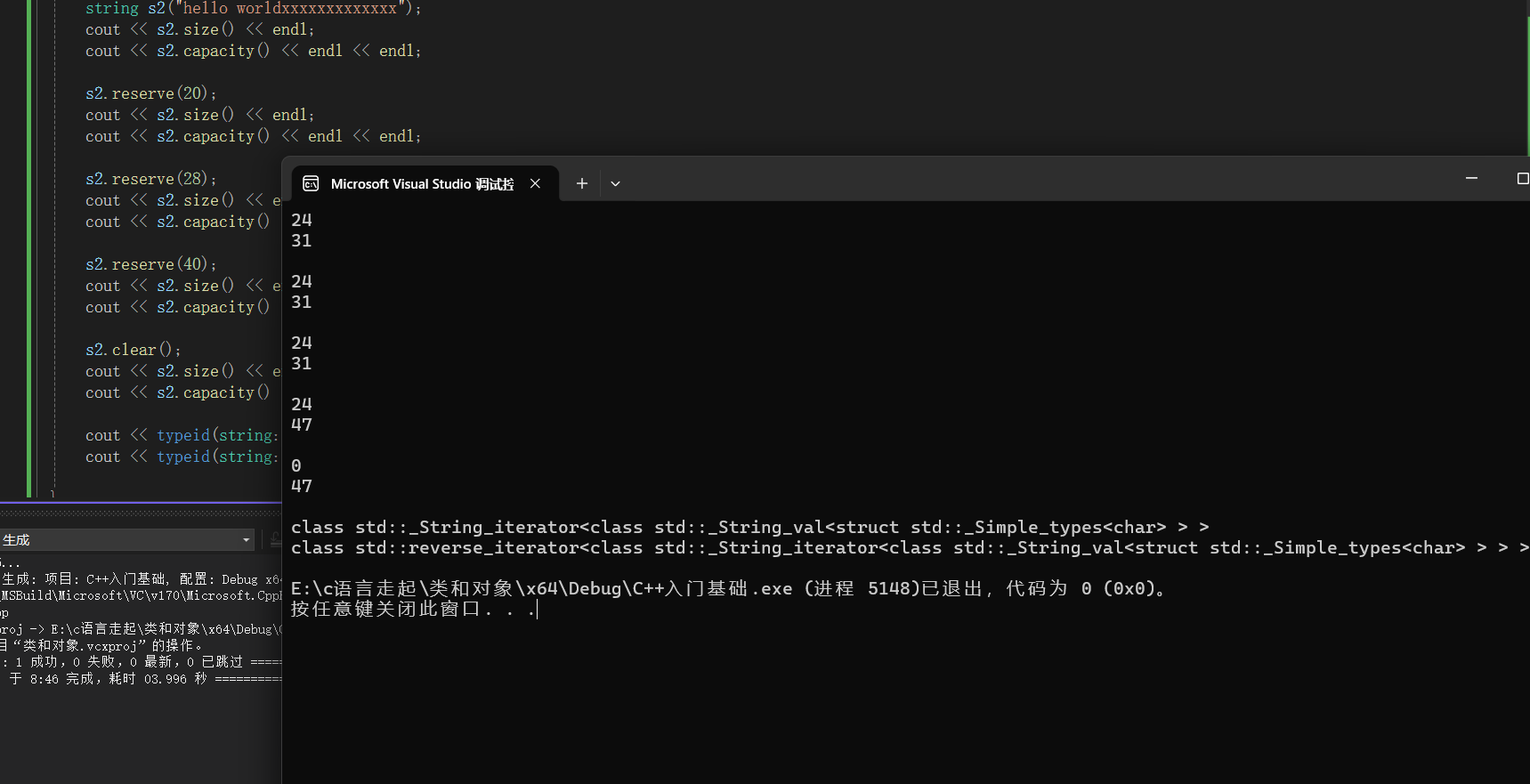
cpp
void test_string4()
{
    // 第1步:创建字符串
    string s2("hello worldxxxxxxxxxxxxx");
    cout << s2.size() << endl;      // 输出:24(假设有21个字符)
    cout << s2.capacity() << endl;  // 输出:31(VS下初始容量)
    cout << endl;
cpp
 // 第2步:reserve(20) 请求预留20个位置
    s2.reserve(20);
    cout << s2.size() << endl;      // 输出:24(size不变)
    cout << s2.capacity() << endl;  // 输出:31(20 < 31,容量不变)
    cout << endl;
reserve(20) 想要缩小容量到20,但 reserve 只能扩容不能缩容
cpp
    // 第3步:reserve(28) 请求预留28个位置
    s2.reserve(28);
    cout << s2.size() << endl;      // 输出:24(size不变)
    cout << s2.capacity() << endl;  // 输出:47(28 < 47,容量不变)
    cout << endl;
28 仍然小于当前容量31,所以不变
cpp
    // 第4步:reserve(40) 请求预留40个位置
    s2.reserve(40);
    cout << s2.size() << endl;      // 输出:24(size不变)
    cout << s2.capacity() << endl;  // 输出:47(40 >31)变
    cout << endl;
reserve(n)是立即分配至少 n 字节的物理内存,不是预留名额也不是在原基础上增加;当 n > 当前容量时,会重新分配新内存并拷贝数据,否则什么都不做。
注意:
size()与length()方法底层实现原理 完全相同,引入size()的原因是为了与其他容器的接
口保持一致 ,一般情况下基本都是用size()。clear()只是将string中有效字符清空,不改变底层空间大小 。
resize(size_t n) 与 resize(size_t n, char c)都是将字符串中有效字符个数改变到n个 ,不
同的是当字符个数增多时:resize(n)用0来填充多出的元素空间 ,resize(size_t n, char
c)用字符c来填充多出的元素空间 。注意:resize在改变元素个数时,如果是将元素个数
增多,可能会改变底层容量的大小,如果是将元素个数减少,底层空间总大小不变。
- reserve(size_t res_arg=0):为string预留空间,不改变有效元素个数,当reserve的参
数小于string的底层空间总大小时,reserver不会改变容量大小。
完整代码:
cpp
#include<iostream>
#include<string>
#include<map>
#include<list>
using namespace std;

//class string
//{
//private:
//	char _buff[16];
//	char*  _str;
//
//	size_t _size;
//	size_t _capacity;
//};

void TestPushBack()
{
	// reverse 反转  逆置
	// reserve 保留、预留
	string s;
	// 提前开空间,避免扩容,提高效率
	s.reserve(100);
	size_t sz = s.capacity();
	cout << "capacity changed: " << sz << '\n';

	cout << "making s grow:\n";
	for (int i = 0; i < 100; ++i)
	{
		s.push_back('c');
		if (sz != s.capacity())
		{
			sz = s.capacity();
			cout << "capacity changed: " << sz << '\n';
		}
	}
}

void test_string3()
{
	string s2("hello world");
	cout << s2.length() << endl;
	cout << s2.size() << endl;

	cout << s2.max_size() << endl;

	cout << s2.capacity() << endl;
	TestPushBack();

	string s3("xxxxxxxxxxxxxxxxxxxxxxxxxxxxxxxxxxxxxx");
	//cout << sizeof(s2) << endl;
	//cout << sizeof(s3) << endl;
}

void test_string4()
{
	string s2("hello worldxxxxxxxxxxxxx");
	cout << s2.size() << endl;
	cout << s2.capacity() << endl << endl;

	s2.reserve(20);
	cout << s2.size() << endl;
	cout << s2.capacity() << endl << endl;

	s2.reserve(28);
	cout << s2.size() << endl;
	cout << s2.capacity() << endl << endl;

	s2.reserve(40);
	cout << s2.size() << endl;
	cout << s2.capacity() << endl << endl;

	s2.clear();
	cout << s2.size() << endl;
	cout << s2.capacity() << endl << endl;

	cout << typeid(string::iterator).name() << endl;
	cout << typeid(string::reverse_iterator).name() << endl;

}

int main()
{
	test_string4();

	return 0;
}
补充:
resize() 和 reserve() 的区别
reserve()只开空间,影响 capacity,resize()开空间 又初始化影响 size。
string类对象的访问及遍历操作
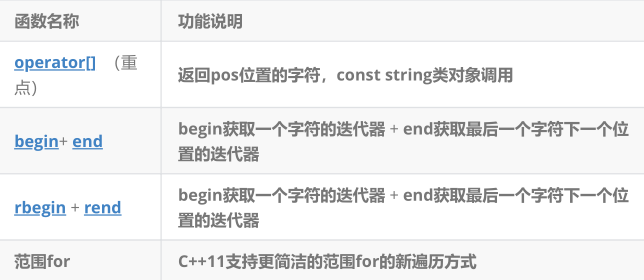
遍历
string主要有三种方式,如下:下标
[]:最常用,直观灵活。范围
for(C++11):最简洁,适用于简单遍历。迭代器 :主要用于调用STL算法 (如
reverse,sotr,find等),而非日常遍历。三者都支持修改字符串中的字符。
函数解析:
operator[](重点)
cpp
char& operator[](size_t pos);
const char& operator[](size_t pos) const;
返回
pos位置的字符引用;可以读取 :char ch = s[0];;可以修改 :s[0] = 'x';const版本只能读取,不能修改.
begin() + end()
cpp
iterator begin();
const_iterator begin() const;
iterator end();
const_iterator end() const;
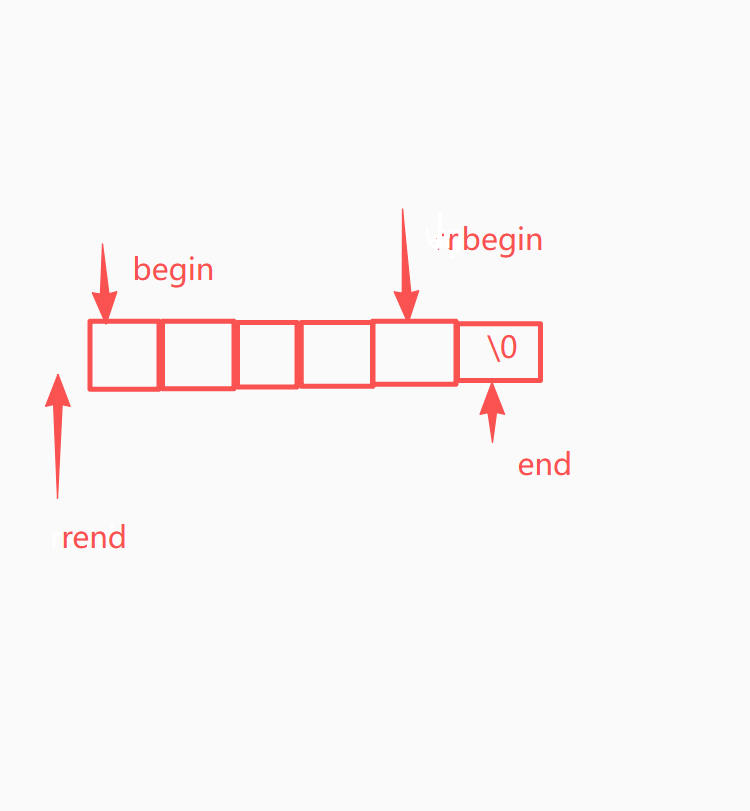
begin() 第一个字符的位置 指向 s0
end() 最后一个字符的下一个位置 指向 ssize()
rbegin() + rend()
cpp
reverse_iterator rbegin();
const_reverse_iterator rbegin() const;
reverse_iterator rend();
const_reverse_iterator rend() const;
rbegin() 最后一个字符的位置 反向遍历的起点
rend() 第一个字符的前一个位置 反向遍历的终点
范围 for 的底层等价代码
cpp
// 范围 for
for (char ch : s) {
    cout << ch;
}

// 等价于迭代器
for (auto it = s.begin(); it != s.end(); it++) {
    char ch = *it;
    cout << ch;
}
完整代码如下:
cpp
void test_string1()
{
	string s1;
	string s2("hello world");

	cout << s1 << s2 << endl;

	s2[0] = 'x';
	cout << s1 << s2 << endl;

	// 1、下标 + []
	for (size_t i = 0; i < s2.size(); i++)
	{
		cout << s2[i] << " ";
	}
	cout << endl;

	// 2、迭代器
	//string::iterator it = s2.begin();
	auto it = s2.begin();
	while (it != s2.end())
	{
		*it += 2;

		cout << *it << " ";
		++it;
	}
	cout << endl;

	cout << s2 << endl;


	// 3、字符赋值,自动迭代,自动判断结束
	// 底层就是迭代器
	//for (auto ch : s2)
	for (auto& ch : s2)
	{
		ch -= 2;
		cout << ch << " ";
	}
	cout << endl;

	cout << s2 << endl;
}

void test_string2()
{
	string s2("hello world");
	string::iterator it = s2.begin();
	while (it != s2.end())
	{
		*it += 2;
		cout << *it << " ";
		++it;
	}
	cout << endl;

	string::reverse_iterator rit = s2.rbegin();
	while (rit != s2.rend())
	{
		cout << *rit << " ";
		++rit;
	}
	cout << endl;

	const string s3("hello world");
	//string::const_iterator cit = s3.begin();
	auto cit = s3.begin();
	while (cit != s3.end())
	{
		//*cit += 2;
		cout << *cit << " ";
		++cit;
	}
	cout << endl;

	//string::const_reverse_iterator rcit = s3.rbegin();
	auto rcit = s3.rbegin();
	while (rcit != s3.rend())
	{
		// *rcit += 2;
		cout << *rcit << " ";
		++rcit;
	}
	cout << endl;
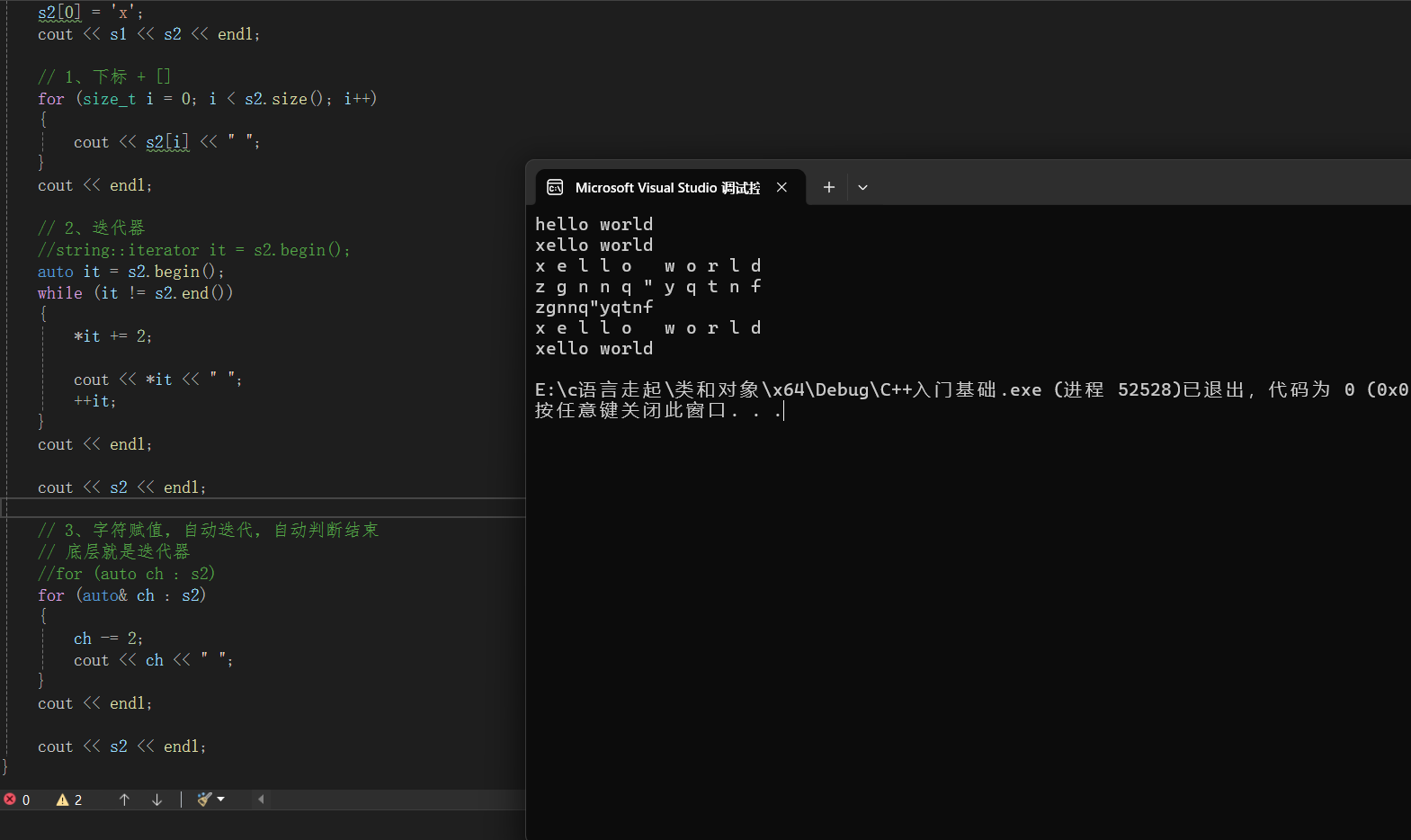
}
参考资料:
https://cplusplus.com/reference/string/string/operator%5B%5D/
string类对象的修改操作
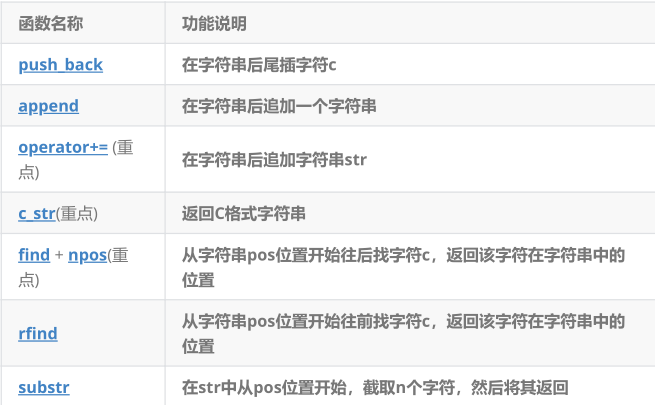
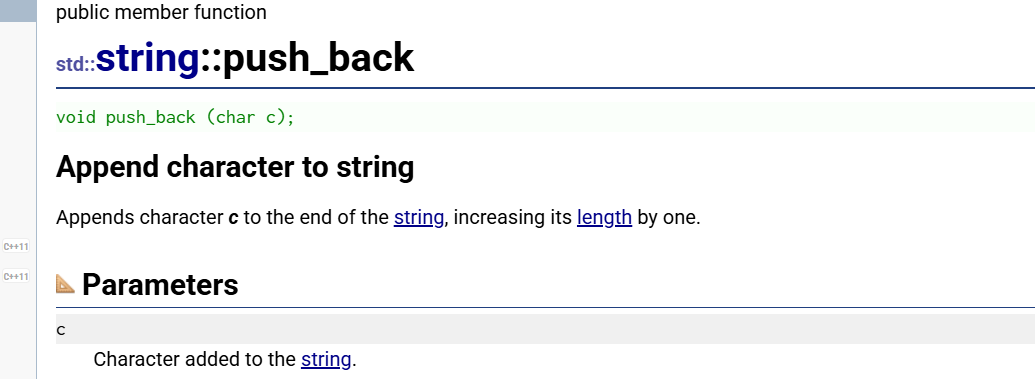
**增加:**push_back和append
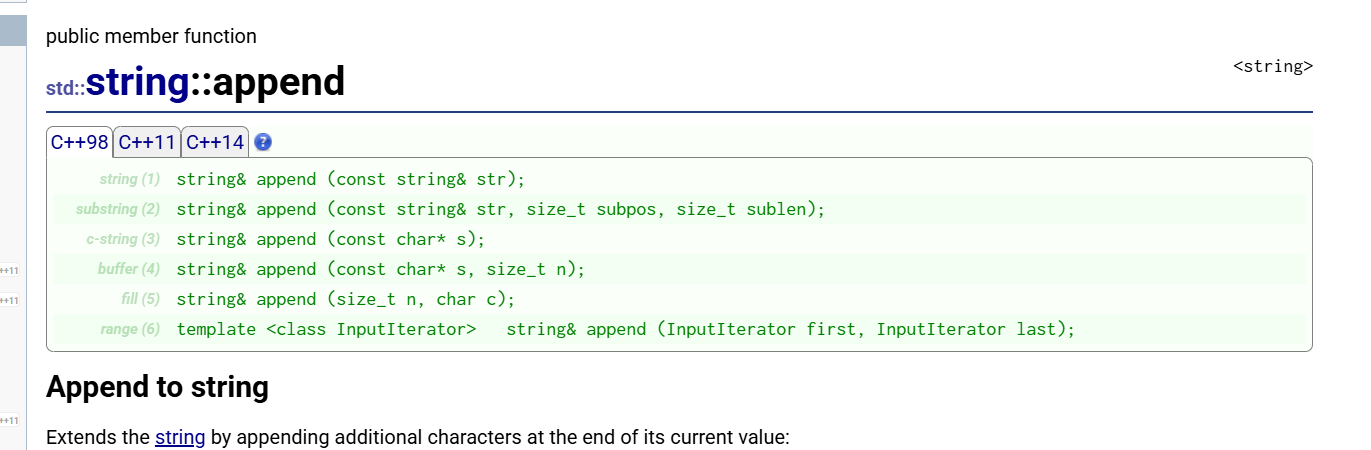
cpp
// (1) 追加另一个 string
string& append (const string& str);

// (2) 追加 string 的子串
string& append (const string& str, size_t subpos, size_t sublen);

// (3) 追加 C 风格字符串
string& append (const char* s);

// (4) 追加 C 字符串的前 n 个字符
string& append (const char* s, size_t n);

// (5) 追加 n 个重复字符
string& append (size_t n, char c);

// (6) 追加迭代器区间的内容
template <class InputIterator>
string& append (InputIterator first, InputIterator last);
cpp
#include<iostream>
#include<string>
#include<map>
#include<list>
using namespace std;

void test_string1()
{
	string s("hello world");
	s.push_back(' ');//加单个字符串
	s.push_back('x');
	s.append("yyyyyy");
	cout << s << endl;

	s += ' ';
	s += "333333";

	cout << s << endl;

	s.insert(0, "hello world");
	cout << s << endl;

	s.insert(10, "zzzzzz");
	cout << s << endl;

	s.insert(0, "p");
	cout << s << endl;

	char ch = 't';
	s.insert(0, 1, ch);
	s.insert(s.begin(), ch);

	cout << s << endl;


}


int main()
{
	test_string1();
}
cpp
s.insert(0, "p"); 双引号是指:字符串常量 "p"(包含 'p' 和 '\0')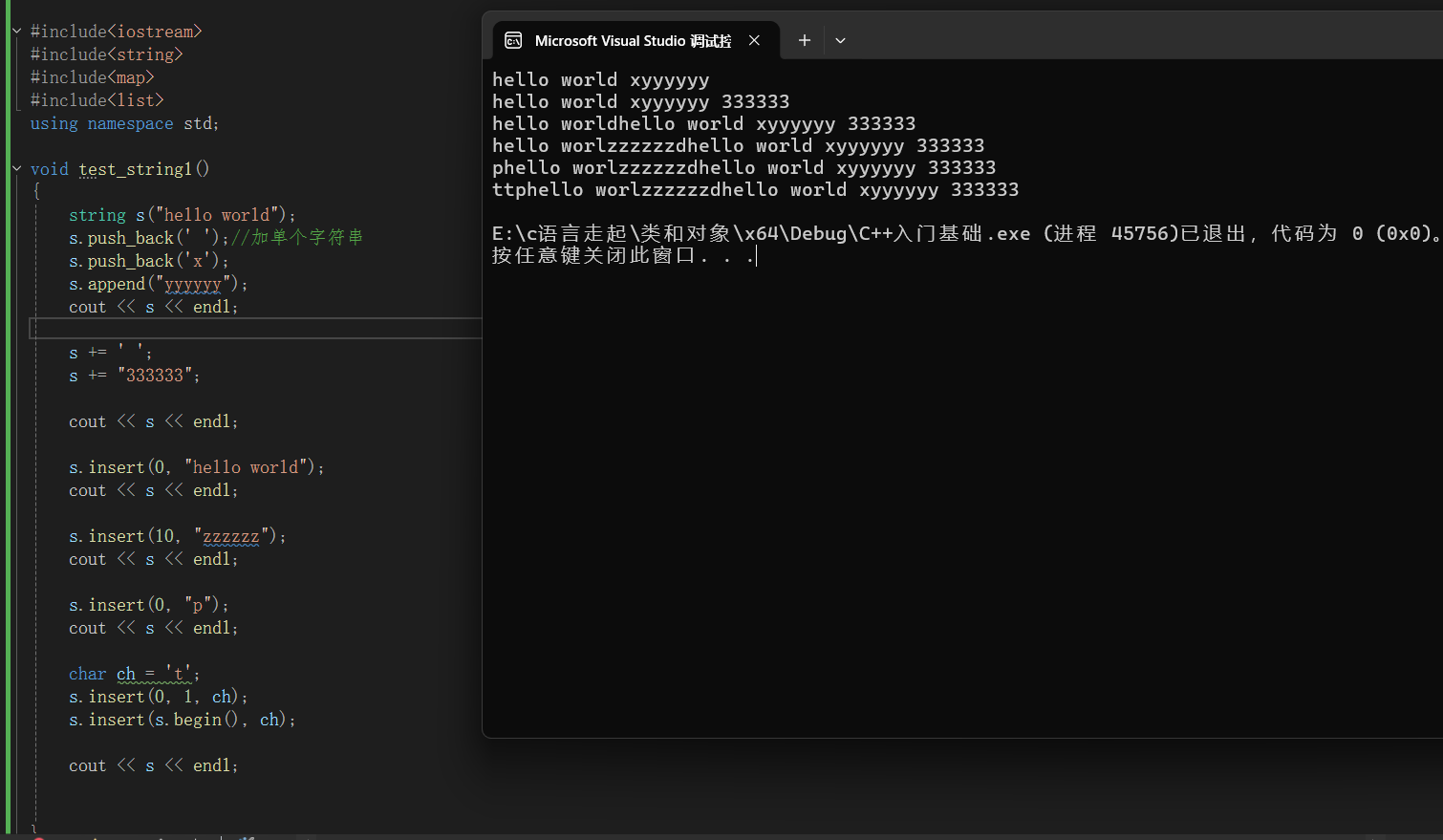
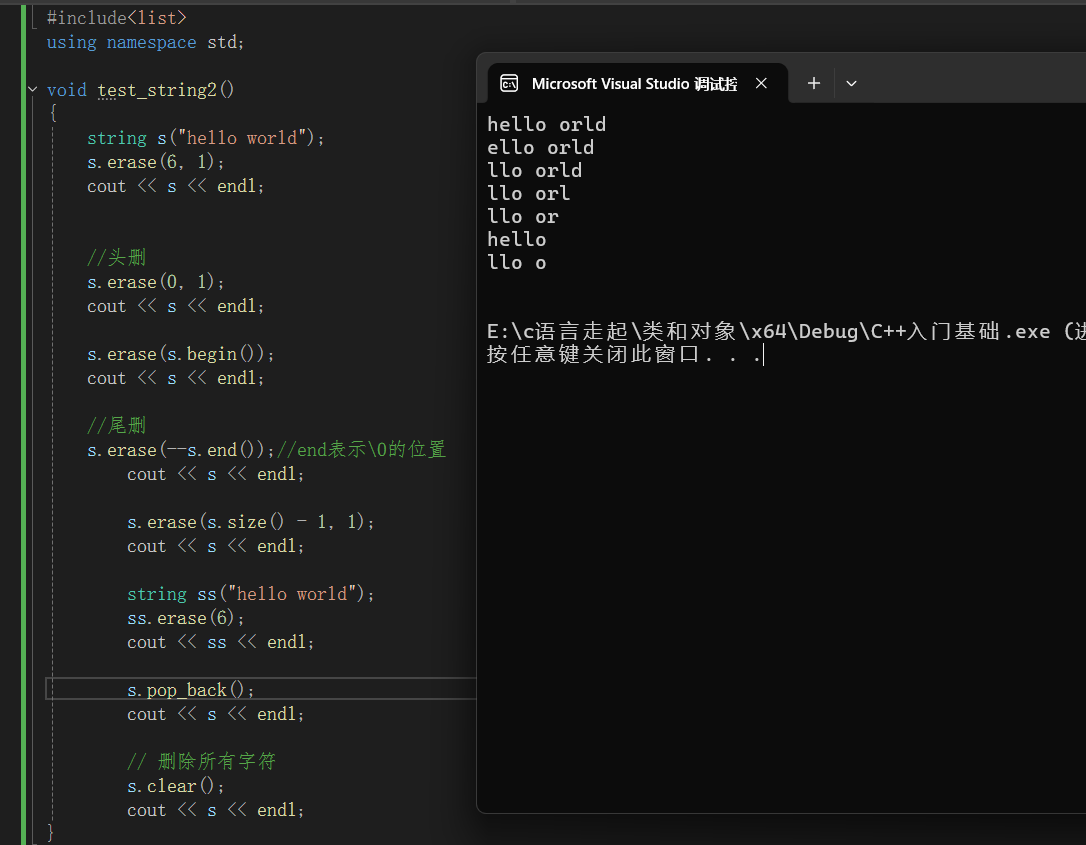
删除:删除用
erase()最全能(按位置、按长度、按迭代器),删除最后一个字符用pop_back()(C++11),清空整个字符串用clear()。
cpp
void test_string2()
{
	string s("hello world");
	s.erase(6, 1);
	cout << s << endl;


	//头删
	s.erase(0, 1);
	cout << s << endl;

	s.erase(s.begin());
	cout << s << endl;

	//尾删
	s.erase(--s.end());//end表示\0的位置
		cout << s << endl;

		s.erase(s.size() - 1, 1);
		cout << s << endl;

		string ss("hello world");
		ss.erase(6);
		cout << ss << endl;

}
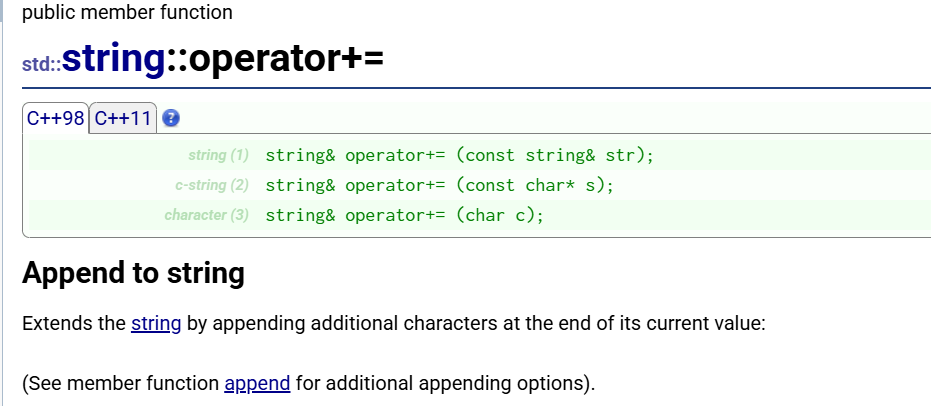
c_str() 返回一个以 \0 结尾的只读 C 风格字符串指针,用于与 C 语言函数(如 printf、strlen、fopen、strcmp)交互;注意修改 string 后指针可能失效,需要重新调用 c_str()。
cpp
#include <iostream>
#include <string>
using namespace std;

void test_string8()
{
	string s1("hello");

	string s2 = s1 + "world";
	cout << s2 << endl;


	string s3 = string("world") + s1;
	cout << s3 << endl;

	// 使用 operator+= 实现拼接
	string s4 = "world";
	s4 += s1;
	cout << s4 << endl;
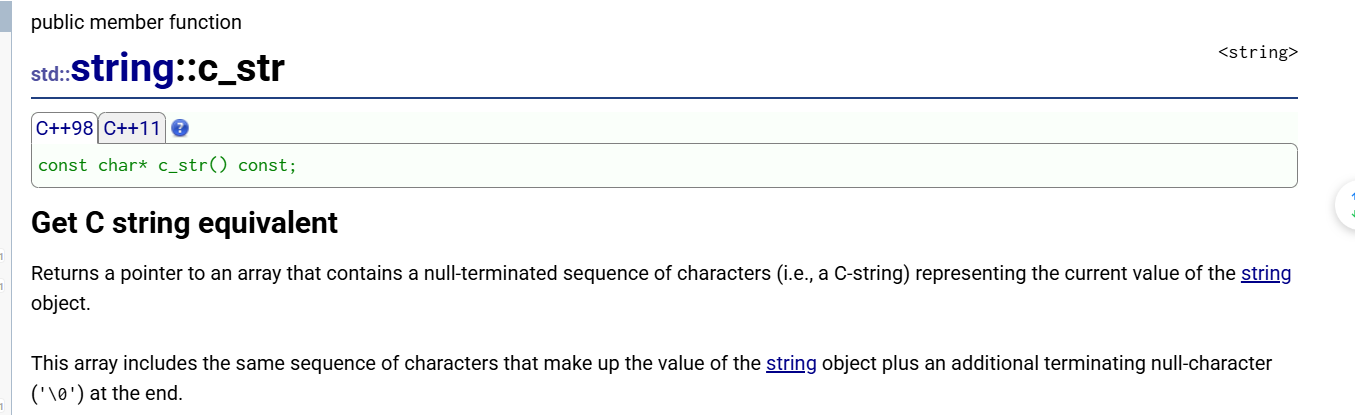
}

int main()
{
	test_string8();
	return 0;
}
cpp
void teststring4()
{
string file;                    // 1. 定义 string 对象,存储文件名
cin >> file;                    // 2. 从键盘输入文件名(如 "test.txt")

FILE* fout = fopen(file.c_str(), "r");  // 3. 用 C 方式打开文件
                                        //      "r" = read,只读模式

char ch = fgetc(fout);          // 4. 读取第一个字符
while (ch != EOF)               // 5. 循环直到文件末尾
{
    cout << ch;                 // 6. 输出字符到屏幕
    ch = fgetc(fout);           // 7. 读取下一个字符
}
fclose(fout);                   // 8. 关闭文件

}
c_str()返回一个以\0结尾的只读 C 风格字符串指针,用于与 C 语言函数(如printf、strlen、fopen、strcmp)交互;注意修改 string 后指针可能失效,需要重新调用c_str()。
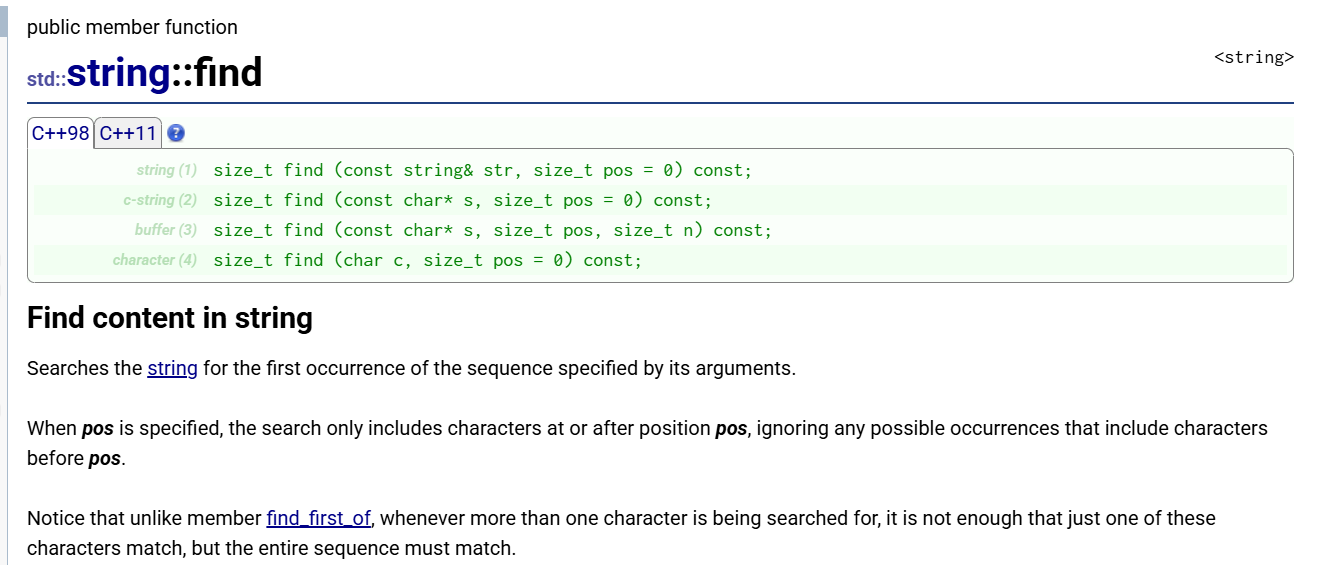

cpp
// (1) 查找另一个 string
size_t find(const string& str, size_t pos = 0) const;

// (2) 查找 C 风格字符串
size_t find(const char* s, size_t pos = 0) const;

// (3) 查找 C 字符串的前 n 个字符
size_t find(const char* s, size_t pos, size_t n) const;

// (4) 查找单个字符
size_t find(char c, size_t pos = 0) const;
cpp
string s = "hello world";

// 查找
size_t pos = s.find("world");  // 找到返回位置6,找不到返回npos

// 判断是否找到
if (pos != string::npos) {
    cout << "找到位置:" << pos << endl;
} else {
    cout << "没找到" << endl;
}

//////////////////////////////////////////////////////////////////
string url = "https://example.com";

// 查找子串
if (url.find("https") != string::npos) {
    cout << "这是安全链接" << endl;
}

// 查找字符
if (url.find(':') != string::npos) {
    cout << "包含冒号" << endl;
}
find() 有 4 种重载:查找 string、C 字符串、C 字符串的前 n 个字符、单个字符;从指定位置开始找,返回第一次出现的位置;找不到返回 string::npos;注意判断必须用 != npos,与 find_first_of(找任意字符)不同。
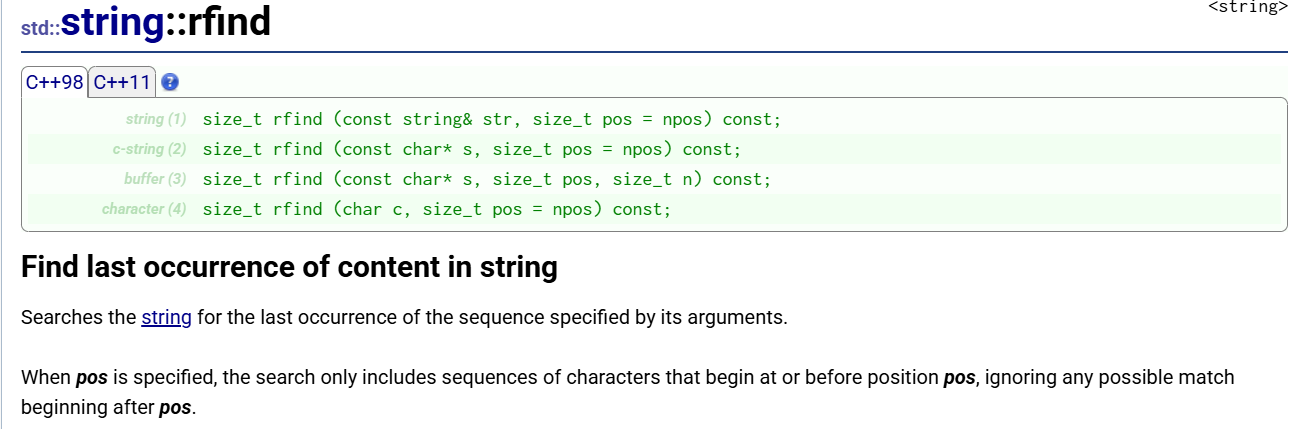
cpp
// (1) 反向查找另一个 string
size_t rfind(const string& str, size_t pos = npos) const;

// (2) 反向查找 C 风格字符串
size_t rfind(const char* s, size_t pos = npos) const;

// (3) 反向查找 C 字符串的前 n 个字符
size_t rfind(const char* s, size_t pos, size_t n) const;

// (4) 反向查找单个字符
size_t rfind(char c, size_t pos = npos) const;
cpp
string s = "test.cpp.zip";

size_t pos1 = s.find('.');    // 返回 4(指向 .cpp 的点)
size_t pos2 = s.rfind('.');   // 返回 8(指向 .zip 的点)

cout << pos1 << endl;  // 4
cout << pos2 << endl;  // 8

// 获取后缀名(常用)
string suffix = s.substr(s.rfind('.'));
cout << suffix << endl;  // .zip
rfind() 从后往前(或从指定位置往前)查找最后一次出现的内容,有 4 种重载;最常用于获取文件后缀(rfind('.'))、解析文件路径(rfind('/'))、找最后一个单词等场景;找不到返回 string::npos。
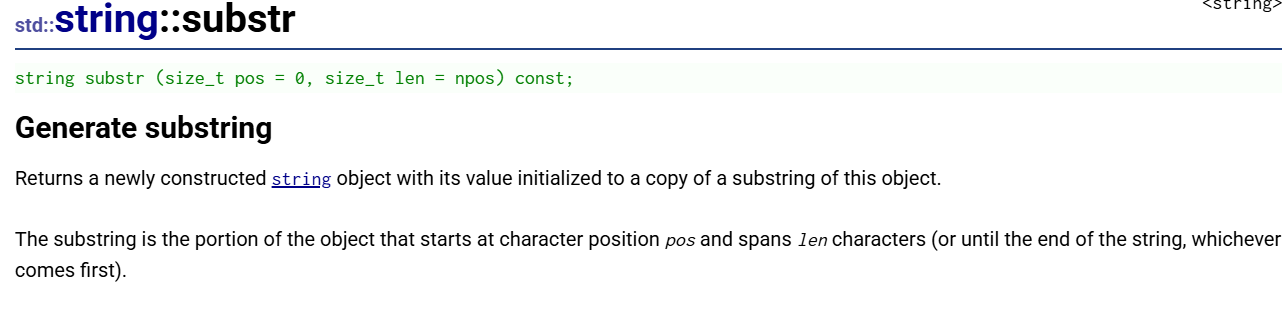
cpp
string substr(size_t pos = 0, size_t len = npos) const;
cpp
string s = "hello world";

// 用法1:从位置0开始,截取5个字符
string s1 = s.substr(0, 5);
cout << s1 << endl;  // hello

// 用法2:从位置6开始,截取到末尾
string s2 = s.substr(6);
cout << s2 << endl;  // world

// 用法3:只给位置,默认截取到末尾
string s3 = s.substr(6);
cout << s3 << endl;  // world

// 用法4:截取长度超出范围--截取到末尾
string s4 = s.substr(0, 100);
cout << s4 << endl;  // hello world
substr(pos, len)从pos位置开始截取len个字符,返回新字符串(原字符串不变);pos默认 0,len默认npos(截到末尾);常用于获取文件后缀、解析路径、提取子串;注意pos越界会抛异常
混合使用
cpp
void SplitFilename(const std::string& str)
{
    std::cout << "Splitting: " << str << '\n';
    std::size_t found = str.find_last_of("/\\");  // 找最后一个 '/' 或 '\'

    std::cout << " path: " << str.substr(0, found) << '\n';      // 目录部分
    std::cout << " file: " << str.substr(found + 1) << '\n';     // 文件名部分
}

void test_string4()
{

    string s("test.cpp.zip");
    size_t pos = s.rfind('.');           // 找最后一个 '.'(位置8)
    string suffix = s.substr(pos);       // 从位置8截取到末尾
    cout << suffix << endl;              // 输出:.zip


    std::string str("Please, replace the vowels in this sentence by asterisks.");
    std::cout << str << '\n';

    std::size_t found = str.find_first_not_of("abcdef");  // 找第一个不是a-f的字符
    while (found != std::string::npos)
    {
        str[found] = '*';                                 // 替换成 *
        found = str.find_first_not_of("abcdef", found + 1); // 继续往后找
    }
    std::cout << str << '\n';  // 所有非a-f的字符都变成 *


    std::string str1("/usr/bin/man");
    std::string str2("/home/user/Documents/test.cpp");

    SplitFilename(str1);
    SplitFilename(str2);
}
注意:
- 在string尾部追加字符时,s.push_back(c) / s.append(1, c) / s += 'c'三种的实现方式差
不多,一般情况下string类的+=操作用的比较多,+=操作不仅可以连接**单个字符,**还可
以连接字符串。
- 对string操作时,如果能够大概预估到放多少字符,可以先通过reserve把空间预留
好。
npos 在 string 里面是一个静态成员变量。(static const size_t npos = -1;).
string类非成员函数
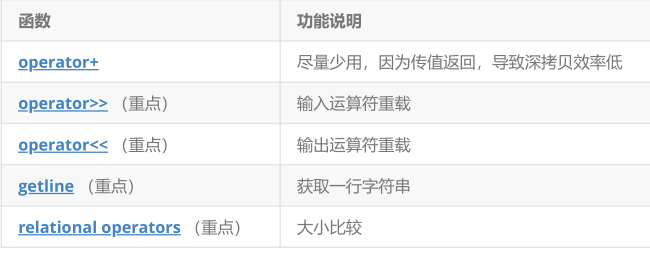
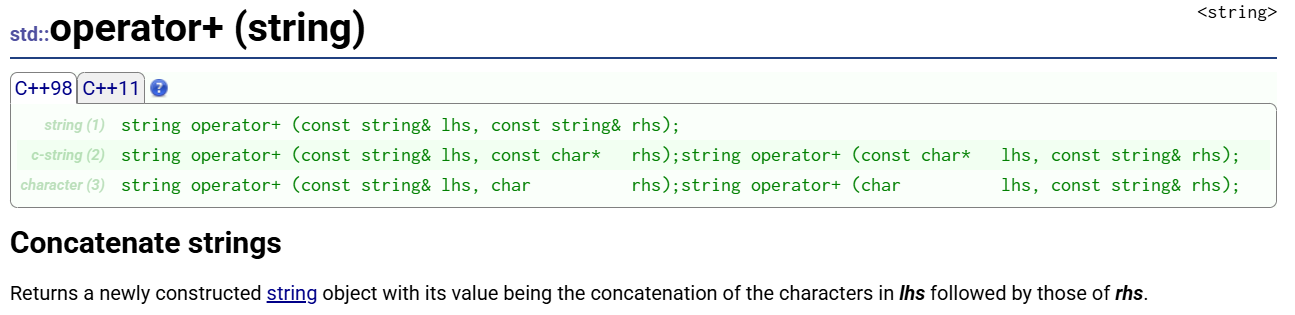
cpp
// 1. string + string
string operator+ (const string& lhs, const string& rhs);

// 2. string + 字符串常量(或反过来)
string operator+ (const string& lhs, const char* rhs);
string operator+ (const char* lhs, const string& rhs);

// 3. string + 单个字符(或反过来)
string operator+ (const string& lhs, char rhs);
string operator+ (char lhs, const string& rhs);
cpp
string s1 = "hello";
string s2 = "world";

string s3 = s1 + s2;      // "helloworld"
string s4 = s1 + "!!!";   // "hello!!!"
string s5 = "!!!" + s1;   // "!!!hello"
string s6 = s1 + '!';     // "hello!"
string s7 = '!' + s1;     // "!hello"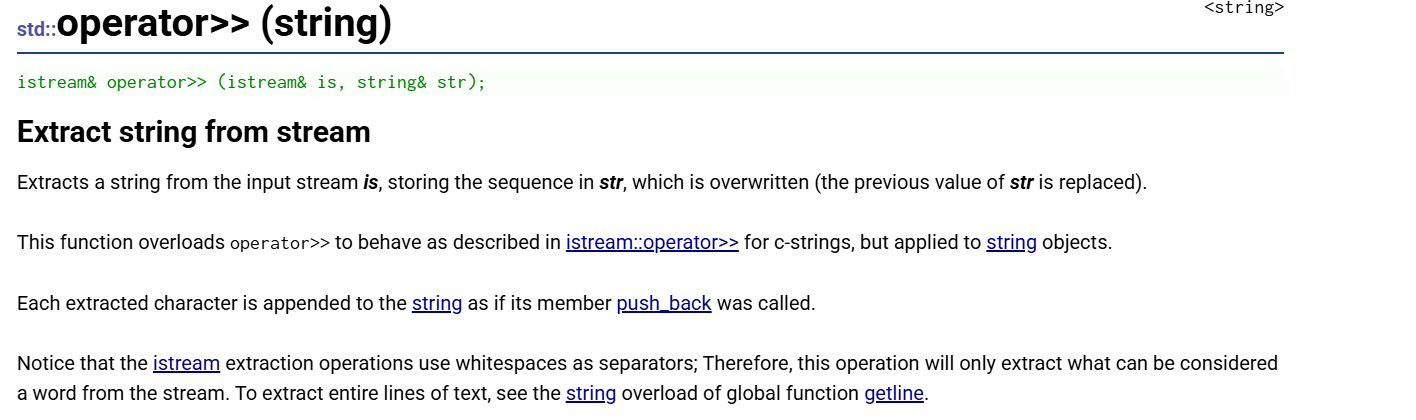
cpp
istream& operator>> (istream& is, string& str);
cpp
string s;
cin >> s;        // 从键盘读取一个单词到 s
operator>>从输入流提取一个"单词"(以空格/换行/制表符分隔),会覆盖原字符串,每个字符通过

cpp
ostream& operator<< (ostream& os, const string& str);
cpp
string s = "hello world";
cout << s;           // 输出字符串
cout << s << endl;   // 输出并换行
operator<<将字符串内容插入到输出流(如cout),返回流引用支持链式输出;参数是const string&(只读),可以安全地与其它类型混合输出,是 C++ 中最常用的字符串输出方式
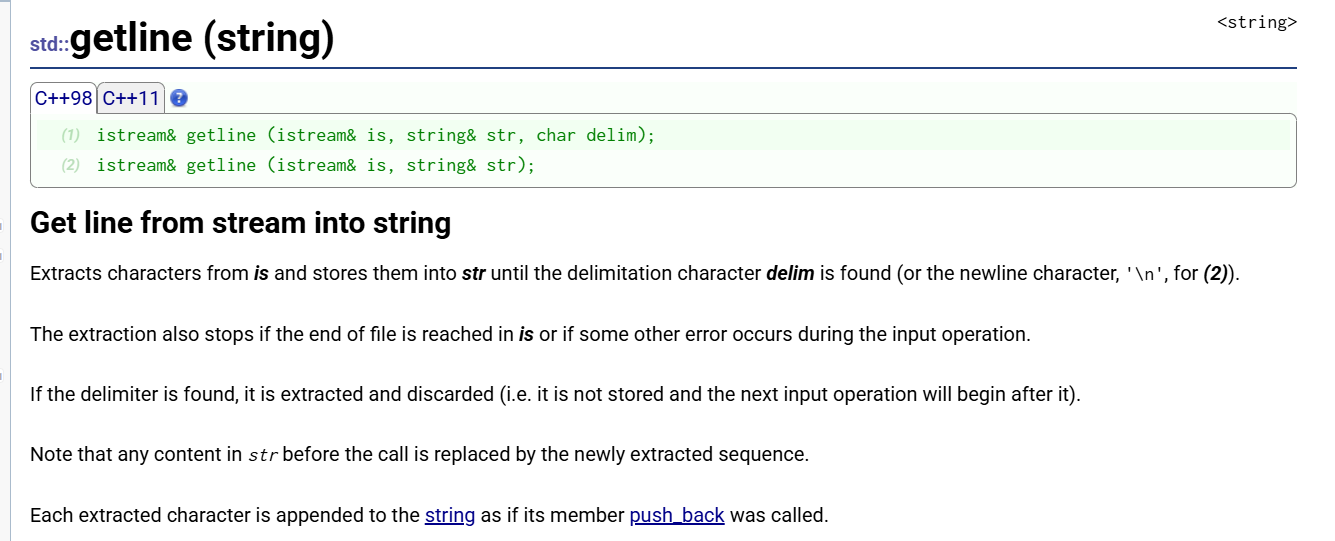
cpp
// (1) 自定义分隔符版本
istream& getline(istream& is, string& str, char delim);

// (2) 默认换行符版本
istream& getline(istream& is, string& str);
cpp
getline(cin, str);        // 默认:按换行符停止
getline(cin, str, ',');   // 自定义:按逗号停止
getline()读取整行文本(保留空格),覆盖原字符串;默认以换行符\n分隔,也可自定义分隔符;常用于读取带空格的句子、CSV 文件解析、多行文本处理。注意与cin >>混用时需要cin.ignore()清除缓冲区。
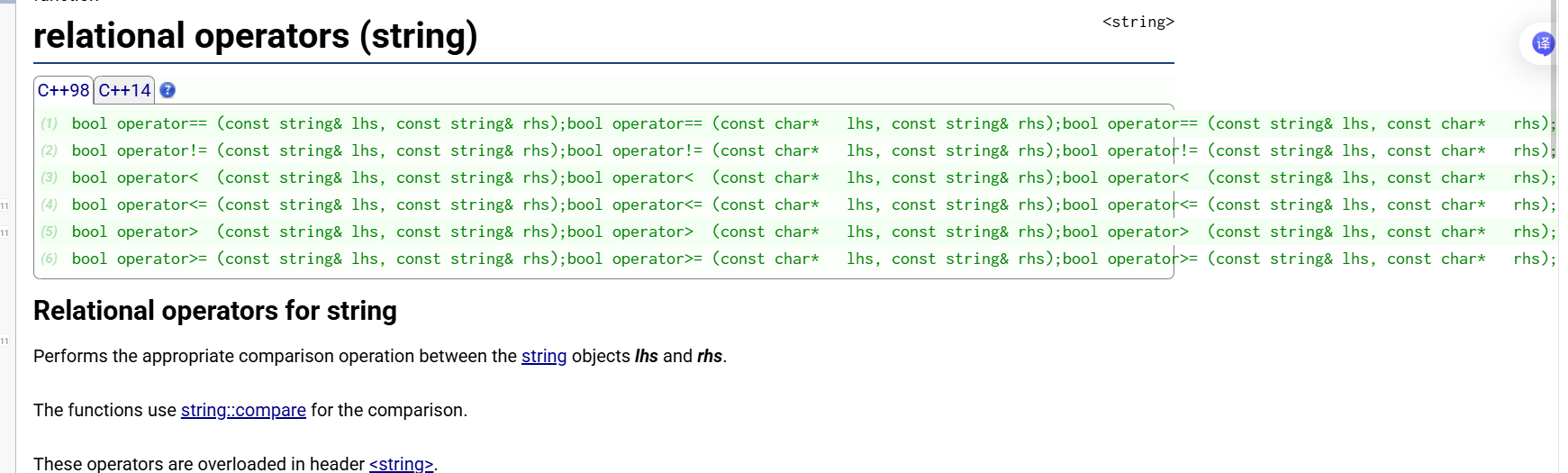
cpp
bool operator== (const string& lhs, const string& rhs);  // 等于
bool operator!= (const string& lhs, const string& rhs);  // 不等于
bool operator<  (const string& lhs, const string& rhs);  // 小于
bool operator<= (const string& lhs, const string& rhs);  // 小于等于
bool operator>  (const string& lhs, const string& rhs);  // 大于
bool operator>= (const string& lhs, const string& rhs);  // 大于等于
cpp
#include <iostream>
#include <string>
using namespace std;

int main() {
    // string vs string
    string a = "abc";
    string b = "abd";
    cout << (a < b) << endl;   // 1 (true)

    // string vs C字符串
    cout << (a < "abd") << endl;   // 1 (true)
    cout << ("abc" < b) << endl;   // 1 (true)

    // 大小写敏感
    string c = "Apple";
    string d = "apple";
    cout << (c < d) << endl;   // 1 (true, 'A'(65) < 'a'(97))

    // 前缀规则
    string e = "abc";
    string f = "abcd";
    cout << (e < f) << endl;   // 1 (true, 较短的小)

    return 0;
}
string 的六大关系运算符(
==、!=、<、<=、>、>=)按字典序(ASCII 码)逐字符比较,支持 string 与 string 或 string 与 C 字符串直接比较,常用于条件判断和排序。