摘要:本文深入解析 OpenClaw 节点的屏幕共享能力体系,涵盖屏幕截图(screen.snapshot)、屏幕录制(screen.record)、Canvas 远程呈现与控制、实时投屏等核心功能。通过三个完整实战案例------远程桌面演示、多屏幕监控、屏幕录制与回放,展示如何利用 OpenClaw 节点命令表面(command surface)构建高效的远程协作与监控方案。文章结合 Mermaid 架构图、配置代码与 CLI 命令,帮助开发者快速掌握从节点配对到屏幕共享落地的全链路实践。
目录
-
- 一、屏幕共享基础
-
- [1.1 什么是 OpenClaw 节点](#1.1 什么是 OpenClaw 节点)
- [1.2 节点配对流程](#1.2 节点配对流程)
- [1.3 屏幕共享命令概览](#1.3 屏幕共享命令概览)
- [1.4 命令策略双门机制](#1.4 命令策略双门机制)
- 二、显示控制详解
-
- [2.1 Canvas 远程呈现](#2.1 Canvas 远程呈现)
-
- 基本呈现操作
- [页面导航与 JavaScript 执行](#页面导航与 JavaScript 执行)
- [2.2 Canvas 截图](#2.2 Canvas 截图)
- [2.3 屏幕截图(screen.snapshot)](#2.3 屏幕截图(screen.snapshot))
- [2.4 A2UI:Agent 到 UI 的实时推送](#2.4 A2UI:Agent 到 UI 的实时推送)
- 三、远程投屏功能解析
-
- [3.1 屏幕录制(screen.record)](#3.1 屏幕录制(screen.record))
- [3.2 实时投屏架构](#3.2 实时投屏架构)
- [3.3 批量截图与定时巡检](#3.3 批量截图与定时巡检)
- 四、实战案例1:远程桌面演示
-
- [4.1 场景描述](#4.1 场景描述)
- [4.2 架构设计](#4.2 架构设计)
- [4.3 实现代码](#4.3 实现代码)
- [4.4 远程控制补充](#4.4 远程控制补充)
- 五、实战案例2:多屏幕监控
-
- [5.1 场景描述](#5.1 场景描述)
- [5.2 多节点配置](#5.2 多节点配置)
- [5.3 巡检脚本](#5.3 巡检脚本)
- [5.4 监控流程图](#5.4 监控流程图)
- 六、实战案例3:屏幕录制与回放
-
- [6.1 场景描述](#6.1 场景描述)
- [6.2 录制脚本](#6.2 录制脚本)
- [6.3 回放与标注](#6.3 回放与标注)
- [6.4 自动分析流水线](#6.4 自动分析流水线)
- 七、安全与权限模型
-
- [7.1 命令分类与默认策略](#7.1 命令分类与默认策略)
- [7.2 配置授权](#7.2 配置授权)
- [7.3 前台要求](#7.3 前台要求)
- [7.4 macOS TCC 权限](#7.4 macOS TCC 权限)
- 八、性能优化与最佳实践
-
- [8.1 截图参数优化](#8.1 截图参数优化)
- [8.2 录屏参数优化](#8.2 录屏参数优化)
- [8.3 带宽与 Payload 限制](#8.3 带宽与 Payload 限制)
- [8.4 最佳实践清单](#8.4 最佳实践清单)
- 九、总结与展望
-
- [9.1 核心能力总结](#9.1 核心能力总结)
- [9.2 与传统方案对比](#9.2 与传统方案对比)
- [9.3 未来方向](#9.3 未来方向)
- [📚 参考链接](#📚 参考链接)
一、屏幕共享基础
1.1 什么是 OpenClaw 节点
OpenClaw 节点(Node)是连接到 Gateway WebSocket 的伴侣设备,包括 macOS 应用、iOS/Android 移动端以及无头主机(headless node host)。节点通过 role: "node" 身份认证,向 Gateway 暴露一组命令表面(command surface),如 canvas.*、camera.*、screen.*、device.* 等。
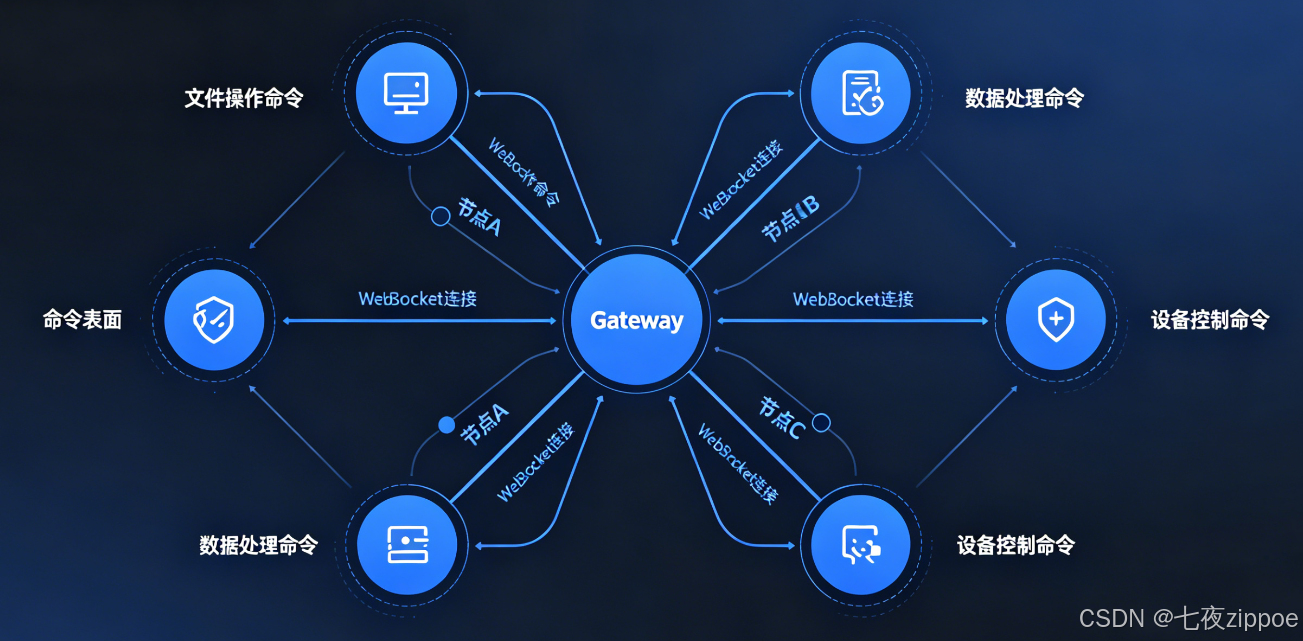
图1:OpenClaw 节点架构示意图,Gateway 作为中心枢纽与多个节点建立 WebSocket 连接,每个节点暴露不同的命令表面
理解节点与 Gateway 的关系是掌握屏幕共享的前提:
| 概念 | 说明 |
|---|---|
| Gateway | 消息路由中心,接收聊天消息、运行模型、转发工具调用 |
| Node | 外围设备,执行本地命令(截图、录屏、Canvas 渲染等) |
| Command Surface | 节点声明的可调用命令集合,如 screen.snapshot、screen.record |
| Device Pairing | 节点连接 Gateway 时的身份认证与审批流程 |
1.2 节点配对流程
屏幕共享功能依赖节点成功配对到 Gateway。配对流程如下:
操作员CLI Gateway 节点设备 操作员CLI Gateway 节点设备 #mermaid-svg-jHo7MoGhAPIFYzj9{font-family:"trebuchet ms",verdana,arial,sans-serif;font-size:16px;fill:#333;}@keyframes edge-animation-frame{from{stroke-dashoffset:0;}}@keyframes dash{to{stroke-dashoffset:0;}}#mermaid-svg-jHo7MoGhAPIFYzj9 .edge-animation-slow{stroke-dasharray:9,5!important;stroke-dashoffset:900;animation:dash 50s linear infinite;stroke-linecap:round;}#mermaid-svg-jHo7MoGhAPIFYzj9 .edge-animation-fast{stroke-dasharray:9,5!important;stroke-dashoffset:900;animation:dash 20s linear infinite;stroke-linecap:round;}#mermaid-svg-jHo7MoGhAPIFYzj9 .error-icon{fill:#552222;}#mermaid-svg-jHo7MoGhAPIFYzj9 .error-text{fill:#552222;stroke:#552222;}#mermaid-svg-jHo7MoGhAPIFYzj9 .edge-thickness-normal{stroke-width:1px;}#mermaid-svg-jHo7MoGhAPIFYzj9 .edge-thickness-thick{stroke-width:3.5px;}#mermaid-svg-jHo7MoGhAPIFYzj9 .edge-pattern-solid{stroke-dasharray:0;}#mermaid-svg-jHo7MoGhAPIFYzj9 .edge-thickness-invisible{stroke-width:0;fill:none;}#mermaid-svg-jHo7MoGhAPIFYzj9 .edge-pattern-dashed{stroke-dasharray:3;}#mermaid-svg-jHo7MoGhAPIFYzj9 .edge-pattern-dotted{stroke-dasharray:2;}#mermaid-svg-jHo7MoGhAPIFYzj9 .marker{fill:#333333;stroke:#333333;}#mermaid-svg-jHo7MoGhAPIFYzj9 .marker.cross{stroke:#333333;}#mermaid-svg-jHo7MoGhAPIFYzj9 svg{font-family:"trebuchet ms",verdana,arial,sans-serif;font-size:16px;}#mermaid-svg-jHo7MoGhAPIFYzj9 p{margin:0;}#mermaid-svg-jHo7MoGhAPIFYzj9 .actor{stroke:hsl(259.6261682243, 59.7765363128%, 87.9019607843%);fill:#ECECFF;}#mermaid-svg-jHo7MoGhAPIFYzj9 text.actor>tspan{fill:black;stroke:none;}#mermaid-svg-jHo7MoGhAPIFYzj9 .actor-line{stroke:hsl(259.6261682243, 59.7765363128%, 87.9019607843%);}#mermaid-svg-jHo7MoGhAPIFYzj9 .innerArc{stroke-width:1.5;stroke-dasharray:none;}#mermaid-svg-jHo7MoGhAPIFYzj9 .messageLine0{stroke-width:1.5;stroke-dasharray:none;stroke:#333;}#mermaid-svg-jHo7MoGhAPIFYzj9 .messageLine1{stroke-width:1.5;stroke-dasharray:2,2;stroke:#333;}#mermaid-svg-jHo7MoGhAPIFYzj9 #arrowhead path{fill:#333;stroke:#333;}#mermaid-svg-jHo7MoGhAPIFYzj9 .sequenceNumber{fill:white;}#mermaid-svg-jHo7MoGhAPIFYzj9 #sequencenumber{fill:#333;}#mermaid-svg-jHo7MoGhAPIFYzj9 #crosshead path{fill:#333;stroke:#333;}#mermaid-svg-jHo7MoGhAPIFYzj9 .messageText{fill:#333;stroke:none;}#mermaid-svg-jHo7MoGhAPIFYzj9 .labelBox{stroke:hsl(259.6261682243, 59.7765363128%, 87.9019607843%);fill:#ECECFF;}#mermaid-svg-jHo7MoGhAPIFYzj9 .labelText,#mermaid-svg-jHo7MoGhAPIFYzj9 .labelText>tspan{fill:black;stroke:none;}#mermaid-svg-jHo7MoGhAPIFYzj9 .loopText,#mermaid-svg-jHo7MoGhAPIFYzj9 .loopText>tspan{fill:black;stroke:none;}#mermaid-svg-jHo7MoGhAPIFYzj9 .loopLine{stroke-width:2px;stroke-dasharray:2,2;stroke:hsl(259.6261682243, 59.7765363128%, 87.9019607843%);fill:hsl(259.6261682243, 59.7765363128%, 87.9019607843%);}#mermaid-svg-jHo7MoGhAPIFYzj9 .note{stroke:#aaaa33;fill:#fff5ad;}#mermaid-svg-jHo7MoGhAPIFYzj9 .noteText,#mermaid-svg-jHo7MoGhAPIFYzj9 .noteText>tspan{fill:black;stroke:none;}#mermaid-svg-jHo7MoGhAPIFYzj9 .activation0{fill:#f4f4f4;stroke:#666;}#mermaid-svg-jHo7MoGhAPIFYzj9 .activation1{fill:#f4f4f4;stroke:#666;}#mermaid-svg-jHo7MoGhAPIFYzj9 .activation2{fill:#f4f4f4;stroke:#666;}#mermaid-svg-jHo7MoGhAPIFYzj9 .actorPopupMenu{position:absolute;}#mermaid-svg-jHo7MoGhAPIFYzj9 .actorPopupMenuPanel{position:absolute;fill:#ECECFF;box-shadow:0px 8px 16px 0px rgba(0,0,0,0.2);filter:drop-shadow(3px 5px 2px rgb(0 0 0 / 0.4));}#mermaid-svg-jHo7MoGhAPIFYzj9 .actor-man line{stroke:hsl(259.6261682243, 59.7765363128%, 87.9019607843%);fill:#ECECFF;}#mermaid-svg-jHo7MoGhAPIFYzj9 .actor-man circle,#mermaid-svg-jHo7MoGhAPIFYzj9 line{stroke:hsl(259.6261682243, 59.7765363128%, 87.9019607843%);fill:#ECECFF;stroke-width:2px;}#mermaid-svg-jHo7MoGhAPIFYzj9 :root{--mermaid-font-family:"trebuchet ms",verdana,arial,sans-serif;} "WebSocket connect (role: node, commands: ...)" "创建设备配对请求" "openclaw devices list" "返回待审批请求列表" "openclaw devices approve <requestId>" "存储配对记录 + 授权范围" "连接成功,节点已配对" "后续 node.invoke 调用"
配对完成后,可通过 openclaw nodes status 查看节点状态:
bash
# 查看所有节点状态
openclaw nodes status

# 查看特定节点详情
openclaw nodes describe --node my-mac-node
1.3 屏幕共享命令概览
OpenClaw 节点暴露的屏幕相关命令主要包括:
| 命令 | 功能 | 支持平台 | 需要显式授权 |
|---|---|---|---|
screen.snapshot |
屏幕截图,返回 base64 图像 | macOS, iOS, Android | 否(默认允许) |
screen.record |
屏幕录制,返回 mp4 视频 | macOS | 是(需 gateway.nodes.allowCommands) |
canvas.snapshot |
Canvas WebView 截图 | macOS, iOS, Android | 否(默认允许) |
canvas.present |
在 Canvas 中呈现 URL 或本地文件 | macOS, iOS, Android | 否(默认允许) |
canvas.navigate |
Canvas 内页面导航 | macOS, iOS, Android | 否(默认允许) |
canvas.eval |
在 Canvas 中执行 JavaScript | macOS, iOS, Android | 否(默认允许) |
⚠️ 注意 :
screen.record属于隐私敏感命令,需要在 Gateway 配置中显式允许。screen.snapshot则属于安全命令,默认即可使用。
1.4 命令策略双门机制
节点命令必须通过两道关卡才能被调用:
- 节点声明门 :节点在 WebSocket
connect.commands列表中声明该命令 - Gateway 策略门:Gateway 的平台策略允许该声明命令
#mermaid-svg-gu0EEkjEYjggIg3D{font-family:"trebuchet ms",verdana,arial,sans-serif;font-size:16px;fill:#333;}@keyframes edge-animation-frame{from{stroke-dashoffset:0;}}@keyframes dash{to{stroke-dashoffset:0;}}#mermaid-svg-gu0EEkjEYjggIg3D .edge-animation-slow{stroke-dasharray:9,5!important;stroke-dashoffset:900;animation:dash 50s linear infinite;stroke-linecap:round;}#mermaid-svg-gu0EEkjEYjggIg3D .edge-animation-fast{stroke-dasharray:9,5!important;stroke-dashoffset:900;animation:dash 20s linear infinite;stroke-linecap:round;}#mermaid-svg-gu0EEkjEYjggIg3D .error-icon{fill:#552222;}#mermaid-svg-gu0EEkjEYjggIg3D .error-text{fill:#552222;stroke:#552222;}#mermaid-svg-gu0EEkjEYjggIg3D .edge-thickness-normal{stroke-width:1px;}#mermaid-svg-gu0EEkjEYjggIg3D .edge-thickness-thick{stroke-width:3.5px;}#mermaid-svg-gu0EEkjEYjggIg3D .edge-pattern-solid{stroke-dasharray:0;}#mermaid-svg-gu0EEkjEYjggIg3D .edge-thickness-invisible{stroke-width:0;fill:none;}#mermaid-svg-gu0EEkjEYjggIg3D .edge-pattern-dashed{stroke-dasharray:3;}#mermaid-svg-gu0EEkjEYjggIg3D .edge-pattern-dotted{stroke-dasharray:2;}#mermaid-svg-gu0EEkjEYjggIg3D .marker{fill:#333333;stroke:#333333;}#mermaid-svg-gu0EEkjEYjggIg3D .marker.cross{stroke:#333333;}#mermaid-svg-gu0EEkjEYjggIg3D svg{font-family:"trebuchet ms",verdana,arial,sans-serif;font-size:16px;}#mermaid-svg-gu0EEkjEYjggIg3D p{margin:0;}#mermaid-svg-gu0EEkjEYjggIg3D .label{font-family:"trebuchet ms",verdana,arial,sans-serif;color:#333;}#mermaid-svg-gu0EEkjEYjggIg3D .cluster-label text{fill:#333;}#mermaid-svg-gu0EEkjEYjggIg3D .cluster-label span{color:#333;}#mermaid-svg-gu0EEkjEYjggIg3D .cluster-label span p{background-color:transparent;}#mermaid-svg-gu0EEkjEYjggIg3D .label text,#mermaid-svg-gu0EEkjEYjggIg3D span{fill:#333;color:#333;}#mermaid-svg-gu0EEkjEYjggIg3D .node rect,#mermaid-svg-gu0EEkjEYjggIg3D .node circle,#mermaid-svg-gu0EEkjEYjggIg3D .node ellipse,#mermaid-svg-gu0EEkjEYjggIg3D .node polygon,#mermaid-svg-gu0EEkjEYjggIg3D .node path{fill:#ECECFF;stroke:#9370DB;stroke-width:1px;}#mermaid-svg-gu0EEkjEYjggIg3D .rough-node .label text,#mermaid-svg-gu0EEkjEYjggIg3D .node .label text,#mermaid-svg-gu0EEkjEYjggIg3D .image-shape .label,#mermaid-svg-gu0EEkjEYjggIg3D .icon-shape .label{text-anchor:middle;}#mermaid-svg-gu0EEkjEYjggIg3D .node .katex path{fill:#000;stroke:#000;stroke-width:1px;}#mermaid-svg-gu0EEkjEYjggIg3D .rough-node .label,#mermaid-svg-gu0EEkjEYjggIg3D .node .label,#mermaid-svg-gu0EEkjEYjggIg3D .image-shape .label,#mermaid-svg-gu0EEkjEYjggIg3D .icon-shape .label{text-align:center;}#mermaid-svg-gu0EEkjEYjggIg3D .node.clickable{cursor:pointer;}#mermaid-svg-gu0EEkjEYjggIg3D .root .anchor path{fill:#333333!important;stroke-width:0;stroke:#333333;}#mermaid-svg-gu0EEkjEYjggIg3D .arrowheadPath{fill:#333333;}#mermaid-svg-gu0EEkjEYjggIg3D .edgePath .path{stroke:#333333;stroke-width:2.0px;}#mermaid-svg-gu0EEkjEYjggIg3D .flowchart-link{stroke:#333333;fill:none;}#mermaid-svg-gu0EEkjEYjggIg3D .edgeLabel{background-color:rgba(232,232,232, 0.8);text-align:center;}#mermaid-svg-gu0EEkjEYjggIg3D .edgeLabel p{background-color:rgba(232,232,232, 0.8);}#mermaid-svg-gu0EEkjEYjggIg3D .edgeLabel rect{opacity:0.5;background-color:rgba(232,232,232, 0.8);fill:rgba(232,232,232, 0.8);}#mermaid-svg-gu0EEkjEYjggIg3D .labelBkg{background-color:rgba(232, 232, 232, 0.5);}#mermaid-svg-gu0EEkjEYjggIg3D .cluster rect{fill:#ffffde;stroke:#aaaa33;stroke-width:1px;}#mermaid-svg-gu0EEkjEYjggIg3D .cluster text{fill:#333;}#mermaid-svg-gu0EEkjEYjggIg3D .cluster span{color:#333;}#mermaid-svg-gu0EEkjEYjggIg3D div.mermaidTooltip{position:absolute;text-align:center;max-width:200px;padding:2px;font-family:"trebuchet ms",verdana,arial,sans-serif;font-size:12px;background:hsl(80, 100%, 96.2745098039%);border:1px solid #aaaa33;border-radius:2px;pointer-events:none;z-index:100;}#mermaid-svg-gu0EEkjEYjggIg3D .flowchartTitleText{text-anchor:middle;font-size:18px;fill:#333;}#mermaid-svg-gu0EEkjEYjggIg3D rect.text{fill:none;stroke-width:0;}#mermaid-svg-gu0EEkjEYjggIg3D .icon-shape,#mermaid-svg-gu0EEkjEYjggIg3D .image-shape{background-color:rgba(232,232,232, 0.8);text-align:center;}#mermaid-svg-gu0EEkjEYjggIg3D .icon-shape p,#mermaid-svg-gu0EEkjEYjggIg3D .image-shape p{background-color:rgba(232,232,232, 0.8);padding:2px;}#mermaid-svg-gu0EEkjEYjggIg3D .icon-shape .label rect,#mermaid-svg-gu0EEkjEYjggIg3D .image-shape .label rect{opacity:0.5;background-color:rgba(232,232,232, 0.8);fill:rgba(232,232,232, 0.8);}#mermaid-svg-gu0EEkjEYjggIg3D .label-icon{display:inline-block;height:1em;overflow:visible;vertical-align:-0.125em;}#mermaid-svg-gu0EEkjEYjggIg3D .node .label-icon path{fill:currentColor;stroke:revert;stroke-width:revert;}#mermaid-svg-gu0EEkjEYjggIg3D :root{--mermaid-font-family:"trebuchet ms",verdana,arial,sans-serif;} 否
是
否
是
调用请求
节点已声明?
❌ 拒绝: 未声明
Gateway策略允许?
❌ 拒绝: 策略禁止
✅ 执行命令
如果节点更新了声明的命令列表,需要拒绝旧的设备配对请求并审批新请求,使 Gateway 存储更新后的命令快照。
二、显示控制详解
2.1 Canvas 远程呈现
Canvas 是 OpenClaw 节点上的 WebView 容器,支持远程呈现网页内容、本地文件以及 Agent 生成的 UI(A2UI)。这是实现远程显示控制的核心载体。
基本呈现操作
bash
# 在节点 Canvas 中打开网页
openclaw nodes canvas present --node my-mac-node --target https://example.com

# 呈现本地 HTML 文件
openclaw nodes canvas present --node my-mac-node --target ./dashboard.html

# 指定 Canvas 窗口位置和大小
openclaw nodes canvas present --node my-mac-node \
  --target https://monitor.example.com \
  --x 100 --y 100 --width 1280 --height 720

# 隐藏 Canvas
openclaw nodes canvas hide --node my-mac-node上述命令中,--target 参数支持 URL 和本地文件路径两种形式。--x/--y/--width/--height 可选参数用于精确控制 Canvas 窗口在节点设备屏幕上的位置和尺寸,这在多窗口布局场景中非常实用。
页面导航与 JavaScript 执行
Canvas 不仅支持静态呈现,还支持动态交互:
bash
# Canvas 内页面导航
openclaw nodes canvas navigate https://new-page.example.com --node my-mac-node

# 执行 JavaScript 获取页面信息
openclaw nodes canvas eval --node my-mac-node --js "document.title"

# 执行复杂 JS 操作
openclaw nodes canvas eval --node my-mac-node --js "
  const elements = document.querySelectorAll('.status-item');
  JSON.stringify(Array.from(elements).map(e => e.textContent));
"
canvas.eval 是实现远程控制的关键------通过注入 JavaScript,可以操作页面 DOM、触发事件、读取状态,从而实现完整的远程交互闭环。
2.2 Canvas 截图
Canvas 截图(canvas.snapshot)返回当前 WebView 内容的 base64 编码图像,适用于获取 Agent 渲染的 UI 状态:
bash
# PNG 格式截图
openclaw nodes canvas snapshot --node my-mac-node --format png

# JPEG 格式,控制宽度和质量
openclaw nodes canvas snapshot --node my-mac-node \
  --format jpg --max-width 1200 --quality 0.9
返回数据结构为 { format, base64 },CLI helper 会自动将 base64 解码写入临时文件并输出保存路径。
2.3 屏幕截图(screen.snapshot)
与 Canvas 截图不同,screen.snapshot 捕获的是节点设备的整个屏幕内容,而非仅 Canvas WebView 区域。这是远程桌面监控的基础能力。
bash
# 通过底层 invoke 调用屏幕截图
openclaw nodes invoke --node my-mac-node \
  --command screen.snapshot \
  --params '{}'
💡 Canvas vs Screen 截图 :
canvas.snapshot仅捕获 WebView 内容,文件更小、速度更快;screen.snapshot捕获全屏,包含所有窗口和桌面元素,信息更完整。根据场景选择合适的截图方式。
2.4 A2UI:Agent 到 UI 的实时推送
A2UI(Agent-to-UI)是 Canvas 上的高级功能,允许 Agent 实时推送结构化 UI 内容到节点设备:
bash
# 推送文本内容
openclaw nodes canvas a2ui push --node my-mac-node --text "操作完成:部署成功 ✅"

# 推送 JSONL 格式的富 UI 内容
openclaw nodes canvas a2ui push --node my-mac-node --jsonl ./payload.jsonl

# 重置 A2UI 状态
openclaw nodes canvas a2ui reset --node my-mac-node
A2UI 的典型应用场景包括:
- 实时状态推送:将 Agent 的执行进度、结果推送到移动端
- 交互式表单:推送带按钮的 UI,用户点击后触发回调
- 监控仪表盘:实时更新监控数据可视化
📱 移动端注意:iOS 和 Android 节点使用内置的 app-owned A2UI 页面渲染,按钮操作仅从该内置页面分发。Gateway 托管的 HTTP/HTTPS A2UI 页面在移动端为纯渲染模式。
三、远程投屏功能解析
3.1 屏幕录制(screen.record)
screen.record 是 OpenClaw 节点提供的屏幕录制能力,输出 mp4 格式视频。这是实现"投屏"的核心原语。
bash
# 基础录屏:10秒,10fps
openclaw nodes screen record --node my-mac-node --duration 10s --fps 10

# 无音频录屏(适合纯屏幕操作录制)
openclaw nodes screen record --node my-mac-node --duration 10s --fps 10 --no-audio

# 多屏幕环境选择指定显示器
openclaw nodes screen record --node my-mac-node --duration 30s --fps 15 --screen 1
录屏参数说明:
| 参数 | 说明 | 默认值/限制 |
|---|---|---|
--duration |
录制时长 | 最长 60 秒 |
--fps |
帧率 | 建议 10-15 |
--no-audio |
禁用麦克风捕获 | 默认包含音频 |
--screen |
选择显示器索引(多屏环境) | 默认主屏幕 |
⚠️ macOS 权限要求 :
screen.record需要授予 macOS Screen Recording 权限(TCC 系统设置)。首次使用时系统会弹出权限请求对话框。
3.2 实时投屏架构
OpenClaw 的"实时投屏"并非传统 VNC 式的持续像素流,而是基于定时截图 + Agent 分析的智能投屏模式。这种架构在带宽效率和智能理解之间取得了良好平衡。
#mermaid-svg-6HBNHMpPbly4FM8r{font-family:"trebuchet ms",verdana,arial,sans-serif;font-size:16px;fill:#333;}@keyframes edge-animation-frame{from{stroke-dashoffset:0;}}@keyframes dash{to{stroke-dashoffset:0;}}#mermaid-svg-6HBNHMpPbly4FM8r .edge-animation-slow{stroke-dasharray:9,5!important;stroke-dashoffset:900;animation:dash 50s linear infinite;stroke-linecap:round;}#mermaid-svg-6HBNHMpPbly4FM8r .edge-animation-fast{stroke-dasharray:9,5!important;stroke-dashoffset:900;animation:dash 20s linear infinite;stroke-linecap:round;}#mermaid-svg-6HBNHMpPbly4FM8r .error-icon{fill:#552222;}#mermaid-svg-6HBNHMpPbly4FM8r .error-text{fill:#552222;stroke:#552222;}#mermaid-svg-6HBNHMpPbly4FM8r .edge-thickness-normal{stroke-width:1px;}#mermaid-svg-6HBNHMpPbly4FM8r .edge-thickness-thick{stroke-width:3.5px;}#mermaid-svg-6HBNHMpPbly4FM8r .edge-pattern-solid{stroke-dasharray:0;}#mermaid-svg-6HBNHMpPbly4FM8r .edge-thickness-invisible{stroke-width:0;fill:none;}#mermaid-svg-6HBNHMpPbly4FM8r .edge-pattern-dashed{stroke-dasharray:3;}#mermaid-svg-6HBNHMpPbly4FM8r .edge-pattern-dotted{stroke-dasharray:2;}#mermaid-svg-6HBNHMpPbly4FM8r .marker{fill:#333333;stroke:#333333;}#mermaid-svg-6HBNHMpPbly4FM8r .marker.cross{stroke:#333333;}#mermaid-svg-6HBNHMpPbly4FM8r svg{font-family:"trebuchet ms",verdana,arial,sans-serif;font-size:16px;}#mermaid-svg-6HBNHMpPbly4FM8r p{margin:0;}#mermaid-svg-6HBNHMpPbly4FM8r .label{font-family:"trebuchet ms",verdana,arial,sans-serif;color:#333;}#mermaid-svg-6HBNHMpPbly4FM8r .cluster-label text{fill:#333;}#mermaid-svg-6HBNHMpPbly4FM8r .cluster-label span{color:#333;}#mermaid-svg-6HBNHMpPbly4FM8r .cluster-label span p{background-color:transparent;}#mermaid-svg-6HBNHMpPbly4FM8r .label text,#mermaid-svg-6HBNHMpPbly4FM8r span{fill:#333;color:#333;}#mermaid-svg-6HBNHMpPbly4FM8r .node rect,#mermaid-svg-6HBNHMpPbly4FM8r .node circle,#mermaid-svg-6HBNHMpPbly4FM8r .node ellipse,#mermaid-svg-6HBNHMpPbly4FM8r .node polygon,#mermaid-svg-6HBNHMpPbly4FM8r .node path{fill:#ECECFF;stroke:#9370DB;stroke-width:1px;}#mermaid-svg-6HBNHMpPbly4FM8r .rough-node .label text,#mermaid-svg-6HBNHMpPbly4FM8r .node .label text,#mermaid-svg-6HBNHMpPbly4FM8r .image-shape .label,#mermaid-svg-6HBNHMpPbly4FM8r .icon-shape .label{text-anchor:middle;}#mermaid-svg-6HBNHMpPbly4FM8r .node .katex path{fill:#000;stroke:#000;stroke-width:1px;}#mermaid-svg-6HBNHMpPbly4FM8r .rough-node .label,#mermaid-svg-6HBNHMpPbly4FM8r .node .label,#mermaid-svg-6HBNHMpPbly4FM8r .image-shape .label,#mermaid-svg-6HBNHMpPbly4FM8r .icon-shape .label{text-align:center;}#mermaid-svg-6HBNHMpPbly4FM8r .node.clickable{cursor:pointer;}#mermaid-svg-6HBNHMpPbly4FM8r .root .anchor path{fill:#333333!important;stroke-width:0;stroke:#333333;}#mermaid-svg-6HBNHMpPbly4FM8r .arrowheadPath{fill:#333333;}#mermaid-svg-6HBNHMpPbly4FM8r .edgePath .path{stroke:#333333;stroke-width:2.0px;}#mermaid-svg-6HBNHMpPbly4FM8r .flowchart-link{stroke:#333333;fill:none;}#mermaid-svg-6HBNHMpPbly4FM8r .edgeLabel{background-color:rgba(232,232,232, 0.8);text-align:center;}#mermaid-svg-6HBNHMpPbly4FM8r .edgeLabel p{background-color:rgba(232,232,232, 0.8);}#mermaid-svg-6HBNHMpPbly4FM8r .edgeLabel rect{opacity:0.5;background-color:rgba(232,232,232, 0.8);fill:rgba(232,232,232, 0.8);}#mermaid-svg-6HBNHMpPbly4FM8r .labelBkg{background-color:rgba(232, 232, 232, 0.5);}#mermaid-svg-6HBNHMpPbly4FM8r .cluster rect{fill:#ffffde;stroke:#aaaa33;stroke-width:1px;}#mermaid-svg-6HBNHMpPbly4FM8r .cluster text{fill:#333;}#mermaid-svg-6HBNHMpPbly4FM8r .cluster span{color:#333;}#mermaid-svg-6HBNHMpPbly4FM8r div.mermaidTooltip{position:absolute;text-align:center;max-width:200px;padding:2px;font-family:"trebuchet ms",verdana,arial,sans-serif;font-size:12px;background:hsl(80, 100%, 96.2745098039%);border:1px solid #aaaa33;border-radius:2px;pointer-events:none;z-index:100;}#mermaid-svg-6HBNHMpPbly4FM8r .flowchartTitleText{text-anchor:middle;font-size:18px;fill:#333;}#mermaid-svg-6HBNHMpPbly4FM8r rect.text{fill:none;stroke-width:0;}#mermaid-svg-6HBNHMpPbly4FM8r .icon-shape,#mermaid-svg-6HBNHMpPbly4FM8r .image-shape{background-color:rgba(232,232,232, 0.8);text-align:center;}#mermaid-svg-6HBNHMpPbly4FM8r .icon-shape p,#mermaid-svg-6HBNHMpPbly4FM8r .image-shape p{background-color:rgba(232,232,232, 0.8);padding:2px;}#mermaid-svg-6HBNHMpPbly4FM8r .icon-shape .label rect,#mermaid-svg-6HBNHMpPbly4FM8r .image-shape .label rect{opacity:0.5;background-color:rgba(232,232,232, 0.8);fill:rgba(232,232,232, 0.8);}#mermaid-svg-6HBNHMpPbly4FM8r .label-icon{display:inline-block;height:1em;overflow:visible;vertical-align:-0.125em;}#mermaid-svg-6HBNHMpPbly4FM8r .node .label-icon path{fill:currentColor;stroke:revert;stroke-width:revert;}#mermaid-svg-6HBNHMpPbly4FM8r :root{--mermaid-font-family:"trebuchet ms",verdana,arial,sans-serif;} 通知渠道
Gateway
节点设备
screen.snapshot
base64 图像
screen.record
mp4 视频
定时触发器
调用节点截图
Media Understanding
图像描述/OCR
Agent 决策
canvas.eval 远程控制
Telegram/飞书/Slack
Web Control UI
这种架构的优势:
- 带宽友好:截图体积远小于视频流,适合移动网络
- 智能理解:通过 Media Understanding 自动提取屏幕内容语义
- 按需控制:Agent 根据屏幕内容智能决定是否需要远程操作
- 多渠道通知:屏幕变化可推送到任意聊天渠道
3.3 批量截图与定时巡检
通过组合 CLI 命令和定时任务,可以实现批量截图巡检:
bash
#!/bin/bash
# screen-patrol.sh - 屏幕巡检脚本
# 每隔 N 秒对指定节点执行截图并保存

NODE="my-mac-node"
INTERVAL=30
OUTPUT_DIR="./screen-captures"
mkdir -p "$OUTPUT_DIR"

while true; do
  TIMESTAMP=$(date +%Y%m%d_%H%M%S)
  openclaw nodes canvas snapshot --node "$NODE" --format png \
    2>/dev/null | tail -1 | xargs -I{} cp {} "$OUTPUT_DIR/capture_${TIMESTAMP}.png"
  echo "[$TIMESTAMP] 截图已保存"
  sleep "$INTERVAL"
done
这个脚本每 30 秒对节点执行一次 Canvas 截图,以时间戳命名保存到本地目录。结合 Media Understanding,可以进一步对截图进行自动分析和异常检测。
四、实战案例1:远程桌面演示
4.1 场景描述
团队技术分享会中,演讲者在 macOS 上操作演示,远程参与者通过 OpenClaw 节点实时观看演示内容。Agent 自动截取关键画面并推送到群聊渠道。
4.2 架构设计
#mermaid-svg-p1hYabctzAczjP6Z{font-family:"trebuchet ms",verdana,arial,sans-serif;font-size:16px;fill:#333;}@keyframes edge-animation-frame{from{stroke-dashoffset:0;}}@keyframes dash{to{stroke-dashoffset:0;}}#mermaid-svg-p1hYabctzAczjP6Z .edge-animation-slow{stroke-dasharray:9,5!important;stroke-dashoffset:900;animation:dash 50s linear infinite;stroke-linecap:round;}#mermaid-svg-p1hYabctzAczjP6Z .edge-animation-fast{stroke-dasharray:9,5!important;stroke-dashoffset:900;animation:dash 20s linear infinite;stroke-linecap:round;}#mermaid-svg-p1hYabctzAczjP6Z .error-icon{fill:#552222;}#mermaid-svg-p1hYabctzAczjP6Z .error-text{fill:#552222;stroke:#552222;}#mermaid-svg-p1hYabctzAczjP6Z .edge-thickness-normal{stroke-width:1px;}#mermaid-svg-p1hYabctzAczjP6Z .edge-thickness-thick{stroke-width:3.5px;}#mermaid-svg-p1hYabctzAczjP6Z .edge-pattern-solid{stroke-dasharray:0;}#mermaid-svg-p1hYabctzAczjP6Z .edge-thickness-invisible{stroke-width:0;fill:none;}#mermaid-svg-p1hYabctzAczjP6Z .edge-pattern-dashed{stroke-dasharray:3;}#mermaid-svg-p1hYabctzAczjP6Z .edge-pattern-dotted{stroke-dasharray:2;}#mermaid-svg-p1hYabctzAczjP6Z .marker{fill:#333333;stroke:#333333;}#mermaid-svg-p1hYabctzAczjP6Z .marker.cross{stroke:#333333;}#mermaid-svg-p1hYabctzAczjP6Z svg{font-family:"trebuchet ms",verdana,arial,sans-serif;font-size:16px;}#mermaid-svg-p1hYabctzAczjP6Z p{margin:0;}#mermaid-svg-p1hYabctzAczjP6Z .label{font-family:"trebuchet ms",verdana,arial,sans-serif;color:#333;}#mermaid-svg-p1hYabctzAczjP6Z .cluster-label text{fill:#333;}#mermaid-svg-p1hYabctzAczjP6Z .cluster-label span{color:#333;}#mermaid-svg-p1hYabctzAczjP6Z .cluster-label span p{background-color:transparent;}#mermaid-svg-p1hYabctzAczjP6Z .label text,#mermaid-svg-p1hYabctzAczjP6Z span{fill:#333;color:#333;}#mermaid-svg-p1hYabctzAczjP6Z .node rect,#mermaid-svg-p1hYabctzAczjP6Z .node circle,#mermaid-svg-p1hYabctzAczjP6Z .node ellipse,#mermaid-svg-p1hYabctzAczjP6Z .node polygon,#mermaid-svg-p1hYabctzAczjP6Z .node path{fill:#ECECFF;stroke:#9370DB;stroke-width:1px;}#mermaid-svg-p1hYabctzAczjP6Z .rough-node .label text,#mermaid-svg-p1hYabctzAczjP6Z .node .label text,#mermaid-svg-p1hYabctzAczjP6Z .image-shape .label,#mermaid-svg-p1hYabctzAczjP6Z .icon-shape .label{text-anchor:middle;}#mermaid-svg-p1hYabctzAczjP6Z .node .katex path{fill:#000;stroke:#000;stroke-width:1px;}#mermaid-svg-p1hYabctzAczjP6Z .rough-node .label,#mermaid-svg-p1hYabctzAczjP6Z .node .label,#mermaid-svg-p1hYabctzAczjP6Z .image-shape .label,#mermaid-svg-p1hYabctzAczjP6Z .icon-shape .label{text-align:center;}#mermaid-svg-p1hYabctzAczjP6Z .node.clickable{cursor:pointer;}#mermaid-svg-p1hYabctzAczjP6Z .root .anchor path{fill:#333333!important;stroke-width:0;stroke:#333333;}#mermaid-svg-p1hYabctzAczjP6Z .arrowheadPath{fill:#333333;}#mermaid-svg-p1hYabctzAczjP6Z .edgePath .path{stroke:#333333;stroke-width:2.0px;}#mermaid-svg-p1hYabctzAczjP6Z .flowchart-link{stroke:#333333;fill:none;}#mermaid-svg-p1hYabctzAczjP6Z .edgeLabel{background-color:rgba(232,232,232, 0.8);text-align:center;}#mermaid-svg-p1hYabctzAczjP6Z .edgeLabel p{background-color:rgba(232,232,232, 0.8);}#mermaid-svg-p1hYabctzAczjP6Z .edgeLabel rect{opacity:0.5;background-color:rgba(232,232,232, 0.8);fill:rgba(232,232,232, 0.8);}#mermaid-svg-p1hYabctzAczjP6Z .labelBkg{background-color:rgba(232, 232, 232, 0.5);}#mermaid-svg-p1hYabctzAczjP6Z .cluster rect{fill:#ffffde;stroke:#aaaa33;stroke-width:1px;}#mermaid-svg-p1hYabctzAczjP6Z .cluster text{fill:#333;}#mermaid-svg-p1hYabctzAczjP6Z .cluster span{color:#333;}#mermaid-svg-p1hYabctzAczjP6Z div.mermaidTooltip{position:absolute;text-align:center;max-width:200px;padding:2px;font-family:"trebuchet ms",verdana,arial,sans-serif;font-size:12px;background:hsl(80, 100%, 96.2745098039%);border:1px solid #aaaa33;border-radius:2px;pointer-events:none;z-index:100;}#mermaid-svg-p1hYabctzAczjP6Z .flowchartTitleText{text-anchor:middle;font-size:18px;fill:#333;}#mermaid-svg-p1hYabctzAczjP6Z rect.text{fill:none;stroke-width:0;}#mermaid-svg-p1hYabctzAczjP6Z .icon-shape,#mermaid-svg-p1hYabctzAczjP6Z .image-shape{background-color:rgba(232,232,232, 0.8);text-align:center;}#mermaid-svg-p1hYabctzAczjP6Z .icon-shape p,#mermaid-svg-p1hYabctzAczjP6Z .image-shape p{background-color:rgba(232,232,232, 0.8);padding:2px;}#mermaid-svg-p1hYabctzAczjP6Z .icon-shape .label rect,#mermaid-svg-p1hYabctzAczjP6Z .image-shape .label rect{opacity:0.5;background-color:rgba(232,232,232, 0.8);fill:rgba(232,232,232, 0.8);}#mermaid-svg-p1hYabctzAczjP6Z .label-icon{display:inline-block;height:1em;overflow:visible;vertical-align:-0.125em;}#mermaid-svg-p1hYabctzAczjP6Z .node .label-icon path{fill:currentColor;stroke:revert;stroke-width:revert;}#mermaid-svg-p1hYabctzAczjP6Z :root{--mermaid-font-family:"trebuchet ms",verdana,arial,sans-serif;} screen.snapshot
Media Understanding
推送
推送
canvas.eval
演讲者 macOS
Canvas 呈现演示内容
Gateway
图像描述
飞书群聊
Slack 频道
远程控制
翻页/高亮
4.3 实现代码
bash
#!/bin/bash
# remote-demo.sh - 远程演示助手
# 监听演示节点,定时截图并推送关键画面

NODE="presenter-mac"
CHANNEL="feishu:demo-group"
LAST_SCREENHASH=""

while true; do
  # 1. 截取当前屏幕
  SCREENSHOT=$(openclaw nodes canvas snapshot \
    --node "$NODE" --format jpg --max-width 1280 --quality 0.8 2>/dev/null | tail -1)

  if [ -z "$SCREENSHOT" ] || [ ! -f "$SCREENSHOT" ]; then
    echo "截图失败,等待重试..."
    sleep 5
    continue
  fi

  # 2. 计算图像哈希判断是否有显著变化
  CURRENT_HASH=$(md5sum "$SCREENSHOT" | cut -d' ' -f1)

  if [ "$CURRENT_HASH" != "$LAST_SCREENHASH" ]; then
    # 3. 屏幕内容变化,推送到群聊
    openclaw message send \
      --target "$CHANNEL" \
      --media "$SCREENSHOT" \
      --message "📢 演示画面更新 $(date +%H:%M:%S)"

    LAST_SCREENHASH="$CURRENT_HASH"
    echo "[$(date +%H:%M:%S)] 画面已推送"
  fi

  sleep 3
done
代码解析 :该脚本实现了一个轻量级远程演示推送器。核心逻辑是每 3 秒截取一次 Canvas 画面,通过 MD5 哈希比对判断画面是否发生变化。只有画面真正改变时才推送,避免重复消息轰炸。--max-width 1280 控制截图尺寸,兼顾清晰度和传输效率。推送使用 openclaw message send 的 --media 参数,支持图片+文字组合发送。
4.4 远程控制补充
远程参与者不仅观看,还可以通过 Agent 发送控制指令:
bash
# 演示翻页(假设演示是网页幻灯片)
openclaw nodes canvas eval --node presenter-mac --js "
  document.querySelector('.next-slide').click();
"

# 高亮当前内容
openclaw nodes canvas eval --node presenter-mac --js "
  const sel = window.getSelection();
  if (sel.rangeCount > 0) {
    const range = sel.getRangeAt(0);
    const highlight = document.createElement('mark');
    highlight.style.background = 'yellow';
    range.surroundContents(highlight);
  }
"
五、实战案例2:多屏幕监控
5.1 场景描述
运维团队需要同时监控多台服务器的状态仪表盘。每台服务器运行一个 Web 监控页面,通过多个 OpenClaw 节点分别呈现,Agent 定时巡检所有画面并汇总异常。
5.2 多节点配置
json5
// openclaw.json - 多节点监控配置
{
  gateway: {
    nodes: {
      // 允许屏幕录制命令
      allowCommands: ["screen.record", "screen.snapshot"],
    },
  },
  tools: {
    media: {
      image: {
        // 配置图像理解模型用于自动分析截图
        models: [
          {
            type: "provider",
            provider: "openai",
            model: "gpt-4o",
            prompt: "分析这个监控仪表盘截图,指出任何异常指标或告警信息。用中文回答,不超过200字。",
            maxChars: 200,
            capabilities: ["image"],
          },
        ],
      },
    },
  },
}
配置解析 :这段 JSON5 配置做了两件事。第一,通过 gateway.nodes.allowCommands 显式允许 screen.record 和 screen.snapshot 命令------因为 screen.record 是隐私敏感命令,默认不在安全命令列表中。第二,配置 Media Understanding 的图像理解模型,使用 GPT-4o 自动分析监控截图内容,maxChars: 200 限制输出长度以控制 token 消耗。这样 Agent 截图后可以自动获得图像语义描述,无需人工查看每张截图。
5.3 巡检脚本
bash
#!/bin/bash
# multi-screen-monitor.sh - 多屏幕监控巡检

declare -A NODES=(
  ["prod-server-1"]="https://grafana.example.com/d/prod1"
  ["prod-server-2"]="https://grafana.example.com/d/prod2"
  ["staging-server"]="https://grafana.example.com/d/staging"
)

ALERT_CHANNEL="slack:ops-alerts"

for node in "${!NODES[@]}"; do
  url="${NODES[$node]}"

  # 1. 在各节点 Canvas 中呈现监控页面
  openclaw nodes canvas present --node "$node" --target "$url" \
    --width 1920 --height 1080

  # 2. 等待页面加载
  sleep 5

  # 3. 截图并分析
  openclaw nodes canvas snapshot --node "$node" --format jpg \
    --max-width 1920 --quality 0.9 2>/dev/null

  echo "[$(date +%H:%M:%S)] 节点 $node 巡检完成"
done

# 4. 汇总巡检结果(由 Agent 通过 Media Understanding 自动分析)
echo "所有节点巡检完成,Agent 正在分析截图..."
5.4 监控流程图
#mermaid-svg-rcHQSEOmD8CQgkhf{font-family:"trebuchet ms",verdana,arial,sans-serif;font-size:16px;fill:#333;}@keyframes edge-animation-frame{from{stroke-dashoffset:0;}}@keyframes dash{to{stroke-dashoffset:0;}}#mermaid-svg-rcHQSEOmD8CQgkhf .edge-animation-slow{stroke-dasharray:9,5!important;stroke-dashoffset:900;animation:dash 50s linear infinite;stroke-linecap:round;}#mermaid-svg-rcHQSEOmD8CQgkhf .edge-animation-fast{stroke-dasharray:9,5!important;stroke-dashoffset:900;animation:dash 20s linear infinite;stroke-linecap:round;}#mermaid-svg-rcHQSEOmD8CQgkhf .error-icon{fill:#552222;}#mermaid-svg-rcHQSEOmD8CQgkhf .error-text{fill:#552222;stroke:#552222;}#mermaid-svg-rcHQSEOmD8CQgkhf .edge-thickness-normal{stroke-width:1px;}#mermaid-svg-rcHQSEOmD8CQgkhf .edge-thickness-thick{stroke-width:3.5px;}#mermaid-svg-rcHQSEOmD8CQgkhf .edge-pattern-solid{stroke-dasharray:0;}#mermaid-svg-rcHQSEOmD8CQgkhf .edge-thickness-invisible{stroke-width:0;fill:none;}#mermaid-svg-rcHQSEOmD8CQgkhf .edge-pattern-dashed{stroke-dasharray:3;}#mermaid-svg-rcHQSEOmD8CQgkhf .edge-pattern-dotted{stroke-dasharray:2;}#mermaid-svg-rcHQSEOmD8CQgkhf .marker{fill:#333333;stroke:#333333;}#mermaid-svg-rcHQSEOmD8CQgkhf .marker.cross{stroke:#333333;}#mermaid-svg-rcHQSEOmD8CQgkhf svg{font-family:"trebuchet ms",verdana,arial,sans-serif;font-size:16px;}#mermaid-svg-rcHQSEOmD8CQgkhf p{margin:0;}#mermaid-svg-rcHQSEOmD8CQgkhf .label{font-family:"trebuchet ms",verdana,arial,sans-serif;color:#333;}#mermaid-svg-rcHQSEOmD8CQgkhf .cluster-label text{fill:#333;}#mermaid-svg-rcHQSEOmD8CQgkhf .cluster-label span{color:#333;}#mermaid-svg-rcHQSEOmD8CQgkhf .cluster-label span p{background-color:transparent;}#mermaid-svg-rcHQSEOmD8CQgkhf .label text,#mermaid-svg-rcHQSEOmD8CQgkhf span{fill:#333;color:#333;}#mermaid-svg-rcHQSEOmD8CQgkhf .node rect,#mermaid-svg-rcHQSEOmD8CQgkhf .node circle,#mermaid-svg-rcHQSEOmD8CQgkhf .node ellipse,#mermaid-svg-rcHQSEOmD8CQgkhf .node polygon,#mermaid-svg-rcHQSEOmD8CQgkhf .node path{fill:#ECECFF;stroke:#9370DB;stroke-width:1px;}#mermaid-svg-rcHQSEOmD8CQgkhf .rough-node .label text,#mermaid-svg-rcHQSEOmD8CQgkhf .node .label text,#mermaid-svg-rcHQSEOmD8CQgkhf .image-shape .label,#mermaid-svg-rcHQSEOmD8CQgkhf .icon-shape .label{text-anchor:middle;}#mermaid-svg-rcHQSEOmD8CQgkhf .node .katex path{fill:#000;stroke:#000;stroke-width:1px;}#mermaid-svg-rcHQSEOmD8CQgkhf .rough-node .label,#mermaid-svg-rcHQSEOmD8CQgkhf .node .label,#mermaid-svg-rcHQSEOmD8CQgkhf .image-shape .label,#mermaid-svg-rcHQSEOmD8CQgkhf .icon-shape .label{text-align:center;}#mermaid-svg-rcHQSEOmD8CQgkhf .node.clickable{cursor:pointer;}#mermaid-svg-rcHQSEOmD8CQgkhf .root .anchor path{fill:#333333!important;stroke-width:0;stroke:#333333;}#mermaid-svg-rcHQSEOmD8CQgkhf .arrowheadPath{fill:#333333;}#mermaid-svg-rcHQSEOmD8CQgkhf .edgePath .path{stroke:#333333;stroke-width:2.0px;}#mermaid-svg-rcHQSEOmD8CQgkhf .flowchart-link{stroke:#333333;fill:none;}#mermaid-svg-rcHQSEOmD8CQgkhf .edgeLabel{background-color:rgba(232,232,232, 0.8);text-align:center;}#mermaid-svg-rcHQSEOmD8CQgkhf .edgeLabel p{background-color:rgba(232,232,232, 0.8);}#mermaid-svg-rcHQSEOmD8CQgkhf .edgeLabel rect{opacity:0.5;background-color:rgba(232,232,232, 0.8);fill:rgba(232,232,232, 0.8);}#mermaid-svg-rcHQSEOmD8CQgkhf .labelBkg{background-color:rgba(232, 232, 232, 0.5);}#mermaid-svg-rcHQSEOmD8CQgkhf .cluster rect{fill:#ffffde;stroke:#aaaa33;stroke-width:1px;}#mermaid-svg-rcHQSEOmD8CQgkhf .cluster text{fill:#333;}#mermaid-svg-rcHQSEOmD8CQgkhf .cluster span{color:#333;}#mermaid-svg-rcHQSEOmD8CQgkhf div.mermaidTooltip{position:absolute;text-align:center;max-width:200px;padding:2px;font-family:"trebuchet ms",verdana,arial,sans-serif;font-size:12px;background:hsl(80, 100%, 96.2745098039%);border:1px solid #aaaa33;border-radius:2px;pointer-events:none;z-index:100;}#mermaid-svg-rcHQSEOmD8CQgkhf .flowchartTitleText{text-anchor:middle;font-size:18px;fill:#333;}#mermaid-svg-rcHQSEOmD8CQgkhf rect.text{fill:none;stroke-width:0;}#mermaid-svg-rcHQSEOmD8CQgkhf .icon-shape,#mermaid-svg-rcHQSEOmD8CQgkhf .image-shape{background-color:rgba(232,232,232, 0.8);text-align:center;}#mermaid-svg-rcHQSEOmD8CQgkhf .icon-shape p,#mermaid-svg-rcHQSEOmD8CQgkhf .image-shape p{background-color:rgba(232,232,232, 0.8);padding:2px;}#mermaid-svg-rcHQSEOmD8CQgkhf .icon-shape .label rect,#mermaid-svg-rcHQSEOmD8CQgkhf .image-shape .label rect{opacity:0.5;background-color:rgba(232,232,232, 0.8);fill:rgba(232,232,232, 0.8);}#mermaid-svg-rcHQSEOmD8CQgkhf .label-icon{display:inline-block;height:1em;overflow:visible;vertical-align:-0.125em;}#mermaid-svg-rcHQSEOmD8CQgkhf .node .label-icon path{fill:currentColor;stroke:revert;stroke-width:revert;}#mermaid-svg-rcHQSEOmD8CQgkhf :root{--mermaid-font-family:"trebuchet ms",verdana,arial,sans-serif;} 是
否
定时触发
遍历节点列表
节点1: canvas.present
节点2: canvas.present
节点N: canvas.present
canvas.snapshot
canvas.snapshot
canvas.snapshot
Media Understanding
GPT-4o 图像分析
检测到异常?
🚨 推送告警到 Slack
✅ 记录正常状态
六、实战案例3:屏幕录制与回放
6.1 场景描述
QA 团队需要录制 Bug 复现步骤,自动保存录屏并生成操作日志。录屏完成后,Agent 自动分析视频内容,生成文字描述和关键帧截图。
6.2 录制脚本
bash
#!/bin/bash
# screen-recorder.sh - 屏幕录制与回放

NODE="qa-mac-node"
BUG_ID="${1:-BUG-$(date +%Y%m%d%H%M%S)}"
OUTPUT_DIR="./recordings/$BUG_ID"
mkdir -p "$OUTPUT_DIR"

echo "🎬 开始录制 Bug $BUG_ID ..."

# 1. 开始屏幕录制(30秒片段循环)
for i in $(seq 1 100); do
  openclaw nodes screen record \
    --node "$NODE" \
    --duration 30s \
    --fps 15 \
    --no-audio \
    2>/dev/null | tail -1 | xargs -I{} cp {} "$OUTPUT_DIR/segment_${i}.mp4"

  echo "  片段 $i 已保存"

  # 检查是否收到停止信号
  if [ -f "$OUTPUT_DIR/STOP" ]; then
    echo "⏹️ 收到停止信号,结束录制"
    break
  fi
done

# 2. 合并视频片段
echo "📦 合并视频片段..."
concat_file="$OUTPUT_DIR/concat.txt"
for f in "$OUTPUT_DIR"/segment_*.mp4; do
  echo "file '$f'" >> "$concat_file"
done

ffmpeg -f concat -safe 0 -i "$concat_file" \
  -c copy "$OUTPUT_DIR/full_recording.mp4" 2>/dev/null

# 3. 提取关键帧
echo "📸 提取关键帧..."
ffmpeg -i "$OUTPUT_DIR/full_recording.mp4" \
  -vf "fps=1/5" \
  -q:v 2 \
  "$OUTPUT_DIR/keyframe_%03d.jpg" 2>/dev/null

echo "✅ 录制完成!"
echo "  视频文件: $OUTPUT_DIR/full_recording.mp4"
echo "  关键帧目录: $OUTPUT_DIR/"
ls -la "$OUTPUT_DIR"/keyframe_*.jpg | wc -l | xargs -I{} echo "  关键帧数量: {}"
代码解析 :这是一个完整的 Bug 复现录制工具。录制采用 30 秒片段循环策略,避免单次录屏超过 60 秒的限制。通过创建 STOP 文件作为停止信号,QA 人员可以随时终止录制。录制完成后,使用 ffmpeg 合并所有片段为完整视频,并以每 5 秒一帧的频率提取关键帧截图。这些关键帧可后续通过 Media Understanding 进行自动分析,生成 Bug 描述文字。
6.3 回放与标注
录制完成后,可以通过 Canvas 回放并添加标注:
bash
# 在 Canvas 中回放录制视频
openclaw nodes canvas present --node qa-mac-node \
  --target "file://$OUTPUT_DIR/full_recording.mp4"

# 通过 JS 控制视频播放
openclaw nodes canvas eval --node qa-mac-node --js "
  const video = document.querySelector('video');
  video.currentTime = 15;  // 跳转到15秒处
  video.pause();           // 暂停
"

# 添加标注覆盖层
openclaw nodes canvas eval --node qa-mac-node --js "
  const overlay = document.createElement('div');
  overlay.style.cssText = 'position:fixed;top:20px;left:20px;
    background:red;color:white;padding:8px 16px;
    border-radius:4px;font-size:14px;z-index:9999';
  overlay.textContent = '🔴 Bug 位置:此处点击无响应';
  document.body.appendChild(overlay);
"
6.4 自动分析流水线
#mermaid-svg-sNcnlT4phWLbdUGL{font-family:"trebuchet ms",verdana,arial,sans-serif;font-size:16px;fill:#333;}@keyframes edge-animation-frame{from{stroke-dashoffset:0;}}@keyframes dash{to{stroke-dashoffset:0;}}#mermaid-svg-sNcnlT4phWLbdUGL .edge-animation-slow{stroke-dasharray:9,5!important;stroke-dashoffset:900;animation:dash 50s linear infinite;stroke-linecap:round;}#mermaid-svg-sNcnlT4phWLbdUGL .edge-animation-fast{stroke-dasharray:9,5!important;stroke-dashoffset:900;animation:dash 20s linear infinite;stroke-linecap:round;}#mermaid-svg-sNcnlT4phWLbdUGL .error-icon{fill:#552222;}#mermaid-svg-sNcnlT4phWLbdUGL .error-text{fill:#552222;stroke:#552222;}#mermaid-svg-sNcnlT4phWLbdUGL .edge-thickness-normal{stroke-width:1px;}#mermaid-svg-sNcnlT4phWLbdUGL .edge-thickness-thick{stroke-width:3.5px;}#mermaid-svg-sNcnlT4phWLbdUGL .edge-pattern-solid{stroke-dasharray:0;}#mermaid-svg-sNcnlT4phWLbdUGL .edge-thickness-invisible{stroke-width:0;fill:none;}#mermaid-svg-sNcnlT4phWLbdUGL .edge-pattern-dashed{stroke-dasharray:3;}#mermaid-svg-sNcnlT4phWLbdUGL .edge-pattern-dotted{stroke-dasharray:2;}#mermaid-svg-sNcnlT4phWLbdUGL .marker{fill:#333333;stroke:#333333;}#mermaid-svg-sNcnlT4phWLbdUGL .marker.cross{stroke:#333333;}#mermaid-svg-sNcnlT4phWLbdUGL svg{font-family:"trebuchet ms",verdana,arial,sans-serif;font-size:16px;}#mermaid-svg-sNcnlT4phWLbdUGL p{margin:0;}#mermaid-svg-sNcnlT4phWLbdUGL .label{font-family:"trebuchet ms",verdana,arial,sans-serif;color:#333;}#mermaid-svg-sNcnlT4phWLbdUGL .cluster-label text{fill:#333;}#mermaid-svg-sNcnlT4phWLbdUGL .cluster-label span{color:#333;}#mermaid-svg-sNcnlT4phWLbdUGL .cluster-label span p{background-color:transparent;}#mermaid-svg-sNcnlT4phWLbdUGL .label text,#mermaid-svg-sNcnlT4phWLbdUGL span{fill:#333;color:#333;}#mermaid-svg-sNcnlT4phWLbdUGL .node rect,#mermaid-svg-sNcnlT4phWLbdUGL .node circle,#mermaid-svg-sNcnlT4phWLbdUGL .node ellipse,#mermaid-svg-sNcnlT4phWLbdUGL .node polygon,#mermaid-svg-sNcnlT4phWLbdUGL .node path{fill:#ECECFF;stroke:#9370DB;stroke-width:1px;}#mermaid-svg-sNcnlT4phWLbdUGL .rough-node .label text,#mermaid-svg-sNcnlT4phWLbdUGL .node .label text,#mermaid-svg-sNcnlT4phWLbdUGL .image-shape .label,#mermaid-svg-sNcnlT4phWLbdUGL .icon-shape .label{text-anchor:middle;}#mermaid-svg-sNcnlT4phWLbdUGL .node .katex path{fill:#000;stroke:#000;stroke-width:1px;}#mermaid-svg-sNcnlT4phWLbdUGL .rough-node .label,#mermaid-svg-sNcnlT4phWLbdUGL .node .label,#mermaid-svg-sNcnlT4phWLbdUGL .image-shape .label,#mermaid-svg-sNcnlT4phWLbdUGL .icon-shape .label{text-align:center;}#mermaid-svg-sNcnlT4phWLbdUGL .node.clickable{cursor:pointer;}#mermaid-svg-sNcnlT4phWLbdUGL .root .anchor path{fill:#333333!important;stroke-width:0;stroke:#333333;}#mermaid-svg-sNcnlT4phWLbdUGL .arrowheadPath{fill:#333333;}#mermaid-svg-sNcnlT4phWLbdUGL .edgePath .path{stroke:#333333;stroke-width:2.0px;}#mermaid-svg-sNcnlT4phWLbdUGL .flowchart-link{stroke:#333333;fill:none;}#mermaid-svg-sNcnlT4phWLbdUGL .edgeLabel{background-color:rgba(232,232,232, 0.8);text-align:center;}#mermaid-svg-sNcnlT4phWLbdUGL .edgeLabel p{background-color:rgba(232,232,232, 0.8);}#mermaid-svg-sNcnlT4phWLbdUGL .edgeLabel rect{opacity:0.5;background-color:rgba(232,232,232, 0.8);fill:rgba(232,232,232, 0.8);}#mermaid-svg-sNcnlT4phWLbdUGL .labelBkg{background-color:rgba(232, 232, 232, 0.5);}#mermaid-svg-sNcnlT4phWLbdUGL .cluster rect{fill:#ffffde;stroke:#aaaa33;stroke-width:1px;}#mermaid-svg-sNcnlT4phWLbdUGL .cluster text{fill:#333;}#mermaid-svg-sNcnlT4phWLbdUGL .cluster span{color:#333;}#mermaid-svg-sNcnlT4phWLbdUGL div.mermaidTooltip{position:absolute;text-align:center;max-width:200px;padding:2px;font-family:"trebuchet ms",verdana,arial,sans-serif;font-size:12px;background:hsl(80, 100%, 96.2745098039%);border:1px solid #aaaa33;border-radius:2px;pointer-events:none;z-index:100;}#mermaid-svg-sNcnlT4phWLbdUGL .flowchartTitleText{text-anchor:middle;font-size:18px;fill:#333;}#mermaid-svg-sNcnlT4phWLbdUGL rect.text{fill:none;stroke-width:0;}#mermaid-svg-sNcnlT4phWLbdUGL .icon-shape,#mermaid-svg-sNcnlT4phWLbdUGL .image-shape{background-color:rgba(232,232,232, 0.8);text-align:center;}#mermaid-svg-sNcnlT4phWLbdUGL .icon-shape p,#mermaid-svg-sNcnlT4phWLbdUGL .image-shape p{background-color:rgba(232,232,232, 0.8);padding:2px;}#mermaid-svg-sNcnlT4phWLbdUGL .icon-shape .label rect,#mermaid-svg-sNcnlT4phWLbdUGL .image-shape .label rect{opacity:0.5;background-color:rgba(232,232,232, 0.8);fill:rgba(232,232,232, 0.8);}#mermaid-svg-sNcnlT4phWLbdUGL .label-icon{display:inline-block;height:1em;overflow:visible;vertical-align:-0.125em;}#mermaid-svg-sNcnlT4phWLbdUGL .node .label-icon path{fill:currentColor;stroke:revert;stroke-width:revert;}#mermaid-svg-sNcnlT4phWLbdUGL :root{--mermaid-font-family:"trebuchet ms",verdana,arial,sans-serif;} screen.record
屏幕录制
mp4 片段
ffmpeg 合并
完整视频
关键帧提取
关键帧 JPG
Media Understanding
GPT-4o 图像分析
操作步骤描述
异常检测
Canvas 回放
JS 标注覆盖
标注后截图
📝 Bug 报告生成
七、安全与权限模型
7.1 命令分类与默认策略
OpenClaw 对节点命令采用分级安全策略:
| 分类 | 命令示例 | 默认策略 | 说明 |
|---|---|---|---|
| 安全命令 | canvas.*, camera.list, screen.snapshot |
默认允许 | 只读或低风险操作 |
| 隐私敏感 | camera.snap, camera.clip, screen.record |
需显式授权 | 涉及摄像头/麦克风/录屏 |
| 高危命令 | system.run, system.which |
需 operator.admin |
可执行任意系统命令 |
7.2 配置授权
在 openclaw.json 中配置允许的命令:
json5
{
  gateway: {
    nodes: {
      // 允许隐私敏感命令
      allowCommands: ["screen.record", "camera.snap", "camera.clip"],
      // 禁止特定命令(优先级最高)
      denyCommands: ["system.run"],
    },
  },
}
🔒 安全原则 :
denyCommands始终优先于allowCommands和默认策略。即使命令同时在两个列表中,denyCommands也会生效。
7.3 前台要求
iOS 和 Android 节点要求应用处于前台 才能执行 canvas.* 和 camera.* 命令。后台调用会返回 NODE_BACKGROUND_UNAVAILABLE 错误。
这意味着:
- 屏幕截图需要节点应用在前台活跃
- 屏幕录制同样需要前台状态
- 设计监控方案时需考虑节点应用的生命周期
7.4 macOS TCC 权限
macOS 节点使用 screen.record 需要系统级 Screen Recording 权限:
- 打开 系统设置 → 隐私与安全性 → 屏幕录制
- 找到 OpenClaw 应用并勾选允许
- 重启 OpenClaw 节点应用使权限生效
八、性能优化与最佳实践
8.1 截图参数优化
不同场景对截图质量和尺寸的要求不同:
| 场景 | 推荐参数 | 说明 |
|---|---|---|
| 快速巡检 | --format jpg --max-width 800 --quality 0.6 |
小体积,低延迟 |
| 常规监控 | --format jpg --max-width 1280 --quality 0.8 |
平衡质量与体积 |
| 高清存档 | --format png --max-width 1920 |
无损,大体积 |
| 移动端推送 | --format jpg --max-width 640 --quality 0.7 |
适配小屏幕 |
8.2 录屏参数优化
| 场景 | fps | 音频 | 说明 |
|---|---|---|---|
| 操作演示 | 15 | 包含 | 需要语音讲解 |
| Bug 复现 | 10 | 不含 | 纯操作步骤,无需音频 |
| 性能监控 | 5 | 不含 | 低帧率节省资源 |
8.3 带宽与 Payload 限制
OpenClaw 对节点返回的 Payload 有内置保护:
- 照片:base64 不超过 5 MB(自动重压缩)
- 视频片段:时长不超过 60 秒
- Canvas 截图 :通过
--max-width和--quality控制体积
在大规模监控场景中,建议:
- 使用 JPEG 格式而非 PNG(体积差异可达 5-10 倍)
- 合理设置
--max-width(通常 1280px 足够识别内容) - 采用变化检测策略,仅在画面变化时推送
- 利用 Media Understanding 在 Gateway 端压缩语义,只传输文字描述
8.4 最佳实践清单
- ✅ 配对后验证 :
openclaw nodes status确认节点已配对且在线 - ✅ 最小权限原则 :只
allowCommands真正需要的命令 - ✅ 前台保障:移动端节点确保应用在前台,或实现自动前台唤醒
- ✅ 变化检测:截图巡检使用哈希比对,避免重复推送
- ✅ 分段录制:长时录屏采用分段策略,每段 ≤ 60 秒
- ✅ 错误处理 :检查
NODE_BACKGROUND_UNAVAILABLE等错误码并重试 - ✅ 资源清理:定期清理临时截图和录屏文件
九、总结与展望
9.1 核心能力总结
OpenClaw 节点的屏幕共享能力构建了一套完整的远程显示与控制体系:
#mermaid-svg-vGShie12i0MJIKvs{font-family:"trebuchet ms",verdana,arial,sans-serif;font-size:16px;fill:#333;}@keyframes edge-animation-frame{from{stroke-dashoffset:0;}}@keyframes dash{to{stroke-dashoffset:0;}}#mermaid-svg-vGShie12i0MJIKvs .edge-animation-slow{stroke-dasharray:9,5!important;stroke-dashoffset:900;animation:dash 50s linear infinite;stroke-linecap:round;}#mermaid-svg-vGShie12i0MJIKvs .edge-animation-fast{stroke-dasharray:9,5!important;stroke-dashoffset:900;animation:dash 20s linear infinite;stroke-linecap:round;}#mermaid-svg-vGShie12i0MJIKvs .error-icon{fill:#552222;}#mermaid-svg-vGShie12i0MJIKvs .error-text{fill:#552222;stroke:#552222;}#mermaid-svg-vGShie12i0MJIKvs .edge-thickness-normal{stroke-width:1px;}#mermaid-svg-vGShie12i0MJIKvs .edge-thickness-thick{stroke-width:3.5px;}#mermaid-svg-vGShie12i0MJIKvs .edge-pattern-solid{stroke-dasharray:0;}#mermaid-svg-vGShie12i0MJIKvs .edge-thickness-invisible{stroke-width:0;fill:none;}#mermaid-svg-vGShie12i0MJIKvs .edge-pattern-dashed{stroke-dasharray:3;}#mermaid-svg-vGShie12i0MJIKvs .edge-pattern-dotted{stroke-dasharray:2;}#mermaid-svg-vGShie12i0MJIKvs .marker{fill:#333333;stroke:#333333;}#mermaid-svg-vGShie12i0MJIKvs .marker.cross{stroke:#333333;}#mermaid-svg-vGShie12i0MJIKvs svg{font-family:"trebuchet ms",verdana,arial,sans-serif;font-size:16px;}#mermaid-svg-vGShie12i0MJIKvs p{margin:0;}#mermaid-svg-vGShie12i0MJIKvs .edge{stroke-width:3;}#mermaid-svg-vGShie12i0MJIKvs .section--1 rect,#mermaid-svg-vGShie12i0MJIKvs .section--1 path,#mermaid-svg-vGShie12i0MJIKvs .section--1 circle,#mermaid-svg-vGShie12i0MJIKvs .section--1 polygon,#mermaid-svg-vGShie12i0MJIKvs .section--1 path{fill:hsl(240, 100%, 76.2745098039%);}#mermaid-svg-vGShie12i0MJIKvs .section--1 text{fill:#ffffff;}#mermaid-svg-vGShie12i0MJIKvs .node-icon--1{font-size:40px;color:#ffffff;}#mermaid-svg-vGShie12i0MJIKvs .section-edge--1{stroke:hsl(240, 100%, 76.2745098039%);}#mermaid-svg-vGShie12i0MJIKvs .edge-depth--1{stroke-width:17;}#mermaid-svg-vGShie12i0MJIKvs .section--1 line{stroke:hsl(60, 100%, 86.2745098039%);stroke-width:3;}#mermaid-svg-vGShie12i0MJIKvs .disabled,#mermaid-svg-vGShie12i0MJIKvs .disabled circle,#mermaid-svg-vGShie12i0MJIKvs .disabled text{fill:lightgray;}#mermaid-svg-vGShie12i0MJIKvs .disabled text{fill:#efefef;}#mermaid-svg-vGShie12i0MJIKvs .section-0 rect,#mermaid-svg-vGShie12i0MJIKvs .section-0 path,#mermaid-svg-vGShie12i0MJIKvs .section-0 circle,#mermaid-svg-vGShie12i0MJIKvs .section-0 polygon,#mermaid-svg-vGShie12i0MJIKvs .section-0 path{fill:hsl(60, 100%, 73.5294117647%);}#mermaid-svg-vGShie12i0MJIKvs .section-0 text{fill:black;}#mermaid-svg-vGShie12i0MJIKvs .node-icon-0{font-size:40px;color:black;}#mermaid-svg-vGShie12i0MJIKvs .section-edge-0{stroke:hsl(60, 100%, 73.5294117647%);}#mermaid-svg-vGShie12i0MJIKvs .edge-depth-0{stroke-width:14;}#mermaid-svg-vGShie12i0MJIKvs .section-0 line{stroke:hsl(240, 100%, 83.5294117647%);stroke-width:3;}#mermaid-svg-vGShie12i0MJIKvs .disabled,#mermaid-svg-vGShie12i0MJIKvs .disabled circle,#mermaid-svg-vGShie12i0MJIKvs .disabled text{fill:lightgray;}#mermaid-svg-vGShie12i0MJIKvs .disabled text{fill:#efefef;}#mermaid-svg-vGShie12i0MJIKvs .section-1 rect,#mermaid-svg-vGShie12i0MJIKvs .section-1 path,#mermaid-svg-vGShie12i0MJIKvs .section-1 circle,#mermaid-svg-vGShie12i0MJIKvs .section-1 polygon,#mermaid-svg-vGShie12i0MJIKvs .section-1 path{fill:hsl(80, 100%, 76.2745098039%);}#mermaid-svg-vGShie12i0MJIKvs .section-1 text{fill:black;}#mermaid-svg-vGShie12i0MJIKvs .node-icon-1{font-size:40px;color:black;}#mermaid-svg-vGShie12i0MJIKvs .section-edge-1{stroke:hsl(80, 100%, 76.2745098039%);}#mermaid-svg-vGShie12i0MJIKvs .edge-depth-1{stroke-width:11;}#mermaid-svg-vGShie12i0MJIKvs .section-1 line{stroke:hsl(260, 100%, 86.2745098039%);stroke-width:3;}#mermaid-svg-vGShie12i0MJIKvs .disabled,#mermaid-svg-vGShie12i0MJIKvs .disabled circle,#mermaid-svg-vGShie12i0MJIKvs .disabled text{fill:lightgray;}#mermaid-svg-vGShie12i0MJIKvs .disabled text{fill:#efefef;}#mermaid-svg-vGShie12i0MJIKvs .section-2 rect,#mermaid-svg-vGShie12i0MJIKvs .section-2 path,#mermaid-svg-vGShie12i0MJIKvs .section-2 circle,#mermaid-svg-vGShie12i0MJIKvs .section-2 polygon,#mermaid-svg-vGShie12i0MJIKvs .section-2 path{fill:hsl(270, 100%, 76.2745098039%);}#mermaid-svg-vGShie12i0MJIKvs .section-2 text{fill:#ffffff;}#mermaid-svg-vGShie12i0MJIKvs .node-icon-2{font-size:40px;color:#ffffff;}#mermaid-svg-vGShie12i0MJIKvs .section-edge-2{stroke:hsl(270, 100%, 76.2745098039%);}#mermaid-svg-vGShie12i0MJIKvs .edge-depth-2{stroke-width:8;}#mermaid-svg-vGShie12i0MJIKvs .section-2 line{stroke:hsl(90, 100%, 86.2745098039%);stroke-width:3;}#mermaid-svg-vGShie12i0MJIKvs .disabled,#mermaid-svg-vGShie12i0MJIKvs .disabled circle,#mermaid-svg-vGShie12i0MJIKvs .disabled text{fill:lightgray;}#mermaid-svg-vGShie12i0MJIKvs .disabled text{fill:#efefef;}#mermaid-svg-vGShie12i0MJIKvs .section-3 rect,#mermaid-svg-vGShie12i0MJIKvs .section-3 path,#mermaid-svg-vGShie12i0MJIKvs .section-3 circle,#mermaid-svg-vGShie12i0MJIKvs .section-3 polygon,#mermaid-svg-vGShie12i0MJIKvs .section-3 path{fill:hsl(300, 100%, 76.2745098039%);}#mermaid-svg-vGShie12i0MJIKvs .section-3 text{fill:black;}#mermaid-svg-vGShie12i0MJIKvs .node-icon-3{font-size:40px;color:black;}#mermaid-svg-vGShie12i0MJIKvs .section-edge-3{stroke:hsl(300, 100%, 76.2745098039%);}#mermaid-svg-vGShie12i0MJIKvs .edge-depth-3{stroke-width:5;}#mermaid-svg-vGShie12i0MJIKvs .section-3 line{stroke:hsl(120, 100%, 86.2745098039%);stroke-width:3;}#mermaid-svg-vGShie12i0MJIKvs .disabled,#mermaid-svg-vGShie12i0MJIKvs .disabled circle,#mermaid-svg-vGShie12i0MJIKvs .disabled text{fill:lightgray;}#mermaid-svg-vGShie12i0MJIKvs .disabled text{fill:#efefef;}#mermaid-svg-vGShie12i0MJIKvs .section-4 rect,#mermaid-svg-vGShie12i0MJIKvs .section-4 path,#mermaid-svg-vGShie12i0MJIKvs .section-4 circle,#mermaid-svg-vGShie12i0MJIKvs .section-4 polygon,#mermaid-svg-vGShie12i0MJIKvs .section-4 path{fill:hsl(330, 100%, 76.2745098039%);}#mermaid-svg-vGShie12i0MJIKvs .section-4 text{fill:black;}#mermaid-svg-vGShie12i0MJIKvs .node-icon-4{font-size:40px;color:black;}#mermaid-svg-vGShie12i0MJIKvs .section-edge-4{stroke:hsl(330, 100%, 76.2745098039%);}#mermaid-svg-vGShie12i0MJIKvs .edge-depth-4{stroke-width:2;}#mermaid-svg-vGShie12i0MJIKvs .section-4 line{stroke:hsl(150, 100%, 86.2745098039%);stroke-width:3;}#mermaid-svg-vGShie12i0MJIKvs .disabled,#mermaid-svg-vGShie12i0MJIKvs .disabled circle,#mermaid-svg-vGShie12i0MJIKvs .disabled text{fill:lightgray;}#mermaid-svg-vGShie12i0MJIKvs .disabled text{fill:#efefef;}#mermaid-svg-vGShie12i0MJIKvs .section-5 rect,#mermaid-svg-vGShie12i0MJIKvs .section-5 path,#mermaid-svg-vGShie12i0MJIKvs .section-5 circle,#mermaid-svg-vGShie12i0MJIKvs .section-5 polygon,#mermaid-svg-vGShie12i0MJIKvs .section-5 path{fill:hsl(0, 100%, 76.2745098039%);}#mermaid-svg-vGShie12i0MJIKvs .section-5 text{fill:black;}#mermaid-svg-vGShie12i0MJIKvs .node-icon-5{font-size:40px;color:black;}#mermaid-svg-vGShie12i0MJIKvs .section-edge-5{stroke:hsl(0, 100%, 76.2745098039%);}#mermaid-svg-vGShie12i0MJIKvs .edge-depth-5{stroke-width:-1;}#mermaid-svg-vGShie12i0MJIKvs .section-5 line{stroke:hsl(180, 100%, 86.2745098039%);stroke-width:3;}#mermaid-svg-vGShie12i0MJIKvs .disabled,#mermaid-svg-vGShie12i0MJIKvs .disabled circle,#mermaid-svg-vGShie12i0MJIKvs .disabled text{fill:lightgray;}#mermaid-svg-vGShie12i0MJIKvs .disabled text{fill:#efefef;}#mermaid-svg-vGShie12i0MJIKvs .section-6 rect,#mermaid-svg-vGShie12i0MJIKvs .section-6 path,#mermaid-svg-vGShie12i0MJIKvs .section-6 circle,#mermaid-svg-vGShie12i0MJIKvs .section-6 polygon,#mermaid-svg-vGShie12i0MJIKvs .section-6 path{fill:hsl(30, 100%, 76.2745098039%);}#mermaid-svg-vGShie12i0MJIKvs .section-6 text{fill:black;}#mermaid-svg-vGShie12i0MJIKvs .node-icon-6{font-size:40px;color:black;}#mermaid-svg-vGShie12i0MJIKvs .section-edge-6{stroke:hsl(30, 100%, 76.2745098039%);}#mermaid-svg-vGShie12i0MJIKvs .edge-depth-6{stroke-width:-4;}#mermaid-svg-vGShie12i0MJIKvs .section-6 line{stroke:hsl(210, 100%, 86.2745098039%);stroke-width:3;}#mermaid-svg-vGShie12i0MJIKvs .disabled,#mermaid-svg-vGShie12i0MJIKvs .disabled circle,#mermaid-svg-vGShie12i0MJIKvs .disabled text{fill:lightgray;}#mermaid-svg-vGShie12i0MJIKvs .disabled text{fill:#efefef;}#mermaid-svg-vGShie12i0MJIKvs .section-7 rect,#mermaid-svg-vGShie12i0MJIKvs .section-7 path,#mermaid-svg-vGShie12i0MJIKvs .section-7 circle,#mermaid-svg-vGShie12i0MJIKvs .section-7 polygon,#mermaid-svg-vGShie12i0MJIKvs .section-7 path{fill:hsl(90, 100%, 76.2745098039%);}#mermaid-svg-vGShie12i0MJIKvs .section-7 text{fill:black;}#mermaid-svg-vGShie12i0MJIKvs .node-icon-7{font-size:40px;color:black;}#mermaid-svg-vGShie12i0MJIKvs .section-edge-7{stroke:hsl(90, 100%, 76.2745098039%);}#mermaid-svg-vGShie12i0MJIKvs .edge-depth-7{stroke-width:-7;}#mermaid-svg-vGShie12i0MJIKvs .section-7 line{stroke:hsl(270, 100%, 86.2745098039%);stroke-width:3;}#mermaid-svg-vGShie12i0MJIKvs .disabled,#mermaid-svg-vGShie12i0MJIKvs .disabled circle,#mermaid-svg-vGShie12i0MJIKvs .disabled text{fill:lightgray;}#mermaid-svg-vGShie12i0MJIKvs .disabled text{fill:#efefef;}#mermaid-svg-vGShie12i0MJIKvs .section-8 rect,#mermaid-svg-vGShie12i0MJIKvs .section-8 path,#mermaid-svg-vGShie12i0MJIKvs .section-8 circle,#mermaid-svg-vGShie12i0MJIKvs .section-8 polygon,#mermaid-svg-vGShie12i0MJIKvs .section-8 path{fill:hsl(150, 100%, 76.2745098039%);}#mermaid-svg-vGShie12i0MJIKvs .section-8 text{fill:black;}#mermaid-svg-vGShie12i0MJIKvs .node-icon-8{font-size:40px;color:black;}#mermaid-svg-vGShie12i0MJIKvs .section-edge-8{stroke:hsl(150, 100%, 76.2745098039%);}#mermaid-svg-vGShie12i0MJIKvs .edge-depth-8{stroke-width:-10;}#mermaid-svg-vGShie12i0MJIKvs .section-8 line{stroke:hsl(330, 100%, 86.2745098039%);stroke-width:3;}#mermaid-svg-vGShie12i0MJIKvs .disabled,#mermaid-svg-vGShie12i0MJIKvs .disabled circle,#mermaid-svg-vGShie12i0MJIKvs .disabled text{fill:lightgray;}#mermaid-svg-vGShie12i0MJIKvs .disabled text{fill:#efefef;}#mermaid-svg-vGShie12i0MJIKvs .section-9 rect,#mermaid-svg-vGShie12i0MJIKvs .section-9 path,#mermaid-svg-vGShie12i0MJIKvs .section-9 circle,#mermaid-svg-vGShie12i0MJIKvs .section-9 polygon,#mermaid-svg-vGShie12i0MJIKvs .section-9 path{fill:hsl(180, 100%, 76.2745098039%);}#mermaid-svg-vGShie12i0MJIKvs .section-9 text{fill:black;}#mermaid-svg-vGShie12i0MJIKvs .node-icon-9{font-size:40px;color:black;}#mermaid-svg-vGShie12i0MJIKvs .section-edge-9{stroke:hsl(180, 100%, 76.2745098039%);}#mermaid-svg-vGShie12i0MJIKvs .edge-depth-9{stroke-width:-13;}#mermaid-svg-vGShie12i0MJIKvs .section-9 line{stroke:hsl(0, 100%, 86.2745098039%);stroke-width:3;}#mermaid-svg-vGShie12i0MJIKvs .disabled,#mermaid-svg-vGShie12i0MJIKvs .disabled circle,#mermaid-svg-vGShie12i0MJIKvs .disabled text{fill:lightgray;}#mermaid-svg-vGShie12i0MJIKvs .disabled text{fill:#efefef;}#mermaid-svg-vGShie12i0MJIKvs .section-10 rect,#mermaid-svg-vGShie12i0MJIKvs .section-10 path,#mermaid-svg-vGShie12i0MJIKvs .section-10 circle,#mermaid-svg-vGShie12i0MJIKvs .section-10 polygon,#mermaid-svg-vGShie12i0MJIKvs .section-10 path{fill:hsl(210, 100%, 76.2745098039%);}#mermaid-svg-vGShie12i0MJIKvs .section-10 text{fill:black;}#mermaid-svg-vGShie12i0MJIKvs .node-icon-10{font-size:40px;color:black;}#mermaid-svg-vGShie12i0MJIKvs .section-edge-10{stroke:hsl(210, 100%, 76.2745098039%);}#mermaid-svg-vGShie12i0MJIKvs .edge-depth-10{stroke-width:-16;}#mermaid-svg-vGShie12i0MJIKvs .section-10 line{stroke:hsl(30, 100%, 86.2745098039%);stroke-width:3;}#mermaid-svg-vGShie12i0MJIKvs .disabled,#mermaid-svg-vGShie12i0MJIKvs .disabled circle,#mermaid-svg-vGShie12i0MJIKvs .disabled text{fill:lightgray;}#mermaid-svg-vGShie12i0MJIKvs .disabled text{fill:#efefef;}#mermaid-svg-vGShie12i0MJIKvs .section-root rect,#mermaid-svg-vGShie12i0MJIKvs .section-root path,#mermaid-svg-vGShie12i0MJIKvs .section-root circle,#mermaid-svg-vGShie12i0MJIKvs .section-root polygon{fill:hsl(240, 100%, 46.2745098039%);}#mermaid-svg-vGShie12i0MJIKvs .section-root text{fill:#ffffff;}#mermaid-svg-vGShie12i0MJIKvs .section-root span{color:#ffffff;}#mermaid-svg-vGShie12i0MJIKvs .section-2 span{color:#ffffff;}#mermaid-svg-vGShie12i0MJIKvs .icon-container{height:100%;display:flex;justify-content:center;align-items:center;}#mermaid-svg-vGShie12i0MJIKvs .edge{fill:none;}#mermaid-svg-vGShie12i0MJIKvs .mindmap-node-label{dy:1em;alignment-baseline:middle;text-anchor:middle;dominant-baseline:middle;text-align:center;}#mermaid-svg-vGShie12i0MJIKvs :root{--mermaid-font-family:"trebuchet ms",verdana,arial,sans-serif;} OpenClaw 屏幕共享
截图
Canvas 截图
全屏截图
批量巡检
录制
screen.record
分段策略
关键帧提取
显示
Canvas 呈现
A2UI 推送
JS 远程控制
安全
命令策略双门
TCC 权限
前台要求
9.2 与传统方案对比
| 维度 | 传统 VNC/RDP | OpenClaw 节点屏幕共享 |
|---|---|---|
| 连接方式 | 持续像素流 | 按需截图/录屏 |
| 带宽消耗 | 高(持续传输) | 低(按需传输) |
| 智能理解 | 无 | Media Understanding 自动分析 |
| 多渠道推送 | 仅桌面客户端 | 任意聊天渠道 |
| 远程控制 | 专用协议 | Canvas JS 注入 |
| 安全模型 | VPN/密码 | 命令策略 + 设备配对 + TCC |
9.3 未来方向
随着 OpenClaw 的持续演进,屏幕共享能力有望在以下方向增强:
- 更高帧率实时投屏:突破当前 60 秒录屏限制,支持更长时间的连续录制
- WebRTC 实时流:基于 WebRTC 的低延迟像素流,接近 VNC 体验
- 多节点协同:多个节点屏幕拼接为虚拟大屏
- AI 驱动的智能监控:Agent 主动识别屏幕异常并自动告警