Python + FontTools 自动生成字体子集工具 & FontForge 实现字体加粗
- 一、创建项目目录
- 二、创建虚拟环境
- 三、安装依赖
- [四、核心脚本 font_subset_core.py](#四、核心脚本 font_subset_core.py)
- [六、打包 EXE](#六、打包 EXE)
- [七、 字体加粗](#七、 字体加粗)
- 参考资料
一、创建项目目录
text
fonttools/
│
├─ font_subset_core.py
├─ build.bat
└─ venv/
进入目录:
bat
cd /d F:\tools\fonttools二、创建虚拟环境
创建:
bat
python -m venv venv激活:
bat
venv\Scripts\activate成功后命令行会出现:
text
(venv)验证:
bat
where python输出应类似:
text
F:\tools\fonttools\venv\Scripts\python.exe三、安装依赖
安装 FontTools:
bat
python -m pip install fonttools安装 PyInstaller:
bat
python -m pip install pyinstaller验证 FontTools:
bat
python -c "from fontTools.subset import main;print('OK')"输出:
text
OK说明环境正常。
四、核心脚本 font_subset_core.py
python
import sys
from pathlib import Path
from fontTools.subset import main as pyftsubset_main

FONT_EXTS = {".ttf", ".otf"}


def read_text_auto(path):
    data = Path(path).read_bytes()

    for enc in ("utf-8-sig", "utf-8", "gbk", "gb18030"):
        try:
            return data.decode(enc), enc
        except UnicodeDecodeError:
            pass

    return data.decode("gb18030", errors="ignore"), "gb18030-ignore"


def sort_key(c):
    code = ord(c)

    if '0' <= c <= '9':
        return (0, code)

    if 'A' <= c <= 'Z':
        return (1, code)

    if 'a' <= c <= 'z':
        return (2, code)

    if 0x4E00 <= code <= 0x9FFF:
        return (4, code)

    return (3, code)


def make_unique_chars(text):
    chars = {
        c
        for c in text
        if not c.isspace()
        and ord(c) >= 32
    }

    return "".join(sorted(chars, key=sort_key))


def build_subset(font_path, chars_path, out_font_path):
    pyftsubset_main([
        str(font_path),
        f"--text-file={chars_path}",
        f"--output-file={out_font_path}",
        "--layout-features=*",
        "--glyph-names",
        "--symbol-cmap",
        "--legacy-cmap",
        "--notdef-glyph",
        "--notdef-outline",`
        "--recommended-glyphs",
    ])


def main():
    if len(sys.argv) < 3:
        print("用法: font_subset_core.exe 字体.ttf 文本.txt")
        return

    font_path = Path(sys.argv[1])
    text_path = Path(sys.argv[2])

    if not font_path.exists():
        print("字体文件不存在:", font_path)
        return

    if not text_path.exists():
        print("文本文件不存在:", text_path)
        return

    if font_path.suffix.lower() not in FONT_EXTS:
        print("第一个参数必须是字体文件:", font_path)
        return

    text, enc = read_text_auto(text_path)
    chars = make_unique_chars(text)

    chars_path = text_path.with_name(text_path.stem + "_chars.txt")
    chars_path.write_text(chars, encoding="utf-8")

    out_font_path = font_path.with_name(font_path.stem + "_subset" + font_path.suffix)

    build_subset(font_path, chars_path, out_font_path)

    print("处理完成")
    print("识别编码 :", enc)
    print("字符数量 :", len(chars))
    print("字符文件 :", chars_path)
    print("子集字体 :", out_font_path)


if __name__ == "__main__":
    main()
命令格式:
bat
python font_subset_core.py 字体.ttf 文本.txt测试:
powershell
python font_subset_core.py test.ttf test.txt
powershell
处理完成
识别编码 : utf-8-sig
字符数量 : 247
字符文件 : test_chars.txt
子集字体 : test_subset.ttf- 自动完成
text
读取文本
↓
去重
↓
排序
↓
生成 chars.txt
↓
调用 pyftsubset
↓
生成 subset.ttf
六、打包 EXE
使用 PyInstaller:
bat
python -m PyInstaller -F --clean --collect-all fontTools --name FontSubset font_subset_core.py参数说明:
text
-F               单文件
--clean          清理缓存
--collect-all    打包 FontTools 全部依赖
--name           EXE名称
打包完成:
text
dist/
└─ FontSubset.exe
FontSubset.exe 用于根据游戏文本自动生成字体子集。第一个参数为原始字体文件(支持 .ttf、.otf),第二个参数为文本文件(.txt)。程序会自动读取文本内容、提取所有可见字符、去重排序、生成字符集文件,并调用内置的 pyftsubset 生成子集字体。
使用方式:
bat
FontSubset.exe FZBWKS.ttf all_text.txt执行后会生成:
text
all_text_chars.txt     // 去重后的字符集
FZBWKS_subset.ttf      // 生成的子集字体
适用于传奇游戏、手游项目、UI字体优化等场景,可大幅缩小字体体积,同时保留项目实际使用到的全部字符。
无需安装:
text
Python
FontTools
PyInstaller
用户机器直接运行即可。
七、 字体加粗
安装 FontForge
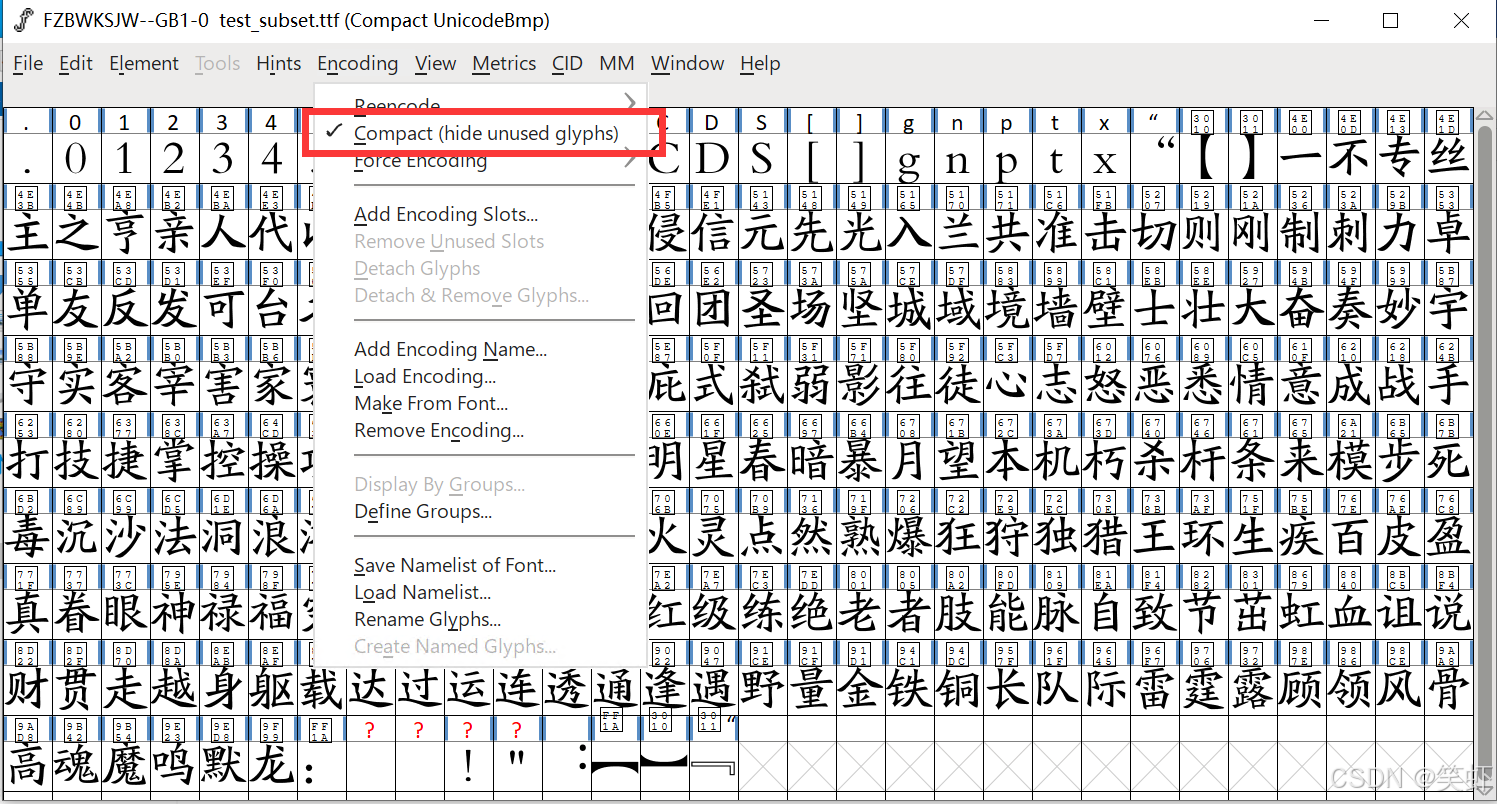
然后打开上面生成的字体子集。勾选如下红框可紧凑显示(忽略空格只显示有的字符)
设置
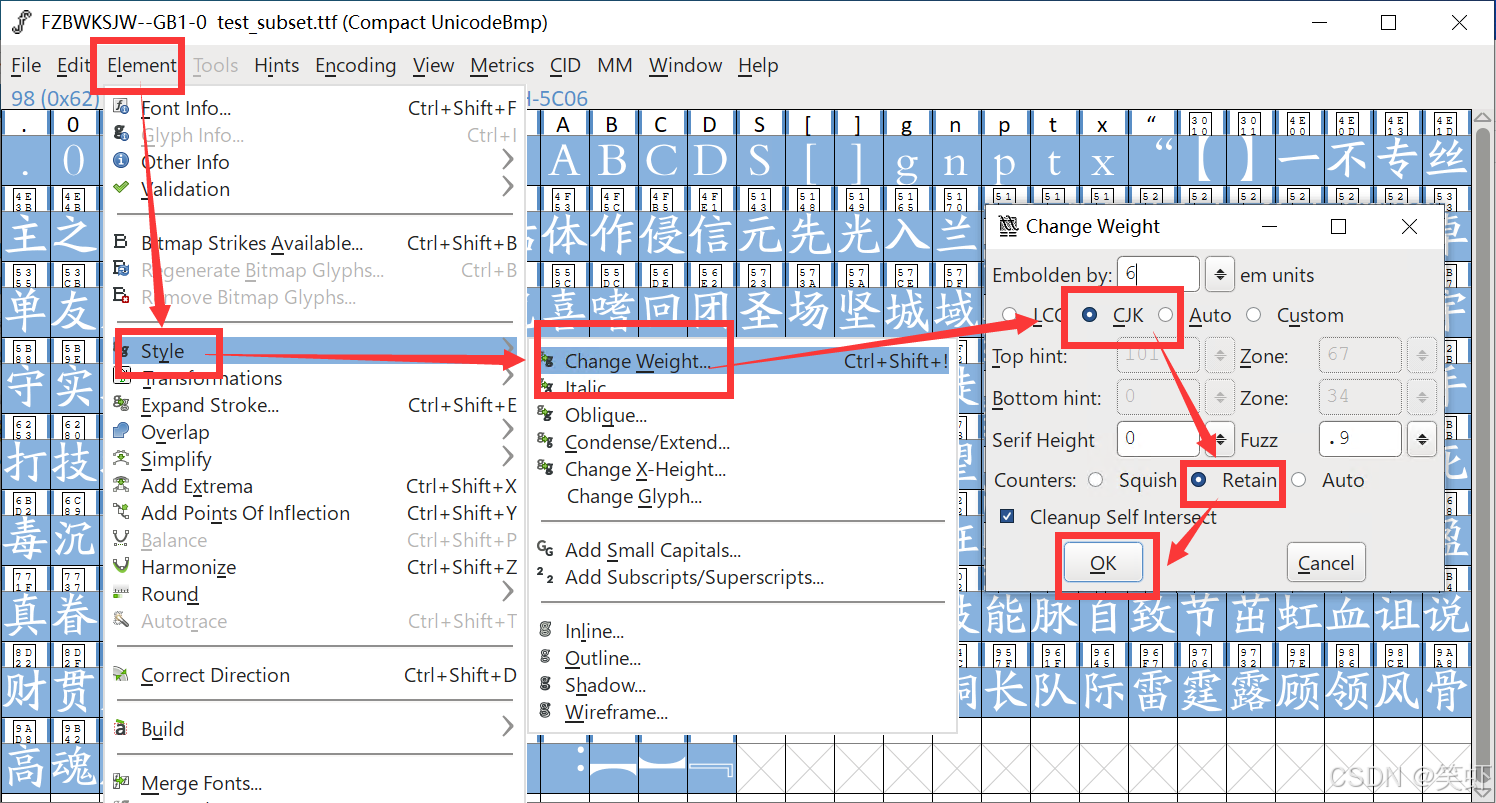
Ctrl + A 全选,然后调整字体实现加粗。中文选 CJK 字中空隙保留选 Retain
我用 6 em units 这个要自己调看效果
导出
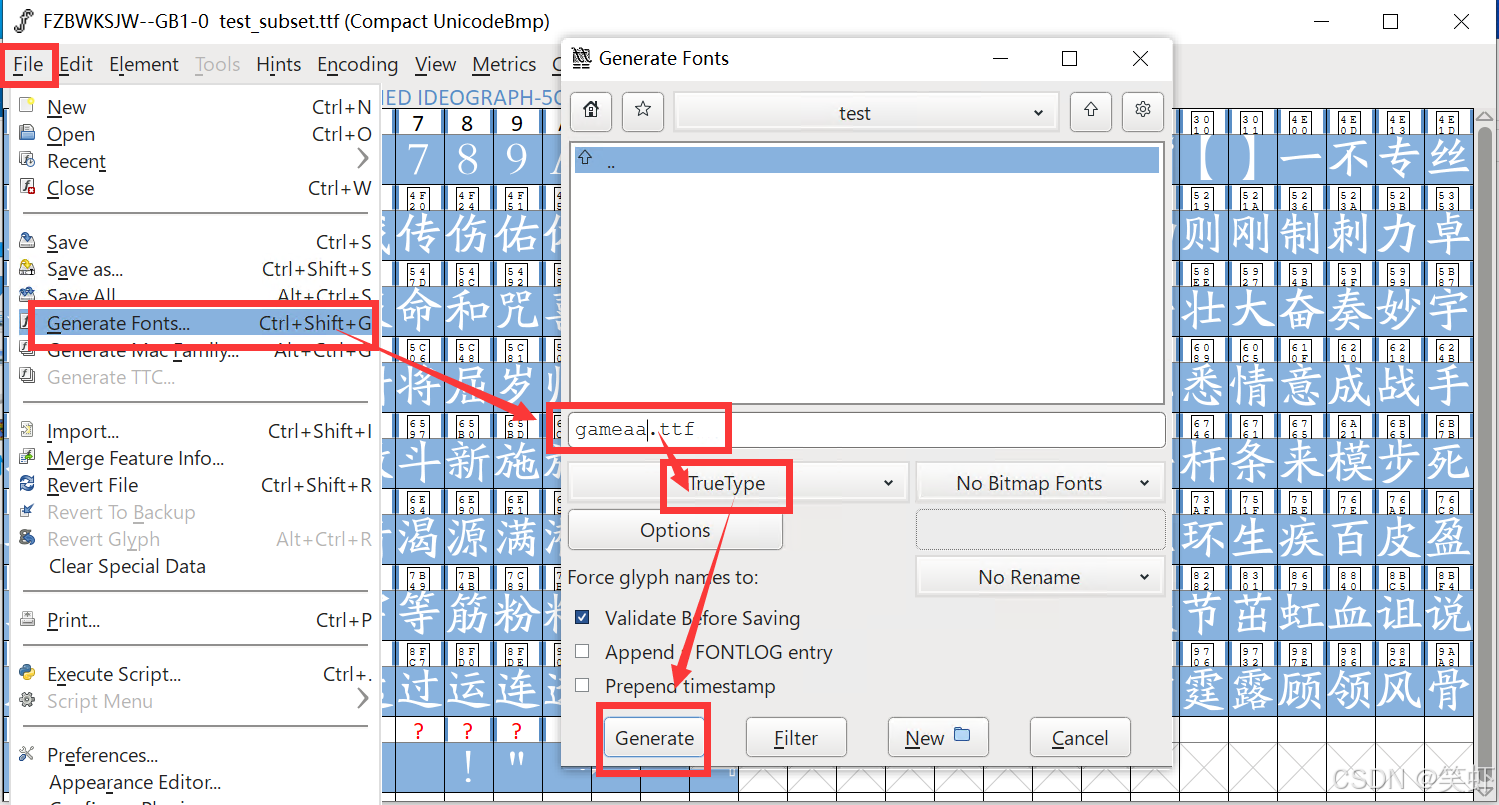
将选中字符导出为字体文件(警告什么的,反正也不会处理,直接跳过)