前言
最近遇到了一个实际需求:
整个 Vue/Vite 项目需要交给第三方继续开发,但是部分核心 JS 文件(例如无人机轨迹算法、设备通信协议、加密逻辑等)不希望暴露源码。
要求如下:
✓ 不影响原有项目运行
✓ npm run dev 正常开发
✓ npm run build 正常打包
✓ 原有 import 路径不变
✓ 不需要修改大量业务代码
✓ 核心实现无法直接查看
一开始尝试过:
- javascript-obfuscator 直接混淆源码;
- Vite 打包阶段混淆;
- 运行时动态替换源码;
但都存在各种问题,例如:
❌ import/export 被破坏
❌ 路径解析异常
❌ 开发环境无法运行
❌ 需要修改大量引用代码
最终采用了一套比较稳妥的方案。
最终方案
将核心文件拆分成三部分:
src/utils/
├── identifyPos.js          ← 对外代理文件
├── identifyPos.min.js      ← 混淆后的文件
└── identifyPos.source.js   ← 原始源码(自己保存)
项目中原来的引用方式:
import identifyPos from '@/utils/identifyPos'保持完全不变。
实现原理
代理文件:
export { default } from './identifyPos.min'
export * from './identifyPos.min'
这样:
业务代码
    ↓
identifyPos.js
    ↓
identifyPos.min.js
开发人员只能看到混淆后的实现。
安装依赖
npm install javascript-obfuscator terser -D编写一键保护脚本
创建:
scripts/protect.js代码如下:
javascript
const fs = require('fs');
const path = require('path');
const terser = require('terser');
const JavaScriptObfuscator = require('javascript-obfuscator');

// 需要保护的文件
const files = [
    'js/identifyPos.js',
];

async function build(filePath) {
    const absolutePath = path.resolve(filePath);

    if (!fs.existsSync(absolutePath)) {
        console.error(`文件不存在:${filePath}`);
        return;
    }

    const dir = path.dirname(absolutePath);
    const ext = path.extname(absolutePath);
    const fileName = path.basename(absolutePath, ext);

    const sourcePath = path.join(dir, `${fileName}.source${ext}`);
    const minPath = path.join(dir, `${fileName}.min${ext}`);

    // 第一次执行时自动备份源码
    if (!fs.existsSync(sourcePath)) {
        fs.copyFileSync(absolutePath, sourcePath);
        console.log(`已备份源码:${sourcePath}`);
    }

    // 永远从 source 文件生成
    const sourceCode = fs.readFileSync(sourcePath, 'utf8');

    // 压缩
    const minified = await terser.minify(sourceCode, {
        module: true,
        compress: {
            drop_console: false,
            drop_debugger: true,
        },
        mangle: true,
    });

    if (minified.error) {
        throw minified.error;
    }

    // 混淆
    const obfuscated =
        JavaScriptObfuscator.obfuscate(minified.code, {
            compact: true,

            identifierNamesGenerator: 'hexadecimal',

            stringArray: true,

            rotateStringArray: true,

            stringArrayThreshold: 0.75,

            renameGlobals: false,

            controlFlowFlattening: false,

            deadCodeInjection: false,

            selfDefending: false,
        }).getObfuscatedCode();

    // 输出 min 文件
    fs.writeFileSync(minPath, obfuscated);

    // 生成代理文件
    const proxyCode = `
export { default } from './${fileName}.min';
export * from './${fileName}.min';
`.trim();

    fs.writeFileSync(absolutePath, proxyCode);

    console.log(`保护完成:${filePath}`);
}

(async () => {
    try {
        for (const file of files) {
            await build(file);
        }

        console.log('\n全部完成');
    } catch (e) {
        console.error(e);
    }
})();
package.json 配置
{
    "scripts": {
        "protect": "node scripts/protect.js"
    }
}
使用方式
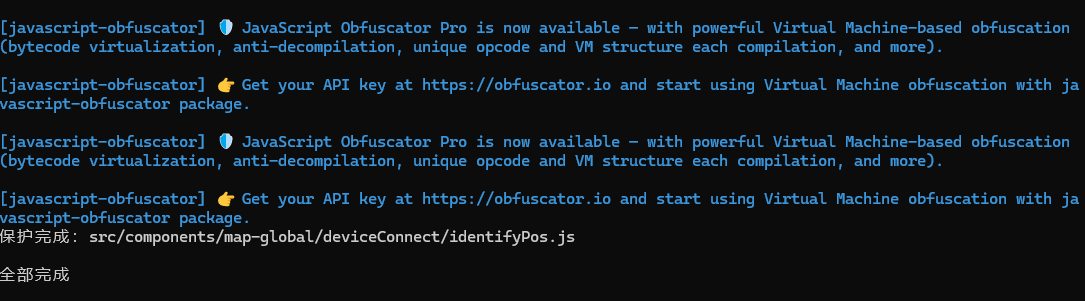
第一次执行:
npm run protect目录会变成:
src/utils/
├── identifyPos.js
├── identifyPos.min.js
└── identifyPos.source.js
以后修改核心逻辑时:
只修改:
identifyPos.source.js然后重新执行:
npm run protect即可重新生成混淆文件。
最终交付
交付项目时:
保留:
identifyPos.js
identifyPos.min.js
删除:
identifyPos.source.js这样:
✓ 第三方正常开发
✓ 项目正常运行
✓ 原有代码零修改
✓ import 路径保持不变
✓ 核心源码得到保护
注意事项
该方案适用于:
✓ 普通 JS 工具库
✓ 算法实现
✓ 数据处理逻辑
✓ 加密逻辑
✓ 协议解析
不建议用于:
✗ Vue 单文件组件(.vue)
✗ 大型业务控制器
✗ 依赖复杂的页面逻辑
对于复杂业务文件,更推荐将核心算法抽离成独立模块后再进行保护。
总结
前端源码无法做到绝对隐藏,但可以有效提高逆向成本。
对于需要交付源码、又希望保护部分核心实现的 Vue/Vit 项目来说:
源码备份
    ↓
压缩 + 混淆
    ↓
生成 .min.js
    ↓
代理转发
    ↓
删除 source.js
是一种改动最小、兼容性最好、实际项目中可落地的方案。
如果你也有类似需求,不妨试试这套方法。
(如果打包报错,试试把package.json中 {"type": "module"}删除再运行)