♌博主名称:鱼子星_
✅数据结构专栏:【数据结构】
✅算法竞赛专栏:【算法竞赛】
✅C++系列专栏:【C++从零开始系列】
前言
前面的数据结构基础的篇章终于是完结撒花,接下来就将进入C++的学习阶段。C++在实际的应用范围很广包括但不限于游戏开发,音视频处理,高性能组件,AI infra开发......在学习方面C++在前期的学期会比较有难度,但是万事开头难嘛,只要理解了对应的知识点也就没有难这一说法了。本系类并不仅仅只是讲解C++的语法,还会从C++的STL和数据结构一共三个方面和大家一起学习C++。好了,废话不多说,一起来进步吧~
目录
-
- [一. 初识C++](#一. 初识C++)
- [二. 命名空间](#二. 命名空间)
- [三. 输入与输出](#三. 输入与输出)
- [四. 缺省参数](#四. 缺省参数)
一. 初识C++
【小提示】:之前写的C语言的程序定义文件后缀名都是.c(例如:test.c),写C++代码定义的文件名的后缀要使用初始的.cpp(例如:test.cpp)意为
c plus plus,如果文件后缀使用其他格式C++程序将无法通过编译
- C++对C语言的兼容性:在C++的程序中是兼容C语言的,在C++程序中C语言可以和C++混合使用,因为C++本身就是C语言的进阶产物,所以C++很多东西是和C语言相通的。
这,是一个C的程序
c
#include<stdio.h>

int main()
{
	printf("hello world\n");
	return 0;
}
而这,是一个C++的程序
cpp
#include<iostream>
using namespace std;
int main()
{
	cout << "hello world" << endl;
	return 0;
}
这两端代码实现的效果是一样的,观察发现,C++和C的主要框架是一样的(头文件+main函数),那C++程序多出来的 using namespace std有什么特性?
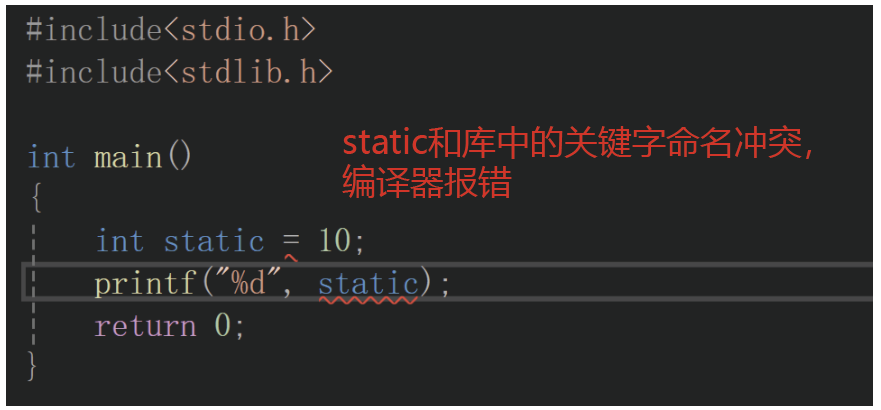
在C程序中如果一个变量名和库中的函数或者关键字的名字一样,那么这个程序编译时就会报错,因为编译器不知道你到底用的是你定义的变量还是库中的函数。
当遇到这种问题时C语言只能通过修改变量的名字来解决这个问题,这样就使得一个程序所有的变量,函数名都要不一样,导致写程序时非常困难。而C++的namespace(命名空间)就是用来解决名字冲突问题。
C++与C语言关系的可视化对比:
#mermaid-svg-4G0aFkYY7Ni8GGjM{font-family:"trebuchet ms",verdana,arial,sans-serif;font-size:16px;fill:#333;}@keyframes edge-animation-frame{from{stroke-dashoffset:0;}}@keyframes dash{to{stroke-dashoffset:0;}}#mermaid-svg-4G0aFkYY7Ni8GGjM .edge-animation-slow{stroke-dasharray:9,5!important;stroke-dashoffset:900;animation:dash 50s linear infinite;stroke-linecap:round;}#mermaid-svg-4G0aFkYY7Ni8GGjM .edge-animation-fast{stroke-dasharray:9,5!important;stroke-dashoffset:900;animation:dash 20s linear infinite;stroke-linecap:round;}#mermaid-svg-4G0aFkYY7Ni8GGjM .error-icon{fill:#552222;}#mermaid-svg-4G0aFkYY7Ni8GGjM .error-text{fill:#552222;stroke:#552222;}#mermaid-svg-4G0aFkYY7Ni8GGjM .edge-thickness-normal{stroke-width:1px;}#mermaid-svg-4G0aFkYY7Ni8GGjM .edge-thickness-thick{stroke-width:3.5px;}#mermaid-svg-4G0aFkYY7Ni8GGjM .edge-pattern-solid{stroke-dasharray:0;}#mermaid-svg-4G0aFkYY7Ni8GGjM .edge-thickness-invisible{stroke-width:0;fill:none;}#mermaid-svg-4G0aFkYY7Ni8GGjM .edge-pattern-dashed{stroke-dasharray:3;}#mermaid-svg-4G0aFkYY7Ni8GGjM .edge-pattern-dotted{stroke-dasharray:2;}#mermaid-svg-4G0aFkYY7Ni8GGjM .marker{fill:#333333;stroke:#333333;}#mermaid-svg-4G0aFkYY7Ni8GGjM .marker.cross{stroke:#333333;}#mermaid-svg-4G0aFkYY7Ni8GGjM svg{font-family:"trebuchet ms",verdana,arial,sans-serif;font-size:16px;}#mermaid-svg-4G0aFkYY7Ni8GGjM p{margin:0;}#mermaid-svg-4G0aFkYY7Ni8GGjM .label{font-family:"trebuchet ms",verdana,arial,sans-serif;color:#333;}#mermaid-svg-4G0aFkYY7Ni8GGjM .cluster-label text{fill:#333;}#mermaid-svg-4G0aFkYY7Ni8GGjM .cluster-label span{color:#333;}#mermaid-svg-4G0aFkYY7Ni8GGjM .cluster-label span p{background-color:transparent;}#mermaid-svg-4G0aFkYY7Ni8GGjM .label text,#mermaid-svg-4G0aFkYY7Ni8GGjM span{fill:#333;color:#333;}#mermaid-svg-4G0aFkYY7Ni8GGjM .node rect,#mermaid-svg-4G0aFkYY7Ni8GGjM .node circle,#mermaid-svg-4G0aFkYY7Ni8GGjM .node ellipse,#mermaid-svg-4G0aFkYY7Ni8GGjM .node polygon,#mermaid-svg-4G0aFkYY7Ni8GGjM .node path{fill:#ECECFF;stroke:#9370DB;stroke-width:1px;}#mermaid-svg-4G0aFkYY7Ni8GGjM .rough-node .label text,#mermaid-svg-4G0aFkYY7Ni8GGjM .node .label text,#mermaid-svg-4G0aFkYY7Ni8GGjM .image-shape .label,#mermaid-svg-4G0aFkYY7Ni8GGjM .icon-shape .label{text-anchor:middle;}#mermaid-svg-4G0aFkYY7Ni8GGjM .node .katex path{fill:#000;stroke:#000;stroke-width:1px;}#mermaid-svg-4G0aFkYY7Ni8GGjM .rough-node .label,#mermaid-svg-4G0aFkYY7Ni8GGjM .node .label,#mermaid-svg-4G0aFkYY7Ni8GGjM .image-shape .label,#mermaid-svg-4G0aFkYY7Ni8GGjM .icon-shape .label{text-align:center;}#mermaid-svg-4G0aFkYY7Ni8GGjM .node.clickable{cursor:pointer;}#mermaid-svg-4G0aFkYY7Ni8GGjM .root .anchor path{fill:#333333!important;stroke-width:0;stroke:#333333;}#mermaid-svg-4G0aFkYY7Ni8GGjM .arrowheadPath{fill:#333333;}#mermaid-svg-4G0aFkYY7Ni8GGjM .edgePath .path{stroke:#333333;stroke-width:2.0px;}#mermaid-svg-4G0aFkYY7Ni8GGjM .flowchart-link{stroke:#333333;fill:none;}#mermaid-svg-4G0aFkYY7Ni8GGjM .edgeLabel{background-color:rgba(232,232,232, 0.8);text-align:center;}#mermaid-svg-4G0aFkYY7Ni8GGjM .edgeLabel p{background-color:rgba(232,232,232, 0.8);}#mermaid-svg-4G0aFkYY7Ni8GGjM .edgeLabel rect{opacity:0.5;background-color:rgba(232,232,232, 0.8);fill:rgba(232,232,232, 0.8);}#mermaid-svg-4G0aFkYY7Ni8GGjM .labelBkg{background-color:rgba(232, 232, 232, 0.5);}#mermaid-svg-4G0aFkYY7Ni8GGjM .cluster rect{fill:#ffffde;stroke:#aaaa33;stroke-width:1px;}#mermaid-svg-4G0aFkYY7Ni8GGjM .cluster text{fill:#333;}#mermaid-svg-4G0aFkYY7Ni8GGjM .cluster span{color:#333;}#mermaid-svg-4G0aFkYY7Ni8GGjM div.mermaidTooltip{position:absolute;text-align:center;max-width:200px;padding:2px;font-family:"trebuchet ms",verdana,arial,sans-serif;font-size:12px;background:hsl(80, 100%, 96.2745098039%);border:1px solid #aaaa33;border-radius:2px;pointer-events:none;z-index:100;}#mermaid-svg-4G0aFkYY7Ni8GGjM .flowchartTitleText{text-anchor:middle;font-size:18px;fill:#333;}#mermaid-svg-4G0aFkYY7Ni8GGjM rect.text{fill:none;stroke-width:0;}#mermaid-svg-4G0aFkYY7Ni8GGjM .icon-shape,#mermaid-svg-4G0aFkYY7Ni8GGjM .image-shape{background-color:rgba(232,232,232, 0.8);text-align:center;}#mermaid-svg-4G0aFkYY7Ni8GGjM .icon-shape p,#mermaid-svg-4G0aFkYY7Ni8GGjM .image-shape p{background-color:rgba(232,232,232, 0.8);padding:2px;}#mermaid-svg-4G0aFkYY7Ni8GGjM .icon-shape .label rect,#mermaid-svg-4G0aFkYY7Ni8GGjM .image-shape .label rect{opacity:0.5;background-color:rgba(232,232,232, 0.8);fill:rgba(232,232,232, 0.8);}#mermaid-svg-4G0aFkYY7Ni8GGjM .label-icon{display:inline-block;height:1em;overflow:visible;vertical-align:-0.125em;}#mermaid-svg-4G0aFkYY7Ni8GGjM .node .label-icon path{fill:currentColor;stroke:revert;stroke-width:revert;}#mermaid-svg-4G0aFkYY7Ni8GGjM :root{--mermaid-font-family:"trebuchet ms",verdana,arial,sans-serif;} C语言
C++
兼容C语言语法
新增面向对象特性
新增命名空间机制
新增引用等特性
C程序示例
#include
printf函数
C++程序示例
#include
using namespace std
cout对象
endl函数
二. 命名空间
命名空间的概念
为了解决一个程序不能有相同变量名的问题,C++提出了一个方法:使用命名空间。命名空间可以看成是一个域,里面可以存放任何名字的变量,函数,类型,不会与库中相同名字的函数,关键字起冲突。可以看成一个命名空间中的变量被封起来了,其特性和全局域,局部域的变量与函数不同。
- 命名空间的特性
- 调用特性:命名空间中定义的变量,函数可以和命名空间外的任意变量,函数的名字相同。调用命名空间内的变量和函数时需要声明在该变量在哪个命名空间中。
在命名空间中的变量调用逻辑和普通的变量不一样,命名空间中的变量没有特殊的处理是不会被编译器访问到的。 - 无生命周期性:命名空间中定义的变量没有生命周期。和局部变量不同,命名空间中的变量就像是装在容器里的物品,需要用的时候就用,不需要用的时候就放在那里,并且它是一直存在,随时可以调用的。
- 调用特性:命名空间中定义的变量,函数可以和命名空间外的任意变量,函数的名字相同。调用命名空间内的变量和函数时需要声明在该变量在哪个命名空间中。
命名空间作用域的可视化示意图:
#mermaid-svg-ceuIMKPU5FYEcZxC{font-family:"trebuchet ms",verdana,arial,sans-serif;font-size:16px;fill:#333;}@keyframes edge-animation-frame{from{stroke-dashoffset:0;}}@keyframes dash{to{stroke-dashoffset:0;}}#mermaid-svg-ceuIMKPU5FYEcZxC .edge-animation-slow{stroke-dasharray:9,5!important;stroke-dashoffset:900;animation:dash 50s linear infinite;stroke-linecap:round;}#mermaid-svg-ceuIMKPU5FYEcZxC .edge-animation-fast{stroke-dasharray:9,5!important;stroke-dashoffset:900;animation:dash 20s linear infinite;stroke-linecap:round;}#mermaid-svg-ceuIMKPU5FYEcZxC .error-icon{fill:#552222;}#mermaid-svg-ceuIMKPU5FYEcZxC .error-text{fill:#552222;stroke:#552222;}#mermaid-svg-ceuIMKPU5FYEcZxC .edge-thickness-normal{stroke-width:1px;}#mermaid-svg-ceuIMKPU5FYEcZxC .edge-thickness-thick{stroke-width:3.5px;}#mermaid-svg-ceuIMKPU5FYEcZxC .edge-pattern-solid{stroke-dasharray:0;}#mermaid-svg-ceuIMKPU5FYEcZxC .edge-thickness-invisible{stroke-width:0;fill:none;}#mermaid-svg-ceuIMKPU5FYEcZxC .edge-pattern-dashed{stroke-dasharray:3;}#mermaid-svg-ceuIMKPU5FYEcZxC .edge-pattern-dotted{stroke-dasharray:2;}#mermaid-svg-ceuIMKPU5FYEcZxC .marker{fill:#333333;stroke:#333333;}#mermaid-svg-ceuIMKPU5FYEcZxC .marker.cross{stroke:#333333;}#mermaid-svg-ceuIMKPU5FYEcZxC svg{font-family:"trebuchet ms",verdana,arial,sans-serif;font-size:16px;}#mermaid-svg-ceuIMKPU5FYEcZxC p{margin:0;}#mermaid-svg-ceuIMKPU5FYEcZxC .label{font-family:"trebuchet ms",verdana,arial,sans-serif;color:#333;}#mermaid-svg-ceuIMKPU5FYEcZxC .cluster-label text{fill:#333;}#mermaid-svg-ceuIMKPU5FYEcZxC .cluster-label span{color:#333;}#mermaid-svg-ceuIMKPU5FYEcZxC .cluster-label span p{background-color:transparent;}#mermaid-svg-ceuIMKPU5FYEcZxC .label text,#mermaid-svg-ceuIMKPU5FYEcZxC span{fill:#333;color:#333;}#mermaid-svg-ceuIMKPU5FYEcZxC .node rect,#mermaid-svg-ceuIMKPU5FYEcZxC .node circle,#mermaid-svg-ceuIMKPU5FYEcZxC .node ellipse,#mermaid-svg-ceuIMKPU5FYEcZxC .node polygon,#mermaid-svg-ceuIMKPU5FYEcZxC .node path{fill:#ECECFF;stroke:#9370DB;stroke-width:1px;}#mermaid-svg-ceuIMKPU5FYEcZxC .rough-node .label text,#mermaid-svg-ceuIMKPU5FYEcZxC .node .label text,#mermaid-svg-ceuIMKPU5FYEcZxC .image-shape .label,#mermaid-svg-ceuIMKPU5FYEcZxC .icon-shape .label{text-anchor:middle;}#mermaid-svg-ceuIMKPU5FYEcZxC .node .katex path{fill:#000;stroke:#000;stroke-width:1px;}#mermaid-svg-ceuIMKPU5FYEcZxC .rough-node .label,#mermaid-svg-ceuIMKPU5FYEcZxC .node .label,#mermaid-svg-ceuIMKPU5FYEcZxC .image-shape .label,#mermaid-svg-ceuIMKPU5FYEcZxC .icon-shape .label{text-align:center;}#mermaid-svg-ceuIMKPU5FYEcZxC .node.clickable{cursor:pointer;}#mermaid-svg-ceuIMKPU5FYEcZxC .root .anchor path{fill:#333333!important;stroke-width:0;stroke:#333333;}#mermaid-svg-ceuIMKPU5FYEcZxC .arrowheadPath{fill:#333333;}#mermaid-svg-ceuIMKPU5FYEcZxC .edgePath .path{stroke:#333333;stroke-width:2.0px;}#mermaid-svg-ceuIMKPU5FYEcZxC .flowchart-link{stroke:#333333;fill:none;}#mermaid-svg-ceuIMKPU5FYEcZxC .edgeLabel{background-color:rgba(232,232,232, 0.8);text-align:center;}#mermaid-svg-ceuIMKPU5FYEcZxC .edgeLabel p{background-color:rgba(232,232,232, 0.8);}#mermaid-svg-ceuIMKPU5FYEcZxC .edgeLabel rect{opacity:0.5;background-color:rgba(232,232,232, 0.8);fill:rgba(232,232,232, 0.8);}#mermaid-svg-ceuIMKPU5FYEcZxC .labelBkg{background-color:rgba(232, 232, 232, 0.5);}#mermaid-svg-ceuIMKPU5FYEcZxC .cluster rect{fill:#ffffde;stroke:#aaaa33;stroke-width:1px;}#mermaid-svg-ceuIMKPU5FYEcZxC .cluster text{fill:#333;}#mermaid-svg-ceuIMKPU5FYEcZxC .cluster span{color:#333;}#mermaid-svg-ceuIMKPU5FYEcZxC div.mermaidTooltip{position:absolute;text-align:center;max-width:200px;padding:2px;font-family:"trebuchet ms",verdana,arial,sans-serif;font-size:12px;background:hsl(80, 100%, 96.2745098039%);border:1px solid #aaaa33;border-radius:2px;pointer-events:none;z-index:100;}#mermaid-svg-ceuIMKPU5FYEcZxC .flowchartTitleText{text-anchor:middle;font-size:18px;fill:#333;}#mermaid-svg-ceuIMKPU5FYEcZxC rect.text{fill:none;stroke-width:0;}#mermaid-svg-ceuIMKPU5FYEcZxC .icon-shape,#mermaid-svg-ceuIMKPU5FYEcZxC .image-shape{background-color:rgba(232,232,232, 0.8);text-align:center;}#mermaid-svg-ceuIMKPU5FYEcZxC .icon-shape p,#mermaid-svg-ceuIMKPU5FYEcZxC .image-shape p{background-color:rgba(232,232,232, 0.8);padding:2px;}#mermaid-svg-ceuIMKPU5FYEcZxC .icon-shape .label rect,#mermaid-svg-ceuIMKPU5FYEcZxC .image-shape .label rect{opacity:0.5;background-color:rgba(232,232,232, 0.8);fill:rgba(232,232,232, 0.8);}#mermaid-svg-ceuIMKPU5FYEcZxC .label-icon{display:inline-block;height:1em;overflow:visible;vertical-align:-0.125em;}#mermaid-svg-ceuIMKPU5FYEcZxC .node .label-icon path{fill:currentColor;stroke:revert;stroke-width:revert;}#mermaid-svg-ceuIMKPU5FYEcZxC :root{--mermaid-font-family:"trebuchet ms",verdana,arial,sans-serif;} 全局域
全局变量a = 20
局部域
局部变量a = 10
命名空间 yzx
命名空间变量a = 30
命名空间 ins
嵌套变量a = 40
编译器查找顺序
- 局部域
- 全局域
- 命名空间
(需显式指定)
命名空间的定义
- 定义方式:使用 namespace 定义
cpp
#include<iostream>
using namespace std;

namespace yzx
{
	int a = 30;
}
int a = 20;
int main()
{
	int a = 10;
	printf("%d\n", a);
	printf("%d\n", ::a);
	printf("%d\n", yzx::a);
	return 0;
}
此时就是定义了一个名字为 yzx 命名空间,而在局部域,全局域都各有一个变量a,此时不会产生名字上的冲突。但是当程序被执行时,打印出来的确是局部变量 a ,那么要如何直接打印全局变量 a 呢?在 a 的前面加上::即可,第二个打印的就是全局变量 a ,访问命名空间的变量需要声明在哪个命名空间只需在::前加上明明空间的名字即可
局部变量 :a
全局变量 :::a
命名空间中的变量 :yzx::a
- 嵌套定义:命名空间支持嵌套定义,一个命名空间里面还可以再定义一个命名空间
cpp
#include<iostream>
using namespace std;

namespace yzx
{
	int a = 30;
	namespace ins
	{
		int a = 40;
	}
}
int a = 20;
int main()
{
	int a = 10;
	printf("%d\n", a);
	printf("%d\n", ::a);
	printf("%d\n", yzx::a);
	printf("%d\n", yzx::ins::a);
	return 0;
}
嵌套再命名空间里面的命名空间也是独立的一个空间,它和外层的命名空间的关系就和外层命名空间和局部域,全局域的关系相同。访问嵌套的命名空间的变量也是通过嵌套,有几层命名空间就找几层(如上代码所示)。
- 多文件的命名空间:可以在多个文件中定义相同名字的命名空间,在相同名字的命名空间中定义的东西都是共享的,即都是同一个命名空间
命名空间定义和访问方式的可视化流程图:
#mermaid-svg-m4INLGRPx1z9DgGo{font-family:"trebuchet ms",verdana,arial,sans-serif;font-size:16px;fill:#333;}@keyframes edge-animation-frame{from{stroke-dashoffset:0;}}@keyframes dash{to{stroke-dashoffset:0;}}#mermaid-svg-m4INLGRPx1z9DgGo .edge-animation-slow{stroke-dasharray:9,5!important;stroke-dashoffset:900;animation:dash 50s linear infinite;stroke-linecap:round;}#mermaid-svg-m4INLGRPx1z9DgGo .edge-animation-fast{stroke-dasharray:9,5!important;stroke-dashoffset:900;animation:dash 20s linear infinite;stroke-linecap:round;}#mermaid-svg-m4INLGRPx1z9DgGo .error-icon{fill:#552222;}#mermaid-svg-m4INLGRPx1z9DgGo .error-text{fill:#552222;stroke:#552222;}#mermaid-svg-m4INLGRPx1z9DgGo .edge-thickness-normal{stroke-width:1px;}#mermaid-svg-m4INLGRPx1z9DgGo .edge-thickness-thick{stroke-width:3.5px;}#mermaid-svg-m4INLGRPx1z9DgGo .edge-pattern-solid{stroke-dasharray:0;}#mermaid-svg-m4INLGRPx1z9DgGo .edge-thickness-invisible{stroke-width:0;fill:none;}#mermaid-svg-m4INLGRPx1z9DgGo .edge-pattern-dashed{stroke-dasharray:3;}#mermaid-svg-m4INLGRPx1z9DgGo .edge-pattern-dotted{stroke-dasharray:2;}#mermaid-svg-m4INLGRPx1z9DgGo .marker{fill:#333333;stroke:#333333;}#mermaid-svg-m4INLGRPx1z9DgGo .marker.cross{stroke:#333333;}#mermaid-svg-m4INLGRPx1z9DgGo svg{font-family:"trebuchet ms",verdana,arial,sans-serif;font-size:16px;}#mermaid-svg-m4INLGRPx1z9DgGo p{margin:0;}#mermaid-svg-m4INLGRPx1z9DgGo .label{font-family:"trebuchet ms",verdana,arial,sans-serif;color:#333;}#mermaid-svg-m4INLGRPx1z9DgGo .cluster-label text{fill:#333;}#mermaid-svg-m4INLGRPx1z9DgGo .cluster-label span{color:#333;}#mermaid-svg-m4INLGRPx1z9DgGo .cluster-label span p{background-color:transparent;}#mermaid-svg-m4INLGRPx1z9DgGo .label text,#mermaid-svg-m4INLGRPx1z9DgGo span{fill:#333;color:#333;}#mermaid-svg-m4INLGRPx1z9DgGo .node rect,#mermaid-svg-m4INLGRPx1z9DgGo .node circle,#mermaid-svg-m4INLGRPx1z9DgGo .node ellipse,#mermaid-svg-m4INLGRPx1z9DgGo .node polygon,#mermaid-svg-m4INLGRPx1z9DgGo .node path{fill:#ECECFF;stroke:#9370DB;stroke-width:1px;}#mermaid-svg-m4INLGRPx1z9DgGo .rough-node .label text,#mermaid-svg-m4INLGRPx1z9DgGo .node .label text,#mermaid-svg-m4INLGRPx1z9DgGo .image-shape .label,#mermaid-svg-m4INLGRPx1z9DgGo .icon-shape .label{text-anchor:middle;}#mermaid-svg-m4INLGRPx1z9DgGo .node .katex path{fill:#000;stroke:#000;stroke-width:1px;}#mermaid-svg-m4INLGRPx1z9DgGo .rough-node .label,#mermaid-svg-m4INLGRPx1z9DgGo .node .label,#mermaid-svg-m4INLGRPx1z9DgGo .image-shape .label,#mermaid-svg-m4INLGRPx1z9DgGo .icon-shape .label{text-align:center;}#mermaid-svg-m4INLGRPx1z9DgGo .node.clickable{cursor:pointer;}#mermaid-svg-m4INLGRPx1z9DgGo .root .anchor path{fill:#333333!important;stroke-width:0;stroke:#333333;}#mermaid-svg-m4INLGRPx1z9DgGo .arrowheadPath{fill:#333333;}#mermaid-svg-m4INLGRPx1z9DgGo .edgePath .path{stroke:#333333;stroke-width:2.0px;}#mermaid-svg-m4INLGRPx1z9DgGo .flowchart-link{stroke:#333333;fill:none;}#mermaid-svg-m4INLGRPx1z9DgGo .edgeLabel{background-color:rgba(232,232,232, 0.8);text-align:center;}#mermaid-svg-m4INLGRPx1z9DgGo .edgeLabel p{background-color:rgba(232,232,232, 0.8);}#mermaid-svg-m4INLGRPx1z9DgGo .edgeLabel rect{opacity:0.5;background-color:rgba(232,232,232, 0.8);fill:rgba(232,232,232, 0.8);}#mermaid-svg-m4INLGRPx1z9DgGo .labelBkg{background-color:rgba(232, 232, 232, 0.5);}#mermaid-svg-m4INLGRPx1z9DgGo .cluster rect{fill:#ffffde;stroke:#aaaa33;stroke-width:1px;}#mermaid-svg-m4INLGRPx1z9DgGo .cluster text{fill:#333;}#mermaid-svg-m4INLGRPx1z9DgGo .cluster span{color:#333;}#mermaid-svg-m4INLGRPx1z9DgGo div.mermaidTooltip{position:absolute;text-align:center;max-width:200px;padding:2px;font-family:"trebuchet ms",verdana,arial,sans-serif;font-size:12px;background:hsl(80, 100%, 96.2745098039%);border:1px solid #aaaa33;border-radius:2px;pointer-events:none;z-index:100;}#mermaid-svg-m4INLGRPx1z9DgGo .flowchartTitleText{text-anchor:middle;font-size:18px;fill:#333;}#mermaid-svg-m4INLGRPx1z9DgGo rect.text{fill:none;stroke-width:0;}#mermaid-svg-m4INLGRPx1z9DgGo .icon-shape,#mermaid-svg-m4INLGRPx1z9DgGo .image-shape{background-color:rgba(232,232,232, 0.8);text-align:center;}#mermaid-svg-m4INLGRPx1z9DgGo .icon-shape p,#mermaid-svg-m4INLGRPx1z9DgGo .image-shape p{background-color:rgba(232,232,232, 0.8);padding:2px;}#mermaid-svg-m4INLGRPx1z9DgGo .icon-shape .label rect,#mermaid-svg-m4INLGRPx1z9DgGo .image-shape .label rect{opacity:0.5;background-color:rgba(232,232,232, 0.8);fill:rgba(232,232,232, 0.8);}#mermaid-svg-m4INLGRPx1z9DgGo .label-icon{display:inline-block;height:1em;overflow:visible;vertical-align:-0.125em;}#mermaid-svg-m4INLGRPx1z9DgGo .node .label-icon path{fill:currentColor;stroke:revert;stroke-width:revert;}#mermaid-svg-m4INLGRPx1z9DgGo :root{--mermaid-font-family:"trebuchet ms",verdana,arial,sans-serif;} 定义命名空间
namespace yzx
{ int a = 30; }
访问方式
yzx::a
(显式访问)
using namespace yzx
(展开访问)
using yzx::a
(部分展开)
变量作用域层次
局部变量 a
(直接访问)
全局变量 ::a
(全局访问)
命名空间变量 yzx::a
(限定访问)
嵌套命名空间
namespace yzx
{ namespace ins
{ int a = 40; } }
访问方式: yzx::ins::a
命名空间的应用
- 工程项目
在实际做项目的过程中,代码量会到达几万行甚至是几十万行,此时项目不同的功能需要分组去做,此时为了避免使用相同的名字使得程序矛盾,就需要使用命名空间。
对于每一个小组都可以使用一个命名空间,然后在小组里面再嵌套每个程序员自己的命名空间,这样就避免了名字重复的问题
- 展开命名空间
命名空间虽然解决了重复名字的问题,但是如果一个在命名空间中的变量经常需要使用,每调用一次就需要写一个命名空间的名字太麻烦了,于是就有了命名空间的展开操作。
cpp
//这是一个命名空间
namespace yzx
{
	int a = 30;
}
//将命名空间展开
using namespace yzx;
将命名空间展开之后在命名空间里面的变量,函数就像是从容器中解放出来了,此时不需要声明命名空间的声明就可以直接调用里面的变量和函数。但是展开命名空间后其内部的变量相当于全局域的变量,所以展开命名空间需要谨慎。
- 命名空间的部分展开
有时会遇到只是经常使用命名空间中某个变量,如果将全部的命名空间打开成本太高了,此时就可以展开一部分的命名空间
cpp
namespace yzx
{
	int a = 10;
	int b = 20;
	void print()
	{
		printf("haha\n");
	}
}
//此时只有a和b被展开 在main函数中可以直接调用
using yzx::a;
using yzx::b;- 使用场景划分
- 工程项目场景:在工程项目中命名空间一般不会直接展开。一般情况下都是直接使用声明命名空间的形式和展开部分的命名空间。
- 算法竞赛和日常练习场景:在算法竞赛中一个题目的代码量最多只有100~200行,此时将命名空间全部展开会比较方便。日常练习也是展开所有的命名空间会比较方便。
三. 输入与输出
【引入】标准库中的命名空间:C++中提供了很多已经封装好的函数,变量......它们都被封装在命名空间
std中
- std::cin
- 类型 :类 std::istream 中的对象,可以看成是一个变量。
- 作用:用于输入数据,会自行判断数据类型。
- 定义位置:在头文件
<iostream>中定义,位于 std 命名空间中
- std::cout
- 类型:类 std::ostream 中的对象,可以看成是一个变量
- 作用:用于输出数据,会自行判断数据类型
- 定义位置:在头文件
<iostream>中定义,位于 std 命名空间中
- std::endl
- 类型:函数模板
- 作用:全名可以看成 endline ,用于换行。它还有刷新缓冲区的功能,当程序进入死循环时可以使用这个特性来 debug。
在输入输出时还会见到<< , >>。<<是流插入运算符,一般搭配 cout 使用,>>是流提取运算符,一般搭配 cin 使用。
cpp
#include<iostream>
using namespace std;
int main()
{
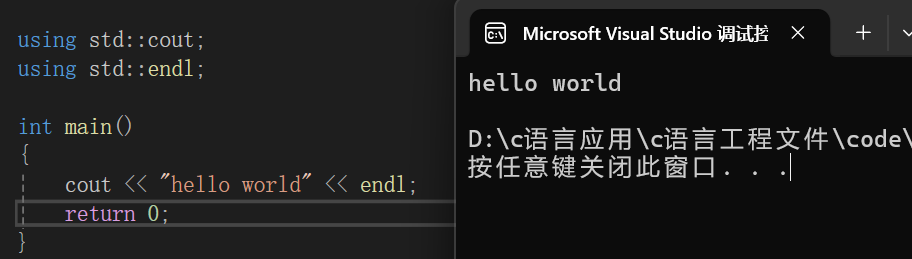
	cout << "hello world" << endl;
	return 0;
}到这里这个C++的程序你应该可以看懂了。using namespace std 就是展开 std 的命名空间,那如果没有展开呢?此时使用 std 空间中的对象就需要加上前置的命名空间的声明。
cpp
#include<iostream>
//using namespace std;
int main()
{
	std::cout << "hello world" << std::endl;
	return 0;
}
那如果嫌麻烦,又不展开全部的命名空间要怎么办?部分展开即可。
cpp
#include<iostream>
//using namespace std;
using std::cout;
using std::endl;
int main()
{
	cout << "hello world" << endl;
	return 0;
}
输出结果
C++输入输出流的关系图:
#mermaid-svg-X11VuKpNXwjOiNEC{font-family:"trebuchet ms",verdana,arial,sans-serif;font-size:16px;fill:#333;}@keyframes edge-animation-frame{from{stroke-dashoffset:0;}}@keyframes dash{to{stroke-dashoffset:0;}}#mermaid-svg-X11VuKpNXwjOiNEC .edge-animation-slow{stroke-dasharray:9,5!important;stroke-dashoffset:900;animation:dash 50s linear infinite;stroke-linecap:round;}#mermaid-svg-X11VuKpNXwjOiNEC .edge-animation-fast{stroke-dasharray:9,5!important;stroke-dashoffset:900;animation:dash 20s linear infinite;stroke-linecap:round;}#mermaid-svg-X11VuKpNXwjOiNEC .error-icon{fill:#552222;}#mermaid-svg-X11VuKpNXwjOiNEC .error-text{fill:#552222;stroke:#552222;}#mermaid-svg-X11VuKpNXwjOiNEC .edge-thickness-normal{stroke-width:1px;}#mermaid-svg-X11VuKpNXwjOiNEC .edge-thickness-thick{stroke-width:3.5px;}#mermaid-svg-X11VuKpNXwjOiNEC .edge-pattern-solid{stroke-dasharray:0;}#mermaid-svg-X11VuKpNXwjOiNEC .edge-thickness-invisible{stroke-width:0;fill:none;}#mermaid-svg-X11VuKpNXwjOiNEC .edge-pattern-dashed{stroke-dasharray:3;}#mermaid-svg-X11VuKpNXwjOiNEC .edge-pattern-dotted{stroke-dasharray:2;}#mermaid-svg-X11VuKpNXwjOiNEC .marker{fill:#333333;stroke:#333333;}#mermaid-svg-X11VuKpNXwjOiNEC .marker.cross{stroke:#333333;}#mermaid-svg-X11VuKpNXwjOiNEC svg{font-family:"trebuchet ms",verdana,arial,sans-serif;font-size:16px;}#mermaid-svg-X11VuKpNXwjOiNEC p{margin:0;}#mermaid-svg-X11VuKpNXwjOiNEC .label{font-family:"trebuchet ms",verdana,arial,sans-serif;color:#333;}#mermaid-svg-X11VuKpNXwjOiNEC .cluster-label text{fill:#333;}#mermaid-svg-X11VuKpNXwjOiNEC .cluster-label span{color:#333;}#mermaid-svg-X11VuKpNXwjOiNEC .cluster-label span p{background-color:transparent;}#mermaid-svg-X11VuKpNXwjOiNEC .label text,#mermaid-svg-X11VuKpNXwjOiNEC span{fill:#333;color:#333;}#mermaid-svg-X11VuKpNXwjOiNEC .node rect,#mermaid-svg-X11VuKpNXwjOiNEC .node circle,#mermaid-svg-X11VuKpNXwjOiNEC .node ellipse,#mermaid-svg-X11VuKpNXwjOiNEC .node polygon,#mermaid-svg-X11VuKpNXwjOiNEC .node path{fill:#ECECFF;stroke:#9370DB;stroke-width:1px;}#mermaid-svg-X11VuKpNXwjOiNEC .rough-node .label text,#mermaid-svg-X11VuKpNXwjOiNEC .node .label text,#mermaid-svg-X11VuKpNXwjOiNEC .image-shape .label,#mermaid-svg-X11VuKpNXwjOiNEC .icon-shape .label{text-anchor:middle;}#mermaid-svg-X11VuKpNXwjOiNEC .node .katex path{fill:#000;stroke:#000;stroke-width:1px;}#mermaid-svg-X11VuKpNXwjOiNEC .rough-node .label,#mermaid-svg-X11VuKpNXwjOiNEC .node .label,#mermaid-svg-X11VuKpNXwjOiNEC .image-shape .label,#mermaid-svg-X11VuKpNXwjOiNEC .icon-shape .label{text-align:center;}#mermaid-svg-X11VuKpNXwjOiNEC .node.clickable{cursor:pointer;}#mermaid-svg-X11VuKpNXwjOiNEC .root .anchor path{fill:#333333!important;stroke-width:0;stroke:#333333;}#mermaid-svg-X11VuKpNXwjOiNEC .arrowheadPath{fill:#333333;}#mermaid-svg-X11VuKpNXwjOiNEC .edgePath .path{stroke:#333333;stroke-width:2.0px;}#mermaid-svg-X11VuKpNXwjOiNEC .flowchart-link{stroke:#333333;fill:none;}#mermaid-svg-X11VuKpNXwjOiNEC .edgeLabel{background-color:rgba(232,232,232, 0.8);text-align:center;}#mermaid-svg-X11VuKpNXwjOiNEC .edgeLabel p{background-color:rgba(232,232,232, 0.8);}#mermaid-svg-X11VuKpNXwjOiNEC .edgeLabel rect{opacity:0.5;background-color:rgba(232,232,232, 0.8);fill:rgba(232,232,232, 0.8);}#mermaid-svg-X11VuKpNXwjOiNEC .labelBkg{background-color:rgba(232, 232, 232, 0.5);}#mermaid-svg-X11VuKpNXwjOiNEC .cluster rect{fill:#ffffde;stroke:#aaaa33;stroke-width:1px;}#mermaid-svg-X11VuKpNXwjOiNEC .cluster text{fill:#333;}#mermaid-svg-X11VuKpNXwjOiNEC .cluster span{color:#333;}#mermaid-svg-X11VuKpNXwjOiNEC div.mermaidTooltip{position:absolute;text-align:center;max-width:200px;padding:2px;font-family:"trebuchet ms",verdana,arial,sans-serif;font-size:12px;background:hsl(80, 100%, 96.2745098039%);border:1px solid #aaaa33;border-radius:2px;pointer-events:none;z-index:100;}#mermaid-svg-X11VuKpNXwjOiNEC .flowchartTitleText{text-anchor:middle;font-size:18px;fill:#333;}#mermaid-svg-X11VuKpNXwjOiNEC rect.text{fill:none;stroke-width:0;}#mermaid-svg-X11VuKpNXwjOiNEC .icon-shape,#mermaid-svg-X11VuKpNXwjOiNEC .image-shape{background-color:rgba(232,232,232, 0.8);text-align:center;}#mermaid-svg-X11VuKpNXwjOiNEC .icon-shape p,#mermaid-svg-X11VuKpNXwjOiNEC .image-shape p{background-color:rgba(232,232,232, 0.8);padding:2px;}#mermaid-svg-X11VuKpNXwjOiNEC .icon-shape .label rect,#mermaid-svg-X11VuKpNXwjOiNEC .image-shape .label rect{opacity:0.5;background-color:rgba(232,232,232, 0.8);fill:rgba(232,232,232, 0.8);}#mermaid-svg-X11VuKpNXwjOiNEC .label-icon{display:inline-block;height:1em;overflow:visible;vertical-align:-0.125em;}#mermaid-svg-X11VuKpNXwjOiNEC .node .label-icon path{fill:currentColor;stroke:revert;stroke-width:revert;}#mermaid-svg-X11VuKpNXwjOiNEC :root{--mermaid-font-family:"trebuchet ms",verdana,arial,sans-serif;} 头文件
std命名空间
std::cin
(输入流对象)
std::cout
(输出流对象)
std::endl
(换行函数)
输入操作
cin >> 变量
(流提取)
输出操作
cout << 数据 << endl
(流插入)
命名空间使用方式
- 完全展开
using namespace std
2. 部分展开
using std::cout
using std::endl
3. 显式指定
std::cout << ...
效率优化
ios_base::sync_with_stdio(false)
cin.tie(nullptr)
cout.tie(nullptr)
< 输入输出流关系图 > <输入输出流关系图> <输入输出流关系图>
标准库中封装的输入输出的好处与优势
C++程序中,可以使用cin替换掉scanf,cout替换掉printf,endl替换掉 '\n' 。
- 使用 cin,cout 来输入输出数据时不用去定义要输入输出数据的类型,它们会自动的识别。
- cin,cout 经过一定操作后能直接读取和输出结构体,这是printf,scanf做不到的。
- endl 有刷新缓冲区的功能,这使得数据不会堆积在内存缓冲区中,而是输出到终端。
std::cin,std::cout,std::endl效率更低问题
使用 std 命名空间中的这几个对象时确实会更加方便,它们的效率会比scanf,printf,'\n',更低。数据量越大效率低下的问题就越明显(当数据量达到1000000时,时间效率上相差接近10倍)。解决方案也很简单,只需加上几行代码即可。
cpp
#include<iostream>
using namespace std;
int main()
{
// 在io需求⽐较⾼的地⽅,如部分⼤量输⼊的竞赛题中,加上以下3⾏代码
// 可以提⾼C++IO效率
	ios_base::sync_with_stdio(false);
	cin.tie(nullptr);
	cout.tie(nullptr);
	return 0;
}
四. 缺省参数
缺省参数的概念
缺省参数本质上就是给函数的形参定义了一个默认值。对于一个需要传参的函数,如果该参数为缺省参数,调用函数而没有传参时函数的形参会使用默认值执行函数。
缺省参数的定义
缺省参数在函数就是给函数的形参赋一个默认值
cpp
#include<iostream>
using namespace std;
//缺省参数
void func(int a = 10)
{
	cout << a << endl;
}
int main()
{
	//传递了参数,a的值为1
	func(1);
	//没有传递参数,a的值为默认值10
	func();
	return 0;
}
缺省参数的使用规则
- 全缺省参数:当一个函数的所有的形参都为缺省参数时就称作全缺省参数
cpp
void func(int a = 10, int b = 20, int c = 30)
{
	cout << a << " " << b << " " << c << endl;
}
调用全缺省参数的函数时,传参的顺序是从左至右的,不能间隔,不能跳过。带有缺省参数的函数就是遵从这个规则,否则调用函数传参容易产生歧义。
cpp
int main()
{
	//此时只传递了两个参数,赋值逻辑为 a = 1,b = 2
	func(1, 2);
	//只传递一个参数,这个参数就会赋值给函数的第一个参数,即 a = 1
	func(1);
	return 0;
}- 半缺省参数:当一个函数只有一部分的参数为缺省参数就称作半缺省参数。
cpp
void func(int a, int b = 20, int c = 30)
{
	cout << a << " " << b << " " << c << endl;
}
半缺省参数只能从右往左定义,否则容易产生歧义。例如:
cpp
//错误演示
void func(int a = 10, int b, int c = 30)
{
	cout << a << " " << b << " " << c << endl;
}
int main()
{
	func(2);
	return 0;
}
此时,只传递一个参数,那这个参数到底是给谁的?a可以赋值也可以不赋值,b一定需要赋值,如果这个参数 2 是给 a 的那么 b 就没有传递参数了,报错。如果强行将 2 给 b,那编译器也不知道你这个 2 是不是给 a 的。
缺省参数的应用
既然有了缺省参数这个新的概念,那么就可以使用这个方法来对之前实现的一些操作进行优化
cpp
//顺序表
struct SeqList
{
	int* arr;
	int size;
	int capacity;
}SL;

void SLInit(SL* p)
{
	p->arr = NULL;
	p->size = p->capacity = 0;
}
这是之前完全使用C语言使用的顺序表的一部分操作,初始时顺序表的容量为0。
【场景设置】假如此时你需要两个顺序表,一个不确定顺序表的大小,另外一个确定了顺序表的大小就是100,你要如何设置函数使得整体的效率最优?
因为有一个确定了大小的顺序表,如果还是和之前一样,初始时定义顺序表容量为 0 ,那要存储100个数据就要不断进行扩容。但是扩容是有代价的,使用realloc 扩容分为两种情况:1.直接原地扩容。2.将顺序表已有元素拷贝下来,去内存的另外一个地方扩容。
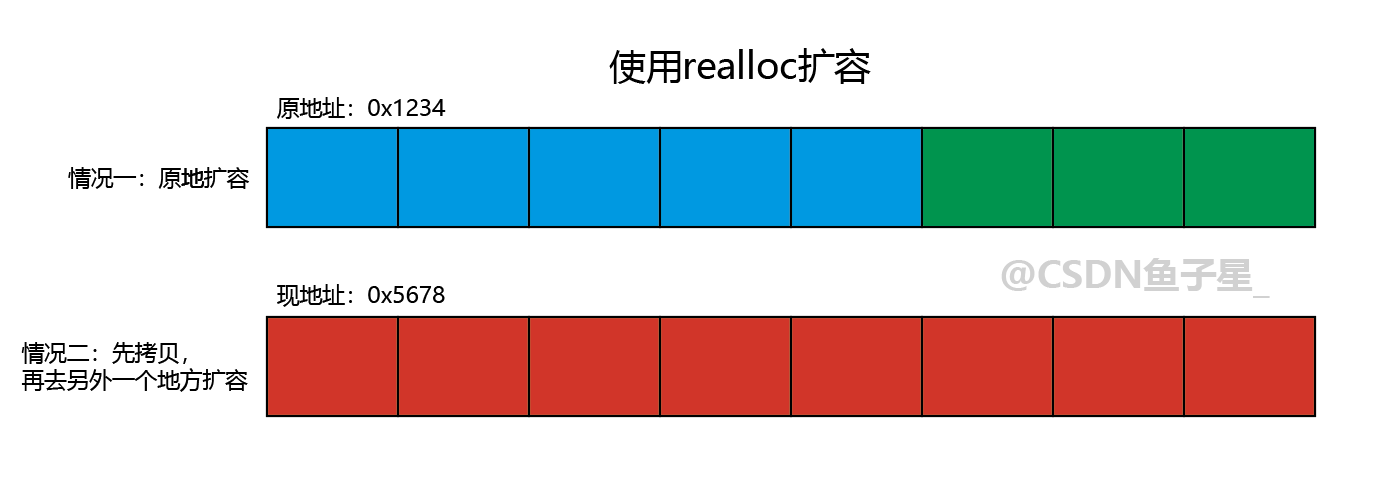
扩容的情况很不稳定无法预测,如果是情况二,那么这个扩容的效率就很低,直接就影响的顺序表的整体的效率。
解决方案
可以为将顺序表的初始化加上一个默认值为 4 的缺省参数。当不确定顺序表的大小时就不进行传值,此时初始大小就为 4 。当确定了顺序表的大小时,初始化直接提前开辟好空间,就避免了动态扩容的时间消耗。
cpp
//顺序表
struct SeqList
{
	int* arr;
	int size;
	int capacity;
}SL;
//定义缺省参数
void SLInit(SL* p, int n = 4)
{
	int* tmp = (int*)malloc(sizeof(int) * n);
	if(tmp == NULL)
	{
		perror("malloc fail");
		exit(1);
	}
	arr = tmp;
	p->size = 0;
	p->capacity = n;
}

int main()
{
	SL sql1;
	SLInit(&sql1);
	SL sql2;
	SLInit(&sql2, 100);
	return 0;
}
本篇完结
下期预告:
- C++从零开始系列篇(二):C++入门------函数重载,引用,inline与nullptr