鸿蒙原生应用实战(一):项目搭建与首页开发 --- 游戏收藏夹
一、前言
鸿蒙生态快速发展,越来越多的开发者开始投身鸿蒙原生应用开发。本文将以一个完整的"游戏收藏夹"App为案例,从零开始带大家走完项目搭建到首页开发的完整流程。
项目环境:DevEco Studio / HarmonyOS API 23 (Stage模型) / ArkTS
二、项目初始化
2.1 创建项目
打开 DevEco Studio,选择"Create Project" → 选择 Empty Ability 模板 → Stage Model → ArkTS 语言。
关键配置:
| 配置项 | 值 |
|---|---|
| Project Name | MyApplication |
| Bundle Name | com.example.myapplication |
| Compile SDK | API 23 |
| Compatible SDK | API 23 |
| Device Type | Phone |
2.2 项目目录结构
创建完成后,我们来看项目的核心结构:
MyApplication/
├── AppScope/                   # 全局应用配置
│   ├── app.json5               # 应用级信息
│   └── resources/              # 全局资源
├── entry/                      # 主模块
│   ├── src/main/
│   │   ├── ets/
│   │   │   ├── entryability/   # Ability 入口
│   │   │   └── pages/          # 页面文件
│   │   ├── module.json5        # 模块配置
│   │   └── resources/          # 页面级资源
│   └── build-profile.json5     # 模块构建配置
├── build-profile.json5         # 项目构建配置
└── hvigor/                     # 构建工具配置
2.3 注册多页面路由
我们的 App 有 5 个页面,需要在 main_pages.json 中注册:
json
{
  "src": [
    "pages/Index",
    "pages/GameListPage",
    "pages/GameDetailPage",
    "pages/WishPage",
    "pages/StatsPage"
  ]
}
这个路由配置在 module.json5 中通过 "pages": "$profile:main_pages" 引用。
2.4 颜色和字号资源
我们精心设计了 UI 的主色系统,在 color.json 中定义:
json
{
  "color": [
    { "name": "start_window_background", "value": "#FFFFFF" },
    { "name": "primary_color",           "value": "#FF6B35" },
    { "name": "background_color",        "value": "#F5F5F5" },
    { "name": "header_bg",              "value": "#1A1A2E" }
  ]
}
以及 float.json 中的尺寸资源:
json
{
  "float": [
    { "name": "title_font_size",    "value": "22fp" },
    { "name": "subtitle_font_size", "value": "16fp" },
    { "name": "card_radius",        "value": "12vp" },
    { "name": "list_item_height",   "value": "80vp" }
  ]
}
三、Ability 入口分析
3.1 UIAbility 生命周期
在 Stage 模型中,每个 Ability 对应一个页面入口。我们的 EntryAbility.ets 继承 UIAbility:
typescript
import { AbilityConstant, UIAbility, Want } from '@kit.AbilityKit';
import { window } from '@kit.ArkUI';

export default class EntryAbility extends UIAbility {
  onCreate(want: Want, launchParam: AbilityConstant.LaunchParam): void {
    // 应用启动时调用
    this.context.getApplicationContext().setColorMode(
      ConfigurationConstant.ColorMode.COLOR_MODE_NOT_SET
    );
  }

  onWindowStageCreate(windowStage: window.WindowStage): void {
    // 加载首页
    windowStage.loadContent('pages/Index', (err) => {
      if (err.code) {
        hilog.error(0x0000, 'testTag', 'Failed to load content');
      }
    });
  }
}关键点:
onCreate():应用首次启动时调用,适合做全局初始化onWindowStageCreate():窗口创建后加载首页内容- 使用
windowStage.loadContent()路由到第一个页面
四、首页开发 --- Index.ets
首页是我们 App 的门面,它包含:
- 顶部 Header(应用标题 + 头像)
- 统计卡片(游戏总数 / 已通关 / 游玩中 / 愿望单)
- 累计时长卡片
- 快速筛选标签栏
- 平台分布
- 最近游玩列表
- 底部导航栏
4.1 定义数据模型
首先用 interface 定义游戏数据类型:
typescript
interface Game {
  id: number;
  title: string;
  platform: string;
  genre: string;
  status: string;
  rating: number;
  hours: number;
  progress: number;
  coverColor: string;
}
4.2 状态管理与数据初始化
使用 @State 装饰器声明响应式状态:
typescript
@Entry
@Component
struct Index {
  @State games: Game[] = [];
  @State totalGames: number = 0;
  @State totalHours: number = 0;
  @State completedGames: number = 0;
  @State wishCount: number = 0;
  @State playingCount: number = 0;

  aboutToAppear(): void {
    this.initGames();
    this.calcStats();
  }
}
aboutToAppear() 是 ArkTS 的生命周期钩子,在组件即将显示时调用。我们在这里初始化游戏数据和统计数据。
4.3 初始化游戏数据
typescript
initGames(): void {
  this.games = [
    { id: 1, title: '艾尔登法环', platform: 'PC', genre: '动作RPG',
      status: '通关', rating: 49, hours: 186, progress: 100, coverColor: '#FFD700' },
    { id: 2, title: '塞尔达传说: 王国之泪', platform: 'Switch', genre: '动作冒险',
      status: '在玩', rating: 48, hours: 72, progress: 55, coverColor: '#2ECC71' },
    // ... 更多游戏
  ];
}
4.4 统计数据计算
typescript
calcStats(): void {
  this.totalGames = this.games.length;
  this.completedGames = this.games.filter(g => g.status === '通关').length;
  this.wishCount = this.games.filter(g => g.status === '想玩').length;
  this.playingCount = this.games.filter(g => g.status === '在玩').length;
  this.totalHours = this.games.reduce((sum, g) => sum + g.hours, 0);
}
ArkTS 严格模式注意 :过滤函数中的参数需要显式声明类型,否则 arkts-no-noninferrable-arr-literals 规则会报错。正确写法:
typescript
this.games.filter((g: Game) => g.status === '通关')4.5 使用 @Builder 构建复用组件
ArkTS 提供了 @Builder 装饰器来创建可复用的 UI 片段。这是 ArkTS 声明式 UI 的核心特性之一。
4.5.1 Header 组件
typescript
@Builder buildHeader() {
  Row() {
    Column() {
      Text('🎮 游戏收藏夹')
        .fontSize(22).fontWeight(FontWeight.Bold).fontColor('#1A1A2E')
      Text('我的游戏库')
        .fontSize(13).fontColor('#999999').margin({ top: 4 })
    }.alignItems(HorizontalAlign.Start)

    Blank()
    Stack() {
      Column().width(40).height(40).borderRadius(20)
        .backgroundColor('#F0F0F0').justifyContent(FlexAlign.Center)
      Text('🎮').fontSize(18)
    }
  }
  .width('100%').padding({ left: 16, right: 16, top: 12, bottom: 8 })
  .backgroundColor('#FFFFFF')
}
4.5.2 统计卡片 --- 数据可视化
typescript
@Builder buildStatsCards() {
  Row() {
    Column() {
      Text(this.totalGames.toString()).fontSize(22)
        .fontWeight(FontWeight.Bold).fontColor('#FF6B35')
      Text('游戏总数').fontSize(11).fontColor('#999999').margin({ top: 2 })
    }.layoutWeight(1).alignItems(HorizontalAlign.Center)

    Column() {
      Text(this.completedGames.toString()).fontSize(22)
        .fontWeight(FontWeight.Bold).fontColor('#2ECC71')
      Text('已通关').fontSize(11).fontColor('#999999').margin({ top: 2 })
    }.layoutWeight(1).alignItems(HorizontalAlign.Center)

    // ... 更多统计项
  }
  .width('100%').padding(14).backgroundColor('#FFFFFF')
  .borderRadius(12).margin({ top: 8, left: 16, right: 16 })
}设计亮点:每个数据项使用对应色系的颜色区分------橙色代表总量、绿色代表已完成、蓝色代表进行中、紫色代表愿望单,配合 emoji 图标,一目了然。
4.5.3 快速筛选标签 --- 横向滚动
typescript
@Builder buildQuickFilters() {
  Scroll() {
    Row() {
      ForEach(['全部', '在玩', '通关', '想玩'], (filter: string) => {
        Text(filter)
          .fontSize(12).fontColor('#666666')
          .padding({ left: 18, right: 18, top: 6, bottom: 6 })
          .backgroundColor('#F0F0F0').borderRadius(16).margin({ right: 8 })
          .onClick(() => {
            router.pushUrl({
              url: 'pages/GameListPage',
              params: { filter: filter }
            });
          })
      }, (filter: string) => filter)
    }.padding({ left: 16 })
  }
  .scrollable(ScrollDirection.Horizontal)
  .height(40).margin({ top: 8 })
}技术细节:
Scroll+ScrollDirection.Horizontal实现横向滚动- 圆角药丸形状的标签,采用
borderRadius(16)实现 - 点击时通过
router.pushUrl携带参数跳转到游戏库页面
4.5.4 平台分布
typescript
@Builder buildPlatformDistribution() {
  Column() {
    Text('🖥️ 平台分布').fontSize(15)
      .fontWeight(FontWeight.Bold).fontColor('#1A1A2E').width('100%')

    Row() {
      Column() {
        Text('PC').fontSize(13).fontWeight(FontWeight.Bold).fontColor('#3498DB')
        Text(this.games.filter(g => g.platform === 'PC').length.toString())
          .fontSize(20).fontWeight(FontWeight.Bold).fontColor('#1A1A2E')
        Text('款游戏').fontSize(10).fontColor('#999999')
      }.layoutWeight(1).alignItems(HorizontalAlign.Center)

      // Switch 和 PS5 同理...
    }.width('100%').margin({ top: 10 })
  }
  .width('100%').padding(16).backgroundColor('#FFFFFF')
  .borderRadius(12).margin({ top: 8, left: 16, right: 16 })
}
4.5.5 最近游玩列表
这是首页的"精选推荐"区域,展示最近游玩的游戏,带进度信息可跳转到详情:
typescript
@Builder buildRecentlyPlayed() {
  Column() {
    Text('🎯 最近游玩').fontSize(15)
      .fontWeight(FontWeight.Bold).fontColor('#1A1A2E').width('100%')

    ForEach(this.games.filter(g => g.status === '在玩' || g.status === '通关')
      .slice(0, 4), (game: Game) => {
      Row() {
        // 封面色块
        Stack() {
          Column().width(44).height(44).borderRadius(8)
            .backgroundColor(game.coverColor)
            .justifyContent(FlexAlign.Center)
          Text('🎮').fontSize(20)
        }

        Column() {
          Text(game.title).fontSize(14).fontWeight(FontWeight.Medium)
          Text(`${game.platform} · ${game.genre}`)
            .fontSize(11).fontColor('#999999')
        }.alignItems(HorizontalAlign.Start).margin({ left: 10 }).layoutWeight(1)

        Text(`${game.progress}%`)
          .fontSize(13).fontWeight(FontWeight.Bold).fontColor('#FF6B35')
      }
      .width('100%').padding(10).backgroundColor('#FFFFFF')
      .borderRadius(8).margin({ top: 6 })
      .onClick(() => {
        router.pushUrl({
          url: 'pages/GameDetailPage',
          params: { gameId: game.id }
        })
      })
    }, (game: Game) => game.id.toString())
  }
  // ...
}
4.6 底部导航栏
typescript
@Builder buildBottomNav() {
  Row() {
    Column() {
      Text('🏠').fontSize(20)
      Text('首页').fontSize(10).fontColor('#FF6B35')
    }.layoutWeight(1)

    Column() {
      Text('📋').fontSize(20)
      Text('游戏库').fontSize(10).fontColor('#999999')
    }.layoutWeight(1)
      .onClick(() => { router.pushUrl({ url: 'pages/GameListPage' }); })

    // 愿望单、统计同理...
  }
  .width('100%').height(60).backgroundColor('#FFFFFF')
}
4.7 组装页面
最后,在 build() 方法中将所有组件组装起来:
typescript
build(): void {
  Column() {
    this.buildHeader()
    Scroll() {
      Column() {
        this.buildStatsCards()
        this.buildHoursCard()
        this.buildQuickFilters()
        this.buildPlatformDistribution()
        this.buildRecentlyPlayed()
      }.width('100%').padding({ bottom: 20 })
    }
    .scrollable(ScrollDirection.Vertical)
    .layoutWeight(1).width('100%')

    this.buildBottomNav()
  }
  .width('100%').height('100%').backgroundColor('#F5F5F5')
}
整个页面结构是:固定头部 → 可滚动内容 → 固定底部导航栏。使用 layoutWeight(1) 让 Scroll 区域填满剩余空间。
五、ArkTS 开发要点总结
5.1 @State 与响应式编程
@State修饰的变量变化时会自动触发 UI 重渲染- 初始值必须在声明时或
aboutToAppear()中设置 - 数组操作(
filter,push等)会触发响应式更新
5.2 @Builder 组件化
- 使用
@Builder将 UI 拆分为可复用的构建函数 - 调用方式:
this.buildXxx() - 可以在
@Builder中访问组件实例的所有属性和方法
5.3 路由传参
typescript
// 携带参数跳转
router.pushUrl({
  url: 'pages/GameListPage',
  params: { filter: '通关' }
})

// 目标页面接收
const params = router.getParams() as Record<string, Object>;
if (params && params['filter'] !== undefined) {
  this.filter = params['filter'] as string;
}
5.4 ForEach 循环渲染
typescript
ForEach(
  dataArray,                          // 数据源
  (item: Type, index?: number) => {   // UI 生成函数
    // 返回组件
  },
  (item: Type) => item.key            // 唯一键生成
)注意:ArkTS 严格模式下,数组字面量必须有可推断的类型,建议显式指定类型变量。
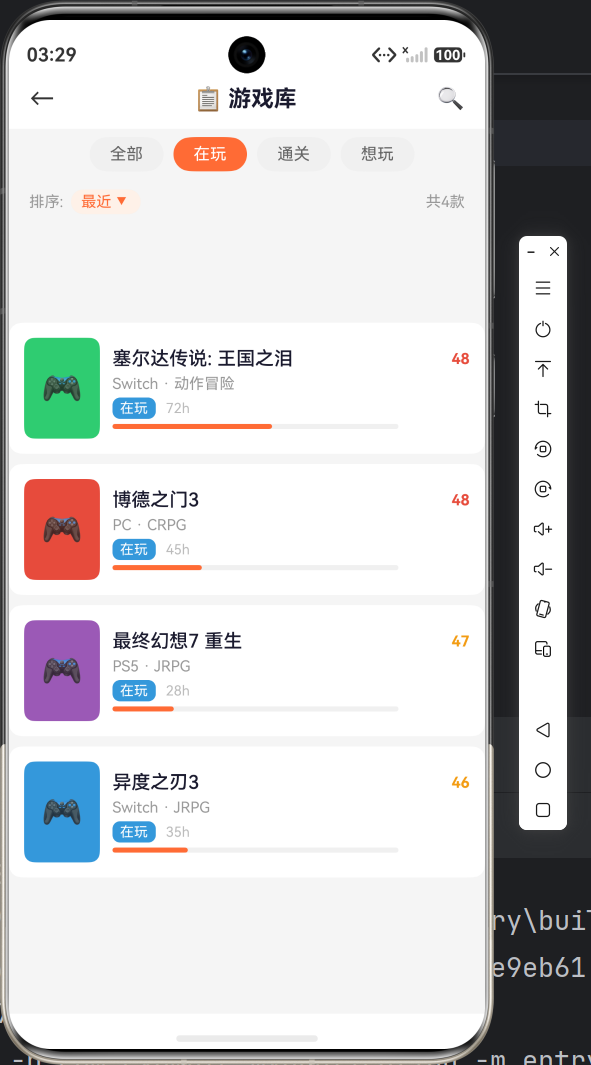
六、小结
本篇我们完成了:
- ✅ 鸿蒙 Stage 模型项目搭建与配置
- ✅ EntryAbility 生命周期理解
- ✅ 首页 5 个核心模块开发
- ✅ @Builder 组件化实践
- ✅ 路由注册与页面跳转
下一篇中,我们将开发游戏库列表页,实现多标签筛选、排序切换,以及精美的卡片式 UI 设计。
项目源码 :本文基于 HarmonyOS API 23 + Stage 模型 + ArkTS 完整实现
系列目录:
- 第一篇:项目搭建与首页开发(本文)
- 第二篇:游戏库列表与筛选排序
- 第三篇:游戏详情页与交互功能
- 第四篇:愿望单与个人统计
- 第五篇:路由导航与工程优化