文章目录
-
- 一、前言
- [二、MCP Client 核心概念](#二、MCP Client 核心概念)
-
- [2.1 MCP Client 是什么?](#2.1 MCP Client 是什么?)
- [2.2 核心术语解释](#2.2 核心术语解释)
- [2.3 MCP Client 架构全景](#2.3 MCP Client 架构全景)
- [2.4 MCP Client 传输方式对比](#2.4 MCP Client 传输方式对比)
- 三、完整实战项目
-
- [3.1 项目功能清单](#3.1 项目功能清单)
- [3.2 项目结构](#3.2 项目结构)
- [3.3 依赖配置](#3.3 依赖配置)
- [3.4 配置文件(application.yml)](#3.4 配置文件(application.yml))
- [3.5 启动类](#3.5 启动类)
- [3.6 本地工具实现](#3.6 本地工具实现)
- [3.7 工具调用日志拦截器](#3.7 工具调用日志拦截器)
- [3.8 MCP Client 请求定制器配置](#3.8 MCP Client 请求定制器配置)
- [3.9 ChatClient 配置](#3.9 ChatClient 配置)
- [3.10 动态工具加载服务](#3.10 动态工具加载服务)
- [3.11 聊天服务](#3.11 聊天服务)
- [3.12 控制器](#3.12 控制器)
- 四、一次工具调用的完整链路分析
-
- [4.1 完整调用流程图](#4.1 完整调用流程图)
- [4.2 调用链路详细说明](#4.2 调用链路详细说明)
- 五、端到端测试
-
- [5.1 启动服务](#5.1 启动服务)
- [5.2 测试用例](#5.2 测试用例)
- [5.3 预期效果](#5.3 预期效果)
- [5.4 调试日志示例](#5.4 调试日志示例)
- 六、部署方案
-
- [6.1 Docker 部署](#6.1 Docker 部署)
- [6.2 Kubernetes 部署](#6.2 Kubernetes 部署)
- 七、总结
一、前言
各位好,上一篇我们聊了 MCP Server 端的架构设计和实战代码,今天来聊聊 MCP Client 端。在实际项目中,MCP Client 才是真正面向用户的 AI 应用核心,它负责连接各种 MCP Server,自动发现并调用工具,让大模型具备"动手"的能力。
本文与上一篇的关系:
- 上一篇:MCP Server 端,提供天气查询、订单查询、审批通知等工具服务(端口 8080)
- 这一篇:MCP Client 端,连接 Server 端的工具,让 MiniMax 大模型能够调用这些工具
为什么选 MiniMax 作为示例模型?因为国内大模型里,MiniMax 的 API 设计非常规范,而且 Spring AI 1.1.5 版本已经原生支持 MiniMax,配合 MCP 协议,简直是天作之合。
本文特色:一个 Demo 项目搞定核心功能!我们将构建一个轻量的 MCP Client 项目,包含:
- 连接多个 MCP Server(天气、订单、文件系统等)
- 本地工具与 MCP 工具混合使用
- 动态工具加载(基于角色配置)
- 同步和流式对话
- 对话历史管理
- 完整的端到端测试
废话不多说,直接上干货!
二、MCP Client 核心概念
2.1 MCP Client 是什么?
MCP Client 是 AI 应用与 MCP Server 之间的桥梁。它负责:
- 协议协商:与 Server 协商 MCP 协议版本和能力
- 工具发现:自动获取 Server 暴露的工具列表和 JSON Schema
- 工具调用:将 LLM 的工具调用请求转发给 Server
- 结果回传:将 Server 的执行结果返回给 LLM
2.2 核心术语解释
| 术语 | 解释 | 类比 |
|---|---|---|
| MCP (Model Context Protocol) | 模型上下文协议,AI 应用与工具服务之间的标准通信协议 | 就像 USB 协议,让不同设备可以即插即用 |
| MCP Client | 连接 MCP Server 的客户端,负责工具发现和调用 | 就像浏览器,连接各种网站服务 |
| MCP Server | 提供工具服务的后端,暴露工具给 Client 调用 | 就像网站服务器,提供各种 API |
| ToolCallback | Spring AI 中的工具回调接口,统一本地工具和 MCP 工具 | 就像统一的插头接口,不管什么电器都能插 |
| ChatClient | Spring AI 的对话客户端,构建 Prompt 并调用模型 | 就像智能助手的大脑,理解用户意图并执行 |
| ChatModel | 大模型接口(MiniMax、OpenAI 等),负责与 LLM 通信 | 就像 AI 的思考引擎 |
| Streamable HTTP | MCP 的传输协议,基于 HTTP 的流式通信 | 就像 WebSocket,支持实时双向通信 |
| JSON-RPC | MCP 的通信协议格式,基于 JSON 的远程过程调用 | 就像 REST API,但使用 JSON 格式 |
2.3 MCP Client 架构全景
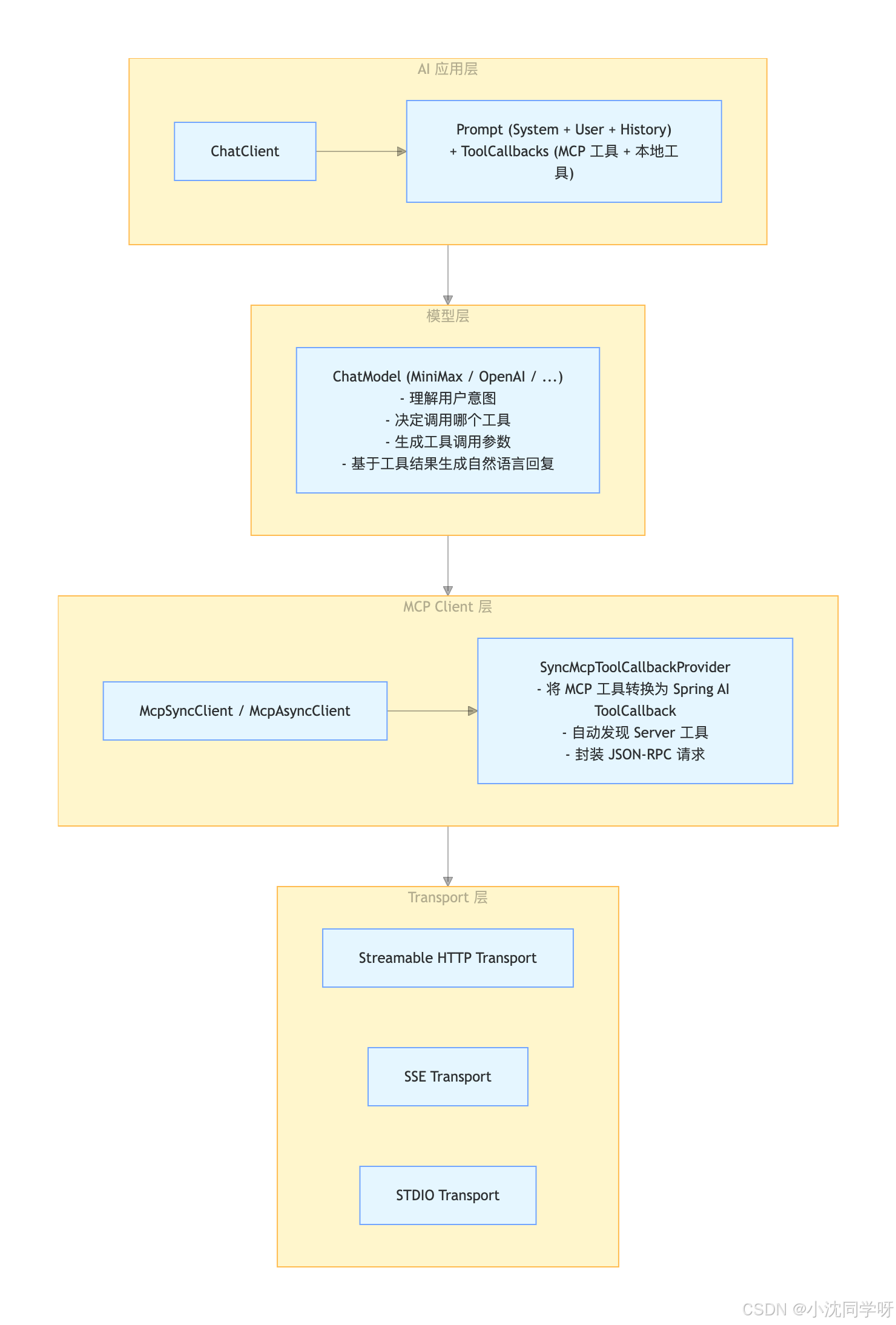
2.4 MCP Client 传输方式对比
| 传输方式 | 适用场景 | 优势 | 劣势 |
|---|---|---|---|
| Streamable HTTP | 远程服务、微服务 | 断线重连、会话恢复、统一端点 | 需要 HTTP 基础设施 |
| SSE | 远程服务(旧版) | 实现简单 | 断线无法恢复,逐步弃用 |
| STDIO | 本地进程 | 简单安全,无需网络 | 仅支持本地,无法跨网络 |
三、完整实战项目
3.1 项目功能清单
我们将构建一个轻量的 MCP Client Demo 项目,包含以下功能:
| 功能 | 说明 | 实现方式 |
|---|---|---|
| 多 MCP Server 连接 | 同时连接天气、订单、文件等多个 Server | spring.ai.mcp.client.connections 配置 |
| 本地工具 | 项目内的 Java 工具方法 | Function 接口 |
| 混合工具调用 | LLM 自动选择本地或 MCP 工具 | 统一注册到 ChatClient |
| 动态工具加载 | 基于角色配置动态加载工具 | Mock 数据模拟角色配置 |
| 同步对话 | 一次性返回完整结果 | chatClient.prompt().call() |
| 流式对话 | 实时流式返回结果 | chatClient.prompt().stream() |
| 对话历史 | 支持多轮对话上下文 | ChatMemory |
| 工具调用日志 | 记录工具调用详情 | Advisor 拦截器 |
3.2 项目结构
mcp-client-demo/
├── pom.xml                          # Maven 依赖配置
├── src/
│   ├── main/
│   │   ├── java/
│   │   │   └── com/example/mcpclient/
│   │   │       ├── McpClientApplication.java          # 启动类
│   │   │       ├── config/
│   │   │       │   ├── McpRequestCustomizerProperties.java  # MCP 请求定制器配置属性
│   │   │       │   ├── McpClientConfig.java           # MCP Client HTTP 请求定制器
│   │   │       │   └── ChatConfig.java                # ChatClient 配置
│   │   │       ├── tool/
│   │   │       │   └── LocalWeatherTool.java          # 本地天气工具
│   │   │       ├── advisor/
│   │   │       │   └── ToolCallLoggingAdvisor.java    # 工具调用日志拦截器
│   │   │       ├── service/
│   │   │       │   ├── DynamicToolService.java        # 动态工具加载服务
│   │   │       │   └── ChatService.java               # 聊天服务
│   │   │       └── controller/
│   │   │           └── ChatController.java            # REST API 控制器
│   │   └── resources/
│   │       └── application.yml                        # 配置文件
│   └── test/
│       └── java/
│           └── com/example/mcpclient/
│               └── McpClientApplicationTests.java
└── target/说明:项目结构按依赖关系排列,底层配置和工具类在前,上层服务和控制器在后。
3.3 依赖配置
xml
<?xml version="1.0" encoding="UTF-8"?>
<project xmlns="http://maven.apache.org/POM/4.0.0"
         xmlns:xsi="http://www.w3.org/2001/XMLSchema-instance"
         xsi:schemaLocation="http://maven.apache.org/POM/4.0.0
         http://maven.apache.org/xsd/maven-4.0.0.xsd">
    <modelVersion>4.0.0</modelVersion>

    <parent>
        <groupId>org.springframework.boot</groupId>
        <artifactId>spring-boot-starter-parent</artifactId>
        <version>3.5.5</version>
    </parent>

    <groupId>com.example</groupId>
    <artifactId>mcp-client-demo</artifactId>
    <version>1.0.0</version>
    <name>MCP Client Demo</name>
    <description>轻量的 MCP Client Demo 项目,包含多 Server 连接、本地工具混合、动态加载等功能</description>

    <properties>
        <java.version>17</java.version>
        <spring-ai.version>1.1.5</spring-ai.version>
    </properties>

    <dependencyManagement>
        <dependencies>
            <dependency>
                <groupId>org.springframework.ai</groupId>
                <artifactId>spring-ai-bom</artifactId>
                <version>${spring-ai.version}</version>
                <type>pom</type>
                <scope>import</scope>
            </dependency>
        </dependencies>
    </dependencyManagement>

    <dependencies>
        <!-- Web 相关 -->
        <dependency>
            <groupId>org.springframework.boot</groupId>
            <artifactId>spring-boot-starter-web</artifactId>
        </dependency>

        <!-- MiniMax 模型 -->
        <dependency>
            <groupId>org.springframework.ai</groupId>
            <artifactId>spring-ai-starter-model-minimax</artifactId>
        </dependency>

        <!-- MCP Client - 支持 Streamable HTTP -->
        <dependency>
            <groupId>org.springframework.ai</groupId>
            <artifactId>spring-ai-starter-mcp-client</artifactId>
        </dependency>

        <!-- 对话历史支持 -->
        <dependency>
            <groupId>org.springframework.ai</groupId>
            <artifactId>spring-ai-client-chat</artifactId>
        </dependency>

        <dependency>
            <groupId>org.projectlombok</groupId>
            <artifactId>lombok</artifactId>
            <optional>true</optional>
        </dependency>

        <!-- 测试 -->
        <dependency>
            <groupId>org.springframework.boot</groupId>
            <artifactId>spring-boot-starter-test</artifactId>
            <scope>test</scope>
        </dependency>
    </dependencies>

    <build>
        <plugins>
            <plugin>
                <groupId>org.springframework.boot</groupId>
                <artifactId>spring-boot-maven-plugin</artifactId>
                <configuration>
                    <excludes>
                        <exclude>
                            <groupId>org.projectlombok</groupId>
                            <artifactId>lombok</artifactId>
                        </exclude>
                    </excludes>
                </configuration>
            </plugin>
        </plugins>
    </build>
</project>
3.4 配置文件(application.yml)
yaml
server:
  port: 8081  # Client 端口,与 Server 端(8080)区分开

spring:
  ai:
    # MiniMax 模型配置
    minimax:
      api-key: ${MINIMAX_API_KEY:your-minimax-api-key-here}
      chat:
        options:
          model: abab6.5s-chat  # MiniMax 模型
          temperature: 0.7

    # MCP Client 配置 - Streamable HTTP 模式
    mcp:
      client:
        enabled: true
        name: mini-mcp-client
        version: 1.0.0
        type: sync  # sync=同步模式,async=异步模式
        request-timeout: 60s
        # 多 MCP Server 连接配置(streamable-http 传输方式)
        streamable-http:
          connections:
            server-a:
              url: http://localhost:8080
              endpoint: /mcp
              auth:
                type: api-key
                header-name: "X-API-Key"
                header-value: "demo-api-key"
#            server-b:
#              url: http://localhost:8080
#              endpoint: /mcp
#              auth:
#                type: bearer
#                token: "token-for-server-b"

# 日志配置(调试时开启)
logging:
  level:
    io.modelcontextprotocol: debug  # MCP 协议调试日志
    com.example.mcpclient: debug    # 项目调试日志
连接配置说明
每个连接支持以下配置项:
| 配置项 | 说明 | 示例 |
|---|---|---|
url |
MCP Server 的基础 URL | http://localhost:8080 |
endpoint |
MCP 端点路径 | /mcp |
headers |
静态请求头(所有请求都添加) | X-API-Key: "demo-api-key" |
auth |
认证配置(可选) | 见下方认证配置说明 |
认证配置(auth)
支持两种认证方式:
1. API Key 认证
yaml
auth:
  type: api-key
  header-name: "X-API-Key"
  header-value: "your-api-key"
2. Bearer Token 认证
yaml
auth:
  type: bearer
  token: "your-bearer-token"
注意 :没有配置
auth的连接将不添加额外认证头,使用默认的headers配置即可。
3.5 启动类
java
package com.example.mcpclient;

import org.springframework.boot.SpringApplication;
import org.springframework.boot.autoconfigure.SpringBootApplication;

/**
 * MCP Client 启动类
 * 一个 Demo 项目搞定核心功能:多 Server 连接、本地工具混合、动态加载等
 *
 * @author senfel
 * @date 2023/11/5 14:01
 */
@SpringBootApplication
public class McpClientApplication {

    public static void main(String[] args) {
        SpringApplication.run(McpClientApplication.class, args);
    }
}
3.6 本地工具实现
java
package com.example.mcpclient.tool;

import com.fasterxml.jackson.annotation.JsonClassDescription;
import com.fasterxml.jackson.annotation.JsonProperty;
import com.fasterxml.jackson.annotation.JsonPropertyDescription;
import lombok.Data;
import org.springframework.ai.tool.annotation.Tool;
import org.springframework.stereotype.Component;

import java.util.Random;

/**
 * 本地天气查询工具
 * 与 MCP 工具互补,提供本地模拟数据
 *
 * 为什么需要本地工具?
 * - 有些工具不需要远程调用,直接在本地执行更快
 * - 可以模拟数据用于测试
 * - 与 MCP 工具混合使用,LLM 会自动选择最合适的工具
 *
 * Spring AI 1.1.5 变化:
 * - 使用 @Tool 注解标记工具方法,而不是实现 Function 接口
 * - MethodToolCallbackProvider 会自动扫描 @Tool 注解的方法
 *
 * @author senfel
 * @date 2023/11/5 14:01
 */
@Component("local_weather_query")
public class LocalWeatherTool {

    private static final String[] CONDITIONS = {"晴朗", "多云", "阴天", "小雨", "大雨", "雷雨"};
    private final Random random = new Random();

    /**
     * 工具请求参数
     * JSON Schema 会自动生成,用于告诉 LLM 如何调用这个工具
     */
    @Data
    @JsonClassDescription("查询指定城市的天气信息")
    public static class Request {
        @JsonProperty(required = true, value = "city")
        @JsonPropertyDescription("城市名称,例如:北京、上海、广州")
        private String city;
    }

    /**
     * 工具响应结果
     */
    @Data
    public static class Response {
        private String city;
        private WeatherInfo weatherInfo;

        @Data
        public static class WeatherInfo {
            private Integer temperature;
            private String condition;
            private Integer humidity;
            private Integer windSpeed;
        }
    }

    /**
     * 查询天气的工具方法
     * 使用 @Tool 注解,Spring AI 会自动将其注册为 ToolCallback
     */
    @Tool(description = "查询指定城市的天气信息")
    public Response queryWeather(Request request) {
        Response.WeatherInfo weatherInfo = new Response.WeatherInfo();
        weatherInfo.setTemperature(random.nextInt(35) - 5);  // -5 ~ 30°C
        weatherInfo.setCondition(CONDITIONS[random.nextInt(CONDITIONS.length)]);
        weatherInfo.setHumidity(random.nextInt(80) + 20);    // 20% ~ 100%
        weatherInfo.setWindSpeed(random.nextInt(30) + 1);    // 1 ~ 30 km/h

        Response response = new Response();
        response.setCity(request.getCity());
        response.setWeatherInfo(weatherInfo);
        return response;
    }
}
3.7 工具调用日志拦截器
java
package com.example.mcpclient.advisor;

import lombok.extern.slf4j.Slf4j;
import org.springframework.ai.chat.client.ChatClientRequest;
import org.springframework.ai.chat.client.ChatClientResponse;
import org.springframework.ai.chat.client.advisor.api.CallAdvisor;
import org.springframework.ai.chat.client.advisor.api.CallAdvisorChain;
import org.springframework.stereotype.Component;

/**
 * 工具调用日志记录 Advisor
 * 记录每次工具调用的详细信息,方便调试和监控
 *
 * Advisor 是什么?
 * - 类似于 Spring 的拦截器,可以在工具调用前后执行逻辑
 * - 用于日志记录、性能监控、权限检查等
 *
 * Spring AI 1.1.5 变化:
 * - 使用 CallAdvisor 接口替代 CallAroundAdvisor
 * - 使用 ChatClientRequest 和 ChatClientResponse 替代 AdvisedRequest 和 AdvisedResponse
 * - 使用 adviseCall 方法替代 aroundCall 方法
 *
 * @author senfel
 * @date 2023/11/5 14:01
 */
@Component
@Slf4j
public class ToolCallLoggingAdvisor implements CallAdvisor {

    @Override
    public String getName() {
        return "ToolCallLoggingAdvisor";
    }

    @Override
    public int getOrder() {
        return 0;  // 执行顺序,数字越小越先执行
    }

    @Override
    public ChatClientResponse adviseCall(ChatClientRequest request, CallAdvisorChain chain) {
        // 工具调用前
        log.info("=== 工具调用开始 ===");
        log.info("请求内容: {}", request.prompt().getContents());
        long startTime = System.currentTimeMillis();

        // 执行工具调用
        ChatClientResponse response = chain.nextCall(request);

        // 工具调用后
        long duration = System.currentTimeMillis() - startTime;
        log.info("响应结果: {}", response);
        log.info("耗时: {}ms", duration);
        log.info("=== 工具调用结束 ===");

        return response;
    }
}
3.8 MCP Client 请求定制器配置
java
package com.example.mcpclient.config;

import io.modelcontextprotocol.client.transport.customizer.McpSyncHttpClientRequestCustomizer;
import io.modelcontextprotocol.common.McpTransportContext;
import lombok.RequiredArgsConstructor;
import lombok.extern.slf4j.Slf4j;
import org.springframework.context.annotation.Bean;
import org.springframework.context.annotation.Configuration;

import java.net.http.HttpRequest;

/**
 * MCP Client 配置
 * 负责定制 HTTP 请求,例如添加认证头、日志记录等
 *
 * @author senfel
 * @date 2023/11/5 14:01
 */
@Configuration
@Slf4j
@RequiredArgsConstructor
public class McpClientConfig {

    private final McpRequestCustomizerProperties customizerProperties;

    @Bean
    public McpSyncHttpClientRequestCustomizer mcpHttpClientRequestCustomizer() {
        return (builder, method, endpoint, body, context) -> {
            String requestUrl = endpoint.toString();

            // 根据请求 URL 匹配对应的 server 配置
            customizerProperties.getConnections().values().stream()
                    .filter(conn -> requestUrl.startsWith(conn.getUrl()))
                    .findFirst()
                    .ifPresent(conn -> {
                        McpRequestCustomizerProperties.AuthConfig auth = conn.getAuth();
                        if (auth != null) {
                            applyAuth(builder, auth);
                            log.info("MCP request to {} with auth type={}: method={}",
                                    endpoint.getHost(), auth.getType(), method);
                        } else {
                            log.info("MCP request to {} without custom auth: method={}",
                                    endpoint.getHost(), method);
                        }
                    });
        };
    }

    private void applyAuth(HttpRequest.Builder builder, McpRequestCustomizerProperties.AuthConfig auth) {
        switch (auth.getType()) {
            case "api-key":
                builder.header(auth.getHeaderName(), auth.getHeaderValue());
                break;
            case "bearer":
                builder.header("Authorization", "Bearer " + auth.getToken());
                break;
            default:
                log.warn("Unknown auth type: {}", auth.getType());
        }
    }
}
配置属性类
java
package com.example.mcpclient.config;

import lombok.Data;
import org.springframework.boot.context.properties.ConfigurationProperties;
import org.springframework.context.annotation.Configuration;

import java.util.Map;

/**
 * MCP 请求定制器配置属性
 * 绑定 spring.ai.mcp.client.streamable-http 配置
 *
 * @author senfel
 * @date 2023/11/5 14:01
 */
@Data
@Configuration
@ConfigurationProperties(prefix = "spring.ai.mcp.client.streamable-http")
public class McpRequestCustomizerProperties {

    private Map<String, ServerConnection> connections;

    @Data
    public static class ServerConnection {
        private String url;
        private String endpoint;
        private AuthConfig auth;
    }

    @Data
    public static class AuthConfig {
        private String type;
        private String headerName;
        private String headerValue;
        private String token;
    }
}
3.9 ChatClient 配置
java
package com.example.mcpclient.config;

import com.example.mcpclient.advisor.ToolCallLoggingAdvisor;
import com.example.mcpclient.service.DynamicToolService;
import com.example.mcpclient.tool.LocalWeatherTool;
import io.modelcontextprotocol.client.McpSyncClient;
import org.springframework.ai.chat.client.ChatClient;
import org.springframework.ai.chat.client.advisor.MessageChatMemoryAdvisor;
import org.springframework.ai.chat.memory.ChatMemory;
import org.springframework.ai.chat.model.ChatModel;
import org.springframework.ai.mcp.SyncMcpToolCallbackProvider;
import org.springframework.ai.tool.method.MethodToolCallbackProvider;
import org.springframework.ai.tool.resolution.ToolCallbackResolver;
import org.springframework.context.annotation.Bean;
import org.springframework.context.annotation.Configuration;

import java.util.List;

/**
 * ChatClient 配置
 * 一个配置类搞定所有功能:
 * - 多 MCP Server 工具注入
 * - 本地工具注入
 * - 对话历史管理
 * - 工具调用日志
 * - 动态工具加载服务(基于角色)
 *
 * Spring AI 1.1.5 变化:
 * - ChatMemory 由 Spring Boot 自动配置,无需手动创建 InMemoryChatMemory Bean
 * - MessageChatMemoryAdvisor 使用 builder 模式构建
 *
 * @author senfel
 * @date 2023/11/5 14:01
 */
@Configuration
public class ChatConfig {

    private final LocalWeatherTool localWeatherTool;
    private final ToolCallLoggingAdvisor toolCallLoggingAdvisor;
    private final ChatModel chatModel;
    private final ToolCallbackResolver toolCallbackResolver;

    public ChatConfig(LocalWeatherTool localWeatherTool,
                     ToolCallLoggingAdvisor toolCallLoggingAdvisor,
                     ChatModel chatModel,
                     ToolCallbackResolver toolCallbackResolver) {
        this.localWeatherTool = localWeatherTool;
        this.toolCallLoggingAdvisor = toolCallLoggingAdvisor;
        this.chatModel = chatModel;
        this.toolCallbackResolver = toolCallbackResolver;
    }

    /**
     * 默认 ChatClient(包含所有工具)
     * 用于 /api/chat 接口
     *
     * 注意:
     * - McpSyncClient 由 Spring AI 自动创建
     * - ChatMemory 由 Spring Boot 自动配置(基于 spring-ai-client-chat 依赖)
     * - 根据 application.yml 中的 spring.ai.mcp.client.connections 配置
     *   每个 connection 会自动创建一个 McpSyncClient Bean
     */
    @Bean
    public ChatClient chatClient(ChatMemory chatMemory, List<McpSyncClient> mcpClients) {
        // 1. 收集所有 MCP Server 的工具
        // Spring AI 已自动创建多个 McpSyncClient,每个对应一个 Server
        SyncMcpToolCallbackProvider[] mcpProviders = mcpClients.stream()
                .map(SyncMcpToolCallbackProvider::new)
                .toArray(SyncMcpToolCallbackProvider[]::new);

        // 2. 本地工具
        MethodToolCallbackProvider localProvider = MethodToolCallbackProvider.builder()
                .toolObjects(localWeatherTool)
                .build();

        // 3. 构建 ChatClient
        return ChatClient.builder(chatModel)
                .defaultSystem("你是一个智能助手,可以帮助用户查询天气、订单、文件等信息。\n" +
                        "当用户询问天气、订单或文件时,请使用相应的工具来获取信息。\n" +
                        "回答要简洁明了,直接给出用户需要的信息。")
                // 注入所有工具(MCP + 本地)
                .defaultToolCallbacks(mcpProviders)
                .defaultToolCallbacks(localProvider)
                // 注入对话历史(使用 builder 模式)
                .defaultAdvisors(
                        MessageChatMemoryAdvisor.builder(chatMemory).build()
                )
                // 注入工具调用日志
                .defaultAdvisors(toolCallLoggingAdvisor)
                .build();
    }

    /**
     * 动态工具加载服务
     * 用于 /api/role/chat 接口,根据角色动态加载工具
     */
    @Bean
    public DynamicToolService dynamicToolService(ChatModel chatModel, ChatMemory chatMemory, List<McpSyncClient> mcpClients) {
        return new DynamicToolService(chatModel, chatMemory, mcpClients, toolCallbackResolver);
    }
}
3.10 动态工具加载服务
java
package com.example.mcpclient.service;

import io.modelcontextprotocol.client.McpSyncClient;
import lombok.RequiredArgsConstructor;
import lombok.extern.slf4j.Slf4j;
import org.springframework.ai.chat.client.ChatClient;
import org.springframework.ai.chat.memory.ChatMemory;
import org.springframework.ai.chat.model.ChatModel;
import org.springframework.ai.mcp.SyncMcpToolCallbackProvider;
import org.springframework.ai.tool.ToolCallback;
import org.springframework.ai.tool.resolution.ToolCallbackResolver;
import org.springframework.stereotype.Service;

import java.util.ArrayList;
import java.util.List;
import java.util.Map;

/**
 * 动态工具加载服务
 * 根据角色配置动态加载本地工具和 MCP 工具
 *
 * 使用场景:
 * - 客服助手角色:只能查询天气和订单
 * - 财务助手角色:只能查询订单和处理支付
 * - 管理员角色:可以使用所有工具
 *
 * @author senfel
 * @date 2023/11/5 14:01
 */
@Service
@RequiredArgsConstructor
@Slf4j
public class DynamicToolService {

    private final ChatModel chatModel;
    private final ChatMemory chatMemory;
    private final List<McpSyncClient> mcpClients;
    private final ToolCallbackResolver toolCallbackResolver;

    // Mock 角色配置(实际项目中从数据库读取)
    private final Map<Long, ChatRole> roleConfig = Map.of(
        1L, new ChatRole(1L, "客服助手", "你是一个客服助手,可以帮助用户查询天气和订单。",
                List.of("local_weather_query"), List.of("business-server")),
        2L, new ChatRole(2L, "财务助手", "你是一个财务助手,可以帮助用户查询订单和处理支付。",
                List.of(), List.of("business-server", "payment-server"))
    );

    /**
     * 根据角色 ID 创建 ChatClient
     * 自动加载角色关联的工具
     */
    public ChatClient createChatClientByRole(Long roleId) {
        ChatRole role = roleConfig.get(roleId);
        if (role == null) {
            throw new IllegalArgumentException("角色不存在: " + roleId);
        }

        List<ToolCallback> toolCallbacks = new ArrayList<>();

        // 1. 加载本地工具
        role.toolNames().forEach(toolName -> {
            ToolCallback toolCallback = toolCallbackResolver.resolve(toolName);
            if (toolCallback != null) {
                toolCallbacks.add(toolCallback);
            }
        });

        // 2. 加载 MCP 工具
        role.mcpClientNames().forEach(mcpClientName -> {
            // 匹配对应的 McpSyncClient
            mcpClients.stream()
                .filter(client -> client.getClientInfo().name().contains(mcpClientName))
                .findFirst()
                .ifPresent(client -> {
                    ToolCallback[] mcpToolCallbacks =
                        new SyncMcpToolCallbackProvider(client).getToolCallbacks();
                    toolCallbacks.addAll(List.of(mcpToolCallbacks));
                });
        });

        // 3. 构建 ChatClient
        return ChatClient.builder(chatModel)
                .defaultSystem(role.systemMessage())
                .defaultToolCallbacks(toolCallbacks.toArray(new ToolCallback[0]))
                .build();
    }

    /**
     * 角色定义
     */
    public record ChatRole(Long id, String name, String systemMessage,
                          List<String> toolNames, List<String> mcpClientNames) {}
}
3.11 聊天服务
java
package com.example.mcpclient.service;

import lombok.RequiredArgsConstructor;
import lombok.extern.slf4j.Slf4j;
import org.springframework.ai.chat.client.ChatClient;
import org.springframework.stereotype.Service;
import org.springframework.web.servlet.mvc.method.annotation.SseEmitter;
import reactor.core.publisher.Flux;

/**
 * 聊天服务
 * 封装 ChatClient 调用逻辑
 *
 * 一个 Service 搞定所有功能:
 * - 同步对话
 * - 流式对话
 * - SSE 流式对话
 *
 * @author senfel
 * @date 2023/11/5 14:01
 */
@Service
@RequiredArgsConstructor
@Slf4j
public class ChatService {

    private final ChatClient chatClient;

    /**
     * 同步对话
     * @param message 用户消息
     * @return AI 回复
     */
    public String chat(String message) {
        log.info("用户消息: {}", message);

        String response = chatClient.prompt()
                .user(message)
                .call()
                .content();

        log.info("AI 回复: {}", response);
        return response;
    }

    /**
     * 流式对话
     * @param message 用户消息
     * @return AI 回复(流式拼接)
     */
    public String chatStream(String message) {
        log.info("用户消息(流式): {}", message);

        StringBuilder result = new StringBuilder();

        Flux<String> stream = chatClient.prompt()
                .user(message)
                .stream()
                .content();

        stream.doOnNext(chunk -> {
            result.append(chunk);
            System.out.print(chunk);
        }).then().block();

        return result.toString();
    }

    /**
     * SSE 流式对话
     * @param message 用户消息
     * @return SseEmitter
     */
    public SseEmitter chatSse(String message) {
        SseEmitter emitter = new SseEmitter(60000L);  // 60 秒超时

        Flux<String> stream = chatClient.prompt()
                .user(message)
                .stream()
                .content();

        stream.doOnNext(chunk -> {
            try {
                emitter.send(SseEmitter.event().data(chunk));
            } catch (Exception e) {
                emitter.completeWithError(e);
            }
        })
        .doOnComplete(emitter::complete)
        .doOnError(emitter::completeWithError)
        .subscribe();

        return emitter;
    }
}
3.12 控制器
java
package com.example.mcpclient.controller;

import com.example.mcpclient.service.ChatService;
import com.example.mcpclient.service.DynamicToolService;
import lombok.RequiredArgsConstructor;
import lombok.extern.slf4j.Slf4j;
import org.springframework.http.MediaType;
import org.springframework.web.bind.annotation.*;
import org.springframework.web.servlet.mvc.method.annotation.SseEmitter;

/**
 * 聊天控制器
 * 提供同步、流式、SSE 三种对话接口
 * 支持基于角色的动态工具加载
 *
 * 接口说明:
 * - POST /api/chat          : 同步对话,一次性返回完整结果
 * - POST /api/chat/stream   : 流式对话,实时返回文本片段
 * - GET  /api/chat/sse      : SSE 流式对话,浏览器可直接使用
 * - POST /api/role/chat     : 基于角色的对话(动态加载工具)
 *
 * @author senfel
 * @date 2023/11/5 14:01
 */
@RestController
@RequestMapping("/api")
@RequiredArgsConstructor
@Slf4j
public class ChatController {

    private final ChatService chatService;
    private final DynamicToolService dynamicToolService;

    /**
     * 同步对话接口
     * @param message 用户消息
     * @return AI 回复
     */
    @PostMapping("/chat")
    public String chat(@RequestParam String message) {
        log.info("用户消息: {}", message);
        return chatService.chat(message);
    }

    /**
     * 流式对话接口
     * @param message 用户消息
     * @return AI 回复(流式拼接)
     */
    @PostMapping("/chat/stream")
    public String chatStream(@RequestParam String message) {
        log.info("用户消息(流式): {}", message);
        return chatService.chatStream(message);
    }

    /**
     * SSE 流式对话接口
     * SSE (Server-Sent Events) 是什么?
     * - 服务器向浏览器推送实时事件的技术
     * - 基于 HTTP,单向通信(服务器 → 客户端)
     * - 浏览器可直接使用 EventSource API 接收
     *
     * @param message 用户消息
     * @return SSE 流
     */
    @GetMapping(value = "/chat/sse", produces = MediaType.TEXT_EVENT_STREAM_VALUE)
    public SseEmitter chatSse(@RequestParam String message) {
        log.info("用户消息(SSE): {}", message);
        return chatService.chatSse(message);
    }

    /**
     * 基于角色的同步对话
     * @param roleId 角色 ID(1=客服助手,2=财务助手)
     * @param message 用户消息
     * @return AI 回复
     */
    @PostMapping("/role/chat")
    public String roleChat(@RequestParam Long roleId, @RequestParam String message) {
        log.info("角色 ID: {}, 用户消息: {}", roleId, message);

        // 根据角色动态创建 ChatClient(自动加载对应工具)
        org.springframework.ai.chat.client.ChatClient chatClient =
                dynamicToolService.createChatClientByRole(roleId);

        String response = chatClient.prompt()
                .user(message)
                .call()
                .content();

        log.info("AI 回复: {}", response);
        return response;
    }
}
四、一次工具调用的完整链路分析
4.1 完整调用流程图
用户                    ChatController              ChatService              ChatClient
 │                          │                          │                        │
 │  "北京天气怎么样?"        │                          │                        │
 │─────────────────────────>│                          │                        │
 │                          │  chat("北京天气怎么样?")  │                        │
 │                          │─────────────────────────>│                        │
 │                          │                          │  prompt().user(msg)    │
 │                          │                          │───────────────────────>│
 │                          │                          │                        │
 │                          │                          │                   构建 Prompt
 │                          │                          │              + 附加工具列表
 │                          │                          │                        │
 │                          │                          │                        ▼
 │                          │                          │                  MiniMax ChatModel
 │                          │                          │                        │
 │                          │                          │  1. 分析用户意图         │
 │                          │                          │  2. 决定调用 getWeather │
 │                          │                          │  3. 生成参数 cityName   │
 │                          │                          │<───────────────────────│
 │                          │                          │                        │
 │                          │                          ▼                        │
 │                          │                    McpSyncClient                  │
 │                          │                    SyncMcpToolCallbackProvider    │
 │                          │                        │                        │
 │                          │                        │  封装 JSON-RPC 请求      │
 │                          │                        │  tools/call              │
 │                          │                        │  HTTP POST /mcp          │
 │                          │                        │                        │
 │                          │                        ▼                        │
 │                          │              ┌─────────────────┐                 │
 │                          │              │  MCP Server     │                 │
 │                          │              │  (localhost:8080)│                │
 │                          │              │  WeatherTool    │                 │
 │                          │              └─────────────────┘                 │
 │                          │                        │                        │
 │                          │                        │  返回天气数据            │
 │                          │                        │<───────────────────────│
 │                          │                          │                        │
 │                          │                          ▼                        │
 │                          │                    MiniMax ChatModel              │
 │                          │                        │                        │
 │                          │                        │  基于工具结果生成回复     │
 │                          │                        │<───────────────────────│
 │                          │                          │                        │
 │                          │  返回 AI 回复              │                        │
 │                          │<─────────────────────────│                        │
 │  "北京今天天气晴朗..."    │                          │                        │
 │<─────────────────────────│                          │                        │
4.2 调用链路详细说明
| 步骤 | 组件 | 动作 | 说明 |
|---|---|---|---|
| 1 | 用户 | 发送自然语言请求 | "北京天气怎么样?" |
| 2 | ChatController | 接收请求,调用 Service | POST /api/chat?message=北京天气怎么样? |
| 3 | ChatService | 调用 ChatClient | chatClient.prompt().user(message).call() |
| 4 | ChatClient | 构建 Prompt,注入工具列表 | 将所有工具(MCP + 本地)转换为 JSON Schema |
| 5 | MiniMax ChatModel | 分析用户意图 | 理解用户想要查询天气 |
| 6 | MiniMax ChatModel | 决定调用工具 | 选择 getWeather 工具,生成参数 {cityName: "北京"} |
| 7 | McpSyncClient | 封装 JSON-RPC 请求 | 转换为 MCP 协议格式 |
| 8 | Transport | HTTP POST 到 Server | POST http://localhost:8080/mcp |
| 9 | MCP Server | 执行工具方法 | WeatherTool.getWeather("北京") |
| 10 | MCP Server | 返回结构化结果 | {city: "北京", temperature: 22, condition: "晴朗"} |
| 11 | MiniMax ChatModel | 基于工具结果生成回复 | "北京今天天气晴朗,温度 22°C..." |
| 12 | ChatClient | 返回最终结果 | 返回给用户 |
五、端到端测试
5.1 启动服务
bash
# 1. 先启动 MCP Server(端口 8080)
# 参考:SpringAI+MCPServer实战-StreamableHTTP协议打造企业级AI工具服务.md
cd ../mcp-server
mvn spring-boot:run

# 2. 启动 MCP Client(端口 8081)
cd mcp-client-demo
mvn spring-boot:run
5.2 测试用例
bash
# 测试 1:本地工具调用(天气查询)
curl -X POST "http://localhost:8081/api/chat" \
  -d "message=北京今天天气怎么样"

# 测试 2:MCP 工具调用(订单查询)
curl -X POST "http://localhost:8081/api/chat" \
  -d "message=帮我查一下订单 ORD-1001 的状态"

# 测试 3:多工具调用(本地 + MCP)
curl -X POST "http://localhost:8081/api/chat" \
  -d "message=先查一下北京天气,再帮我看看 ORD-1002 订单发货没"

# 测试 4:流式对话
curl -X POST "http://localhost:8081/api/chat/stream" \
  -d "message=今天适合外出吗?"

# 测试 5:SSE 流式对话(浏览器可直接访问)
curl -X GET "http://localhost:8081/api/chat/sse?message=上海天气怎么样"

# 测试 6:基于角色的对话(客服助手角色)
curl -X POST "http://localhost:8081/api/role/chat" \
  -d "roleId=1&message=北京天气怎么样"

# 测试 7:基于角色的对话(财务助手角色)
curl -X POST "http://localhost:8081/api/role/chat" \
  -d "roleId=2&message=订单 ORD-1001 发货没"
5.3 预期效果
测试 1:本地工具调用
用户:北京今天天气怎么样
AI:北京今天天气晴朗,温度 18°C,湿度 45%,风速 12 km/h。天气不错,适合外出!
测试 2:MCP 工具调用
用户:帮我查一下订单 ORD-1001 的状态
AI:订单 ORD-1001 购买的是 iPhone 16 Pro,当前状态为"已发货",预计 2 天后送达,价格 8999.00 元。
测试 3:多工具调用
用户:先查一下北京天气,再帮我看看 ORD-1002 订单发货没
AI:北京今天多云,温度 22°C。订单 ORD-1002(MacBook Air M3)当前状态为"处理中",预计 5 天后送达。
5.4 调试日志示例
2025-06-06 10:30:15.123 DEBUG [main] i.m.client.McpSyncClient : Initializing MCP client...
2025-06-06 10:30:15.456 DEBUG [main] i.m.client.McpSyncClient : Connected to server: business-server v1.0.0
2025-06-06 10:30:15.789 DEBUG [main] i.m.client.McpSyncClient : Connected to server: filesystem-server v1.0.0
2025-06-06 10:30:16.123 DEBUG [main] i.m.client.McpSyncClient : Connected to server: payment-server v1.0.0
2025-06-06 10:30:16.456 DEBUG [main] i.m.client.McpSyncClient : Discovered tools: [getWeather, getOrderStatus, listFiles, processPayment]
2025-06-06 10:30:16.789 INFO  [main] c.e.m.config.ChatConfig : Registered local tool: local_weather_query
2025-06-06 10:30:20.123 INFO  [http-nio-8081-exec-1] c.e.m.service.ChatService : 用户消息: 北京今天天气怎么样
2025-06-06 10:30:21.456 INFO  [http-nio-8081-exec-1] c.e.m.advisor.ToolCallLoggingAdvisor : === 工具调用开始 ===
2025-06-06 10:30:21.456 INFO  [http-nio-8081-exec-1] c.e.m.advisor.ToolCallLoggingAdvisor : 工具名称: local_weather_query
2025-06-06 10:30:21.456 INFO  [http-nio-8081-exec-1] c.e.m.advisor.ToolCallLoggingAdvisor : 工具参数: {city=北京}
2025-06-06 10:30:21.789 INFO  [http-nio-8081-exec-1] c.e.m.advisor.ToolCallLoggingAdvisor : 工具结果: {city=北京, weatherInfo={temperature=22, condition=晴朗, ...}}
2025-06-06 10:30:21.789 INFO  [http-nio-8081-exec-1] c.e.m.advisor.ToolCallLoggingAdvisor : 耗时: 333ms
2025-06-06 10:30:21.789 INFO  [http-nio-8081-exec-1] c.e.m.advisor.ToolCallLoggingAdvisor : === 工具调用结束 ===
2025-06-06 10:30:22.123 INFO  [http-nio-8081-exec-1] c.e.m.service.ChatService : AI 回复: 北京今天天气晴朗,温度 22°C...
六、部署方案
6.1 Docker 部署
dockerfile
FROM eclipse-temurin:17-jre-alpine

WORKDIR /app

COPY target/mcp-client-demo-1.0.0.jar app.jar

EXPOSE 8081

ENV MINIMAX_API_KEY=your-api-key-here

ENTRYPOINT ["java", "-jar", "app.jar"]
bash
# 构建镜像
docker build -t mcp-client-demo:1.0.0 .

# 运行容器
docker run -d -p 8081:8081 \
  -e MINIMAX_API_KEY=your-real-api-key \
  --name mcp-client-demo mcp-client-demo:1.0.0
6.2 Kubernetes 部署
yaml
apiVersion: apps/v1
kind: Deployment
metadata:
  name: mcp-client-demo
spec:
  replicas: 2
  selector:
    matchLabels:
      app: mcp-client-demo
  template:
    metadata:
      labels:
        app: mcp-client-demo
    spec:
      containers:
      - name: mcp-client-demo
        image: mcp-client-demo:1.0.0
        ports:
        - containerPort: 8081
        env:
        - name: MINIMAX_API_KEY
          valueFrom:
            secretKeyRef:
              name: minimax-secret
              key: api-key
        - name: SPRING_AI_MCP_CLIENT_CONNECTIONS_BUSINESS-SERVER_URL
          value: "http://business-mcp-server/mcp"
        - name: SPRING_AI_MCP_CLIENT_CONNECTIONS_FILESYSTEM-SERVER_URL
          value: "http://filesystem-mcp-server/mcp"
        - name: SPRING_AI_MCP_CLIENT_CONNECTIONS_PAYMENT-SERVER_URL
          value: "http://payment-mcp-server/mcp"
---
apiVersion: v1
kind: Service
metadata:
  name: mcp-client-demo
spec:
  selector:
    app: mcp-client-demo
  ports:
  - port: 80
    targetPort: 8081
  type: ClusterIP
---
apiVersion: v1
kind: Secret
metadata:
  name: minimax-secret
type: Opaque
data:
  api-key: eW91ci1iYXNlNjQtZW5jb2RlZC1hcGkta2V5
七、总结
通过本文的实战,我们完成了一个轻量的 MCP Client Demo 项目,包含:
- 多 MCP Server 连接:同时连接天气、订单、文件、支付等多个 Server
- 本地工具与 MCP 工具混合使用:LLM 自动选择最合适的工具
- 动态工具加载:基于角色配置动态加载工具(Mock 数据)
- 同步和流式对话:支持多种对话模式
- 对话历史管理:支持多轮对话上下文
- 工具调用日志:记录工具调用详情,方便调试
- 完整的端到端测试:从用户请求到工具调用再到 AI 回复的全流程
关键要点回顾
| 要点 | 说明 |
|---|---|
| 模型选择 | MiniMax abab6.5s-chat,Spring AI 1.1.5 原生支持 |
| 依赖配置 | spring-ai-starter-model-minimax + spring-ai-starter-mcp-client |
| 工具注入 | SyncMcpToolCallbackProvider 将 MCP 工具转换为 ToolCallback |
| 多 Server | connections 配置多个 MCP Server,自动发现合并工具 |
| 流式支持 | 使用 Reactor Flux 实现流式对话 |
| 工具选择 | LLM 根据工具描述自动选择,不需要代码逻辑判断 |
适用场景建议
- 企业内部 AI 助手:连接多个业务系统的 MCP Server,提供统一 AI 入口
- 微服务架构:MCP Client 作为 API Gateway,后端连接多个 MCP Server 微服务
- 角色权限管理:基于角色动态加载工具,不同角色使用不同工具集
感谢各位看官的一路陪伴,大家都再接再厉!
上一篇回顾:《Spring AI MCP Server 实战:用 Streamable HTTP 协议打造企业级 AI 工具服务》