鸿蒙原生应用实战(二):数独游戏核心逻辑开发 --- 棋盘渲染与交互
前言
上一篇我们完成了项目搭建和首页开发。本篇是整款数独游戏的核心------GamePage 的开发。我们将深入探讨以下内容:
- 数独题目的动态生成算法
- 9×9 棋盘的 ArkTS 布局实现
- 单元格点击选择与高亮联动
- 数字填入逻辑与有效性检查
- 游戏计时器与完成判定
这是整个应用技术含量最高的页面,也是用户交互最密集的地方。
一、数独题目生成算法
1.1 算法设计思路
数独生成有两种常见方案:
- 穷举回溯法:从空白棋盘开始,用回溯算法逐格填充
- 挖空法(本方案):预置一套完整有效的数独解,然后根据难度随机挖掉一定数量的数字
我们的游戏使用第二种方案,因为实现简单、性能稳定,且能保证每个题目都有唯一解。
1.2 预置完整棋局
typescript
let fullBoard: number[][] = [
  [5, 3, 4, 6, 7, 8, 9, 1, 2],
  [6, 7, 2, 1, 9, 5, 3, 4, 8],
  [1, 9, 8, 3, 4, 2, 5, 6, 7],
  [8, 5, 9, 7, 6, 1, 4, 2, 3],
  [4, 2, 6, 8, 5, 3, 7, 9, 1],
  [7, 1, 3, 9, 2, 4, 8, 5, 6],
  [9, 6, 1, 5, 3, 7, 2, 8, 4],
  [2, 8, 7, 4, 1, 9, 6, 3, 5],
  [3, 4, 5, 2, 8, 6, 1, 7, 9]
];
这是一个完整有效的数独终盘,每行、每列、每个 3×3 宫格都包含 1~9 不重复。
1.3 挖空生成函数
typescript
interface PuzzleResult {
  puzzle: number[][];
  solution: number[][];
}

function generatePuzzle(difficulty: string): PuzzleResult {
  // 1. 深拷贝完整棋盘作为答案
  let solution: number[][] = [];
  for (let r = 0; r < 9; r++) {
    let row: number[] = [];
    for (let c = 0; c < 9; c++) {
      row.push(fullBoard[r][c]);
    }
    solution.push(row);
  }

  // 2. 根据难度决定挖空数量
  let removeCount = difficulty === 'easy' ? 30
    : difficulty === 'medium' ? 45
    : difficulty === 'hard' ? 55
    : 40;  // daily 难度

  // 3. 再拷贝一份用于挖空
  let puzzle: number[][] = [];
  for (let r = 0; r < 9; r++) {
    let row: number[] = [];
    for (let c = 0; c < 9; c++) {
      row.push(solution[r][c]);
    }
    puzzle.push(row);
  }

  // 4. 随机挖空
  let removed = 0;
  while (removed < removeCount) {
    let r = Math.floor(Math.random() * 9);
    let c = Math.floor(Math.random() * 9);
    if (puzzle[r][c] !== 0) {
      puzzle[r][c] = 0;
      removed++;
    }
  }

  return { puzzle, solution };
}
各难度挖空数对比:
| 难度 | 挖空数 | 提示数 | 剩余格数 |
|---|---|---|---|
| 简单 | 30 | 51 | 81-30=51 |
| 中等 | 45 | 36 | 81-45=36 |
| 困难 | 55 | 26 | 81-55=26 |
| 每日挑战 | 40 | 41 | 81-40=41 |
提示:真正的数独最少需要 17 个提示数才能保证唯一解。我们的困难难度有 26 个,留有余地。
1.4 深拷贝的必要性
这里需要特别注意:JavaScript/ArkTS 中二维数组是引用类型,直接 let puzzle = solution 只是复制了外层数组的引用,内层数组仍然是同一个对象。修改 puzzle[0][0] 会同时修改 solution[0][0]。
因此必须使用双层循环逐元素拷贝:
typescript
// 深拷贝
for (let r = 0; r < 9; r++) {
  let row: number[] = [];
  for (let c = 0; c < 9; c++) {
    row.push(source[r][c]);
  }
  target.push(row);
}
二、GamePage 状态设计
游戏页面的状态管理是整个页面最复杂的部分。我们使用 ArkTS 的 @State 装饰器来管理响应式数据:
typescript
struct GamePage {
  @State board: number[][] = [];       // 当前棋盘状态(含玩家填入数字)
  @State solution: number[][] = [];    // 完整答案(用于对比验证)
  @State given: boolean[][] = [];      // 标记哪些是初始提示数字
  @State selectedRow: number = -1;     // 当前选中行(-1表示未选中)
  @State selectedCol: number = -1;     // 当前选中列
  @State noteMode: boolean = false;    // 笔记模式开关
  @State notes: CellNote[] = [];       // 笔记候选数列表
  @State seconds: number = 0;          // 游戏计时(秒)
  @State isComplete: boolean = false;  // 是否完成
  @State difficulty: string = 'easy';  // 当前难度
  @State selectedNumber: number = 0;   // 选中的数字
  private timerId: number = -1;        // 计时器ID(非UI状态)
}
2.1 @State 的作用
@State 是 ArkTS 最核心的装饰器之一。被 @State 修饰的变量:
- 当值变化时,自动触发 UI 重新渲染
- 组件内部私有,不能从外部访问
- 只能通过组件内部方法修改
2.2 非状态变量 timerId
timerId 没有用 @State 装饰,因为:
- 它不影响 UI 渲染
- 修改它不需要触发页面刷新
- 它只是
setInterval返回的句柄,用于销毁时清理
这是 ArkTS 中一个重要的性能优化原则:只将影响 UI 的数据标记为 @State。
三、棋盘渲染 --- ForEach + Stack 组合
3.1 棋盘布局方案
9×9 的数独棋盘,我们采用双重 ForEach 结构:外层遍历行(9行),内层遍历列(9列),每个单元格用 Stack 容器包裹。
typescript
// 棋盘渲染
Column() {
  ForEach([0, 1, 2, 3, 4, 5, 6, 7, 8], (row: number) => {
    Row() {
      ForEach([0, 1, 2, 3, 4, 5, 6, 7, 8], (col: number) => {
        Stack() {
          if (this.board[row][col] !== 0) {
            // 显示数字
            Text(this.board[row][col].toString())
              .fontSize(22)
              .fontColor(...)
          } else {
            // 显示笔记候选数(3×3小网格)
            Grid() {
              ForEach([1, 2, 3, 4, 5, 6, 7, 8, 9], (num: number) => {
                GridItem() {
                  Text(this.hasNote(row, col, num) ? num.toString() : '')
                    .fontSize(9)
                }
              })
            }
            .columnsTemplate('1fr 1fr 1fr')
            .rowsTemplate('1fr 1fr 1fr')
          }
        }
        .width(40)
        .height(40)
        .backgroundColor(...)
        .border(...)
        .onClick(() => { this.onCellClick(row, col); })
      })
    }
  })
}
.border({ width: 2, color: '#FF333333' })
3.2 单元格样式规则
每个单元格的背景色根据状态动态变化:
typescript
.backgroundColor(
  // 1. 当前选中的格子 → 蓝色高亮
  (row === this.selectedRow && col === this.selectedCol)
    ? $r('app.color.cell_selected')
  // 2. 与选中格子相同数字的其他格子 → 浅蓝
  : (this.selectedRow >= 0 && this.selectedCol >= 0 &&
     this.board[this.selectedRow][this.selectedCol] !== 0 &&
     this.board[row][col] === this.board[this.selectedRow][this.selectedCol])
    ? $r('app.color.cell_highlight')
  // 3. 同行或同列的格子 → 极浅灰
  : (row === this.selectedRow || col === this.selectedCol)
    ? '#FFF5F5F5'
  : Color.White
)这个三层逻辑实现了联动高亮效果:
- 点击某个数字时,棋盘上所有相同数字的格子都会高亮
- 选中格子的整行整列都会变灰
- 极大提升了用户填数的视觉引导
3.3 3×3 宫格边线
数独游戏需要区分 3×3 宫格的边界线,通过 border 属性实现:
typescript
.border({
  width: {
    right: (col + 1) % 3 === 0 && col < 8 ? 2 : 0,
    bottom: (row + 1) % 3 === 0 && row < 8 ? 2 : 0
  },
  color: '#FF333333'
})
这会在每第 3、6 列的右侧和第 3、6 行的底部画一条 2px 粗线,形成清晰的宫格分界。
四、交互逻辑实现
4.1 点击选择
typescript
onCellClick(row: number, col: number): void {
  if (this.isComplete) return;   // 游戏结束不再响应
  this.selectedRow = row;
  this.selectedCol = col;
}
4.2 数字填入
当用户点击数字按钮时,执行 onNumberPress:
typescript
onNumberPress(num: number): void {
  if (this.selectedRow < 0 || this.selectedCol < 0 || this.isComplete) return;
  if (this.given[this.selectedRow][this.selectedCol]) return; // 不能修改提示数

  if (this.noteMode) {
    // === 笔记模式:添加/移除候选数 ===
    let existing = -1;
    for (let i = 0; i < this.notes.length; i++) {
      if (this.notes[i].row === this.selectedRow &&
          this.notes[i].col === this.selectedCol) {
        existing = i;
        break;
      }
    }
    if (existing >= 0) {
      let idx = this.notes[existing].values.indexOf(num);
      if (idx >= 0) {
        this.notes[existing].values.splice(idx, 1);  // 已存在则移除
        if (this.notes[existing].values.length === 0) {
          this.notes.splice(existing, 1);
        }
      } else {
        this.notes[existing].values.push(num);        // 不存在则添加
        this.notes[existing].values.sort();           // 保持排序
      }
    } else {
      this.notes.push({ row: this.selectedRow, col: this.selectedCol, values: [num] });
    }
    this.board[this.selectedRow][this.selectedCol] = 0; // 清除格子中的数字
  } else {
    // === 正常模式:填入数字 ===
    this.board[this.selectedRow][this.selectedCol] = num;
    // 清除该格的笔记
    for (let i = this.notes.length - 1; i >= 0; i--) {
      if (this.notes[i].row === this.selectedRow &&
          this.notes[i].col === this.selectedCol) {
        this.notes.splice(i, 1);
        break;
      }
    }
    this.checkComplete(); // 检查是否完成
  }
}
4.3 擦除功能
typescript
onErase(): void {
  if (this.selectedRow < 0 || this.selectedCol < 0 || this.isComplete) return;
  if (this.given[this.selectedRow][this.selectedCol]) return; // 不能擦除提示数
  this.board[this.selectedRow][this.selectedCol] = 0;
  // 同时清除该格的笔记
  for (let i = this.notes.length - 1; i >= 0; i--) {
    if (this.notes[i].row === this.selectedRow &&
        this.notes[i].col === this.selectedCol) {
      this.notes.splice(i, 1);
      break;
    }
  }
}
4.4 提示功能
当用户卡住时,点击"提示"按钮会自动填充一个空格:
typescript
onHint(): void {
  for (let r = 0; r < 9; r++) {
    for (let c = 0; c < 9; c++) {
      if (this.board[r][c] === 0) {           // 找到第一个空格
        this.board[r][c] = this.solution[r][c]; // 填入正确答案
        this.given[r][c] = true;               // 标记为不可修改
        this.selectedRow = r;
        this.selectedCol = c;
        this.checkComplete();
        return;
      }
    }
  }
}
4.5 完成判定
typescript
checkComplete(): void {
  for (let r = 0; r < 9; r++) {
    for (let c = 0; c < 9; c++) {
      if (this.board[r][c] !== this.solution[r][c]) return; // 有任何不一致就返回
    }
  }
  this.isComplete = true;    // 全部正确,标记完成
  if (this.timerId > 0) {
    clearInterval(this.timerId); // 停止计时器
  }
}
五、游戏计时器
计时器在 aboutToAppear(页面加载时)启动,在 aboutToDisappear(页面离开时)销毁:
typescript
aboutToAppear(): void {
  // 读取路由参数中的难度
  const params = router.getParams() as Record<string, Object>;
  if (params && params['difficulty']) {
    this.difficulty = params['difficulty'] as string;
  }
  this.startNewGame();

  // 启动计时器
  this.timerId = setInterval(() => {
    if (!this.isComplete) {
      this.seconds++;
    }
  }, 1000);
}

aboutToDisappear(): void {
  if (this.timerId > 0) {
    clearInterval(this.timerId); // 防止内存泄漏
  }
}
时间格式化显示:
typescript
formatTime(totalSec: number): string {
  let min = Math.floor(totalSec / 60);
  let sec = totalSec % 60;
  return (min < 10 ? '0' + min : min.toString()) +
         ':' + (sec < 10 ? '0' + sec : sec.toString());
}
重要 :aboutToDisappear 中必须 clearInterval,否则离开页面后计时器仍在运行,导致内存泄漏。这是鸿蒙生命周期管理中的一个常见注意事项。
六、操作栏与数字键盘
6.1 操作工具栏
在棋盘下方,提供了四个操作按钮:
typescript
Row() {
  Button($r('app.string.btn_undo'))     // 撤销
  Button($r('app.string.note_mode'))     // 笔记模式
  Button($r('app.string.btn_hint'))      // 提示
  Button($r('app.string.btn_erase'))     // 擦除
}
其中"笔记模式"按钮有状态颜色切换:
typescript
Button($r('app.string.note_mode'))
  .fontColor(this.noteMode ? Color.White : $r('app.color.text_primary'))
  .backgroundColor(this.noteMode ?
    $r('app.color.number_btn_selected') :
$r('app.color.number_btn_bg'))当笔记模式开启时,按钮变为主题色实心,给用户清晰的交互反馈。
6.2 数字键盘
数字 1~9 使用圆形按钮,整齐排列:
typescript
Row() {
  ForEach([1, 2, 3, 4, 5, 6, 7, 8, 9], (num: number) => {
    Circle()
      .width(36).height(36)
      .fill($r('app.color.number_btn_bg'))
      .overlay(() => {
        Text(num.toString())
          .fontSize(18)
          .fontWeight(FontWeight.Medium)
          .fontColor($r('app.color.text_primary'))
      })
      .onClick(() => { this.onNumberPress(num); })
      .margin({ left: 3, right: 3 })
  })
}
使用 Circle 组件 + overlay 遮罩文字的方式,比直接用 Button 更容易控制圆形样式。
七、笔记候选数系统
笔记模式是数独游戏的重要功能。它的设计如下:
typescript
interface CellNote {
  row: number;
  col: number;
  values: number[];  // 候选数字列表
}

@State notes: CellNote[] = [];
每个单元格的笔记通过 hasNote 方法查询:
typescript
hasNote(row: number, col: number, num: number): boolean {
  for (let note of this.notes) {
    if (note.row === row && note.col === col) {
      return note.values.indexOf(num) >= 0;
    }
  }
  return false;
}
在棋盘渲染中,空格部分显示一个 3×3 的小网格,每个小格对应数字 1~9:
typescript
// 在空格中显示笔记
Grid() {
  ForEach([1, 2, 3, 4, 5, 6, 7, 8, 9], (num: number) => {
    GridItem() {
      Text(this.hasNote(row, col, num) ? num.toString() : '')
        .fontSize(9)
        .fontColor($r('app.color.cell_note'))
    }
  })
}
.columnsTemplate('1fr 1fr 1fr')
.rowsTemplate('1fr 1fr 1fr')
笔记的增删逻辑:
- 点击笔记模式按钮进入笔记状态
- 选中一个空格,点击数字 → 添加候选数
- 再次点击同一数字 → 移除候选数
- 填入正式数字时自动清除单元格的笔记
八、错误号码显示
当用户填入的数字与答案不一致时,会用红色标记:
typescript
isCellError(row: number, col: number): boolean {
  return !this.given[row][col] &&      // 不是提示数
    this.board[row][col] !== 0 &&       // 有数字
    this.board[row][col] !== this.solution[row][col]; // 与答案不一致
}

// 字体颜色:
.fontColor(
  this.isCellError(row, col)
    ? $r('app.color.cell_error')    // 红色
    : this.given[row][col]
      ? $r('app.color.cell_given')  // 黑色(提示数)
      : $r('app.color.cell_user')   // 蓝色(用户填入)
)
三种颜色的设计含义:
- 黑色:题目自带的提示数字(不可修改)
- 蓝色:玩家自己填入的数字
- 红色:填入错误(与答案不一致)
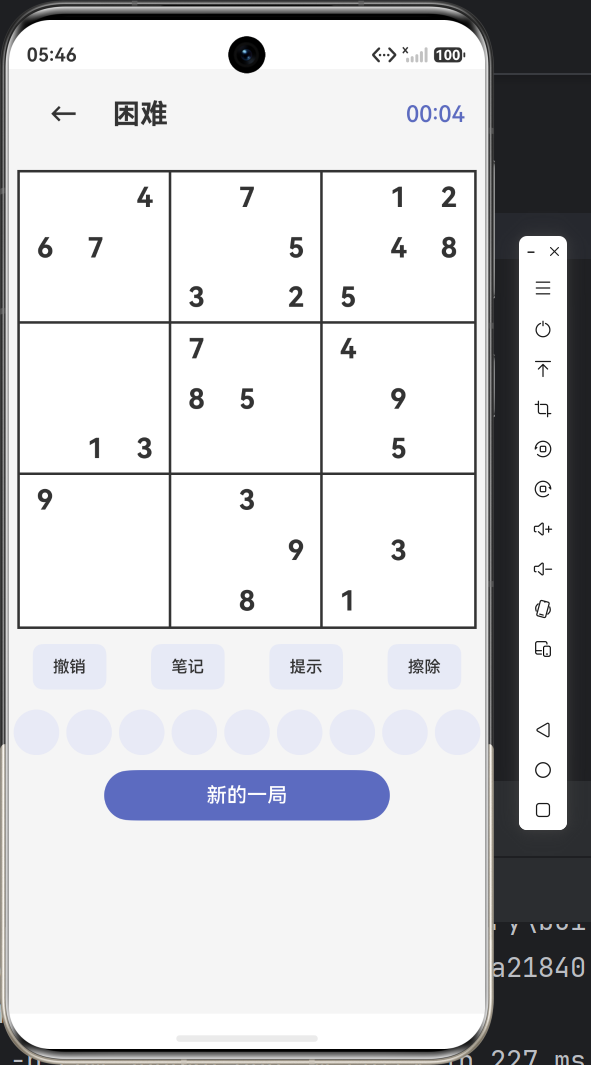
九、完整的当前游戏效果
目前 GamePage 已经具备:
| 功能 | 状态 |
|---|---|
| ✅ 4种难度生成题目 | 完成 |
| ✅ 9×9 棋盘渲染 | 完成 |
| ✅ 点击选中 + 联动高亮 | 完成 |
| ✅ 数字填入 | 完成 |
| ✅ 笔记候选数模式 | 完成 |
| ✅ 擦除功能 | 完成 |
| ✅ 提示功能 | 完成 |
| ✅ 错误检测标记 | 完成 |
| ✅ 计时器 | 完成 |
| ✅ 完成判定 | 完成 |
| ✅ 重新开始 | 完成 |
十、小结与预告
本篇我们完成了数独游戏最核心的 GamePage 开发,内容包括:
- 数独题目挖空生成算法
- 9×9 棋盘的嵌套 ForEach 渲染
- 单元格联动高亮交互
- 笔记候选数系统
- 错误检测与完成判定
- 计时器生命周期管理
下一篇我们将开发游戏的辅助功能页面:
- 设置页面(音效/高亮/自动检查开关)
- 游戏统计页面(完成局数/平均用时/难度分布)
- 为后续的成就系统和排行榜奠定数据基础
敬请期待!