🌤️ 鸿蒙原生应用实战(九)ArkUI 天气预报 App:HTTP 请求 + 定位 + 动效
博主说: 天气预报是每个手机的基础应用,也是学习「网络请求 + 定位 + 动画」全链路的最佳项目。今天我们用 ArkUI 的 HTTP 网络请求 + 地理定位 API,从零实现一个支持自动定位、未来 7 天预报、天气动效的完整天气 App。
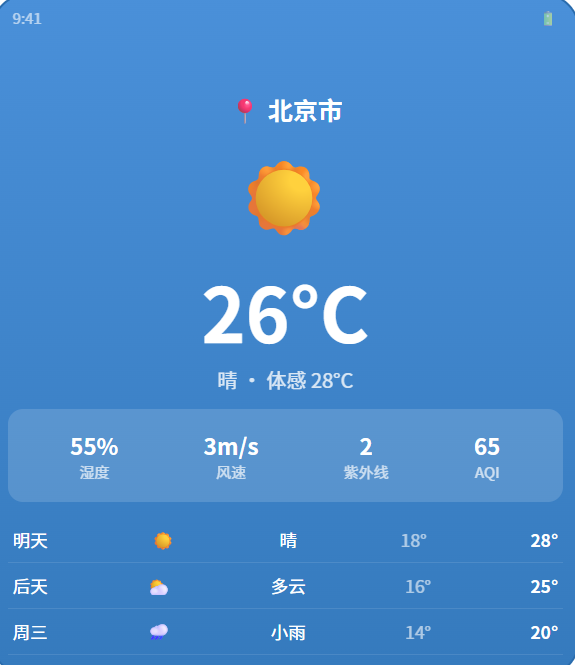
📱 应用场景
| 功能 | 说明 |
|---|---|
| 📍 自动定位 | 获取当前位置并显示天气 |
| 🌡️ 实时温度 | 当前温度 + 体感温度 |
| 📅 7天预报 | 未来 7 天的天气概况 |
| 🎨 天气动效 | 晴天/阴天/雨天/雪天动态背景 |
| 🔍 城市搜索 | 手动切换城市 |
| 🌤️ 天气详情 | 湿度/风速/紫外线/空气质量 |
⚙️ 运行环境要求
| 项目 | 版本要求 |
|---|---|
| DevEco Studio | 5.0.3.800+ |
| HarmonyOS SDK | API 12 |
| 核心 API | @ohos.net.http + @ohos.geoLocation |
| 权限 | INTERNET + LOCATION |
🛠️ 实战:从零搭建天气预报 App
Step 1:天气数据模型
typescript
interface WeatherData {
  city: string;
  temperature: number;     // 当前温度
  feelsLike: number;       // 体感温度
  condition: string;       // 天气状况 (晴/多云/雨等)
  humidity: number;        // 湿度 %
  windSpeed: number;       // 风速
  uvIndex: number;         // 紫外线
  aqi: number;             // 空气质量指数
  forecast: DayForecast[]; // 7天预报
}
interface DayForecast {
  date: string;
  high: number;  low: number;
  condition: string;
  icon: string;
}
Step 2:完整代码
typescript
// pages/Index.ets --- 天气预报
import http from '@ohos.net.http';
import geoLocation from '@ohos.geoLocation';
import abilityAccessCtrl from '@ohos.abilityAccessCtrl';

@Entry
@Component
struct WeatherApp {
  @State weather: WeatherData | null = null;
  @State isLoading: boolean = true;
  @State cityName: string = '北京';
  @State currentPage: number = 0;  // 0=今天, 1=7天
  @State locationEnabled: boolean = false;

  // 天气动画状态
  @State animationType: 'sunny' | 'cloudy' | 'rainy' | 'snowy' = 'sunny';

  aboutToAppear() {
    this.requestLocation();
  }

  async requestLocation() {
    try {
      const atManager = abilityAccessCtrl.createAtManager();
      await atManager.requestPermissionsFromUser(
        getContext(this), ['ohos.permission.LOCATION']
      );
      this.locationEnabled = true;

      const loc = await geoLocation.getCurrentLocation({
        priority: geoLocation.LocationRequestPriority.FIRST_FIX,
        timeoutMs: 5000
      });
      // 用经纬度获取城市名
      this.fetchWeatherByCoords(loc.latitude, loc.longitude);
    } catch {
      // 定位失败,用默认城市
      this.fetchWeatherByCity('北京');
    }
  }

  async fetchWeatherByCoords(lat: number, lon: number) {
    this.isLoading = true;
    try {
      const req = http.createHttp();
      const resp = await req.request(
        `https://api.openweathermap.org/data/2.5/weather?lat=${lat}&lon=${lon}&appid=YOUR_API_KEY&units=metric&lang=zh_cn`,
        { method: http.RequestMethod.GET, expectDataType: http.HttpDataType.OBJECT }
      );
      const data = JSON.parse(resp.result as string);
      this.cityName = data.name;
      this.parseWeatherData(data);
    } catch {
      this.fetchWeatherByCity('北京');
    }
    this.isLoading = false;
  }

  async fetchWeatherByCity(city: string) {
    this.isLoading = true;
    try {
      const req = http.createHttp();
      const resp = await req.request(
        `https://api.openweathermap.org/data/2.5/weather?q=${city}&appid=YOUR_API_KEY&units=metric&lang=zh_cn`,
        { method: http.RequestMethod.GET, expectDataType: http.HttpDataType.OBJECT }
      );
      const data = JSON.parse(resp.result as string);
      this.parseWeatherData(data);

      // 同时获取7天预报
      const resp2 = await req.request(
        `https://api.openweathermap.org/data/2.5/forecast?q=${city}&appid=YOUR_API_KEY&units=metric&lang=zh_cn`,
        { method: http.RequestMethod.GET }
      );
      const forecastData = JSON.parse(resp2.result as string);
      this.parseForecast(forecastData);
    } catch (err) {
      AlertDialog.show({ message: '获取天气数据失败,请检查网络' });
    }
    this.isLoading = false;
  }

  parseWeatherData(data: any) {
    this.weather = {
      city: data.name,
      temperature: Math.round(data.main.temp),
      feelsLike: Math.round(data.main.feels_like),
      condition: data.weather[0].description,
      humidity: data.main.humidity,
      windSpeed: data.wind.speed,
      uvIndex: 0,
      aqi: 0,
      forecast: []
    };
    this.updateAnimation(data.weather[0].main);
  }

  parseForecast(data: any) {
    if (!this.weather) return;
    const daily: DayForecast[] = [];
    const groups: Record<string, any[]> = {};

    for (const item of data.list) {
      const date = item.dt_txt.split(' ')[0];
      if (!groups[date]) groups[date] = [];
      groups[date].push(item);
    }

    let count = 0;
    for (const date of Object.keys(groups)) {
      if (count >= 7) break;
      const items = groups[date];
      const highs = items.map((i: any) => i.main.temp_max);
      const lows = items.map((i: any) => i.main.temp_min);
      daily.push({
        date: date,
        high: Math.round(Math.max(...highs)),
        low: Math.round(Math.min(...lows)),
        condition: items[4]?.weather[0]?.description || items[0].weather[0].description,
        icon: items[0].weather[0].icon
      });
      count++;
    }
    this.weather.forecast = daily;
  }

  updateAnimation(condition: string) {
    if (condition.includes('Rain') || condition.includes('Drizzle')) {
      this.animationType = 'rainy';
    } else if (condition.includes('Snow')) {
      this.animationType = 'snowy';
    } else if (condition.includes('Cloud')) {
      this.animationType = 'cloudy';
    } else {
      this.animationType = 'sunny';
    }
  }

  getWeatherIcon(): string {
    const icons: Record<string, string> = {
      'sunny': '☀️', 'cloudy': '⛅', 'rainy': '🌧️', 'snowy': '❄️'
    };
    return icons[this.animationType] || '☀️';
  }

  build() {
    Stack() {
      // ---- 天气动效背景 ----
      Column()
        .width('100%').height('100%')
        .backgroundColor(
          this.animationType === 'sunny' ? '#4A90D9' :
          this.animationType === 'cloudy' ? '#8E9EAB' :
          this.animationType === 'rainy' ? '#4A5568' : '#B8C6D0'
        )

      // ---- 主内容 ----
      if (this.isLoading) {
        Column() {
          LoadingProgress().width(48).height(48).color('#fff')
          Text('获取天气数据...').fontSize(16).fontColor('#fff').margin({ top: 16 })
        }
      } else if (this.weather) {
        Column() {
          // 城市 + 刷新
          Row() {
            Text(this.weather.city).fontSize(20).fontWeight(FontWeight.Bold).fontColor('#fff')
            Text('↻').fontSize(18).fontColor('rgba(255,255,255,0.7)').margin({ left: 8 })
              .onClick(() => { this.fetchWeatherByCity(this.cityName); })
          }.padding({ top: 40 })

          // 温度
          Text(this.getWeatherIcon()).fontSize(64).margin({ top: 8 })
          Text(`${this.weather.temperature}°C`).fontSize(64).fontWeight(FontWeight.Bold)
            .fontColor('#fff').margin({ top: 4 })
          Text(this.weather.condition).fontSize(18).fontColor('rgba(255,255,255,0.8)')
          Text(`体感 ${this.weather.feelsLike}°C`).fontSize(14).fontColor('rgba(255,255,255,0.6)')
            .margin({ top: 4 })

          // 详情卡片
          Row() {
            WeatherDetail('💧', '湿度', `${this.weather.humidity}%`)
            WeatherDetail('💨', '风速', `${this.weather.windSpeed} m/s`)
            WeatherDetail('☀️', '紫外线', `${this.weather.uvIndex}`)
            WeatherDetail('🌫️', 'AQI', `${this.weather.aqi}`)
          }
          .width('94%').padding(16)
          .backgroundColor('rgba(255,255,255,0.2)')
          .borderRadius(16).margin({ top: 16 })

          // 7天预报
          if (this.weather.forecast.length > 0) {
            Text('📅 未来 7 天').fontSize(16).fontWeight(FontWeight.Bold)
              .fontColor('#fff').margin({ top: 16, bottom: 8 })

            List() {
              ForEach(this.weather.forecast, (day: DayForecast) => {
                ListItem() {
                  Row() {
                    Text(day.date.substring(5)).fontSize(14).fontColor('#fff').width(50)
                    Text(this.getConditionEmoji(day.condition)).fontSize(20).width(30)
                    Text(day.condition).fontSize(13).fontColor('rgba(255,255,255,0.7)').layoutWeight(1)
                    Text(`${day.low}°`).fontSize(14).fontColor('rgba(255,255,255,0.6)')
                    Text(`${day.high}°`).fontSize(14).fontColor('#fff').fontWeight(FontWeight.Bold).width(40)
                  }
                  .padding(10).width('94%')
                  .backgroundColor('rgba(255,255,255,0.1)')
                  .borderRadius(8).margin({ top: 4 })
                }
              }, (day: DayForecast) => day.date)
            }
            .height(200)
          }
        }
        .width('100%').height('100%')
        .alignItems(HorizontalAlign.Center)
        .justifyContent(FlexAlign.Start)
      }
    }
    .width('100%').height('100%')
  }

  getConditionEmoji(condition: string): string {
    if (condition.includes('晴')) return '☀️';
    if (condition.includes('云') || condition.includes('阴')) return '☁️';
    if (condition.includes('雨')) return '🌧️';
    if (condition.includes('雪')) return '❄️';
    return '🌤️';
  }
}

@Builder
function WeatherDetail(icon: string, label: string, value: string) {
  Column() {
    Text(icon).fontSize(24)
    Text(label).fontSize(12).fontColor('rgba(255,255,255,0.7)').margin({ top: 4 })
    Text(value).fontSize(16).fontColor('#fff').fontWeight(FontWeight.Bold).margin({ top: 2 })
  }
}
官方文档: HarmonyOS 应用开发文档
- 开发者社区: 华为开发者论坛
- 欢迎加入开源鸿蒙跨平台社区: https://openharmonycrossplatform.csdn.net/