Boop武/java - Gitee.com可以直接在仓库中下载Spring-cloud-demo1
准备工作
环境准备,windows jdk17,linux jdk17,linux Mysql 8+,Spring3.x
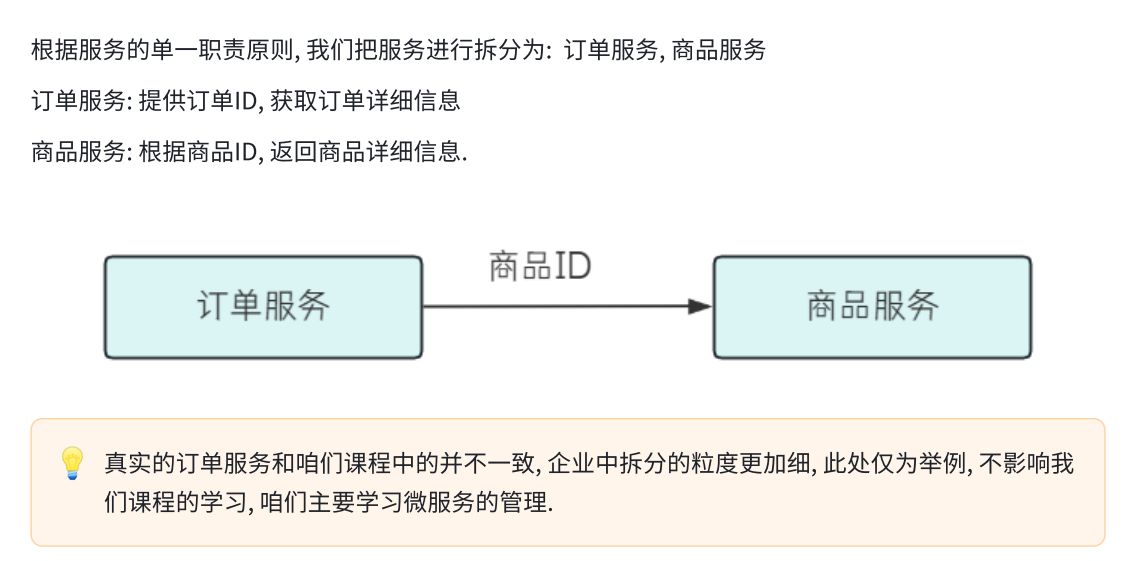
1.设计需求
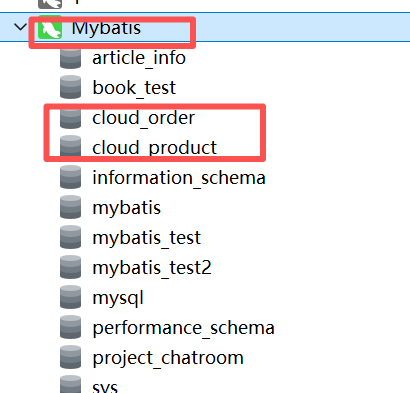
2.数据准备
① 订单服务
-- 订单服务

-- 建库
create database if not exists cloud_order charset utf8mb4;

use cloud_order;
-- 订单表
DROP TABLE IF EXISTS order_detail;
CREATE TABLE order_detail (
        `id` INT NOT NULL AUTO_INCREMENT COMMENT '订单id',
        `user_id` BIGINT ( 20 ) NOT NULL COMMENT '用户ID',
        `product_id` BIGINT ( 20 ) NULL COMMENT '产品id',
        `num` INT ( 10 ) NULL DEFAULT 0 COMMENT '下单数量',
        `price` BIGINT ( 20 ) NOT NULL COMMENT '实付款',
        `delete_flag` TINYINT ( 4 ) NULL DEFAULT 0,
        `create_time` DATETIME DEFAULT now(),
        `update_time` DATETIME DEFAULT now(),
PRIMARY KEY ( id )) ENGINE = INNODB DEFAULT CHARACTER
SET = utf8mb4 COMMENT = '订单表';

-- 数据初始化
insert into order_detail (user_id,product_id,num,price)
values
(2001, 1001,1,99), (2002, 1002,1,30), (2001, 1003,1,40),
(2003, 1004,3,58), (2004, 1005,7,85), (2005, 1006,7,94);
② 产品服务
-- 产品服务
create database if not exists cloud_product charset utf8mb4;

-- 产品表
use cloud_product;
DROP TABLE IF EXISTS product_detail;
CREATE TABLE product_detail (
        `id` INT NOT NULL AUTO_INCREMENT COMMENT '产品id',
        `product_name` varchar ( 128 ) NULL COMMENT '产品名称',
        `product_price` BIGINT ( 20 ) NOT NULL COMMENT '产品价格',
        `state` TINYINT ( 4 ) NULL DEFAULT 0 COMMENT '产品状态 0-有效 1-下架',
        `create_time` DATETIME DEFAULT now(),
        `update_time` DATETIME DEFAULT now(),
PRIMARY KEY ( id )) ENGINE = INNODB DEFAULT CHARACTER
SET = utf8mb4 COMMENT = '产品表';

-- 数据初始化
insert into product_detail (id, product_name,product_price,state)
values
(1001,"T恤", 101, 0), (1002, "短袖",30, 0), (1003, "短裤",44, 0),
(1004, "卫衣",58, 0), (1005, "马甲",98, 0),(1006,"羽绒服", 101, 0),
(1007, "冲锋衣",30, 0), (1008, "袜子",44, 0), (1009, "鞋子",58, 0),
(10010, "毛衣",98, 0);
位置
使用父子工程来搭建项目
父工程
直接创建一个空的项目
父工程 pom.xml
<?xml version="1.0" encoding="UTF-8"?>
<project xmlns="http://maven.apache.org/POM/4.0.0"
         xmlns:xsi="http://www.w3.org/2001/XMLSchema-instance"
         xsi:schemaLocation="http://maven.apache.org/POM/4.0.0 http://maven.apache.org/xsd/maven-4.0.0.xsd">
    <modelVersion>4.0.0</modelVersion>

    <groupId>org.example</groupId>
    <artifactId>spring-cloud-eureka</artifactId>
    <version>1.0-SNAPSHOT</version>
    <modules>
        <module>order-service</module>
        <module>product-service</module>
        <module>eureka-server</module>
    </modules>
    <packaging>pom</packaging>

    <parent>
        <groupId>org.springframework.boot</groupId>
        <artifactId>spring-boot-starter-parent</artifactId>
        <version>3.1.6</version>
        <relativePath/> <!-- lookup parent from repository -->
    </parent>
    <properties>
        <maven.compiler.source>17</maven.compiler.source>
        <maven.compiler.target>17</maven.compiler.target>
        <java.version>17</java.version>
        <mybatis.version>3.0.3</mybatis.version>
        <mysql.version>8.0.33</mysql.version>
        <spring-cloud.version>2022.0.3</spring-cloud.version>
    </properties>

    <dependencies>
        <dependency>
            <groupId>org.projectlombok</groupId>
            <artifactId>lombok</artifactId>
            <optional>true</optional>
        </dependency>
    </dependencies>

    <dependencyManagement>
        <dependencies>
            <dependency>
                <groupId>org.springframework.cloud</groupId>
                <artifactId>spring-cloud-dependencies</artifactId>
                <version>${spring-cloud.version}</version>
                <type>pom</type>
                <scope>import</scope>
            </dependency>
            <dependency>
                <groupId>org.mybatis.spring.boot</groupId>
                <artifactId>mybatis-spring-boot-starter</artifactId>
                <version>${mybatis.version}</version>
            </dependency>
            <dependency>
                <groupId>com.mysql</groupId>
                <artifactId>mysql-connector-j</artifactId>
                <version>${mysql.version}</version>
            </dependency>
            <dependency>
                <groupId>org.mybatis.spring.boot</groupId>
                <artifactId>mybatis-spring-boot-starter-test</artifactId>
                <version>${mybatis.version}</version>
                <scope>test</scope>
            </dependency>
        </dependencies>
    </dependencyManagement>

</project>
子工程 :
右键项目名称 , 新建 modul
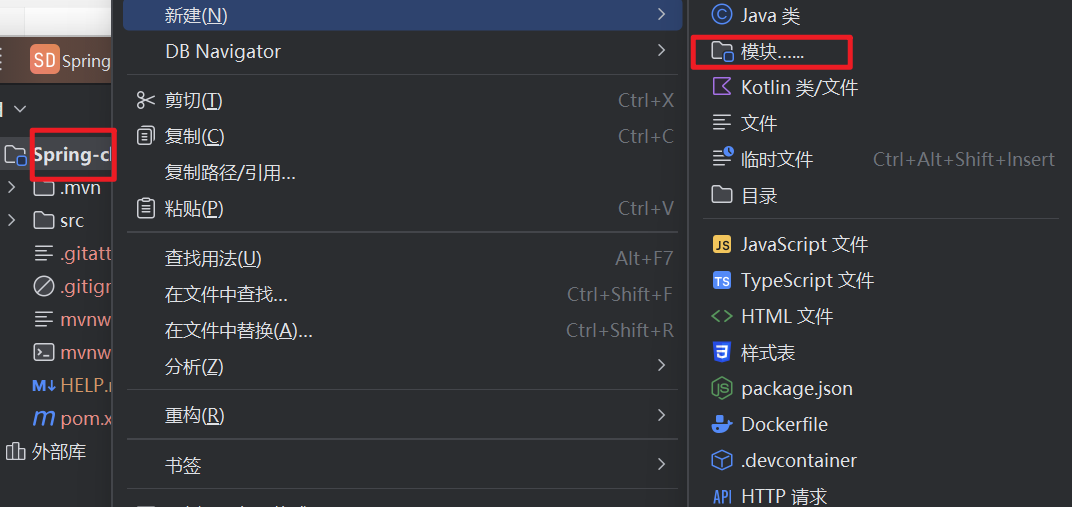
分别创建两个 modul
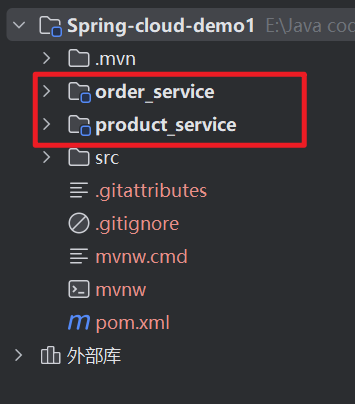
order_service
pom
<?xml version="1.0" encoding="UTF-8"?>
<project xmlns="http://maven.apache.org/POM/4.0.0"
         xmlns:xsi="http://www.w3.org/2001/XMLSchema-instance"
         xsi:schemaLocation="http://maven.apache.org/POM/4.0.0 http://maven.apache.org/xsd/maven-4.0.0.xsd">
    <parent>
        <artifactId>spring-cloud-eureka</artifactId>
        <groupId>org.example</groupId>
        <version>1.0-SNAPSHOT</version>
    </parent>
    <modelVersion>4.0.0</modelVersion>

    <artifactId>order-service</artifactId>

    <properties>
        <maven.compiler.source>17</maven.compiler.source>
        <maven.compiler.target>17</maven.compiler.target>
    </properties>
    <dependencies>
        <dependency>
            <groupId>org.springframework.boot</groupId>
            <artifactId>spring-boot-starter-web</artifactId>
        </dependency>
        <dependency>
            <groupId>com.mysql</groupId>
            <artifactId>mysql-connector-j</artifactId>
        </dependency>
        <!--mybatis-->
        <dependency>
            <groupId>org.mybatis.spring.boot</groupId>
            <artifactId>mybatis-spring-boot-starter</artifactId>
        </dependency>
        <dependency>
            <groupId>org.springframework.cloud</groupId>
            <artifactId>spring-cloud-starter-netflix-eureka-client</artifactId>
        </dependency>
    </dependencies>
    <profiles>
        <profile>
            <id>dev</id>
            <properties>
                <profile.name>dev</profile.name>
            </properties>
        </profile>
        <profile>
            <id>prod</id>
            <properties>
                <profile.name>prod</profile.name>
            </properties>
        </profile>
    </profiles>
    <build>
        <plugins>
            <plugin>
                <groupId>org.springframework.boot</groupId>
                <artifactId>spring-boot-maven-plugin</artifactId>
            </plugin>
        </plugins>
    </build>

</project>
配置文件 application.yml
spring:
  datasource:
    url: jdbc:mysql://127.0.0.1:3306/cloud_order?characterEncoding=utf8&useSSL=false
    username: root
    password: 123456
    driver-class-name: com.mysql.cj.jdbc.Driver

# 设置 Mybatis 的 xml 保存路径
mybatis:
  mapper-locations: classpath:mapper/*Mapper.xml
  configuration: # 配置打印 MyBatis 执行的 SQL
    log-impl: org.apache.ibatis.logging.stdout.StdOutImpl
    map-underscore-to-camel-case: true  #自动驼峰转换
OrderMapper
@Mapper
public interface OrderMapper {
    @Select("select * from order_detail where id = #{orderId}")
    OrderInfo selectOrderById (Integer orderId);
}
OrderService
@Service
public class OrderService {
    @Autowired
    private OrderMapper orderMapper;

    public OrderInfo selectOrderById(Integer orderId){
        return orderMapper.selectOrderById(orderId);
    }
}
OrderController
@RequestMapping("/order")
@RestController
public class OrderController {
    @Autowired
    private OrderService orderService;

    @RequestMapping("/{orderId}")
    public OrderInfo selectOrderById (@PathVariable("orderId") Integer orderId){//从请求url中获取参数
        return orderService.selectOrderById(orderId);
    }
}
product_service
pom 文件
<?xml version="1.0" encoding="UTF-8"?>
<project xmlns="http://maven.apache.org/POM/4.0.0"
         xmlns:xsi="http://www.w3.org/2001/XMLSchema-instance"
         xsi:schemaLocation="http://maven.apache.org/POM/4.0.0 http://maven.apache.org/xsd/maven-4.0.0.xsd">
    <parent>
        <artifactId>spring-cloud-eureka</artifactId>
        <groupId>org.example</groupId>
        <version>1.0-SNAPSHOT</version>
    </parent>
    <modelVersion>4.0.0</modelVersion>

    <artifactId>product-service</artifactId>

    <properties>
        <maven.compiler.source>17</maven.compiler.source>
        <maven.compiler.target>17</maven.compiler.target>
    </properties>
    <dependencies>
        <dependency>
            <groupId>org.springframework.boot</groupId>
            <artifactId>spring-boot-starter-web</artifactId>
        </dependency>
        <dependency>
            <groupId>com.mysql</groupId>
            <artifactId>mysql-connector-j</artifactId>
        </dependency>
        <!--mybatis-->
        <dependency>
            <groupId>org.mybatis.spring.boot</groupId>
            <artifactId>mybatis-spring-boot-starter</artifactId>
        </dependency>
        <dependency>
            <groupId>org.springframework.cloud</groupId>
            <artifactId>spring-cloud-starter-netflix-eureka-client</artifactId>
        </dependency>
    </dependencies>
    <profiles>
        <profile>
            <id>dev</id>
            <properties>
                <profile.name>dev</profile.name>
            </properties>
        </profile>
        <profile>
            <id>prod</id>
            <properties>
                <profile.name>prod</profile.name>
            </properties>
        </profile>
    </profiles>
    <build>
        <plugins>
            <plugin>
                <groupId>org.springframework.boot</groupId>
                <artifactId>spring-boot-maven-plugin</artifactId>
            </plugin>
        </plugins>
    </build>

</project>
配置文件
server:
  port: 9090
spring:
  datasource:
    url: jdbc:mysql://127.0.0.1:3306/cloud_product?characterEncoding=utf8&useSSL=false
    username: root
    password: 123456
    driver-class-name: com.mysql.cj.jdbc.Driver

# 设置 Mybatis 的 xml 保存路径
mybatis:
  mapper-locations: classpath:mapper/*Mapper.xml
  configuration: # 配置打印 MyBatis 执行的 SQL
    log-impl: org.apache.ibatis.logging.stdout.StdOutImpl
    map-underscore-to-camel-case: true  #自动驼峰转换
ProductMapper
@Mapper
public interface ProductMapper {
    @Select("select * from product_detail where id = #{id}")
    ProductInfo selectProductById(Integer id);
}
ProductService
@Service
public class ProductService {
    @Autowired
    private ProductMapper productMapper;

    public ProductInfo selectProductById(Integer id){
        return productMapper.selectProductById(id);
    }
}
ProductController
@RequestMapping("/product")
@RestController
public class ProductController {
    @Autowired
    private ProductService productService;

    @RequestMapping("/{productId}")
    public ProductInfo getProductById(@PathVariable("productId") Integer productId){
        return productService.selectProductById(productId);
    }
}
测试
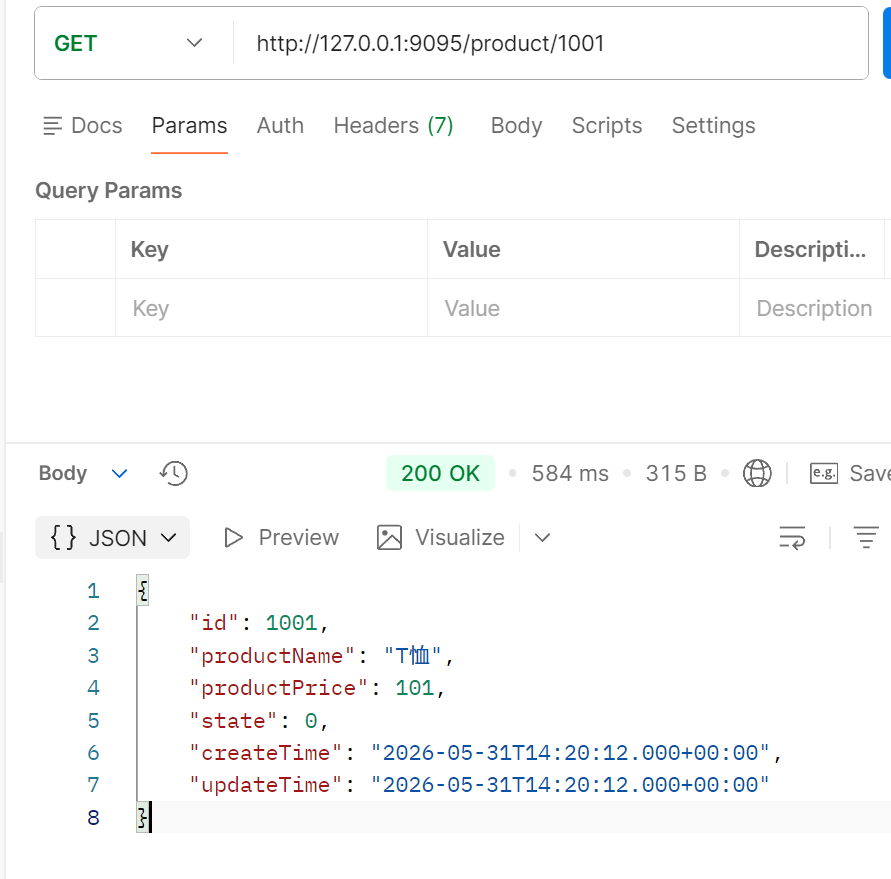
测试 url 此处由于端口被占用,故修改端口号
http://127.0.0.1:9095/product/1001
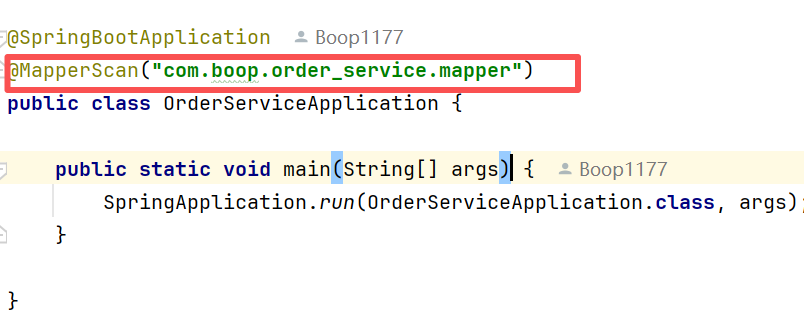
注意:可能出现找不到 bean 类似注解 , 需要手都写入扫描路径
需求 2 :
根据订单信息查询订单 , 获取到商品的 ID , 用商品 ID 查询商品表,从而获取到商品的详细信息
思路 : 我们需要让 order_service 服务向 produce_service 发起一个 http 请求 , 把得到的结果整合到返回结果中 , 一起发送给调用者
发起 http 请求的方式 : 采用 Spring 提供的 RestTemple (其它实现方式https://zhuanlan.zhihu.com/p/670101467)
定义 RestTemplate
@Configuration
public class BeanConfig {
    @Bean
    public RestTemplate restTemplate(){
        return new RestTemplate();
    }
}
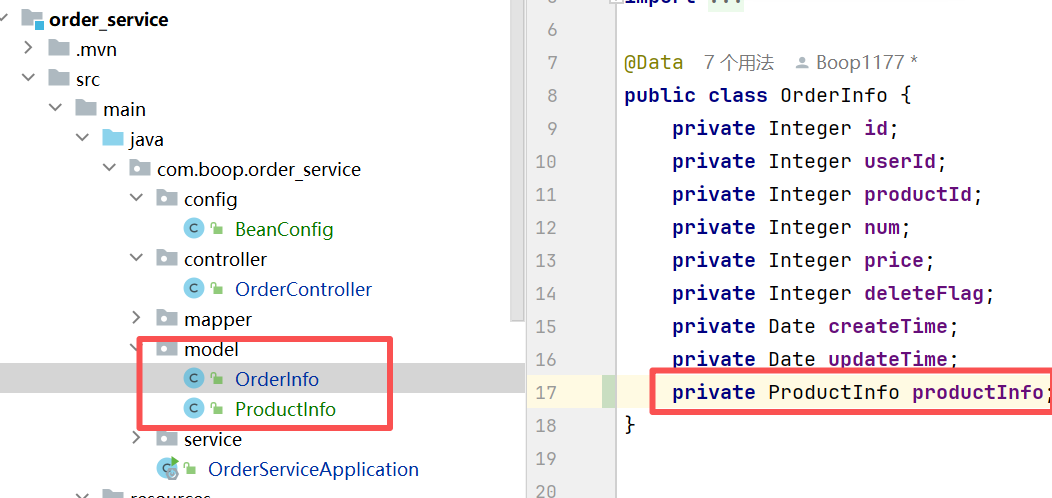
在 OrderInfo 中加入 ProductInfo 字段 , 并将该实体类加入到 order_service 中
OrderController
@RequestMapping("/order")
@RestController
public class OrderController {
    @Autowired
    private OrderService orderService;

    @Autowired
    private RestTemplate restTemplate;

    @RequestMapping("/{orderId}")
    public OrderInfo selectOrderById (@PathVariable("orderId") Integer orderId){//从请求url中获取参数
        OrderInfo info =  orderService.selectOrderById(orderId);
        String url = "http://127.0.0.1:9095/product/"+info.getProductId();
        ProductInfo productInfo = restTemplate.getForObject(url, ProductInfo.class);
        info.setProductInfo(productInfo);
        return info;
    }
}
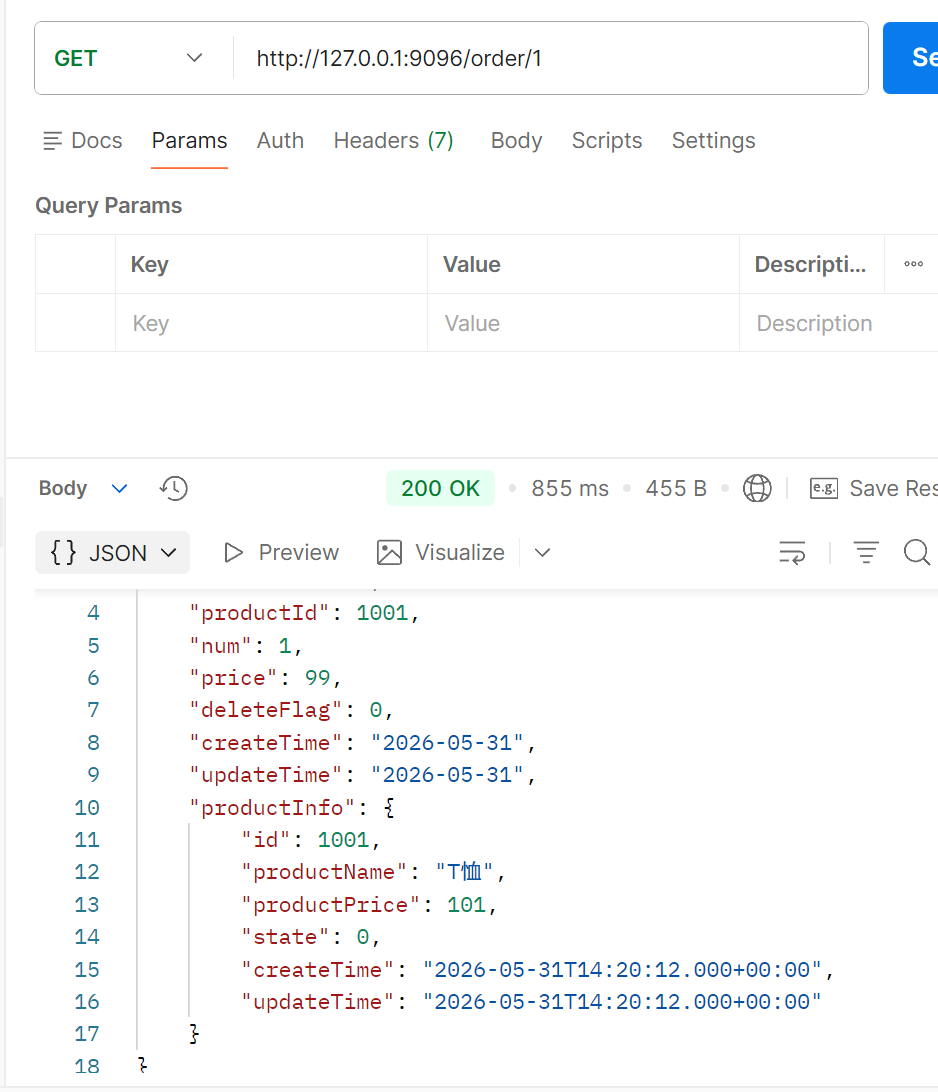
使用restTemplate.getForObject() 发起 http 请求 , 第一个参数为 url , 第二个参数为返回类型
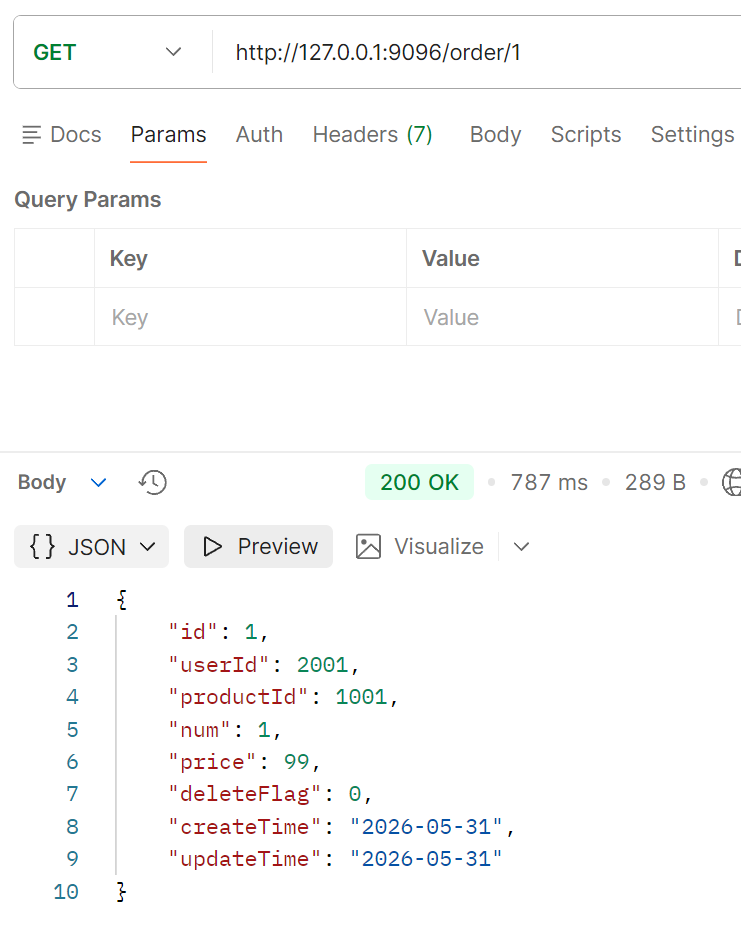
测试