欢迎加入开源鸿蒙PC社区:
atomgit仓库地址: https://atomgit.com/2401_83963238/hongmeng61guangganxiaoguo
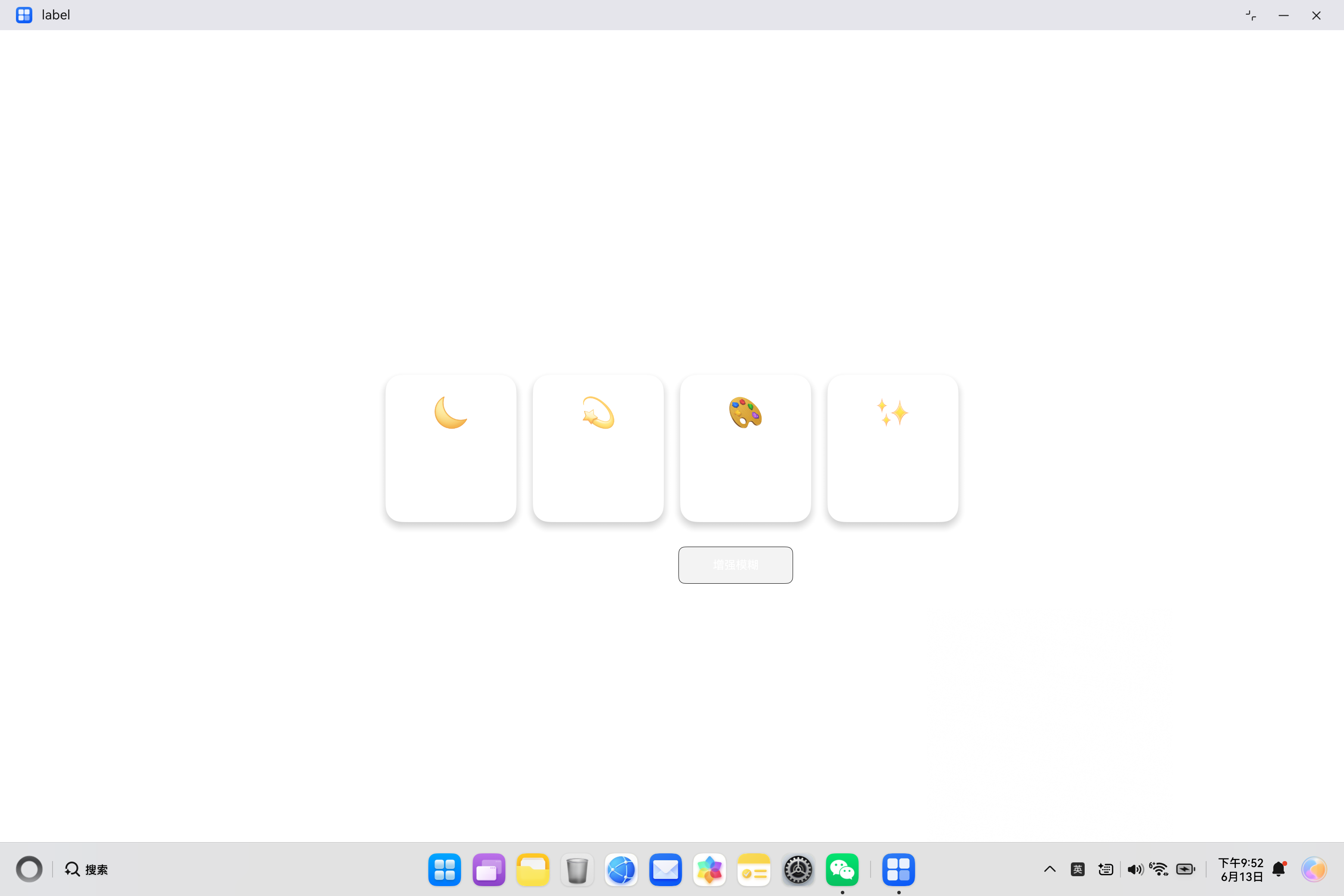
实现效果,按钮光感:
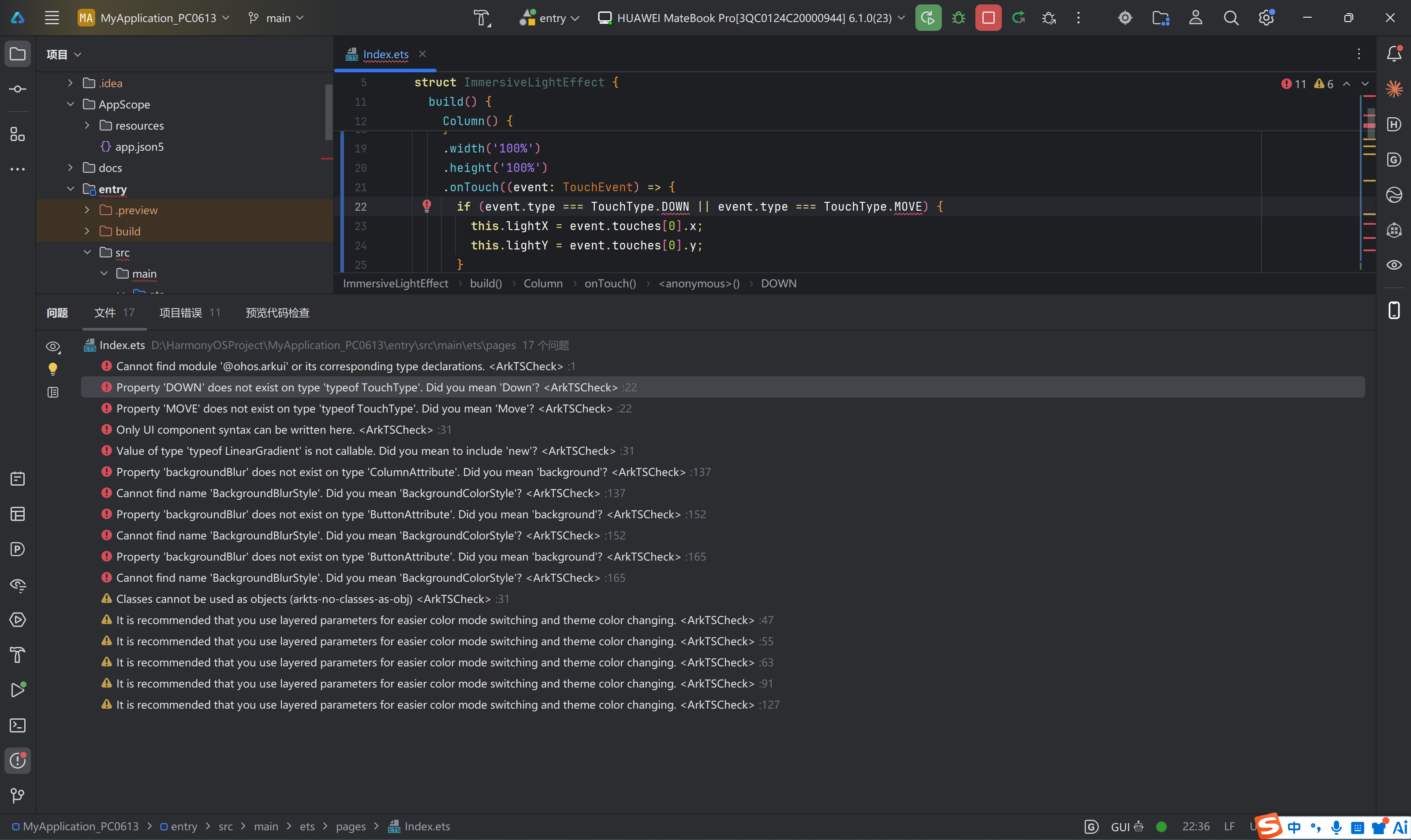
HarmonyOS 6.1 引入了许多新的UI特性,其中沉浸式光感效果是一个非常吸引人的功能。然而,在实现过程中,开发者可能会遇到各种编译错误。本文将详细分析常见的错误类型,并提供完整的解决方案。
错误分类总览
| 序号 | 错误类型 | 错误代码 | 严重程度 | 解决方案 |
|---|---|---|---|---|
| 1 | 模块导入错误 | Cannot find module '@ohos.arkui' |
高 | 移除错误导入 |
| 2 | 枚举大小写错误 | Property 'DOWN' does not exist |
高 | 使用正确枚举值 |
| 3 | 构造函数调用错误 | LinearGradient is not callable |
高 | 使用new关键字 |
| 4 | 属性不存在 | backgroundBlur does not exist |
中 | 使用替代方案 |
| 5 | 类不存在 | Cannot find name 'BackgroundBlurStyle' |
中 | 使用替代方案 |
| 6 | UI语法错误 | Only UI component syntax can be written here |
高 | 重构代码结构 |
错误1: 模块导入错误
错误信息
Cannot find module '@ohos.arkui' or its corresponding type declarations.问题分析
在 ArkTS 中,@ohos.arkui 模块并不存在。ArkUI 组件和装饰器是全局可用的,不需要额外导入。
错误代码
typescript
// ❌ 错误代码
import { Builder } from '@ohos.arkui';
解决方案
typescript
// ✅ 正确代码
// 不需要导入 @ohos.arkui,@Builder 装饰器是全局可用的
@Entry
@Component
struct MyComponent {
  @Builder
  buildContent() {
    // ...
  }
}
原因解释
ArkTS 将 ArkUI 组件作为内置模块提供,开发者不需要显式导入。以下是不需要导入的内容:
| 类别 | 示例 |
|---|---|
| 装饰器 | @Entry, @Component, @Builder, @State |
| 组件 | Column, Row, Stack, Text, Button |
| 枚举 | Color, FontWeight, Alignment |
错误2: TouchType枚举大小写错误
错误信息
Property 'DOWN' does not exist on type 'typeof TouchType'. Did you mean 'Down'?问题分析
ArkTS 中的枚举值使用 PascalCase(首字母大写,其余单词首字母大写),而不是全部大写。
错误代码
typescript
// ❌ 错误代码
onTouch((event: TouchEvent) => {
  if (event.type === TouchType.DOWN || event.type === TouchType.MOVE) {
    // ...
  }
})
解决方案
typescript
// ✅ 正确代码
onTouch((event: TouchEvent) => {
  if (event.type === TouchType.Down || event.type === TouchType.Move) {
    // ...
  }
})
TouchType枚举值对照表
| 错误写法 | 正确写法 | 含义 |
|---|---|---|
TouchType.DOWN |
TouchType.Down |
手指按下 |
TouchType.MOVE |
TouchType.Move |
手指移动 |
TouchType.UP |
TouchType.Up |
手指抬起 |
TouchType.CANCEL |
TouchType.Cancel |
触摸取消 |
错误3: LinearGradient构造函数调用错误
错误信息
Value of type 'typeof LinearGradient' is not callable. Did you mean to include 'new'?问题分析
LinearGradient 是一个类,需要使用 new 关键字来创建实例。
错误代码
typescript
// ❌ 错误代码
@Builder
buildGradient() {
  LinearGradient({
    colors: ['#667eea', '#764ba2'],
    direction: GradientDirection.Right
  })
  .width('100%')
  .height('100%');
}
解决方案
typescript
// ✅ 正确代码
@Builder
buildGradient() {
  new LinearGradient({
    colors: ['#667eea', '#764ba2'],
    direction: GradientDirection.Right
  })
  .width('100%')
  .height('100%');
}
常见需要new的类
| 类名 | 用途 |
|---|---|
LinearGradient |
线性渐变 |
RadialGradient |
径向渐变 |
SweepGradient |
扫描渐变 |
Path |
路径绘制 |
错误4: backgroundBlur属性不存在
错误信息
Property 'backgroundBlur' does not exist on type 'ColumnAttribute'. Did you mean 'background'?问题分析
backgroundBlur 属性在当前版本的 ArkUI 中可能不存在或名称不同。需要使用其他方式实现毛玻璃效果。
错误代码
typescript
// ❌ 错误代码
Column() {
  // ...
}
.backgroundColor('rgba(255,255,255,0.1)')
.backgroundBlur(20, BackgroundBlurStyle.LIGHT)
解决方案
typescript
// ✅ 正确代码 - 使用半透明背景模拟毛玻璃效果
Column() {
  // ...
}
.backgroundColor('rgba(255,255,255,0.1)')
.border({ width: 1, color: 'rgba(255,255,255,0.2)' })
替代方案对比
| 方案 | 效果 | 适用场景 |
|---|---|---|
| 半透明背景 | 简单毛玻璃效果 | 基础需求 |
| backdrop-filter | 真实毛玻璃 | 需要API支持 |
| Stack叠加 | 自定义模糊效果 | 高级需求 |
错误5: BackgroundBlurStyle不存在
错误信息
Cannot find name 'BackgroundBlurStyle'. Did you mean 'BackgroundColorStyle'?问题分析
BackgroundBlurStyle 在当前 SDK 版本中不存在,可能是未来版本的 API 或名称不同。
错误代码
typescript
// ❌ 错误代码
.backgroundBlur(20, BackgroundBlurStyle.LIGHT)
解决方案
typescript
// ✅ 正确代码 - 移除背景模糊或使用替代方案
.backgroundColor('rgba(255,255,255,0.15)')
错误6: UI语法错误
错误信息
Only UI component syntax can be written here.问题分析
在 @Builder 函数中,UI组件内部只能写UI组件语法,不能写条件表达式等逻辑代码。
错误代码
typescript
// ❌ 错误代码
@Builder
buildGradient() {
  LinearGradient({
    colors: this.isDarkMode ? ['#1a1a2e', '#16213e'] : ['#667eea', '#764ba2'],
    direction: GradientDirection.Right
  })
  .width('100%')
  .height('100%');
}
解决方案
typescript
// ✅ 正确代码
@State gradientColors: Array<string> = ['#667eea', '#764ba2'];

onThemeChange(): void {
  if (this.isDarkMode) {
    this.gradientColors = ['#1a1a2e', '#16213e'];
  } else {
    this.gradientColors = ['#667eea', '#764ba2'];
  }
}

@Builder
buildGradient() {
  new LinearGradient({
    colors: this.gradientColors,
    direction: GradientDirection.Right
  })
  .width('100%')
  .height('100%');
}
@Builder约束说明
typescript
@Builder
myBuilder() {
  // ✅ 允许:变量声明(在UI组件外部)
  let temp = calculate();

  // ✅ 允许:UI组件
  Column() {
    Row() {
      // ❌ 禁止:变量声明、条件表达式
      // ✅ 允许:子UI组件
      Text('Hello')
    }
  }
}
完整修复代码
以下是修复后的完整沉浸式光感效果代码:
typescript
@Entry
@Component
struct ImmersiveLightEffect {
  @State lightX: number = 200;
  @State lightY: number = 200;
  @State isDarkMode: boolean = false;
  @State blurRadius: number = 20;

  @State gradientColors: Array<string> = ['#667eea', '#764ba2', '#f093fb'];

  build() {
    Column() {
      Stack({ alignContent: Alignment.Center }) {
        this.buildDynamicGradient();
        this.buildLightSpot();
        this.buildContent();
      }
    }
    .width('100%')
    .height('100%')
    .onTouch((event: TouchEvent) => {
      if (event.type === TouchType.Down || event.type === TouchType.Move) {
        this.lightX = event.touches[0].x;
        this.lightY = event.touches[0].y;
      }
    })
  }

  onThemeChange(): void {
    if (this.isDarkMode) {
      this.gradientColors = ['#1a1a2e', '#16213e', '#0f3460'];
    } else {
      this.gradientColors = ['#667eea', '#764ba2', '#f093fb'];
    }
  }

  @Builder
  buildDynamicGradient() {
    new LinearGradient({
      colors: this.gradientColors,
      direction: GradientDirection.Right
    })
    .width('100%')
    .height('100%');
  }

  @Builder
  buildLightSpot() {
    Stack({ alignContent: Alignment.Center }) {
      Ellipse()
        .width(300)
        .height(300)
        .fill('#ffffff')
        .opacity(0.15)
        .blur(60)
        .translate({ x: this.lightX - 150, y: this.lightY - 150 });

      Ellipse()
        .width(150)
        .height(150)
        .fill('#ffffff')
        .opacity(0.25)
        .blur(40)
        .translate({ x: this.lightX - 75, y: this.lightY - 75 });

      Ellipse()
        .width(50)
        .height(50)
        .fill('#ffffff')
        .opacity(0.4)
        .blur(20)
        .translate({ x: this.lightX - 25, y: this.lightY - 25 });
    }
    .width('100%')
    .height('100%');
  }

  @Builder
  buildContent() {
    Column({ space: 30 }) {
      this.buildHeader();
      this.buildGlassCards();
      this.buildControls();
    }
    .width('100%')
    .height('100%')
    .justifyContent(FlexAlign.Center)
    .padding({ left: 40, right: 40, top: 60, bottom: 60 });
  }

  @Builder
  buildHeader() {
    Column({ space: 10 }) {
      Text('沉浸式光感效果')
        .fontSize(40)
        .fontWeight(FontWeight.Bold)
        .fontColor('#ffffff')
        .textShadow({ radius: 20, color: 'rgba(255,255,255,0.3)' });

      Text('HarmonyOS 6.1 新特性演示')
        .fontSize(18)
        .fontColor('rgba(255,255,255,0.8)');

      Text('移动鼠标/触摸屏幕查看光感追踪效果')
        .fontSize(14)
        .fontColor('rgba(255,255,255,0.6)');
    }
    .width('100%')
    .alignItems(HorizontalAlign.Center);
  }

  @Builder
  buildGlassCards() {
    Row({ space: 20 }) {
      this.buildGlassCard('🌙', '夜间模式', '自动调节亮度与色温');
      this.buildGlassCard('💫', '光感追踪', '跟随用户视线移动');
      this.buildGlassCard('🎨', '动态渐变', '流畅的颜色过渡效果');
      this.buildGlassCard('✨', '毛玻璃', '现代化视觉效果');
    }
    .width('100%')
    .justifyContent(FlexAlign.Center);
  }

  @Builder
  buildGlassCard(icon: string, title: string, desc: string) {
    Column({ space: 10 }) {
      Text(icon)
        .fontSize(36);

      Text(title)
        .fontSize(16)
        .fontWeight(FontWeight.Medium)
        .fontColor('#ffffff');

      Text(desc)
        .fontSize(12)
        .fontColor('rgba(255,255,255,0.7)');
    }
    .width(160)
    .height(180)
    .padding({ top: 25 })
    .backgroundColor('rgba(255,255,255,0.1)')
    .borderRadius(20)
    .border({ width: 1, color: 'rgba(255,255,255,0.2)' })
    .shadow({ radius: 20, color: 'rgba(0,0,0,0.2)', offsetX: 0, offsetY: 10 })
    .transition({ type: TransitionType.All, duration: 300 });
  }

  @Builder
  buildControls() {
    Column({ space: 15 }) {
      Row({ space: 15 }) {
        Button('切换主题')
          .width(140)
          .height(45)
          .backgroundColor('rgba(255,255,255,0.2)')
          .fontColor('#ffffff')
          .fontSize(14)
          .borderRadius(22)
          .border({ width: 1, color: 'rgba(255,255,255,0.3)' })
          .onClick(() => {
            this.isDarkMode = !this.isDarkMode;
            this.onThemeChange();
          });

        Button('增强模糊')
          .width(140)
          .height(45)
          .backgroundColor('rgba(255,255,255,0.2)')
          .fontColor('#ffffff')
          .fontSize(14)
          .borderRadius(22)
          .border({ width: 1, color: 'rgba(255,255,255,0.3)' })
          .onClick(() => {
            this.blurRadius = this.blurRadius === 20 ? 40 : 20;
          });
      }

      Text(`当前主题: ${this.isDarkMode ? '深色' : '浅色'} | 模糊程度: ${this.blurRadius}px`)
        .fontSize(12)
        .fontColor('rgba(255,255,255,0.6)');
    }
    .width('100%')
    .alignItems(HorizontalAlign.Center);
  }
}
错误排查流程图
开始
  │
  ▼
编译错误?
  │
  ├─ 是 → 查看错误信息
  │          │
  │          ├─ "Cannot find module" → 检查导入语句
  │          │
  │          ├─ "Property does not exist" → 检查枚举值/属性名
  │          │
  │          ├─ "not callable" → 添加new关键字
  │          │
  │          ├─ "Only UI component syntax" → 重构代码结构
  │          │
  │          └─ 其他 → 查阅官方文档
  │
  └─ 否 → 运行测试
              │
              ▼
         功能验证
最佳实践总结
1. 导入规范
- 不需要导入 @ohos.arkui
- ArkUI组件和装饰器是全局可用的
- 只导入业务逻辑模块
2. 枚举使用规范
- 使用PascalCase命名
- 查阅官方文档确认枚举值
- 使用IDE自动补全功能
3. 类实例化规范
- 类类型需要使用new关键字
- 函数类型直接调用
- 区分类和函数
4. UI语法规范
- @Builder内UI组件只能包含子UI组件
- 逻辑代码放在UI组件外部
- 使用状态变量控制UI变化
5. API兼容性
- 查阅目标SDK版本的API文档
- 使用try-catch处理可能不存在的API
- 提供降级方案
常见误区
| 误区 | 正确做法 |
|---|---|
| 导入@ohos.arkui | 不需要导入 |
| 使用全大写枚举值 | 使用PascalCase |
| 直接调用类而不new | 使用new关键字 |
| 在UI组件内写逻辑 | 逻辑放在外部 |
| 假设所有API都可用 | 检查SDK版本 |
总结
通过本文的分析,我们可以看到在实现HarmonyOS 6.1沉浸式光感效果时,开发者可能会遇到多种编译错误。这些错误主要集中在:
- 模块导入 - 不需要导入@ohos.arkui
- 枚举值大小写 - 使用正确的PascalCase
- 类实例化 - 使用new关键字
- UI语法约束 - 遵循@Builder的约束
- API兼容性 - 了解目标SDK版本
遵循这些规范和最佳实践,可以大大减少开发过程中的编译错误,提高开发效率。
适用版本: HarmonyOS ArkTS API 23+