欢迎加入开源鸿蒙PC社区:
atomgit仓库地址: https://atomgit.com/YM52e/modelListEroor
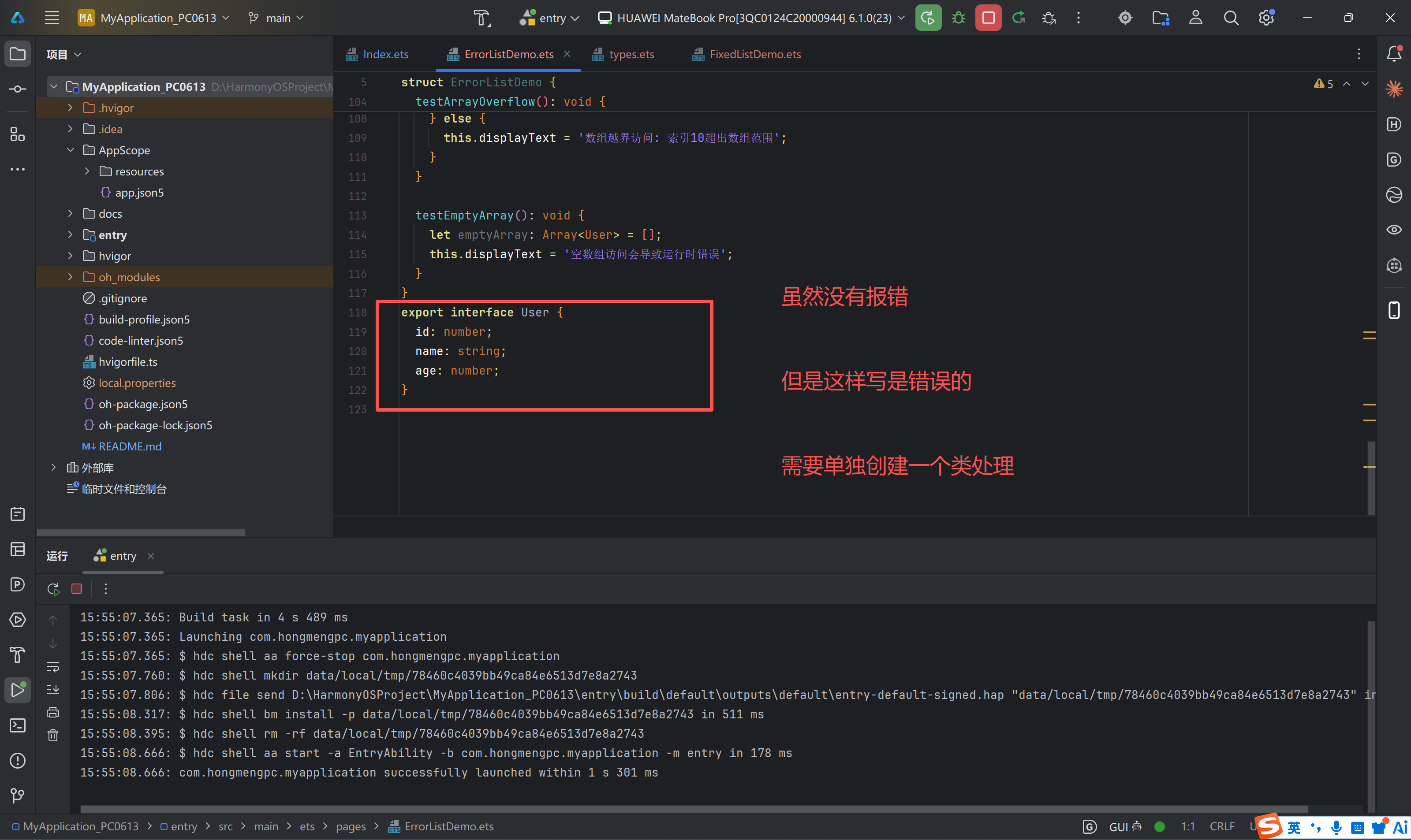
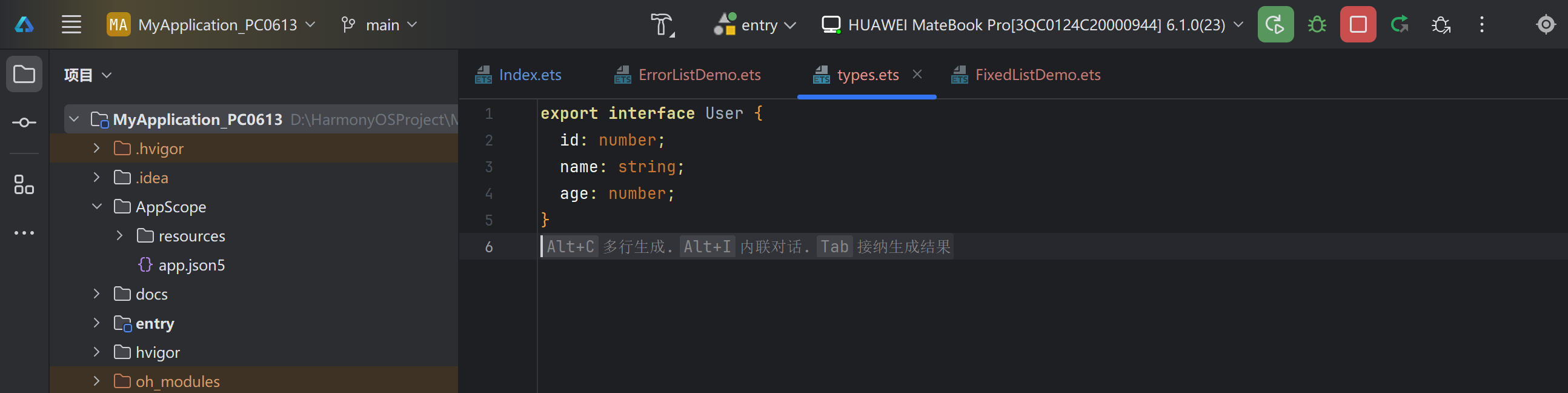
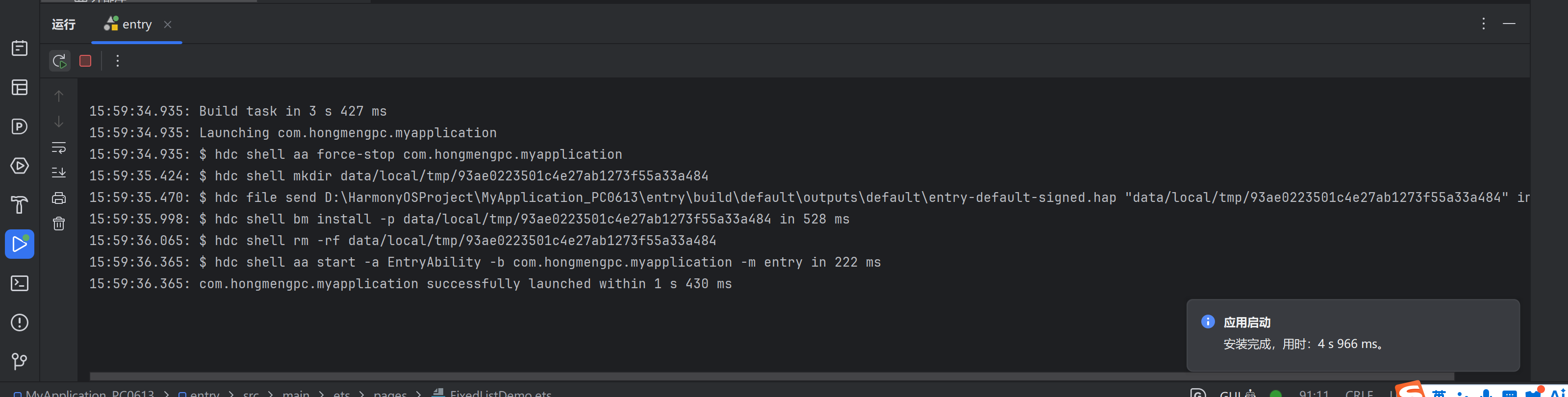
解决错误-运行成功:
引言
在HarmonyOS应用开发过程中,ArkTS作为一种静态类型语言,具有严格的语法约束。其中,声明合并(Declaration Merging) 是开发者最常遇到的编译错误之一。本文将深入探讨声明合并的概念、ArkTS不支持声明合并的原因、常见错误场景以及完整的解决方案。
第一章 声明合并概念解析
1.1 TypeScript中的声明合并
在标准TypeScript中,声明合并是一个强大的特性,允许开发者将多个同名声明合并为一个:
typescript
// 接口声明合并
interface User {
  id: number;
}

interface User {
  name: string;
}

// 合并后的接口
// interface User {
//   id: number;
//   name: string;
// }

let user: User = { id: 1, name: '张三' };
类型合并
- 接口合并:多个同名接口会自动合并
- 命名空间合并:同名命名空间可以合并
- 类与接口合并:类可以与接口合并
1.2 ArkTS不支持声明合并的原因
ArkTS作为HarmonyOS的专用语言,基于以下考虑不支持声明合并:
| 原因 | 说明 |
|---|---|
| 静态类型安全 | 避免类型定义的歧义,确保类型系统的确定性 |
| 编译性能 | 减少编译时的类型解析复杂度 |
| 运行时性能 | 简化运行时类型信息,提升应用性能 |
| 代码可维护性 | 强制单一来源定义,避免分散定义导致的维护困难 |
第二章 常见声明合并错误场景
2.1 场景一:多个文件定义同名接口
问题代码:
typescript
// File: ErrorListDemo.ets
interface User {
  id: number;
  name: string;
  age: number;
}

// File: FixedListDemo.ets
interface User {  // ❌ 编译错误:重复定义
  id: number;
  name: string;
  age: number;
}
编译错误信息:
ERROR: 10605103 ArkTS Compiler Error
Error Message: Declaration merging is not supported (arkts-no-decl-merging)
At File: D:/Project/entry/src/main/ets/pages/FixedListDemo.ets:177:1
2.2 场景二:类与接口同名
问题代码:
typescript
interface User {
  id: number;
}

class User {  // ❌ 编译错误:声明合并不支持
  id: number = 0;
}
2.3 场景三:命名空间与类同名
问题代码:
typescript
namespace User {
  export const ROLE_ADMIN = 'admin';
}

class User {  // ❌ 编译错误
  id: number = 0;
}
2.4 场景四:模块内重复声明
问题代码:
typescript
@Entry
@Component
struct UserProfile {
  @State user: User = { id: 1, name: '张三' };
}

interface User {
  id: number;
  name: string;
}

// 同一文件中再次定义
interface User {  // ❌ 编译错误
  age: number;
}
第三章 完整解决方案
3.1 方案一:创建公共类型模块
步骤1:创建类型定义文件
typescript
// File: common/types.ets
export interface User {
  id: number;
  name: string;
  age: number;
}

export interface Product {
  id: number;
  name: string;
  price: number;
}

export interface Order {
  id: string;
  items: Array<OrderItem>;
  total: number;
}

export interface OrderItem {
  productId: number;
  quantity: number;
  price: number;
}
步骤2:在组件中导入使用
typescript
// File: ErrorListDemo.ets
import { User } from '../common/types';

@Entry
@Component
struct ErrorListDemo {
  @State users: Array<User> = [
    { id: 1, name: '张三', age: 25 },
    { id: 2, name: '李四', age: 30 }
  ];
}
typescript
// File: FixedListDemo.ets
import { User } from '../common/types';

@Entry
@Component
struct FixedListDemo {
  @State users: Array<User> = [
    { id: 1, name: '张三', age: 25 },
    { id: 3, name: '王五', age: 28 }
  ];
}
3.2 方案二:使用命名空间模式
代码示例:
typescript
// File: common/types.ets
export namespace Model {
  export interface User {
    id: number;
    name: string;
    age: number;
  }

  export interface Product {
    id: number;
    name: string;
    price: number;
  }
}
使用方式:
typescript
import { Model } from '../common/types';

@Entry
@Component
struct UserProfile {
  @State user: Model.User = { id: 1, name: '张三', age: 25 };
}
3.3 方案三:使用类替代接口
代码示例:
typescript
// File: common/User.ets
export class User {
  id: number;
  name: string;
  age: number;

  constructor(id: number, name: string, age: number) {
    this.id = id;
    this.name = name;
    this.age = age;
  }
}
使用方式:
typescript
import { User } from '../common/User';

@Entry
@Component
struct UserProfile {
  @State user: User = new User(1, '张三', 25);
}
第四章 类型组织最佳实践
4.1 类型文件结构设计
entry/src/main/ets/
├── common/
│   ├── types/
│   │   ├── index.ets          # 类型导出入口
│   │   ├── user.ts            # 用户相关类型
│   │   ├── product.ts         # 产品相关类型
│   │   └── order.ts           # 订单相关类型
│   └── utils/
│       └── typeGuards.ts      # 类型守卫工具
└── pages/
    ├── Index.ets
    ├── UserList.ets
    └── UserProfile.ets
4.2 类型导出入口
typescript
// File: common/types/index.ets
export { User, UserCreateRequest, UserUpdateRequest } from './user';
export { Product, ProductCategory } from './product';
export { Order, OrderItem, OrderStatus } from './order';
4.3 类型定义规范
typescript
// File: common/types/user.ts

// 基础接口
export interface User {
  id: number;
  name: string;
  email: string;
  age?: number;
  createdAt: string;
  updatedAt: string;
}

// 请求类型
export interface UserCreateRequest {
  name: string;
  email: string;
  age?: number;
}

export interface UserUpdateRequest {
  name?: string;
  email?: string;
  age?: number;
}

// 响应类型
export interface UserResponse {
  data: User;
  message: string;
}

export interface UserListResponse {
  data: Array<User>;
  total: number;
  page: number;
  size: number;
}
第五章 实战案例:重构声明合并错误
5.1 问题场景分析
假设项目中有以下文件结构:
pages/
├── UserList.ets      # 定义了 User 接口
├── UserProfile.ets   # 也定义了 User 接口
├── OrderList.ets     # 使用了 User 接口
└── OrderDetail.ets   # 使用了 User 接口
编译错误:
ERROR: Declaration merging is not supported (arkts-no-decl-merging)
At File: pages/UserProfile.ets:45:1
5.2 重构步骤
步骤1:创建公共类型模块
typescript
// File: common/types/user.ts
export interface User {
  id: number;
  name: string;
  email: string;
  age: number;
}
步骤2:更新 UserList.ets
typescript
// 移除原有 interface User 定义
import { User } from '../common/types/user';

@Entry
@Component
struct UserList {
  @State users: Array<User> = [];
}
步骤3:更新 UserProfile.ets
typescript
// 移除原有 interface User 定义
import { User } from '../common/types/user';

@Entry
@Component
struct UserProfile {
  @State user: User = { id: 0, name: '', email: '', age: 0 };
}
步骤4:更新 OrderList.ets
typescript
import { User } from '../common/types/user';
import { Order } from '../common/types/order';

@Entry
@Component
struct OrderList {
  @State orders: Array<Order> = [];
  @State currentUser: User | null = null;
}
5.3 重构前后对比
| 维度 | 重构前 | 重构后 |
|---|---|---|
| 类型定义 | 分散在多个文件 | 集中在类型模块 |
| 可维护性 | 难以维护和更新 | 统一管理,易于维护 |
| 编译状态 | 报错:声明合并不支持 | 编译通过 |
| 代码重复 | 存在重复定义 | 单一来源 |
第六章 高级类型模式
6.1 泛型类型定义
typescript
// File: common/types/base.ts
export interface BaseResponse<T> {
  code: number;
  message: string;
  data: T;
}

export interface ListResponse<T> {
  code: number;
  message: string;
  data: Array<T>;
  total: number;
  page: number;
  size: number;
}

export interface PaginatedRequest {
  page: number;
  size: number;
  sortBy?: string;
  sortOrder?: 'asc' | 'desc';
}
使用示例:
typescript
import { BaseResponse, ListResponse, User } from '../common/types';

async function getUser(id: number): Promise<BaseResponse<User>> {
  let response = await fetch(`/api/users/${id}`);
  return response.json();
}

async function listUsers(params: PaginatedRequest): Promise<ListResponse<User>> {
  let response = await fetch(`/api/users?page=${params.page}&size=${params.size}`);
  return response.json();
}
6.2 联合类型与交叉类型
typescript
// File: common/types/common.ts
export type Status = 'active' | 'inactive' | 'pending';

export type Role = 'admin' | 'user' | 'guest';

export interface AuditInfo {
  createdBy: string;
  createdAt: string;
  updatedBy?: string;
  updatedAt?: string;
}

export type AuditedUser = User & AuditInfo;
6.3 类型守卫
typescript
// File: common/utils/typeGuards.ts
import { User, Product } from '../types';

export function isUser(obj: unknown): obj is User {
  if (typeof obj !== 'object' || obj === null) {
    return false;
  }
  let user = obj as User;
  return typeof user.id === 'number' &&
         typeof user.name === 'string' &&
         typeof user.email === 'string';
}

export function isProduct(obj: unknown): obj is Product {
  if (typeof obj !== 'object' || obj === null) {
    return false;
  }
  let product = obj as Product;
  return typeof product.id === 'number' &&
         typeof product.name === 'string' &&
         typeof product.price === 'number';
}
第七章 编译错误排查指南
7.1 错误信息解析
错误模式1:声明合并不支持
ERROR: 10605103 ArkTS Compiler Error
Error Message: Declaration merging is not supported (arkts-no-decl-merging)
At File: D:/Project/entry/src/main/ets/pages/FixedListDemo.ets:177:1
错误模式2:重复声明
ERROR: 10605103 ArkTS Compiler Error
Error Message: Duplicate identifier 'User'
At File: D:/Project/entry/src/main/ets/pages/UserProfile.ets:45:1
7.2 排查步骤
1. 定位错误文件和行号
    ↓
2. 搜索项目中所有同名声明
    ↓
3. 确认哪些是重复定义
    ↓
4. 创建公共类型模块
    ↓
5. 替换所有重复定义为导入语句
    ↓
6. 重新编译验证
7.3 搜索命令示例
bash
# 搜索项目中所有 User 接口定义
grep -r "interface User" --include="*.ets" .

# 搜索项目中所有 User 类定义
grep -r "class User" --include="*.ets" .
第八章 类型系统最佳实践总结
8.1 核心原则
- 单一来源原则:每个类型只在一个地方定义
- 集中管理:将类型定义集中在专门的类型模块中
- 明确导出:通过 index 文件统一导出类型
- 避免重复:使用导入而非重复定义
- 类型安全:充分利用 ArkTS 的静态类型检查
8.2 代码规范
typescript
// ✅ 推荐模式
// 1. 在类型模块中定义
// common/types/user.ts
export interface User {
  id: number;
  name: string;
}

// 2. 在组件中导入使用
import { User } from '../common/types/user';

@Entry
@Component
struct UserProfile {
  @State user: User = { id: 1, name: '张三' };
}
8.3 常见误区
| 误区 | 后果 | 正确做法 |
|---|---|---|
| 重复定义接口 | 编译错误 | 创建公共类型模块 |
| 使用any类型 | 失去类型检查 | 定义明确的接口 |
| 类型定义分散 | 难以维护 | 集中管理类型 |
| 忽略类型导出 | 无法跨模块使用 | 正确导出类型 |
第九章 与TypeScript的对比
9.1 声明合并差异
| 特性 | TypeScript | ArkTS |
|---|---|---|
| 接口合并 | ✅ 支持 | ❌ 不支持 |
| 命名空间合并 | ✅ 支持 | ❌ 不支持 |
| 类与接口合并 | ✅ 支持 | ❌ 不支持 |
| 模块级导出 | ✅ 支持 | ✅ 支持 |
9.2 迁移策略
如果从TypeScript迁移到ArkTS,需要:
- 识别合并声明:找出所有使用声明合并的地方
- 创建类型模块:将合并的声明统一到一个文件中
- 更新引用:修改所有引用点使用导入语句
- 测试验证:确保编译通过且功能正常
第十章 总结与展望
10.1 核心要点回顾
- ArkTS约束:不支持声明合并,每个类型只能定义一次
- 解决方案:创建公共类型模块,集中管理类型定义
- 最佳实践:遵循单一来源原则,使用统一导出入口
10.2 实践建议
- 项目初始化时规划:在项目初期就建立类型管理体系
- 代码审查:将类型定义规范纳入代码审查标准
- 文档记录:维护类型定义文档,说明每个类型的用途
- 持续改进:定期审查和优化类型定义
10.3 未来发展
随着HarmonyOS生态的发展,ArkTS可能会在未来版本中提供更多的类型工具和模式,帮助开发者更好地组织和管理类型定义。
附录:类型定义模板
A.1 基础接口模板
typescript
// 实体接口
export interface EntityName {
  id: number | string;
  // 其他字段...
}

// 请求接口
export interface EntityNameCreateRequest {
  // 创建所需字段
}

export interface EntityNameUpdateRequest {
  // 更新所需字段(可选)
}

// 响应接口
export interface EntityNameResponse {
  data: EntityName;
  message: string;
}

export interface EntityNameListResponse {
  data: Array<EntityName>;
  total: number;
  page: number;
  size: number;
}
A.2 枚举类型模板
typescript
// 使用常量对象替代枚举
export const Status = {
  ACTIVE: 'active',
  INACTIVE: 'inactive',
  PENDING: 'pending'
} as const;

export type StatusType = typeof Status[keyof typeof Status];