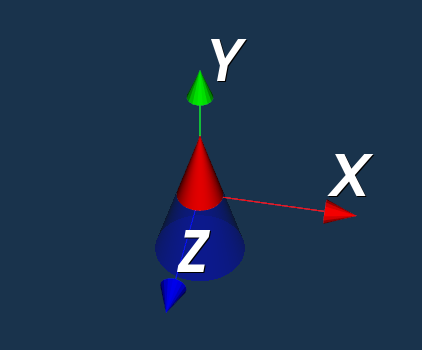
红色是留下的部分,透明蓝色是切去的部分
cpp
#include "MainWindow.h"

#include <QApplication>
#include <vtkConeSource.h>
#include <vtkPolyDataMapper.h>
#include <vtkActor.h>
#include <vtkRenderWindow.h>
#include <vtkRenderer.h>
#include <vtkRenderWindowInteractor.h>
#include <vtkCamera.h>
#include <vtkProperty.h>
#include <vtkClipPolyData.h>
#include <vtkPlane.h>
#include <vtkAxesActor.h>

#include <vtkAutoInit.h>
VTK_MODULE_INIT(vtkRenderingOpenGL2)
VTK_MODULE_INIT(vtkInteractionStyle)
VTK_MODULE_INIT(vtkRenderingFreeType)

int main(int argc, char *argv[])
{
    double h = 1.0f;

    auto cone = vtkSmartPointer<vtkConeSource>::New();
    cone->SetRadius(0.3);
    cone->SetHeight(h);
    cone->SetResolution(100);
    cone->SetDirection(0, 1, 0);

    auto plane = vtkSmartPointer<vtkPlane>::New();
    plane->SetNormal(0, 1, 0); // 希望用X、Z平面去切割,则法向量是Y轴方向
    plane->SetOrigin(0, 0, 0); // 平面过原点

    auto clip = vtkSmartPointer<vtkClipPolyData>::New();
    clip->SetInputConnection(cone->GetOutputPort());
    clip->SetClipFunction(plane);
    clip->SetValue(0);
    clip->GenerateClippedOutputOn(); // 生成切去部分
    clip->Update();

    auto mapperRemain = vtkSmartPointer<vtkPolyDataMapper>::New();
    mapperRemain->SetInputConnection(clip->GetOutputPort()); // 切割留下的部分

    auto actorRemain = vtkSmartPointer<vtkActor>::New();
    actorRemain->SetMapper(mapperRemain);
    actorRemain->GetProperty()->SetColor(1, 0, 0);


    auto mapperClip = vtkSmartPointer<vtkPolyDataMapper>::New();
    mapperClip->SetInputConnection(clip->GetClippedOutputPort()); // 切去的部分

    auto actorClip = vtkSmartPointer<vtkActor>::New();
    actorClip->SetMapper(mapperClip);
    actorClip->GetProperty()->SetColor(0, 0, 1);
    actorClip->GetProperty()->SetOpacity(0.3);


    auto actorAxes = vtkSmartPointer<vtkAxesActor>::New();

    auto render = vtkSmartPointer<vtkRenderer>::New();
    render->SetBackground(0.1, 0.2, 0.3);
    render->AddActor(actorRemain);
    render->AddActor(actorClip);
    render->AddActor(actorAxes);

    render->GetActiveCamera()->SetFocalPoint(0, 0, 0);
    render->GetActiveCamera()->SetPosition(1, 5, 5);

    auto wd = vtkSmartPointer<vtkRenderWindow>::New();
    wd->AddRenderer(render);

    auto interator = vtkSmartPointer<vtkRenderWindowInteractor>::New();
    wd->SetInteractor(interator);
    wd->SetSize(800, 600);
    wd->SetPosition(200, 200);

    wd->Render();
    interator->Start();

    return 0;
}