背景
TkDocs tutorial 里介绍了 Tkinter,其中有 A First (Real) Example 一文,这篇文章里有一个使用 Tkinter 生成图形化界面的简单例子。我想在那篇文章的基础上实战一下,于是想到可以实现简单的 15 puzzle。15 puzzle 是维基百科中关于该游戏的介绍。在 这个链接 里可以看到 15 puzzle 的示例效果。
正文
需要解决哪些问题
整体布局
整体布局的草图如下 ⬇️ (有些细节并不准确,这里只是展示一下大意)
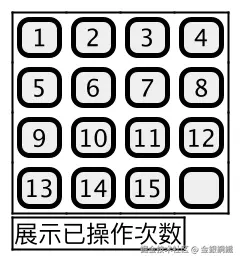
一共需要 2 个 frame ⬇️
- 上方的 frame 用于展示所有按钮,其中包括
- 15 个数字按钮
- 1 个表示空位置的按钮
- 下方的 frame 用于展示提示信息
如何生成随机开局?
我们可以对 16 个按钮执行 shuffle 操作,从而得到随机的开局。但是 15 puzzle 里提到,并非所有的开局都有解。于是我想到,可以从最终局面倒着来(这样可以保证用户看到的局面总是有解的)。具体操作是这样的:最终局面是这样的 ⬇️
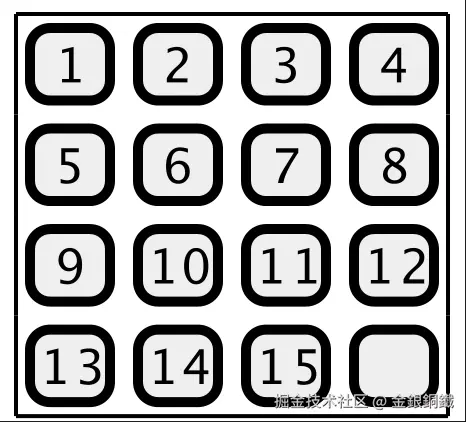
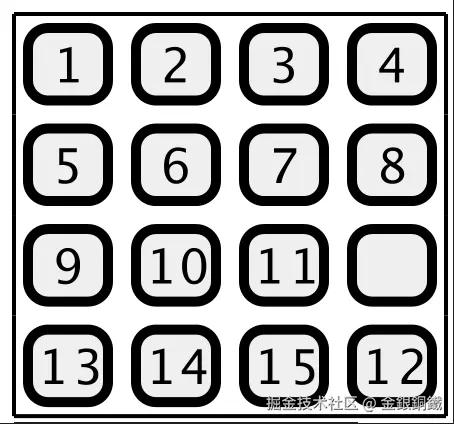
我们可以随机点击与空位置相邻的某个按钮。例如,如果点击 12 的话,得到的结果会是 ⬇️
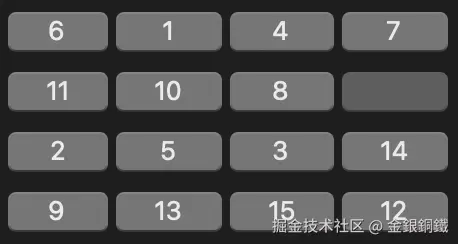
这样操作多次之后,就可以得到一个看似"随机"的开局。一个可能的开局如下 ⬇️
这部分的关键代码如下(略去了一些细节)
python
def shuffle_buttons():
    while True:
        for _ in range(100):
            swap_empty_with_random_neighbor()
        if not all_buttons_at_original_position():
            break
    reset_click_cnt()
    update_message()

def initialize_buttons():
    for r in range(n):
        for c in range(n):
            add_button(r, c)

def initialize_board():
    initialize_buttons()
    shuffle_buttons()

initialize_board()
如何交换两个 button?
我们并不需要真的交换两个 button 的指针或者引用。只要交换两个 button 的 text,就会造成 "这两个 button 被交换了" 的错觉。这部分的关键代码如下(略去了一些细节)⬇️ 请注意,表示 "空位置" 的那个 button 总是会参与 "交换" 操作。
python
def update_button_text(button_position, text):
    button_dict[button_position]['text'] = text

def build_state(disable):
    return ['disabled'] if disable else ['!disabled']

def update_button_state(button_position, disable):
    state = build_state(disable)
    button_dict[button_position].state(state)

def swap_empty_button(normal_button_position):
    normal_button_text = find_button_text(normal_button_position)
    update_button_text(empty_button_position, normal_button_text)
    update_button_text(normal_button_position, '')

    update_button_state(normal_button_position, True)
    update_button_state(empty_button_position, False)

    update_empty_button_position(normal_button_position)

    update_click_cnt()
    update_message()
基于以上分析,再结合 TkDocs tutorial 里介绍的 Tkinter 的知识,可以写出完整的代码(trae 对我完成代码提供了不少帮助,但是重构和关键思路还是要靠自己)
完整的代码
python
from tkinter import *
from tkinter import ttk
import random

root = Tk()
root.title("15 Puzzle")

mainframe = ttk.Frame(root)
mainframe.grid(column=0, row=0, sticky=W)
mainframe['padding'] = 5

messageframe = ttk.Frame(root)
messageframe.grid(column=0, row=1, sticky=W)
messageframe['padding'] = 5

n = 4
button_dict = {}
empty_button_position = (n - 1, n - 1)
click_cnt = 0

message_label = ttk.Label(messageframe, text='')
message_label.grid(column=0, row=0, sticky=W)

delta_position_candidates = [(-1, 0), (1, 0), (0, -1), (0, 1)]

def is_inside_board(row, col):
    return row >= 0 and row < n and col >= 0 and col < n

def is_empty_button(row, col):
    if not is_inside_board(row, col):
        return False
    return button_dict[(row, col)]['text'] == ''

def to_index(row, col):
    return row * n + col

def update_button_text(button_position, text):
    button_dict[button_position]['text'] = text

def build_state(disable):
    return ['disabled'] if disable else ['!disabled']

def update_button_state(button_position, disable):
    state = build_state(disable)
    button_dict[button_position].state(state)

def update_empty_button_position(new_position):
    global empty_button_position
    empty_button_position = new_position

def all_buttons_at_original_position():
    for row in range(n):
        for col in range(n):
            if find_button_text((row, col)) != to_original_text(row, col):
                return False
    return True

def find_button_text(button_position):
    return button_dict[button_position]['text']

def update_click_cnt():
    global click_cnt
    click_cnt += 1

def reset_click_cnt():
    global click_cnt
    click_cnt = 0

def swap_empty_button(normal_button_position):
    normal_button_text = find_button_text(normal_button_position)
    update_button_text(empty_button_position, normal_button_text)
    update_button_text(normal_button_position, '')

    update_button_state(normal_button_position, True)
    update_button_state(empty_button_position, False)

    update_empty_button_position(normal_button_position)

    update_click_cnt()
    update_message()

def update_message():
    if all_buttons_at_original_position():
        message_label['text'] = 'You won after clicking %d times' % click_cnt
        for button_position in button_dict:
            update_button_state(button_position, True)
    else:
        message_label['text'] = 'You have clicked %d times' % click_cnt

def move(normal_button_position):
    row, col = normal_button_position
    for candidate in delta_position_candidates:
        delta_row, delta_col = candidate
        target_button_position = (row + delta_row, col + delta_col)
        if target_button_position != empty_button_position:
            continue
        swap_empty_button(normal_button_position)

def to_original_text(row, col):
    if (row, col) == (n - 1, n - 1):
        return ''
    return str(row * n + col + 1)

def add_button(row, col):
    text = to_original_text(row, col)
    button = ttk.Button(mainframe, text=text, command=lambda: move((row, col)))
    button.grid(column=col, row=row, sticky='WE')
    button_dict[(row, col)] = button
    if (row, col) == (n - 1, n - 1):
        update_button_state((row, col), True)

def swap_empty_with_random_neighbor():
    row, col = empty_button_position
    while True:
        delta_row, delta_col = random.choice(delta_position_candidates)
        if not is_inside_board(row + delta_row, col + delta_col):
            continue
        normal_button_position = (row + delta_row, col + delta_col)
        swap_empty_button(normal_button_position)
        break

def shuffle_buttons():
    while True:
        for _ in range(100):
            swap_empty_with_random_neighbor()
        if not all_buttons_at_original_position():
            break
    reset_click_cnt()
    update_message()

def initialize_buttons():
    for r in range(n):
        for c in range(n):
            add_button(r, c)

def initialize_board():
    initialize_buttons()
    shuffle_buttons()

initialize_board()

root.columnconfigure(0, weight=1)
root.rowconfigure(0, weight=1)
for child in mainframe.winfo_children():
    child.grid_configure(padx='1', pady='1')

root.mainloop()
运行效果
请将完整的代码(上文已提供)保存为 fifteen.py。使用下方的命令可以运行 fifteen.py
bash
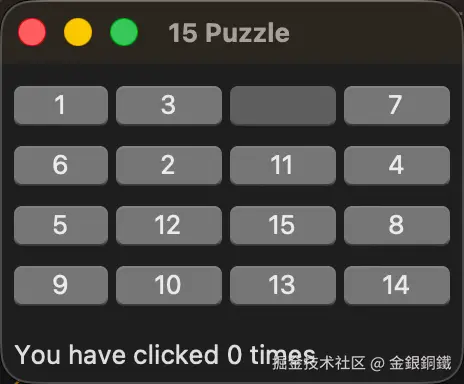
python3 fifteen.py运行效果如下图所示 ⬇️ (您在自己电脑上运行该程序得到的开局很可能和下图展示的局面不同)
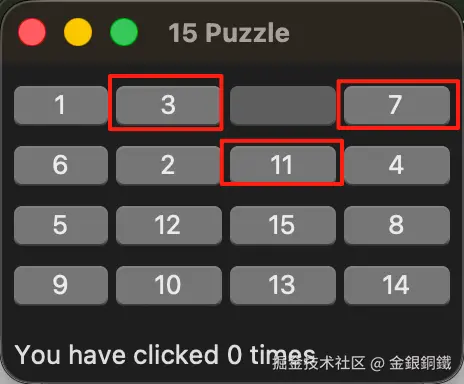
对这个局面而言,可以点击的位置是 3,7,11 这 3 个按钮
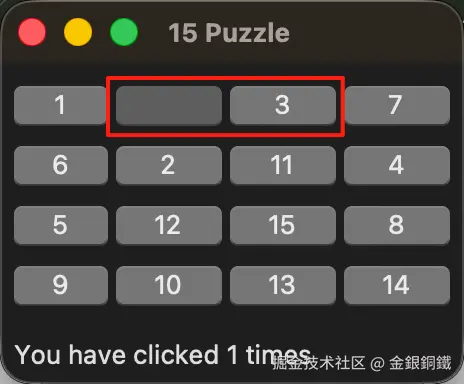
如果点击 3,局面变为 ⬇️ (请注意,"空位置" 和 3 发生了交换)
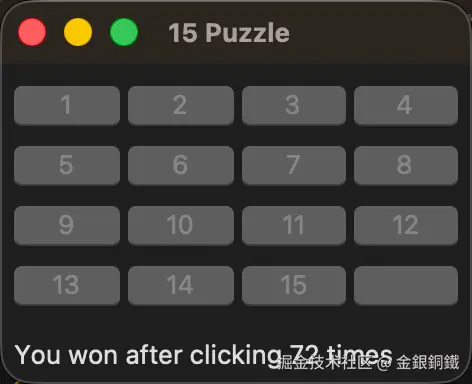
我玩了一会儿,终于得到了预期的局面 ⬇️ (一共有 72 次有效的点击)
其他
整体布局的草图是如何画出来的?
我用了 IntelliJ IDEA (Community Edition) 中 PlantUML 的插件来画那张图。完整的代码如下 ⬇️
puml
@startsalt
{
    {+
        [ 1]|[ 2]|[ 3]|[ 4]
        [ 5]|[ 6]|[ 7]|[ 8]
        [ 9]|[10]|[11]|[12]
        [13]|[14]|[15]|[  ]
    }
    {+
        展示已操作次数
    }
}
@endsalt
参考资料
- TkDocs tutorial 中的
- 15 puzzle (维基百科中关于 15 puzzle 的介绍)