ArcGIS JS 基础教程(11):飞行定位 goTo
-
- 零、写在前面
- 一、功能介绍
- 二、功能实现
-
- [2.1 基础用法:定位到坐标](#2.1 基础用法:定位到坐标)
- [2.2 定位至几何对象(Point / Polyline / Polygon / Extent)](#2.2 定位至几何对象(Point / Polyline / Polygon / Extent))
- [2.3 定位至图层(Layer)](#2.3 定位至图层(Layer))
- [2.4 飞行动画控制参数](#2.4 飞行动画控制参数)
- [2.5 缓动函数(easing)](#2.5 缓动函数(easing))
- [2.6 指定目标视角(heading / tilt / zoom)](#2.6 指定目标视角(heading / tilt / zoom))
- [2.7 取消飞行动画(AbortSignal)](#2.7 取消飞行动画(AbortSignal))
- [2.8 链式飞行(顺序飞往多个目标)](#2.8 链式飞行(顺序飞往多个目标))
- [2.9 goTo vs Camera 赋值对比](#2.9 goTo vs Camera 赋值对比)
- 三、功能应用
- 四、核心代码
- 五、在线示例
- 六、关键API说明
- 七、系列导航
零、写在前面
📌 本系列教程完整目录 :ArcGIS JS 系列基础教程(100个项目常用热门功能)
💡 在线示例 :完整可运行的 HTML 示例,无需任何环境配置,可直接在浏览器中打开体验
🗂️ 专栏导航 :收藏 + 关注,专栏文章第一时间送达
❤️ 一键三连:点赞(给教程充电)+ 评论(提问必回)+ 收藏(下次再看)
一、功能介绍
在 ArcGIS Maps SDK for JavaScript 中,SceneView.goTo() 是控制三维场景相机移动的核心方法 。与第10课学的 view.camera = ...(瞬间跳转)不同,goTo() 提供了平滑过渡动画,让相机像"飞行"一样到达目标位置。
goTo() 的强大之处在于其灵活性:
- 目标类型丰富 :支持坐标对
[lng, lat]、Point、Polyline、Polygon、Extent、Camera、Graphic、Viewpoint 等多种目标类型 - 完整动画控制 :可配置飞行时间
duration、速度因子speedFactor、缓动函数easing - 视角可设定 :到达目标后可指定
heading、tilt、zoom等视角参数 - 支持中断 :通过
AbortSignal随时取消飞行动画 - 链式调用 :多个
goTo()可串行执行,实现复杂的飞行路径
二、功能实现
核心 API: SceneView.goTo(target, options?),返回 Promise<void>。
2.1 基础用法:定位到坐标
javascript
// 方式一:数组坐标 [longitude, latitude]
view.goTo([116.39, 39.9]);

// 方式二:center 对象,可同时指定 zoom
view.goTo({
    center: [116.39, 39.9],
    zoom: 15               // 缩放级别
});
2.2 定位至几何对象(Point / Polyline / Polygon / Extent)
goTo() 可以接收 Geometry 对象,SDK 会自动计算最佳视角来框选该几何范围:
javascript
const Point = await $arcgis.import("@arcgis/core/geometry/Point.js");
const Polyline = await $arcgis.import("@arcgis/core/geometry/Polyline.js");
const Polygon = await $arcgis.import("@arcgis/core/geometry/Polygon.js");
const Extent = await $arcgis.import("@arcgis/core/geometry/Extent.js");

// 定位到点
const point = new Point({ longitude: 116.39, latitude: 39.9 });
view.goTo(point);

// 定位到线(自动框选整条线)
const polyline = new Polyline({
    paths: [[[116.38, 39.89], [116.40, 39.90], [116.42, 39.91]]]
});
view.goTo(polyline);

// 定位到面(自动框选整个面)
const polygon = new Polygon({
    rings: [[[116.38, 39.89], [116.42, 39.89], [116.42, 39.92], [116.38, 39.92]]]
});
view.goTo(polygon);

// 定位到范围
const extent = new Extent({
    xmin: 116.38, ymin: 39.89, xmax: 116.42, ymax: 39.92
});
view.goTo(extent);
目标类型速查表:
| 目标类型 | 示例 | SDK 行为 |
|---|---|---|
[lng, lat] |
[116.39, 39.9] |
以该坐标为中心,保持当前 zoom |
Point |
new Point({...}) |
以该点为中心,自动计算合适 zoom |
Polyline |
new Polyline({...}) |
框选整条线,自动调整视角 |
Polygon |
new Polygon({...}) |
框选整个面,自动计算最佳视角 |
Extent |
new Extent({...}) |
框选该范围区域 |
Camera |
new Camera({...}) |
精确到达指定相机视角 |
Graphic |
graphic 对象 | 自动框选该图形的几何范围 |
Viewpoint |
view.viewpoint |
恢复到指定视点 |
| 对象字面量 | {center, zoom, heading, tilt} |
灵活组合各参数 |
2.3 定位至图层(Layer)
通过图层的 fullExtent 属性可以飞到图层数据范围:
javascript
// 定位到图层的完整范围
view.when(() => {
    // 假设有一个 IntegratedMeshLayer 或 FeatureLayer
    const layer = map.layers.getItemAt(0);
    if (layer.fullExtent) {
        view.goTo(layer.fullExtent);
    }
});
2.4 飞行动画控制参数
goTo() 的第二个参数 options 控制飞行过程的动画行为:
javascript
view.goTo(target, {
    animate: true,           // 默认 true,启用动画过渡
    duration: 3000,          // 动画持续 3000 毫秒(3秒)
    maxDuration: 8000,       // 最大允许时长(duration > 8000 时必设此项)
    speedFactor: 0.5,       // 速度因子:<1 更慢, >1 更快(默认 1)
    easing: "cubic-out"      // 缓动函数:控制速度曲线
});
参数详解:
| 参数 | 类型 | 默认值 | 说明 |
|---|---|---|---|
animate |
boolean | true |
是否启用动画。false 则相当于 view.camera = ... 瞬间跳转 |
duration |
number | 自动 | 动画持续时间(毫秒)。SDK 默认会根据距离自动计算 |
maxDuration |
number | 8000 | 最大动画时长限制。手动设置 duration > 8000 时必须同时设置此项 |
speedFactor |
number | 1 | 速度倍率。0.1=极慢,1=默认,6=快速 |
easing |
string | function | --- | 缓动函数。预设字符串或自定义 function(t) |
signal |
AbortSignal | --- | 用于中断动画的 AbortController 信号 |
2.5 缓动函数(easing)
easing 控制飞行过程中速度的变化曲线。支持预设字符串和自定义函数:
预设缓动字符串:
| easing 值 | 效果 | 适用场景 |
|---|---|---|
"linear" |
匀速飞行 | 机械感、匀速巡检 |
"cubic-out" |
先快后慢(减速停止) | 最常见的自然过渡 |
"expo-in" |
指数加速 | 快速启动效果 |
"expo-out" |
指数减速 | 柔和到达 |
"in-out" |
先加速后减速 | 最自然的飞行感 |
自定义缓动函数:
javascript
// t ∈ [0, 1],返回修正后的进度值
function bounceEasing(t) {
    return 1 - Math.abs(Math.sin(-1.7 + t * 4.5 * Math.PI)) * Math.pow(0.5, t * 10);
}

view.goTo(target, { easing: bounceEasing });
2.6 指定目标视角(heading / tilt / zoom)
在 target 对象中可以直接指定到达后的相机视角:
javascript
// 飞到指定位置,到达后以 heading=180 朝向正南、tilt=60 倾斜观察
view.goTo({
    center: [116.39, 39.9],
    zoom: 17,
    heading: 180,    // 朝向正南
    tilt: 60         // 60° 倾斜
}, {
    duration: 2000,
    easing: "cubic-out"
});

// 也可以传 Camera 对象实现精确控制
const Camera = await $arcgis.import("@arcgis/core/Camera.js");
const targetCam = new Camera({
    position: { longitude: 116.39, latitude: 39.9, z: 500 },
    heading: 90,
    tilt: 45
});
view.goTo(targetCam, { duration: 3000 });
⚠️ 注意: 当目标距离当前相机位置很远时(地球对面),如果没有显式指定 heading 和 tilt,SDK 会自动重置为默认值(北向、垂直俯视)。
2.7 取消飞行动画(AbortSignal)
通过 AbortController 可以随时中断正在进行的飞行动画:
javascript
let controller = null;

// 开始飞行
function startFlight(target) {
    controller = new AbortController();
    view.goTo(target, { signal: controller.signal })
        .catch(err => {
            if (err.name === "AbortError") {
                console.log("飞行已被取消");
            }
        });
}

// 取消飞行
function cancelFlight() {
    if (controller) {
        controller.abort();
        controller = null;
    }
}
实用技巧: 用户在飞行过程中手动操作地图(鼠标拖拽、滚轮缩放)也会自动中断 goTo() 动画,此时 Promise 会 reject 一个 AbortError。建议统一捕获此错误。
2.8 链式飞行(顺序飞往多个目标)
goTo() 返回 Promise,支持链式调用实现顺序飞行:
javascript
// 方式一:Promise 链
view.goTo(target1, { duration: 2000 })
    .then(() => view.goTo(target2, { duration: 3000 }))
    .then(() => view.goTo(target3, { duration: 1500 }));

// 方式二:async/await
async function flightTour() {
    await view.goTo(target1, { duration: 2000 });
    await view.goTo(target2, { duration: 3000 });
    await view.goTo(target3, { duration: 1500 });
    console.log("飞行巡检完成!");
}
2.9 goTo vs Camera 赋值对比
| 特性 | view.goTo(target, options) |
view.camera = new Camera(...) |
|---|---|---|
| 动画效果 | ✅ 平滑飞行过渡 | ❌ 瞬间跳转 |
| 自定义时长 | ✅ duration / speedFactor |
❌ 不支持 |
| 缓动曲线 | ✅ easing 预设/自定义 |
❌ 不支持 |
| 中断取消 | ✅ AbortSignal |
❌ 不支持 |
| 链式调用 | ✅ Promise 链 | ❌ 不支持 |
| 几何框选 | ✅ 自动计算最佳视角 | ❌ 仅精确 Camera 视角 |
| 性能开销 | 略高(动画计算) | 低 |
三、功能应用
| 应用场景 | target 类型 | 关键参数 | 说明 |
|---|---|---|---|
| 点击 POI 后平滑缩放 | Point / [lng, lat] |
duration: 1500, easing: "cubic-out" |
点击标记后平滑飞近观察 |
| 框选区域快速定位 | Polygon / Extent |
animate: false(快速跳转) |
切换到指定区域视图 |
| 城市飞行漫游 | 多个 Camera |
链式 goTo,duration: 3000~5000 |
顺序飞过多地标 |
| 路线沿线巡检 | Polyline |
heading 跟随路线方向 |
飞越整条路线 |
| 图层数据总览 | layer.fullExtent |
duration: 2000, tilt: 45 |
加载图层后飞到数据范围 |
| 慢镜头特写 | Camera (低空) |
speedFactor: 0.2, easing: "expo-out" |
超慢速飞到建筑近处 |
| 快速返回总览 | {center, zoom, tilt: 0} |
speedFactor: 4(快速) |
一键回到上帝视角 |
| 可中断飞行 | 任意 | signal: controller.signal |
用户可随时取消飞行 |
四、核心代码
📦 完整代码 已保存至
sample/lesson11_goto_flight.html,可直接在浏览器打开。
html
<!DOCTYPE html>
<html lang="zh-CN">
<head>
    <meta charset="UTF-8">
    <meta name="viewport" content="width=device-width, initial-scale=1.0">
    <title>第11课:飞行定位 goTo</title>
    <link rel="stylesheet" href="https://js.arcgis.com/5.0/esri/themes/light/main.css">
    <script type="module" src="https://js.arcgis.com/5.0/"></script>
    <style>
        * { margin: 0; padding: 0; box-sizing: border-box; }
        body { font-family: "Microsoft YaHei", sans-serif; }
        #mapContainer { width: 100vw; height: 100vh; }
        .page-title {
            position: absolute;
            top: 20px; left: 50%;
            transform: translateX(-50%);
            background: rgba(255,255,255,0.95);
            padding: 10px 24px; border-radius: 6px;
            font-size: 18px; font-weight: bold;
            z-index: 100;
            box-shadow: 0 2px 8px rgba(0,0,0,0.15);
        }
        .control-panel {
            position: absolute;
            top: 80px; right: 20px;
            background: rgba(255,255,255,0.95);
            padding: 16px; border-radius: 8px;
            box-shadow: 0 2px 12px rgba(0,0,0,0.15);
            z-index: 100; min-width: 320px; max-height: 85vh; overflow-y: auto;
        }
        .control-panel h3 { margin: 0 0 8px 0; font-size: 14px; color: #333; }
        .section { margin-bottom: 14px; padding-bottom: 10px; border-bottom: 1px solid #eee; }
        .section:last-child { border-bottom: none; margin-bottom: 0; }
        .preset-row { display: flex; gap: 6px; flex-wrap: wrap; }
        .preset-row button {
            padding: 6px 12px; font-size: 12px;
            border: 1px solid #d9d9d9; border-radius: 4px;
            background: white; cursor: pointer;
            transition: all 0.2s;
        }
        .preset-row button:hover { border-color: #1890ff; color: #1890ff; }
        .preset-row button.active { background: #1890ff; color: white; border-color: #1890ff; }
        .preset-row button.flying { background: #ff9800; color: white; border-color: #ff9800; animation: pulse 1s infinite; }
        @keyframes pulse { 0%,100% { opacity:1; } 50% { opacity:0.6; } }
        .btn-full { width: 100%; margin-top: 6px; }
        .btn-full button {
            width: 100%; padding: 8px 0;
            border: 1px solid #d9d9d9; border-radius: 4px;
            background: white; cursor: pointer; font-size: 13px;
        }
        .btn-full button:hover { border-color: #1890ff; color: #1890ff; }
        .btn-full button.cancel { border-color: #ff4d4f; color: #ff4d4f; }
        .form-group { margin-bottom: 10px; }
        .form-group label { display: block; font-size: 12px; color: #666; margin-bottom: 4px; }
        .form-group label span { float: right; font-weight: bold; color: #1890ff; }
        .form-group input[type="range"] { width: 100%; }
        .form-group select { width: 100%; padding: 4px 8px; border: 1px solid #d9d9d9; border-radius: 4px; font-size: 12px; }
        .info-card {
            margin-top: 10px; padding: 10px 12px;
            background: #f0f5ff; border-radius: 6px;
            border-left: 3px solid #1890ff;
            font-size: 12px; color: #333; line-height: 1.6;
        }
        .info-card .status { font-weight: bold; color: #1890ff; }
        .status-text {
            position: absolute; bottom: 20px; left: 50%;
            transform: translateX(-50%);
            background: rgba(0,0,0,0.7); color: white;
            padding: 8px 20px; border-radius: 20px;
            font-size: 13px; z-index: 100; pointer-events: none;
            white-space: nowrap;
            transition: all 0.3s;
        }
    </style>
</head>
<body>
<h1 class="page-title">第11课:飞行定位 goTo</h1>

<div class="control-panel">
    <div class="section">
        <h3>📍 目标类型演示</h3>
        <div class="preset-row">
            <button data-target="point">点定位</button>
            <button data-target="polyline">线框选</button>
            <button data-target="polygon">面框选</button>
            <button data-target="extent">范围框选</button>
            <button data-target="coordinate">坐标定位</button>
        </div>
    </div>

    <div class="section">
        <h3>🌍 城市快速跳转</h3>
        <div class="preset-row">
            <button data-city="beijing">🏯 北京</button>
            <button data-city="shanghai">🌆 上海</button>
            <button data-city="guangzhou">🗼 广州</button>
            <button data-city="lasvegas">🎰 拉斯维加斯</button>
        </div>
    </div>

    <div class="section">
        <h3>🎬 动画参数</h3>
        <div class="form-group">
            <label>飞行时间(duration):<span id="valDuration">2.0s</span></label>
            <input type="range" id="sliderDuration" min="0.5" max="10" value="2" step="0.5">
        </div>
        <div class="form-group">
            <label>速度因子(speedFactor):<span id="valSpeed">1.0x</span></label>
            <input type="range" id="sliderSpeed" min="0.1" max="6" value="1" step="0.1">
        </div>
        <div class="form-group">
            <label>缓动函数(easing):</label>
            <select id="selEasing">
                <option value="cubic-out">cubic-out(先快后慢)</option>
                <option value="linear">linear(匀速)</option>
                <option value="expo-in">expo-in(指数加速)</option>
                <option value="expo-out">expo-out(指数减速)</option>
                <option value="in-out">in-out(加速后减速)</option>
            </select>
        </div>
    </div>

    <div class="section">
        <h3>📐 目标视角</h3>
        <div class="form-group">
            <label>heading:<span id="valHeading">0°</span></label>
            <input type="range" id="sliderHeading" min="0" max="360" value="0" step="5">
        </div>
        <div class="form-group">
            <label>tilt:<span id="valTilt">45°</span></label>
            <input type="range" id="sliderTilt" min="0" max="90" value="45" step="5">
        </div>
    </div>

    <div class="btn-full">
        <button id="btnAutoTour">🚁 自动巡检(链式飞行)</button>
    </div>
    <div class="btn-full">
        <button id="btnCancel" class="cancel">⏹ 取消飞行</button>
    </div>

    <div class="info-card" id="infoCard">
        <span class="status" id="flightStatus">⏸ 待命</span>
        <br>当前:<span id="infoPos">--</span>
    </div>
</div>

<div class="status-text" id="statusText">goTo 飞行定位 | 点击按钮开始演示</div>

<div id="mapContainer"></div>

<script type="module">
    const Map = await $arcgis.import("@arcgis/core/Map.js");
    const SceneView = await $arcgis.import("@arcgis/core/views/SceneView.js");
    const Camera = await $arcgis.import("@arcgis/core/Camera.js");
    const Point = await $arcgis.import("@arcgis/core/geometry/Point.js");
    const Polyline = await $arcgis.import("@arcgis/core/geometry/Polyline.js");
    const Polygon = await $arcgis.import("@arcgis/core/geometry/Polygon.js");
    const Extent = await $arcgis.import("@arcgis/core/geometry/Extent.js");
    const GraphicsLayer = await $arcgis.import("@arcgis/core/layers/GraphicsLayer.js");
    const Graphic = await $arcgis.import("@arcgis/core/Graphic.js");
    const Mesh = await $arcgis.import("@arcgis/core/geometry/Mesh.js");
    const getTianditu = await $arcgis.import("https://openlayers.vip/examples/resources/tianditu.js");

    const vecLayers = getTianditu.default({ type: "vec_w" });
    const map = new Map({
        basemap: { baseLayers: [vecLayers.base, vecLayers.anno] },
        ground: {
            surface: {
                elevationLayers: [{
                    url: "https://www.geosceneonline.cn/image/rest/services/OpenData/ChinaTerrain3D/ImageServer/"
                }]
            }
        }
    });

    const view = new SceneView({
        container: "mapContainer", map: map,
        camera: {
            position: { longitude: 116.397, latitude: 39.917, z: 5000 },
            heading: 0, tilt: 45
        }
    });
    window.view = view;

    let abortController = null;
    let isFlying = false;

    // ===== 城市坐标预设 =====
    const cities = {
        beijing:   { lng: 116.397, lat: 39.917, zoom: 15 },
        shanghai:  { lng: 121.491, lat: 31.240, zoom: 15 },
        guangzhou: { lng: 113.324, lat: 23.109, zoom: 15 },
        lasvegas:  { lng: -115.172, lat: 36.114, zoom: 14 }
    };

    // ===== 添加参照几何对象到场景 =====
    function addReferenceGeometries() {
        const layer = new GraphicsLayer({ title: "参照几何" });

        // 点标记
        layer.add(new Graphic({
            geometry: new Point({ longitude: 116.397, latitude: 39.920 }),
            symbol: { type: "point-3d", symbolLayers: [{ type: "icon", size: 24, resource: { primitive: "circle" }, material: { color: [255, 50, 50] } }] }
        }));

        // 线
        layer.add(new Graphic({
            geometry: new Polyline({ paths: [[[116.393, 39.914], [116.398, 39.918], [116.403, 39.914], [116.405, 39.920]]] }),
            symbol: { type: "line-3d", symbolLayers: [{ type: "line", size: 3, material: { color: [255, 165, 0] } }] }
        }));

        // 面
        layer.add(new Graphic({
            geometry: new Polygon({ rings: [[[116.388, 39.912], [116.395, 39.910], [116.396, 39.916], [116.390, 39.918]]] }),
            symbol: { type: "polygon-3d", symbolLayers: [{ type: "fill", material: { color: [0, 120, 255, 0.25] }, outline: { color: [0, 120, 255, 0.8], size: 1.5 } }] }
        }));

        map.add(layer);

        // 3D 参照物
        const objLayer = new GraphicsLayer({ title: "3D物体", castShadows: true, receiveShadows: true });
        objLayer.add(new Graphic({
            geometry: Mesh.createBox(new Point({ longitude: 116.397, latitude: 39.917, z: 0 }), { size: { width: 300, height: 400, depth: 300 } }),
            symbol: { type: "mesh-3d", symbolLayers: [{ type: "fill", material: { color: [220, 180, 100, 0.85] } }] }
        }));
        map.add(objLayer);
    }

    // ===== goTo 操作封装 =====
    async function doGoTo(target, cityLabel) {
        cancelFlight();

        const duration = parseFloat(document.getElementById("sliderDuration").value) * 1000;
        const speedFactor = parseFloat(document.getElementById("sliderSpeed").value);
        const easing = document.getElementById("selEasing").value;
        const heading = parseInt(document.getElementById("sliderHeading").value);
        const tilt = parseInt(document.getElementById("sliderTilt").value);

        // 如果是坐标对象,附带 heading/tilt
        let finalTarget = target;
        if (typeof target === "object" && !(target instanceof Point) && !(target instanceof Polyline)
            && !(target instanceof Polygon) && !(target instanceof Extent) && !(target instanceof Camera)) {
            finalTarget = { ...target, heading, tilt };
        }

        abortController = new AbortController();
        isFlying = true;
        updateFlightStatus("🛫 飞行中" + (cityLabel ? " → " + cityLabel : ""));
        setFlyingClass(true);

        try {
            await view.goTo(finalTarget, {
                animate: true,
                duration: duration,
                speedFactor: (duration > 0) ? undefined : speedFactor,
                easing: easing,
                signal: abortController.signal
            });
            updateFlightStatus("✅ 已到达" + (cityLabel ? " " + cityLabel : ""));
        } catch (err) {
            if (err.name === "AbortError") {
                updateFlightStatus("⏹ 已取消");
            } else {
                console.error(err);
                updateFlightStatus("❌ 飞行失败");
            }
        } finally {
            isFlying = false;
            setFlyingClass(false);
            abortController = null;
        }
        updatePositionInfo();
    }

    function cancelFlight() {
        if (abortController) {
            abortController.abort();
            abortController = null;
        }
        isFlying = false;
        setFlyingClass(false);
    }

    // ===== UI 更新 =====
    function updateFlightStatus(msg) {
        document.getElementById("flightStatus").textContent = msg;
        document.getElementById("statusText").textContent = "goTo | " + msg;
    }

    function updatePositionInfo() {
        const cam = view.camera;
        document.getElementById("infoPos").textContent =
            `经度 ${cam.position.longitude.toFixed(4)}, 纬度 ${cam.position.latitude.toFixed(4)}, 高度 ${Math.round(cam.position.z)}m`;
    }

    function setFlyingClass(flying) {
        document.querySelectorAll(".preset-row button, .btn-full button").forEach(b => {
            if (flying) b.classList.add("flying");
            else b.classList.remove("flying");
        });
    }

    // ===== 初始化 =====
    view.when(() => {
        addReferenceGeometries();
        initUI();
        updatePositionInfo();
    });

    function initUI() {
        // 几何目标类型
        const beijingCenter = { lng: 116.397, lat: 39.917 };
        const geometryTargets = {
            point:      { target: new Point({ longitude: beijingCenter.lng, latitude: beijingCenter.lat + 0.003 }), label: "点" },
            polyline:   { target: new Polyline({ paths: [[[116.393, 39.914], [116.398, 39.918], [116.403, 39.914], [116.405, 39.920]]] }), label: "线" },
            polygon:    { target: new Polygon({ rings: [[[116.388, 39.912], [116.395, 39.910], [116.396, 39.916], [116.390, 39.918]]] }), label: "面" },
            extent:     { target: new Extent({ xmin: 116.386, ymin: 39.910, xmax: 116.408, ymax: 39.924, spatialReference: { wkid: 4326 } }), label: "范围" },
            coordinate: { target: { center: [116.397, 39.917], zoom: 17 }, label: "坐标" }
        };

        document.querySelectorAll("[data-target]").forEach(btn => {
            btn.addEventListener("click", () => {
                const key = btn.dataset.target;
                const g = geometryTargets[key];
                doGoTo(g.target, g.label);
            });
        });

        // 城市跳转
        document.querySelectorAll("[data-city]").forEach(btn => {
            btn.addEventListener("click", () => {
                const city = cities[btn.dataset.city];
                doGoTo(
                    { center: [city.lng, city.lat], zoom: city.zoom },
                    btn.textContent.trim()
                );
            });
        });

        // 自动巡检(链式飞行)
        document.getElementById("btnAutoTour").addEventListener("click", async () => {
            cancelFlight();
            const easing = document.getElementById("selEasing").value;
            const heading = parseInt(document.getElementById("sliderHeading").value);
            const tilt = parseInt(document.getElementById("sliderTilt").value);
            const tourStops = [
                { label: "北京", target: { center: [116.397, 39.917], zoom: 15, heading, tilt } },
                { label: "上海", target: { center: [121.491, 31.240], zoom: 15, heading, tilt } },
                { label: "广州", target: { center: [113.324, 23.109], zoom: 15, heading, tilt } }
            ];

            isFlying = true;
            setFlyingClass(true);
            updateFlightStatus("🛫 巡检开始 → 北京");

            for (let i = 0; i < tourStops.length; i++) {
                const stop = tourStops[i];
                abortController = new AbortController();
                try {
                    await view.goTo(stop.target, {
                        duration: 4000,
                        easing: easing,
                        signal: abortController.signal
                    });
                    updateFlightStatus("📍 " + stop.label);
                } catch (err) {
                    if (err.name === "AbortError") { updateFlightStatus("⏹ 巡检中断"); break; }
                    else throw err;
                }
                updatePositionInfo();
            }

            if (isFlying) updateFlightStatus("✅ 巡检完成");
            isFlying = false;
            setFlyingClass(false);
            abortController = null;
        });

        // 取消飞行
        document.getElementById("btnCancel").addEventListener("click", cancelFlight);

        // 滑块
        document.getElementById("sliderDuration").addEventListener("input", (e) => {
            document.getElementById("valDuration").textContent = parseFloat(e.target.value).toFixed(1) + "s";
        });
        document.getElementById("sliderSpeed").addEventListener("input", (e) => {
            document.getElementById("valSpeed").textContent = parseFloat(e.target.value).toFixed(1) + "x";
        });
        document.getElementById("sliderHeading").addEventListener("input", (e) => {
            document.getElementById("valHeading").textContent = e.target.value + "°";
        });
        document.getElementById("sliderTilt").addEventListener("input", (e) => {
            document.getElementById("valTilt").textContent = e.target.value + "°";
        });
    }
</script>
</body>
</html>
五、在线示例
🔗 在线体验地址(GitHub资源,等待时间较长,或者架梯子) :https://southjor.github.io/arcgis-examples/lessons/lesson11.html
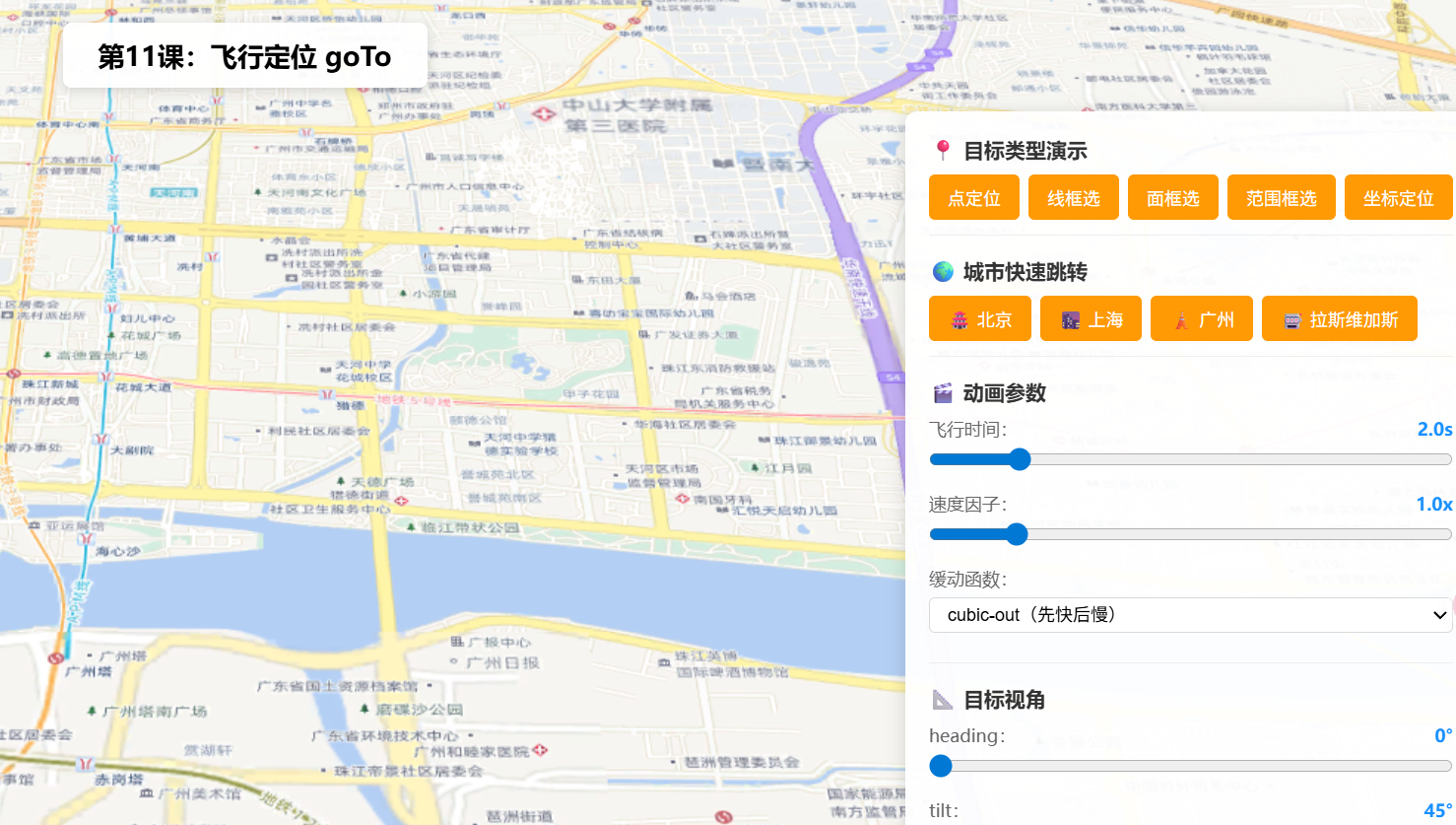
操作说明:
- 点击「点定位/线框选/面框选/范围框选/坐标定位」按钮,观察
goTo()对不同类型的自动框选行为- 点击城市按钮(北京/上海/广州/拉斯维加斯),体验跨国远距离飞行
- 调整「飞行时间」滑块(0.5s~10s)控制动画快慢
- 调整「速度因子」滑块(0.1x~6x)改变飞行速度
- 切换「缓动函数」下拉(cubic-out/linear/expo-in/expo-out/in-out)感受不同速度曲线
- 设置 heading 和 tilt 指定到达后的目标视角
- 点击「🚁 自动巡检」体验链式调用依次飞过北京→上海→广州
- 飞行过程中点击「⏹ 取消飞行」中断动画(AbortSignal 演示)
六、关键API说明
| API | 类型 | 说明 |
|---|---|---|
view.goTo(target, options) |
方法 | 平滑飞行到目标位置,返回 Promise<void> |
target(GoToTarget3D) |
多种类型 | 支持 [lng,lat]、Point、Polyline、Polygon、Extent、Camera、Graphic、Viewpoint、对象字面量 |
options.animate |
boolean | 是否启用动画,默认 true |
options.duration |
number | 飞行动画时长(毫秒),>8000 需同时设 maxDuration |
options.maxDuration |
number | 最大动画时长限制 |
options.speedFactor |
number | 速度因子,<1 减速,>1 加速,默认 1 |
options.easing |
string | function | 缓动函数,预设:linear、cubic-out、expo-in、expo-out、in-out |
options.signal |
AbortSignal | 通过 AbortController 取消飞行 |
常见坑点
| 问题 | 原因 | 解决方案 |
|---|---|---|
duration > 8000 不生效 |
SDK 有 maxDuration 默认 8000ms 限制 |
同时设置 maxDuration: 10000 或更大值 |
| 远距离飞行后视角变了 | 目标太远时 heading/tilt 会自动重置 | 在 target 中显式指定 heading 和 tilt |
| 连续点两次导致动画冲突 | 前一次动画未完成 | 在 goTo 前先 abortController.abort() 取消前次 |
| 飞行中用户操作地图后状态异常 | 用户交互会自动触发 AbortError | 统一 .catch() 捕获 AbortError |
speedFactor 和 duration 同时设置 |
duration 优先级更高 |
选其一使用:定速用 speedFactor,定时用 duration |
七、系列导航
⬅️ 上一篇 :ArcGIS JS 基础教程(10):Camera 相机控制
💡 小贴士 :
goTo()是三维场景中最常用的导航方法。记住两个关键原则:(1) 定速用speedFactor,定时用duration;(2) 链式飞行用async/await。飞行结束后想精确控制视角?在target对象中传入heading+tilt即可。下一课我们将学习如何用takeScreenshot()把精彩场景保存为图片。