文章目录
-
- [1. 现代 Flow Matching 图像管线长什么样?](#1. 现代 Flow Matching 图像管线长什么样?)
- [2. Diffusers 中怎么识别 FlowMatch 模型?](#2. Diffusers 中怎么识别 FlowMatch 模型?)
- [3. Stable Diffusion 3 类模型的最小推理代码](#3. Stable Diffusion 3 类模型的最小推理代码)
- [4. FLUX 类模型的常见推理结构](#4. FLUX 类模型的常见推理结构)
- [5. scheduler 参数怎么调?](#5. scheduler 参数怎么调?)
-
- [5.1 `num_inference_steps`](#5.1
num_inference_steps) - [5.2 `shift`](#5.2
shift) - [5.3 `use_dynamic_shifting`](#5.3
use_dynamic_shifting)
- [5.1 `num_inference_steps`](#5.1
- [6. 不能随便换 scheduler](#6. 不能随便换 scheduler)
- [7. LoRA 微调时要注意什么?](#7. LoRA 微调时要注意什么?)
-
- [7.1 训练目标](#7.1 训练目标)
- [7.2 数据处理](#7.2 数据处理)
- [7.3 显存设置](#7.3 显存设置)
- [7.4 prompt 过拟合检查](#7.4 prompt 过拟合检查)
- [8. ComfyUI / WebUI 工作流里怎么判断?](#8. ComfyUI / WebUI 工作流里怎么判断?)
- [9. 常见问题排查表](#9. 常见问题排查表)
- [10. 选型建议](#10. 选型建议)
- [11. 这篇文章的核心结论](#11. 这篇文章的核心结论)
关键词:SD3、FLUX、FlowMatchEuler、Diffusers、DiT、MMDiT、LoRA
目标:从使用者角度理解 Flow Matching 在现代图像生成管线里的位置
Flow Matching 真正进入大众视野,很大程度上和新一代图像生成模型有关。Stable Diffusion 3 相关论文使用 Rectified Flow Transformer,Hugging Face Diffusers 也为这类模型提供了 FlowMatch 系列 scheduler。
如果你是工具使用者,不必一上来推导所有数学。你更需要知道:模型输出是什么、scheduler 用哪个、步数和 shift 怎么调、LoRA 微调时目标怎么对齐。
1. 现代 Flow Matching 图像管线长什么样?
典型 latent 图像生成流程:
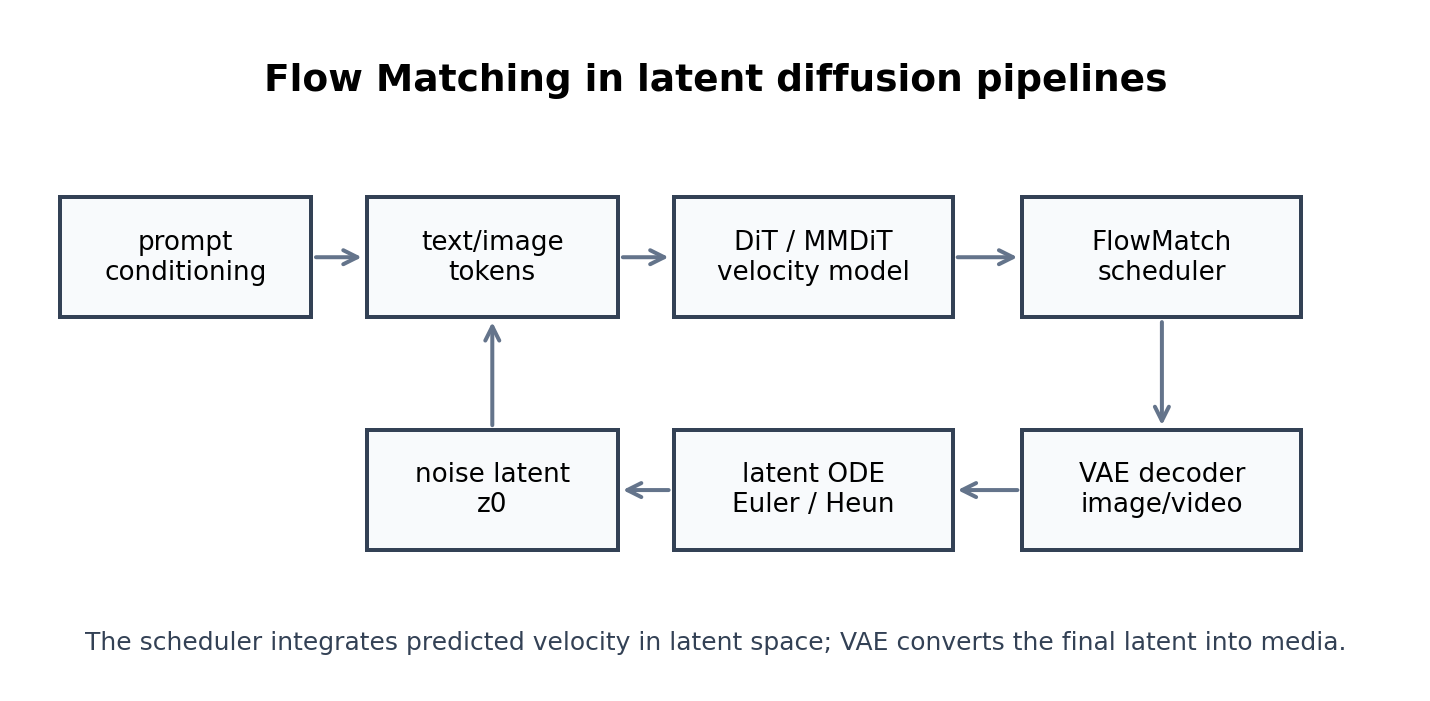
可以拆成 6 个模块:
| 模块 | 作用 |
|---|---|
| Text Encoder | 把 prompt 变成文本条件 |
| VAE Encoder / Decoder | 图像和 latent 互相转换 |
| Noise Latent | 生成起点 |
| DiT / MMDiT | 预测 velocity |
| FlowMatch Scheduler | 根据速度场更新 latent |
| Guidance | 增强 prompt 约束 |
在 SD1.5/SDXL 时代,很多人习惯说"U-Net 去噪"。在 SD3/FLUX 类路线里,更常见的是:Transformer 在 latent space 里预测 velocity,scheduler 沿着 Flow Matching 路径更新 latent。
2. Diffusers 中怎么识别 FlowMatch 模型?
加载模型后先看 scheduler:
python
print(pipe.scheduler)
print(pipe.scheduler.config)
如果输出里有:
text
FlowMatchEulerDiscreteScheduler
FlowMatchHeunDiscreteScheduler
就说明这个模型的推理流程需要按 Flow Matching 的 scheduler 来理解。
Diffusers 官方文档中说明,FlowMatchEulerDiscreteScheduler 基于 Stable Diffusion 3 中的 flow-matching sampling,并提供了 shift、use_dynamic_shifting、base_shift、max_shift 等参数。
3. Stable Diffusion 3 类模型的最小推理代码
下面是通用写法。模型 ID 需要根据你实际拥有的权重和授权协议替换。
python
import torch
from diffusers import DiffusionPipeline, FlowMatchEulerDiscreteScheduler

model_id = "your-model-id"

pipe = DiffusionPipeline.from_pretrained(
    model_id,
    torch_dtype=torch.float16,
).to("cuda")

pipe.scheduler = FlowMatchEulerDiscreteScheduler.from_config(
    pipe.scheduler.config
)

image = pipe(
    prompt="a glass teapot on a wooden table, soft studio lighting",
    num_inference_steps=28,
    guidance_scale=4.5,
).images[0]

image.save("flowmatch_result.png")
如果是显存较小的机器,可以尝试:
python
pipe.enable_model_cpu_offload()
pipe.enable_vae_slicing()
pipe.enable_attention_slicing()
4. FLUX 类模型的常见推理结构
Diffusers 中 FLUX 类模型通常使用独立的 pipeline。不同版本的权重、许可和显存要求不同,代码结构大致如下:
python
import torch
from diffusers import FluxPipeline

pipe = FluxPipeline.from_pretrained(
    "your-flux-model-id",
    torch_dtype=torch.bfloat16,
).to("cuda")

image = pipe(
    prompt="a futuristic lab bench with holographic molecular diagrams",
    num_inference_steps=28,
    guidance_scale=3.5,
    height=1024,
    width=1024,
).images[0]

image.save("flux_result.png")
调参时优先从这几个参数开始:
| 参数 | 推荐起点 | 说明 |
|---|---|---|
num_inference_steps |
24-32 | 平衡质量与速度 |
guidance_scale |
3.0-5.0 | 过高可能导致画面发硬 |
height/width |
模型推荐分辨率 | 超分辨率容易带来结构问题 |
seed |
固定 | 便于复现调参结果 |
5. scheduler 参数怎么调?
5.1 num_inference_steps
这是最直观的参数。步数越多,ODE 积分越细,通常质量越稳,但速度越慢。
建议调参顺序:
text
16 → 24 → 28 → 32 → 40常见经验:
- 快速预览:16-20;
- 正常出图:24-32;
- 精修或复杂 prompt:32-40。
5.2 shift
shift 改变时间步或噪声尺度的分配方式。直觉上,它决定采样器更关注生成过程的哪些阶段。
python
pipe.scheduler = FlowMatchEulerDiscreteScheduler.from_config(
    pipe.scheduler.config,
    shift=3.0,
)
通常可以这样试:
| 画面现象 | 调整方向 |
|---|---|
| 构图乱、主体不稳 | 适当提高 steps 或 shift |
| 画面太保守、变化少 | 适当降低 shift 或换 seed |
| 细节发硬 | 降低 guidance_scale |
| prompt 跟随弱 | 适当提高 guidance_scale |
5.3 use_dynamic_shifting
高分辨率出图时,不同分辨率对噪声尺度的需求可能不同。动态 shifting 的作用是根据分辨率调整时间步分配。
python
pipe.scheduler = FlowMatchEulerDiscreteScheduler.from_config(
    pipe.scheduler.config,
    use_dynamic_shifting=True,
)
不是所有模型都需要手动改这个参数。最稳妥的方法是先使用模型默认 scheduler 配置,再在小范围内调。
6. 不能随便换 scheduler
很多用户会把 SDXL 时代的习惯带过来,例如直接换成:
text
DDIMScheduler
EulerAncestralDiscreteScheduler
DPMSolverMultistepScheduler
对于 Flow Matching / Rectified Flow 模型,这样可能导致:
- 输出目标解释不匹配;
- 时间步方向不匹配;
- sigma 分布不匹配;
- guidance 效果异常;
- 画面变灰、变糊或结构崩坏。
推荐原则:
text
模型默认是什么 scheduler,就先用什么 scheduler。
只有在确认输出参数化一致时,再尝试替换。
7. LoRA 微调时要注意什么?
如果你准备微调 SD3/FLUX 类 Flow Matching 模型,重点不是把 SDXL 的 LoRA 脚本原封不动套上去,而是确认训练目标是否一致。
7.1 训练目标
重点检查:
text
模型预测的是 noise 还是 velocity
loss target 是否与 scheduler 匹配
timestep / sigma 采样是否与原模型一致
VAE latent scaling 是否正确
7.2 数据处理
推荐流程:
text
图片清洗
尺寸统一或分桶
caption 规范化
VAE 编码 latent
随机采样 timestep / sigma
训练 transformer 的 LoRA 层
保存权重并回到原 pipeline 测试
7.3 显存设置
常见组合:
text
bf16 / fp16
gradient checkpointing
8-bit optimizer
LoRA rank 8-32
batch size 1-4
gradient accumulation
7.4 prompt 过拟合检查
每隔固定 step 做一组固定 prompt:
text
主体一致性 prompt
风格 prompt
复杂构图 prompt
文字渲染 prompt
负面场景 prompt
如果只在训练集风格上变好,但通用 prompt 变差,说明 rank、学习率、训练步数或数据重复度需要调整。
8. ComfyUI / WebUI 工作流里怎么判断?
如果你不是写 Python,而是用 ComfyUI 这类节点式工具,可以检查:
text
Sampler 是否为 FlowMatch / Euler 类
Scheduler 是否使用模型推荐配置
CFG 是否过高
分辨率是否超出模型推荐范围
VAE 是否匹配
Text Encoder 是否完整加载
建议新模型第一次出图时固定:
text
seed: 固定
steps: 28
guidance: 3.5-4.5
resolution: 模型推荐分辨率
sampler: 默认 FlowMatch sampler
确认稳定后,再逐个改参数。不要同时改 sampler、steps、CFG、分辨率,否则无法判断是哪一个参数导致画面变化。
9. 常见问题排查表
| 问题 | 先看哪里 | 常见处理 |
|---|---|---|
| 图像发灰 | scheduler / VAE | 恢复默认 scheduler,检查 VAE |
| 主体不听 prompt | guidance / text encoder | 提高 guidance,确认文本编码器加载完整 |
| 细节很硬 | guidance 过高 | 降低 guidance_scale |
| 构图乱 | steps / shift | 提高 steps,尝试默认或较高 shift |
| 显存爆 | dtype / offload | bf16、fp16、CPU offload、VAE slicing |
| LoRA 一加就崩 | 训练目标不匹配 | 检查 velocity target、sigma sampling |
10. 选型建议
| 使用场景 | 推荐路线 |
|---|---|
| 只想快速出图 | 使用模型默认 FlowMatch scheduler |
| 想追求速度 | 降低 steps,配合固定 seed 比较 |
| 想提高复杂 prompt 跟随 | 适当提高 guidance,检查 text encoder |
| 想做 LoRA | 找支持该模型训练目标的脚本 |
| 想研究算法 | 从二维 Flow Matching 或小 latent 模型开始 |
| 想改 sampler | 先读 scheduler 配置,再改一个参数 |
11. 这篇文章的核心结论
Flow Matching 在现代图像生成中的使用方式,可以总结成一句话:
Transformer 预测 latent velocity,FlowMatch scheduler 负责沿速度场更新 latent,VAE 把最终 latent 解码成图像。
对工具用户来说,最重要的不是记住所有公式,而是建立三个判断:
text
模型输出目标是什么?
scheduler 是否匹配?
steps、shift、guidance 是否一起调通?
只要这三点一致,Flow Matching 模型就能稳定进入实际出图、微调和工作流搭建。