一、引言
在实时数据处理管道中,数据的序列化与反序列化(SerDe)是连接外部系统的关键环节。Apache Flink 通过Connector Formats机制,将数据编解码逻辑从连接器中解耦,实现了格式与连接器的灵活组合。
┌──────────────┐       ┌──────────────┐       ┌──────────────┐
│  数据源系统   │──────▶│  Flink 作业   │──────▶│  目标系统     │
│ (Kafka/MQ)   │ bytes │  (处理逻辑)   │ bytes │ (ES/DB/HDFS) │
└──────────────┘       └──────────────┘       └──────────────┘
        │                      │                       │
        ▼                      ▼                       ▼
   JSON/Avro/CSV         内部 RowData            JSON/Parquet
   Protobuf...           类型系统               Avro/Canal...
外部系统中的数据以多种编码格式存储和传输(JSON、Avro、Protobuf、CSV、Parquet 等),Flink 作业在读取和写出时,必须完成:
- 反序列化(Deserialization):将 byte\[\] 解析为 Flink 内部数据结构。
- 序列化(Serialization):将 Flink 内部数据结构编码为 byte\[\] 。
Flink 采用Connector + Format 分层架构,核心设计原则:
|--------|----------------------------------------------------------|
| 设计原则 | 说明 |
| 关注点分离 | Connector 负责与外部系统的 I/O 交互,Format 负责数据编解码 |
| 组合灵活性 | 同一 Connector 可搭配不同 Format(如 Kafka + JSON / Kafka + Avro) |
| 可扩展性 | 用户可自定义 Format 而无需修改 Connector |
| API 统一 | Table/SQL 层通过 SPI 机制自动发现并加载 Format |
二、核心机制原理
1.整体架构
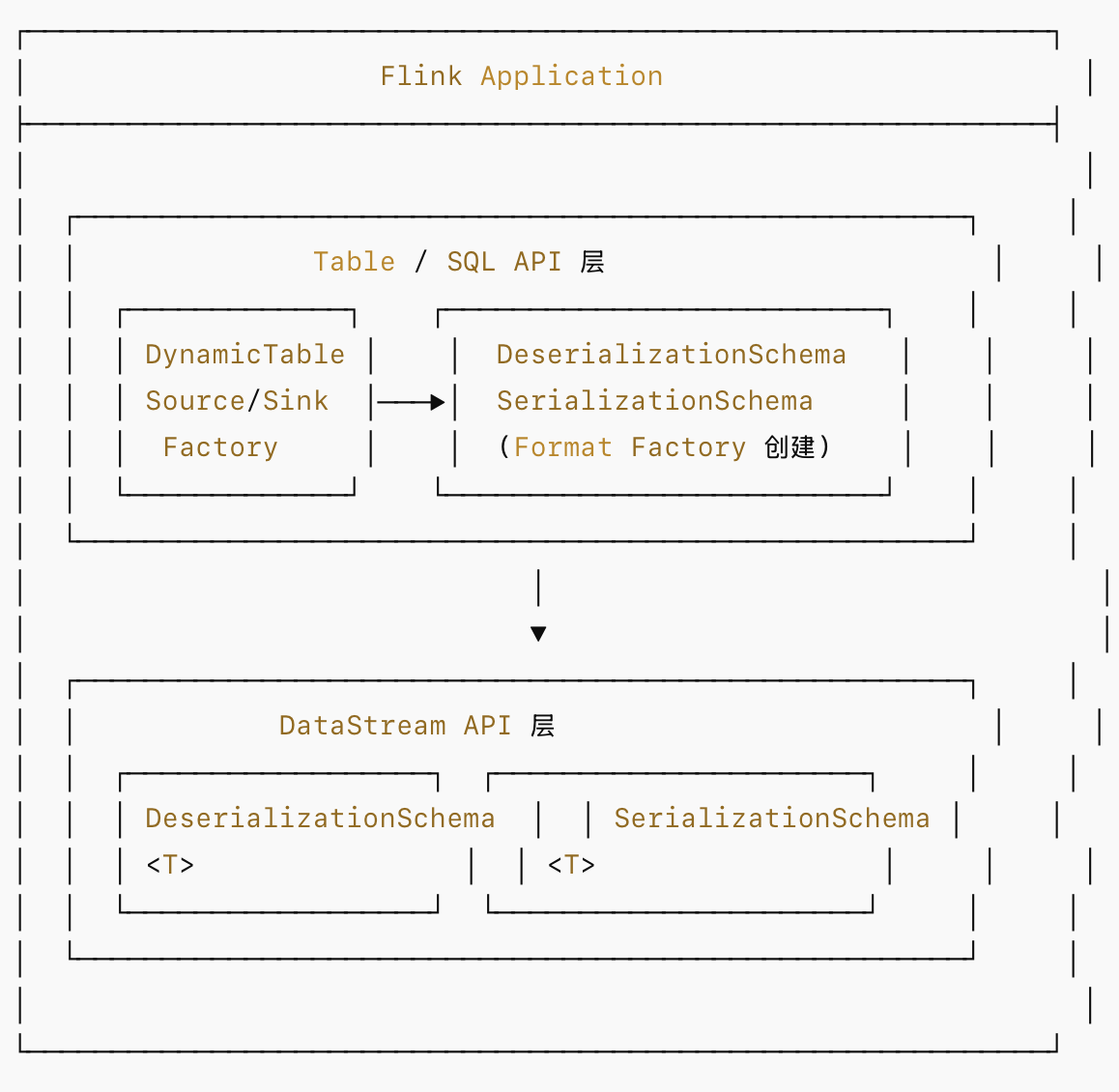
2.DataStream API 中的 Format 机制
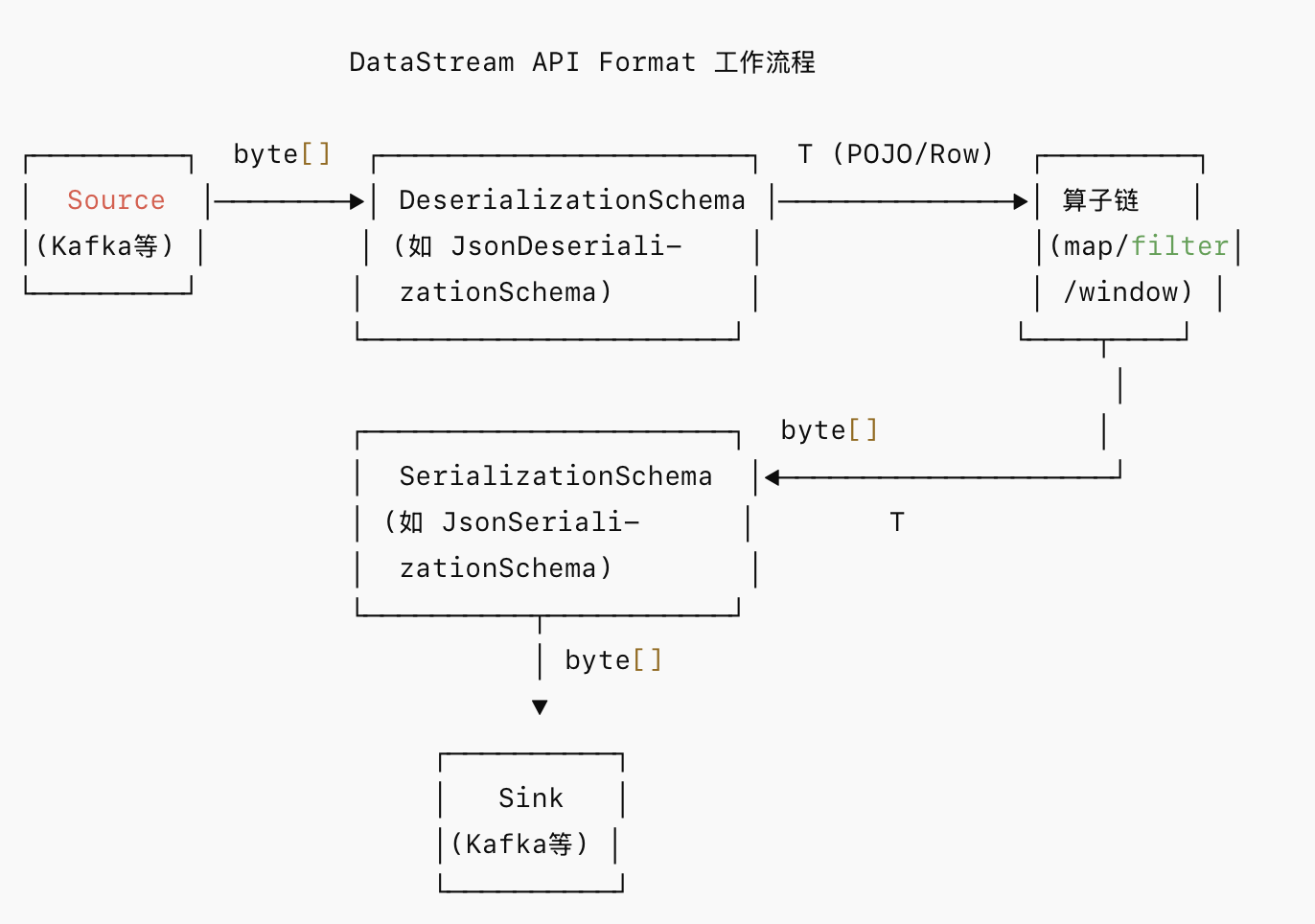
在 DataStream API 中,Format 的核心接口:
// 反序列化接口
public interface DeserializationSchema<T> extends Serializable, ResultTypeQueryable<T> {
    T deserialize(byte[] message) throws IOException;
    default void open(InitializationContext context) throws Exception {}
    boolean isEndOfStream(T nextElement);
}

// 序列化接口
public interface SerializationSchema<T> extends Serializable {
    byte[] serialize(T element);
    default void open(InitializationContext context) throws Exception {}
}
3.Table/SQL API 中的 Format 机制
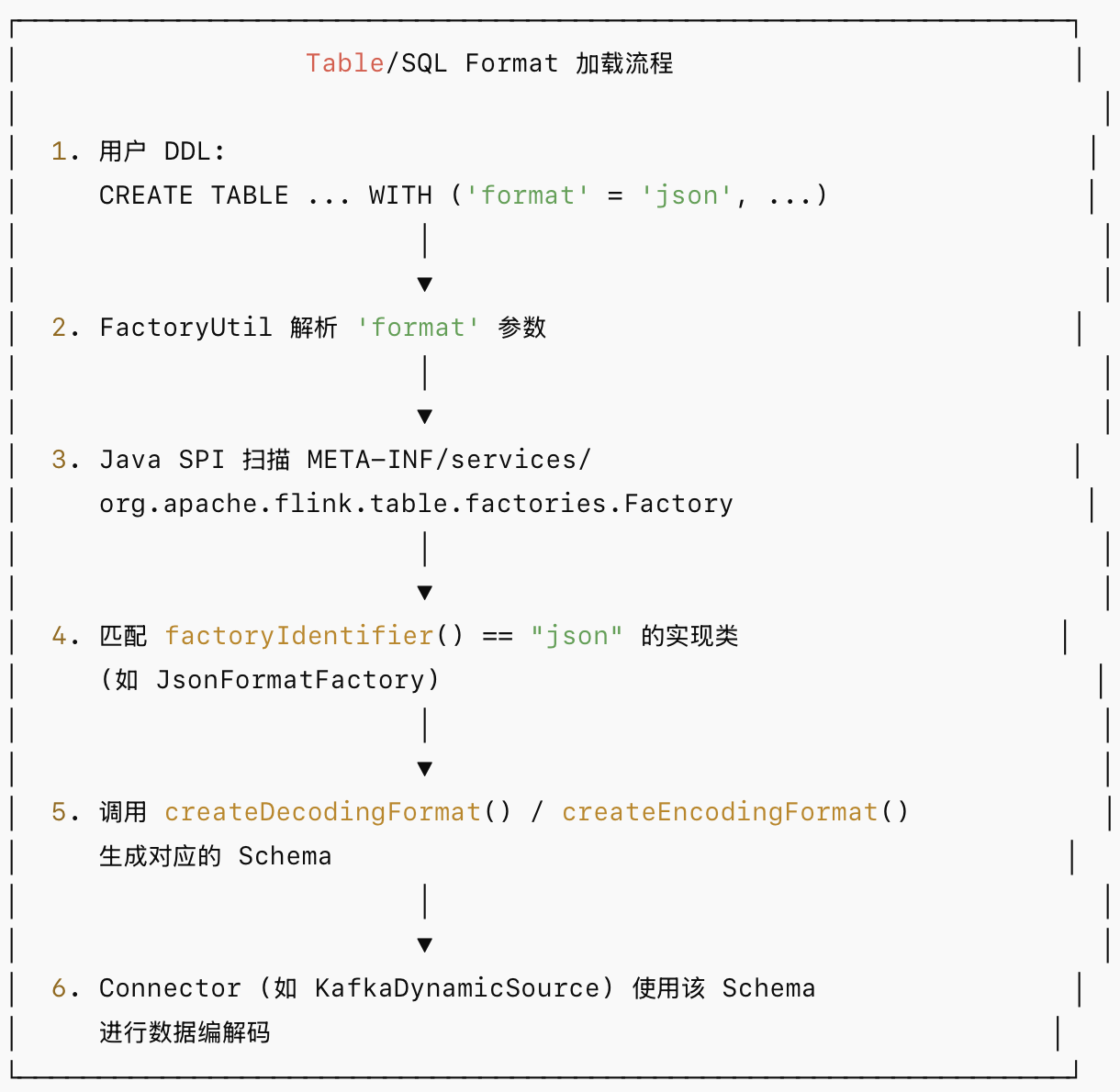
Table API 层引入了更高级的抽象:
// Table API 反序列化格式工厂
public interface DeserializationFormatFactory extends FormatFactory {
    DecodingFormat<DeserializationSchema<RowData>> createDecodingFormat(
        DynamicTableFactory.Context context,
        ReadableConfig formatOptions);
}

// Table API 序列化格式工厂
public interface SerializationFormatFactory extends FormatFactory {
    EncodingFormat<SerializationSchema<RowData>> createEncodingFormat(
        DynamicTableFactory.Context context,
        ReadableConfig formatOptions);
}
4.Format 与 Connector 的绑定关系
并非所有 Format 都能与所有 Connector 搭配。以下是常见的兼容矩阵:
|---------------|-------|------------|------|---------------|--------------|
| Format | Kafka | Filesystem | JDBC | Elasticsearch | Upsert-Kafka |
| JSON | ✅ | ✅ | ❌ | ✅ | ✅ |
| Avro | ✅ | ✅ | ❌ | ❌ | ✅ |
| CSV | ✅ | ✅ | ❌ | ❌ | ✅ |
| Parquet | ❌ | ✅ | ❌ | ❌ | ❌ |
| ORC | ❌ | ✅ | ❌ | ❌ | ❌ |
| Canal-JSON | ✅ | ❌ | ❌ | ❌ | ❌ |
| Debezium-JSON | ✅ | ❌ | ❌ | ❌ | ❌ |
| Maxwell-JSON | ✅ | ❌ | ❌ | ❌ | ❌ |
| Raw | ✅ | ✅ | ❌ | ❌ | ✅ |
| Protobuf | ✅ | ✅ | ❌ | ❌ | ✅ |
三、Flink 支持的主要 Formats 详解
1.JSON Format
Table API DDL 配置示例:
CREATE TABLE kafka_source (
    user_id BIGINT,
    user_name STRING,
    event_time TIMESTAMP(3),
    payload ROW<action STRING, amount DECIMAL(10,2)>
) WITH (
    'connector' = 'kafka',
    'topic' = 'user_events',
    'properties.bootstrap.servers' = 'kafka:9092',
    'properties.group.id' = 'flink-consumer',
    'scan.startup.mode' = 'latest-offset',

    -- Format 配置
    'format' = 'json',
    'json.fail-on-missing-field' = 'false',
    'json.ignore-parse-errors' = 'true',
    'json.timestamp-format.standard' = 'SQL',
    'json.map-null-key.mode' = 'DROP',
    'json.encode.decimal-as-plain-number' = 'true'
);
关键配置参数说明:
|-------------------------------------|-------|----------------------------------------|
| 参数 | 默认值 | 说明 |
| json.fail-on-missing-field | false | JSON 中缺失声明字段时是否失败 |
| json.ignore-parse-errors | false | 解析错误时是否跳过(而非抛异常) |
| json.timestamp-format.standard | SQL | 时间戳格式:SQL 或 ISO-8601 |
| json.map-null-key.mode | FAIL | Map 中 key 为 null 的处理:FAIL/DROP/LITERAL |
| json.encode.decimal-as-plain-number | false | DECIMAL 类型是否以非科学计数法输出 |
DataStream API 使用示例:
// 使用 JsonDeserializationSchema(需要 POJO 或指定 TypeInformation)
KafkaSource<Event> source = KafkaSource.<Event>builder()
    .setBootstrapServers("kafka:9092")
    .setTopics("user_events")
    .setGroupId("flink-consumer")
    .setStartingOffsets(OffsetsInitializer.latest())
    .setDeserializer(new JsonDeserializationSchema<>(Event.class))
    .build();

// 或使用 JSONKeyValueDeserializationSchema 获取元数据
KafkaSource<ObjectNode> source = KafkaSource.<ObjectNode>builder()
    .setBootstrapServers("kafka:9092")
    .setTopics("user_events")
    .setGroupId("flink-consumer")
    .setDeserializer(new JSONKeyValueDeserializationSchema(true))
    .build();
2.Avro Format
Table API 示例:
CREATE TABLE kafka_avro_source (
    user_id BIGINT,
    user_name STRING,
    email STRING,
    created_at TIMESTAMP(3)
) WITH (
    'connector' = 'kafka',
    'topic' = 'user_avro',
    'properties.bootstrap.servers' = 'kafka:9092',

    -- Avro Confluent Format
    'format' = 'avro-confluent',
    'avro-confluent.url' = 'http://schema-registry:8081',
    'avro-confluent.schema-registry.subject' = 'user_avro-value'
);
DataStream API 示例:
// 使用 Avro SpecificRecord
KafkaSource<UserEvent> source = KafkaSource.<UserEvent>builder()
    .setBootstrapServers("kafka:9092")
    .setTopics("user_avro")
    .setGroupId("flink-consumer")
    .setDeserializer(
        KafkaRecordDeserializationSchema.valueOnly(
            ConfluentRegistryAvroDeserializationSchema.forSpecific(
                UserEvent.class,
                "http://schema-registry:8081"
            )
        )
    )
    .build();
3.CSV Format
CREATE TABLE csv_source (
    order_id BIGINT,
    product STRING,
    quantity INT,
    price DECIMAL(10,2)
) WITH (
    'connector' = 'kafka',
    'topic' = 'orders_csv',
    'properties.bootstrap.servers' = 'kafka:9092',

    'format' = 'csv',
    'csv.field-delimiter' = ',',
    'csv.disable-quote-character' = 'false',
    'csv.quote-character' = '"',
    'csv.allow-comments' = 'true',
    'csv.ignore-parse-errors' = 'true',
    'csv.null-literal' = 'NULL'
);
4.Debezium-JSON Format(CDC 场景)
CREATE TABLE mysql_cdc_source (
    id INT,
    name STRING,
    status STRING,
    update_time TIMESTAMP(3),
    PRIMARY KEY (id) NOT ENFORCED
) WITH (
    'connector' = 'kafka',
    'topic' = 'dbserver1.mydb.users',
    'properties.bootstrap.servers' = 'kafka:9092',

    'format' = 'debezium-json',
    'debezium-json.schema-include' = 'true',
    'debezium-json.ignore-parse-errors' = 'false',
    'debezium-json.timestamp-format.standard' = 'ISO-8601'
);
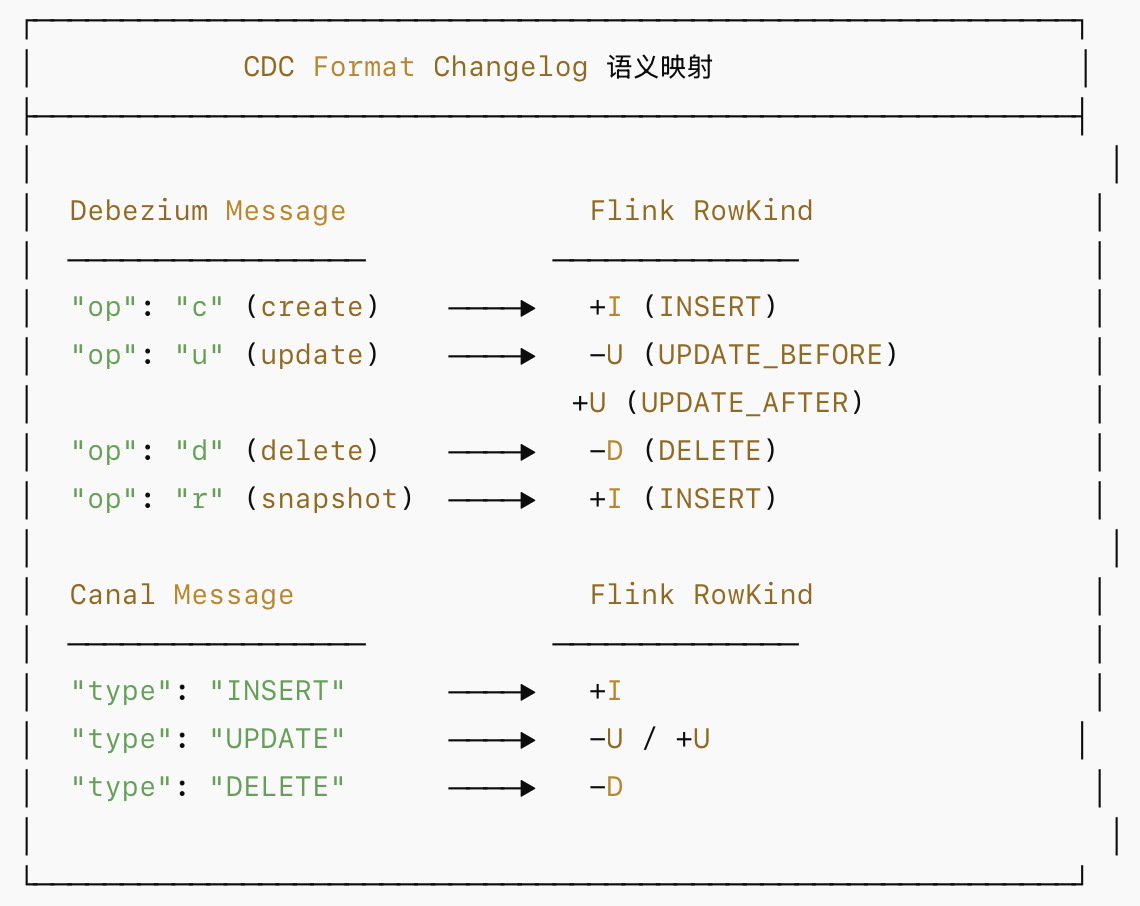
CDC Format 的 changelog 语义:
5.Protobuf Format
CREATE TABLE proto_source (
    user_id INT,
    user_name STRING,
    email STRING
) WITH (
    'connector' = 'kafka',
    'topic' = 'proto_users',
    'properties.bootstrap.servers' = 'kafka:9092',

    'format' = 'protobuf',
    'protobuf.message-class-name' = 'com.example.proto.UserProto$User',
    'protobuf.ignore-parse-errors' = 'true',
    'protobuf.read-default-values' = 'true'
);
6.Raw Format
CREATE TABLE raw_source (
    message STRING
) WITH (
    'connector' = 'kafka',
    'topic' = 'raw_topic',
    'properties.bootstrap.servers' = 'kafka:9092',

    'format' = 'raw',
    'raw.charset' = 'UTF-8',
    'raw.endianness' = 'big-endian'
);