一句话:SKILL.md 不该被 LLM 在 runtime 解读,它该被编译。这篇文章讲我怎么把这件事做出来的,源码全在这里。
先说结论(怕你划走)
我用三个月,给 SKILL.md 写了个编译器,叫 agenthatch。
它干的事就一件:把一个 markdown 写的 skill,编译成一个能 pip install、能独立运行、带类型签名和状态机的 Python Agent。
不是 prompt wrapper,不是 RAG 套壳,是真的生成代码------pyproject.toml、agent.py、tools.py、runtime.toml,一套齐全,跑起来是个正经的 Python 包。
perl
pip install agenthatch
agenthatch init
agenthatch skills add ./my-skill/SKILL.md
agenthatch hatch my-skill    # 编译
agenthatch run my-skill      # 运行
三条命令,markdown → 运行中的 agent。
仓库在这:github.com/agenthatch/...
下面是为什么做、怎么做、踩了什么坑。不是翻 README 的水文,每个关键点我都贴了源码位置,你可以去验证。
一、起源:Claude Code 把我写的 skill 当厕纸翻了
我是 EternalRights,一个智能体开发工程师,在滴滴,之前在 CodeFlying 也是做 agent。
今年四月份,滴滴全公司推 skill。每个团队都在写------测试的、部署的、代码审查的,热潮跟抢鸡蛋似的。我也写了一个,把自己那摊 agent 开发的事全塞进去:每个 API 端点怎么调、MCP 怎么配、token 在什么场景下不够用、几个月踩坑攒下来的规则------一五一十写进一个 SKILL.md,当工作交付物交上去了。
然后我眼睁睁看着 Claude Code 跑它。
我写的那些严格要求------"必须先检查环境变量"、"遇到 X 类型错误立即退出"------模型跟没看见一样。它把 skill 当一本参考书,不是规范。每次运行,理解都歪一点。那次它歪到差点让一个本该在测试环境就拦截的问题溜进生产。
我花心血写的东西,在它手里就是一段可以被选择性跳过的散文。
你知道那种感觉吗?你交了一份自认为严谨的产出,但执行它的"大脑"压根不尊重它。
那天晚上我冒出来一个特别朴素的想法:skill 不该被"解读",它应该被"编译"。
二、范式的坑在哪:SKILL.md 本质是散文
我先把问题说清楚,不跟你扯虚的。
一个 SKILL.md 文件,本质是什么?是一段散文。人类写给人类看的散文。 然后你把它塞进 system prompt,让 LLM 在运行时自己去猜这段话到底要求它干什么。
一两个 skill 还行。三个?凑合。五个以上?开始出事了。
| 痛点 | 实际发生了什么 |
|---|---|
| 零隔离 | 所有 skill 挤在同一个 context window 里。文件整理 skill 的逻辑会嫁接到 git 操作上,输出四不像。 |
| 参考书,不是操作手册 | Agent 把 SKILL.md 当 loose suggestion,不是 contract。长 skill 它扫读,挑看起来相关的,忽略剩下的。 |
| Token 浪费 | 每个 SKILL.md 都死在 system prompt 里。5 个 skill 每个 3KB,开口前上下文烧了 15KB。长任务指数级恶化。 |
| 零校验 | 工具名拼错、参数缺失、指令歧义------agent 一个都抓不到,全留到 runtime 爆。等爆的时候对话已经 20 轮深了。 |
| 规模衰减 | 1-3 个 skill 还能用,10+ 就失控。没有依赖图,没有冲突检测,不知道谁覆盖谁。 |
这不是 Anthropic 的 bug。这不是你 skill 写得烂。这是架构级别的衰减------一个 LLM 在同一段上下文里解读七份互相零隔离的散文,每次解读都不一样。
打个比方:你让一个人同时读七本操作手册,每次问他问题他都得从头翻这七本书再拼答案。这个人早晚疯。LLM 也一样。
核心问题不在格式。问题在于 SKILL.md 是 prompt engineering,不是 software engineering。你在让 LLM 在 runtime 解读人类散文,没有编译,没有类型检查,没有契约。
三、范式反转:skill 的终局是 agent 化
这是我整篇文章最想让你记住的一句话,也是我做这个项目的底层逻辑:
skill 的最佳形态是 agent 化。skill 是最完美的 agent 的孵化输入。
展开讲。
现在所有人都在写 skill,写给 Claude Code、写给 Codex CLI、写给 OpenClaw。但 skill 在这些工具里的角色是什么?是一段塞进 system prompt 的散文,被 LLM 在 runtime 反复解读。 skill 是 prompt 的一部分,永远依附于某个 host agent。
这个范式有问题。skill 不该是 prompt 的附属品,skill 应该是 agent 的源码。
你想想,Java 源码编译成字节码给 JVM 跑,TypeScript 编译成 JavaScript 给浏览器跑。编译这一步,在运行之前就把人类表达变成了机器能确定性执行的格式------编译时抓 typo,编译时做类型检查,编译时把歧义消灭。
skill 缺的就是这一步。它没有编译。它把散文原封不动塞给 LLM,让 LLM 每次自己猜意思。
所以 skill 的终局不是"写得更好",是"被编译成 agent"。 skill 不该是 host agent 的 prompt 配件,skill 该是 agent 的孵化输入------你写 skill,编译器把它孵化成一个独立的、有自己运行时、有自己工具、有自己状态机的 agent。
这就是 agenthatch 干的事。它不是 skill 的替代品(你的 skill 该怎么写还怎么写),它不是 Claude Code 的替代品(生成的 agent 完全独立运行)。它是中间那一步:把散文变成可执行代码。 javac 之于 .java,tsc 之于 .ts,agenthatch 之于 SKILL.md。
一旦你想通这一层,很多事就顺了:
- skill 不再死在 system prompt 里烧 token,编译后运行时只占 ~150 字节配置
- 每个 skill 编译成独立 agent,天然隔离,不再互相污染
- 编译时做 schema 校验,typo 和歧义在编译期就被抓,不留到 runtime
- 生成的 agent 能
pip install、能import、能独立跑,不依赖任何 host
四、三阶段管线:不跟你扯虚的,源码在这
agenthatch 的核心是一条三阶段管线:
scss
SKILL.md  →  Parse  →  6-Harness LLM Pipeline  →  Code Generation  →  Runnable Agent
  (输入)    (Phase 1)    (Phase 2: AI 推理)        (Phase 3: Jinja2)     (输出)
我一个个讲,源码位置都贴出来,你可以去翻。
Phase 1:确定性解析,零 AI
Phase 1 不用 AI。直接把 SKILL.md 的 frontmatter、正文、目录文件拆出来。确定性操作,不存在 AI 随机性。
入口在 parser.py 的 assemble_context():
ini
def assemble_context(skill_path: str | Path) -> ContextPack:
    # Step 1: 路径解析 → dir_name
    skill_dir = _resolve_skill_directory(Path(skill_path))
    dir_name = skill_dir.name
    # Step 2: 文件发现 → FileManifest(SHA-256 + 全文内容)
    manifest = _discover_files(skill_dir)
    # Step 3: YAML best-effort 解析 → frontmatter dict | body raw
    frontmatter, body, warnings = _best_effort_parse_yaml(skill_dir)
return ContextPack(frontmatter, body, manifest, dir_name, warnings, skill_dir)关键设计:Phase 1 不做任何语义判断。文件是脚本还是文档还是配置,Phase 1 不猜------那是 Phase 2 的活。Phase 1 只负责把字节读出来、算 SHA-256、做 YAML 解析。
v0.8 加了个 Phase 1.5 ScriptAnalyzer,用 AST 解析 Python 脚本、用正则解析 shell 脚本,提取函数签名。这一步也是确定性的,喂给 Phase 2 的 Harness C 做精确接口推理。能用确定性解决的,绝不麻烦 LLM。
Phase 2:6 个 AI Harness 并行推理
这是整个项目的心脏。六个专门化的 AI Harness 处理 skill,每个有自己的 persona 和温度。
温度配置表在 engine.py 里写死了,我直接贴:
python
HARNESS_CONFIG: dict[str, dict[str, Any]] = {
    "A": {"thinking": True, "temperature": 0.1,
          "reason": "Identity extraction is deterministic --- low temp for consistency"},
    "B": {"thinking": True, "temperature": 0.5,
          "reason": "Intent inference requires creativity for long-tail triggers"},
    "C": {"thinking": True, "temperature": 0.5,
          "reason": "Interface inference is complex --- needs SKILL.md + ScriptManifest"},
    "D": {"thinking": True, "temperature": 0.3,
          "reason": "Base detection needs precision --- moderate temp"},
    "E": {"thinking": True, "temperature": 0.2,
          "reason": "Assembly validation is structured --- low temp for consistency"},
    "F": {"thinking": True, "temperature": 0.3,
          "reason": "MCP config extraction needs exact matching --- moderate temp"},
}
每个温度都不是拍脑袋定的,有 reason。Identity 提取是确定性的,温度压到 0.1;Intent 推理要覆盖长尾触发词,需要一点创造力,给 0.5;Assembly 校验是结构化的,压到 0.2。
六个 Harness 各干一件事:
| Harness | 职责 | 模型档位 | 温度 |
|---|---|---|---|
| A --- Identity | 从 frontmatter 提取 name/version/description | small | 0.1 |
| B --- Intent | 推理触发词和用户意图 | small | 0.5 |
| C --- Interface | 设计工具签名、参数、返回类型 | large | 0.5 |
| D --- Base | 检测运行时基类和指令结构 | large | 0.3 |
| E --- Assembly | 交叉校验其他五个输出,产出 AHSSPEC | small | 0.2 |
| F --- MCP | 检测并配置 MCP server 连接 | small | 0.3 |
为什么拆六个?因为我试过一个超大 prompt 全搞定,输出跟抽奖似的。 拆开之后每个只管一件事,质量高了不是一星半点。这跟编译器把前端拆成 lexer/parser/semantic 是一个道理------单一职责。
每个 Harness 赑一个 Analyze → Infer → Self-Validate → Correct 循环,最多两次内部重试。循环实现在 engine.py 的 AgentHarness.run():
python
def run(self, **inputs: object) -> HarnessOutput:
    """Execute Analyze → Infer → Self-Validate → Correct loop."""
    reasoning: list[str] = []
    degradations: list[str] = []
    retries = 0
    system = self.build_system_prompt()
    user = self.build_user_message(**inputs)
    messages = [{"role": "system", "content": system},
                {"role": "user", "content": user}]
    reasoning.append(f"[{self.name}] analyze: inputs received")
    # Step 1: 初始推理
    result = self._infer(messages)
    reasoning.append(f"[{self.name}] infer: output received, {len(str(result))} chars")
    # Step 2: 自校验 + 纠错循环
    while retries <= self.max_internal_retries:
        passed, reason = self.validate_output(result)
        if passed:
            reasoning.append(f"[{self.name}] self_validate: passed")
            break
        reasoning.append(f"[{self.name}] self_validate: failed --- {reason}")
        if retries >= self.max_internal_retries:
            degradations.append(reason)
            break
        result = self.correct_on_failure(result, reason, **inputs)
        retries += 1
    confidence = self._estimate_confidence(result, degradations, retries)
    return HarnessOutput(result, confidence, reasoning, ...)
每个 Harness 都有自己的 validate_output()。比如 Harness A 校验 identity.id 必须是 kebab-case:
python
def validate_output(self, result: dict[str, Any]) -> tuple[bool, str]:
    identity = result.get("identity", {})
    identity_id = identity.get("id", "")
    if not identity_id:
        return False, "identity.id is empty"
    if not re.match(r"^[a-z0-9]+(-[a-z0-9]+)*$", identity_id):
        return False, f"identity.id '{identity_id}' is not kebab-case"
    if not identity.get("display_name"):
        return False, "identity.display_name is empty"
    return True, ""
Harness B 校验 triggers 数量必须在 5, 15,satisfies 在 3, 8,summary 至少 20 字符。这些约束不是 LLM 自己说的算,是代码强制执行的。 LLM 输出不合规,立刻打回去重做。
E 最关键------它校验其他五个的输出,生成统一的 AHSSPEC(Agent Hatch Standard Specification)。E 还会算一个结构性置信度,不是 LLM 自评,是代码数字段:
python
def _compute_structural_confidence(self, ahs_dict: dict[str, Any]) -> float:
    checks = 0
    passed = 0
    id_ = ahs_dict.get("identity", {})
    for f in ("id", "display_name", "version"):
        checks += 1
        if id_.get(f): passed += 1
    iface = ahs_dict.get("interface", {})
    for f in ("provides", "requires"):
        checks += 1
        if iface.get(f): passed += 1
    # ... 继续数 instructions、resources
    score = round(passed / max(checks, 1), 2)
    return score
LLM 自评的 confidence 我不信,我信代码数出来的。 这是个很重要的设计决定。
还有个细节值得一提:Orchestrator 在派发 Harness 之前,会先做一个预飞分类 ,根据 skill 类型决定每个 Harness 用哪个模型档位。分类逻辑在 _classify():
python
def _classify(self, context: ContextPack) -> str:
    _SCRIPT_SUFFIXES = {".py", ".sh", ".js", ".ts", ".rb", ".go", ".rs"}
    has_scripts = any(Path(e.path).suffix.lower() in _SCRIPT_SUFFIXES
                      for e in context.file_manifest.entries)
    body_lower = context.body.lower()
    api_indicators = ["api", "oauth", "token", "http", "rest", "webhook"]
    has_api = any(ind in body_lower for ind in api_indicators)
    if has_scripts and has_api: return "integration"
    if has_scripts: return "script_driven"
    if len(entries) > 2: return "knowledge"
    return "pure_instruction"
四种 skill 类型,对应四套模型档位组合。纯指令类 skill D 直接 skip(不需要检测基类),省 token;集成类 skill 全部上 large 模型。不是所有 skill 都值得烧大模型,预飞分类帮你省钱。
Phase 3:Jinja2 把 spec 渲染成完整 Python 包
Phase 3 是代码生成。Jinja2 模板把 AHSSPEC 渲染成一个完整的 Python agent 包:
bash
hatched-agent/
├── pyproject.toml          # pip-installable 包
├── runtime.toml            # LLM provider、model、API keys
├── README.md               # 生成的使用文档
├── agenthatch.yaml         # AHSSPEC manifest
└── src/{package_name}/
    ├── __init__.py
    ├── agent.py            # Agent 类(继承 AHCoreAgent)
    ├── tools.py            # 类型注解的工具实现
    └── references.py       # AI 提取的结构化数据
引擎在 generate/engine.py 的 GenerateEngine。模板映射写得很直白:
python
TEMPLATE_MAP: dict[str, str] = {
    "pyproject.toml.j2": "pyproject.toml",
    "agent.py.j2": "src/{package_name}/agent.py",
    "tools.py.j2": "src/{package_name}/tools.py",
    "references.py.j2": "src/{package_name}/references.py",
    "runtime.toml.j2": "runtime.toml",
    "README.md.j2": "README.md",
}
出来的东西能 pip install,能 import,能独立跑。这次是真 agent,不是套了层皮的 prompt。
Runtime:PlanLayer 六状态机
生成的 agent 跑起来不是裸的 ReAct 循环,它带一个 PlanLayer 状态机 ------六状态规划引擎。状态定义在 plan.py:
ini
class AgentState(str, Enum):
    STARTING = "starting"       # 初始状态,等计划
    PLANNING = "planning"       # 正在生成/更新计划
    EXECUTING = "executing"     # 正在执行计划步骤
    VERIFYING = "verifying"     # 正在校验结果
    REPLANNING = "replanning"   # 遇到阻塞,正在修订计划
    DONE = "done"               # 终态------所有步骤完成
跑法是:agent 启动时先通过一个虚拟的 plan 工具生成结构化计划,然后按步骤执行,每步有显式状态跟踪。遇到连续工具失败或步骤阻塞,触发 replanning。状态转换由循环管,不是 LLM 管------这是关键,LLM 不可靠,状态机可靠。
计划渲染成文本注入 system prompt,agent 自己能看到进度:
vbnet
## Plan: 给项目加国际化
  ☐ Step 1: 安装 next-intl
  ▶ Step 2: 创建语言包
  ☐ Step 3: 配置 middleware
Progress: 1/3 steps done
五、实战:从 SKILL.md 到运行中的 Agent
光说不练假把式。我拿一个真实的 skill 走一遍。
Step 1:写 SKILL.md
yaml
---
name: weather-advisor
description: 查询全球任意城市天气,支持多日预报和穿衣建议
version: 0.1.0
---

# Weather Advisor Agent

## 能力
- 查询指定城市的实时天气
- 查询未来 3 天天气预报
- 根据天气给出穿衣建议

## 工具
- httpx 调用 OpenWeatherMap API
- rich 彩色格式化输出

## 工作流程
1. 接收用户输入的城市名
2. 调用 OpenWeatherMap API 获取天气数据
3. 解析 JSON 响应,提取关键信息
4. 用 rich 格式化输出
5. 根据温度给出穿衣建议
就这么个 markdown 文件。没有一行代码,没有工具签名,没有类型。 全是散文。
Step 2:编译
bash
agenthatch skills add ./weather-advisor/SKILL.md
agenthatch hatch weather-advisor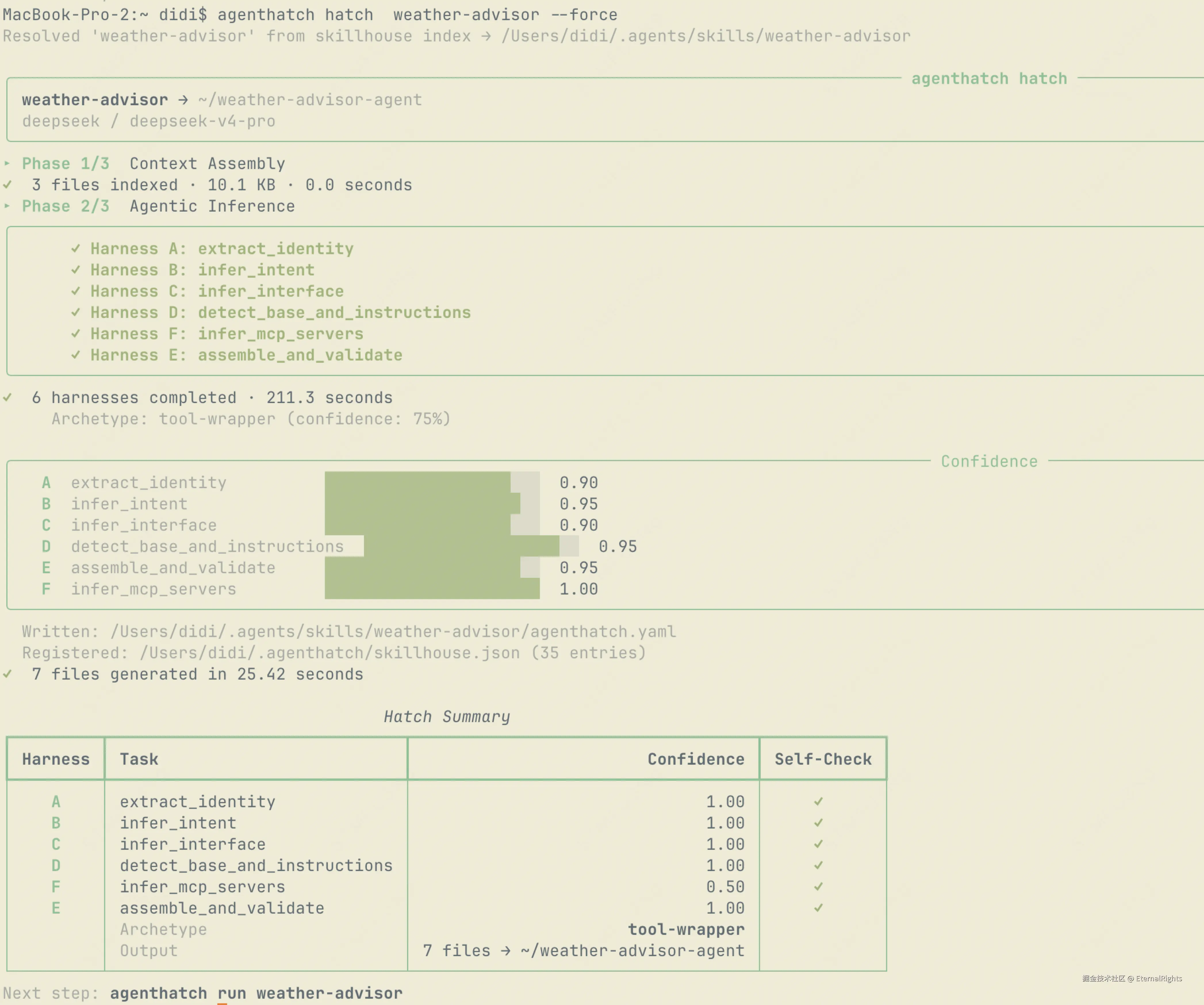 hatch 跑完,你会得到一个完整的 Python 包:
bash
weather-advisor-agent/
├── pyproject.toml
├── runtime.toml
├── README.md
├── agenthatch.yaml
└── src/weather_advisor/
    ├── __init__.py
    ├── agent.py        # 继承 AHCoreAgent,带 PlanLayer
    ├── tools.py        # get_weather(city: str) -> WeatherResponse
    └── references.py
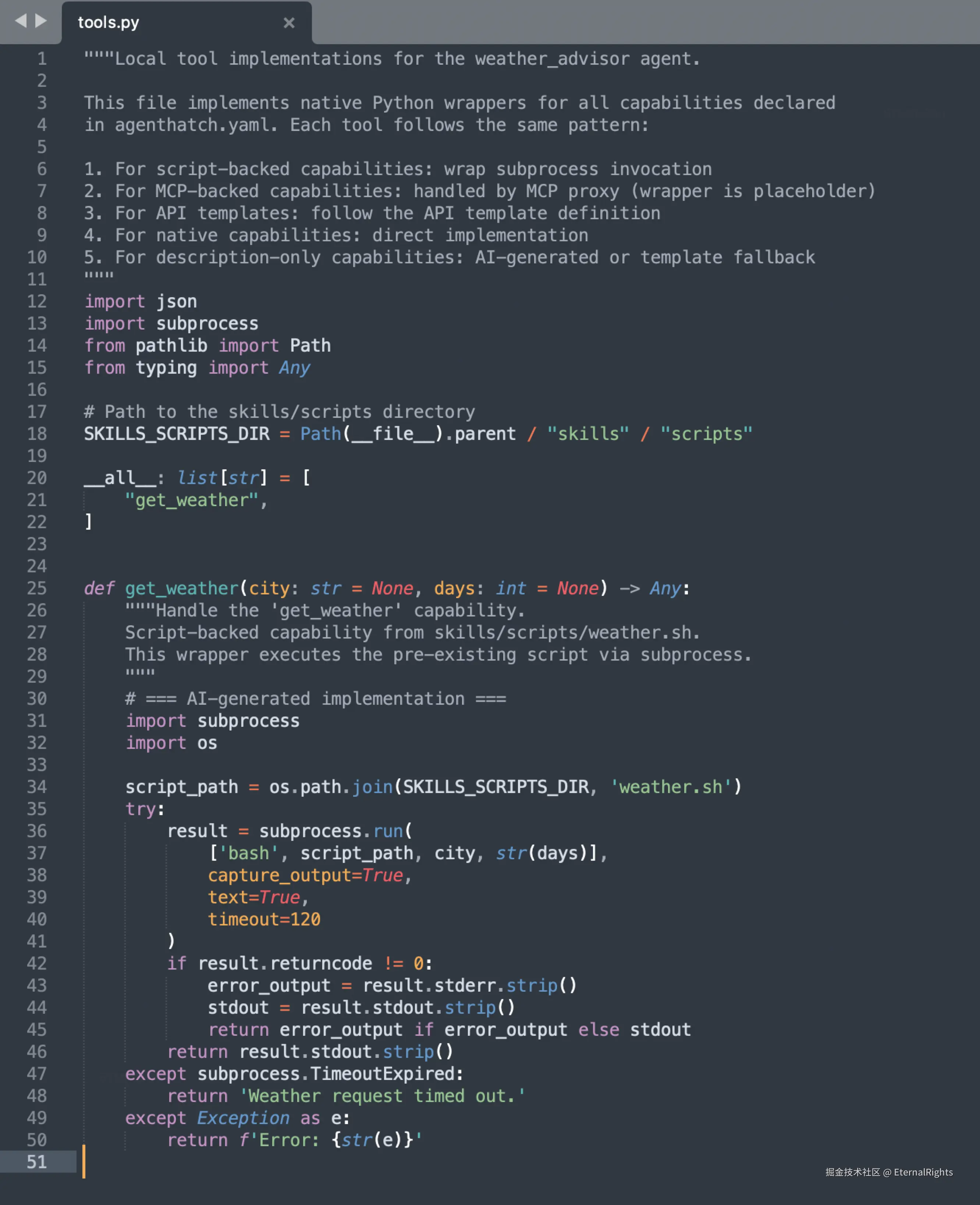
注意 tools.py------Harness C 推理出来的工具签名,是带类型注解的 Python 函数 ,不是散文描述。get_weather(city: str) -> WeatherResponse,参数类型、返回类型都有,LLM 不用猜。
Step 3:运行
arduino
agenthatch run weather-advisor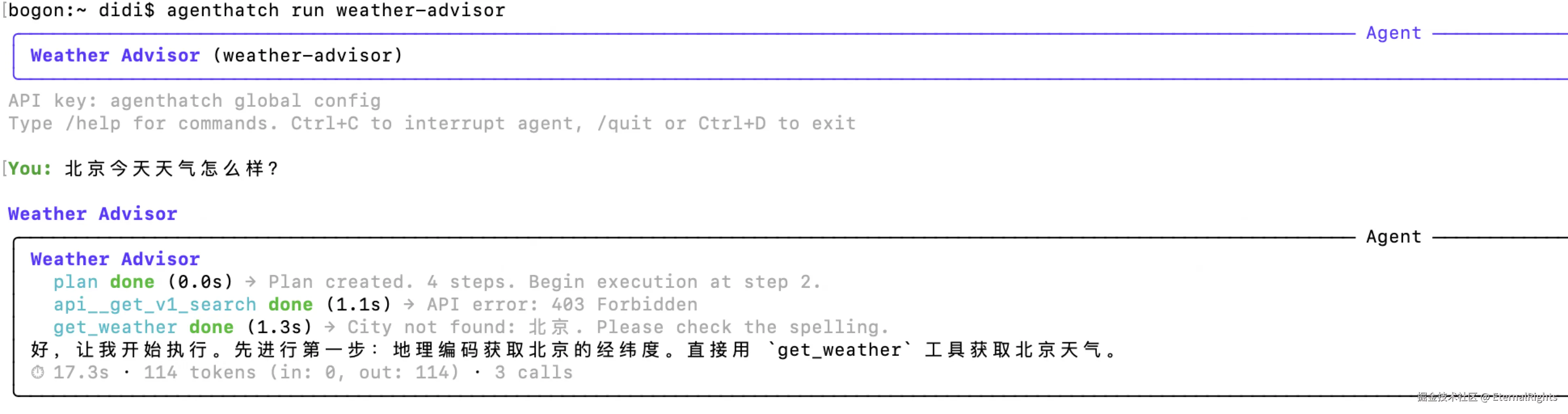
跑起来是个正经的交互式 agent,带工具调用、上下文压缩、PlanLayer 驱动执行。它不依赖 Claude Code,不依赖 Codex,不依赖任何 host agent。它就是个独立的 Python 程序。
六、SKILL.md vs agenthatch,一张表说清楚
| SKILL.md(裸的) | agenthatch(孵化后) | |
|---|---|---|
| 执行方式 | LLM 在 runtime 解读 | 编译成独立 Python 包 |
| 隔离 | 所有 skill 共享一个 context | 每个 agent 有自己的运行时、工具、配置 |
| 校验 | 无,typo 和歧义 runtime 才爆 | 代码生成前 schema 校验 AHSSPEC |
| Token 成本 | 全文塞 system prompt,每轮都烧 | ~150 字节运行时配置 |
| 工具定义 | 散文描述,LLM 猜怎么调 | 类型注解的 Python 函数 + JSON Schema |
| MCP | 每个 agent 手动接线 | 自动检测、自动配置 |
| 确定性 | LLM 每次解读都不一样 | 同一 SKILL.md → 同一 AHSSPEC 结构(低温推理) |
| 多 skill 扩展 | 3-5 个就开始衰减 | 无上限,每个 agent 独立进程 |
| 调试 | 读 LLM 的 chain-of-thought 祈祷 | 标准 Python 调试、日志、测试 |
七、踩坑记录(这玩意儿不完美,我直说)
稀土掘金的文章不写踩坑就是耍流氓。我把 agenthatch 现在的烂处全摊开:
坑 1:Python only。 现在 only Python。JS/TS 在搞,但还没出。你如果是 Node 生态,得再等等。
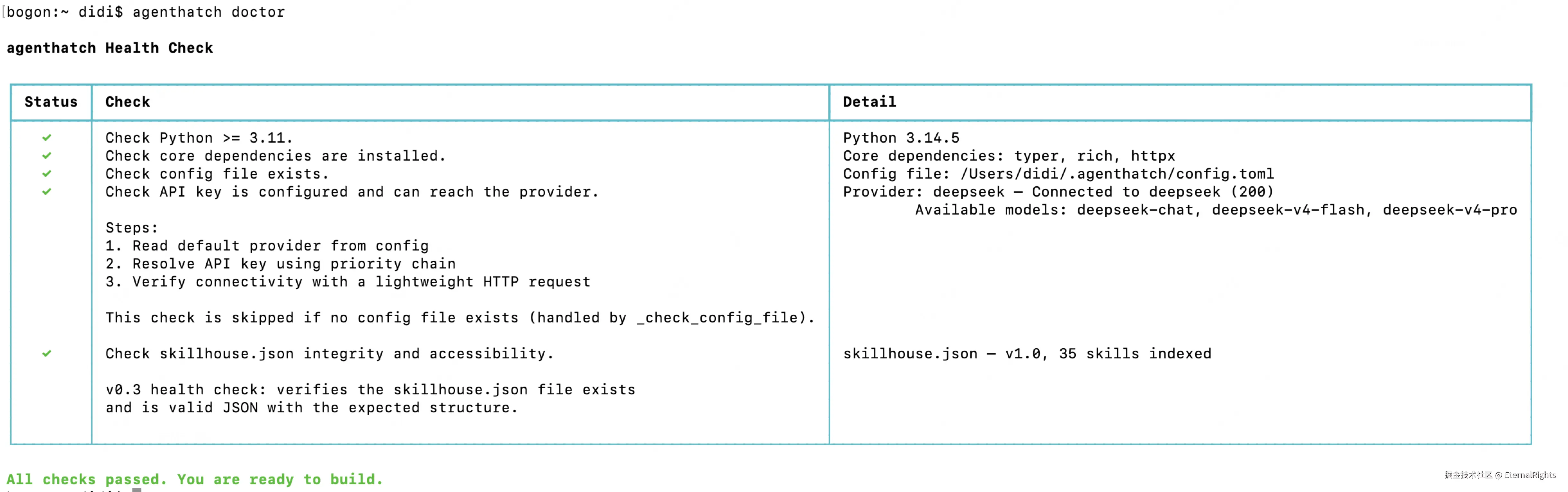
坑 2:需要 LLM API key。 Phase 2 六个 Harness 要调 LLM,DeepSeek、OpenAI、Anthropic 都行,但得有 key。想完全离线?暂时不行。
坑 3:单文件 skill 支持。 多文件目录开发中。现在一个 SKILL.md 带几个脚本文件没问题,复杂的多文件 skill 目录还在打磨。
坑 4:v0.9.x,很早期。 bug 指定有。我自己跑的时候 Harness E 偶尔会 JSON 解析失败,fallback 到 raw chat 重试。代码里有这个 fallback,但意味着不是 100% 稳。
坑 5:Windows 没测过。 我在 macOS 和 Linux 上跑的,Windows 没系统测过。路径处理可能有坑。
坑 6:Harness 调用是串行的,不是真并行。 README 写"6 harnesses working in parallel",但实际看 engine.py的 Orchestrator.run(),A→B→C→D→F→E 是顺序派发的(D 依赖 C,E 依赖前面所有)。我后来意识到 README 这句描述有点夸张,正在改文档。先诚实告诉你。
八、适合谁?
- Claude Code / Codex CLI / OpenClaw 用户,skill 超过 3 个就感觉不对劲的------这是核心受众,你最有感
- 智能体开发工程师,想把 skill 沉淀成可交付、可复用的 agent 产物,而不是每次都让 LLM 重新解读散文
- 团队 lead,想给团队搞一套 skill → agent 的标准化产线,skill 当源码管,agent 当制品管
- 编译器/DSL 爱好者,想看 LLM 怎么被拆成专业化流水线做编译前端的
不适合谁?
- 只有一两个 skill 的个人玩家------杀鸡用牛刀,Claude Code 原生够用
- 等"完美工具"的人------这工具现在不完美,v0.9.x,飞行中修
- 想"零代码搭 agent"的人------agenthatch 不是 no-code 平台,它是 compiler,你得会写 skill 也得能读 Python
九、谁在做这个
我是 EternalRights,github.com/EternalRigh...。
之前给 pytest 提过 8 个 PR(都是 core 的真实 bug fix,不是文档 typo),给 agent-browser 提过 1 个 PR。agenthatch 是我第一个从零到一独立搞完的项目,下班和周末一行行敲的。
开源社区教我最重要的一句话:Ship beats perfect。 这工具现在不完美,但它能跑了,能帮到人。剩下的飞行中修。
如果你也用 Claude Code/Codex CLI,skill 超过三个就感觉不对劲,试试。
仓库地址
pip install agenthatch有问题直接评论区,不整虚的。觉得思路有意思的,star 一个,这对我继续肝下去很重要。
最后再说一遍那个范式判断,因为它值得:
skill 的最佳形态是 agent 化。skill 是最完美的 agent 的孵化输入。
你写 skill,不是在写 prompt,是在写 agent 的源码。agenthatch 是它的编译器。
这件事我认为会成立。时间证明。