从命令行到GUI,一步一步带你写出自己的桌面应用
(GUI 是 Graphical User Interface 的缩写,中文叫图形用户界面)
最近我用Python的tkinter库,把自己之前写的命令行学生管理系统升级成了带图形界面的桌面应用。支持增删改查、按成绩排序、按姓名查找,数据还能自动保存。这篇文章就是一份完整的实现教程,从零开始,每一步都有代码和解释。希望能帮到正在学Python的你。
1.我们要先配置环境
建议:因为我们大部分使用的电脑是Windows系统所以我们的编码是GBK编码,但是在python中要使用的是UTF-8编码 。因此,会导致一个问题:我们在检验输出时会有乱码的问题。这里我分享一个简单的代码来强制转换成UTF-8编码形式输出。这行代码会让所有 print() 输出都使用 UTF-8 编码。如果你运行程序后终端不再实时打印内容,而是等到程序退出才一次性输出,那是因为输出被缓冲了。在 GUI 程序里这通常不是问题,因为用户看的是窗口而不是终端。
python
import sys
import io
#此外我们还会用到json模块(Python 自带)来存取数据。
sys.stdout = io.TextIOWrapper(sys.stdout.buffer, encoding='utf-8')
接下来让我们先确认环境是否就绪:
1.使用我们的编辑器Vs Code
2.使用一个合适的python版本
3.使用自带的tkinter库(模块)
然后写入代码:
python
import tkinter as tk #导入块
root = tk.Tk()#创建主窗口
root.title("学生信息管理系统")#窗口标题
root.geometry("500x450")#窗口大小
root.mainloop()/#类似主循环
(跑通就说明环境没问题。)
2. 搭建主界面骨架
python
title_label = tk.Label(root, text="学生信息管理系统", font=("微软雅黑", 16))
title_label.pack(pady=20)

btn_add = tk.Button(root, text="录入学生", width=20, command=open_add_window)
btn_add.pack(pady=5)

btn_view = tk.Button(root, text="查看全部", width=20, command=open_view_window)
btn_view.pack(pady=5)

btn_search = tk.Button(root, text="按姓名查找", width=20, command=open_search_window)
btn_search.pack(pady=5)

btn_sort = tk.Button(root, text="按成绩顺序排序", width=20, command=open_sort_window)
btn_sort.pack(pady=5)

btn_modify = tk.Button(root, text="修改姓名或成绩信息", width=20, command=open_modify_window)
btn_modify.pack(pady=5)

btn_delete = tk.Button(root, text="删除学生信息", width=20, command=open_delete_window)
btn_delete.pack(pady=5)

def on_closing():
    save_to_file(students)
    root.destroy()

root.protocol("WM_DELETE_WINDOW", on_closing)

btn_exit = tk.Button(root, text="退出系统", width=20, command=on_closing)
btn_exit.pack(pady=20)
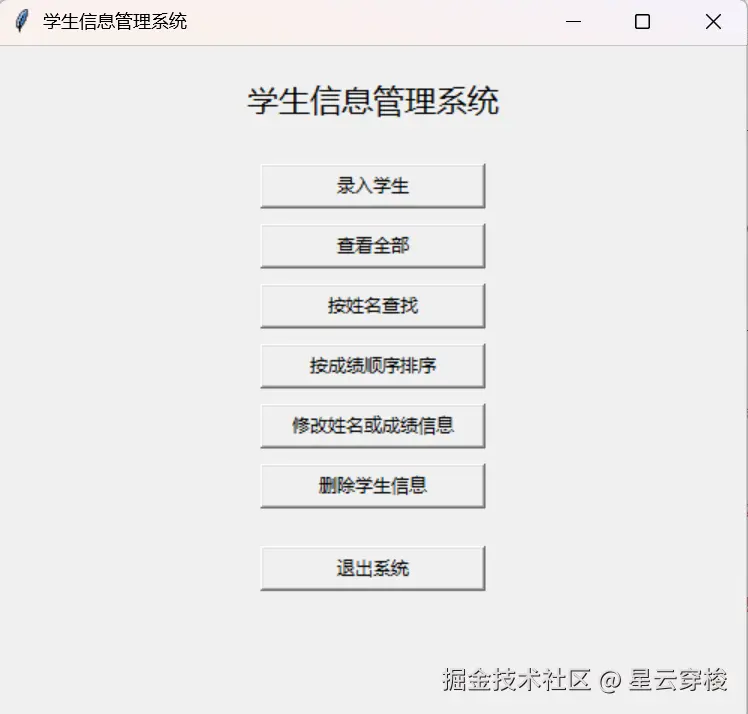
以上是主窗口代码包括(标题、按钮、布局)
代码解释:
1.因为在之前代码上我们给tkinter库取了个别名叫tk,所以我们接下来的代码用tk.来应用库中的函数
2.Label是标签的意思,tk.Label就是创建一个标签,括号中是内容。包括标签名,字体等等。
3.Button的意思是按钮,而在这里运用tk.Button来创建一个按钮。括号中有按钮的名字和按钮的宽度以及点击按钮后执行的操作。
4.pack()的作用是在窗口上创建一个按钮,把前面定义的所有参数在root窗口中实际呈现出来。
以下是窗口的样子:
3. 实现录入功能
以下代码实现录入功能:
python
def open_add_window():
    add_win = tk.Toplevel(root)
    add_win.title("录入学生")
    add_win.geometry("300x250")

    tk.Label(add_win, text="姓名").pack(pady=5)
    entry_name = tk.Entry(add_win)
    entry_name.pack(pady=5)

    tk.Label(add_win, text="学号").pack(pady=5)
    entry_sid = tk.Entry(add_win)
    entry_sid.pack(pady=5)

    tk.Label(add_win, text="成绩").pack(pady=5)
    entry_score = tk.Entry(add_win)
    entry_score.pack(pady=5)
    def save_student():
        name = entry_name.get()
        sid = entry_sid.get()
        score = float(entry_score.get())
        stu = {"name": name, "sid": sid, "score": score}
        students.append(stu)
        print(f"已录入:{stu}")
        add_win.destroy()

tk.Button(add_win, text="保存", command=save_student).pack(pady=10)代码解释:Toplevel、Entry、.get()、.destroy()
1.Toplevel的作用是创建一个子窗口,而后面括号中的是父窗口。
2.Entry是创建一个输入框,用来输入用户的值。
3..get()方法是用来读取输入框中的数据并存储到一个变量中。
4..destroy()的作用是关掉窗口。
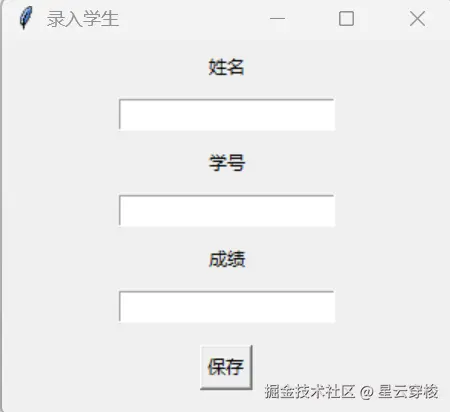
以下是录入窗口的图片:
4. 实现查看全部
以下代码实现查看全部功能:
python
def open_view_window():
    view_win = tk.Toplevel(root)
    view_win.title("查看全部学生")
    view_win.geometry("400x300")

    if not students:
        tk.Label(view_win, text="暂时没有学生数据", font=("微软雅黑", 12)).pack(pady=50)
    else:
        tk.Label(view_win, text=f"一共{len(students)}个学生", font=("微软雅黑", 12)).pack(pady=10)
        text_area = tk.Text(view_win, width=45, height=12)
        text_area.pack(pady=10)
        for stu in students:
            line = f"姓名:{stu['name']}  学号:{stu['sid']}  成绩:{stu['score']}\n"
            text_area.insert(tk.END, line)
        text_area.config(state="disabled")
代码解释:
1.insert()的作用是向文本空间传入数据,tk.END的意思是在末尾加上line。
2.config(state="disabled")这句代码的意思是设置文本为只读,不允许修改。
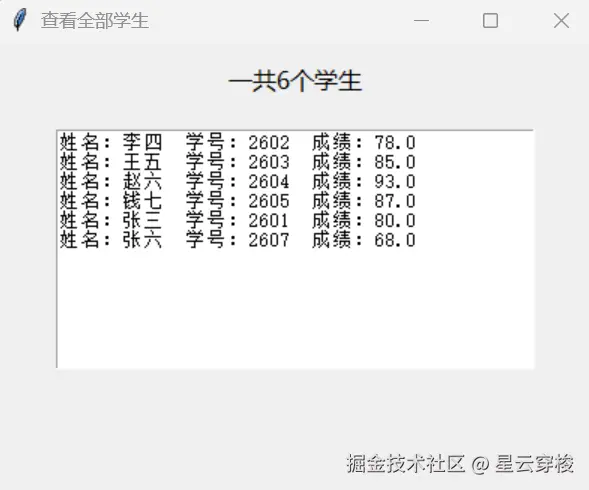
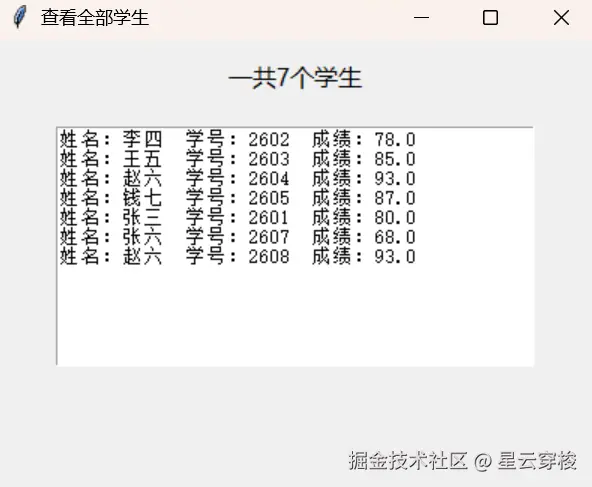
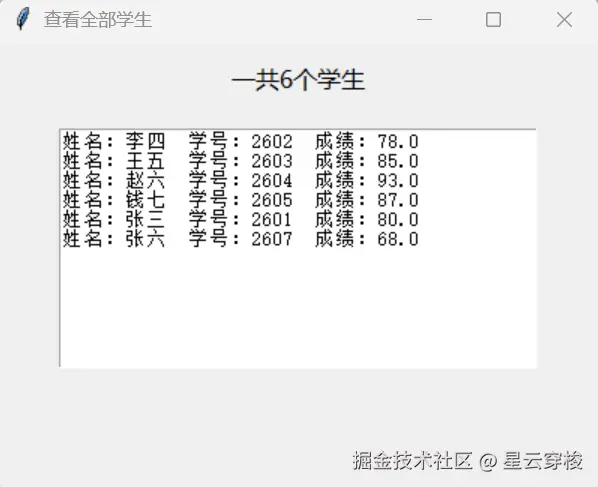
以下是查看窗口的图片(我已经提前录入数据)
5. 实现按姓名查找
以下代码实现查找功能:
python
def open_search_window():
    search_win = tk.Toplevel(root)
    search_win.title("按姓名查找学生")
    search_win.geometry("400x300")

    tk.Label(search_win, text="输入要查找的姓名或关键字:", font=("微软雅黑", 10)).pack(pady=10)
    entry_keyword = tk.Entry(search_win, width=30)
    entry_keyword.pack(pady=5)

    result_area = tk.Text(search_win, width=45, height=10)
    result_area.pack(pady=10)

    def do_search():
        result_area.config(state="normal")
        result_area.delete(1.0, tk.END)
        keyword = entry_keyword.get()
        found_list = []
        for stu in students:
            if keyword in stu['name']:
                found_list.append(stu)
        if found_list:
            result_area.insert(tk.END, f"找到了 {len(found_list)} 条匹配记录:\n")
            for stu in found_list:
                line = f"姓名:{stu['name']}  学号:{stu['sid']}  成绩:{stu['score']}\n"
                result_area.insert(tk.END, line)
        else:
            result_area.insert(tk.END, f"未找到姓名包含 '{keyword}' 的学生。")
        result_area.config(state="disabled")

    tk.Button(search_win, text="查找", command=do_search, width=15).pack(pady=10)
代码解释:
1.首先是我们在这运用了in的模糊匹配,用来寻找关键字并提取数据
2.在这是关于result_area.config(state="normal")和result_area.config(state="disabled")的运用,第一句的作用是让文本恢复可以修改的状态,而第二句的作用则是让文本处于只读状态。如此循环使得文本上文字随着随着输入关键字改变而不断刷新。
6. 实现按成绩排序
以下代码实现排序功能:
python
def open_sort_window():

    sort_win = tk.Toplevel(root)
    sort_win.title("排序")
    sort_win.geometry("400x300")

    if not students:
        tk.Label(sort_win, text="暂时没有学生数据", font=("微软雅黑", 12)).pack(pady=50)
    else:
        tk.Label(sort_win, text="按成绩排序(高分在前)", font=("微软雅黑", 12)).pack(pady=10)
        sorted_students = sorted(students, key=lambda stu: stu["score"], reverse=True)
        text_area = tk.Text(sort_win, width=45, height=12)
        text_area.pack(pady=10)
        for stu in sorted_students:
            line = f"姓名:{stu['name']}  学号:{stu['sid']}  成绩:{stu['score']}\n"
            text_area.insert(tk.END, line)
        text_area.config(state="disabled")
代码解释:
1.sorted是一个排序的函数。
2.key=lambda是创建一个匿名函数。如代码中的key=lambda stu: stu"score",stu是参数,用冒号后面的值来排序。
3.reverse=Ture的意思是用降序的方式。
7. 实现修改和删除
以下代码实现修改和删除两个功能:
python
def open_modify_window():
    modify_win = tk.Toplevel(root)
    modify_win.title("修改学生数据")
    modify_win.geometry("400x450")

    result_text = tk.Text(modify_win, width=45, height=8)
    result_text.pack(pady=10)

    tk.Label(modify_win, text="请输入要修改的学生学号:", font=("微软雅黑", 10)).pack(pady=5)
    entry_sid = tk.Entry(modify_win, width=25)
    entry_sid.pack(pady=5)

    tk.Label(modify_win, text="新姓名(留空则不修改):", font=("微软雅黑", 10)).pack(pady=5)
    entry_name = tk.Entry(modify_win, width=25)
    entry_name.pack(pady=5)

    tk.Label(modify_win, text="新成绩(留空则不修改):", font=("微软雅黑", 10)).pack(pady=5)
    entry_score = tk.Entry(modify_win, width=25)
    entry_score.pack(pady=5)

    def do_modify():
        sid = entry_sid.get()
        new_name = entry_name.get()
        new_score = entry_score.get()
        found = False
        for stu in students:
            if stu['sid'] == sid:
                found = True
                if new_name:
                    stu['name'] = new_name
                if new_score:
                    stu['score'] = float(new_score)
                line = f"姓名:{stu['name']}  学号:{stu['sid']}  成绩:{stu['score']}\n"
                result_text.delete(1.0, tk.END)
                result_text.insert(tk.END, "修改成功!\n")
                result_text.insert(tk.END, line)
                break
        if not found:
            result_text.delete(1.0, tk.END)
            result_text.insert(tk.END, f"未找到学号为 {sid} 的学生。")

    tk.Button(modify_win, text="确认修改", command=do_modify, width=15).pack(pady=10)


def open_delete_window():
    delete_win = tk.Toplevel(root)
    delete_win.title("删除学生")
    delete_win.geometry("400x350")

    tk.Label(delete_win, text="请输入你要删除的学生的学号:", font=("微软雅黑", 12)).pack(pady=10)
    entry_sid = tk.Entry(delete_win, width=30)
    entry_sid.pack(pady=5)

    result_text = tk.Text(delete_win, width=45, height=12)
    result_text.pack(pady=10)

    def do_delete():
        sid = entry_sid.get()
        found = False
        for stu in students:
            if sid == stu['sid']:
                found = True
                students.remove(stu)
                result_text.delete(1.0, tk.END)
                result_text.insert(tk.END, f"已删除:{stu['name']}(学号 {sid})\n\n")
                break
        if not found:
            result_text.delete(1.0, tk.END)
            result_text.insert(tk.END, f"未找到学号为 {sid} 的学生。\n")
        else:
            result_text.insert(tk.END, "当前学生列表:\n")
            for stu in students:
                line = f"姓名:{stu['name']}  学号:{stu['sid']}  成绩:{stu['score']}\n"
                result_text.insert(tk.END, line)

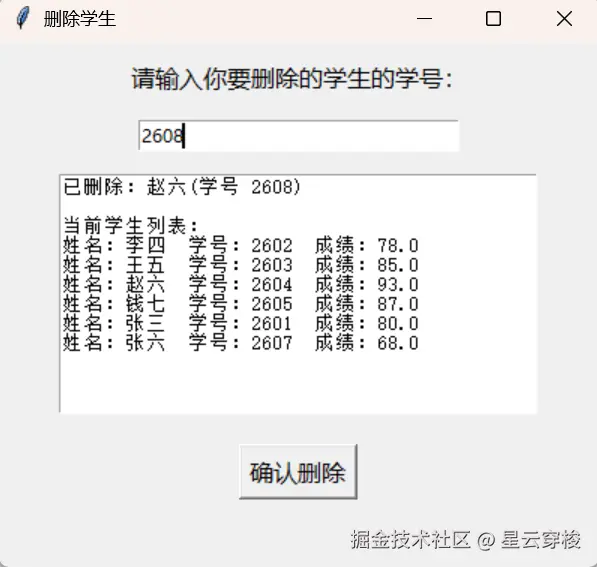
tk.Button(delete_win, text="确认删除", command=do_delete, font=("微软雅黑", 12)).pack(pady=10)代码解释:students.remove(stu) 和字典修改
1.students.remove(stu)的功能是移去students列表中的stu字典。
2.字典修改则是先用学号定位再用Entry和get()读取修改后的数据来代替原有的数据。
8. JSON文件存储(数据不丢失)
这个其实和C语言的FILE十分相同
以下代码实现文件存储功能:
python
import json
def load_from_file(filename="students.json"):
    try:
        with open(filename, "r", encoding="utf-8") as f:
            return json.load(f)
    except FileNotFoundError:
        return []

def save_to_file(students_data, filename="students.json"):
    with open(filename, "w", encoding="utf-8") as f:
        json.dump(students_data, f, ensure_ascii=False, indent=2)

students = load_from_file()
~
def on_closing():
    save_to_file(students)
root.destroy()代码解释:json.load() 和 json.dump()
我们在一开始就导入了一个库它的名字是json,它有两个主要的函数是json.load()和json.dump()他们分别有提取功能和存入功能。
先讲讲json.load()部分的代码:先搞清楚它的作用是用来把文件中的数据导入到students列表中的,它用 try...except 来捕获异常:先尝试读取文件,如果文件不存在就返回空列表。
而json.dump()则是向students.json文件中输入东西。
9. 完整代码和运行效果
python
import sys
import io
import tkinter as tk
import json

def load_from_file(filename="students.json"):
    try:
        with open(filename, "r", encoding="utf-8") as f:
            return json.load(f)
    except FileNotFoundError:
        return []

def save_to_file(students_data, filename="students.json"):
    with open(filename, "w", encoding="utf-8") as f:
        json.dump(students_data, f, ensure_ascii=False, indent=2)

students = load_from_file()

sys.stdout = io.TextIOWrapper(sys.stdout.buffer, encoding='utf-8')


root = tk.Tk()
root.title("学生信息管理系统")
root.geometry("500x450")

def open_add_window():
    add_win = tk.Toplevel(root)
    add_win.title("录入学生")
    add_win.geometry("300x250")

    tk.Label(add_win, text="姓名").pack(pady=5)
    entry_name = tk.Entry(add_win)
    entry_name.pack(pady=5)

    tk.Label(add_win, text="学号").pack(pady=5)
    entry_sid = tk.Entry(add_win)
    entry_sid.pack(pady=5)

    tk.Label(add_win, text="成绩").pack(pady=5)
    entry_score = tk.Entry(add_win)
    entry_score.pack(pady=5)
    def save_student():
        name = entry_name.get()
        sid = entry_sid.get()
        score = float(entry_score.get())
        stu = {"name": name, "sid": sid, "score": score}
        students.append(stu)
        print(f"已录入:{stu}")
        add_win.destroy()

    tk.Button(add_win, text="保存", command=save_student).pack(pady=10)


def open_view_window():
    view_win = tk.Toplevel(root)
    view_win.title("查看全部学生")
    view_win.geometry("400x300")

    if not students:
        tk.Label(view_win, text="暂时没有学生数据", font=("微软雅黑", 12)).pack(pady=50)
    else:
        tk.Label(view_win, text=f"一共{len(students)}个学生", font=("微软雅黑", 12)).pack(pady=10)
        text_area = tk.Text(view_win, width=45, height=12)
        text_area.pack(pady=10)
        for stu in students:
            line = f"姓名:{stu['name']}  学号:{stu['sid']}  成绩:{stu['score']}\n"
            text_area.insert(tk.END, line)
        text_area.config(state="disabled")


def open_search_window():
    search_win = tk.Toplevel(root)
    search_win.title("按姓名查找学生")
    search_win.geometry("400x300")

    tk.Label(search_win, text="输入要查找的姓名或关键字:", font=("微软雅黑", 10)).pack(pady=10)
    entry_keyword = tk.Entry(search_win, width=30)
    entry_keyword.pack(pady=5)

    result_area = tk.Text(search_win, width=45, height=10)
    result_area.pack(pady=10)

    def do_search():
        result_area.config(state="normal")
        result_area.delete(1.0, tk.END)
        keyword = entry_keyword.get()
        found_list = []
        for stu in students:
            if keyword in stu['name']:
                found_list.append(stu)
        if found_list:
            result_area.insert(tk.END, f"找到了 {len(found_list)} 条匹配记录:\n")
            for stu in found_list:
                line = f"姓名:{stu['name']}  学号:{stu['sid']}  成绩:{stu['score']}\n"
                result_area.insert(tk.END, line)
        else:
            result_area.insert(tk.END, f"未找到姓名包含 '{keyword}' 的学生。")
        result_area.config(state="disabled")

    tk.Button(search_win, text="查找", command=do_search, width=15).pack(pady=10)


def open_sort_window():

    sort_win = tk.Toplevel(root)
    sort_win.title("排序")
    sort_win.geometry("400x300")

    if not students:
        tk.Label(sort_win, text="暂时没有学生数据", font=("微软雅黑", 12)).pack(pady=50)
    else:
        tk.Label(sort_win, text="按成绩排序(高分在前)", font=("微软雅黑", 12)).pack(pady=10)
        sorted_students = sorted(students, key=lambda stu: stu["score"], reverse=True)
        text_area = tk.Text(sort_win, width=45, height=12)
        text_area.pack(pady=10)
        for stu in sorted_students:
            line = f"姓名:{stu['name']}  学号:{stu['sid']}  成绩:{stu['score']}\n"
            text_area.insert(tk.END, line)
        text_area.config(state="disabled")


def open_modify_window():
    modify_win = tk.Toplevel(root)
    modify_win.title("修改学生数据")
    modify_win.geometry("400x450")

    result_text = tk.Text(modify_win, width=45, height=8)
    result_text.pack(pady=10)

    tk.Label(modify_win, text="请输入要修改的学生学号:", font=("微软雅黑", 10)).pack(pady=5)
    entry_sid = tk.Entry(modify_win, width=25)
    entry_sid.pack(pady=5)

    tk.Label(modify_win, text="新姓名(留空则不修改):", font=("微软雅黑", 10)).pack(pady=5)
    entry_name = tk.Entry(modify_win, width=25)
    entry_name.pack(pady=5)

    tk.Label(modify_win, text="新成绩(留空则不修改):", font=("微软雅黑", 10)).pack(pady=5)
    entry_score = tk.Entry(modify_win, width=25)
    entry_score.pack(pady=5)

    def do_modify():
        sid = entry_sid.get()
        new_name = entry_name.get()
        new_score = entry_score.get()
        found = False
        for stu in students:
            if stu['sid'] == sid:
                found = True
                if new_name:
                    stu['name'] = new_name
                if new_score:
                    stu['score'] = float(new_score)
                line = f"姓名:{stu['name']}  学号:{stu['sid']}  成绩:{stu['score']}\n"
                result_text.delete(1.0, tk.END)
                result_text.insert(tk.END, "修改成功!\n")
                result_text.insert(tk.END, line)
                break
        if not found:
            result_text.delete(1.0, tk.END)
            result_text.insert(tk.END, f"未找到学号为 {sid} 的学生。")

    tk.Button(modify_win, text="确认修改", command=do_modify, width=15).pack(pady=10)


def open_delete_window():
    delete_win = tk.Toplevel(root)
    delete_win.title("删除学生")
    delete_win.geometry("400x350")

    tk.Label(delete_win, text="请输入你要删除的学生的学号:", font=("微软雅黑", 12)).pack(pady=10)
    entry_sid = tk.Entry(delete_win, width=30)
    entry_sid.pack(pady=5)

    result_text = tk.Text(delete_win, width=45, height=12)
    result_text.pack(pady=10)

    def do_delete():
        sid = entry_sid.get()
        found = False
        for stu in students:
            if sid == stu['sid']:
                found = True
                students.remove(stu)
                result_text.delete(1.0, tk.END)
                result_text.insert(tk.END, f"已删除:{stu['name']}(学号 {sid})\n\n")
                break
        if not found:
            result_text.delete(1.0, tk.END)
            result_text.insert(tk.END, f"未找到学号为 {sid} 的学生。\n")
        else:
            result_text.insert(tk.END, "当前学生列表:\n")
            for stu in students:
                line = f"姓名:{stu['name']}  学号:{stu['sid']}  成绩:{stu['score']}\n"
                result_text.insert(tk.END, line)

    tk.Button(delete_win, text="确认删除", command=do_delete, font=("微软雅黑", 12)).pack(pady=10)


title_label = tk.Label(root, text="学生信息管理系统", font=("微软雅黑", 16))
title_label.pack(pady=20)

btn_add = tk.Button(root, text="录入学生", width=20, command=open_add_window)
btn_add.pack(pady=5)

btn_view = tk.Button(root, text="查看全部", width=20, command=open_view_window)
btn_view.pack(pady=5)

btn_search = tk.Button(root, text="按姓名查找", width=20, command=open_search_window)
btn_search.pack(pady=5)

btn_sort = tk.Button(root, text="按成绩顺序排序", width=20, command=open_sort_window)
btn_sort.pack(pady=5)

btn_modify = tk.Button(root, text="修改姓名或成绩信息", width=20, command=open_modify_window)
btn_modify.pack(pady=5)

btn_delete = tk.Button(root, text="删除学生信息", width=20, command=open_delete_window)
btn_delete.pack(pady=5)

def on_closing():
    save_to_file(students)
    root.destroy()

root.protocol("WM_DELETE_WINDOW", on_closing)

btn_exit = tk.Button(root, text="退出系统", width=20, command=on_closing)
btn_exit.pack(pady=20)

root.mainloop()
1.打开窗口
2.查看学生信息
3.录入学生信息
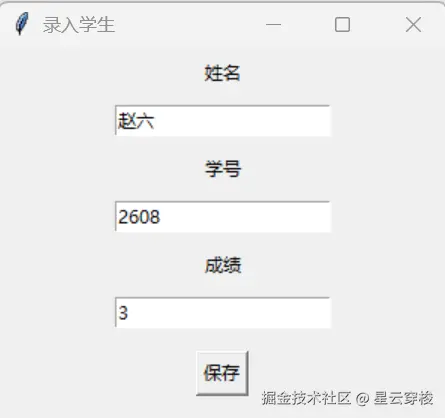
4.再次查看学生信息
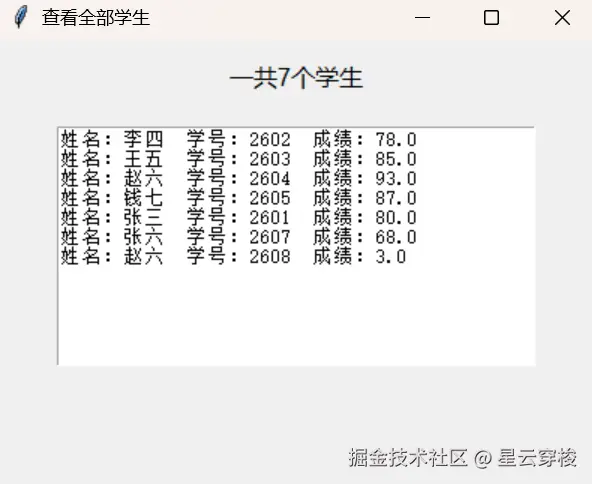
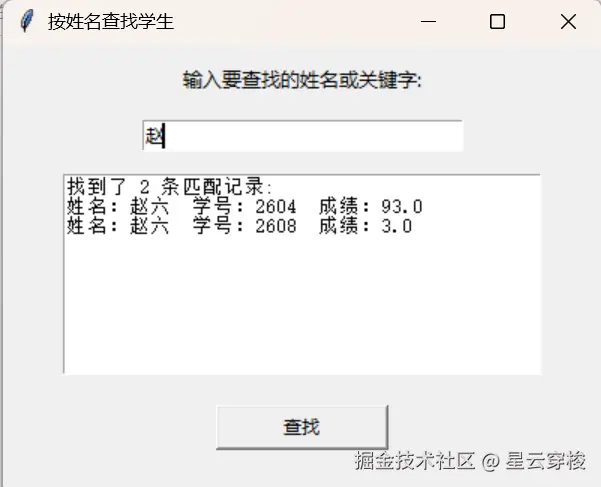
5.查询关键字"赵"的学生
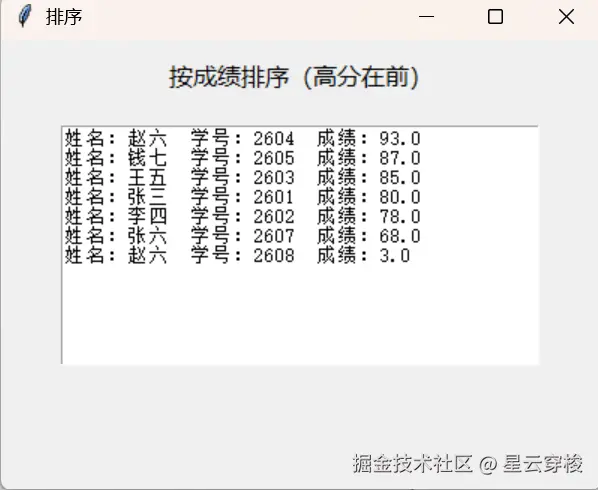
6.按成绩降序
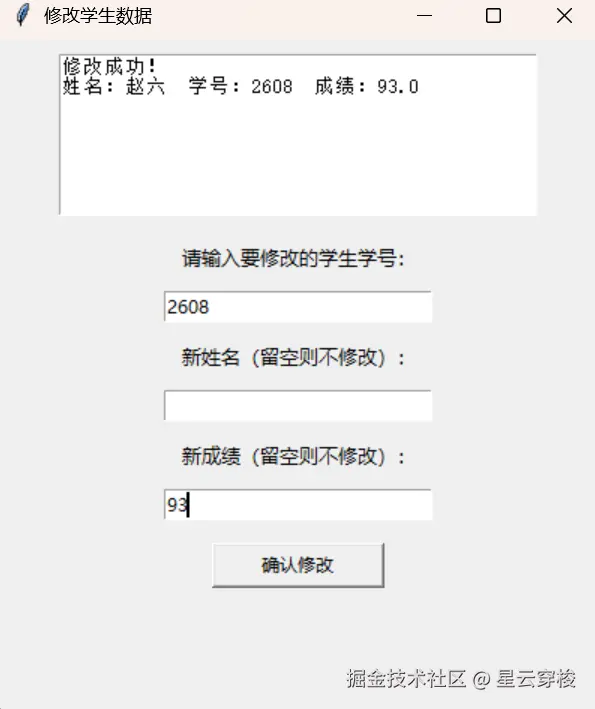
7.修改赵六不合理的成绩
8.再次查询学生信息,看看赵六是否修改成功
9.删除赵六信息
10.再次检查
11.成功退出窗口
12.再次打开窗口检查文件在关闭时是否成功存入文件,在打开时是否成功输入列表
功能完全,检查完毕!
结尾
这个项目从命令行版到GUI版,经历了好几轮迭代。下一步我计划加入AI学习建议功能,让系统能根据成绩自动生成分析报告。如果你也在学Python,欢迎一起交流。(完整代码已上传)