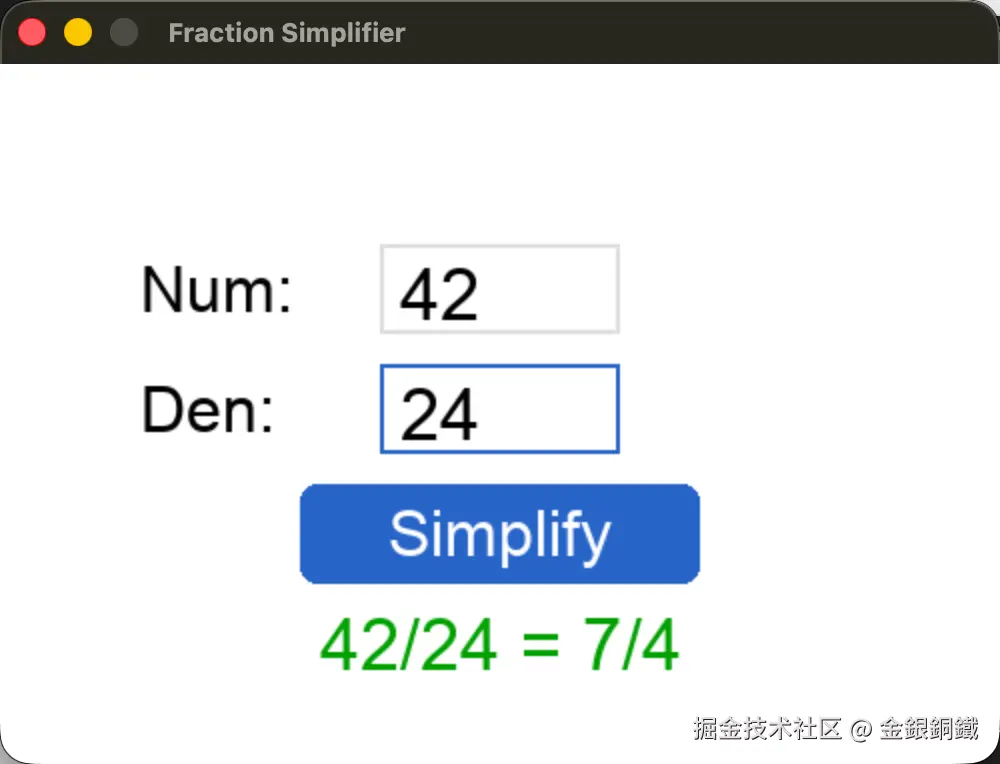
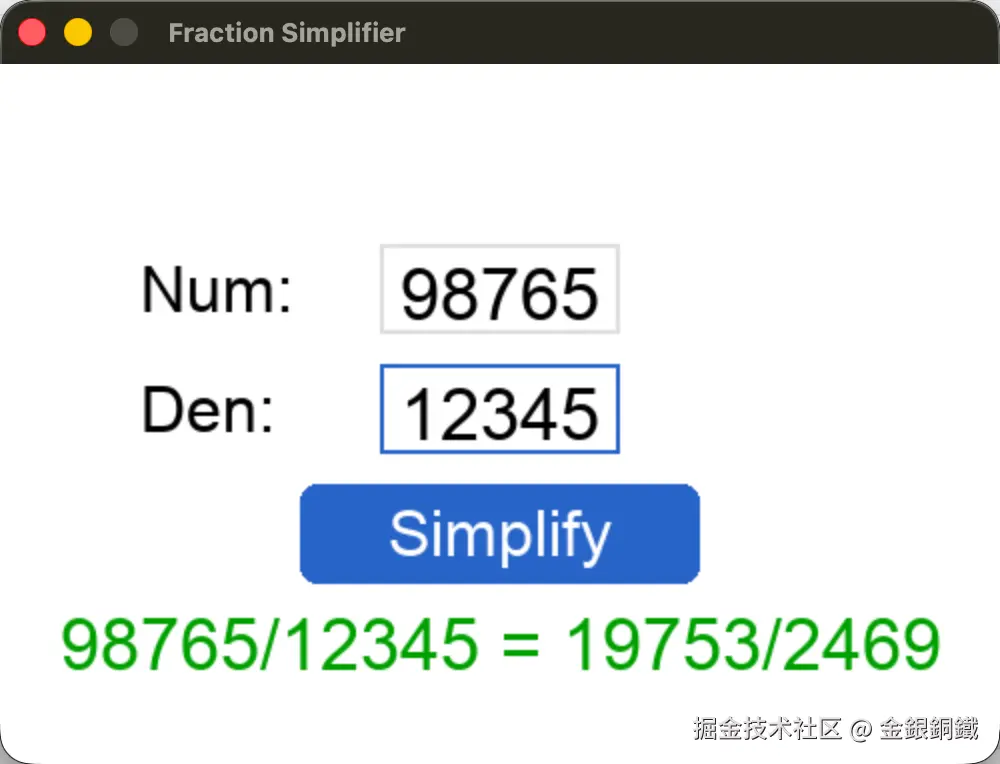
背景与简介
在 Python 体验用欧几里得算法计算最大公约数的过程 一文中,我们已经了解了如何通过欧几里得算法( Euclidean Algorithm)来计算两个自然数的最大公约数(这个自然数不能同时为 0)。欧几里得算法可以用于分数约分。本文会先提供基于命令行的可以进行分数约分的程序,在此基础上,再提供基于 Pygame 的可以对分数进行约分的程序。
正文
欧几里得算法
在 Python 体验用欧几里得算法计算最大公约数的过程 一文中,已经介绍了欧几里得算法,这里不赘述。可以用这样的 Python 代码来实现欧几里得算法 ⬇️
python
def gcd(a, b):
    if (a, b) == (0, 0):
        raise ValueError("a and b cannot be both 0")
    if b == 0:
        return a
    return gcd(b, a % b)
利用欧几里得算法对分数进行约分
在对分数进行约分时,我们可以先计算出分子 num 和分母 den 的最大公约数 g,然后让分子 num 和分母 den 分别除以 g,从而得到新的分子 num′ 和新的分母 den′ ⬇️
- num′=num/g
- den′=den/g
num′ 和 den′ 的最大公约数会是 1 (可以用反证法来证明)。可以用 Python 代码来进行实现 ⬇️ (trae 辅助我完成了这部分代码)
python
class FractionSimplifier:
    def __init__(self, num, den):
        if (num < 0) or (den < 0):
            raise ValueError("Numerator and denominator can't be negative!")
        if (den == 0):
            raise ZeroDivisionError("Denominator can't be 0!")
        self.num = num
        self.den = den

    def gcd(self,a, b):
        if (a, b) == (0, 0):
            raise ValueError("a and b cannot be both 0")
        if b == 0:
            return a
        return self.gcd(b, a % b)

    def simplify_fraction(self):
        if self.den == 0:
            raise ZeroDivisionError("Denominator can't be 0!")

        gcd = self.gcd(self.num, self.den)
        self.num = self.num // gcd
        self.den = self.den // gcd

while True:
    try:
        num = int(input("Please input numerator: (input -1 to exit)\n>>> "))
        if num == -1:
            break
        den = int(input("Please input denominator:\n>>> "))
        fraction_simplifier = FractionSimplifier(num, den)
    except ValueError:
        print("Please input integers!")
        continue
    except ZeroDivisionError:
        print("The denominator can't be 0!")
        continue
    fraction_simplifier.simplify_fraction()
    print(f"{num}/{den} = {fraction_simplifier.num}/{fraction_simplifier.den}\n")
请将以上代码保存为 fraction_simplifier.py,使用以下命令可以运行 fraction_simplifier.py
bash
python3 fraction_simplifier.py示例效果如下 ⬇️
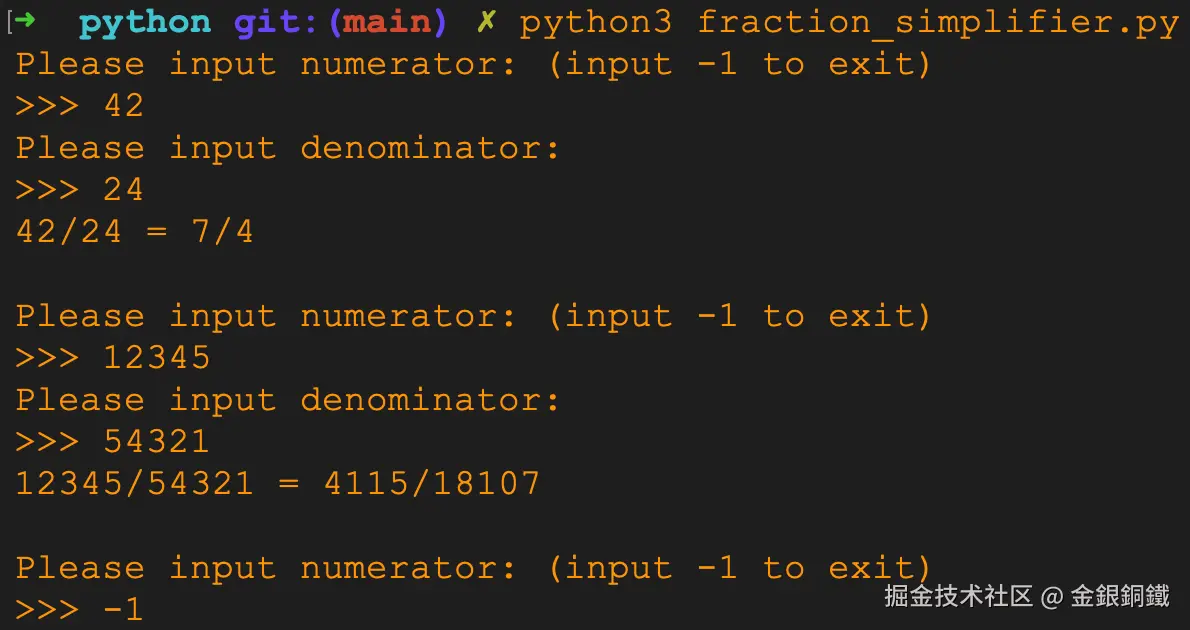
使用图形化界面
在上一小节的基础上,我们可以借助 Pygame 来实现对应的图形化界面。我让 豆包 帮我完成了和 Pygame 相关的代码(我做了些小调整)。完整的代码如下 ⬇️
python
import pygame

class FractionSimplifier:
    def __init__(self, num, den):
        if (num < 0) or (den < 0):
            raise ValueError("Numerator and denominator can't be negative!")
        if (den == 0):
            raise ZeroDivisionError("Denominator can't be 0!")
        self.num = num
        self.den = den

    def gcd(self,a, b):
        if (a, b) == (0, 0):
            raise ValueError("a and b cannot be both 0")
        if b == 0:
            return a
        return self.gcd(b, a % b)

    def simplify_fraction(self):
        if self.den == 0:
            raise ZeroDivisionError("Denominator can't be 0!")

        gcd = self.gcd(self.num, self.den)
        self.num = self.num // gcd
        self.den = self.den // gcd

# ===================== Pygame 极简界面初始化 =====================
pygame.init()

# 窗口尺寸保持不变
WIDTH, HEIGHT = 500, 350
screen = pygame.display.set_mode((WIDTH, HEIGHT))
pygame.display.set_caption("Fraction Simplifier")

# 配色(完全保留)
WHITE = (255, 255, 255)
BLACK = (0, 0, 0)
GRAY = (220, 220, 220)
BLUE = (40, 100, 200)
RED = (220, 50, 50)
GREEN = (0, 160, 0)

# 字体(完全保留)
font_text = pygame.font.SysFont("Arial", 32)
font_input = pygame.font.SysFont("Arial", 36)
font_result = pygame.font.SysFont("Arial", 36)

# ===================== 【核心优化】居中美观布局 =====================
# 计算水平中心,让所有元素居中
CENTER_X = WIDTH // 2
INPUT_WIDTH = 120
INPUT_HEIGHT = 45
BTN_WIDTH = 200
BTN_HEIGHT = 50

# 分子输入框(水平居中)
num_rect = pygame.Rect(CENTER_X - INPUT_WIDTH//2, 90, INPUT_WIDTH, INPUT_HEIGHT)
num_text = ""
num_active = False

# 分母输入框(水平居中,与分子垂直间距均匀)
den_rect = pygame.Rect(CENTER_X - INPUT_WIDTH//2, 150, INPUT_WIDTH, INPUT_HEIGHT)
den_text = ""
den_active = False

# 计算按钮(水平居中)
btn_rect = pygame.Rect(CENTER_X - BTN_WIDTH//2, 210, BTN_WIDTH, BTN_HEIGHT)

# 结果
result_text = ""
result_color = BLACK

# ===================== 主循环 =====================
running = True
while running:
    screen.fill(WHITE)

    # -------------------- 优化:标签与输入框垂直居中对齐、整体居中 --------------------
    # Num 标签(与输入框垂直居中,左侧对称)
    num_label = font_text.render("Num:", True, BLACK)
    screen.blit(num_label, (CENTER_X - 180, 95))

    # Den 标签(与输入框垂直居中,左侧对称)
    den_label = font_text.render("Den:", True, BLACK)
    screen.blit(den_label, (CENTER_X - 180, 155))

    # 绘制分子输入框
    pygame.draw.rect(screen, BLUE if num_active else GRAY, num_rect, 2)
    screen.blit(font_input.render(num_text, True, BLACK), (num_rect.x+10, num_rect.y+5))

    # 绘制分母输入框
    pygame.draw.rect(screen, BLUE if den_active else GRAY, den_rect, 2)
    screen.blit(font_input.render(den_text, True, BLACK), (den_rect.x+10, den_rect.y+5))

    # -------------------- 优化:按钮文字完美居中 --------------------
    pygame.draw.rect(screen, BLUE, btn_rect, border_radius=8)
    btn_text = font_text.render("Simplify", True, WHITE)
    screen.blit(btn_text, (btn_rect.centerx - btn_text.get_width()//2, btn_rect.centery - btn_text.get_height()//2))

    # -------------------- 优化:结果文字水平居中 --------------------
    result_surface = font_result.render(result_text, True, result_color)
    screen.blit(result_surface, (CENTER_X - result_surface.get_width()//2, 270))

    # ===================== 事件处理(完全保留你的逻辑)=====================
    for event in pygame.event.get():
        if event.type == pygame.QUIT:
            running = False

        # 点击输入框/按钮
        if event.type == pygame.MOUSEBUTTONDOWN:
            # 激活分子输入框
            if num_rect.collidepoint(event.pos):
                num_active = True
                den_active = False
            # 激活分母输入框
            elif den_rect.collidepoint(event.pos):
                den_active = True
                num_active = False
            # 点击计算
            elif btn_rect.collidepoint(event.pos):
                try:
                    # 获取输入的整数
                    num = int(num_text)
                    den= int(den_text)
                    # 调用函数化简
                    fraction_simplifier = FractionSimplifier(num, den)
                    fraction_simplifier.simplify_fraction()
                    # 显示结果
                    result_text = f"{num}/{den} = {fraction_simplifier.num}/{fraction_simplifier.den}"
                    result_color = GREEN
                except ValueError:
                    result_text = "Please input valid integers!"
                    result_color = RED
                except ZeroDivisionError:
                    result_text = "Denominator can't be 0!"
                    result_color = RED
            # 点击空白处
            else:
                num_active = False
                den_active = False

        # 键盘输入(只允许数字)
        if event.type == pygame.KEYDOWN:
            # 处理分子输入
            if num_active:
                if event.key == pygame.K_BACKSPACE:
                    num_text = num_text[:-1]
                # 允许输入数字
                elif event.unicode.isdigit():
                    num_text += event.unicode
            # 处理分母输入
            if den_active:
                if event.key == pygame.K_BACKSPACE:
                    den_text = den_text[:-1]
                elif event.unicode.isdigit():
                    den_text += event.unicode

    pygame.display.flip()

pygame.quit()
请将以上代码保存为 gui_fraction_simplifier.py,使用如下命令可以运行 gui_fraction_simplifier.py ⬇️
bash
python3 gui_fraction_simplifier.py示例效果如下 ⬇️