FastAPI自带Swagger UI与ReDoc,开发阶段打开/docs就能试接口极其方便。但一旦要把API文档交付给客户、测试团队或第三方集成方 ,默认页面往往不够用,没有品牌Logo、接口分组混乱、内部调试路由暴露在文档里、生产环境仍能通过/docs窥探接口结构,这些问题在对外项目中非常常见。
本文面向需要正式交付接口文档的后端开发者,讲解如何定制SwaggerUI(Logo、排序、注释规范、隐藏内部接口)、导出Redoc离线HTML、为文档路径加密码保护、在生产环境关闭文档入口,以及如何通过OpenAPI扩展字段对接Apifox等第三方文档平台。
一、文档体系在FastAPI里由什么组成
FastAPI的交互文档并不是手写HTML,而是OpenAPI规范(通常是JSON)+文档渲染器 。你在路由上写的summary、description、response_model、Pydantic的Field(description=...)都会汇总进/openapi.json;Swagger UI和ReDoc只是两种前端,读取同一份Schema渲染出不同风格的页面。 因此文档定制的核心工作其实分两层,一层是把OpenAPI Schema写对、写全、写干净 ;另一层是控制谁能访问Schema与UI、用什么皮肤展示。
二、Swagger UI定制,Logo、参数与自定义页面
FastAPI默认会在/docs挂载Swagger UI。若要换Logo、折叠模型、开启搜索过滤,需要关闭内置页面,改为自己注册路由:
python
app = FastAPI(
    title=settings.app_title,
    docs_url=None,   # 关闭默认/docs
    redoc_url=None,
    openapi_url="/openapi.json",
) 然后在register_custom_doc_routes里调用get_swagger_ui_html:
python
@app.get("/docs", include_in_schema=False)
async def swagger_ui():
    return get_swagger_ui_html(
        openapi_url="/openapi.json",
        title=f"{settings.app_title} - Swagger UI",
        swagger_favicon_url="/static/logo.svg",
        swagger_ui_parameters={
            "docExpansion": "none",           # 默认折叠接口
            "defaultModelsExpandDepth": -1,   # 隐藏底部Schemas大列表
            "displayRequestDuration": True,
            "filter": True,                   # 顶部搜索框
            "persistAuthorization": True,
        },
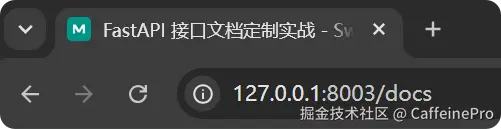
) Logo文件放在static/logo.svg,通过app.mount("/static", StaticFiles(...))提供静态访问。swagger_favicon_url指向该路径后,浏览器标签页与Swagger顶栏都会使用自定义图标。 如下图所示显示了设置的logo:
三、接口排序与注释标准化
Swagger侧边栏的分组顺序由 openapi_tags的声明顺序决定:
python
OPENAPI_TAGS = [
    {"name": "01-用户", "description": "对外公开的用户查询接口..."},
    {"name": "02-订单", "description": "订单创建与查询..."},
    {"name": "03-文档工具", "description": "OpenAPI 导出与平台同步..."},
]
如下图所示:
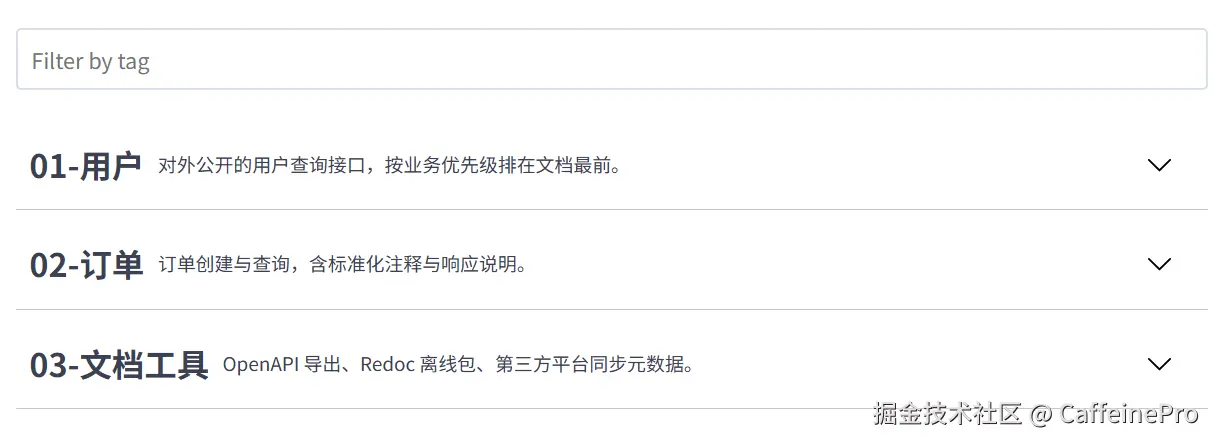
路由通过tags=["01-用户"]归入对应分组。前缀数字只是为了在交付文档中固定排序,上线后可改成业务名。
路径级别的顺序可在自定义build_openapi_schema里对paths字典排序,导出JSON时路径会按字母序稳定排列,便于Git diff与CI比对:
python
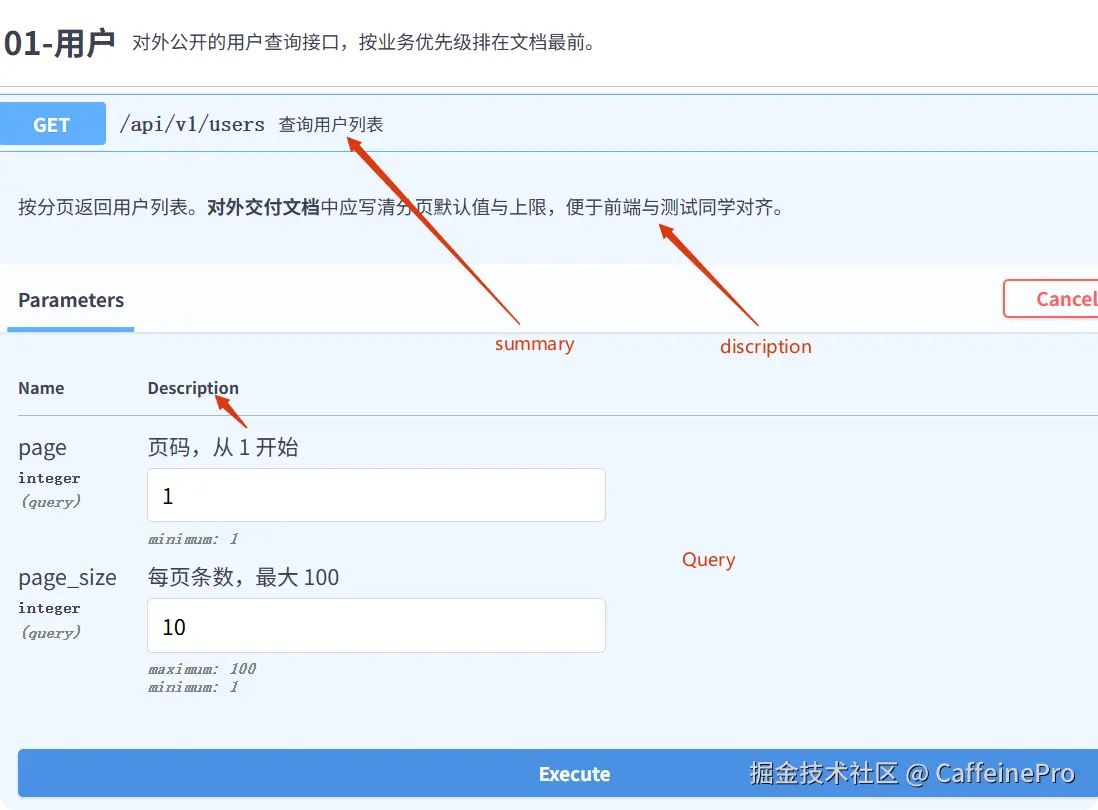
schema["paths"] = dict(sorted(schema["paths"].items(), key=lambda x: x[0])) 注释标准化 应同时写三层:路由上的summary(短标题)、description(详细说明,支持 Markdown)、response_description(返回值说明);模型字段用Field(description=..., examples=[...])。
python
@router.get(
    "",
    response_model=list[UserOut],
    summary="查询用户列表",
    description="按分页返回用户列表。分页默认值与上限见 Query 参数说明。",
    response_description="用户数组,按 id 升序",
)
async def list_users(
    page: int = Query(default=1, ge=1, description="页码,从 1 开始"),
    page_size: int = Query(default=10, ge=1, le=100, description="每页条数,最大 100"),
):
    ...
这样Swagger里每个接口都有清晰的一行标题、展开后的长描述,以及参数表格中的中文说明,无需另写Word文档。将在文档页看到:
四、隐藏内部接口
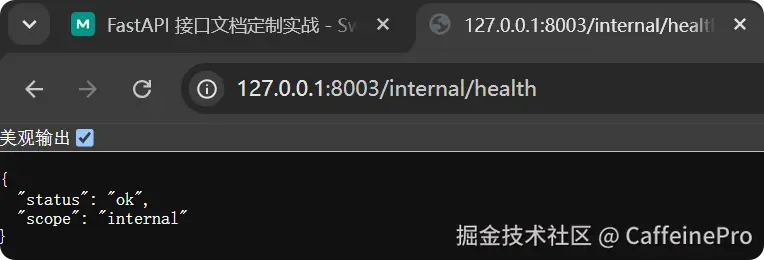
调试、运维探针、配置快照等路由不应出现在对外文档 中。做法是在路由或Router上设置include_in_schema=False:
python
router = APIRouter(prefix="/internal", include_in_schema=False)

@router.get("/health")
async def internal_health():
return {"status": "ok", "scope": "internal"} /internal/health仍可正常访问,但不会出现在/openapi.json、Swagger或Redoc里。导出给客户的JSON也不会泄露内部路径。验证方式:打开文档或调用GET /api/v1/doc-tools/openapi,确认paths中没有/internal/*。
五、Redoc 与离线 HTML 导出
ReDoc适合只读、排版更美观的交付场景。定制方式与Swagger类似,使用get_redoc_html注册/redoc路由,并指定redoc_favicon_url。
离线HTML 需要把OpenAPI JSON内嵌 进单个文件,否则离线打开时无法拉取/openapi.json。app/docs/export.py中的write_redoc_offline将Schema序列化后写入<script>,由Redoc CDN渲染:
python
def write_redoc_offline(schema: dict) -> Path:
    spec_json = json.dumps(schema, ensure_ascii=False)
    html = f"""
    ...
    <script>
      const spec = {spec_json};
      Redoc.init(spec, {{}}, document.getElementById("redoc-container"));
    </script>
""" 两种导出方式:访问GET /api/v1/doc-tools/redoc-offline下载;或在命令行运行python scripts/export_docs.py,在exports/目录生成openapi.json与redoc-offline.html,可直接邮件发送或上传到文档门户。 导出的脚本:
python
"""CLI: export OpenAPI JSON and offline ReDoc HTML without running the server."""

from __future__ import annotations

import json
import sys
from pathlib import Path

_ROOT = Path(__file__).resolve().parents[1]
if str(_ROOT) not in sys.path:
    sys.path.insert(0, str(_ROOT))

from app.core.config import settings  # noqa: E402
from app.docs.export import write_redoc_offline  # noqa: E402
from app.main import app  # noqa: E402


def main() -> None:
    schema = app.openapi()
    exports = _ROOT / "exports"
    exports.mkdir(parents=True, exist_ok=True)

    json_path = exports / "openapi.json"
    json_path.write_text(json.dumps(schema, ensure_ascii=False, indent=2), encoding="utf-8")

    html_path = write_redoc_offline(schema)
    print(f"OpenAPI JSON -> {json_path}")
    print(f"ReDoc HTML  -> {html_path}")
    print(f"Platform    -> {schema['info'].get('x-platform')}")
    print(f"Docs auth   -> {settings.docs_username} / {settings.docs_password}")


if __name__ == "__main__":
    main()
六、文档密码保护与生产环境关闭
默认开发环境下,Swagger、ReDoc、/openapi.json 均启用,且 DocsAuthMiddleware要求 HTTP Basic认证,账号密码写在config.py下:
python
class DocsAuthMiddleware(BaseHTTPMiddleware):
    """Protect Swagger, ReDoc, and openapi.json with HTTP Basic when enabled."""

    async def dispatch(self, request: Request, call_next: Callable) -> Response:
        if not settings.docs_enabled or not settings.docs_require_auth:
            return await call_next(request)

        path = request.url.path.rstrip("/") or "/"
        normalized = path if path in PROTECTED_PATHS else None
        if normalized is None and not any(
            path.startswith(f"{item}/") for item in PROTECTED_PATHS
        ):
            return await call_next(request)

        auth_header = request.headers.get("Authorization", "")
        if not auth_header.startswith("Basic "):
            return self._challenge()

        try:
            decoded = base64.b64decode(auth_header[6:]).decode("utf-8")
            username, _, password = decoded.partition(":")
        except (ValueError, UnicodeDecodeError):
            return self._challenge()

        valid_user = secrets.compare_digest(username, settings.docs_username)
        valid_pass = secrets.compare_digest(password, settings.docs_password)
        if not (valid_user and valid_pass):
            logger.warning("docs auth failed path=%s user=%s", path, username)
            return self._challenge()

        return await call_next(request)

    @staticmethod
    def _challenge() -> Response:
        return Response(
            status_code=401,
            headers={"WWW-Authenticate": 'Basic realm="API Documentation"'},
            content="Documentation requires authentication",
            media_type="text/plain",
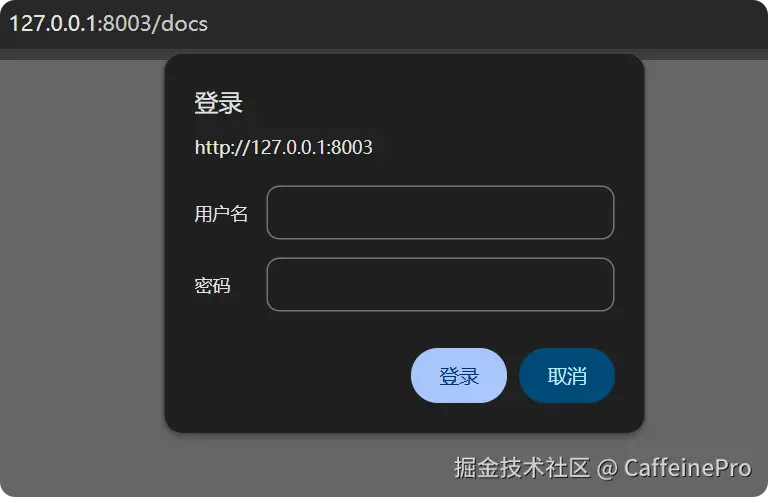
) 未带凭证访问/openapi.json返回401并带WWW-Authenticate: Basic realm="API Documentation",浏览器打开/docs时会弹出登录框。业务接口/api/v1/*不受此中间件影响 ,避免把文档鉴权与业务Token混在一起。
生产环境应关闭文档入口,避免暴露接口结构:
bash
set DOCS_ENABLED=false
set APP_ENV=production
uvicorn app.main:app --port 8003
settings.effective_docs_url 等为 None 时,FastAPI 不暴露 /docs、/redoc、/openapi.json,也不会注册自定义文档路由与鉴权中间件。业务 API 照常服务。CI/CD 中应把 DOCS_ENABLED=false 写入生产环境变量模板。
七、OpenAPI 扩展字段与第三方平台对接
OpenAPI允许在info下添加x-*扩展字段,Apifox、Postman、YApi等导入时会保留这些元数据,便于自动化同步。build_openapi_schema中添加:
python
schema["info"]["x-logo"] = {"url": "/static/logo.svg", "altText": settings.app_title}
schema["info"]["x-platform"] = {
    "name": "Apifox",
    "projectId": "demo-api-003",
    "syncUrl": "https://api.apifox.com/v1/projects/demo-api-003/import-openapi",
    "environment": settings.app_env,
}
schema["info"]["x-doc-policy"] = {
    "publicDelivery": True,
    "requireAuth": settings.docs_require_auth,
    "hiddenInternalRoutes": True,
}
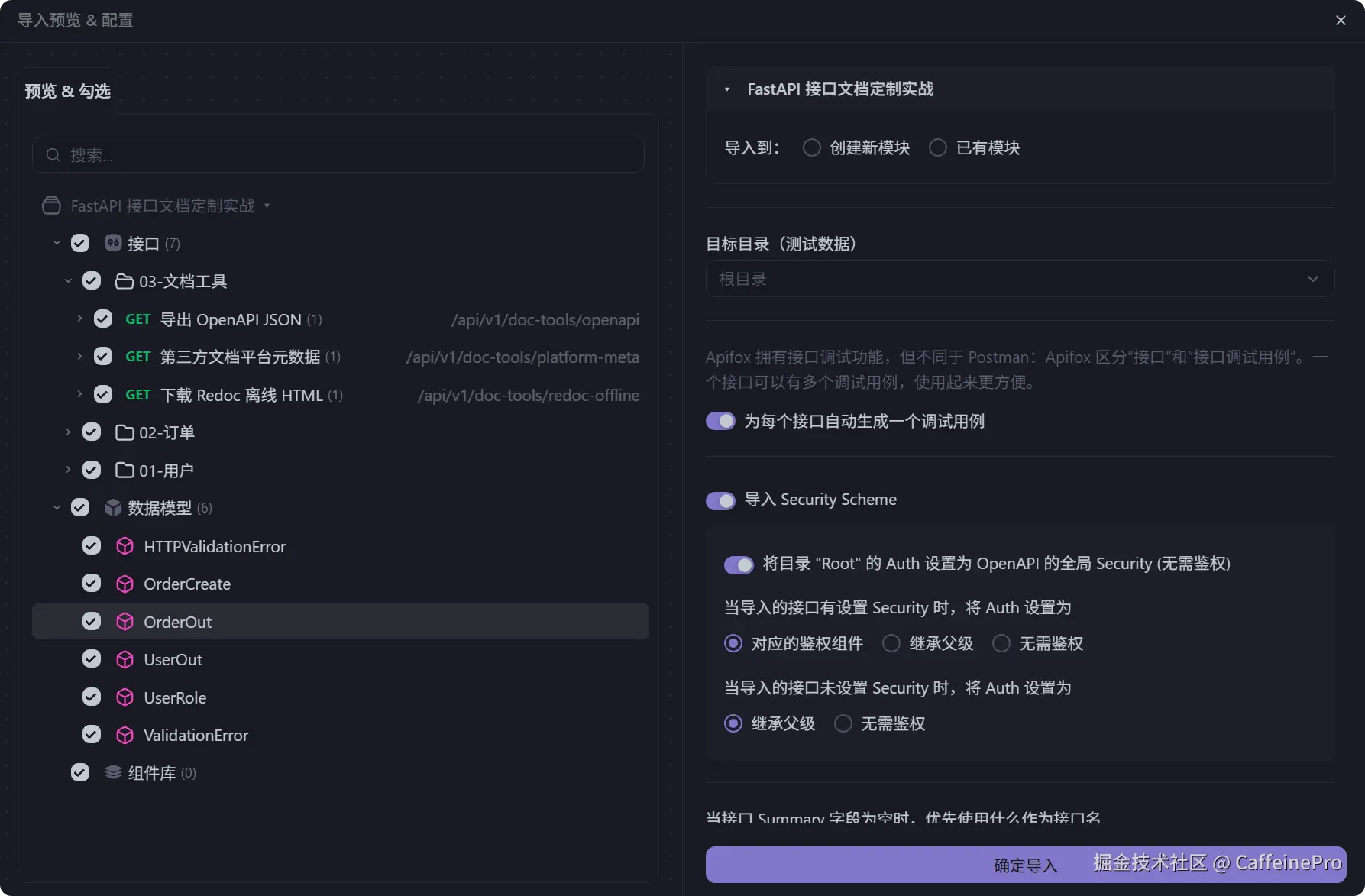
对接流程通常是:CI执行 python scripts/export_docs.py生成exports/openapi.json、调用平台OpenAPI导入API、平台按projectId更新项目。GET /api/v1/doc-tools/platform-meta 返回当前扩展字段,供流水线脚本读取,无需硬编码。
GET /api/v1/doc-tools/openapi则带Content-Disposition: attachment直接下载JSON,响应Header含 X-Platform-Project-Id,方便脚本判断导入目标。 下图为使用Apifox导入json:
总结
对外交付接口文档时,默认/docs只是起点。通过关闭内置文档页、自定义Swagger/ReDoc路由,可以控制Logo与交互参数;通过openapi_tags、summary/description与Field说明,可以把文档写像产品;通过include_in_schema=False隐藏内部路由;通过Basic认证与DOCS_ENABLED环境变量,区分开发联调与生产暴露面;通过x-platform等扩展字段与导出脚本,把OpenAPI JSON纳入CI,对接Apifox等平台。
记住一条原则:业务鉴权保护API,文档鉴权保护Schema与UI,生产环境默认关闭文档。 这样既能保留FastAPI自动生成文档的效率,又满足正式交付与安全合规的要求。