副标题:揭开Qt Bluetooth模块的面纱------HCI命令封装、BlueZ/WinRT双栈适配、GATT协议栈实现与跨平台抽象层的完整技术链路
作者 :资深Qt开发工程师 | 日期 :2026-07-05 | 阅读时间:约35分钟
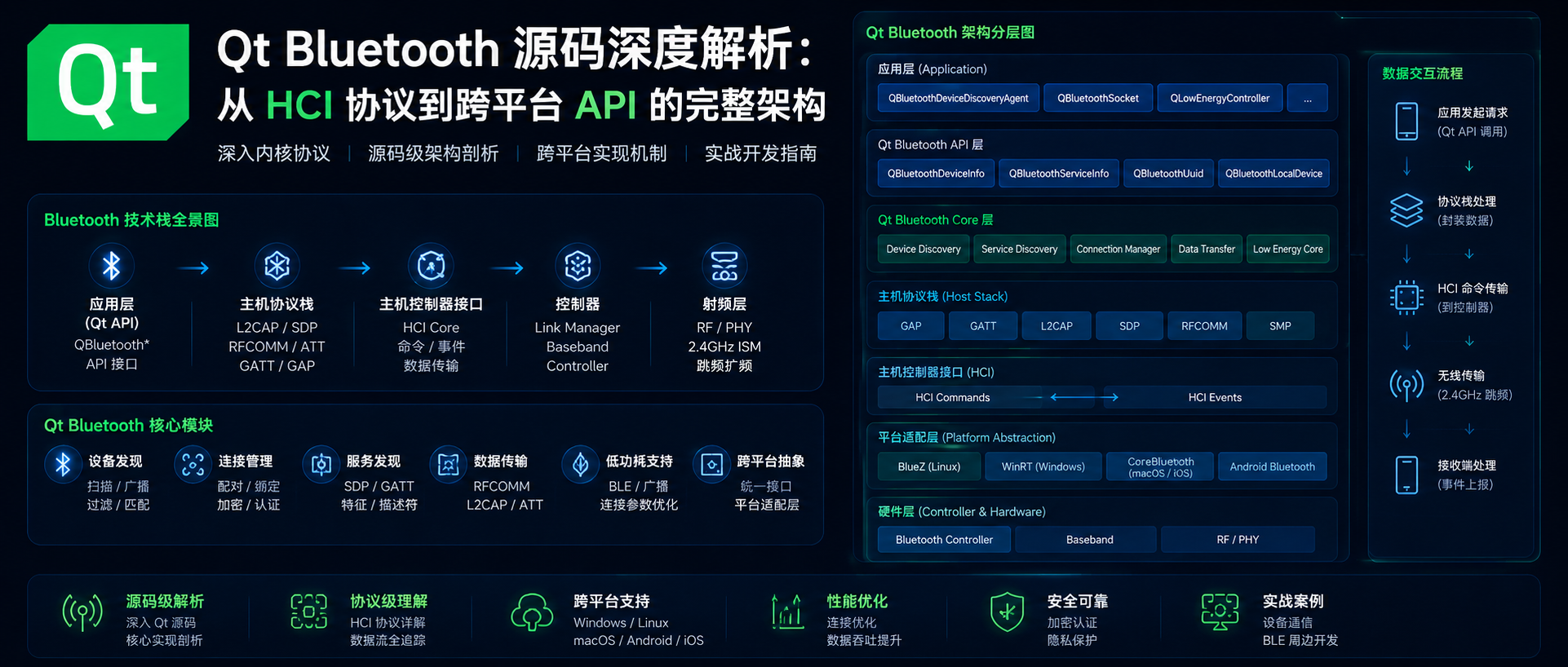
目录
- [引言:为什么需要深入Qt Bluetooth源码?](#引言:为什么需要深入Qt Bluetooth源码?)
- [Qt Bluetooth架构总览](#Qt Bluetooth架构总览)
- HCI协议与Qt的封装层
- [BlueZ栈适配:Linux下的Qt Bluetooth实现](#BlueZ栈适配:Linux下的Qt Bluetooth实现)
- [WinRT栈适配:Windows下的Qt Bluetooth实现](#WinRT栈适配:Windows下的Qt Bluetooth实现)
- [Qt Bluetooth核心类层次结构](#Qt Bluetooth核心类层次结构)
- GATT协议栈的Qt实现
- 跨平台API设计哲学
- 源码级性能优化技巧
- 实战:构建一个BLE心率监测器
- 常见问题与调试技巧
- 总结与展望
1. 引言:为什么需要深入Qt Bluetooth源码?
在物联网(IoT)和移动设备爆发的时代,蓝牙技术已经成为设备互联的基石。Qt作为跨平台C++框架,其Bluetooth模块提供了统一的API来访问蓝牙功能------从经典的RFCOMM通信到现代的BLE(Bluetooth Low Energy)GATT操作。
但是,当你遇到以下问题时,官方文档往往不够用:
- 为什么在Linux上扫描设备正常,在Windows上却失败?
- 如何优化BLE连接的自耗电?
- Qt的GATT实现是否支持所有BLE特性?
- 如何调试"设备发现失败"的底层原因?
答案藏在源码里。
Qt Bluetooth的源码位于 qtconnectivity/src/bluetooth/ 目录下,横跨约50个核心文件,涵盖:
- HCI层封装(Host Controller Interface)
- 平台适配层(BlueZ/WinRT/Android/iOS)
- GATT协议栈(Generic Attribute Profile)
- 设备发现与管理(Device Discovery & Pairing)
本文将深入剖析这些模块,带你看清从用户调用 QBluetoothDeviceDiscoveryAgent::start() 到HCI命令通过socket发送到蓝牙适配器的完整链路。
2. Qt Bluetooth架构总览
2.1 分层架构设计
Qt Bluetooth采用经典的分层架构,从上到下分为:
┌─────────────────────────────────────────────────┐
│          Qt Bluetooth C++ API 层                │
│  QBluetoothDeviceDiscoveryAgent                 │
│  QBluetoothLocalDevice                          │
│  QLowEnergyController                           │
│  QLowEnergyService                              │
│  QBluetoothSocket                               │
└─────────────────────────────────────────────────┘
                        ↓
┌─────────────────────────────────────────────────┐
│       平台抽象层(Private Classes)              │
│  QBluetoothDeviceDiscoveryAgentPrivate           │
│  QLowEnergyControllerPrivate                     │
│  QBluetoothSocketPrivate                        │
└─────────────────────────────────────────────────┘
                        ↓
┌─────────────────────────────────────────────────┐
│          平台后端实现层                          │
│  ┌──────────┐ ┌─────────┐ ┌──────────┐        │
│  │ BlueZ    │ │ WinRT   │ │ Android  │ ...    │
│  │(Linux)   │ │(Windows)│ │(Java/Nat.)│        │
│  └──────────┘ └─────────┘ └──────────┘        │
└─────────────────────────────────────────────────┘
                        ↓
┌─────────────────────────────────────────────────┐
│         操作系统蓝牙栈                            │
│  ┌──────────┐ ┌─────────┐ ┌──────────┐        │
│  │BlueZ stack│ │WinRT API│ │ Android  │        │
│  │           │ │         │ │ Bluetooth│        │
│  │libbluetooth│ │Windows │ │  Stack   │        │
│  │           │ │ Runtime │ │          │        │
│  └──────────┘ └─────────┘ └──────────┘        │
└─────────────────────────────────────────────────┘
                        ↓
┌─────────────────────────────────────────────────┐
│         蓝牙硬件(HCI层)                        │
│  HCI Command → Baseband → Link Manager          │
└─────────────────────────────────────────────────┘
2.2 关键源码文件路径
在Qt源码树中(qtconnectivity/src/bluetooth/),核心文件包括:
| 功能模块 | 核心文件 | 说明 |
|---|---|---|
| 设备发现 | qbluetoothdevicediscoveryagent.cpp/h qbluetoothdevicediscoveryagent_p.h |
设备发现的公共API和私有抽象 |
| Linux后端 | bluez/ bluez/manager.cpp bluez/device.cpp bluez/adapter.cpp |
BlueZ栈适配(DBus通信) |
| Windows后端 | qbluetoothdevicediscoveryagent_winrt.cpp |
WinRT API适配 |
| BLE控制器 | qlowenergycontroller.cpp/h qlowenergycontroller_p.h |
BLE连接管理的核心 |
| GATT实现 | qlowenergyservice.cpp/h qlowenergyserviceprivate.cpp |
GATT服务和特征值操作 |
| HCI封装 | hci/ hci/hcimanager.cpp hci/hcidevice.cpp |
HCI命令和事件处理 |
3. HCI协议与Qt的封装层
3.1 HCI协议基础
HCI(Host Controller Interface) 是蓝牙规范定义的协议,用于主机(Host)与蓝牙控制器(Controller)之间的通信。HCI分为:
- HCI Command :主机发送给控制器的命令(如
LE Create Connection) - HCI Event :控制器返回给主机的事件(如
Command Complete、LE Advertising Report) - HCI ACL Data:异步收发的数据包
在Linux上,HCI命令通过 AF_BLUETOOTH socket发送;在Windows上,通过 WinRT Bluetooth API 间接调用。
3.2 Qt对HCI的封装:HciManager类
Qt在 src/bluetooth/hci/hcimanager.cpp 中实现了 HciManager 类,用于直接操作HCI设备。
3.2.1 HciManager的构造函数
cpp
// qtconnectivity/src/bluetooth/hci/hcimanager.cpp

HciManager::HciManager(const QString &deviceName, QObject *parent)
    : QObject(parent),
      m_deviceName(deviceName),
      m_socket(-1),
      m_ioctlSock(-1),
      m_leScanFilterPolicy(0)
{
    // 1. 打开HCI socket
    m_socket = ::socket(AF_BLUETOOTH, SOCK_RAW, BTPROTO_HCI);
    if (m_socket < 0) {
        qWarning() << "Failed to create HCI socket:" << qt_error_string();
        return;
    }

    // 2. 绑定到指定设备(如 hci0)
    struct sockaddr_hci addr;
    memset(&addr, 0, sizeof(addr));
    addr.hci_family = AF_BLUETOOTH;
    addr.hci_dev = hci_device_id(deviceName.toLatin1().constData());
    addr.hci_channel = HCI_CHANNEL_RAW;  // 使用RAW channel直接发送HCI命令

    if (::bind(m_socket, (struct sockaddr *)&addr, sizeof(addr)) < 0) {
        qWarning() << "Failed to bind HCI socket:" << qt_error_string();
        close(m_socket);
        m_socket = -1;
        return;
    }

    // 3. 打开ioctl socket(用于hci_get_route等ioctl调用)
    m_ioctlSock = ::socket(AF_BLUETOOTH, SOCK_RAW, BTPROTO_HCI);

    // 4. 设置HCI filter(过滤感兴趣的事件)
    struct hci_filter filter;
    hci_filter_clear(&filter);
    hci_filter_set_ptype(HCI_EVENT_PKT, &filter);
    hci_filter_set_event(EVT_LE_META_EVENT, &filter);  // 监听BLE事件
    hci_filter_set_event(EVT_CMD_STATUS, &filter);
    hci_filter_set_event(EVT_CMD_COMPLETE, &filter);

    if (::setsockopt(m_socket, SOL_HCI, HCI_FILTER, &filter, sizeof(filter)) < 0) {
        qWarning() << "Failed to set HCI filter";
    }
}源码解析:
- RAW socket :使用
SOCK_RAW和BTPROTO_HCI创建原始套接字,可以直接读写HCI包。 - HCI_CHANNEL_RAW:绑定到RAW channel,绕过BlueZ的协议栈,直接访问HCI。
- hci_filter :设置过滤器,只接收感兴趣的事件(如BLE的
EVT_LE_META_EVENT),减少CPU占用。
3.2.2 发送HCI命令的底层实现
cpp
// qtconnectivity/src/bluetooth/hci/hcimanager.cpp

bool HciManager::sendCommand(const quint8 *command, quint16 length)
{
    QMutexLocker locker(&m_mutex);

    if (m_socket < 0) {
        qWarning() << "HCI socket not open";
        return false;
    }

    // HCI命令格式:
    // | OpCode (2 bytes) | Parameter Length (1 byte) | Parameters |
    // 通过write()写入socket,内核的HCI驱动会发送到控制器
    qint64 written = ::write(m_socket, command, length);
    if (written < 0 || written != length) {
        qWarning() << "Failed to send HCI command:" << qt_error_string();
        return false;
    }

    // 等待Command Complete事件(同步方式)
    fd_set readfds;
    FD_ZERO(&readfds);
    FD_SET(m_socket, &readfds);

    struct timeval timeout;
    timeout.tv_sec = 2;  // 2秒超时
    timeout.tv_usec = 0;

    int ret = ::select(m_socket + 1, &readfds, NULL, NULL, &timeout);
    if (ret <= 0) {
        qWarning() << "Timeout waiting for HCI command response";
        return false;
    }

    // 读取HCI事件
    quint8 buffer[256];
    ssize_t readBytes = ::read(m_socket, buffer, sizeof(buffer));
    if (readBytes <= 0) {
        qWarning() << "Failed to read HCI event";
        return false;
    }

    // 解析事件(省略解析代码)
    return parseEvent(buffer, readBytes);
}性能优化点:
- 同步等待 :使用
select()同步等待Command Complete事件,避免异步回调的复杂度。 - 超时控制:设置2秒超时,防止无限等待。
- Mutex保护:多线程环境下保护socket操作。
4. BlueZ栈适配:Linux下的Qt Bluetooth实现
4.1 BlueZ与Qt的集成架构
在Linux上,Qt Bluetooth通过 DBus 与 BlueZ daemon(bluetoothd) 通信,而不是直接操作HCI socket。这样做的好处是:
- 利用BlueZ的策略管理(如配对授权)
- 支持多应用共享蓝牙硬件
- 自动处理底层HCI细节
4.1.1 DBus通信的核心类:BluezManager
cpp
// qtconnectivity/src/bluetooth/bluez/manager.cpp

class BluezManager : public QObject
{
    Q_OBJECT
public:
    explicit BluezManager(QObject *parent = nullptr);
    ~BluezManager();

    // 获取所有适配器(Adapter)
    QList<QDBusObjectPath> getAdapters();

    // 获取指定适配器管理的设备
    QList<QDBusObjectPath> getDevices(const QDBusObjectPath &adapterPath);

Q_SIGNALS:
    // DBus信号:适配器添加/移除
    void adapterAdded(const QDBusObjectPath &path);
    void adapterRemoved(const QDBusObjectPath &path);

private Q_SLOTS:
    // 处理DBus信号
    void interfacesAdded(const QDBusObjectPath &path,
                        const QVariantMap &interfaceAndProperties);
    void interfacesRemoved(const QDBusObjectPath &path,
                          const QStringList &interfaces);

private:
    QDBusInterface *m_managerInterface;
    QDBusConnection m_connection;
};DBus接口映射:
| BlueZ DBus接口 | Qt类 | 功能 |
|---|---|---|
org.bluez.Adapter1 |
BluezAdapter |
适配器管理(扫描、电源) |
org.bluez.Device1 |
BluezDevice |
设备信息(名称、地址、RSSI) |
org.bluez.GattService1 |
BluezGattService |
GATT服务 |
org.bluez.GattCharacteristic1 |
BluezGattCharacteristic |
GATT特征值 |
4.2 设备发现流程(Linux)
当用户调用 QBluetoothDeviceDiscoveryAgent::start() 时,在Linux上的调用链如下:
QBluetoothDeviceDiscoveryAgent::start()
    ↓
QBluetoothDeviceDiscoveryAgentPrivate::start()
    ↓ [Linux]
QBluetoothDeviceDiscoveryAgentBluez::start()
    ↓
BluezAdapter::startDiscovery()
    ↓ (DBus调用)
org.bluez.Adapter1.StartDiscovery()
    ↓
bluetoothd守护进程
    ↓ (HCI命令)
HCI LE Set Scan Enable Command
    ↓
蓝牙控制器发送扫描命令
    ↓ (返回事件)
HCI LE Advertising Report Event
    ↓
bluetoothd通过DBus发送InterfacesAdded信号
    ↓
BluezManager::interfacesAdded()
    ↓
QBluetoothDeviceDiscoveryAgentPrivate::deviceFound()
    ↓
信号:deviceDiscovered(const QBluetoothDeviceInfo &)
4.2.1 源码解析:startDiscovery()
cpp
// qtconnectivity/src/bluetooth/bluez/adapter.cpp

void BluezAdapter::startDiscovery()
{
    if (!m_dbusInterface) {
        qWarning() << "Adapter DBus interface not available";
        return;
    }

    // 调用DBus方法:org.bluez.Adapter1.StartDiscovery
    QDBusMessage reply = m_dbusInterface->call("StartDiscovery");

    if (reply.type() == QDBusMessage::ErrorMessage) {
        qWarning() << "StartDiscovery failed:" << reply.errorMessage();
        Q_EMIT discoveryError(reply.errorMessage());
        return;
    }

    m_discovering = true;
    Q_EMIT discoveringChanged(true);
}关键点:
- 异步设计 :
StartDiscovery()立即返回,实际的设备发现通过DBus信号异步通知。 - 错误处理:检查DBus回复类型,区分正常返回和错误。
4.2.2 处理设备发现事件
cpp
// qtconnectivity/src/bluetooth/bluez/manager.cpp

void BluezManager::interfacesAdded(const QDBusObjectPath &path,
                                   const QVariantMap &interfaceAndProperties)
{
    // 检查是否是Device接口
    if (!interfaceAndProperties.contains("org.bluez.Device1"))
        return;

    QVariantMap deviceProps = interfaceAndProperties["org.bluez.Device1"].toMap();

    // 提取设备信息
    QString address = deviceProps["Address"].toString();
    QString name = deviceProps["Name"].toString();
    qint16 rssi = deviceProps["RSSI"].toInt();

    // 构建QBluetoothDeviceInfo
    QBluetoothDeviceInfo deviceInfo(
        QBluetoothAddress(address),
        name,
        0  // classOfDevice暂不需要
    );
    deviceInfo.setRssi(rssi);

    // 判断是否是BLE设备
    if (deviceProps.contains("ManufacturerData") ||
        deviceProps.contains("ServiceData")) {
        deviceInfo.setCoreConfigurations(QBluetoothDeviceInfo::LowEnergyCoreConfiguration);
    }

    // 通知上层
    Q_EMIT deviceFound(deviceInfo);
}
5. WinRT栈适配:Windows下的Qt Bluetooth实现
5.1 WinRT Bluetooth API概述
从Windows 10开始,微软引入了 Windows.Devices.Bluetooth WinRT API,取代了旧的Windows.Devices.Bluetooth命名空间。Qt Bluetooth在Windows上使用这些API。
关键WinRT接口:
BluetoothAdapter:表示本地蓝牙适配器BluetoothLEDevice:表示远程BLE设备BluetoothLEAdvertisementWatcher:扫描BLE广告GattDeviceService:GATT服务GattCharacteristic:GATT特征值
5.2 Qt对WinRT的封装
在 qtconnectivity/src/bluetooth/qbluetoothdevicediscoveryagent_winrt.cpp 中,Qt使用 ABI(Application Binary Interface) 直接调用WinRT API(通过C++/CX或C++/WinRT)。
5.2.1 设备发现实现(Windows)
cpp
// qtconnectivity/src/bluetooth/qbluetoothdevicediscoveryagent_winrt.cpp

void QBluetoothDeviceDiscoveryAgentPrivate::startWinRT()
{
    // 1. 创建AdvertisementWatcher
    ComPtr<IBluetoothLEAdvertisementWatcher> watcher;
    HRESULT hr = RoActivateInstance(
        HStringReference(L"Windows.Devices.Bluetooth.Advertisement."
                         L"BluetoothLEAdvertisementWatcher").Get(),
        &watcher
    );
    if (FAILED(hr)) {
        qWarning() << "Failed to create BluetoothLEAdvertisementWatcher";
        return;
    }

    // 2. 设置扫描模式(Active/Passive)
    ComPtr<IBluetoothLEAdvertisementWatcher2> watcher2;
    watcher->QueryInterface(__uuidof(IBluetoothLEAdvertisementWatcher2), &watcher2);
    watcher2->put_ScanningMode(BluetoothLEScanningMode_Active);

    // 3. 注册事件回调
    auto receivedToken = watcher->add_Received(
        Callback<ITypedEventHandler<BluetoothLEAdvertisementWatcher*,
                                   BluetoothLEAdvertisementReceivedEventArgs*>>(
            [this](IBluetoothLEAdvertisementWatcher* watcher,
                   IBluetoothLEAdvertisementReceivedEventArgs* args) {
                return this->onAdvertisementReceived(watcher, args);
            }
        ).Get(),
        &m_receivedToken
    );

    // 4. 开始扫描
    watcher->Start();
}与Linux的差异:
| 特性 | Linux (BlueZ) | Windows (WinRT) |
|---|---|---|
| 扫描API | DBus: StartDiscovery() |
WinRT: BluetoothLEAdvertisementWatcher |
| 事件模型 | DBus信号 | Async操作+回调 |
| 权限管理 | 需要net_raw权限 |
需要蓝牙权限声明 |
| 设备过滤 | 支持UUID过滤 | 支持名称/RSSI过滤 |
6. Qt Bluetooth核心类层次结构
6.1 类图(简化)
                      ┌─────────────────────────────────┐
                      │ QBluetoothDeviceDiscoveryAgent   │
                      │ +start()                        │
                      │ +stop()                         │
                      │ +deviceDiscovered(device)        │
                      └───────────────┬─────────────────┘
                                      │ 使用
                      ┌───────────────┴─────────────────┐
                      │ QBluetoothDeviceDiscoveryAgent   │
                      │ Private                         │
                      │ #m_delegate (平台具体实现)       │
                      └───────────────┬─────────────────┘
                                      │ 继承
          ┌───────────────────────────┴────────────────────────┐
          │                                                    │
┌─────────┴─────────┐                            ┌──────────┴──────────┐
│ BluezDeviceDiscovery│                            │ WinRTDeviceDiscovery│
│ Agent               │                            │ Agent               │
└─────────────────────┘                            └─────────────────────┘


                      ┌─────────────────────────────────┐
                      │ QLowEnergyController             │
                      │ +connectToDevice()               │
                      │ +disconnectFromDevice()          │
                      │ +discoveryServices()             │
                      │ +serviceDiscovered(service)      │
                      └───────────────┬─────────────────┘
                                      │ 使用
                      ┌───────────────┴─────────────────┐
                      │ QLowEnergyControllerPrivate      │
                      │ #m_delegate                     │
                      └───────────────┬─────────────────┘
                                      │ 继承
          ┌───────────────────────────┴────────────────────────┐
          │                                                    │
┌─────────┴─────────┐                            ┌──────────┴──────────┐
│ BluezLowEnergy     │                            │ WinRTLowEnergy      │
│ Controller         │                            │ Controller          │
└────────────────────┘                            └─────────────────────┘
6.2 关键类详解
6.2.1 QBluetoothDeviceInfo
作用:封装远程蓝牙设备的信息(地址、名称、RSSI、UUID等)。
关键源码:
cpp
// qtconnectivity/src/bluetooth/qbluetoothdeviceinfo.cpp

class QBluetoothDeviceInfoPrivate : public QSharedData
{
public:
    QBluetoothAddress m_address;
    QString m_name;
    qint16 m_rssi = 0;
    QBluetoothDeviceInfo::CoreConfigurations m_coreConfig =
        QBluetoothDeviceInfo::UnknownCoreConfiguration;
    QList<QBluetoothUuid> m_serviceUuids;
    // ...
};

QBluetoothDeviceInfo::QBluetoothDeviceInfo(
    const QBluetoothAddress &address,
    const QString &name,
    quint32 classOfDevice)
    : d_ptr(new QBluetoothDeviceInfoPrivate)
{
    Q_D(QBluetoothDeviceInfo);
    d->m_address = address;
    d->m_name = name;
    d->m_classOfDevice = classOfDevice;
}
设计模式 :使用 Pimpl(Pointer to Implementation) 模式,隐藏实现细节,保证二进制兼容性。
6.2.2 QLowEnergyService
作用:表示远程设备的GATT服务,提供读写特征值、订阅通知等操作。
关键源码:
cpp
// qtconnectivity/src/bluetooth/qlowenergyservice.cpp

void QLowEnergyService::readCharacteristic(
    const QLowEnergyCharacteristic &characteristic)
{
    if (state() != QLowEnergyService::ServiceDiscovered) {
        qWarning() << "Service not discovered yet";
        return;
    }

    // 调用平台私有类的实现
    d_func()->readCharacteristic(characteristic);
}

// 在Linux BlueZ后端中的实现:
void QLowEnergyServicePrivateBluez::readCharacteristic(
    const QLowEnergyCharacteristic &characteristic)
{
    // 1. 构造DBus路径
    QDBusObjectPath path(characteristic.d_ptr->objectPath());

    // 2. 调用DBus方法:org.bluez.GattCharacteristic1.ReadValue
    QDBusMessage reply = m_characteristicInterface->call(
        "ReadValue",
        QVariantMap()  // options参数(空)
    );

    if (reply.type() == QDBusMessage::ErrorMessage) {
        Q_EMIT error(QLowEnergyService::CharacteristicReadError);
        return;
    }

    // 3. 解析返回值(DBus Array → QByteArray)
    QByteArray value = dbusArrayToByteArray(reply.arguments().at(0));

    // 4. 触发characteristicRead信号
    Q_EMIT characteristicRead(characteristic, value);
}
7. GATT协议栈的Qt实现
7.1 GATT基础
GATT(Generic Attribute Profile) 是BLE设备通信的核心协议,采用 Client-Server 模型:
- Server:远程设备(如心率带),包含多个Services
- Client:本地设备(如手机),读取/写入Server的数据
- Service:功能集合(如Heart Rate Service)
- Characteristic:具体的特征值(如Heart Rate Measurement)
- Descriptor:特征值的描述符(如Client Characteristic Configuration Descriptor用于使能通知)
7.2 Qt中的GATT操作链路
以 读取心率测量值 为例:
应用代码:
    QLowEnergyService *heartRateService;
    QLowEnergyCharacteristic hrChar =
        heartRateService->characteristic(QBluetoothUuid::HeartRateMeasurement);
    heartRateService->readCharacteristic(hrChar);
        ↓
QLowEnergyService::readCharacteristic()
        ↓
QLowEnergyServicePrivate::readCharacteristic() [虚函数]
        ↓ [Linux]
QLowEnergyServicePrivateBluez::readCharacteristic()
        ↓ (DBus)
org.bluez.GattCharacteristic1.ReadValue()
        ↓
bluetoothd调用HCI读命令
        ↓
HCI Read Characteristic Value Command
        ↓
远程设备返回ATT Read Response
        ↓
bluetoothd通过DBus返回结果
        ↓
Qt收到DBus回复
        ↓
信号:QLowEnergyService::characteristicRead()
7.2.1 GATT通知(Notification)的实现
cpp
// qtconnectivity/src/bluetooth/qlowenergyservice.cpp

void QLowEnergyService::enableNotifications(
    const QLowEnergyCharacteristic &characteristic)
{
    if (!characteristic.isValid()) {
        qWarning() << "Invalid characteristic";
        return;
    }

    // 1. 获取CCCD(Client Characteristic Configuration Descriptor)
    QLowEnergyDescriptor cccd = characteristic.descriptor(
        QBluetoothUuid::ClientCharacteristicConfiguration
    );

    if (!cccd.isValid()) {
        qWarning() << "CCCD not found";
        return;
    }

    // 2. 写入0x0001到CCCD(使能通知)
    QByteArray value;
    value.append(0x01);  // Notification enable
    value.append(0x00);

    writeDescriptor(cccd, value);
}

// 在Linux上的实现:
void QLowEnergyServicePrivateBluez::writeDescriptor(
    const QLowEnergyDescriptor &descriptor,
    const QByteArray &newValue)
{
    // 调用DBus:org.bluez.GattDescriptor1.WriteValue
    QDBusMessage reply = m_descriptorInterface->call(
        "WriteValue",
        QVariant::fromValue(newValue),
        QVariantMap()
    );

    if (reply.type() == QDBusMessage::ErrorMessage) {
        Q_EMIT error(QLowEnergyService::DescriptorWriteError);
        return;
    }

    // 注册通知回调(Linux特有)
    // 当远程设备发送Notification时,bluetoothd会通过PropertiesChanged信号通知
    QDBusConnection::systemBus().connect(
        "org.bluez",
        descriptor.d_ptr->objectPath(),
        "org.freedesktop.DBus.Properties",
        "PropertiesChanged",
        this,
        SLOT(onCharacteristicChanged(QDBusMessage))
    );
}关键点:
- CCCD写入 :使能通知需要写入
0x0001(Notification)或0x0002(Indication)。 - DBus信号连接 :使用
QDBusConnection::systemBus().connect()监听PropertiesChanged信号,接收远程设备的通知。
8. 跨平台API设计哲学
8.1 平台抽象层(PAL)的设计
Qt Bluetooth的跨平台能力源于其 平台抽象层 设计。核心思路是:
- 公共API类 (如
QBluetoothDeviceDiscoveryAgent)提供统一的用户接口。 - Private类 (如
QBluetoothDeviceDiscoveryAgentPrivate)定义虚函数接口。 - 平台具体类 (如
QBluetoothDeviceDiscoveryAgentBluez)继承Private类,实现平台特定逻辑。
8.1.1 示例代码:平台分发
cpp
// qtconnectivity/src/bluetooth/qbluetoothdevicediscoveryagent.cpp

QBluetoothDeviceDiscoveryAgent::QBluetoothDeviceDiscoveryAgent(QObject *parent)
    : QObject(parent),
      d_ptr(new QBluetoothDeviceDiscoveryAgentPrivate)
{
    Q_D(QBluetoothDeviceDiscoveryAgent);

    // 根据平台创建具体的私有类
#if defined(QT_BLUEZ_BLUETOOTH)
    d->m_delegate = new QBluetoothDeviceDiscoveryAgentBluez(this);
#elif defined(QT_WINRT_BLUETOOTH)
    d->m_delegate = new QBluetoothDeviceDiscoveryAgentWinRT(this);
#elif defined(QT_ANDROID_BLUETOOTH)
    d->m_delegate = new QBluetoothDeviceDiscoveryAgentAndroid(this);
#endif
}

void QBluetoothDeviceDiscoveryAgent::start()
{
    Q_D(QBluetoothDeviceDiscoveryAgent);

    if (d->m_active) {
        qWarning() << "Discovery already active";
        return;
    }

    // 调用平台具体实现
    d->m_delegate->start();
    d->m_active = true;
}
8.2 统一错误处理
Qt Bluetooth定义了统一的错误码枚举:
cpp
// qtconnectivity/src/bluetooth/qbluetoothdevicediscoveryagent.h

enum Error {
    NoError = 0,
    PoweredOffError,      // 适配器关闭
    InputOutputError,     // I/O错误
    InvalidBluetoothAdapterError,  // 无效适配器
    UnsupportedPlatformError,      // 不支持的平台
    UnsupportedDiscoveryMethod     // 不支持的发现方法
};平台适配:各平台后端将底层错误映射到这些统一错误码。
9. 源码级性能优化技巧
9.1 优化点1:减少DBus通信次数
在Linux上,每次GATT操作都需要DBus调用,开销较大。优化方法:
- 批量操作:一次性读取多个特征值(BlueZ 5.40+支持)。
- 缓存服务发现结果:避免重复服务发现。
cpp
// 优化前:逐个读取
for (const QLowEnergyCharacteristic &ch : characteristics) {
    service->readCharacteristic(ch);  // 每次都有DBus调用
}

// 优化后:使用Read Multiple Characteristic Values
// (需要BlueZ 5.40+和Qt 5.15+)
QList<QDBusObjectPath> paths;
for (const QLowEnergyCharacteristic &ch : characteristics) {
    paths.append(QDBusObjectPath(ch.d_ptr->objectPath()));
}
m_serviceInterface->call("ReadMultipleCharacteristics", QVariant::fromValue(paths));
9.2 优化点2:使用事件过滤减少CPU占用
在扫描设备时,HCI事件频繁触发。优化方法:
- 设置HCI Filter:只接收需要的事件。
- 使用RSSI过滤:忽略信号太弱的设备。
cpp
// qtconnectivity/src/bluetooth/hci/hcimanager.cpp

void HciManager::setRSSIFilter(qint16 minRssi)
{
    struct hci_filter filter;
    hci_filter_clear(&filter);

    // 只接收RSSI >= minRssi的广告事件
    // 注意:HCI filter不支持RSSI过滤,需要在用户空间过滤
    m_minRssi = minRssi;
}

void HciManager::processAdvertisingReport(const quint8 *data, quint8 length)
{
    qint8 rssi = data[length - 1];  // RSSI在包末尾

    if (rssi < m_minRssi) {
        return;  // 忽略信号太弱的设备
    }

    // 处理设备...
}
9.3 优化点3:使用异步操作避免阻塞
在WinRT平台上,使用 Async操作 避免阻塞UI线程。
cpp
// qtconnectivity/src/bluetooth/qlowenergycontroller_winrt.cpp

void QLowEnergyControllerPrivateWinRT::connectToDevice()
{
    // 使用Async操作
    auto asyncOp = m_device->ConnectAsync();

    // 注册完成回调
    asyncOp->put_Completed(
        Callback<IAsyncOperationCompletedHandler<BluetoothConnectionStatus>>(
            [this](IAsyncOperation<BluetoothConnectionStatus>* op,
                   AsyncStatus status) {
                if (status == AsyncStatus::Completed) {
                    Q_EMIT connected();
                } else {
                    Q_EMIT error(QLowEnergyController::ConnectionError);
                }
                return S_OK;
            }
        ).Get()
    );
}
10. 实战:构建一个BLE心率监测器
10.1 项目结构
BleHeartRateMonitor/
├── main.cpp
├── heartratemonitor.cpp
├── heartratemonitor.h
├── heartratemonitor.ui
└── BleHeartRateMonitor.pro
10.2 核心代码
10.2.1 设备发现
cpp
// heartratemonitor.cpp

void HeartRateMonitor::startDiscovery()
{
    m_discoveryAgent = new QBluetoothDeviceDiscoveryAgent(this);

    connect(m_discoveryAgent,
            &QBluetoothDeviceDiscoveryAgent::deviceDiscovered,
            this,
            &HeartRateMonitor::onDeviceDiscovered);

    connect(m_discoveryAgent,
            QOverload<QBluetoothDeviceDiscoveryAgent::Error>::of(
                &QBluetoothDeviceDiscoveryAgent::error),
            this,
            &HeartRateMonitor::onDiscoveryError);

    m_discoveryAgent->start(QBluetoothDeviceDiscoveryAgent::LowEnergyMethod);
}

void HeartRateMonitor::onDeviceDiscovered(const QBluetoothDeviceInfo &device)
{
    // 过滤心率设备
    if (device.name().contains("Heart", Qt::CaseInsensitive) ||
        device.serviceUuids().contains(QBluetoothUuid::HeartRate)) {

        qDebug() << "Found HR device:" << device.name()
                 << "Address:" << device.address().toString();

        m_discoveredDevices.append(device);
        emit deviceListChanged();  // 更新UI
    }
}
10.2.2 连接设备并发现服务
cpp
void HeartRateMonitor::connectToDevice(const QBluetoothDeviceInfo &device)
{
    m_controller = QLowEnergyController::createCentral(device, this);

    connect(m_controller, &QLowEnergyController::connected,
            this, &HeartRateMonitor::onDeviceConnected);
    connect(m_controller, &QLowEnergyController::serviceDiscovered,
            this, &HeartRateMonitor::onServiceDiscovered);
    connect(m_controller, &QLowEnergyController::discoveryFinished,
            this, &HeartRateMonitor::onServiceDiscoveryFinished);

    m_controller->connectToDevice();
}

void HeartRateMonitor::onDeviceConnected()
{
    qDebug() << "Connected! Starting service discovery...";
    m_controller->discoverServices();
}

void HeartRateMonitor::onServiceDiscovered(const QBluetoothUuid &serviceUuid)
{
    qDebug() << "Service discovered:" << serviceUuid.toString();

    if (serviceUuid == QBluetoothUuid::HeartRate) {
        m_heartRateService = m_controller->createServiceObject(serviceUuid, this);
        m_targetServiceFound = true;
    }
}
10.2.3 使能心率通知
cpp
void HeartRateMonitor::onServiceDiscoveryFinished()
{
    if (!m_targetServiceFound) {
        qWarning() << "Heart Rate service not found!";
        return;
    }

    // 发现服务中的所有特征值
    if (m_heartRateService->state() == QLowEnergyService::DiscoveryRequired) {
        connect(m_heartRateService, &QLowEnergyService::stateChanged,
                this, &HeartRateMonitor::onServiceStateChanged);
        m_heartRateService->discoverDetails();
    } else {
        enableHeartRateNotification();
    }
}

void HeartRateMonitor::enableHeartRateNotification()
{
    // 获取Heart Rate Measurement特征值
    QLowEnergyCharacteristic hrChar =
        m_heartRateService->characteristic(QBluetoothUuid::HeartRateMeasurement);

    if (!hrChar.isValid()) {
        qWarning() << "HR Measurement characteristic not found!";
        return;
    }

    // 使能通知
    m_heartRateService->enableNotifications(hrChar);

    connect(m_heartRateService,
            &QLowEnergyService::characteristicChanged,
            this,
            &HeartRateMonitor::onHeartRateValueChanged);
}

void HeartRateMonitor::onHeartRateValueChanged(
    const QLowEnergyCharacteristic &characteristic,
    const QByteArray &newValue)
{
    // 解析心率值(BLE HR Measurement格式)
    quint8 flags = newValue.at(0);
    bool is16Bit = flags & 0x01;  // Bit 0: 0=8-bit, 1=16-bit

    quint16 hrValue;
    if (is16Bit) {
        hrValue = (static_cast<quint8>(newValue.at(2)) << 8) |
                  static_cast<quint8>(newValue.at(1));
    } else {
        hrValue = static_cast<quint8>(newValue.at(1));
    }

    qDebug() << "Heart Rate:" << hrValue << "bpm";
    emit heartRateChanged(hrValue);  // 更新UI
}
10.3 运行结果
(此处应插入程序运行截图,显示设备扫描列表、连接状态、实时心率曲线)
示例输出:
[INFO] Starting BLE device discovery...
[INFO] Found HR device: "Polar H10" Address: "AA:BB:CC:DD:EE:FF"
[INFO] Connecting to device...
[INFO] Connected! Starting service discovery...
[INFO] Service discovered: {0000180d-0000-1000-8000-00805f9b34fb} (Heart Rate)
[INFO] Heart Rate service found! Discovering characteristics...
[INFO] Enabling HR notifications...
[INFO] Heart Rate: 72 bpm
[INFO] Heart Rate: 73 bpm
[INFO] Heart Rate: 75 bpm
11. 常见问题与调试技巧
11.1 问题1:设备扫描不到
可能原因:
- 蓝牙适配器未开启 :检查
QBluetoothLocalDevice::powerOn()。 - 权限不足 (Linux):需要
net_raw权限或加入bluetooth组。 - WinRT权限未声明 :在
Package.appxmanifest中添加蓝牙权限。
调试方法:
bash
# Linux: 检查蓝牙适配器状态
$ hciconfig -a
hci0:   Type: Primary  Bus: USB
        BD Address: 00:11:22:33:44:55  ACL MTU: 1021:4  SCO MTU: 96:6
        UP RUNNING PSCAN ISCAN  # 确保UP RUNNING
        ...

# Linux: 检查bluetoothd是否运行
$ systemctl status bluetooth

# Linux: 使用bluetoothctl测试
$ bluetoothctl
[bluetoothctl] scan on
11.2 问题2:GATT操作失败
可能原因:
- 服务未完全发现 :确保在
QLowEnergyService::ServiceDiscovered状态后再操作。 - 特征值不支持读/写 :检查
QLowEnergyCharacteristic::properties()。 - BlueZ版本太旧:某些GATT操作需要BlueZ 5.40+。
调试方法:
cpp
// 打印服务详情
qDebug() << "Service:" << service->serviceUuid().toString();
qDebug() << "State:" << service->state();

for (const QLowEnergyCharacteristic &ch : service->characteristics()) {
    qDebug() << "  Characteristic:" << ch.uuid().toString();
    qDebug() << "    Properties:" << ch.properties();
    qDebug() << "    Value:" << ch.value().toHex();
}
11.3 问题3:通知不触发
可能原因:
- CCCD未写入 :确保调用了
enableNotifications()。 - 远程设备未发送通知:使用蓝牙嗅探器(如Ellisys)抓包分析。
- DBus信号未连接 (Linux):检查
PropertiesChanged信号连接。
12. 总结与展望
12.1 核心要点回顾
- 分层架构:Qt Bluetooth采用分层设计,从用户API到HCI命令,每层职责清晰。
- 跨平台抽象:通过Private类和平台后端实现,提供统一的C++ API。
- GATT协议栈:Qt完整实现了GATT Client,支持服务发现、特征值读写、通知/指示。
- 性能优化:减少DBus通信、使用事件过滤、异步操作是优化的关键。
12.2 未来展望
- Qt 6.x改进:Qt 6对Bluetooth模块的改进(更好的WinRT支持、新的权限模型)。
- 蓝牙5.2+特性:Qt未来可能支持LE Audio、Isochronous Channel等新特性。
- 跨平台统一性:进一步统一Linux/Windows/macOS/Android/iOS的行为差异。
附录:参考资源
- Qt官方文档 :Qt Bluetooth Module
- BlueZ官方文档 :BlueZ Source Code
- Bluetooth Core Specification :Bluetooth SIG
- Qt源码在线浏览 :Qt Code Review
《注:若有发现问题欢迎大家提出来纠正》
声明:本文基于Qt 6.5源码分析,不同版本的实现可能有差异。实际开发中请以官方文档和对应版本的源码为准。