解反射技术
2、了解C#3.0中扩展方法,分布类,Linq to object,Linq to sql
3、了解ASP.NET MVC
在项目中每添加一个表往往都要添加一套增删改代码,而且这些代码很多情况下都很相似,这里我们给出一个通用的解决方案供大家参考。
一、准备工作:
这里我们先要在数据库中添加两个表News和User如下图:然后拖到dbml中生成实体类。
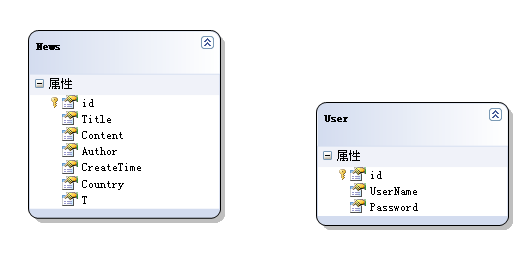
这里我们先准备一个接口:ICommonTable

Code
public interface ICommonTable
{
int id { get; set; }
}
然后让News和User实体都继承于此接口


Code
public partial class News : ICommonTable
{
}
public partial class User : ICommonTable
{
}

二、通用删除操作
分别添加NewsList.aspx和UserList.aspx两个view,添加方式参见ASP.NET MVC实践系列2-简单应用
在这两个View中加入删除链接:
<%= Html.ActionLink("删除", "Delete", new { key = item.id, partialName="News" })%>
和
<%= Html.ActionLink("删除", "Delete", new { key = item.id, partialName="User" })%>
然后添加一个Controller:
public ActionResult Delete(string partialName, int? key)
{
RepositoryBase repositoryBase = new RepositoryBase(partialName);
repositoryBase.Delete(key ?? 0);
return RedirectToAction(partialName + "List");//返回到list
}
接下来我们介绍一下RepositoryBase :

public class RepositoryBase
{
public Type EntityType { get; private set; }
public RepositoryBase(string entityType)
{
Type type = GetBllTypeByName(entityType);
EntityType = type;
}
public ICommonTable CreateNew()
{
return (ICommonTable)Activator.CreateInstance(EntityType);
}
/// <summary>
/// 通过字符串获得其Type
/// </summary>
/// <param name="typeName"></param>
/// <returns></returns>
private static Type GetBllTypeByName(string typeName)
{
Type type = null;
var ass = AppDomain.CurrentDomain.GetAssemblies()
.Where(p => p.FullName.Contains("CommonCEDemo"));
foreach (var a in ass)
{
type = a.GetTypes().Where(p => p.Name == typeName).FirstOrDefault();
if (type != null)
break;
}
if (type == null)
{
throw new Exception("类型未定义:" + typeName);
}
return type;
}
public RepositoryBase(Type entityType)
{
EntityType = entityType;
}
public ICommonTable Get(int id)
{
DBDataContext db = Context.GetContext();
return db.GetTable(EntityType).Cast<ICommonTable>().FirstOrDefault(p => p.id == id);
}
public void Delete(int id)
{
ICommonTable bllTable = Get(id);
Context.GetContext().GetTable(EntityType).DeleteOnSubmit(bllTable);
Context.GetContext().SubmitChanges();
}
}

这里边重点要理解的就是GetBllTypeByName方法。有了这个方法我们就可以动态的通过名字获得相应的Type了。这里还有个问题就是DataContext是从何而来的,我们这里为了简单起见全程声明了一个DataContext没有考虑多线程的情况

public class Context
{
static DBDataContext context;
static Context()
{
if (context==null)
{
context = new DBDataContext();
}
}
public static DBDataContext GetContext()
{
return context;