目录
++[目录... 1](#目录... 1)++
++[一、Launch文件简介... 2](#一、Launch文件简介... 2)++
++[1.1. Launch文件基本结构... 2](#1.1. Launch文件基本结构... 2)++
++[1.1. Launch文件3中代码示例... 4](#1.1. Launch文件3中代码示例... 4)++
++[1.1.1 XML 格式 (test_turtlesim_launch.xml) 4](#1.1.1 XML 格式 (test_turtlesim_launch.xml) 4)++
++[1.1.2 YAML 格式 (test_turtlesim_launch.yaml) 4](#1.1.2 YAML 格式 (test_turtlesim_launch.yaml) 4)++
++[二、Launch 文件的运行... 6](#二、Launch文件的运行... 6)++
++[2.1 创建test_launch功能包... 6](#2.1 创建test_launch功能包... 6)++
++[2.2 修改test_turtlesim_launch.py代码... 6](#2.2 修改test_turtlesim_launch.py代码... 6)++
++[2.2 修改setup.py代码... 8](#2.2 修改setup.py代码... 8)++
++[2.3 编译,加载,运行... 9](#2.3 编译,加载,运行... 9)++
++[2.4 验证小海龟2不跟随运动... 10](#2.4 验证小海龟2不跟随运动... 10)++
++[2.5 验证小海龟2跟随运动... 11](#2.5 验证小海龟2跟随运动... 11)++
一、Launch文件简介
在ROS2中,Launch文件是管理多节点、参数配置和系统启动的核心工具。与ROS1的XML格式不同,ROS2推荐使用Python编写Launch文件,这提供了极大的灵活性(如条件判断、循环、动态参数生成等)。
1.1. Launch文件基本结构
ROS2的Launch文件本质上是一个Python脚本,需要返回一个 LaunchDescription 对象。目前使用于描述系统启动时候的配置,控制管理整个ros2程序的启动。在Launch文件可以设置要运行的节点、什么时候运行、配置节点传递那些参数。还负责监控启动进程的状态,主要包括节点和参数两大部分:
节点定义了要启动的节点,节点名称、报名、执行文件路径等信息;
参数用于设置节点的参数,可以是命令行参数、ros2服务器参数、私有参数。
ros2提供了Python、XML、YAML 三种格式的Launch文件规范。
python格式的Laubch文件,示例代码如下(test_turtlesim_launch.py)
|-------------------------------------------------------------------------------------------------------------------------------------------------------------------------------------------------------------------------------------------------------------------------------------------------------------------------------------------------------------------------------------------------------------------------------------------------------------------------------------------------------------------------------------------------------------------------------------------------------------------------------------------------------------------------------------------------------------------------------------------------------------------------------------------------------------------------------------------------------------------------------------------------------------------------------------------------------------------------------------------------------------------------------------------------------------------------------------------------------------------------------------------------------------------------------------------------------------------------------------------------------------------------------------------------------------------------------------------------------------------------------------------------------------------------------------------------------------------------------------------------------------------------------------------------------------------------------------------------------------------------------------------------------------------------------------------------------------------------------------------------------------------------------------------------------------------------------------------------------------------------------------------------------------------------------------------------------------------------------------------------------------|
| # turtlesim_mimic.launch.py from launch import LaunchDescription # 导入Launch描述符容器 from launch_ros.actions import Node # 导入ROS2节点启动动作 def generate_launch_description(): #固定入口函数,ros2 launch 会自动调用它 return LaunchDescription( # 返回一个包含所有启动项的列表 # 节点1: turtlesim1 仿真器 Node( package='turtlesim', # 节点所属的功能包名 namespace='turtlesim1', # 核心:命名空间隔离 executable='turtlesim_node', # 可执行文件名(对应 CMakeLists.txt 中 add_executable 的名称,编译该文件后生成的运行文件名称) name='sim' # 节点在图中的逻辑名称 ), # 节点2: turtlesim2 仿真器 Node( package='turtlesim', namespace='turtlesim2', executable='turtlesim_node', name='sim' ), # 节点3: mimic 节点(让 turtlesim2 跟随 turtlesim1) Node( package='turtlesim', executable='mimic', name='mimic', remappings=\[ ('/input/pose', '/turtlesim1/turtle1/pose'), # 第1步:偷看 ('/output/cmd_vel', '/turtlesim2/turtle1/cmd_vel'), # 第2步:指挥 ), ]) |
| * generate_launch_description():这是 ROS2 Python Launch 文件的标准入口函数,名称不可更改。ros2 launch 命令执行时会自动寻找并调用此函数。 * LaunchDescription(...):它是一个有序容器,内部按顺序注册所有要启动的实体(Node、IncludeLaunchDescription、DeclareLaunchArgument 等)。 |------------------------------------------------------------------------------------------------------------------------| | package:哪个包 → 可不同 namespace:实例隔离 → 必须不同(多实例时) executable:包里的哪个程序 → 可同可不同 name:节点在 ROS 内的名字 → 不同 namespace 下可相同 | 注意事项: |-----------------------------------------------------------------------------------------------------------------------------------------------------------------------------------------------------------------------------------------------------------------------------------------------------------------------------------------------------------------------------------------------------------------------------------------------------------------------------------------------------------------------------------------------------------------------------------------------------------------------------------------------------------------------| | 1. package='名称1'(功能包名称) * 理解:要运行节点功能包的名称,节点1和节点2名称可以不一样。 这取决于你的节点代码到底写在哪个包里。比如你可以启动一个 turtlesim 包里的节点,再启动一个 my_robot 包里的节点,它们完全可以不一样。 2. namespace='名称2'(命名空间) * 理解:生成实例化的名称,小海龟1和小海龟2,可以不一样。 它是用来做物理或逻辑隔离的(相当于给节点建一个虚拟的"文件夹")。通常用于区分不同的机器人(如 robot1, robot2)或不同的子系统(如 chassis, arm)。 3. executable='名称3'(可执行文件名) * 理解:是编译好的,在功能包里面你要运行的文件名称。 它是磁盘上真实存在的可执行文件名称,但它不是由 Launch 文件编译得到的,而是由你写的 C++ 或 Python 源码编译生成的。Launch 文件只是一个"启动器",它只负责去系统里找这个已经编译好的文件并运行它。 4. name='名称4'(节点名称) * 理解:可以一样也可以不一样,是运行后在 ROS2 系统内的名称。 这是节点在 ROS2 通信网络(图)里的"花名"。如果两个节点 name 一样,系统会报错或自动给其中一个加后缀(如 sim_1)。 在不同 namespace 下,name 可以相同,不会冲突。 在相同 namespace 下,name 不能相同,会冲突。 | Remapping 工作原理图解:逻辑: 读取 pose → 计算误差 → 输出 cmd_vel ①:发布: /output/cmd_vel ──remap──▶ /turtlesim2/turtle1/cmd_vel ②:订阅: /input/pose ──remap──▶ /turtlesim1/turtle1/pose; |
1.1. Launch文件3中代码示例
上文已经输出了Python示例代码,同样的功能代码如下示例XML、YAML;
1.1.1 XML 格式 (test_turtlesim_launch.xml)
XML 格式的结构非常直观,使用标签(Tags)来表示节点和重映射关系。
|--------------------------------------------------------------------------------------------------------------------------------------------------------------------------------------------------------------------------------------------------------------------------------------------------------------------------------------------------------------------------------------------------------------------------------------------------------------------------------------------------------------------------------------|
| <launch> <!-- 节点1: 第一只小海龟 --> <node pkg="turtlesim" exec="turtlesim_node" name="sim" namespace="turtlesim1" output="screen" /> <!-- 节点2: 第二只小海龟 --> <node pkg="turtlesim" exec="turtlesim_node" name="sim" namespace="turtlesim2" output="screen" /> <!-- 节点3: mimic 跟随节点 --> <node pkg="turtlesim" exec="mimic" name="mimic" output="screen"> <!-- 话题重映射 --> <remap from="/input/pose" to="/turtlesim1/turtle1/pose" /> <remap from="/output/cmd_vel" to="/turtlesim2/turtle1/cmd_vel" /> </node> </launch> |
1.1.2 YAML 格式 (test_turtlesim_launch.yaml)
YAML 格式通过缩进来表示层级关系,代码看起来更简洁,但可读性因人而异。
|-----------------------------------------------------------------------------------------------------------------------------------------------------------------------------------------------------------------------------------------------------------------------------------------------------------------------------------------------------------------------------------------------------------------------------------|
| launch: # 节点1: 第一只小海龟 - node: pkg: turtlesim exec: turtlesim_node name: sim namespace: turtlesim1 output: screen # 节点2: 第二只小海龟 - node: pkg: turtlesim exec: turtlesim_node name: sim namespace: turtlesim2 output: screen # 节点3: mimic 跟随节点 - node: pkg: turtlesim exec: mimic name: mimic output: screen # 话题重映射 remap: - from: /input/pose to: /turtlesim1/turtle1/pose - from: /output/cmd_vel to: /turtlesim2/turtle1/cmd_vel |
二、Launch文件的运行
在test_turtlesim_launch的Launch文件中我们实现的功能是让小海龟2跟随小海龟1移动。如下代码我们使用Python代码并且添加一个控制功能,通过命令行参数动态的控制是否启动mimic节点,从而控制是否启动小海龟2跟随小海龟1 运动;
2.1 创建test_launch功能包
在 ~/ros2_ws/src路径下创一个test_launch功能包
|------------------------------------------------------------------------------------------------------------------------------------------------------------------------------------------------------------------------------------------------------------------------------------------------------------------------------------------------------------------------------------------------------------------------------------------------------------------------------------------------------------------------------------------------------------------|
| root@LHAYR:~/ros2_ws# cd src/ #第一步:创建功能包 root@LHAYR:~/ros2_ws/src# ros2 pkg create --build-type ament_python test_launch #第二步:创建 launch 目录 root@LHAYR:~/ros2_ws/src/test_launch# mkdir -p ~/ros2_ws/src/test_launch/launch 第三步:创建三个 launch 文件(进入cd ~/ros2_ws/src/test_launch/launch) root@LHAYR:~/ros2_ws/src/test_launch# cd ~/ros2_ws/src/test_launch/launch root@LHAYR:~/ros2_ws/src/test_launch/launch# touch test_turtlesim_launch.py root@LHAYR:~/ros2_ws/src/test_launch/launch# 第四步:打开 vs code编译器 root@LHAYR:~/ros2_ws/src/test_launch# code . |
2.2 修改test_turtlesim_launch.py代码
test_turtlesim_launch.py 代码如下,
|-----------------------------------------------------------------------------------------------------------------------------------------------------------------------------------------------------------------------------------------------------------------------------------------------------------------------------------------------------------------------------------------------------------------------------------------------------------------------------------------------------------------------------------------------------------------------------------------------------------------------------------------------------------------------------------------------------------------------------------------------------------------------------------------------------------------------------------------------------------------------------------------------------------------------------------------------------------------------------------------------------------------------------------------------------------------------------------------------------------------------------------------------------------------------------------|
| from launch import LaunchDescription from launch.actions import DeclareLaunchArgument from launch.conditions import IfCondition from launch.substitutions import LaunchConfiguration from launch_ros.actions import Node def generate_launch_description(): # 1. 声明一个名为 'start_mimic' 的启动参数 # default_value='true' 表示如果不传参,默认启动 mimic 节点 start_mimic_arg = DeclareLaunchArgument( 'start_mimic', default_value='true', description='Whether to start the mimic node' ) # 2. 定义 turtlesim 节点(这两个节点始终启动,不受参数影响) turtle1_node = Node( package='turtlesim', namespace='turtlesim1', executable='turtlesim_node', name='sim' ) turtle2_node = Node( package='turtlesim', namespace='turtlesim2', executable='turtlesim_node', name='sim' ) # 3. 定义 mimic 节点,并加上 condition=IfCondition(...) mimic_node = Node( package='turtlesim', executable='mimic', name='mimic', remappings= ('/input/pose', '/turtlesim1/turtle1/pose'), ('/output/cmd_vel', '/turtlesim2/turtle1/cmd_vel'), , # 核心:只有当 start_mimic 参数为 True 时,这个节点才会被启动 condition=IfCondition(LaunchConfiguration('start_mimic')) ) return LaunchDescription( start_mimic_arg, turtle1_node, turtle2_node, mimic_node, ) |
| 场景 1:启动所有节点(默认行为) 你不传任何参数,start_mimic会使用默认值true,两只小海龟、mimic节点都会启动: 指令:ros2 launch <your_package_name> test_turtlesim_launch.py |
| 场景 2:只启动两只小海龟,不启动 mimic 在命令行末尾加上 start_mimic:=false,mimic 节点就会被跳过: 指令:ros2 launch <your_package_name> test_turtlesim_launch.py start_mimic:=false |
2.2 修改setup.py代码
在setup.py代码如下,
|----------------------------------------------------------------------------------------------------------------------------------------------------------------------------------------------------------------------------------------------------------------------------------------------------------------------------------------------------------------------------------------------------------------------------------------------------------------------------------------------------------------------------------------------------------------------------------------------------------------------------------------------------------------------------------------------------------------------------------------------------------------------------------------------------------------------------------------------------------------------------------------------------------------------------------------------------------------------------------------------------------------------------------------------------------------------------------------------------------------------------------------------------------|
| import os from glob import glob from setuptools import find_packages, setup package_name = 'test_launch' setup( name=package_name, version='0.0.0', packages=find_packages(exclude='test'), data_files= ('share/ament_index/resource_index/packages', \['resource/' + package_name), ('share/' + package_name, 'package.xml'), (os.path.join('share', package_name, 'launch'), glob(os.path.join('launch', '*'))), ], install_requires='setuptools', zip_safe=True, maintainer='root', maintainer_email='root@todo.todo', description='TODO: Package description', license='TODO: License declaration', extras_require={ 'test': 'pytest', , }, entry_points={ 'console_scripts': , }, ) |
| 第一步:在顶部加两行导入 import os from glob import glob from[L1](#import os from glob import glob from setuptools import find_packages, setup package_name = 'test_launch' setup( name=package_name, version='0.0.0', packages=find_packages(exclude=['test']), data_files=[ ('share/ament_index/resource_index/packages', ['resource/' + package_name]), ('share/' + package_name, ['package.xml']), (os.path.join('share', package_name, 'launch'), glob(os.path.join('launch', ''))), ], install_requires=['setuptools'], zip_safe=True, maintainer='root', maintainer_email='root@todo.todo', description='TODO: Package description', license='TODO: License declaration', extras_require={ 'test': [ 'pytest', ], }, entry_points={ 'console_scripts': [ ], }, ) 第一步:在顶部加两行导入 import os from glob import glob from[L1] setuptools import find_packages, setup 第二步:只修改 data_files 部分 data_files=[ ('share/ament_index/resource_index/packages', ['resource/' + package_name]), ('share/' + package_name, ['package.xml']), (os.path.join('share', package_name, 'launch'), glob(os.path.join('launch', ''))), ],) setuptools import find_packages, setup |
| 第二步:只修改 data_files 部分 data_files= ('share/ament_index/resource_index/packages', \['resource/' + package_name), ('share/' + package_name, 'package.xml'), (os.path.join('share', package_name, 'launch'), glob(os.path.join('launch', '*'))), ], |
2.3 编译,加载,运行
先回到cd ~/ros2_ws中
|-----------------------------------------------------------------------------------------------------------------------------------------------------------------------------------------------------------------------------------------------------------------------------------------------------------------------------------------------------------------------------------------------------------------------------------------------------------------------------------------------------------------------------------------------------------------------------------------------------------------------------------------------------------------------------------------------------------------------------------------------------------------------------------------------------------------------------------------------------------------------------------------------------------------------------------------------------------------------------------------------------------------------------------------------------------------------------------------------------------------------------------------------------------------------------------------------------------------------------------------------------------------------------------------------------------------------|
| root@LHAYR:~/ros2_ws/src/test_launch/launch# cd ~/ros2_ws root@LHAYR:~/ros2_ws# colcon build --packages-select test_launch Starting >>> test_launch Finished <<< test_launch 0.71s Summary: 1 package finished 0.86s root@LHAYR:~/ros2_ws# source install/setup.bash root@LHAYR:~/ros2_ws# ros2 launch test_launch test_turtlesim_launch.py INFO launch: All log files can be found below /root/.ros/log/2026-07-07-18-21-43-388311-LHAYR-1078 INFO launch: Default logging verbosity is set to INFO INFO turtlesim_node-1: process started with pid 1081 INFO turtlesim_node-2: process started with pid 1082 INFO mimic-3: process started with pid 1083 turtlesim_node-2 INFO 1783419703.567428607 turtlesim2.sim: Starting turtlesim with node name /turtlesim2/sim turtlesim_node-1 INFO 1783419703.567694091 turtlesim1.sim: Starting turtlesim with node name /turtlesim1/sim turtlesim_node-1 INFO 1783419703.572234814 turtlesim1.sim: Spawning turtle turtle1 at x=5.544445, y=5.544445, theta=0.000000 turtlesim_node-2 INFO 1783419703.572231798 turtlesim2.sim: Spawning turtle turtle1 at x=5.544445, y=5.544445, theta=0.000000 |
| (运行指令(默认启动所有节点)) 运行结果:ros2 launch test_launch test_turtlesim_launch.py 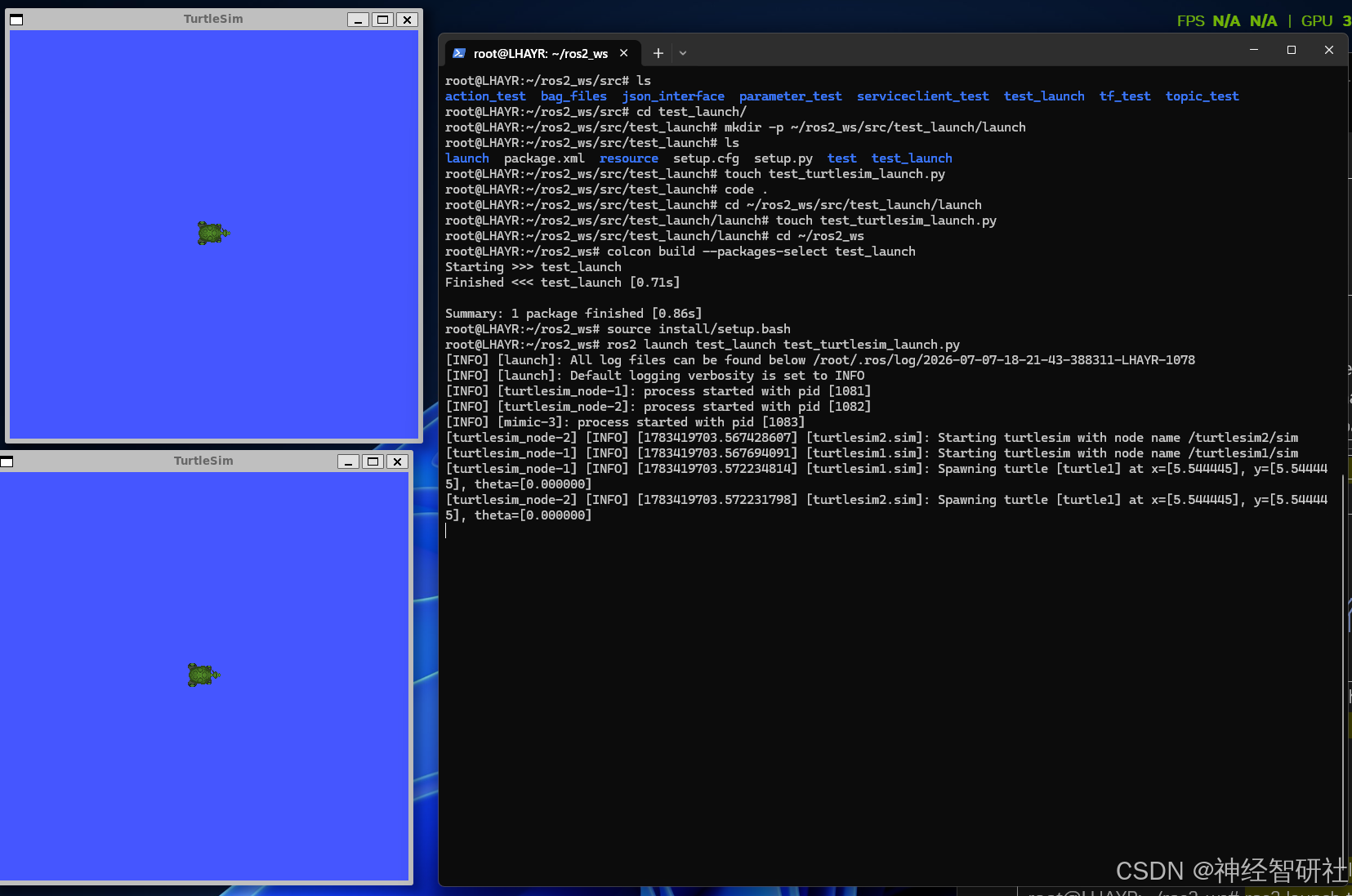 |
|
2.4 验证小海龟2不跟随运动
|--------------------------------------------------------------------------------------------------------------------------------------------------------------------------------------------------------------------------------------------------------------------------------------------------------------------------------------------------------------------------------------------------------------------------------------------------------------------------------------------------------------------------------------------------------------------------------------------------------------------------------------------------------------------------------------------------------------------------------------------------------------------------------------------------------------------------------------------------------------------------------------------------------------------------------------------------------------------------------------------------------------------------------------------------------------------------------------------------------------------------------------------------------------------------------------------------------------------------------------------------------------------------------------------------------------------------------------------------------------------------------------------------------------------------------------------------------------------------------------------------------------------------------------------------------------------------------------------------------------------------------------------------------------------------------------------------------------------------------------------------------------------------------------------------------------------------------------------------------------------------------------------------------------------------------------------------------------------------------------------------------------------------------------------------------------------------------------------------------------------------------------------------------------------------------------------------------------------------------------------------------------------------------------------------------------------------------------------------------------------------------------------------------------------------------------------------------------------------------------------------------------------------------------------------------------------------------------------------------------------------------------------------------------------------------------------------------------------------------------------------------------------------------------------------------------------------------------------------------------------------------------------------------------------------------------------------------------------------------------------------------------------------|
| **终端1:**Ctrl+C关闭上述运行程序 运行指令(通过命令行参数动态控制)(海龟 1,海龟 2 就不动了)。 ros2 launch test_launch test_turtlesim_launch.py start_mimic:=false |------------------------------------------------------------------------------------------------------------------------------------------------------------------------------------------------------------------------------------------------------------------------------------------------------------------------------------------------------------------------------------------------------------------------------------------------------------------------------------------------------------------------------------------------------------------------------------------------------------------------------------------------------------------------------------------------------------------------------------------------------------------------------------------------------------------------------| | root@LHAYR:~/ros2_ws# ros2 launch test_launch test_turtlesim_launch.py start_mimic:=false INFO launch: All log files can be found below /root/.ros/log/2026-07-07-18-43-28-498014-LHAYR-1773 INFO launch: Default logging verbosity is set to INFO INFO turtlesim_node-1: process started with pid 1776 INFO turtlesim_node-2: process started with pid 1777 turtlesim_node-1 INFO 1783421008.543182920 turtlesim1.sim: Starting turtlesim with node name /turtlesim1/sim turtlesim_node-2 INFO 1783421008.543270762 turtlesim2.sim: Starting turtlesim with node name /turtlesim2/sim turtlesim_node-1 INFO 1783421008.546455458 turtlesim1.sim: Spawning turtle turtle1 at x=5.544445, y=5.544445, theta=0.000000 | 终端2:运行键盘控制指令,仅控制小海龟1 |---------------------------------------------------------------------------------------------------------------------------------------------------------------------------------------------------------------------------------------------------------------------------------------------| | root@LHAYR:~/ros2_ws# ros2 run turtlesim turtle_teleop_key --ros-args -r __ns:=/turtlesim1 Reading from keyboard --------------------------- Use arrow keys to move the turtle. Use g|b|v|c|d|e|r|t keys to rotate to absolute orientations. 'f' to cancel a rotation. 'q' to quit. | | --ros-args:表示后面的内容是给 ROS2 本身的参数,不是给程序内部用的。 -r:是 --remap 的缩写,意思是:对节点的名称、话题、服务等进行重映射。 __ns: __ns 是 ROS2 内置保留字段,表示:给这个节点设置命名空间(namespace) | | --ros-args -r __ns:=/turtlesim1 最终效果:不加 ,这个键盘节点原本发布的话题是:/turtle1/cmd_vel ; 加上:加上这句之后,它发布的话题自动变成:/turtlesim1/turtle1/cmd_vel; 正好和launch 里的:namespace='turtlesim1' 匹配上,所以海龟 1 才能收到控制指令。 | |
| 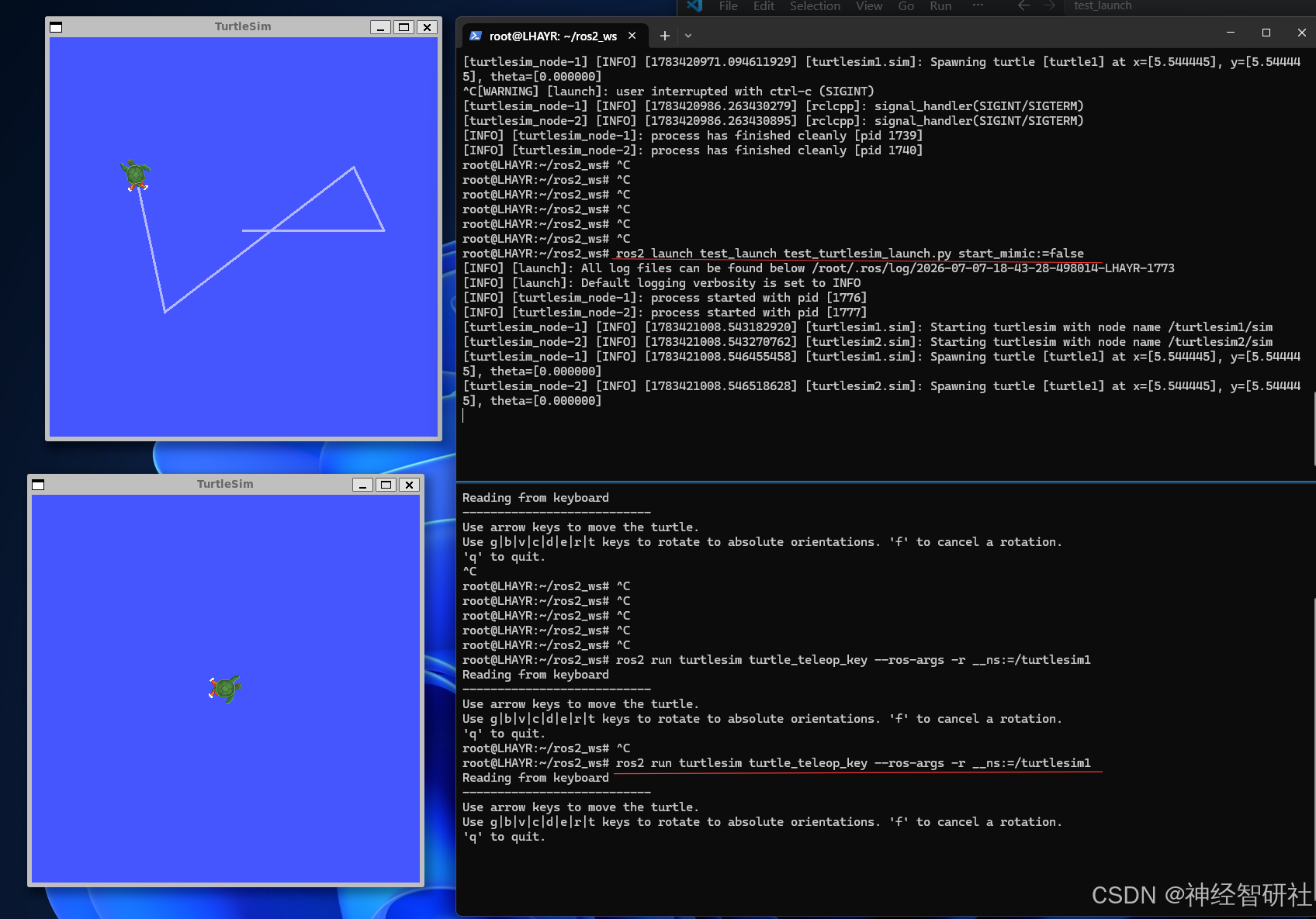 |
|
2.5 验证小海龟2跟随运动
|-----------------------------------------------------------------------------------------------------------------------------------------------------------------------------------------------------------------------------------------------------------------------------------------------------------------------------------------------------------------------------------------------------------------------------------------------------------------------------------------------------------------------------------------------------------------------------------------------------------------------------------------------------------------------------------------------------------------------------------------------------------------------------------------------------------------------------------------------------------------------------------------------------------------------------------------------------------------------------------------------------------------------------------------------------------------------------------------------------------------------------------------------------------------------------------------------------------------------------------------------------------------------------------------------------------------------------------------------------------------------------------------------------------------------------------------------------------------------------------------------------------------------------------------------------------------------------------------------------------------------------------------------------------------------------------------------------------------------------------------------------------------------------------------------------------------------------------------------------------------------------------------------------------------------------------------------------------------------------------------------------------------------------------------------------------------------------------------------------------------------------------------------------------------------------------------------------------------------------------------------------------------------------------------------------------------------------------------------------------------------------------------------------------------------------------------------------------------------------------------------------------------------------------------------------------------------------------------------------------------------------------------------------------------------------------------------------------------------------------------------------------------------------------------------------------------------------------------------------------------------------------------------------------------------------------------------------------------------------------------------------------------------------------------------------------------------------------------|
| **终端1:**Ctrl+C关闭上述运行程序 运行指令(通过命令行参数动态控制)(海龟 1,海龟 2 就不动了)。 ros2 launch test_launch test_turtlesim_launch.py start_mimic:=true |-----------------------------------------------------------------------------------------------------------------------------------------------------------------------------------------------------------------------------------------------------------------------------------------------------------------------------------------------------------------------------------------------------------------------------------------------------------------------------------------------------------------------------------------------------------------------------------------------------------------------------------------------------------------------------------------------------------------------------------------------------------------------------------------------------------------------------------------------------------------------------------------------------------------------------------------------------------------------------------------------------------------------------------------------------------------------------| | root@LHAYR:~/ros2_ws# ^C root@LHAYR:~/ros2_ws# ros2 launch test_launch test_turtlesim_launch.py start_mimic:=true INFO launch: All log files can be found below /root/.ros/log/2026-07-07-19-05-52-782993-LHAYR-1894 INFO launch: Default logging verbosity is set to INFO INFO turtlesim_node-1: process started with pid 1897 INFO turtlesim_node-2: process started with pid 1898 INFO mimic-3: process started with pid 1899 turtlesim_node-2 INFO 1783422352.828822097 turtlesim2.sim: Starting turtlesim with node name /turtlesim2/sim turtlesim_node-1 INFO 1783422352.829254190 turtlesim1.sim: Starting turtlesim with node name /turtlesim1/sim turtlesim_node-2 INFO 1783422352.832119166 turtlesim2.sim: Spawning turtle turtle1 at x=5.544445, y=5.544445, theta=0.000000 turtlesim_node-1 INFO 1783422352.832497668 turtlesim1.sim: Spawning turtle turtle1 at x=5.544445, y=5.544445, theta=0.000000 | 终端2:直接控制无需重新运行 |---------------------------------------------------------------------------------------------------------------------------------------------------------------------------------------| | root@LHAYR:~/ros2_ws# ros2 run turtlesim turtle_teleop_key --ros-args -r __ns:=/turtlesim1 | | --ros-args:表示后面的内容是给 ROS2 本身的参数,不是给程序内部用的。 -r:是 --remap 的缩写,意思是:对节点的名称、话题、服务等进行重映射。 __ns: __ns 是 ROS2 内置保留字段,表示:给这个节点设置命名空间(namespace) | | --ros-args -r __ns:=/turtlesim1 最终效果:不加 ,这个键盘节点原本发布的话题是:/turtle1/cmd_vel ; 加上:加上这句之后,它发布的话题自动变成:/turtlesim1/turtle1/cmd_vel; 正好和launch 里的:namespace='turtlesim1' 匹配上,所以海龟 1 才能收到控制指令。 | |
| 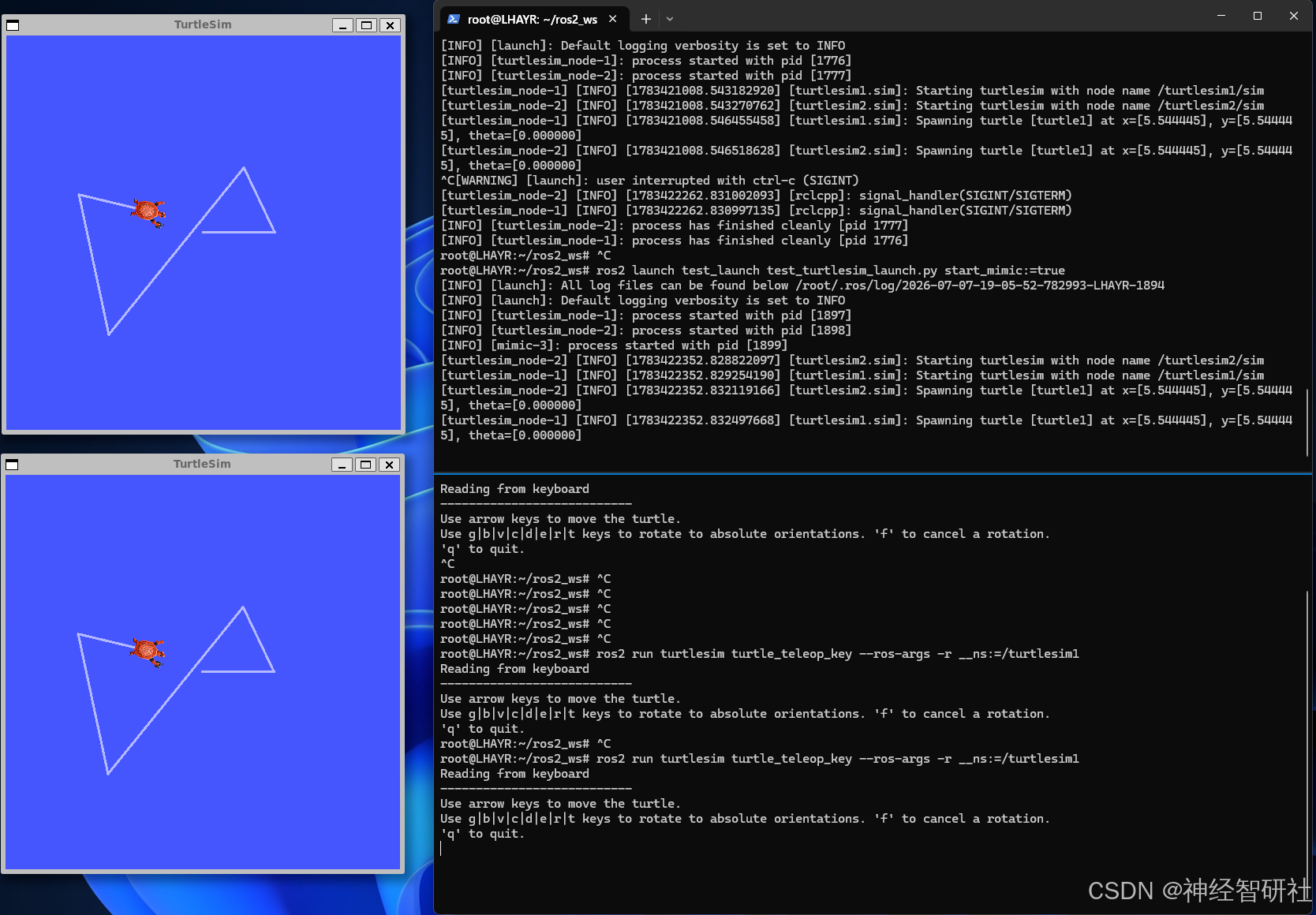 |
|