解决场景
1. 基础文本生成 (/ai/generate)
-
场景:最简单的 AI 对话,输入消息返回生成内容
-
用途:通用问答、闲聊、内容创作等
2. 带参数的模型调用 (/ai/generateWithOptions)
-
场景:自定义模型参数(如模型版本、温度系数)
-
用途:需要精细控制生成效果的场景,如创意写作需要较高温度,精确回答需要较低温度
3. 工具调用(Tool Calling) (/ai/generateWithTool 和 /ai/generateWithToolBySelf)
-
场景:AI 调用外部函数获取实时数据
-
示例:查询巴黎、东京、纽约的天气
-
用途:扩展 AI 能力,让模型能获取实时信息、操作外部系统(数据库、API 等)
-
两种实现方式:
-
方式一 :使用
ChatClient简化 API -
方式二 :手动处理工具调用循环(
while循环处理多轮调用)
-
4. 代码生成(带前缀提示) (/ai/generatePythonCode)
-
场景:生成 Python 代码,且自动补全代码块
-
特点 :通过
stopSequences控制输出结束位置,使用prefix预填充代码块标记 -
用途:代码助手、自动化编程
5. 推理过程展示(DeepSeek Reasoner) (/ai/deepSeekReasoningExample)
-
场景 :获取模型的思维链(Chain of Thought) 推理内容
-
示例:比较 9.11 和 9.8 的大小
-
用途:需要展示推理过程的教育场景、逻辑分析、复杂问题解答
6. 结构化输出 (/ai/structuredOutput)
-
场景 :将非结构化文本转换为 结构化 JSON 对象
-
输出字段:标题、摘要、关键词、情感分数
-
用途:信息抽取、内容摘要、情感分析、数据清洗
7. 流式输出 (/ai/generateStream)
-
场景 :使用
Flux实时返回生成内容 -
用途:需要实时响应的场景(如 AI 对话打字机效果),提升用户体验
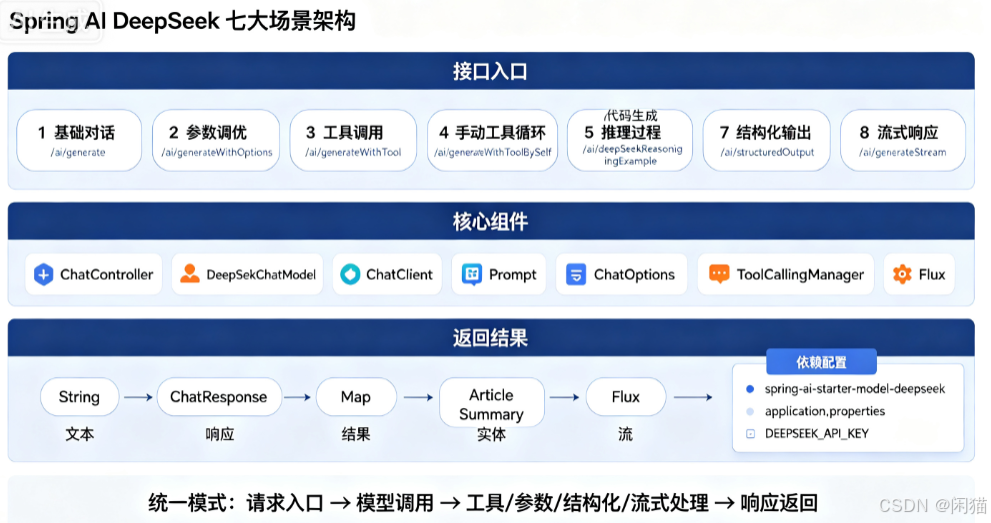
架构图
代码实现
POM
<dependency>
     <groupId>org.springframework.ai</groupId>
     <artifactId>spring-ai-starter-model-deepseek</artifactId>
 </dependency>
application.properties
spring.ai.deepseek.api-key=${DEEPSEEK_API_KEY:}
spring.ai.deepseek.base-url=${DEEPSEEK_API_BASE_URL:https://api.deepseek.com}
ChatController
java
import com.haiwei.javaai.entities.ArticleSummary;
import com.haiwei.javaai.entities.WeatherRequest;
import com.haiwei.javaai.service.impl.WeatherService;
import com.haiwei.javaai.service.impl.WeatherService1;
import com.haiwei.javaai.utils.JsonUtil;
import lombok.extern.slf4j.Slf4j;
import org.springframework.ai.chat.client.ChatClient;
import org.springframework.ai.chat.messages.Message;
import org.springframework.ai.chat.messages.UserMessage;
import org.springframework.ai.chat.model.ChatResponse;
import org.springframework.ai.chat.prompt.ChatOptions;
import org.springframework.ai.chat.prompt.Prompt;
import org.springframework.ai.deepseek.DeepSeekAssistantMessage;
import org.springframework.ai.deepseek.DeepSeekChatModel;
import org.springframework.ai.deepseek.DeepSeekChatOptions;
import org.springframework.ai.deepseek.api.DeepSeekApi;
import org.springframework.ai.model.tool.ToolCallingManager;
import org.springframework.ai.model.tool.ToolExecutionResult;
import org.springframework.ai.support.ToolCallbacks;
import org.springframework.ai.tool.ToolCallback;
import org.springframework.ai.tool.function.FunctionToolCallback;
import org.springframework.beans.factory.annotation.Autowired;
import org.springframework.web.bind.annotation.GetMapping;
import org.springframework.web.bind.annotation.RequestParam;
import org.springframework.web.bind.annotation.RestController;
import reactor.core.publisher.Flux;

import java.util.List;
import java.util.Map;
import java.util.function.Consumer;

@Slf4j
@RestController
public class ChatController {

    private final DeepSeekChatModel chatModel;

    @Autowired
    public ChatController(DeepSeekChatModel chatModel) {
        this.chatModel = chatModel;
    }

    @GetMapping("/ai/generate")
    public Map generate(@RequestParam(value = "message", defaultValue = "Tell me a joke") String message) {
        return Map.of("generation", chatModel.call(message));
    }

    @GetMapping("/ai/generateWithOptions")
    public Map generateWithOptions(@RequestParam(value = "message", defaultValue = "Tell me a joke") String message) {
        DeepSeekChatOptions options = DeepSeekChatOptions.builder()
                .model(DeepSeekApi.ChatModel.DEEPSEEK_V4_PRO.getValue())
                .temperature(0.8)
                .build();
        Prompt prompt = new Prompt(message, options);
        ChatResponse response = chatModel.call(prompt);
        return Map.of("generation", response.toString());
    }

    @GetMapping("/ai/generateWithTool")
    public Map generateWithTool(@RequestParam(value = "message", defaultValue = "Tell me a joke") String message) {
        ToolCallback weatherCallback = FunctionToolCallback.builder("getCurrentWeather", new WeatherService())
                .description("Get the weather in location")
                .inputType(WeatherRequest.class)
                .build();

        // Synchronous
        String response = ChatClient.create(chatModel)
                .prompt()
                .user("What's the weather in Paris, Tokyo, and New York?")
                .tools(weatherCallback)
                .call()
                .content();

        return Map.of("generation", response);
    }

    @GetMapping("/ai/generateWithToolBySelf")
    public Map generateWithToolBySelf() {
        ToolCallingManager toolCallingManager = ToolCallingManager.builder().build();

        DeepSeekChatOptions options = DeepSeekChatOptions.builder()
                .toolCallbacks(ToolCallbacks.from(new WeatherService1()))
                .build();

        Prompt prompt = new Prompt("What's the weather in Paris, Tokyo, and New York?", options);
        ChatResponse response = chatModel.call(prompt);
        log.info("response:{}", JsonUtil.toJson(response));

        while (response.hasToolCalls()) {
            ToolExecutionResult result = toolCallingManager.executeToolCalls(prompt, response);
            log.info("result:{}", JsonUtil.toJson(result));
            prompt = new Prompt(result.conversationHistory(), options);
            response = chatModel.call(prompt);
            log.info("response:{}", JsonUtil.toJson(response));
        }

        return Map.of("generation", response);
    }

    @GetMapping("/ai/generatePythonCode")
    public String generatePythonCode(@RequestParam(value = "message", defaultValue = "Please write quick sort code") String message) {
        UserMessage userMessage = new UserMessage(message);
        Message assistantMessage = DeepSeekAssistantMessage
                .builder()
                .content("```python\\n")
                .prefix(true)
                .build();
        Prompt prompt = new Prompt(List.of(userMessage, assistantMessage)
                , DeepSeekChatOptions.builder().stopSequences(List.of("```")).build()
        );
        ChatResponse response = chatModel.call(prompt);
        return response.getResult().getOutput().getText();
    }

    @GetMapping("/ai/deepSeekReasoningExample")
    public Map<String, String> deepSeekReasoningExample() {
        DeepSeekChatOptions promptOptions = DeepSeekChatOptions.builder()
                .build();
        Prompt prompt = new Prompt("9.11 and 9.8, which is greater?", promptOptions);
        ChatResponse response = chatModel.call(prompt);

        // Get the CoT content generated by the model
        DeepSeekAssistantMessage deepSeekAssistantMessage = (DeepSeekAssistantMessage) response.getResult().getOutput();
        String reasoningContent = deepSeekAssistantMessage.getReasoningContent();
        String text = deepSeekAssistantMessage.getText();
        return Map.of(reasoningContent, text);
    }

    @GetMapping("/ai/structuredOutput")
    public ArticleSummary structuredOutput(
            @RequestParam(value = "message",
                    defaultValue = "Spring AI 是一个用于构建 AI 应用的 Java 框架,支持 RAG、Tool Calling 和结构化输出。") String message) {

        log.info("[StructuredOutput] request message={}", message);

        Consumer<ChatClient.PromptUserSpec> text = u -> u.text("""
                请对以下文本做结构化摘要,严格按 JSON 格式返回:
                - title: 标题(10字以内)
                - summary: 摘要(50字以内)
                - keywords: 3-5个关键词
                - sentimentScore: 情感分数 1-10

                文本:{text}
                """).param("text", message);
        ArticleSummary result = ChatClient.create(chatModel)
                .prompt()
                .user(text)
                .call()
                .entity(ArticleSummary.class);

        log.info("[StructuredOutput] result={}", JsonUtil.toJson(result));
        return result;
    }

    @GetMapping("/ai/generateStream")
    public Flux<ChatResponse> generateStream(@RequestParam(value = "message", defaultValue = "Tell me a joke") String message) {
        var prompt = new Prompt(new UserMessage(message));
        return chatModel.stream(prompt);
    }
}
ArticleSummary
java
import java.util.List;

public record ArticleSummary(
        String title,
        String summary,
        List<String> keywords,
        int sentimentScore
) {
}
WeatherRequest
java
import lombok.Data;

@Data
public class WeatherRequest {
    private String local;
}
WeatherService
java
import com.haiwei.javaai.entities.WeatherRequest;
import com.haiwei.javaai.entities.WeatherResponse;
import lombok.extern.slf4j.Slf4j;

import java.util.function.Function;

@Slf4j
public class WeatherService implements Function<WeatherRequest, WeatherResponse> {
    public WeatherResponse apply(WeatherRequest request) {
        log.info("WeatherService apply ....." + request.getLocal());
        return new WeatherResponse(30.0);
    }
}
WeatherService1
java
import com.haiwei.javaai.entities.WeatherRequest;
import com.haiwei.javaai.entities.WeatherResponse;
import lombok.extern.slf4j.Slf4j;
import org.springframework.ai.tool.annotation.Tool;
import org.springframework.ai.tool.annotation.ToolParam;

import java.util.function.Function;

@Slf4j
public class WeatherService1 {

    @Tool(description = "Get the weather in location")
    WeatherResponse getWeather(@ToolParam(required = false) WeatherRequest request) {
        log.info("getWeather apply ..... {}" , request.getLocal());
        return new WeatherResponse(30.0);
    }
}
JsonUtil
java
import com.google.gson.*;
import com.google.gson.reflect.TypeToken;

import java.lang.reflect.Type;
import java.math.BigInteger;
import java.util.ArrayList;
import java.util.HashMap;
import java.util.List;
import java.util.Map;

public class JsonUtil {

    public static Gson gson = null;

    static {
        builder();
    }

    private JsonUtil() {
        // no-op, just to avoid new instance.
    }

    private static void builder() {
        LongSerializer serializer = new LongSerializer();
        gson = new GsonBuilder().setDateFormat("yyyy-MM-dd'T'HH:mm:ssZ")
            // Serialize BigInteger/Long/long as String for frontend
            .registerTypeAdapter(BigInteger.class, serializer)
            .registerTypeAdapter(long.class, serializer)
            .registerTypeAdapter(Long.class, serializer)
            .create();
    }

    public static synchronized Gson newInstance() {
        if (gson == null) {
            builder();
        }
        return gson;
    }

    public static String toJson(Object obj) {
        return gson.toJson(obj);
    }

    public static <T> T toBean(String json, Class<T> clz) {
        return gson.fromJson(json, clz);
    }

    public static <T> T toBean(Object sourceObject, Class<T> targetClass) {
        return gson.fromJson(toJson(sourceObject), targetClass);
    }

    public static <T> Map<String, T> toMap(String json, Class<T> clz) {
        @SuppressWarnings("serial")
		Map<String, JsonObject> map = gson.fromJson(json, new TypeToken<Map<String, JsonObject>>() {}.getType());
        Map<String, T> result = new HashMap<>(8);
        for(Map.Entry<String, JsonObject> entry : map.entrySet()) {
            result.put(entry.getKey(), gson.fromJson(entry.getValue(), clz));
        }
        return result;
    }

    @SuppressWarnings("serial")
	public static Map<String, Object> toMap(String json) {
        return gson.fromJson(json, new TypeToken<Map<String, Object>>() {}.getType());
    }

    public static <T> List<T> toList(String json, Class<T> targetClass) {
        JsonArray array = new JsonParser().parse(json).getAsJsonArray();
        List<T> list = new ArrayList<>();
        for (final JsonElement elem : array) {
            list.add(gson.fromJson(elem, targetClass));
        }
        return list;
    }

    public static <T> List<T> toList(Object sourceObject, Class<T> clz) {
        return toList(toJson(sourceObject), clz);
    }

    private static class LongSerializer implements JsonSerializer<Long> {
        @Override
        public JsonElement serialize(Long src, Type typeOfSrc, JsonSerializationContext context) {
            if (src != null) {
                String strSrc = src.toString();
                if (strSrc.length() > 15) {
                    return new JsonPrimitive(strSrc);
                }
            }
            return new JsonPrimitive(src);
        }
    }
}
总结对照表
| 场景 | 端点 | 核心技术点 |
|---|---|---|
| 基础对话 | /ai/generate |
简单 call |
| 参数调优 | /ai/generateWithOptions |
ChatOptions、Prompt |
| 工具调用 | /ai/generateWithTool |
FunctionToolCallback |
| 手动工具循环 | /ai/generateWithToolBySelf |
ToolCallingManager |
| 代码生成 | /ai/generatePythonCode |
前缀提示、停止序列 |
| 推理过程 | /ai/deepSeekReasoningExample |
reasoningContent |
| 结构化输出 | /ai/structuredOutput |
.entity() 反序列化 |
| 流式响应 | /ai/generateStream |
Flux<ChatResponse> |