场景:
捕获 console 的所有输出并实时显示在页面上,这在移动端调试或无法打开 DevTools 的环境中特别有用。
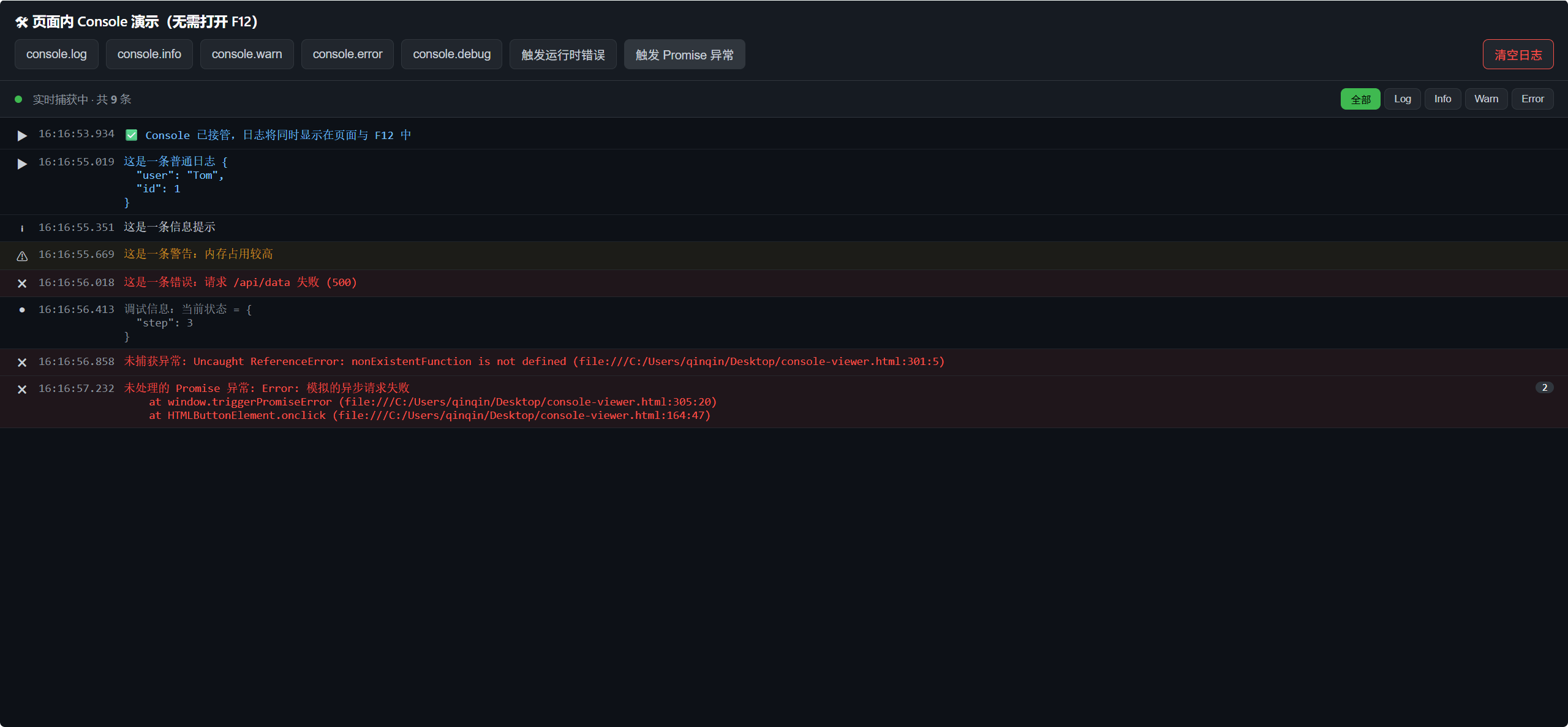
bash
<!DOCTYPE html>
<html lang="zh-CN">
<head>
<meta charset="UTF-8">
<meta name="viewport" content="width=device-width, initial-scale=1.0">
<title>页面内 Console 日志查看器</title>
<style>
  :root {
    --bg: #0d1117;
    --panel: #161b22;
    --border: #30363d;
    --text: #c9d1d9;
    --log: #79c0ff;
    --info: #58a6ff;
    --warn: #d29922;
    --error: #f85149;
    --debug: #8b949e;
    --accent: #3fb950;
  }
  * { box-sizing: border-box; }
  body {
    margin: 0;
    font-family: -apple-system, "Segoe UI", "PingFang SC", "Microsoft YaHei", sans-serif;
    background: var(--bg);
    color: var(--text);
    display: flex;
    flex-direction: column;
    height: 100vh;
  }

  /* 顶部工具区:模拟触发日志的按钮 */
  .toolbar {
    padding: 12px 16px;
    background: var(--panel);
    border-bottom: 1px solid var(--border);
  }
  .toolbar h1 {
    font-size: 15px;
    margin: 0 0 10px;
    color: #fff;
    font-weight: 600;
  }
  .btn-row {
    display: flex;
    flex-wrap: wrap;
    gap: 8px;
  }
  button {
    border: 1px solid var(--border);
    background: #21262d;
    color: var(--text);
    padding: 6px 12px;
    border-radius: 6px;
    font-size: 13px;
    cursor: pointer;
    transition: background .15s;
  }
  button:hover { background: #30363d; }
  button.clear { border-color: var(--error); color: var(--error); margin-left: auto; }
  button.clear:hover { background: rgba(248,81,73,.1); }

  /* 控制台面板 */
  .console-panel {
    flex: 1;
    display: flex;
    flex-direction: column;
    overflow: hidden;
  }
  .console-header {
    padding: 8px 16px;
    background: var(--panel);
    border-bottom: 1px solid var(--border);
    display: flex;
    align-items: center;
    gap: 12px;
    font-size: 12px;
    color: var(--debug);
  }
  .console-header .dot {
    width: 8px; height: 8px; border-radius: 50%;
    background: var(--accent);
    display: inline-block;
  }
  .filter-tabs {
    display: flex;
    gap: 4px;
    margin-left: auto;
  }
  .filter-tabs button {
    padding: 3px 10px;
    font-size: 11px;
  }
  .filter-tabs button.active {
    background: var(--accent);
    color: #000;
    border-color: var(--accent);
  }

  .console-body {
    flex: 1;
    overflow-y: auto;
    padding: 4px 0;
    font-family: "SFMono-Regular", Consolas, "Courier New", monospace;
    font-size: 12.5px;
  }
  .log-entry {
    display: flex;
    padding: 6px 16px;
    border-bottom: 1px solid rgba(48,54,61,.5);
    align-items: flex-start;
    gap: 10px;
    animation: fadeIn .15s ease-out;
  }
  @keyframes fadeIn {
    from { opacity: 0; transform: translateY(-4px); }
    to { opacity: 1; transform: translateY(0); }
  }
  .log-entry:hover { background: rgba(110,118,129,.08); }
  .log-icon { flex-shrink: 0; width: 16px; text-align: center; }
  .log-time { flex-shrink: 0; color: var(--debug); }
  .log-content { flex: 1; white-space: pre-wrap; word-break: break-all; }
  .log-count {
    flex-shrink: 0;
    background: #30363d;
    color: #fff;
    border-radius: 8px;
    padding: 0 7px;
    font-size: 11px;
    min-width: 18px;
    text-align: center;
  }

  .log-entry.log .log-content { color: var(--log); }
  .log-entry.info .log-content { color: var(--text); }
  .log-entry.warn { background: rgba(210,153,34,.08); }
  .log-entry.warn .log-content { color: var(--warn); }
  .log-entry.error { background: rgba(248,81,73,.08); }
  .log-entry.error .log-content { color: var(--error); }
  .log-entry.debug .log-content { color: var(--debug); }

  .empty-tip {
    text-align: center;
    color: var(--debug);
    padding: 40px 20px;
    font-size: 13px;
  }

  /* 滚动条美化 */
  .console-body::-webkit-scrollbar { width: 8px; }
  .console-body::-webkit-scrollbar-thumb { background: var(--border); border-radius: 4px; }
</style>
</head>
<body>

  <div class="toolbar">
    <h1>🛠 页面内 Console 演示(无需打开 F12)</h1>
    <div class="btn-row">
      <button onclick="console.log('这是一条普通日志', {user: 'Tom', id: 1})">console.log</button>
      <button onclick="console.info('这是一条信息提示')">console.info</button>
      <button onclick="console.warn('这是一条警告:内存占用较高')">console.warn</button>
      <button onclick="console.error('这是一条错误:请求 /api/data 失败 (500)')">console.error</button>
      <button onclick="console.debug('调试信息:当前状态 =', {step: 3})">console.debug</button>
      <button onclick="triggerRealError()">触发运行时错误</button>
      <button onclick="triggerPromiseError()">触发 Promise 异常</button>
      <button class="clear" onclick="clearLogs()">清空日志</button>
    </div>
  </div>

  <div class="console-panel">
    <div class="console-header">
      <span class="dot"></span>
      <span>实时捕获中 · 共 <b id="totalCount">0</b> 条</span>
      <div class="filter-tabs">
        <button class="active" data-filter="all" onclick="setFilter('all', this)">全部</button>
        <button data-filter="log" onclick="setFilter('log', this)">Log</button>
        <button data-filter="info" onclick="setFilter('info', this)">Info</button>
        <button data-filter="warn" onclick="setFilter('warn', this)">Warn</button>
        <button data-filter="error" onclick="setFilter('error', this)">Error</button>
      </div>
    </div>
    <div class="console-body" id="consoleBody">
      <div class="empty-tip" id="emptyTip">暂无日志,点击上方按钮试试,或在真实代码里调用 console.xxx()</div>
    </div>
  </div>

<script>
(function () {
  const consoleBody = document.getElementById('consoleBody');
  const emptyTip = document.getElementById('emptyTip');
  const totalCountEl = document.getElementById('totalCount');

  let currentFilter = 'all';
  let totalCount = 0;

  // 保留原始方法,方便同时输出到真实控制台
  const original = {
    log: console.log.bind(console),
    info: console.info.bind(console),
    warn: console.warn.bind(console),
    error: console.error.bind(console),
    debug: console.debug.bind(console),
  };

  const icons = { log: '▶', info: 'ℹ', warn: '⚠', error: '✖', debug: '●' };

  // 把任意参数格式化成字符串(对象/数组转 JSON,Error 显示堆栈)
  function formatArg(arg) {
    if (arg instanceof Error) {
      return arg.stack || (arg.name + ': ' + arg.message);
    }
    if (typeof arg === 'object' && arg !== null) {
      try {
        return JSON.stringify(arg, null, 2);
      } catch (e) {
        return String(arg);
      }
    }
    return String(arg);
  }

  function getTime() {
    const d = new Date();
    const pad = n => String(n).padStart(2, '0');
    return `${pad(d.getHours())}:${pad(d.getMinutes())}:${pad(d.getSeconds())}.${String(d.getMilliseconds()).padStart(3,'0')}`;
  }

  function renderLog(type, args) {
    totalCount++;
    totalCountEl.textContent = totalCount;
    emptyTip.style.display = 'none';

    const text = args.map(formatArg).join(' ');

    // 合并相邻的重复日志(类似真实控制台的折叠计数)
    const lastEntry = consoleBody.lastElementChild;
    if (lastEntry && lastEntry.dataset.type === type && lastEntry.dataset.text === text) {
      const countEl = lastEntry.querySelector('.log-count');
      const n = parseInt(countEl.dataset.n || '1', 10) + 1;
      countEl.dataset.n = n;
      countEl.textContent = n;
      countEl.style.display = 'inline-block';
      return;
    }

    const entry = document.createElement('div');
    entry.className = `log-entry ${type}`;
    entry.dataset.type = type;
    entry.dataset.text = text;
    entry.style.display = (currentFilter === 'all' || currentFilter === type) ? 'flex' : 'none';

    entry.innerHTML = `
      <span class="log-icon">${icons[type] || '▶'}</span>
      <span class="log-time">${getTime()}</span>
      <span class="log-content"></span>
      <span class="log-count" data-n="1" style="display:none">1</span>
    `;
    entry.querySelector('.log-content').textContent = text;

    consoleBody.appendChild(entry);
    consoleBody.scrollTop = consoleBody.scrollHeight;
  }

  // 重写 console 各方法
  ['log', 'info', 'warn', 'error', 'debug'].forEach(type => {
    console[type] = function (...args) {
      original[type](...args);   // 仍然输出到真实 F12 控制台
      renderLog(type, args);      // 同时渲染到页面
    };
  });

  // 捕获未被 try/catch 的运行时错误
  window.addEventListener('error', function (e) {
    renderLog('error', [`未捕获异常: ${e.message} (${e.filename}:${e.lineno}:${e.colno})`]);
  });

  // 捕获未处理的 Promise rejection
  window.addEventListener('unhandledrejection', function (e) {
    renderLog('error', [`未处理的 Promise 异常: ${formatArg(e.reason)}`]);
  });

  // 过滤器
  window.setFilter = function (filter, btn) {
    currentFilter = filter;
    document.querySelectorAll('.filter-tabs button').forEach(b => b.classList.remove('active'));
    btn.classList.add('active');
    document.querySelectorAll('.log-entry').forEach(el => {
      el.style.display = (filter === 'all' || el.dataset.type === filter) ? 'flex' : 'none';
    });
  };

  window.clearLogs = function () {
    consoleBody.innerHTML = '';
    consoleBody.appendChild(emptyTip);
    emptyTip.style.display = 'block';
    totalCount = 0;
    totalCountEl.textContent = 0;
  };

  window.triggerRealError = function () {
    // 故意调用一个不存在的函数,产生真实的运行时错误
    nonExistentFunction();
  };

  window.triggerPromiseError = function () {
    Promise.reject(new Error('模拟的异步请求失败'));
  };

  // 页面加载时打一条欢迎日志,验证功能生效
  console.log('✅ Console 已接管,日志将同时显示在页面与 F12 中');
})();
</script>

</body>
</html>