demo直接放到服务器上面
shell
scp -r wangfei@10.30.71.37:/Users/wangfei/Documents/Codex/2026-06-26/jin-t/outputs/macbert_intent_demo /home/ubuntu/zlink/wangf36_temp其中文件目录
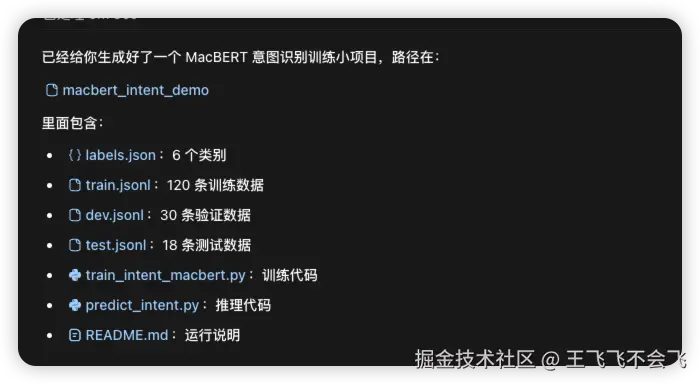
切换一下donda环境
shell
conda activate llama_factory安装一下依赖
shell
pip install -r requirements.txt现在需要下载基座模型有2种方式
- 提前下载好放服务器上,训练使用本地路径
- 直接使用huggingface的源
如果服务器上已经有本地 MacBERT 模型,比如:
arduino
/home/ubuntu/zlink/base_model/chinese-macbert-base就这样训练:
css
python train_intent_macbert.py \
  --model_name /home/ubuntu/zlink/base_model/chinese-macbert-base \
  --data_dir . \
  --output_dir ./macbert-intent-model \
  --epochs 5 \
  --batch_size 16 \
  --learning_rate 2e-5
如果服务器能访问 Hugging Face,也可以直接:
css
python train_intent_macbert.py \
  --model_name hfl/chinese-macbert-base \
  --data_dir . \
  --output_dir ./macbert-intent-model \
  --epochs 5 \
  --batch_size 16 \
  --learning_rate 2e-5
我使用的是自己下载下来,上传到服务器的方式
训练报错
arduino
(llama_factory) ubuntu@VM-12-16-ubuntu:~/zlink/wangf36_temp/macbert_intent_demo$ python train_intent_macbert.py \
  --model_name /home/ubuntu/zlink/base_model/chinese-macbert-base \
  --data_dir . \
  --output_dir ./macbert-intent-model \
  --epochs 5 \
  --batch_size 16 \
  --learning_rate 2e-5
Traceback (most recent call last):
  File "/home/ubuntu/zlink/wangf36_temp/macbert_intent_demo/train_intent_macbert.py", line 6, in <module>
    from datasets import load_dataset
  File "/home/ubuntu/miniconda3/envs/llama_factory/lib/python3.11/site-packages/datasets/__init__.py", line 17, in <module>
    from .arrow_dataset import Column, Dataset
  File "/home/ubuntu/miniconda3/envs/llama_factory/lib/python3.11/site-packages/datasets/arrow_dataset.py", line 75, in <module>
    from .arrow_reader import ArrowReader
  File "/home/ubuntu/miniconda3/envs/llama_factory/lib/python3.11/site-packages/datasets/arrow_reader.py", line 30, in <module>
    from .download.download_config import DownloadConfig  # noqa: F401
    ^^^^^^^^^^^^^^^^^^^^^^^^^^^^^^^^^^^^^^^^^^^^^^^^^^^^
  File "/home/ubuntu/miniconda3/envs/llama_factory/lib/python3.11/site-packages/datasets/download/__init__.py", line 9, in <module>
    from .download_manager import DownloadManager, DownloadMode
  File "/home/ubuntu/miniconda3/envs/llama_factory/lib/python3.11/site-packages/datasets/download/download_manager.py", line 32, in <module>
    from ..utils.file_utils import (
  File "/home/ubuntu/miniconda3/envs/llama_factory/lib/python3.11/site-packages/datasets/utils/file_utils.py", line 48, in <module>
    from aiohttp.client_exceptions import ClientError as _AiohttpClientError
  File "/home/ubuntu/miniconda3/envs/llama_factory/lib/python3.11/site-packages/aiohttp/__init__.py", line 6, in <module>
    from .client import (
  File "/home/ubuntu/miniconda3/envs/llama_factory/lib/python3.11/site-packages/aiohttp/client.py", line 87, in <module>
    from .connector import (
  File "/home/ubuntu/miniconda3/envs/llama_factory/lib/python3.11/site-packages/aiohttp/connector.py", line 933, in <module>
    _SSL_CONTEXT_VERIFIED = _make_ssl_context(True)
                            ^^^^^^^^^^^^^^^^^^^^^^^
  File "/home/ubuntu/miniconda3/envs/llama_factory/lib/python3.11/site-packages/aiohttp/connector.py", line 916, in _make_ssl_context
    sslcontext = ssl.create_default_context()
                 ^^^^^^^^^^^^^^^^^^^^^^^^^^^^
  File "/home/ubuntu/miniconda3/envs/llama_factory/lib/python3.11/ssl.py", line 780, in create_default_context
    context.keylog_filename = keylogfile
    ^^^^^^^^^^^^^^^^^^^^^^^
PermissionError: [Errno 13] Permission denied: '/tmp/ssl_keys.log'
解决办法,取消
bash
(llama_factory) ubuntu@VM-12-16-ubuntu:~/zlink/wangf36_temp/macbert_intent_demo$ unset SSLKEYLOGFILE
python train_intent_macbert.py \
  --model_name /home/ubuntu/zlink/base_model/chinese-macbert-base \
  --data_dir . \
  --output_dir ./macbert-intent-model \
  --epochs 5 \
  --batch_size 16 \
  --learning_rate 2e-5
Generating train split: 120 examples [00:00, 76445.39 examples/s]
Generating validation split: 30 examples [00:00, 41432.04 examples/s]
Generating test split: 18 examples [00:00, 31868.92 examples/s]
Map: 100%|██████████████████████████████████████████████████████████████████████████████████████████████| 120/120 [00:00<00:00, 16187.97 examples/s]
Map: 100%|████████████████████████████████████████████████████████████████████████████████████████████████| 30/30 [00:00<00:00, 10606.85 examples/s]
Map: 100%|█████████████████████████████████████████████████████████████████████████████████████████████████| 18/18 [00:00<00:00, 7173.84 examples/s]
Some weights of BertForSequenceClassification were not initialized from the model checkpoint at /home/ubuntu/zlink/base_model/chinese-macbert-base and are newly initialized: ['classifier.bias', 'classifier.weight']
You should probably TRAIN this model on a down-stream task to be able to use it for predictions and inference.
/home/ubuntu/zlink/wangf36_temp/macbert_intent_demo/train_intent_macbert.py:121: FutureWarning: `tokenizer` is deprecated and will be removed in version 5.0.0 for `Trainer.__init__`. Use `processing_class` instead.
  trainer = Trainer(
  0%|                                                                                                                        | 0/10 [00:00<?, ?it/s]/home/ubuntu/miniconda3/envs/llama_factory/lib/python3.11/site-packages/torch/autograd/function.py:583: UserWarning: Was asked to gather along dimension 0, but all input tensors were scalars; will instead unsqueeze and return a vector.
  return super().apply(*args, **kwargs)  # type: ignore[misc]
{'eval_loss': 1.6575047969818115, 'eval_accuracy': 0.3333333333333333, 'eval_macro_f1': 0.18315018315018317, 'eval_weighted_f1': 0.18315018315018314
, 'eval_runtime': 0.0644, 'eval_samples_per_second': 465.646, 'eval_steps_per_second': 15.522, 'epoch': 1.0}
 20%|██████████████████████▍                                                                                         | 2/10 [00:03<00:23,  2.96s/it]
/home/ubuntu/miniconda3/envs/llama_factory/lib/python3.11/site-packages/torch/autograd/function.py:583: UserWarning: Was asked to gather along dimension 0, but all input tensors were scalars; will instead unsqueeze and return a vector.
  return super().apply(*args, **kwargs)  # type: ignore[misc]
{'eval_loss': 1.5207737684249878, 'eval_accuracy': 0.5, 'eval_macro_f1': 0.39433551198257083, 'eval_weighted_f1': 0.3943355119825708, 'eval_runtime'
: 0.0427, 'eval_samples_per_second': 702.516, 'eval_steps_per_second': 23.417, 'epoch': 2.0}
 40%|████████████████████████████████████████████▊                                                                   | 4/10 [00:04<00:06,  1.16s/it]
/home/ubuntu/miniconda3/envs/llama_factory/lib/python3.11/site-packages/torch/autograd/function.py:583: UserWarning: Was asked to gather along dimension 0, but all input tensors were scalars; will instead unsqueeze and return a vector.
  return super().apply(*args, **kwargs)  # type: ignore[misc]
{'eval_loss': 1.4332877397537231, 'eval_accuracy': 0.5333333333333333, 'eval_macro_f1': 0.4401455026455026, 'eval_weighted_f1': 0.4401455026455026,
'eval_runtime': 0.0412, 'eval_samples_per_second': 728.781, 'eval_steps_per_second': 24.293, 'epoch': 3.0}
 60%|███████████████████████████████████████████████████████████████████▏                                            | 6/10 [00:05<00:03,  1.22it/s]
/home/ubuntu/miniconda3/envs/llama_factory/lib/python3.11/site-packages/torch/autograd/function.py:583: UserWarning: Was asked to gather along dimension 0, but all input tensors were scalars; will instead unsqueeze and return a vector.
  return super().apply(*args, **kwargs)  # type: ignore[misc]
{'eval_loss': 1.3788220882415771, 'eval_accuracy': 0.6333333333333333, 'eval_macro_f1': 0.5854730781201369, 'eval_weighted_f1': 0.5854730781201369,
'eval_runtime': 0.0413, 'eval_samples_per_second': 725.574, 'eval_steps_per_second': 24.186, 'epoch': 4.0}
 80%|█████████████████████████████████████████████████████████████████████████████████████████▌                      | 8/10 [00:06<00:01,  1.46it/s]
/home/ubuntu/miniconda3/envs/llama_factory/lib/python3.11/site-packages/torch/autograd/function.py:583: UserWarning: Was asked to gather along dimension 0, but all input tensors were scalars; will instead unsqueeze and return a vector.
  return super().apply(*args, **kwargs)  # type: ignore[misc]
{'loss': 1.5743, 'grad_norm': 6.348692417144775, 'learning_rate': 2.0000000000000003e-06, 'epoch': 5.0}
{'eval_loss': 1.3524516820907593, 'eval_accuracy': 0.6333333333333333, 'eval_macro_f1': 0.5854730781201369, 'eval_weighted_f1': 0.5854730781201369,
'eval_runtime': 0.0431, 'eval_samples_per_second': 695.542, 'eval_steps_per_second': 23.185, 'epoch': 5.0}
{'train_runtime': 7.9708, 'train_samples_per_second': 75.275, 'train_steps_per_second': 1.255, 'train_loss': 1.5742902755737305, 'epoch': 5.0}
100%|███████████████████████████████████████████████████████████████████████████████████████████████████████████████| 10/10 [00:07<00:00,  1.25it/s]
/home/ubuntu/miniconda3/envs/llama_factory/lib/python3.11/site-packages/torch/autograd/function.py:583: UserWarning: Was asked to gather along dimension 0, but all input tensors were scalars; will instead unsqueeze and return a vector.
  return super().apply(*args, **kwargs)  # type: ignore[misc]
100%|████████████████████████████████████████████████████████████████████████████████████████████████████████████████| 1/1 [00:00<00:00, 363.27it/s]
Test metrics: {'eval_loss': 1.4313329458236694, 'eval_accuracy': 0.5555555555555556, 'eval_macro_f1': 0.4659090909090909, 'eval_weighted_f1': 0.46590909090909094, 'eval_runtime': 0.043, 'eval_samples_per_second': 418.208, 'eval_steps_per_second': 23.234, 'epoch': 5.0}
Saved model to macbert-intent-model/best
训练成功!
测试一下,结果也不错,这里置信度没有达到可信任的阈值,主要是训练数据太少的缘故,可以忽略这个问题,实际生产的时候训练需要大量的数据
js
(llama_factory) ubuntu@VM-12-16-ubuntu:~/zlink/wangf36_temp/macbert_intent_demo$ python predict_intent.py \
  --model_dir ./macbert-intent-model/best \
  --text "明天上海会下雨吗"
{
  "text": "明天上海会下雨吗",
  "intent": "unknown",
  "raw_intent": "query_weather",
  "confidence": 0.4739,
  "threshold": 0.6,
  "scores": {
    "query_weather": 0.4739,
    "book_ticket": 0.1637,
    "open_app": 0.087,
    "search_knowledge": 0.0848,
    "chat": 0.1355,
    "unknown": 0.0551
  }
}