简介
MyBatis 是一款优秀的持久层框架,它支持自定义 SQL、存储过程以及高级映射。MyBatis 免除了几乎所有的 JDBC 代码以及设置参数和获取结果集的工作。MyBatis 可以通过简单的 XML 或注解来配置和映射原始类型、接口和 Java POJO(Plain Old Java Objects,普通老式 Java 对象)为数据库中的记录。

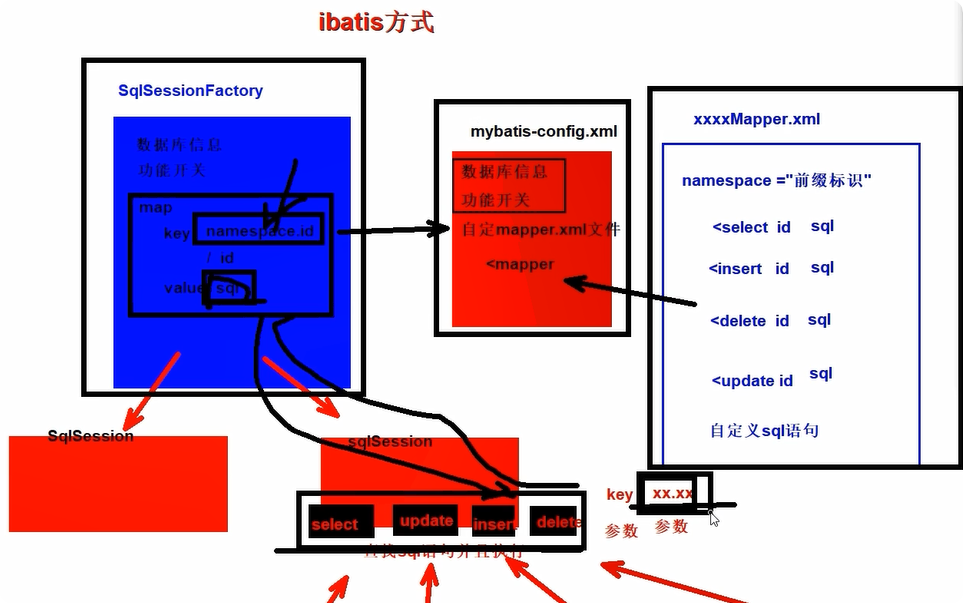
iBatis方式
XML
<mapper namespace="xx.jj">
   <!-- 存放student表对应的sql语句即可 -->
   <select id="kkk" resultType="com.atguigu.pojo.Student" >
       select * from student where sid = #{id}
   </select>
</mapper>-
不要求你写接口
-
直接创建mapper.xml文件内部编写sql语句
-
namespace 没有任何要求,随意声明一个字符串即可
-
内部通过crud标签声明sql语句即可
java
//4. sqlSession提供的curd方法进行数据库查询即可
//  selectOne selectList  /  insert  / delete  / update  查找对应的sql语句标签,mybatis在执行!
//  参数1: 字符串  sql标签对应的标识  id | namespace.id  参数2: Object  执行sql语句传入的参数
Student student = sqlSession.selectOne("kkk", 1);
//缺点: 1. sql语句标签对应的字符串标识,容易出现错误!  2. 参数需要进行整合只能传递一个!  3.返回值问题!
System.out.println("student = " + student);
MyBatis方式
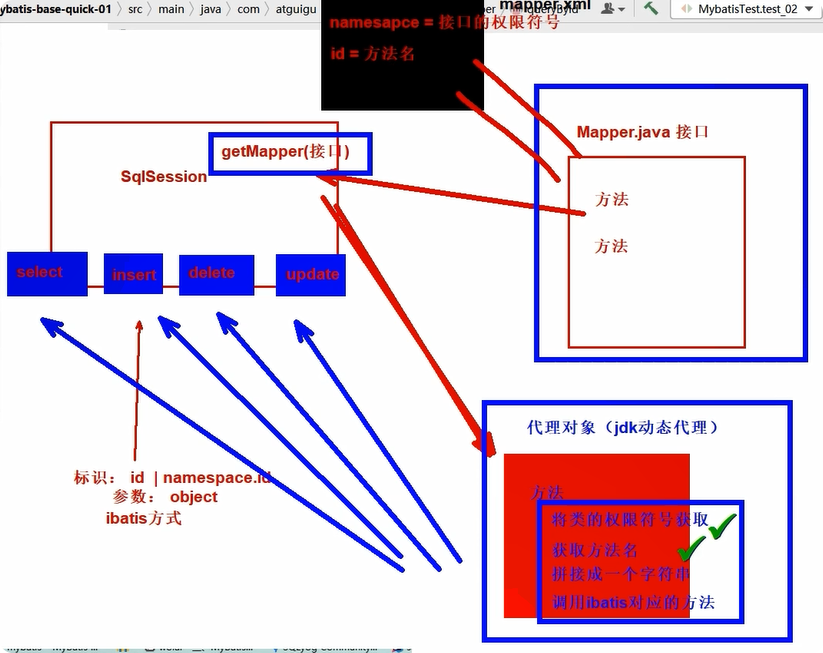
对iBatis的封装,通过获取全限定符号和方法名拼接成为iBatis需要的id后调用iBatis的方法
java
public interface EmployeeMapper {
    //根据id查询员工信息
    Employee queryById(Integer id);
    int deleteById(Integer id);
}
XML
<!--  namespace =  mapper对应接口的全限定符 -->
<mapper namespace="com.atguigu.mapper.EmployeeMapper">
    <!-- 声明标签写sql语句  crud select insert update delete
         每个标签对应接口的一个方法! 方法的一个实现!
         注意: mapper接口不能重载!!!! 因为mapper.xml无法识别! 根据方法名识别!!
    -->
    <select id="queryById" resultType="com.atguigu.pojo.Employee">
        <!-- #{empId}代表动态传入的参数,并且进行赋值!后面详细讲解 -->
        select emp_id empId,emp_name empName, emp_salary empSalary from
        t_emp where emp_id = #{id}
    </select>
</mapper>
java
//4.获取接口的代理对象 (代理技术) 调用代理对象的方法,就会查找mapper接口的方法
//jdk动态代理技术生成的mapper代理对象
EmployeeMapper mapper = sqlSession.getMapper(EmployeeMapper.class);
// 内部拼接接口的全限定符号.方法名  去查找sql语句标签
//1.拼接 类的全限定符.方法名  整合参数  -》 ibatis对应的方法传入参数
// mybatis底层依然调用ibatis只不过有固定的模式!
Employee employee = mapper.queryById(1);
System.out.println("employee = " + employee);方法名和SQL的id一致mapper接口不能重载,根据方法名识别
方法返回值和resultType一致
方法的参数和SQL的参数一致
接口的全类名和映射配置文件的名称空间一致
注:mybatis框架需要配置文件: 数据库连接信息,性能配置,mapper.xml配置等, 习惯上命名为 mybatis-config.xml,这个文件名仅仅只是建议。整合 Spring 之后,这个配置文件可以省略
MyBatis基本使用
向SQL语句传参
mybatis日志输出配置
XML
<?xml version="1.0" encoding="UTF-8" ?>
<!DOCTYPE configuration
        PUBLIC "-//mybatis.org//DTD Config 3.0//EN"
        "http://mybatis.org/dtd/mybatis-3-config.dtd">
<configuration>

    <settings>
        <!-- 开启了 mybatis的日志输出,选择使用system进行控制台输出-->
        <setting name="logImpl" value="STDOUT_LOGGING"/>
    </settings>

    <!-- environments表示配置Mybatis的开发环境,可以配置多个环境,在众多具体环境中,使用default属性指定实际运行时使用的环境。default属性的取值是environment标签的id属性的值。 -->
    <environments default="development">
        <!-- environment表示配置Mybatis的一个具体的环境 -->
        <environment id="development">
            <!-- Mybatis的内置的事务管理器
                 MANAGED  不会自动开启事务!  | JDBC 自动开启事务  , 需要自己提交事务!
            -->
            <transactionManager type="JDBC"/>
            <!-- 配置数据源
                 type=POOLED  mybatis帮助我们维护一个链接池 | UNPOOLED  每次都新建或者释放链接
            -->
            <dataSource type="POOLED">
                <!-- 建立数据库连接的具体信息 -->
                <property name="driver" value="com.mysql.cj.jdbc.Driver"/>
                <property name="url" value="jdbc:mysql://localhost:3306/mybatis-example"/>
                <property name="username" value="root"/>
                <property name="password" value="root"/>
            </dataSource>
        </environment>
        <!-- environment表示配置Mybatis的一个具体的环境 -->
        <environment id="test">...</environment>
    </environments>

    <mappers>
        <!-- Mapper注册:指定Mybatis映射文件的具体位置 -->
        <!-- mapper标签:配置一个具体的Mapper映射文件 -->
        <!-- resource属性:指定Mapper映射文件的实际存储位置,这里需要使用一个以类路径根目录为基准的相对路径 -->
        <!--    对Maven工程的目录结构来说,resources目录下的内容会直接放入类路径,所以这里我们可以以resources目录为基准 -->
        <mapper resource="mappers/EmployeeMapper.xml"/>
    </mappers>

</configuration>
#{}形式与${}形式
Mybatis会将SQL语句中的#{}转换为问号 ? 占位符。
${}形式传参,底层Mybatis做的是字符串拼接操作。
#{ key } : 占位符 + 赋值 emp_id = ? ? = 赋值
${ key } :字符串拼接 " emp_id = " + id 推荐使用#{key} 防止【注入攻击】的问题!!!
总结: 动态值 使用 #{key} 动态的列名 容器名 关键字 ${key}
? 只能替代值的位置 , 不能替代的 容器名(标签,列名,sql关键字) emp_id = ? 不能写 ? = ?
xxx(columnName,columnValue)
sql select * from 表 where 列名是动态的 ${ columnName } = 动态的值 #{columnValue}
java
//注解方式传入参数!!
@Select("select * from user where ${column} = #{value}")
User findByColumn(@Param("column") String column,
                                @Param("value") String value);
数据输入
Mybatis总体机制概括
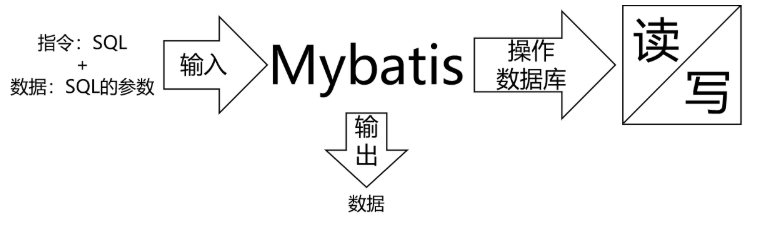
数据输入具体是指上层方法(例如Service方法)调用Mapper接口时,数据传入的形式
简单类型:只包含一个值的数据类型字符串类型、基本数据类型及其包装类
复杂类型:包含多个值的数据类型数组类型、集合类型、实体类类型
单个简单类型参数尽量命名一致
java
    //根据id删除员工信息
    int deleteById(Integer id);

    //根据工资查询员工信息
    List<Employee> queryBySalary(Double salary);
XML
    <!--
       场景1: 传入的单个简单类型  key 随便写 一般情况下推荐使用参数名!!!
    -->
    <delete id="deleteById">
        delete from t_emp where emp_id = #{ ergouzi }
    </delete>

    <select id="queryBySalary" resultType="com.atguigu.pojo.Employee">
        select emp_id empId , emp_name empName , emp_salary empSalary
        from t_emp where emp_salary = #{ salary }
    </select>
单个简单类型参数,在#{}中可以随意命名,但是没有必要。通常还是使用和接口方法参数同名
实体类类型参数必须同属性名一致
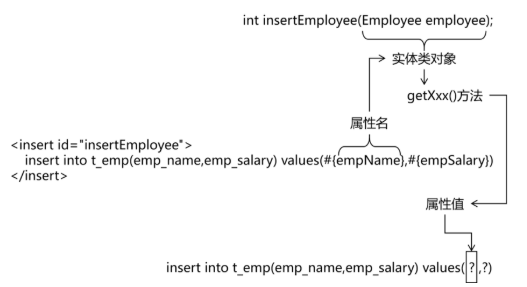
java
    //插入员工数据 【实体对象】
    int insertEmp(Employee employee);
XML
    <!-- 场景2: 传入的是一个实体对象 key 如何写?
                 key = 属性名即可!!!
     -->
    <insert id="insertEmp">
        insert into t_emp (emp_name , emp_salary )  values (#{empName},#{empSalary});
    </insert>
key = 属性名,Mybatis会根据#{}中传入的数据,加工成getXxx()方法,通过反射在实体类对象中调用这个方法,从而获取到对应的数据。
零散的简单类型数据推荐@Param协商一致
java
    //根据员工姓名和工资查询员工信息
    List<Employee> queryByNameAndSalary(@Param("a") String name, @Param("b") Double salary);
XML
    <!--
        场景3: 传入多个简单类型数据如何取值 key!
                可以不可以随便写? 不可以!
                按照形参名称获取? 也不可以!
                方案1: 注解指定  @Param注解  指定多个简单参数的key   key = @Param("value值")  [推荐]
                方案2: mybatis默认机制
                        argo arg1 .... 形参左到右依次对应 argo arg1..
                        (name,salary) name-> key = arg0  salary -> key = arg1
                        param1 param2 ....
                        (name,salary) name-> key = param1  salary -> key = param2
    -->
    <select id="queryByNameAndSalary" resultType="com.atguigu.pojo.Employee">
        select emp_id empId , emp_name empName , emp_salary empSalary
                    from t_emp where emp_name = #{a} and emp_salary = #{b}
</select>Map类型参数Map内的key值
java
public void testUpdateEmpNameByMap() {
  EmployeeMapper mapper = session.getMapper(EmployeeMapper.class);
  Map<String, Object> paramMap = new HashMap<>();
  paramMap.put("empSalaryKey", 999.99);
  paramMap.put("empIdKey", 5);
  int result = mapper.updateEmployeeByMap(paramMap);
  log.info("result = " + result);
}
java
    //插入员工数据,传入的是一个map(name=员工的名字,salary=员工的薪水)
    int updateEmployeeByMap(Map<String, Object> paramMap);
XML
    <!-- 场景4: 传入map 如何指定key的值
                 key = map的key即可!
     -->
    <update id="updateEmployeeByMap">
      update t_emp set emp_salary=#{empSalaryKey} where emp_id=#{empIdKey}
    </update>
#{}中写Map中的key
数据输出与resultType类型匹配
增删改操作返回的受影响行数:直接使用 int 或 long 类型接收即可
查询操作的查询结果
单个简单类型
返回单个简单类型如何指定 resultType的写法! 返回值的数据类型!!
resultType语法:
1.类的全限定符号
2.别名简称
mybatis给我们提供了72种默认的别名!
这些都是我们常用的Java数据类型! java的常用数据类型
基本数据类型 int double -> _int _double
包装数据类型 Integer Double -> int integer double
集合容器类型 Map List HashMap -> 小写即可 map list hashmap
java
    //如果是我们dml语句(插入 修改 删除)
    int deleteById(Integer id);

    //指定输出类型 查询语句
    //根据员工的id查询员工的姓名
    String queryNameById(Integer id);
    //根据员工的id查询员工的工资
    Double querySalaryById(Integer id);
XML
    <!-- DML 默认返回类型为int -->
    <delete id="deleteById" >
        delete from t_emp where emp_id = #{id}
    </delete>

    <select id="queryNameById" resultType="string">
        select emp_name from t_emp where emp_id = #{id}
    </select>
    <select id="querySalaryById" resultType="_double">
        select emp_salary from t_emp where emp_id = #{id}
    </select>
扩展:如果没有没有提供的需要自己定义或者写类的全限定符号
给自己声明的类如何定义别名:
mybatis-config.xml
给类单独定义别名!!!
XML
<typeAliases>
  <typeAlias alias="Author" type="domain.blog.Author"/>
  <typeAlias alias="Blog" type="domain.blog.Blog"/>
</typeAliases>
批量设置:
XML
<typeAliases>
    --批量将包下的类给与别名,别名就是类的首字母小写!
    <package name="com.atguigu.pojo"/>
</typeAliases>
扩展,如果不想使用批量的别名,可以使用注解给与名字!
java
@Alias("ergouzi")
public class Author { ... }返回实体类对象返回数据与属性匹配
java
    //返回单个自定义实体类型
    Employee queryById(Integer id);
XML
    <select id="queryById" resultType="employee" >
        select  *
           from t_emp where emp_id = ${id}
    </select>
默认要求: 查询,返回单个实体类型,要求列名和属性名要一致!
可以进行设置,设置支持驼峰式自动映射! emp_id -\> empId === empId
XML
    <settings>
        <!-- 开启了 mybatis的日志输出,选择使用system进行控制台输出-->
        <setting name="logImpl" value="STDOUT_LOGGING"/>
        <!--开启驼峰式自动映射 数据库 a_column java aColumn -->
        <setting name="mapUnderscoreToCamelCase" value="true"/>
    </settings>
返回Map类型
没有与之对应的实体类可以使用接值的时候
java
    /**
     *查询部门的最高工资和评价工资
     */
    Map<String,Object> selectEmpNameAndMaxSalary();
XML
    <!-- 场景3: 返回map
                 当没有实体类可以使用接值的时候!
                 我们可以使用map接受数据!
                 key - > 查询的列
                 value -> 查询的值
    -->
    <select id="selectEmpNameAndMaxSalary" resultType="map">
        SELECT
            emp_name 员工姓名,
            emp_salary 员工工资,
            (SELECT AVG(emp_salary) FROM t_emp) 部门平均工资
            FROM t_emp WHERE emp_salary=(
            SELECT MAX(emp_salary) FROM t_emp
            )
</select>回List类型匹配返回值的泛型
java
    //查询工资高于传入值的员工姓名们 200
    List<String> queryNamesBySalary(Double salary);

    //查询全部员工信息
    List<Employee> queryAll();
XML
    <!--
       场景4: 返回的是集合类型如何指定
        //查询工资高于传入值的员工姓名们 200
        List<String> queryNamesBySalary(Double salary);

        //查询全部员工信息
        List<Employee> queryAll();
        Employee queryById();

        切记: 返回值是集合。resultType不需要指定集合类型,只需要指定泛型即可!!
        为什么?
            mybatis -> ibatis -> selectOne 单个  | selectList 集合 -》  selectOne 调用 [ selectList ]
    -->
    <select id="queryNamesBySalary" resultType="string">
        select emp_name from t_emp where emp_salary > #{ salary }
    </select>

    <select id="queryAll" resultType="employee">
        select * from t_emp
    </select>
返回值是集合。resultType不需要指定集合类型,只需要指定泛型即可
返回主键值
自增长类型主键:指明主键列,与需要被赋予的对象属性
java
    //员工插入
    int insertEmp(Employee employee);
XML
    <!--
       场景5: 主键回显 获取插入数据的主键
          1. 自增长主键回显 mysql  auto_increment
            //员工插入
            int insertEmp(Employee employee);
            useGeneratedKeys="true" 我们想要数据库自动增强的主键值
            keyColumn="emp_id" 主键列的值!!!
            keyProperty="empId" 接收主键列值的属性!!!
    -->

    <insert id="insertEmp" useGeneratedKeys="true" keyColumn="emp_id" keyProperty="empId">
        insert into t_emp (emp_name,emp_salary)
            value(#{empName},#{empSalary});
    </insert>
非自增长类型主键:期望,非自增长的主键,交给mybatis帮助我们维护
java
int insertTeacher(Teacher teacher);
XML
    <insert id="insertTeacher">
        <!-- 插入之前,先指定一段sql语句,生成一个主键值!
             order="before|after" sql语句是在插入语句之前还是之后执行!
             resultType = 返回值类型
             keyProperty = 查询结果给哪个属性赋值
              //自己维护主键
                String id = UUID.randomUUID().toString().replaceAll("-", "")
                teacher.settId(id);
        -->
        <selectKey order="BEFORE" resultType="string" keyProperty="tId">
            SELECT  REPLACE(UUID(),'-','');
        </selectKey>

        INSERT INTO teacher (t_id,t_name)
                VALUE(#{tId},#{tName});
    </insert>
实体类属性和数据库字段对应关系
别名对应为查询的结果的每一列其与查询对象相一致的别名
XML
<!-- 编写具体的SQL语句,使用id属性唯一的标记一条SQL语句 -->
<!-- resultType属性:指定封装查询结果的Java实体类的全类名 -->
<select id="selectEmployee" resultType="com.atguigu.mybatis.entity.Employee">

  <!-- Mybatis负责把SQL语句中的#{}部分替换成"?"占位符 -->
  <!-- 给每一个字段设置一个别名,让别名和Java实体类中属性名一致 -->
  select emp_id empId,emp_name empName,emp_salary empSalary from t_emp where emp_id=#{maomi}

</select>
全局配置自动识别驼峰式命名规则:resultType按照规则自动映射 按照是否开启驼峰式映射,自己映射属性和列名! 只能映射一层结构!
XML
<!-- 使用settings对Mybatis全局进行设置 -->
<settings>
  <!-- 将xxx_xxx这样的列名自动映射到xxXxx这样驼峰式命名的属性名 -->
  <setting name="mapUnderscoreToCamelCase" value="true"/>
</settings>
XML
<!-- Employee selectEmployee(Integer empId); -->
<select id="selectEmployee" resultType="com.atguigu.mybatis.entity.Employee">
  select emp_id,emp_name,emp_salary from t_emp where emp_id=#{empId}
</select>
使用resultMap:resultMap标签,自定义映射关系,可以深层次可以单层次
java
Teacher queryById(String tId);
XML
    <!-- 声明resultMap标签,自己定义映射规则
               id标识 -> select resultMap="标识"
               type   -> 具体的返回值类型 全限定符和别名 | 集合只写泛型即可
                   <id 主键映射关系
                   <result 普通列的映射关系
    -->
    <resultMap id="tMap" type="teacher">
        <id column="t_id" property="tId" />
        <result  column="t_name" property="tName"/>
    </resultMap>

    <select id="queryById"  resultMap="tMap">
        select * from teacher where t_id = #{tId}
    </select>
MyBatis多表映射
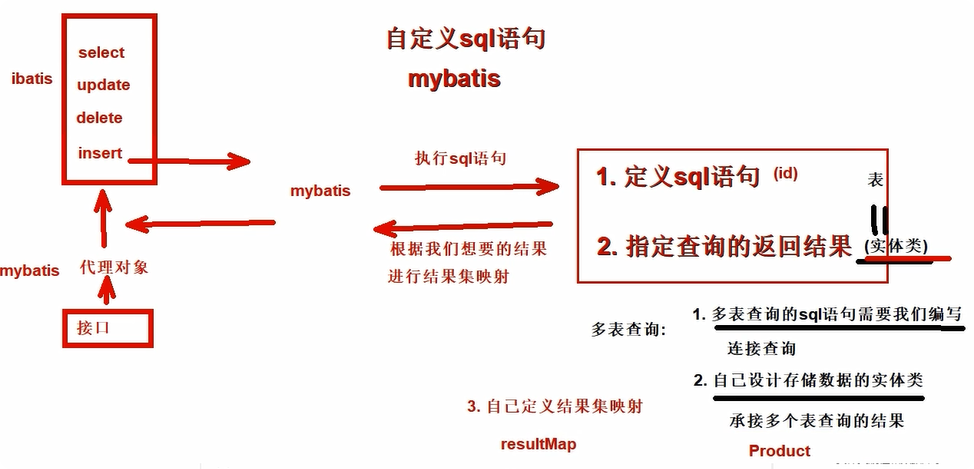
对一,属性中包含对方对象一个订单一个顾客
java
public class Customer {
  private Integer customerId;
  private String customerName;
}
public class Order {
  private Integer orderId;
  private String orderName;
  private Customer customer;// 体现的是对一的关系
}对多,属性中包含对方对象集合一个顾客多个订单
java
public class Customer {
  private Integer customerId;
  private String customerName;
  private List<Order> orderList;// 体现的是对多的关系
}
public class Order {
  private Integer orderId;
  private String orderName;
  private Customer customer;// 体现的是对一的关系
}
//查询客户和客户对应的订单集合 不要管!对一映射-设计一个实体类,装对方对象
java
    //根据id查询订单信息和订单对应的客户
    Order queryOrderById(Integer id);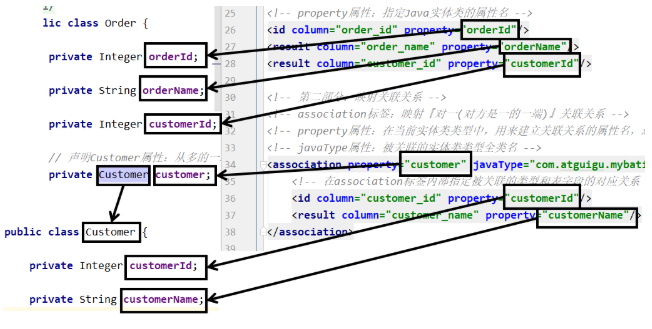
XML
    <!-- 自定义映射关系 ,定义嵌套对象的映射关系 -->
    <resultMap id="orderMap" type="order">
         <!-- 第一层属性 order对象 -->
         <!-- order的主键 id标签-->
         <id column="order_id" property="orderId" />
         <!-- 普通列 -->
         <result column="order_name" property="orderName" />
         <result column="customer_id" property="customerId" />

         <!-- 对象属性赋值
              property 对象属性名
              javaType 对象类型
         -->
         <association property="customer" javaType="customer">
              <id column="customer_id" property="customerId" />
              <result column="customer_name" property="customerName" />
         </association>
    </resultMap>

<!--    Order queryOrderById(Integer id);-->
    <select id="queryOrderById" resultMap="orderMap">
<!--        # 根据id查询订单和订单关联的客户信息-->
        SELECT * FROM t_order tor JOIN  t_customer tur
        ON  tor.customer_id = tur.customer_id
        WHERE tor.order_id = #{id}
    </select>
对多映射
java
Customer selectCustomerWithOrderList(Integer customerId);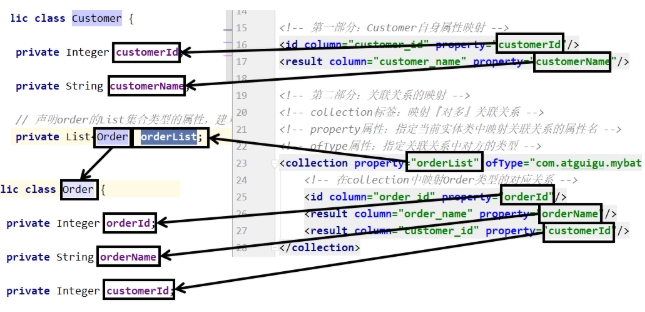
XML
<!-- 配置resultMap实现从Customer到OrderList的"对多"关联关系 -->
<resultMap id="selectCustomerWithOrderListResultMap" type="customer">
  <!-- 映射Customer本身的属性 -->
  <id column="customer_id" property="customerId"/>
  <result column="customer_name" property="customerName"/>

  <!-- collection标签:映射"对多"的关联关系 -->
  <!-- property属性:在Customer类中,关联"多"的一端的属性名 -->
  <!-- ofType属性:集合属性中元素的类型 -->
  <collection property="orderList" ofType="order">
    <!-- 映射Order的属性 -->
    <id column="order_id" property="orderId"/>
    <result column="order_name" property="orderName"/>
  </collection>
</resultMap>

<!-- Customer selectCustomerWithOrderList(Integer customerId); -->
<select id="selectCustomerWithOrderList" resultMap="selectCustomerWithOrderListResultMap">
  SELECT c.customer_id,c.customer_name,o.order_id,o.order_name
  FROM t_customer c
  LEFT JOIN t_order o
  ON c.customer_id=o.customer_id
  WHERE c.customer_id=#{customerId}
</select>
多表映射总结
多表映射优化

默认情况下. resultMap会自动映射单层的result标签 列名和属性名相同,或者开启驼峰式映射 列 _ 属性 驼峰式
嵌套 association | collection 不会自动映射result标签 列名 和 属性名
XML
    <settings>
        <setting name="mapUnderscoreToCamelCase" value="true"/>
        <!-- resultMap 标签 有没有嵌套都会自动帮我们映射result标签的属性和列 -->
        <setting name="autoMappingBehavior" value="FULL"/>
    </settings>
XML
    <resultMap id="customerMap" type="customer">
        <id column="customer_id" property="customerId" />
        <collection property="orderList"  ofType="order">
            <id column="order_id" property="orderId" />
        </collection>
    </resultMap>
多表映射总结

MyBatis动态语句
if和where标签
java
    //根据员工的姓名和工资查询员工的信息
    List<Employee> query(@Param("name") String name, @Param("salary") Double salary);
如果传入属性,就进行判断,如果不传入,不加对应的条件
if 判断传入的参数,最终是否添加语句
test属性 内部做比较运算,最终true将标签内的sql语句进行拼接
false不拼接标签内部语句
判断语句: " key 比较符号 值 and | or key 比较符号 值"
大于和小于 不推荐直接写符号! 实体符号 html > == > < <
XML
假如两个都满足 where emp_name = #{name}  and emp_salary = #{salary}
假如第一个满足 where  emp_name = #{name}
假如第一个不满足,第二个满足 where and emp_salary = #{salary}   错误
假如都不满足 where
where标签的作用有两个:
-
自动添加where关键字 where内部有任何一个if满足,自动添加where关键字,不满足去掉where
-
自动去掉多余的and 和 or 关键字
XML
<select id="query" resultType="employee">
select * from t_emp
<where>
<if test="name != null">
emp_name = #{name}
</if>
<if test="salary != null and salary > 100">
and emp_salary = #{salary}
</if>
</where>
</select>set标签
java
    //根据员工id更新员工的数据,我们要求 传入的name和salary不为null的才更新
    int update(Employee employee);
XML
全部满足: 没问题
第一个满足: 多个了一个 ","
第二个满足: 没问题
都不满足: 语法错误
XML
    <update id="update">
        update t_emp
          <set>
               <if test="empName != null">
                   emp_name = #{empName} ,
               </if>
               <if test="empSalary">
                   emp_salary = #{empSalary}
               </if>
          </set>
        where emp_id = #{empId}
    </update>
set: 1.自动去掉多余的"," ;2.自动添加set关键字
trim标签
trim标签控制条件部分两端是否包含某些字符
prefix属性:指定要动态添加的前缀
suffix属性:指定要动态添加的后缀
prefixOverrides属性:指定要动态去掉的前缀,使用"|"分隔有可能的多个值
suffixOverrides属性:指定要动态去掉的后缀,使用"|"分隔有可能的多个值
添加合适的"where"并且去除多余的"and"或者"or"
java
//根据员工的姓名和工资查询员工的信息
List<Employee> queryTrim(@Param("name") String name, @Param("salary") Double salary);
XML
<!-- List<Employee> queryTrim(@Param("name") String name, @Param("salary") Double salary);-->
<select id="queryTrim" resultType="employee">
select * from t_emp
<trim prefix="where" suffixOverrides="and|or">
<if test="name != null">
emp_name = #{name}
</if>
<if test="salary != null and salary > 100">
and emp_salary = #{salary}
</if>
</trim>
</select>添加合适的"set"并且去除多余的","
java
//根据员工id更新员工的数据,我们要求 传入的name和salary不为null的才更新
int updateTrim(Employee employee);
XML
    <update id="updateTrim">
        update t_emp
        <trim prefix="set" suffixOverrides=",">
            <if test="empName != null">
                emp_name = #{empName} ,
            </if>
            <if test="empSalary">
                emp_salary = #{empSalary}
            </if>
        </trim>
        where emp_id = #{empId}
    </update>
choose/when/otherwise标签
在多个分支条件中,仅执行一个。
从上到下依次执行条件判断
遇到的第一个满足条件的分支会被采纳
被采纳分支后面的分支都将不被考虑
如果所有的when分支都不满足,那么就执行otherwise分支
java
//根据两个条件查询,如果姓名不为null使用姓名查询,如果姓名为null,薪水不为空就使用薪水查询! 都为null查询全部
List<Employee> queryChoose(@Param("name") String name, @Param("salary") Double salary);
XML
<!--    //根据两个条件查询,如果姓名不为null使用姓名查询,如果姓名为null,薪水不为空就使用薪水查询! 都为null查询全部-->
<!--    List<Employee> queryChoose(@Param("name") String name, @Param("salary") Double salary);-->
    <select id="queryTrim" resultType="employee">
        select * from t_emp
         where
            <choose>
                <when test="name != null">
                    emp_name = #{name}
                </when>
                <when test="salary != null">
                    emp_salary = #{salary}
                </when>
                <otherwise>1=1</otherwise>
            </choose>
    </select>
foreach标签
bash
jdbc:mysql://localhost:3306/mybatis-example?allowMultiQueries=true批量操作
java
    //根据id的批量查询
    List<Employee> queryBatch(@Param("ids") List<Integer> ids);
    //根据id的批量删除
    int deleteBatch(@Param("ids") List<Integer> ids);
    //根据id的批量插入
    int insertBatch(@Param("list")List<Employee> employeeList);
    //根据id的批量更新
    int updateBatch(@Param("list") List<Employee> employeeList);
遍历的数据: ( 1 , 2 , 3 )
collection="ids | arg0 | list"
open 遍历之前要追加的字符串
close 遍历结束需要添加的字符串
separator 每次遍历的分割符号! 如果是最后一次,不会追加
item 获取每个遍历项
( 1,2 ,3 )
XML
<!--    //根据id的批量查询-->
<!--    List<Employee> queryBatch(@Param("ids") List<Integer> ids);-->
<!--    [1,2,3]-->
    <select id="queryBatch" resultType="employee">
        select * from t_emp
                        where emp_id in
                        <foreach collection="ids" open="(" separator="," close=")" item="id">
                              <!-- 遍历的内容, #{遍历项 item指定的key}-->
                              #{id}
                        </foreach>
    </select>

<!--    //根据id的批量删除-->
<!--    int deleteBatch(@Param("ids") List<Integer> ids);-->
    <delete id="deleteBatch">
        delete from t_emp where id in
                     <foreach collection="ids" open="("  separator="," close=")" item="id">
                         #{id}
                     </foreach>
    </delete>

<!--    int insertBatch(@Param("list")List<Employee> employeeList);-->
    <insert id="insertBatch">
        insert into t_emp (emp_name,emp_salary)
                  values
                  <foreach collection="list" separator="," item="employee">
                      (#{employee.empName}, #{employee.empSalary})
                  </foreach>
    </insert>

<!--    int updateBatch(@Param("list") List<Employee> employeeList);-->
    <!-- 如果一个标签设计多个语句! 需要设置允许指定多语句 ! allowMultiQueries=true-->
    <update id="updateBatch">
        <foreach collection="list" item="emp">
            update t_emp set emp_name = #{emp.empName} , emp_salary = #{emp.empSalary}
            where  emp_id = #{emp.empId} ;
        </foreach>
    </update>
sql片段
抽取重复的SQL片段
XML
    <sql id="selectSql">
        select * from t_emp
    </sql>
引用重复的SQL片段
XML
    <select id="query" resultType="employee">
        <include refid="selectSql" />

        <where>...</where>
    </select>
MyBatis高级扩展
Mapper批量映射优化将mapper的XML纳入
XML
    <mappers>
        <package name="com.atguigu.mapper"/>
</mappers>-
要求Mapperxml文件和mapper接口的命名必须相同
-
最终打包后的位置要一致 都是指定的包地址下!
方案1: xml文件也加入到接口所在的包即可修改配置文件
XML
    <build>
        <resources>
            <resource>
                <directory>src/main/java</directory>
                <includes>
                    <include>**/*.*</include>
                </includes>
            </resource>
        </resources>
    </build>
方案2: resources文件夹创建对应的文件夹结构即可
注意: resources下直接创建多层文件夹 使用 /分割 .就是一层文件夹
插件和分页插件PageHelper
插件机制和PageHelper插件
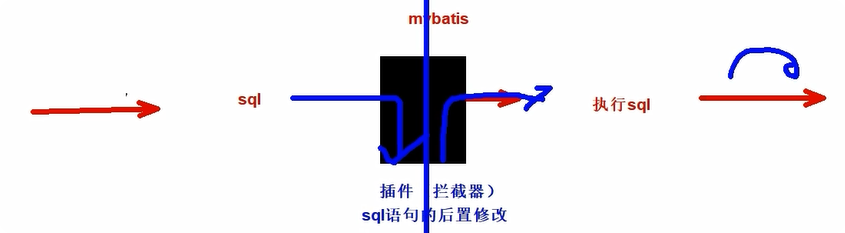
MyBatis 对插件进行了标准化的设计,并提供了一套可扩展的插件机制。插件可以在用于语句执行过程中进行拦截,并允许通过自定义处理程序来拦截和修改 SQL 语句、映射语句的结果等。
PageHelper插件使用
配置文件
XML
    <!-- mybatis内部配置插件,可以sql语句拦截了 -->
    <plugins>
        <plugin interceptor="com.github.pagehelper.PageInterceptor">
            <!-- 插件语法对应的数据库类型 -->
            <property name="helperDialect" value="mysql"/>
        </plugin>
    </plugins>
java
List<Employee> queryList();
XML
    <select id="queryList" resultType="employee">
        <!-- 正常编写语句即可! 不要使用;结尾 -->
        select * from t_emp where emp_salary > 100
    </select>
java
    //使用分页插件
    @Test
    public void test_01(){
        EmployeeMapper mapper = sqlSession.getMapper(EmployeeMapper.class);


        //调用之前,先设置分页数据 (当前是第几页,每页显示多少个! )
        PageHelper.startPage(2,2);  // 1 2

        //TODO: 注意不能将两条查询装到一个分页区
        List<Employee> list =   mapper.queryList();
        //将查询数据封装到一个PageInfo的分页实体类 (一共有多少页,一共有多少条等等)
        PageInfo<Employee> pageInfo = new PageInfo<>(list);

        //pageInfo获取分页的数据

        //当前页的数据
        List<Employee> list1 = pageInfo.getList();
        System.out.println("list1 = " + list1);
        //获取总页数
        int pages = pageInfo.getPages();
        System.out.println("pages = " + pages);
        //总条数
        long total = pageInfo.getTotal();
        System.out.println("total = " + total);
        int pageNum = pageInfo.getPageNum();
        System.out.println("pageNum = " + pageNum);
        int pageSize = pageInfo.getPageSize();
        System.out.println("pageSize = " + pageSize);

    }
逆向工程和MybatisX插件
ORM思维
ORM(Object-Relational Mapping,对象-关系映射)是一种将数据库和面向对象编程语言中的对象之间进行转换的技术。它将对象和关系数据库的概念进行映射,最后我们就可以通过方法调用进行数据库操作使用面向对象思维进行数据库操作
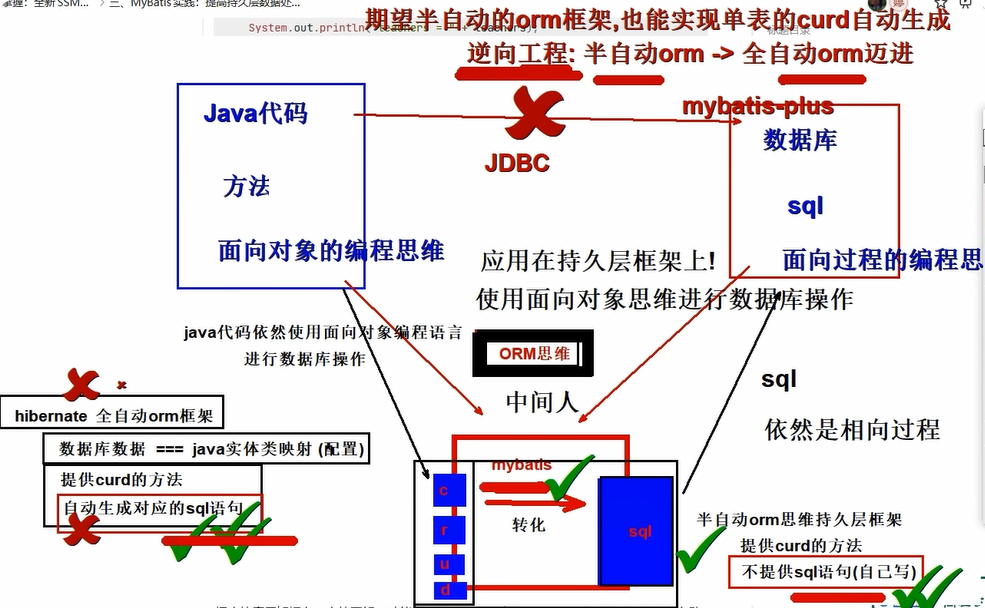
半自动 ORM :通常需要程序员手动编写 SQL 语句或者配置文件,将实体类和数据表进行映射,还需要手动将查询的结果集转换成实体对象
全自动 ORM :是将实体类和数据表进行自动映射,使用 API 进行数据库操作时,ORM 框架会自动执行 SQL 语句并将查询结果转换成实体对象,程序员无需再手动编写 SQL 语句和转换代码
逆向工程
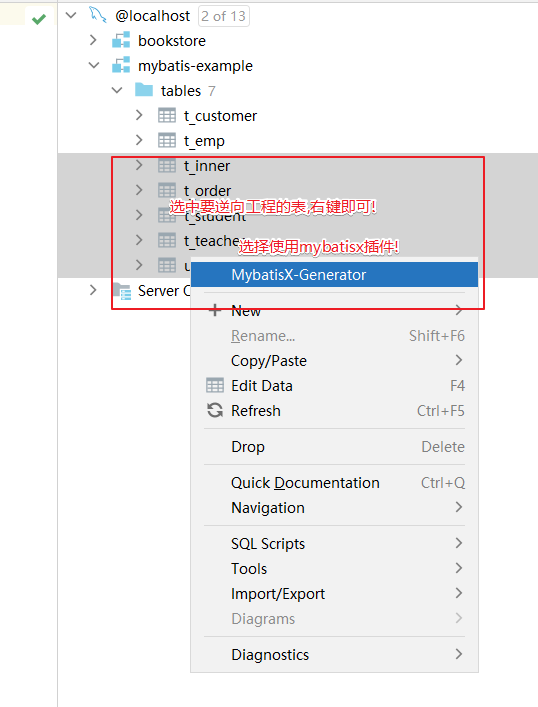
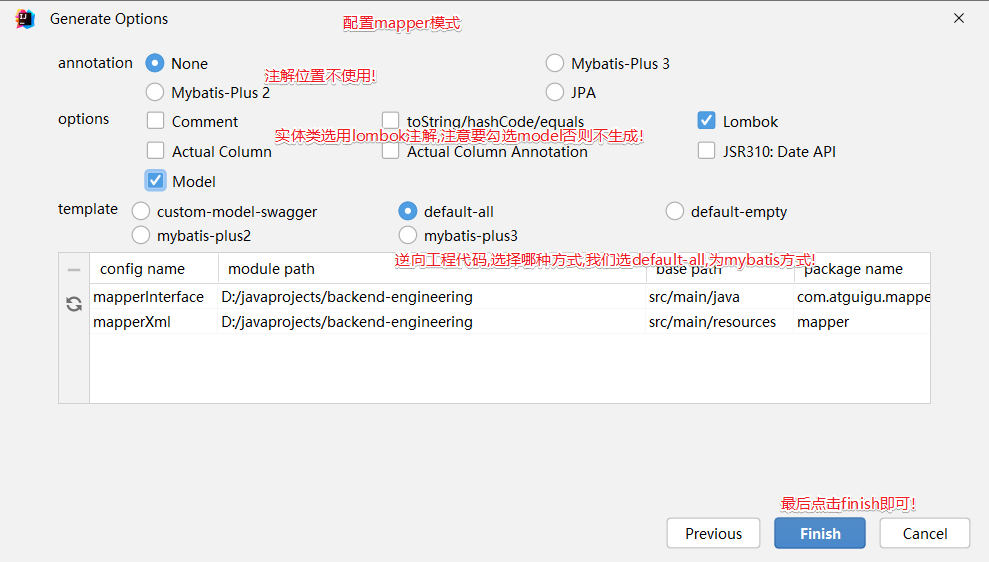
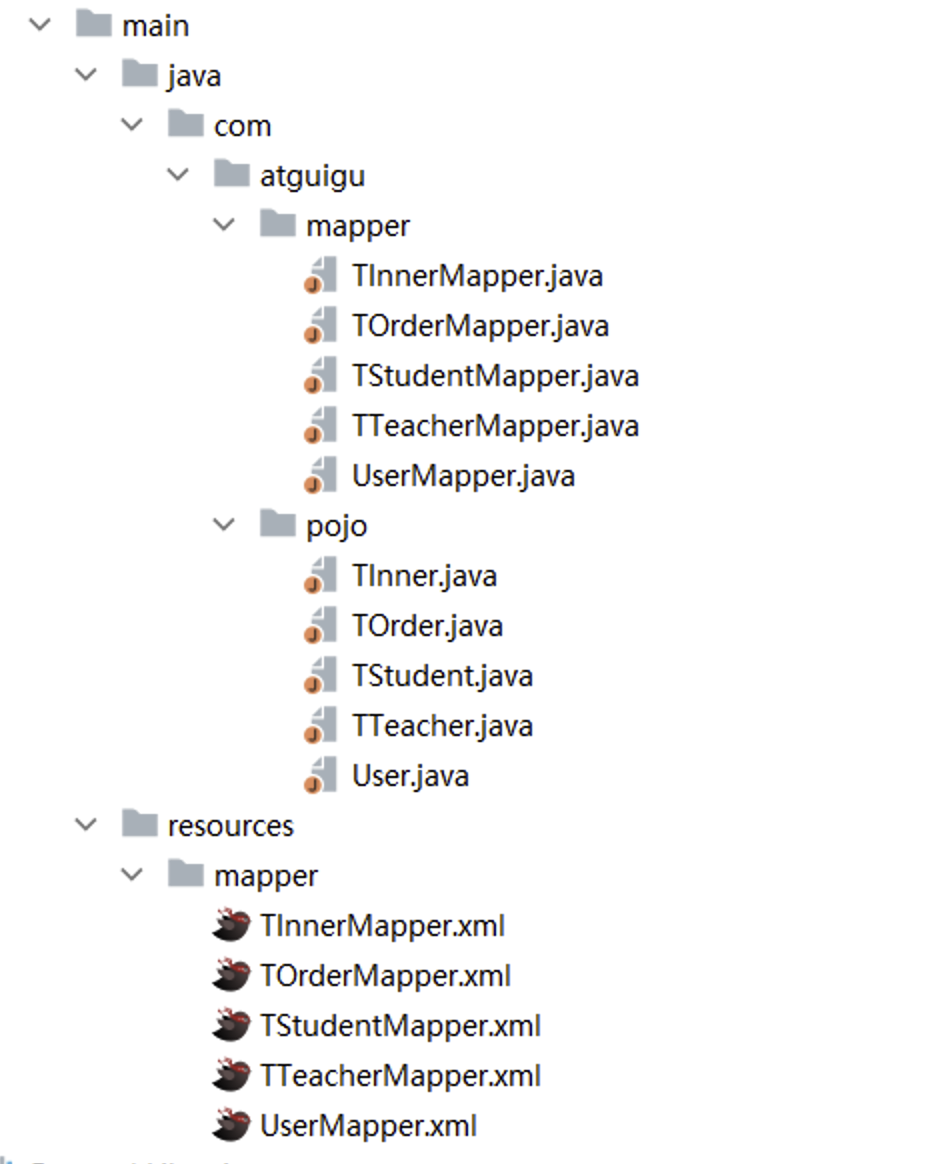
MyBatis 的逆向工程是一种自动化生成持久层代码和映射文件的工具,它可以根据数据库表结构和设置的参数生成对应的实体类、Mapper.xml 文件、Mapper 接口等代码文件,简化了开发者手动生成的过程。
MyBatis 的逆向工程有两种方式:通过 MyBatis Generator 插件实现和通过 Maven 插件实现
MyBatis 的逆向工程为程序员提供了一种方便快捷的方式,能够快速地生成持久层代码和映射文件,是半自动 ORM 思维像全自动发展的过程
注:逆向工程只能生成单表crud的操作,多表查询依然需要我们自己编写