鸿蒙AI菜谱生成器:基于ArkTS原生开发与鸿蒙PC适配实战
一、引言
在万物互联的时代,智能厨房已经成为智能家居的重要组成部分。随着鸿蒙生态的快速发展,越来越多的开发者开始关注鸿蒙平台的应用开发。本文将详细介绍如何使用ArkTS语言开发一款AI菜谱生成器应用,并深入探讨鸿蒙PC端的适配策略。
1.1 鸿蒙生态发展现状
鸿蒙操作系统(HarmonyOS)是华为公司自主研发的分布式操作系统,旨在构建万物互联的智能世界。自发布以来,鸿蒙生态迅速发展,已经覆盖了手机、平板、电脑、智能穿戴、智能家居等多种设备。
鸿蒙PC作为鸿蒙生态的重要组成部分,为开发者提供了更大的屏幕空间和更丰富的交互方式。开发者可以利用鸿蒙PC的特性,为用户提供更加沉浸式的应用体验。
1.2 AI菜谱生成器应用定位
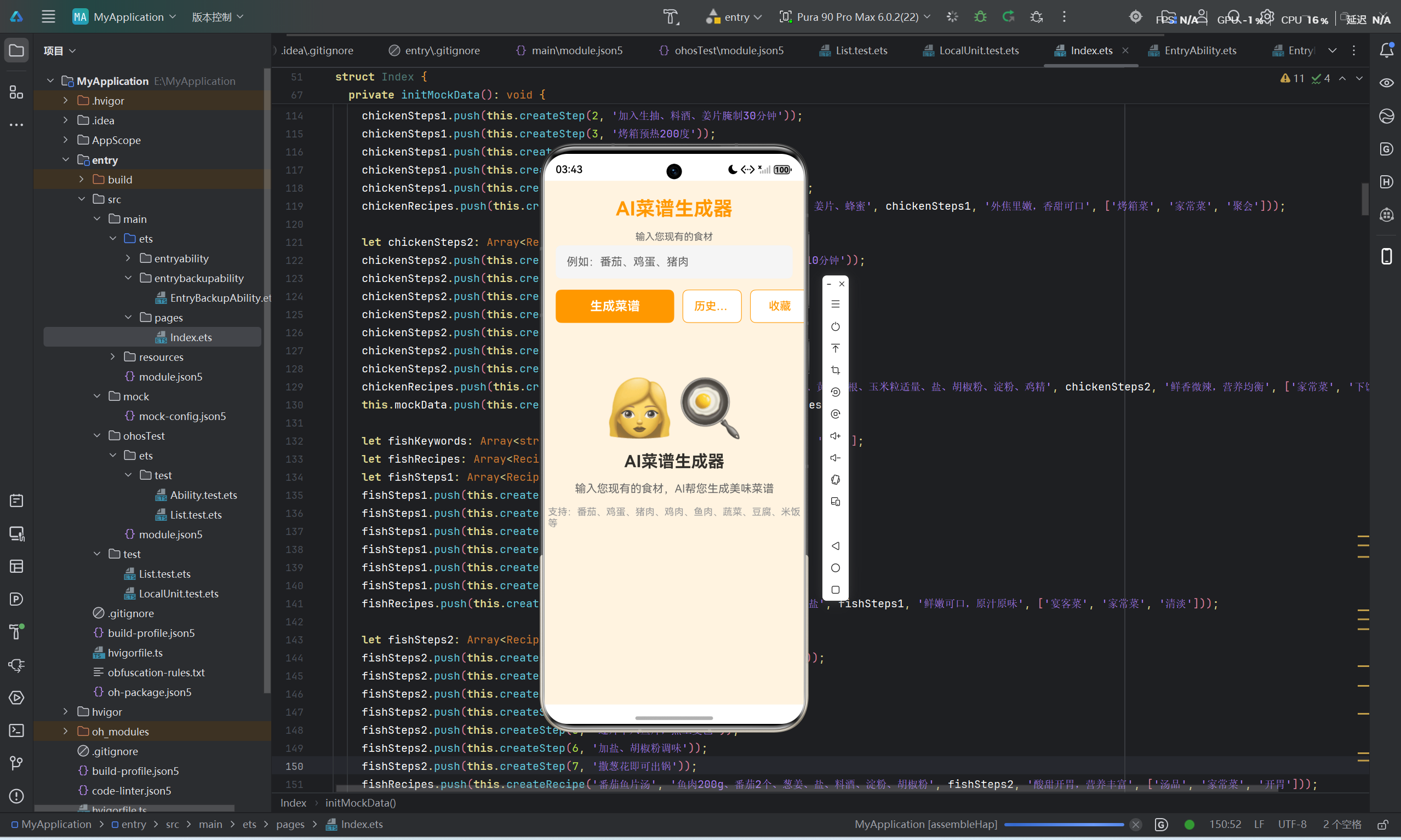
AI菜谱生成器是一款基于鸿蒙平台的智能烹饪辅助应用,旨在帮助用户根据现有食材快速生成美味菜谱。该应用具有以下特点:
- 智能推荐:根据用户输入的食材,智能匹配最合适的菜谱
- 分步指导:提供详细的烹饪步骤,帮助用户轻松完成烹饪
- 收藏功能:支持收藏喜欢的菜谱,方便日后查看
- 历史记录:自动保存生成记录,方便用户回顾和恢复
- 离线运行:内置丰富的Mock数据,无需联网即可使用
1.3 技术选型
在开发AI菜谱生成器时,我们选择了以下技术栈:
- 语言:ArkTS(鸿蒙官方推荐语言)
- 框架:ArkUI(鸿蒙UI框架)
- 状态管理:@State装饰器
- 数据持久化:Preferences
- 构建工具:Hvigor
二、应用概述
2.1 核心功能
AI菜谱生成器主要包含以下核心功能:
2.1.1 食材输入
用户可以在输入框中输入现有的食材,支持多种食材的组合输入,例如"番茄、鸡蛋、猪肉"。
2.1.2 智能菜谱推荐
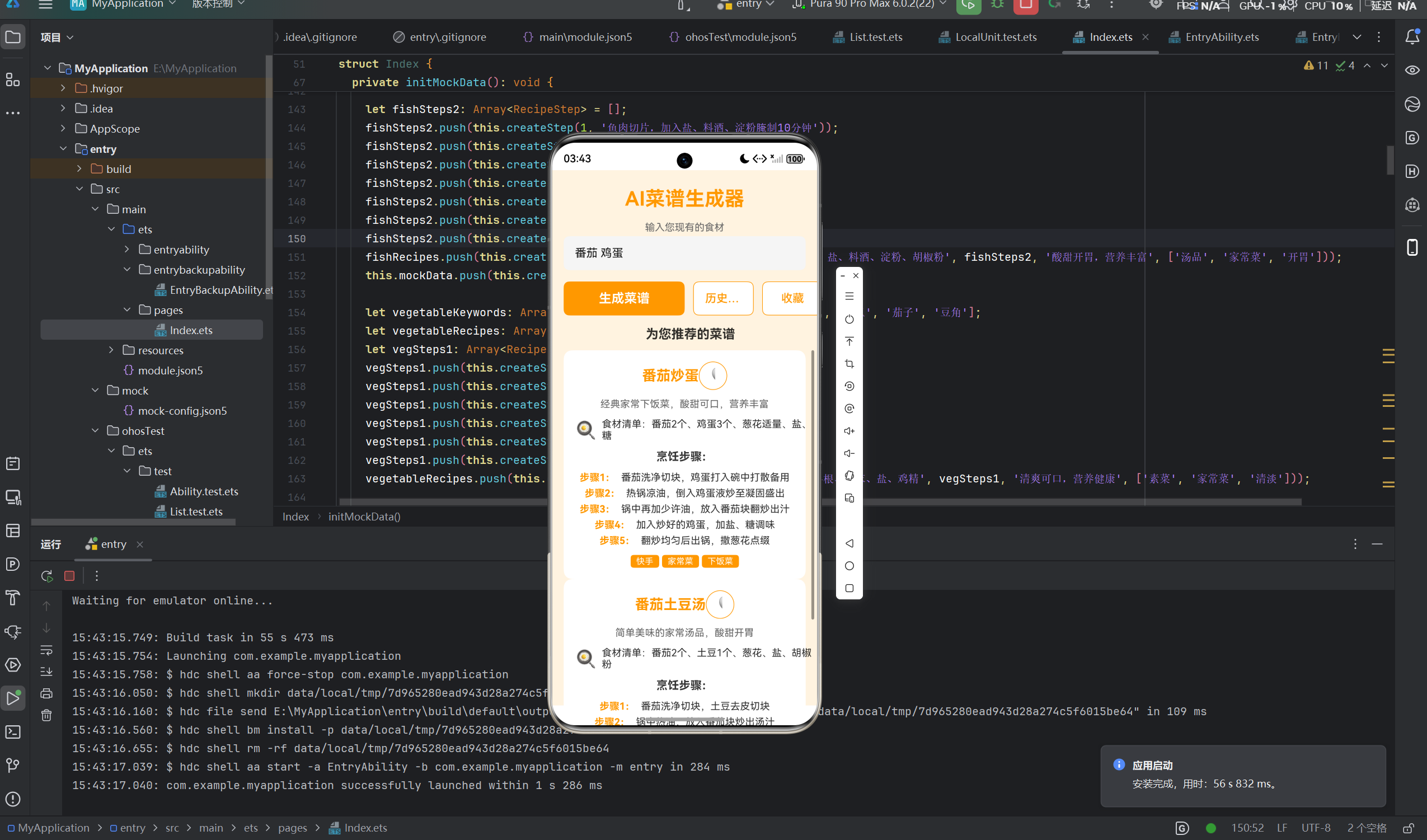
应用根据用户输入的食材,自动匹配内置的Mock菜谱数据,生成最合适的菜谱推荐。
2.1.3 分步烹饪指导
每道菜谱都包含详细的烹饪步骤,从食材准备到出锅装盘,一步一步指导用户完成烹饪。
2.1.4 菜谱收藏
用户可以收藏喜欢的菜谱,方便日后查看和使用。收藏的菜谱会保存在本地,下次打开应用时仍然可见。
2.1.5 历史记录
应用会自动保存用户生成的菜谱记录,支持查看、恢复和删除历史记录。
2.2 UI设计
应用采用橙色主题,整体风格温暖活泼,符合厨房烹饪的氛围。UI布局简洁明了,主要分为以下几个区域:
- 顶部标题区:显示应用名称和Logo
- 输入区域:食材输入框和操作按钮
- 输出区域:菜谱推荐列表或历史记录列表
- 底部信息区:版权信息和免责声明
2.3 技术亮点
- 纯原生开发:使用ArkTS语言和ArkUI框架,实现真正的鸿蒙原生应用
- 轻量化状态管理:仅使用@State装饰器进行状态管理,代码简洁高效
- 离线运行:内置丰富的Mock数据,无需联网即可使用
- 数据持久化:使用Preferences保存历史记录和收藏菜谱
- 响应式设计:支持鸿蒙PC端的适配
三、技术架构分析
3.1 ArkTS语言特性
ArkTS是鸿蒙操作系统的官方编程语言,基于TypeScript扩展而来,具有以下特性:
3.1.1 类型安全
ArkTS是一种强类型语言,要求所有变量都必须声明类型。这有助于在编译时发现类型错误,提高代码的可靠性和可维护性。
typescript
interface RecipeStep {
  step: number;
  content: string;
}

interface RecipeItem {
  name: string;
  ingredients: string;
  steps: Array<RecipeStep>;
  description: string;
  tags: Array<string>;
}
3.1.2 声明式UI
ArkTS结合ArkUI框架,采用声明式UI编程模式,允许开发者以描述性的方式定义UI界面。
typescript
@Entry
@Component
struct Index {
  @State inputIngredients: string = '';

  build() {
    Column() {
      Text('AI菜谱生成器')
        .fontSize(28)
        .fontWeight(FontWeight.Bold);

      TextInput({ placeholder: '例如:番茄、鸡蛋、猪肉' })
        .onChange((value: string) => {
          this.inputIngredients = value;
        });
    }
  }
}
3.1.3 状态管理
ArkTS提供了多种状态管理装饰器,其中@State是最基础的状态管理方式,用于管理组件内部的状态。
typescript
@State inputIngredients: string = '';
@State recipes: Array<RecipeRecommendation> = [];
@State isGenerating: boolean = false;
@State showHistory: boolean = false;
@State showFavorites: boolean = false;
3.2 鸿蒙Flutter框架对比
在鸿蒙平台开发应用时,开发者可以选择使用ArkTS原生开发或Flutter框架。以下是两者的对比:
| 对比维度 | ArkTS原生开发 | Flutter框架 |
|---|---|---|
| 性能 | 原生性能,运行效率高 | 通过Dart虚拟机运行,性能略低 |
| UI组件 | 内置丰富的ArkUI组件 | 自定义Widget,灵活性高 |
| 开发效率 | 学习成本较低,官方文档完善 | 跨平台能力强,一套代码多端运行 |
| 生态支持 | 鸿蒙官方支持,更新及时 | 第三方库丰富,社区活跃 |
| PC适配 | 原生支持鸿蒙PC | 需要额外适配 |
3.2.1 选择建议
- 追求性能:选择ArkTS原生开发,享受原生应用的流畅体验
- 跨平台需求:选择Flutter框架,一套代码支持多平台
- 鸿蒙生态深度集成:选择ArkTS原生开发,更好地利用鸿蒙系统特性
3.3 状态管理方案
在AI菜谱生成器中,我们采用了轻量化的状态管理方案,仅使用@State装饰器管理组件内部的状态。
3.3.1 状态定义
typescript
@State inputIngredients: string = '';      // 用户输入的食材
@State recipes: Array<RecipeRecommendation> = [];  // 生成的菜谱列表
@State isGenerating: boolean = false;      // 是否正在生成
@State showHistory: boolean = false;       // 是否显示历史记录
@State showFavorites: boolean = false;     // 是否显示收藏
@State historyRecords: Array<RecipeRecord> = [];  // 历史记录列表
@State favoriteRecipes: Array<RecipeRecommendation> = [];  // 收藏菜谱列表
@State mockData: Array<MockRecipeCase> = [];  // Mock数据
3.3.2 状态更新
状态更新通过事件处理函数触发,例如用户输入食材时更新inputIngredients状态:
typescript
TextInput({ placeholder: '例如:番茄、鸡蛋、猪肉' })
  .onChange((value: string) => {
    this.inputIngredients = value;
  });
3.3.3 状态驱动UI
ArkUI框架会自动监听状态变化,并更新对应的UI组件。例如,当recipes状态变化时,菜谱列表会自动更新。
typescript
ForEach(this.recipes, (recipe: RecipeRecommendation) => {
  ListItem() {
    Column() {
      Text(recipe.name)
        .fontSize(20)
        .fontWeight(FontWeight.Bold);
      // ... 其他UI组件
    }
  }
}, (recipe: RecipeRecommendation) => recipe.id);
四、核心功能实现
4.1 数据模型设计
4.1.1 接口定义
typescript
interface RecipeStep {
  step: number;
  content: string;
}

interface RecipeItem {
  name: string;
  ingredients: string;
  steps: Array<RecipeStep>;
  description: string;
  tags: Array<string>;
}

interface RecipeRecommendation {
  id: string;
  name: string;
  ingredients: string;
  steps: Array<RecipeStep>;
  description: string;
  tags: Array<string>;
  inputIngredients: string;
  timestamp: number;
  isFavorite: boolean;
}

interface RecipeRecord {
  id: string;
  inputIngredients: string;
  recipes: Array<RecipeRecommendation>;
  timestamp: number;
}

interface MockRecipeCase {
  keywords: Array<string>;
  recipes: Array<RecipeItem>;
}
4.1.2 数据关系
- RecipeStep:单步烹饪步骤,包含步骤序号和内容
- RecipeItem:菜谱基础信息,包含名称、食材、步骤、描述和标签
- RecipeRecommendation:菜谱推荐信息,在RecipeItem基础上增加了ID、输入食材、时间戳和收藏状态
- RecipeRecord:历史记录,包含ID、输入食材、菜谱列表和时间戳
- MockRecipeCase:Mock数据案例,包含关键词和对应的菜谱列表
4.2 Mock数据初始化
应用内置了8大食材场景,共16道菜谱,覆盖了常见的家常菜类型。
4.2.1 Mock数据结构
typescript
private initMockData(): void {
  let tomatoKeywords: Array<string> = ['番茄', '西红柿', '鸡蛋', '番茄炒蛋', '番茄鸡蛋'];
  let tomatoRecipes: Array<RecipeItem> = [];

  let tomatoSteps1: Array<RecipeStep> = [];
  tomatoSteps1.push(this.createStep(1, '番茄洗净切块,鸡蛋打入碗中打散备用'));
  tomatoSteps1.push(this.createStep(2, '热锅凉油,倒入鸡蛋液炒至凝固盛出'));
  tomatoSteps1.push(this.createStep(3, '锅中再加少许油,放入番茄块翻炒出汁'));
  tomatoSteps1.push(this.createStep(4, '加入炒好的鸡蛋,加盐、糖调味'));
  tomatoSteps1.push(this.createStep(5, '翻炒均匀后出锅,撒葱花点缀'));

  tomatoRecipes.push(this.createRecipe('番茄炒蛋', '番茄2个、鸡蛋3个、葱花适量、盐、糖', tomatoSteps1, '经典家常下饭菜,酸甜可口,营养丰富', ['快手', '家常菜', '下饭菜']));

  this.mockData.push(this.createMockCase(tomatoKeywords, tomatoRecipes));
}
4.2.2 工厂方法
为了方便创建对象,我们定义了以下工厂方法:
typescript
private createMockCase(keywords: Array<string>, recipes: Array<RecipeItem>): MockRecipeCase {
  let mock: MockRecipeCase = {
    keywords: keywords,
    recipes: recipes
  };
  return mock;
}

private createRecipe(name: string, ingredients: string, steps: Array<RecipeStep>, description: string, tags: Array<string>): RecipeItem {
  let item: RecipeItem = {
    name: name,
    ingredients: ingredients,
    steps: steps,
    description: description,
    tags: tags
  };
  return item;
}

private createStep(step: number, content: string): RecipeStep {
  let stepItem: RecipeStep = {
    step: step,
    content: content
  };
  return stepItem;
}
4.2.3 食材场景覆盖
应用内置了以下8大食材场景:
| 场景 | 关键词 | 菜谱 |
|---|---|---|
| 番茄 | 番茄、西红柿、鸡蛋 | 番茄炒蛋、番茄土豆汤 |
| 猪肉 | 猪肉、五花肉、瘦肉 | 红烧肉、青椒肉丝 |
| 鸡肉 | 鸡肉、鸡腿、鸡翅 | 蜜汁烤鸡翅、宫保鸡丁 |
| 鱼肉 | 鱼、鱼片、鱼块 | 清蒸鱼、番茄鱼片汤 |
| 蔬菜 | 蔬菜、青菜、西兰花 | 蒜蓉西兰花、红烧茄子 |
| 鸡蛋 | 鸡蛋、蛋 | 蒸水蛋、炒鸡蛋 |
| 豆腐 | 豆腐、嫩豆腐 | 蚝油豆腐、番茄鸡蛋豆腐汤 |
| 米饭 | 米饭、大米 | 蛋炒饭、扬州炒饭 |
4.3 智能匹配算法
4.3.1 匹配逻辑
智能匹配算法的核心逻辑如下:
- 将用户输入的食材转换为小写
- 遍历所有Mock数据案例
- 检查用户输入是否包含案例中的任何关键词
- 如果匹配成功,将案例中的菜谱添加到推荐列表
- 如果没有匹配到任何菜谱,生成默认的家常小炒菜谱
typescript
private handleGenerate(): void {
  if (this.inputIngredients.trim().length === 0) {
    return;
  }

  this.isGenerating = true;
  this.recipes = [];

  setTimeout(() => {
    let matchedRecipes: Array<RecipeItem> = [];
    let inputLower: string = this.inputIngredients.toLowerCase();

    for (let i = 0; i < this.mockData.length; i++) {
      let mock: MockRecipeCase = this.mockData[i];
      let matched: boolean = false;

      for (let j = 0; j < mock.keywords.length; j++) {
        if (inputLower.includes(mock.keywords[j].toLowerCase())) {
          matched = true;
          break;
        }
      }

      if (matched) {
        for (let j = 0; j < mock.recipes.length; j++) {
          matchedRecipes.push(mock.recipes[j]);
        }
      }
    }

    if (matchedRecipes.length === 0) {
      let defaultSteps: Array<RecipeStep> = [];
      defaultSteps.push(this.createStep(1, '准备好所有食材'));
      defaultSteps.push(this.createStep(2, '根据食材特点进行清洗处理'));
      defaultSteps.push(this.createStep(3, '热锅凉油,按食材熟制时间依次下锅'));
      defaultSteps.push(this.createStep(4, '加入适量调料调味'));
      defaultSteps.push(this.createStep(5, '翻炒均匀后出锅装盘'));
      matchedRecipes.push(this.createRecipe('家常小炒', this.inputIngredients, defaultSteps, '根据您提供的食材制作的美味家常菜', ['家常菜', '快手']));
    }

    for (let i = 0; i < matchedRecipes.length; i++) {
      let isFav: boolean = this.isFavoriteRecipe(matchedRecipes[i].name);
      this.recipes.push(this.createRecommendation(matchedRecipes[i], isFav));
    }

    this.saveToHistory();
    this.isGenerating = false;
  }, 1500);
}
4.3.2 推荐生成
匹配成功后,将菜谱转换为推荐对象,添加到推荐列表中:
typescript
private createRecommendation(item: RecipeItem, isFav: boolean): RecipeRecommendation {
  let rec: RecipeRecommendation = {
    id: this.generateId(),
    name: item.name,
    ingredients: item.ingredients,
    steps: item.steps,
    description: item.description,
    tags: item.tags,
    inputIngredients: this.inputIngredients,
    timestamp: Date.now(),
    isFavorite: isFav
  };
  return rec;
}
4.4 数据持久化
应用使用Preferences进行数据持久化,保存历史记录和收藏菜谱。
4.4.1 保存历史记录
typescript
private saveToHistory(): void {
  let record: RecipeRecord = {
    id: this.generateId(),
    inputIngredients: this.inputIngredients,
    recipes: this.recipes,
    timestamp: Date.now()
  };
  this.historyRecords.unshift(record);

  if (this.historyRecords.length > 20) {
    this.historyRecords = this.historyRecords.slice(0, 20);
  }

  let historyStr: string = JSON.stringify(this.historyRecords);
  let context = getContext(this);
  preferences.getPreferences(context, 'recipe_recommend_prefs').then((pref: Object) => {
    let prefObj: PreferencesPut = pref as PreferencesPut;
    prefObj.put('recipeHistory', historyStr).then(() => {
      prefObj.flush();
    }).catch(() => {
      // ignore
    });
  }).catch(() => {
    // ignore
  });
}
4.4.2 加载历史记录
typescript
private loadHistory(): void {
  let context = getContext(this);
  preferences.getPreferences(context, 'recipe_recommend_prefs').then((pref: Object) => {
    let prefObj: PreferencesGet = pref as PreferencesGet;
    prefObj.get('recipeHistory', '').then((historyObj: Object) => {
      let historyStr: string = historyObj as string;
      if (historyStr.length > 0) {
        this.historyRecords = JSON.parse(historyStr) as Array<RecipeRecord>;
      }
    }).catch(() => {
      // ignore
    });
  }).catch(() => {
    // ignore
  });
}
4.4.3 保存收藏菜谱
typescript
private saveFavorites(): void {
  let favoritesStr: string = JSON.stringify(this.favoriteRecipes);
  let context = getContext(this);
  preferences.getPreferences(context, 'recipe_recommend_prefs').then((pref: Object) => {
    let prefObj: PreferencesPut = pref as PreferencesPut;
    prefObj.put('recipeFavorites', favoritesStr).then(() => {
      prefObj.flush();
    }).catch(() => {
      // ignore
    });
  }).catch(() => {
    // ignore
  });
}
4.4.4 加载收藏菜谱
typescript
private loadFavorites(): void {
  let context = getContext(this);
  preferences.getPreferences(context, 'recipe_recommend_prefs').then((pref: Object) => {
    let prefObj: PreferencesGet = pref as PreferencesGet;
    prefObj.get('recipeFavorites', '').then((favoritesObj: Object) => {
      let favoritesStr: string = favoritesObj as string;
      if (favoritesStr.length > 0) {
        this.favoriteRecipes = JSON.parse(favoritesStr) as Array<RecipeRecommendation>;
      }
    }).catch(() => {
      // ignore
    });
  }).catch(() => {
    // ignore
  });
}
五、UI设计与实现
5.1 页面布局
应用采用垂直布局,主要分为以下几个区域:
5.1.1 顶部标题区
typescript
Text('AI菜谱生成器')
  .fontSize(28)
  .fontWeight(FontWeight.Bold)
  .margin({ top: 24 })
  .fontColor('#ff9800');
5.1.2 输入区域
typescript
Column({ space: 4 }) {
  Text('输入您现有的食材')
    .fontSize(14)
    .fontColor('#666666');
  TextInput({ placeholder: '例如:番茄、鸡蛋、猪肉' })
    .width('100%')
    .height(48)
    .padding({ left: 16, right: 16 })
    .backgroundColor('#f5f5f5')
    .borderRadius(8)
    .onChange((value: string) => {
      this.inputIngredients = value;
    });
}
5.1.3 操作按钮区
typescript
Row({ space: 12 }) {
  Button('生成菜谱')
    .width('50%')
    .height(48)
    .fontSize(18)
    .fontWeight(FontWeight.Bold)
    .backgroundColor('#ff9800')
    .fontColor('#ffffff')
    .borderRadius(8)
    .enabled(!this.isGenerating)
    .onClick(() => {
      this.handleGenerate();
    });

  Button('历史记录')
    .width('25%')
    .height(48)
    .fontSize(16)
    .backgroundColor('#ffffff')
    .fontColor('#ff9800')
    .borderRadius(8)
    .borderWidth(1)
    .borderColor('#ff9800')
    .onClick(() => {
      this.showHistory = !this.showHistory;
      this.showFavorites = false;
    });

  Button('收藏')
    .width('25%')
    .height(48)
    .fontSize(16)
    .backgroundColor('#ffffff')
    .fontColor('#ff9800')
    .borderRadius(8)
    .borderWidth(1)
    .borderColor('#ff9800')
    .onClick(() => {
      this.showFavorites = !this.showFavorites;
      this.showHistory = false;
    });
}
5.1.4 输出区域
输出区域根据不同状态显示不同内容:
- 生成中:显示加载动画
- 历史记录:显示历史记录列表
- 收藏:显示收藏菜谱列表
- 菜谱推荐:显示生成的菜谱列表
- 初始状态:显示欢迎信息
5.2 菜谱卡片展示
菜谱卡片是应用的核心UI组件,展示菜谱的详细信息。
typescript
ListItem() {
  Column({ space: 12 }) {
    Row() {
      Text(recipe.name)
        .fontSize(20)
        .fontWeight(FontWeight.Bold)
        .fontColor('#ff9800')
        .flexGrow(1);

      Button(recipe.isFavorite ? '❤️' : '🤍')
        .width(40)
        .height(40)
        .fontSize(24)
        .backgroundColor('#ffffff')
        .borderRadius(20)
        .borderWidth(1)
        .borderColor('#ff9800')
        .onClick(() => {
          this.toggleFavorite(recipe);
        });
    }

    Text(recipe.description)
      .fontSize(14)
      .fontColor('#666666');

    Column({ space: 8 }) {
      Row({ space: 8 }) {
        Text('🍳')
          .fontSize(24);
        Text('食材清单:' + recipe.ingredients)
          .fontSize(14)
          .flexGrow(1);
      }
    }

    Text('烹饪步骤:')
      .fontSize(16)
      .fontWeight(FontWeight.Bold)
      .fontColor('#333333');

    Column({ space: 6 }) {
      ForEach(recipe.steps, (step: RecipeStep) => {
        Row({ space: 8 }) {
          Text('步骤' + step.step + ':')
            .fontSize(14)
            .fontWeight(FontWeight.Bold)
            .fontColor('#ff9800');
          Text(step.content)
            .fontSize(14)
            .fontColor('#333333')
            .flexGrow(1);
        }
      }, (step: RecipeStep) => step.step.toString());
    }

    Row({ space: 4 }) {
      ForEach(recipe.tags, (tag: string) => {
        Text(tag)
          .fontSize(12)
          .fontColor('#ffffff')
          .backgroundColor('#ff9800')
          .padding({ left: 8, right: 8, top: 2, bottom: 2 })
          .borderRadius(4);
      }, (tag: string) => tag);
    }
  }
  .padding({ left: 16, right: 16, top: 16, bottom: 16 })
  .backgroundColor('#ffffff')
  .borderRadius(12)
  .margin({ left: 16, right: 16 });
}
5.3 历史记录管理
历史记录列表展示用户之前生成的菜谱记录,支持恢复和删除操作。
typescript
List() {
  ForEach(this.historyRecords, (record: RecipeRecord) => {
    ListItem() {
      Column({ space: 8 }) {
        Row() {
          Column({ space: 2 }) {
            Text('食材:' + record.inputIngredients)
              .fontSize(16)
              .fontWeight(FontWeight.Bold);
            Text('生成时间:' + this.formatTime(record.timestamp))
              .fontSize(12)
              .fontColor('#999999');
          }
          .flexGrow(1);

          Row({ space: 8 }) {
            Button('恢复')
              .width(60)
              .height(32)
              .fontSize(12)
              .backgroundColor('#ff9800')
              .fontColor('#ffffff')
              .borderRadius(4)
              .onClick(() => {
                this.restoreRecord(record);
              });

            Button('删除')
              .width(60)
              .height(32)
              .fontSize(12)
              .backgroundColor('#ffffff')
              .fontColor('#ff4d4f')
              .borderRadius(4)
              .borderWidth(1)
              .borderColor('#ff4d4f')
              .onClick(() => {
                this.deleteHistory(record);
              });
          }
        }
      }
      .padding({ left: 16, right: 16, top: 12, bottom: 12 })
      .backgroundColor('#ffffff')
      .borderRadius(8)
      .margin({ left: 16, right: 16 });
    }
  }, (record: RecipeRecord) => record.id);
}
六、鸿蒙PC适配策略
6.1 PC端概述
鸿蒙PC为用户提供了更大的屏幕空间和更丰富的交互方式,适配PC端可以提升用户体验。
6.2 响应式布局
应用采用响应式布局,根据屏幕尺寸自动调整布局方式。
6.2.1 宽度自适应
使用百分比宽度和flex布局,使应用能够自适应不同屏幕尺寸。
typescript
Column() {
  // ... 内容
}
.width('100%')
.height('100%');
6.2.2 布局权重
使用flexGrow属性分配空间,使布局更加灵活。
typescript
Row() {
  Text(recipe.name)
    .flexGrow(1);

  Button('❤️')
    .width(40)
    .height(40);
}
6.3 输入区域优化
在PC端,输入区域可以更加宽敞,提高用户输入体验。
typescript
TextInput({ placeholder: '例如:番茄、鸡蛋、猪肉' })
  .width('100%')
  .height(48)
  .padding({ left: 16, right: 16 })
  .backgroundColor('#f5f5f5')
  .borderRadius(8);
6.4 输出区域优化
在PC端,菜谱卡片可以采用两列或多列布局,充分利用屏幕空间。
typescript
Grid() {
  ForEach(this.recipes, (recipe: RecipeRecommendation) => {
    GridItem() {
      // 菜谱卡片内容
    }
  }, (recipe: RecipeRecommendation) => recipe.id);
}
.columnsTemplate('1fr 1fr')
.columnsGap(16)
.rowsGap(16);
6.5 窗口适配
应用支持窗口大小调整,当窗口大小变化时,布局会自动调整。
6.6 交互优化
在PC端,用户可以使用鼠标和键盘进行操作,交互方式更加丰富。
6.6.1 键盘快捷键
可以为常用操作添加键盘快捷键,提高操作效率。
6.6.2 鼠标悬停效果
为按钮和卡片添加鼠标悬停效果,提供更好的反馈。
typescript
Button('生成菜谱')
  .stateEffect(true)
  .onHover((isHover: boolean) => {
    if (isHover) {
      // 悬停效果
    }
  });
七、性能优化策略
7.1 代码优化
7.1.1 减少不必要的渲染
使用条件渲染,只在需要时渲染组件。
typescript
if (this.isGenerating) {
  LoadingProgress()
    .width(40)
    .height(40)
    .color('#ff9800');
}
7.1.2 优化列表渲染
为列表添加key生成器,提高列表渲染性能。
typescript
ForEach(this.recipes, (recipe: RecipeRecommendation) => {
  ListItem() {
    // 内容
  }
}, (recipe: RecipeRecommendation) => recipe.id);
7.1.3 避免重复计算
将重复计算的结果缓存起来,避免每次渲染都重新计算。
typescript
private formatTime(timestamp: number): string {
  let date: Date = new Date(timestamp);
  let year: number = date.getFullYear();
  let month: number = date.getMonth() + 1;
  let day: number = date.getDate();
  let hour: number = date.getHours();
  let minute: number = date.getMinutes();

  let monthStr: string = month < 10 ? '0' + month : month.toString();
  let dayStr: string = day < 10 ? '0' + day : day.toString();
  let hourStr: string = hour < 10 ? '0' + hour : hour.toString();
  let minuteStr: string = minute < 10 ? '0' + minute : minute.toString();

  return year + '-' + monthStr + '-' + dayStr + ' ' + hourStr + ':' + minuteStr;
}
7.2 资源优化
7.2.1 图片优化
使用适当大小的图片,避免加载过大的图片资源。
7.2.2 字体优化
使用系统默认字体,减少字体文件的加载。
7.3 网络优化
7.3.1 缓存策略
对网络请求结果进行缓存,避免重复请求。
7.3.2 请求节流
对频繁的请求进行节流,避免请求过于频繁。
八、安全性考虑
8.1 权限管理
应用需要获取网络权限,用于后续接入AI服务。
json
{
  "module": {
    "requestPermissions": [
      {
        "name": "ohos.permission.INTERNET"
      }
    ]
  }
}
8.2 数据安全
8.2.1 本地存储安全
使用Preferences存储的数据应进行适当的加密处理,保护用户隐私。
8.2.2 网络传输安全
如果后续接入AI服务,应使用HTTPS协议进行数据传输,确保数据传输安全。
8.3 代码安全
8.3.1 输入验证
对用户输入进行验证,防止恶意输入。
typescript
if (this.inputIngredients.trim().length === 0) {
  return;
}
8.3.2 错误处理
对异常情况进行适当的处理,避免应用崩溃。
typescript
preferences.getPreferences(context, 'recipe_recommend_prefs').then((pref: Object) => {
  // 成功处理
}).catch(() => {
  // 错误处理
});
九、扩展与未来规划
9.1 AI能力扩展
9.1.1 接入大语言模型
未来可以接入大语言模型,提供更加智能的菜谱推荐和烹饪建议。
9.1.2 图像识别
可以添加图像识别功能,用户拍照上传食材,自动识别食材并推荐菜谱。
9.2 功能扩展
9.2.1 菜谱分享
支持将菜谱分享给好友,增加社交功能。
9.2.2 烹饪时间提醒
添加烹饪时间提醒功能,帮助用户更好地掌握烹饪进度。
9.2.3 食材购买链接
为食材提供购买链接,方便用户购买所需食材。
9.3 平台扩展
9.3.1 鸿蒙PC优化
进一步优化PC端的用户体验,提供更加丰富的交互方式。
9.3.2 鸿蒙平板适配
针对平板设备进行专门适配,提供更好的大屏体验。
十、总结
10.1 技术亮点
- 纯原生开发:使用ArkTS语言和ArkUI框架,实现真正的鸿蒙原生应用
- 轻量化状态管理:仅使用@State装饰器进行状态管理,代码简洁高效
- 离线运行:内置丰富的Mock数据,无需联网即可使用
- 数据持久化:使用Preferences保存历史记录和收藏菜谱
- 响应式设计:支持鸿蒙PC端的适配
10.2 开发经验
在开发过程中,我们积累了以下经验:
- 接口设计:合理设计接口,提高代码的可读性和可维护性
- 工厂模式:使用工厂方法创建对象,避免重复代码
- 状态管理:合理使用状态管理,提高应用的响应速度
- 异常处理:适当处理异常情况,提高应用的稳定性
- 性能优化:关注性能优化,提高用户体验
10.3 未来展望
随着鸿蒙生态的不断发展,AI菜谱生成器将不断升级和完善,为用户提供更加智能、便捷的烹饪体验。未来,我们将继续探索鸿蒙平台的新特性,为用户带来更好的应用体验。
版权声明:本文为原创文章,未经授权不得转载。
作者:鸿蒙开发者
日期:2026年7月