前言
"Node.js 不是已经原生支持 TypeScript 了吗?为什么我的 enum 还是报错?"
这是最近在技术社区高频出现的一类问题。从 Node.js 22.6 引入 --experimental-strip-types 开始,"Node 原生跑 TypeScript" 的消息就在各种教程和视频里传播开来。很多人跟着配了 node app.ts,简单场景确实跑通了,觉得 Node 终于不用编译就能跑 TypeScript 了。
但一旦项目里用上 enum、装饰器、路径别名,或者把 .tsx 文件丢进去,就会撞上 ERR_UNSUPPORTED_TYPESCRIPT_SYNTAX。更关键的是,Node.js 26(2026 年 5 月发布)直接移除了曾经能处理这些语法的 --experimental-transform-types 标志------没有替代方案。
这篇文章就来把"Node.js 原生跑 TypeScript"这件事讲清楚:Type Stripping 到底做了什么、不做什么,哪些 TypeScript 语法会报错、为什么报错,以及面对 Node 26 的变化,你的项目到底该选 Node 原生、tsx、ts-node 还是老老实实加构建步骤。
背景问题:Node.js 原生 TypeScript 支持的时间线
先理清版本脉络,很多人搞混就是因为没分清两个标志和一个"默认开启":
| 版本 | 关键变化 |
|---|---|
| v22.6.0(2024-08) | 引入 --experimental-strip-types,可手动开启类型擦除 |
| v22.7.0 | 引入 --experimental-transform-types,支持 enum 等需要转译的语法 |
| v23.6.0 / v22.18.0 | Type Stripping 默认开启,不再需要手动加标志 |
| v24.3.0 / v22.18.0 | Type Stripping 不再输出实验性警告 |
| v25.2.0 / v24.12.0 | Type Stripping 标记为稳定(Stable) |
| v26.0.0(2026-05) | 移除 --experimental-transform-types,无替代 |
一句话总结现状:Type Stripping 已经稳定且默认开启,但能跑的只是"可擦除"的 TypeScript 语法;曾经用来处理 enum 等语法的 transform-types 标志已经没了。
核心思路:Type Stripping 到底做了什么
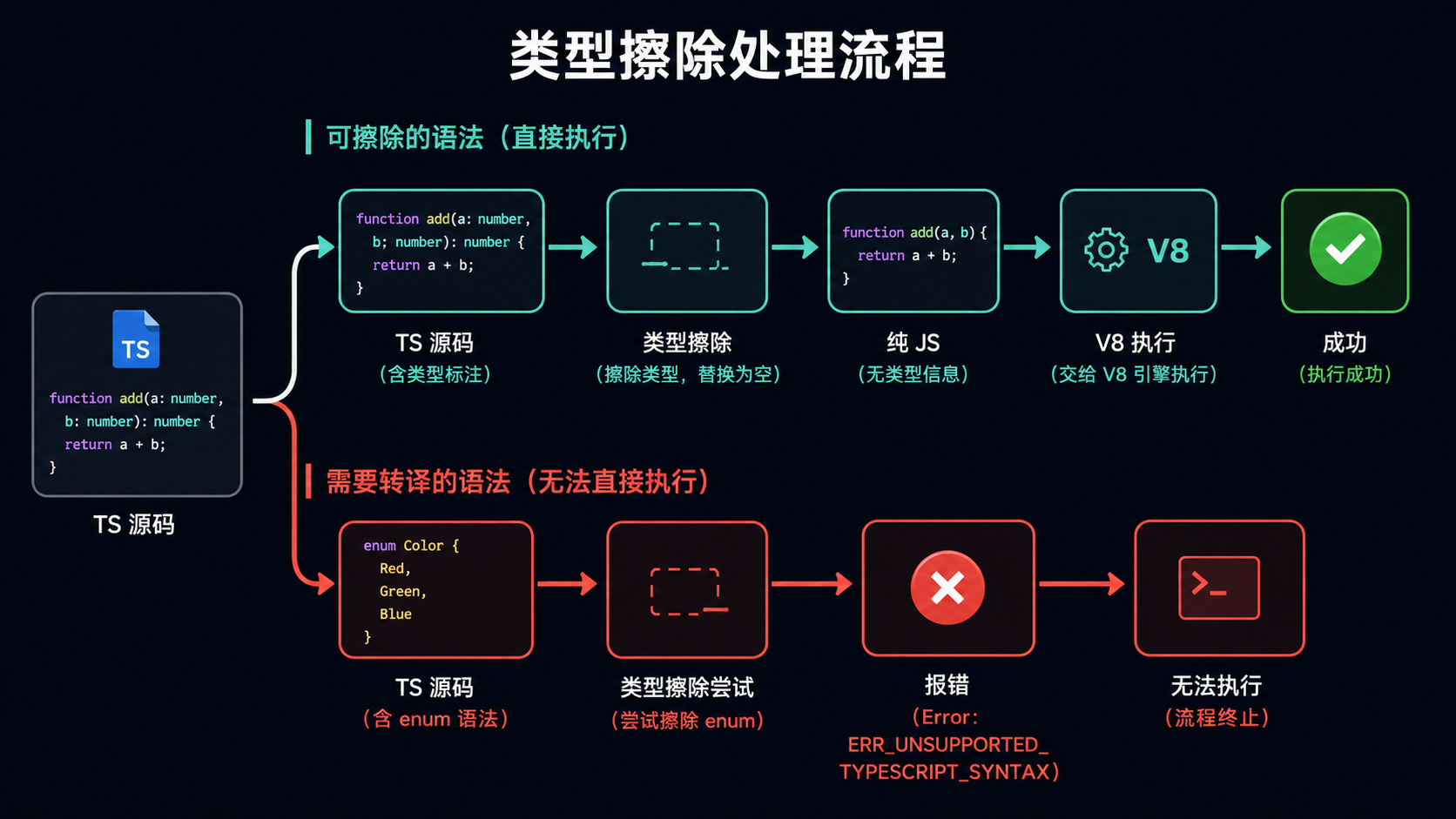
Type Stripping 的原理可以用一句话概括:把 TypeScript 类型注解、接口、类型别名等"可擦除"语法替换成空白字符,然后把剩下的 JavaScript 直接交给 V8 执行。
注意三个关键词:
- 可擦除 ------只处理"删掉不影响运行逻辑"的语法(类型注解、interface、type 别名、
import type)。 - 替换成空白------不是重新生成代码,而是用等长的空白替换被擦除的部分,这样行号不会变,堆栈跟踪能对上源码,也不需要 source map。
- 不做类型检查------Node 不会帮你检查类型错误,它只管把类型擦掉然后跑。
这和 tsc 的完整编译有本质区别。tsc 做两件事:类型检查 + 语法转译(包括生成运行时代码)。Type Stripping 只做了"擦除"这一步中最轻量的部分。
可擦除 vs 需要转译:分界线在哪
判断一种 TypeScript 语法能不能被 Type Stripping 支持,核心标准是:擦掉它之后,剩下的 JavaScript 能不能直接跑?
- 能擦除的 (Node 原生支持):类型注解
let x: number、接口interface、类型别名type、泛型<T>、import type、as断言。 - 不能擦除的 (Node 原生报错):
enum(会生成一个对象)、带运行时代码的namespace、参数属性(constructor(public x: number)会被转译成this.x = x)、装饰器(需要 V8 原生支持或 polyfill)。
为什么 enum 不能擦除?因为 enum Status { Active = 'active' } 在编译后会变成一段真实的 JavaScript 运行时代码(一个双向映射对象)。擦掉它,运行时就没有 Status 这个值了,所以 Node 无法处理。
实现步骤
步骤 1:最小示例------node app.ts 直接运行
确保你的 Node.js 版本 ≥ 22.18 或 ≥ 23.6(在这些版本中 Type Stripping 默认开启)。
typescript
// app.ts
interface User {
  id: number;
  name: string;
  email?: string;
}

function greet(user: User): string {
  return `Hello, ${user.name}! (ID: ${user.id})`;
}

const alice: User = { id: 1, name: 'Alice', email: 'alice@example.com' };
const bob: User = { id: 2, name: 'Bob' };

console.log(greet(alice));
console.log(greet(bob));
直接运行,不需要任何标志:
bash
node app.ts输出:
text
Hello, Alice! (ID: 1)
Hello, Bob! (ID: 2)
这个示例只用了 interface、类型注解和可选属性,全部是可擦除语法,所以 Type Stripping 能正常处理。
步骤 2:Type Stripping 不做类型检查
上面说了 Type Stripping 不检查类型。我们来验证一下------下面这段代码有明显的类型错误,但 Node 照跑不误:
typescript
// no-check.ts
function add(a: number, b: number): number {
  return a + b;
}

// 类型标注是 number,但传入 string ------ tsc 会报错,Node 不会
const result = add('hello', 'world');
console.log(result); // 输出 "helloworld"
bash
node no-check.ts输出:
text
helloworldNode 只是把 : number 擦掉了,然后执行 function add(a, b) { return a + b; },JavaScript 本身不做类型检查,所以正常运行。
这意味着:如果你只用 node app.ts 跑代码而不加 tsc --noEmit,类型错误会一路带到运行时。 后面会讲怎么把类型检查补上。
步骤 3:常见报错复现------enum、参数属性、装饰器
enum 报错
typescript
// enum-error.ts
enum Status {
  Active = 'active',
  Pending = 'pending',
  Archived = 'archived',
}

console.log(Status.Active);
bash
node enum-error.ts报错:
text
enum-error.ts:1:6 - error ERR_UNSUPPORTED_TYPESCRIPT_SYNTAX原因前面讲过:enum 需要生成运行时代码,Type Stripping 只擦除不生成。
参数属性报错
typescript
// param-prop-error.ts
class User {
  // 参数属性语法:constructor(public name, private age)
  // tsc 会转译成 this.name = name; this.age = age;
  constructor(
    public name: string,
    private age: number,
  ) {}

  greet() {
    return `I'm ${this.name}`;
  }
}

const u = new User('Alice', 30);
console.log(u.greet());
bash
node param-prop-error.ts同样报 ERR_UNSUPPORTED_TYPESCRIPT_SYNTAX,因为参数属性的 public/private/readonly 前缀需要转译成赋值语句。
步骤 4:import type 与路径扩展名的坑
Type Stripping 有两个容易踩的行为差异,从 tsx/ts-node 迁移过来时最容易遇到。
import 必须带 type 关键字
typescript
// types.ts
export type UserID = number;
export interface Profile {
  name: string;
  age: number;
}
export function createUser(id: number): Profile {
  return { name: 'Anonymous', age: 0 };
}
typescript
// main.ts ------ 正确写法:类型导入必须加 type 关键字
import type { UserID, Profile } from './types.ts';
import { createUser } from './types.ts';

const id: UserID = 42;
const user: Profile = createUser(id);
console.log(user);
typescript
// main-broken.ts ------ 错误写法:类型当值导入,运行时报错
import { UserID, Profile } from './types.ts'; // 运行时报错!

console.log(UserID); // ERR: UserID is not defined
因为 Type Stripping 不会去分析 UserID 到底是类型还是值,不加 type 关键字它会当成值导入,运行时就找不到。
import 路径必须带文件扩展名
typescript
// ❌ 传统写法,Node 原生模式报错
import { createUser } from './types';

// ✅ 必须带 .ts 扩展名
import { createUser } from './types.ts';
Node.js 原生 ESM 规范要求 import 必须带完整扩展名,Type Stripping 也不会帮你自动补全。
步骤 5:用 tsconfig.json 配合 tsc --noEmit 补上类型检查
既然 Node 不做类型检查,标准做法是:Node 负责跑,tsc 负责查。
在项目根目录创建 tsconfig.json(注意:Node 不读这个文件,它是给 tsc 用的):
json
{
  "compilerOptions": {
    "noEmit": true,
    "target": "esnext",
    "module": "nodenext",
    "strict": true,
    "rewriteRelativeImportExtensions": true,
    "erasableSyntaxOnly": true,
    "verbatimModuleSyntax": true,
    "allowImportingTsExtensions": true
  }
}
逐项解释:
noEmit: true------只做类型检查,不输出.js文件(Node 自己会跑.ts)。erasableSyntaxOnly: true------TS 5.8+ 新增 ,一旦你写了enum、参数属性等不可擦除语法,tsc会在检查阶段就报错提醒你,而不是等到 Node 运行时才炸。这是用 Node 原生 Type Stripping 时最重要的防线。verbatimModuleSyntax: true------强制要求类型导入必须用import type,和 Node 的行为一致。rewriteRelativeImportExtensions: true------TS 5.7+ 新增,如果你之后需要用tsc构建发布.js,它会把.ts导入路径重写成.js。allowImportingTsExtensions: true------允许 import 语句带.ts扩展名。
然后在 package.json 中配置脚本:
json
{
  "name": "my-typescript-app",
  "type": "module",
  "scripts": {
    "typecheck": "tsc --noEmit",
    "start": "node src/index.ts",
    "dev": "node --watch src/index.ts"
  }
}
工作流变成:
bash
# 开发时:边写边检查类型
npm run typecheck    # 类型检查(不输出文件)
npm run dev          # 直接跑 .ts(带热重载)

# 生产时:node src/index.ts 直接跑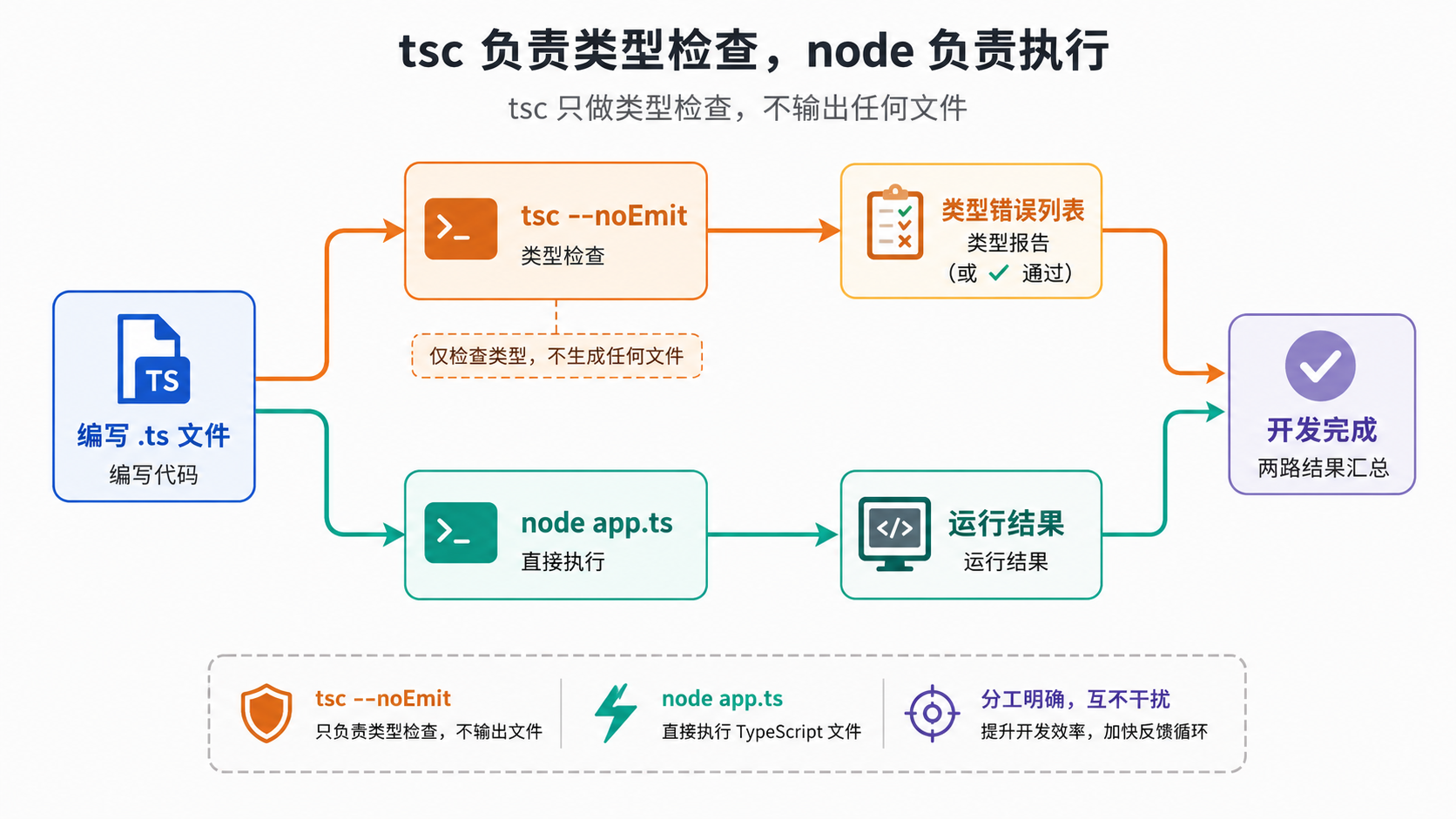
代码示例:完整的可运行项目
把上面的步骤组合成一个完整示例:
text
my-app/
├── package.json
├── tsconfig.json
└── src/
    ├── types.ts
    ├── utils.ts
    └── index.ts
typescript
// src/types.ts
export type TaskStatus = 'pending' | 'running' | 'done' | 'failed';

export interface Task {
  id: number;
  title: string;
  status: TaskStatus;
}

// 注意:不能用 enum,要用 const 对象 + 联合类型替代
const Priority = {
  Low: 'low',
  Medium: 'medium',
  High: 'high',
} as const;

type Priority = (typeof Priority)[keyof typeof Priority];

export { Priority };
typescript
// src/utils.ts
import type { Task, TaskStatus } from './types.ts';

export function createTask(id: number, title: string): Task {
  return { id, title, status: 'pending' as TaskStatus };
}

export function formatTask(task: Task): string {
  return `[${task.status.toUpperCase()}] #${task.id} ${task.title}`;
}
typescript
// src/index.ts
import { createTask, formatTask } from './utils.ts';
import { Priority } from './types.ts';

const tasks = [
  createTask(1, 'Setup project'),
  createTask(2, 'Write tests'),
  createTask(3, 'Deploy'),
];

for (const task of tasks) {
  console.log(formatTask(task));
}

console.log('Default priority:', Priority.Medium);
运行:
bash
npm run typecheck   # 先检查类型
npm start           # 再运行
输出:
text
[PENDING] #1 Setup project
[PENDING] #2 Write tests
[PENDING] #3 Deploy
Default priority: medium
注意这个项目全程没有 enum,用了 as const 对象 + 联合类型替代,所以 Node 原生 Type Stripping 完全够用。
运行结果与效果说明
| 操作 | 命令 | 结果 |
|---|---|---|
| 直接运行纯类型注解代码 | node app.ts |
正常运行,无需任何标志 |
| 类型错误代码 | node no-check.ts |
正常运行(不检查类型),输出错误结果 |
| enum 代码 | node enum-error.ts |
ERR_UNSUPPORTED_TYPESCRIPT_SYNTAX |
| 参数属性代码 | node param-prop-error.ts |
ERR_UNSUPPORTED_TYPESCRIPT_SYNTAX |
| 类型检查 | tsc --noEmit |
检查所有类型错误,不输出文件 |
| 热重载开发 | node --watch src/index.ts |
文件改动自动重启 |
常见问题与避坑
1. 路径别名(paths)不生效
tsconfig.json 里的 paths(如 @/* 映射到 src/*)Node 完全不读 。Node 不解析 tsconfig.json。
替代方案 :使用 Node.js 原生的 subpath imports,在 package.json 中配置:
json
{
  "imports": {
    "#*": "./src/*"
  }
}
然后代码中:
typescript
import { createTask } from '#utils.ts';subpath imports 必须以 # 开头,这是 Node.js 原生支持的特性,不依赖 tsconfig。
2. .tsx 文件不支持
.tsx 文件(JSX + TypeScript)完全不被支持,Node 会直接报错。因为 JSX 的处理依赖于具体框架(React、Solid、Preact 各有不同),Node 无法统一处理。
如果你的项目有 .tsx 文件,必须使用 tsx 或构建工具。
3. 从 tsx 迁移过来,import 路径报错
tsx / ts-node 会自动帮你补全 .ts 扩展名、处理 paths 别名、支持 enum。迁移到 Node 原生模式时,这些都会成为报错点。迁移清单:
- 所有
import './foo'改成import './foo.ts' - 所有
paths别名改成 subpath imports - 所有
enum改成as const对象或加构建步骤 - 所有类型导入加
type关键字
4. node_modules 里的 TypeScript 文件不会被处理
Node.js 有意拒绝处理 node_modules 路径下的 TypeScript 文件,防止包作者直接发布 .ts 源码。如果你依赖的包只提供了 .ts 入口,Node 原生模式跑不了,需要 tsx 或构建步骤。
5. REPL 和 --check 不支持 TypeScript
Type Stripping 不支持 Node REPL(交互式命令行)、--check 标志和 inspect 调试器中的 TypeScript 语法。--eval 和 stdin 可以通过 --input-type=module 启用。
Node 26 移除 transform-types:影响与迁移
这是 2026 年最需要关注的变化。Node.js 26.0.0(2026 年 5 月)移除了 --experimental-transform-types 标志,没有提供替代方案。
之前这个标志做什么
在 Node 22.7 到 25 期间,--experimental-transform-types 可以让 Node 处理 enum、namespace、参数属性等需要转译的语法。很多教程和项目在 2024-2025 年间采用它作为"Node 原生跑完整 TypeScript"的方案。
谁会受影响
如果你的项目中存在以下任一情况,升级到 Node 26 后会出问题:
- Dockerfile / 部署脚本 / CI 配置中有
--experimental-transform-types - 代码中使用了
enum并依赖这个标志直接运行 - 运行在自动升级 Node 版本的托管平台(如 Vercel、Lambda),平台切到 Node 26 LTS 后会自动中断
报错信息和普通的 Type Stripping 报错一样:ERR_UNSUPPORTED_TYPESCRIPT_SYNTAX,指向你的 enum 声明行。
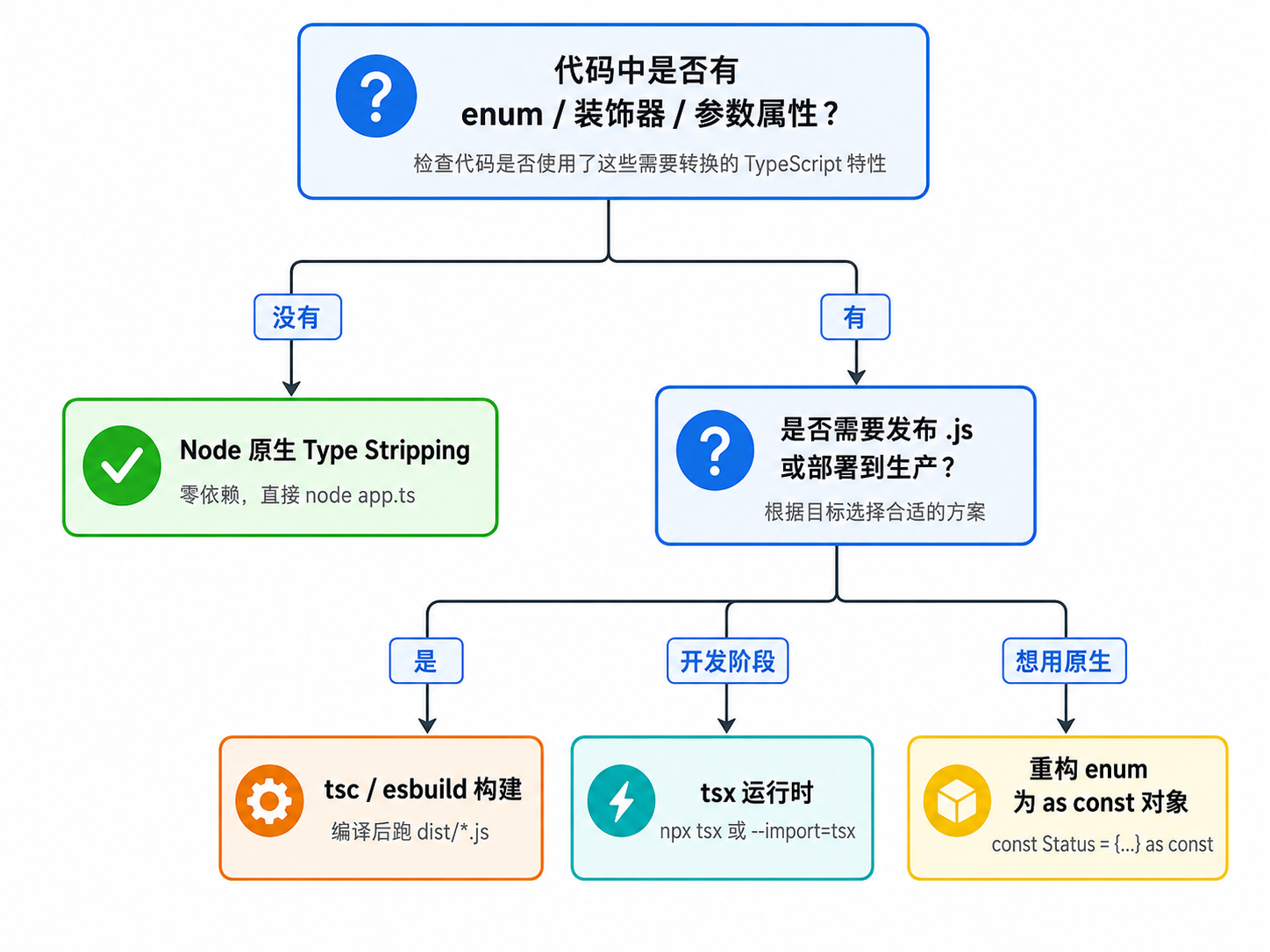
迁移方案(三选一)
方案 A:加构建步骤(推荐生产环境)
用 tsc、esbuild 或 swc 在部署前编译成 JavaScript,然后运行 .js。这是最稳定的方案,适用所有 Node 版本:
json
{
  "scripts": {
    "build": "tsc",
    "start": "node dist/index.js"
  }
}
方案 B:用 tsx 作为运行时
tsx 基于 esbuild,支持完整 TypeScript 语法(包括 enum),且适用于所有 Node 版本:
bash
npx tsx src/index.ts
# 或
node --import=tsx src/index.ts
方案 C:重构 enum 为 const 对象
如果你的项目不大,直接把 enum 改成 as const 模式,就能用 Node 原生 Type Stripping:
typescript
// 原来的 enum(Node 原生不支持)
enum Status {
  Active = 'active',
  Pending = 'pending',
}

// 改成 const 对象 + 联合类型(Node 原生支持)
const Status = {
  Active: 'active',
  Pending: 'pending',
} as const;

type Status = (typeof Status)[keyof typeof Status];
erasableSyntaxOnly: true(TS 5.8+)可以在 tsc --noEmit 阶段帮你找出所有需要重构的 enum。
选型决策:Node 原生 vs tsx vs ts-node vs tsc 构建
| 方案 | 依赖 | enum/装饰器/JSX | tsconfig paths | 类型检查 | 适用场景 |
|---|---|---|---|---|---|
| Node 原生 Type Stripping | 无 | 不支持 | 不支持(用 subpath imports) | 需配 tsc --noEmit | 脚本、小工具、纯可擦除语法的项目 |
| tsx | 外部包 | 支持 | 支持 | 需另配 | 开发调试、需要完整 TS 语法的中小项目 |
| ts-node | 外部包 | 支持 | 支持 | 需另配 | 老项目维护(新项目推荐 tsx) |
| tsc 构建 + node dist | 无额外运行时 | 支持 | 支持 | 构建时自带 | 生产部署、需要发布 .js 的项目 |
选型建议
- 写脚本、CLI 工具、一次性任务 :直接
node script.ts,最轻量。 - 中小型后端项目,不用 enum 和装饰器 :Node 原生 +
tsc --noEmit类型检查,零运行时依赖。 - 项目里大量使用 enum、装饰器、JSX :开发用
tsx,生产用tsc或esbuild构建后跑.js。 - 需要发布到 npm 或部署到只认 .js 的平台 :必须加构建步骤,输出
.js。
一个实用的决策函数:
typescript
function chooseRunner(opts: {
  hasEnums: boolean;
  hasDecorators: boolean;
  hasJsx: boolean;
  needsBuild: boolean;
  nodeVersion: number;
}): string {
  // 需要构建发布的,直接 tsc
  if (opts.needsBuild) return 'tsc build + node dist';

  // 用了 Node 原生不支持的语法
  if (opts.hasEnums || opts.hasDecorators || opts.hasJsx) {
    return 'tsx (开发) + tsc (生产构建)';
  }

  // Node 22.18+ 原生就够
  if (opts.nodeVersion >= 22.18) {
    return 'node 原生 + tsc --noEmit 类型检查';
  }

  // 低版本 Node
  return 'tsx';
}
总结
Node.js 原生 Type Stripping 是一个实用但被广泛误解的功能。它做的事情很简单:把可擦除的类型语法替换成空白,然后执行剩下的 JavaScript。它不是"内置 tsc",不做类型检查,不读 tsconfig,不支持 enum、装饰器、参数属性和 JSX。
实际使用中记住三条主线:
- Node 原生 +
tsc --noEmit是零运行时依赖的组合:Node 负责跑,tsc 负责查类型,配合erasableSyntaxOnly: true可以在检查阶段就拦截不可擦除语法。 - Node 26 移除了
--experimental-transform-types,如果你的代码有 enum 并依赖这个标志,升级前必须迁移:加构建步骤、换 tsx,或重构 enum 为as const对象。 - 选型的核心问题是"你的代码里有没有 Node 擦不掉的语法"。没有就用原生,有就用 tsx 或构建工具,不要在生产环境依赖实验性标志。