------------基于统一协议与配置驱动的通用桌面启动方案
在进阶篇中,我们已经实现了:
- 在多版本桌面程序共存的情况下,实现"可控、可扩展、可演进"的版本选择机制
本篇作为 终极版,核心目标不再只是「多版本」,而是:
在多个软件的一套统一唤醒规则以及实现
为什么需要"统一的规则"?
当前的专用 Launcher 方案面临几个直接问题:
❌ 每接入一个软件,都要注册新协议、编写新脚本
❌ URL 解析、路径校验和启动逻辑被重复实现
❌ exe 路径、软件版本和业务逻辑硬编码在 Launcher 中
❌ 新增应用需要同时修改注册表、脚本和 Web 页面
❌ 不同电脑的安装路径不同,统一部署困难
例如打开多个软件
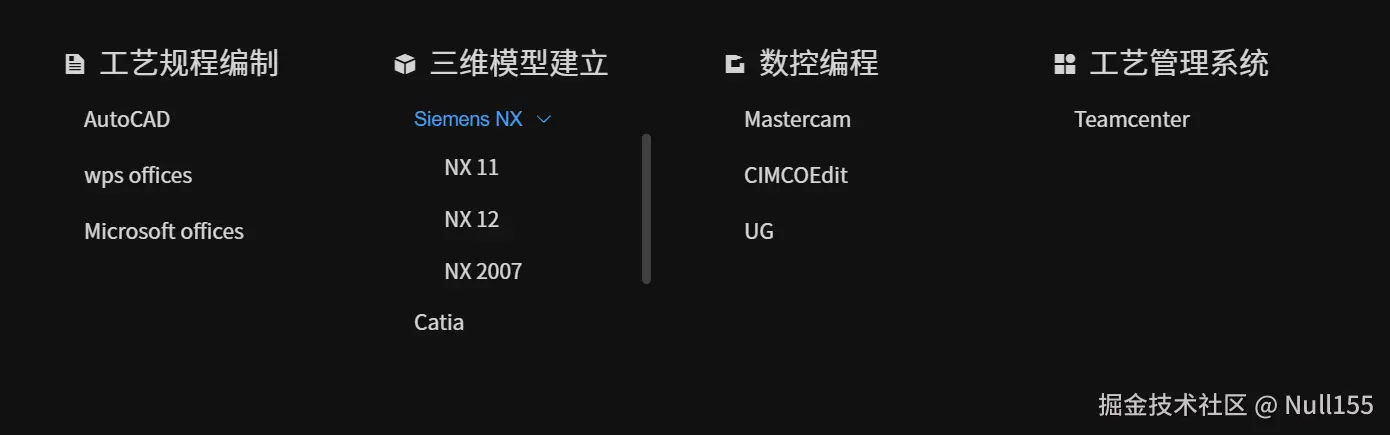
因此我们需要的是 "一套规则和抽象的逻辑"
整体架构设计
text
浏览器 / Web 系统
|
| launcher://open?app=<AppKey>¶m1=***¶m2=***
v
Windows 自定义协议(launcher)
|
| 原样转发完整 URL
v
launcher.bat
|
| 解析参数并读取对应 cfg
v
config\<AppKey>.cfg
|
| 通用配置 + 少量应用特殊处理
v
启动配置中的 exe统一调用格式:
text
launcher://open?app=<AppKey>[,param1=<值>][,param2=<值>]浏览器只表达"启动哪个应用、携带哪些参数",本地 Launcher 决定应用路径、环境准备和启动方式。
整个方案分为四层:
- Web 层:构造启动意图。
- 协议层:转交完整 URL。
- 调度层:解析参数、选择配置、处理应用差异。
- 配置层:保存各应用在本机的启动信息。
新增普通应用只需增加一个配置文件。只有无法配置化的差异,才在 Launcher 中增加小范围分支。
最终目录结构
text
Launcher/
├── launcher.bat
├── install.bat
├── uninstall.bat
├── launcher.reg
├── 浏览器唤起Launcher.html
└── config/
    ├── _template.cfg
    ├── wps.cfg
    └── vscode.cfg
第一步:注册统一协议
注册表只负责转发,不判断应用,也不保存软件路径。
install.bat
shell
@echo off
setlocal

set "INSTALL_ROOT=%~dp0"
set "LAUNCHER=%INSTALL_ROOT%launcher.bat"

if not exist "%LAUNCHER%" (
    echo [install] launcher.bat not found: %LAUNCHER%
    pause
    exit /b 1
)

reg add "HKCR\launcher" /ve /d "URL:Launcher Protocol" /f
if errorlevel 1 goto reg_fail
reg add "HKCR\launcher" /v "URL Protocol" /d "" /f
if errorlevel 1 goto reg_fail
reg add "HKCR\launcher\shell\open\command" /ve /d "\"%LAUNCHER%\" \"%%1\"" /f
if errorlevel 1 goto reg_fail

if not exist "%APPDATA%\Launcher\config" mkdir "%APPDATA%\Launcher\config"

echo [install] OK
echo Protocol: launcher://
echo Launcher: %LAUNCHER%
pause
exit /b 0

:reg_fail
echo [install] Failed to write registry. Try Run as Administrator.
pause
exit /b 1
写入 HKEY_CLASSES_ROOT 失败时,以管理员身份运行安装脚本。
launcher.reg
reg
Windows Registry Editor Version 5.00

; 导入前,将路径改为本机 launcher.bat 的实际位置

[HKEY_CLASSES_ROOT\launcher]
@="URL:Launcher Protocol"
"URL Protocol"=""

[HKEY_CLASSES_ROOT\launcher\shell\open\command]
@="\"D:\\Tools\\Launcher\\launcher.bat\" \"%1\""
核心关系只有一条:
text
launcher://... → "launcher.bat" "%1"双引号不能省略,否则 URL 中的特殊字符可能被 CMD 当成命令分隔符。
第二步:设计应用配置
每个应用对应一个 .cfg,文件名就是 URL 中的 AppKey。
config_template.cfg
ini
; app=sample 对应 sample.cfg

; 应用程序完整路径,必填
exe=C:\Path\To\Application.exe

; 可选:应用资源或扩展目录
resource=C:\Path\To\Resource

; 可选:任意值的写入,例如写入环境变量
env.resource=APP_RESOURCE_DIR
env.param1=APP_PARAM_1
env.param2=APP_PARAM_2
配置查找顺序:
%APPDATA%\Launcher\config\<AppKey>.cfg<安装目录>\config\<AppKey>.cfg
用户配置优先,可以覆盖不同电脑的安装路径。
案例一:WPS
WPS 属于普通启动案例,只需配置 exe:
ini
; config\wps.cfg
exe=C:\Program Files\Example\WPS\wps.exe
text
launcher://open?app=wps示例路径需要替换为本机真实路径。
案例二:VS Code
VS Code 用来展示"启动时还要传入目录"的情况:
ini
; config\vscode.cfg
exe=C:\Program Files\Microsoft VS Code\Code.exe
text
launcher://open?app=vscode,param1=D:\Workspace\Example它的启动参数形式与普通软件不同,稍后在 launcher.bat 中保留一个小范围特殊分支。
第三步:实现 launcher.bat
最终方案不再调用 BAT/PS1 插件,也不经过额外 EXE。解析、配置读取、特殊处理和启动都在同一个批处理上下文中完成。
bat
@echo off
chcp 65001 >nul
setlocal EnableExtensions EnableDelayedExpansion

set "INSTALL_DIR=%~dp0"
set "CONFIG_DIR=%INSTALL_DIR%config"
set "USER_CONFIG_DIR=%APPDATA%\Launcher\config"

set "RAW_URL=%~1"
if not defined RAW_URL (
    echo [launcher] Missing URL argument.
    exit /b 1
)

:: 清理协议前缀
set "PARAMS=!RAW_URL!"
set "PARAMS=!PARAMS:launcher://open/=!"
set "PARAMS=!PARAMS:launcher://open?=!"
set "PARAMS=!PARAMS:launcher://open=!"
if defined PARAMS if "!PARAMS:~0,1!"=="?" set "PARAMS=!PARAMS:~1!"

:: 同时兼容英文逗号和 &
set "APP="
set "PARAM1="
set "PARAM2="
set "P=!PARAMS:&=,!"

:parse_loop
if not defined P goto parse_done
for /f "tokens=1* delims=," %%A in ("!P!") do (
    set "PAIR=%%A"
    set "P=%%B"
    call :trim PAIR "!PAIR!"
    if /i "!PAIR:~0,4!"=="app=" set "APP=!PAIR:~4!"
    if /i "!PAIR:~0,7!"=="param1=" set "PARAM1=!PAIR:~7!"
    if /i "!PAIR:~0,7!"=="param2=" set "PARAM2=!PAIR:~7!"
)
goto parse_loop

:parse_done
call :trim APP "!APP!"
if not defined APP (
    echo [launcher] Missing app= in URL.
    exit /b 1
)

:: 禁止路径字符和空格
set "APP_SAFE=!APP!"
set "APP_SAFE=!APP_SAFE:\=!"
set "APP_SAFE=!APP_SAFE:/=!"
set "APP_SAFE=!APP_SAFE: =!"
if not "!APP_SAFE!"=="!APP!" (
    echo [launcher] Invalid app name: !APP!
    exit /b 1
)

:: 查找配置,用户配置优先
set "CFG_FILE="
if exist "%USER_CONFIG_DIR%\!APP!.cfg" (
    set "CFG_FILE=%USER_CONFIG_DIR%\!APP!.cfg"
) else if exist "%CONFIG_DIR%\!APP!.cfg" (
    set "CFG_FILE=%CONFIG_DIR%\!APP!.cfg"
) else (
    echo [launcher] App config not found: !APP!.cfg
    exit /b 1
)

:: 读取配置
set "EXE="
set "RESOURCE="
set "ENV_RESOURCE="
set "ENV_PARAM1="
set "ENV_PARAM2="

for /f "usebackq eol=; tokens=1,* delims==" %%K in ("!CFG_FILE!") do (
    set "KEY=%%K"
    set "VAL=%%L"
    call :trim KEY "!KEY!"
    call :trim VAL "!VAL!"
    if /i "!KEY!"=="exe" set "EXE=!VAL!"
    if /i "!KEY!"=="resource" set "RESOURCE=!VAL!"
    if /i "!KEY!"=="env.resource" set "ENV_RESOURCE=!VAL!"
    if /i "!KEY!"=="env.param1" set "ENV_PARAM1=!VAL!"
    if /i "!KEY!"=="env.param2" set "ENV_PARAM2=!VAL!"
)

if not defined EXE (
    echo [launcher] exe= not set in !CFG_FILE!
    exit /b 1
)
if not exist "!EXE!" (
    echo [launcher] Invalid exe path in config.
    echo Config: !CFG_FILE!
    echo EXE: !EXE!
    exit /b 1
)

:: 当前进程立即生效,并按需持久化
if defined ENV_RESOURCE if defined RESOURCE (
    set "!ENV_RESOURCE!=!RESOURCE!"
    setx !ENV_RESOURCE! "!RESOURCE!" >nul
)
if defined ENV_PARAM1 if defined PARAM1 (
    set "!ENV_PARAM1!=!PARAM1!"
    setx !ENV_PARAM1! "!PARAM1!" >nul
)
if defined ENV_PARAM2 if defined PARAM2 (
    set "!ENV_PARAM2!=!PARAM2!"
    setx !ENV_PARAM2! "!PARAM2!" >nul
)

:: 少量无法配置化的应用差异
if /i "!APP!"=="vscode" (
    if defined PARAM1 (
        start "" "!EXE!" "!PARAM1!"
    ) else (
        start "" "!EXE!"
    )
    exit /b 0
)

:: 某类应用需要把参数写入临时文件
if /i "!APP!"=="special_app" (
    if defined PARAM1 >"%TEMP%\launcher-task.txt" echo(!PARAM1!
)

:: 普通应用统一启动
start "" "!EXE!"
exit /b 0

:trim
setlocal EnableDelayedExpansion
set "STR=%~2"
:trim_left
if defined STR if "!STR:~0,1!"==" " set "STR=!STR:~1!" & goto trim_left
:trim_right
if defined STR if "!STR:~-1!"==" " set "STR=!STR:~0,-1!" & goto trim_right
endlocal & set "%~1=%STR%"
goto :eof
主流程始终一致:
text
完整 URL → 解析参数 → 查找 cfg → 准备环境 → 特殊处理 → 启动应用路径、变量映射等静态差异放入 cfg;普通应用走统一流程;只有启动参数形式、临时文件等行为才增加应用分支。
第四步:浏览器构造唤起链接
html
<!doctype html>
<html lang="zh-CN">
  <head>
    <meta charset="UTF-8" />
    <meta name="viewport" content="width=device-width, initial-scale=1.0" />
    <title>浏览器唤起桌面应用</title>
  </head>
  <body>
    <h2>launcher:// 统一唤起</h2>
    <select id="app">
      <option value="wps">WPS</option>
      <option value="vscode">VS Code</option>
    </select>
    <input id="param1" placeholder="例如 VS Code 工作目录" />
    <button id="openBtn">唤起</button>

    <script>
      document.getElementById("openBtn").addEventListener("click", function () {
        var app = document.getElementById("app").value;
        var param1 = document.getElementById("param1").value;
        var params = ["app=" + encodeURIComponent(app)];
        if (param1) params.push("param1=" + encodeURIComponent(param1));
        window.location.href = "launcher://open?" + params.join(",");
      });
    </script>
  </body>
</html>
浏览器不保存 exe 路径,也不判断软件是否安装,只传递 AppKey 和可选参数。
第五步:卸载
uninstall.bat
bat
@echo off
setlocal

set "USER_CONFIG=%APPDATA%\Launcher\config"
reg delete "HKCR\launcher" /f >nul 2>&1
echo [uninstall] launcher:// protocol removed.

if exist "%USER_CONFIG%" (
    rmdir /s /q "%USER_CONFIG%"
    echo [uninstall] User config removed.
)
if exist "%APPDATA%\Launcher" rmdir "%APPDATA%\Launcher" 2>nul

echo [uninstall] Done.
pause
卸载脚本删除协议和用户覆盖配置,不删除安装目录,避免误删用户文件。
安装与测试
- 将文件放在同一目录,以管理员身份运行
install.bat。 - 把
wps.cfg、vscode.cfg中的exe=改为本机路径。 - 先测试
launcher://open?app=wps。 - 再测试
launcher://open?app=vscode,param1=D:\Workspace\Example。
失败时按顺序检查:协议注册、注册表脚本路径、AppKey 与 cfg 文件名、exe 路径、特殊字符以及应用是否需要特殊启动处理。

成果展示
更进一步:插件化的终极目标
当前方案最终落地为:
text
统一协议 + 配置驱动 + 单一 Launcher + 少量明确的特殊处理它缩短了调用链,解决了现阶段的启动问题,但少量应用差异仍留在 launcher.bat 中。
最初设想的插件化架构、BAT/PowerShell 插件代码、EXE 中转尝试、参数踩坑与失败结论,已拆分为独立文章:
✅ 总结
进阶篇解决"同一个软件有多个版本时启动哪一个",终极篇解决"软件类型、机器环境和启动参数不断增加时如何统一管理"。
当前真正解决问题的关键,是缩短调用链,让参数在同一个批处理上下文中完成解析、准备和启动。
用 Web 表达意图,用配置隔离机器差异,用 Launcher 收敛桌面启动能力。