UI 卡片渲染系统 ------ 让 Agent 不再只会"说话"
这不是一个"给聊天加个气泡"的教程。 我们要做的,是一个真正能 让 Agent 调用工具渲染交互式卡片 、支持用户点击选择 、交互结果回传给 Agent 继续对话 的 UI 卡片系统。 从方案选型到流式参数累积,从三层连环 Bug 到注册表模式,每一步都写清楚为什么这么做。
目录
- [回顾与问题:Agent 只能"说话"吗?](#回顾与问题:Agent 只能"说话"吗? "#1-%E5%9B%9E%E9%A1%BE%E4%B8%8E%E9%97%AE%E9%A2%98agent-%E5%8F%AA%E8%83%BD%E8%AF%B4%E8%AF%9D%E5%90%97")
- 方案选型:六条路里挑一条
- 整体架构:一张图看清数据流
- [后端工具定义:让 Agent 学会"画图"](#后端工具定义:让 Agent 学会"画图" "#4-%E5%90%8E%E7%AB%AF%E5%B7%A5%E5%85%B7%E5%AE%9A%E4%B9%89%E8%AE%A9-agent-%E5%AD%A6%E4%BC%9A%E7%94%BB%E5%9B%BE")
- 流式参数累积:一个绕不开的坑
- 前端卡片注册表:开闭原则的实践
- [卡片交互闭环:从点击到 Agent 继续思考](#卡片交互闭环:从点击到 Agent 继续思考 "#7-%E5%8D%A1%E7%89%87%E4%BA%A4%E4%BA%92%E9%97%AD%E7%8E%AF%E4%BB%8E%E7%82%B9%E5%87%BB%E5%88%B0-agent-%E7%BB%A7%E7%BB%AD%E6%80%9D%E8%80%83")
- [三层连环 Bug:一次真实的崩溃排查](#三层连环 Bug:一次真实的崩溃排查 "#8-%E4%B8%89%E5%B1%82%E8%BF%9E%E7%8E%AF-bug%E4%B8%80%E6%AC%A1%E7%9C%9F%E5%AE%9E%E7%9A%84%E5%B4%A9%E6%BA%83%E6%8E%92%E6%9F%A5")
- [未来演进:从注册表到 A2UI 协议](#未来演进:从注册表到 A2UI 协议 "#9-%E6%9C%AA%E6%9D%A5%E6%BC%94%E8%BF%9B%E4%BB%8E%E6%B3%A8%E5%86%8C%E8%A1%A8%E5%88%B0-a2ui-%E5%8D%8F%E8%AE%AE")
- 回顾与展望
1. 回顾与问题:Agent 只能"说话"吗?
在前六篇文章中,我们的 Agent 已经具备了不少能力:
| 篇目 | 能力 |
|---|---|
| 第一篇 | 项目初始化与基础 Agent |
| 第二篇 | 文件系统操作与 Backend |
| 第三篇 | 工具调用与 Permissions |
| 第四篇 | 持久记忆与 Skills |
| 第五篇 | 子 Agent 与任务委派 |
| 第六篇 | Human-in-the-loop 中断审批 |
但有一个问题始终存在------Agent 和用户之间的沟通方式,只有纯文本。
想象一下这个场景:
md
用户:帮我查一下最近的订单

Agent:好的,以下是您的订单列表:

1. ORD-2024-001  MacBook Pro 14"  ¥14,999  已完成
2. ORD-2024-002  iPhone 15 Pro    ¥8,999   运输中
3. ORD-2024-003  AirPods Pro      ¥1,999   待发货
...

请问您想查看哪个订单的详情?用户看到一坨文字,得手动复制订单号再发回去。这体验,跟 2005 年的 BBS 没什么区别。
如果 Agent 能直接渲染一个可点击的订单列表卡片呢?用户点一下就能看到详情,交互结果自动回传给 Agent------这才是 2026 年该有的样子。
2. 方案选型:六条路里挑一条
在动手写代码之前,我先花了两天时间调研了业界的做法。结果发现,"让 Agent 渲染 UI"这个问题,至少有六种解法。
2.1 六种方案一览
| 方案 | 原理 | 实现复杂度 | LLM 友好度 | 交互能力 | 类型安全 | 流式渲染 |
|---|---|---|---|---|---|---|
| A: Markdown 扩展 | Agent 输出自定义容器语法,前端解析渲染 | 中 | 高 | 低 | 低 | 高 |
| B: 服务端 HTML | 后端直接返回 HTML 片段,前端 dangerouslySetInnerHTML |
低 | 中 | 低 | 低 | 中 |
| C: Server-Driven UI | 后端返回 UI Schema JSON,前端通用渲染器动态组装 | 高 | 中 | 高 | 高 | 低 |
| D: React Server Components | 后端返回序列化的 React 组件树 | 极高 | 低 | 高 | 高 | 高 |
| E: Vega-Lite 图表 | Agent 输出 Vega-Lite spec,前端渲染图表 | 低 | 高 | 中 | 高 | 低 |
| F: 工具调用 + 卡片注册表 | Agent 调用工具传 type+data,前端注册表匹配组件 | 中 | 中 | 高 | 中 | 低 |
2.2 逐一拆解
方案 A:Markdown 扩展
Agent 输出 Markdown,前端用 markdown-it-container 识别自定义容器:
markdown
:::order-list{title="您的订单列表"}
| 订单号 | 商品 | 金额 | 状态 |
|--------|------|------|------|
| ORD-001 | MacBook Pro | ¥14999 | 已完成 |
:::- ✅ LLM 最擅长的输出格式,流式渲染极好------逐 token 输出即可
- ❌ 无法支持交互------纯静态内容,点击回调做不了
- 适合:只读展示(表格、列表),不需要用户操作
方案 B:服务端 HTML
后端工具直接拼 HTML 字符串,前端用 dangerouslySetInnerHTML 渲染。
- ✅ 实现最简单,前端零逻辑
- ❌ XSS 风险------必须用 DOMPurify sanitize,否则 LLM 生成的 HTML 可能注入恶意脚本
- ❌ LLM 拼 HTML 容易出错(标签不闭合、属性格式不对)
- 适合:内部工具、快速原型
方案 C:Server-Driven UI(代表:Adaptive Cards / Slack Block Kit)
后端返回 UI Schema JSON,前端有一套通用组件库根据 Schema 动态组装:
json
{
  "type": "table",
  "columns": [
    { "header": "订单号", "field": "id" },
    { "header": "金额", "field": "amount", "format": "currency" }
  ],
  "data": [{ "id": "ORD-001", "amount": 14999 }]
}- ✅ 扩展性极高------后端随意组合 UI,前端零改动
- ✅ 安全性好------白名单组件,无 XSS
- ❌ 实现成本高------需要设计完整的 Schema 规范 + 渲染引擎
- 适合:企业级应用、低代码平台
方案 D:React Server Components
- ✅ 完整的 React 交互体验
- ❌ 技术栈绑定严重------必须 Next.js 全栈同构,不适合我们的 WebSocket 场景
- ❌ LLM 无法直接生成 RSC
方案 E:Vega-Lite 图表
Agent 输出 Vega-Lite JSON spec,前端用 react-vega 渲染。
- ✅ LLM 擅长生成结构化 JSON spec
- ✅ 内置丰富的交互(缩放、tooltip、筛选)
- ❌ 仅限图表------做不了订单列表、表单等通用 UI
方案 F:工具调用 + 卡片注册表(我们选的)
Agent 调用 show_ui_card 工具传 type + data,前端根据 type 在注册表中找到对应组件渲染。
- ✅ 前后端解耦------后端只关心数据结构,前端独立维护卡片组件
- ✅ 交互能力强 ------卡片可通过
onAction回调与 Agent 双向通信 - ✅ 类型安全------Zod schema 约束参数结构
- ❌ 每种卡片需要预先开发组件(前端硬编码)
- ❌ 流式渲染受限------需要等工具参数完整才能渲染
2.3 为什么选 F?
核心考量是当前阶段的实际需求:
- 我们需要交互能力(用户点击订单查看详情)→ 排除 A、B
- 我们是 WebSocket 架构,不是 Next.js → 排除 D
- Vega-Lite 只能做图表 → 排除 E(但未来可以共存)
- Server-Driven UI 虽好,但实现成本太高,当前只有两种卡片类型,杀鸡不用牛刀
最终选择:工具调用 + 卡片注册表。简单、够用、交互能力强。 但这不是终点------后面会聊到未来的演进方向。
3. 整体架构:一张图看清数据流
架构确定后,先把整个数据流理清楚。UI 卡片系统涉及 后端工具 → WebSocket 传输 → 前端渲染 → 用户交互 → 回传 Agent 五个步骤:
md
┌──────────────────────────────────────────────────────────────────┐
│                        完整数据流                                 │
│                                                                  │
│  用户:"查看我的订单"                                              │
│       │                                                          │
│       ▼                                                          │
│  ┌─────────┐    tool_call     ┌──────────────┐                   │
│  │  Agent   │ ──────────────► │ show_ui_card  │                   │
│  │ (后端)   │                 │ type:order_list                   │
│  │          │ ◄────────────── │ data:[...]    │                   │
│  │          │   工具结果       └──────────────┘                   │
│  └────┬────┘                                                      │
│       │ WebSocket                                                 │
│       │ { type: 'tool_call', name: 'show_ui_card',                │
│       │   args: { type: 'order_list', data: [...] } }             │
│       ▼                                                           │
│  ┌─────────────────┐                                              │
│  │  useWebSocket    │  检测到 show_ui_card                         │
│  │  (前端 Hook)     │  → 创建 UICardData                          │
│  │                 │  → 挂到 msg.uiCards                          │
│  └────────┬────────┘                                              │
│           ▼                                                       │
│  ┌─────────────────┐    registry.get('order_list')                │
│  │    UICard       │ ──────────────────────────► OrderListCard    │
│  │  (分发组件)      │                                              │
│  └────────┬────────┘                                              │
│           │ 渲染                                                   │
│           ▼                                                       │
│  ┌─────────────────┐                                              │
│  │ OrderListCard   │  用户点击某个订单                              │
│  │  ┌───────────┐  │  → onAction('select_order', order)           │
│  │  │ MacBook ▸ │  │                                              │
│  │  │ iPhone  ▸ │  │                                              │
│  │  │ AirPods ▸ │  │                                              │
│  │  └───────────┘  │                                              │
│  └────────┬────────┘                                              │
│           │ 交互消息                                               │
│           ▼                                                       │
│  ┌─────────────────┐                                              │
│  │  handleCardAction│  → 拼接成交互消息                             │
│  │  (useWebSocket)  │  → 作为新 chat 消息发给 Agent                │
│  └────────┬────────┘                                              │
│           │                                                       │
│           ▼                                                       │
│  Agent 收到交互消息 → 调用 show_ui_card(order_detail) → 渲染详情卡片 │
└──────────────────────────────────────────────────────────────────┘
这张图里有几个关键角色:
| 角色 | 职责 | 文件 |
|---|---|---|
show_ui_card 工具 |
Agent 的"画笔",告诉前端渲染什么卡片 | src/tools.ts |
get_order_history 工具 |
数据源,提供订单数据 | src/tools.ts |
| WebSocket 传输层 | 把 tool_call 事件实时推给前端 | src/server.ts |
useWebSocket Hook |
识别 show_ui_card,构建 UICardData |
frontend/src/hooks/useWebSocket.ts |
UICard 组件 |
根据 type 分发到对应的卡片组件 |
frontend/src/components/UICard.tsx |
cardRegistry |
注册表,维护 type → 组件的映射 | frontend/src/components/cardRegistry.ts |
| 具体卡片组件 | 真正渲染 UI 的组件(OrderListCard 等) | frontend/src/components/cards/ |
下面逐一展开。
4. 后端工具定义:让 Agent 学会"画图"
代码在 src/tools.ts 中。
4.1 思路
Agent 要渲染 UI 卡片,本质上需要两个能力:
- 获取数据 --- 得先知道订单有哪些
- 告诉前端"画什么" --- 不能直接操作 DOM,只能通过工具调用传递意图
所以我们需要两个工具:
| 工具 | 干什么 | 类比 |
|---|---|---|
get_order_history |
查询订单数据 | 翻抽屉找订单 |
show_ui_card |
告诉前端渲染哪种卡片 | 把订单贴到白板上 |
4.2 完整代码
先来看 get_order_history------一个返回模拟数据的查询工具:
typescript
// src/tools.ts

export const getOrderHistoryTool = tool(
  async ({ userId, status }) => {
    // 模拟订单数据(生产环境这里会查数据库)
    const orders = [
      {
        id: 'ORD-2024-001',
        userId: 'u1',
        product: 'MacBook Pro 14"',
        amount: 14999,
        quantity: 1,
        status: 'completed',
        date: '2024-01-15',
        address: '北京市朝阳区xxx路xxx号',
        tracking: 'SF1234567890',
      },
      {
        id: 'ORD-2024-002',
        userId: 'u1',
        product: 'iPhone 15 Pro',
        amount: 8999,
        quantity: 1,
        status: 'shipping',
        date: '2024-01-20',
        address: '上海市浦东新区xxx路xxx号',
        tracking: 'YT9876543210',
      },
      // ... 更多订单
    ];

    // 按 userId 和 status 过滤
    const filtered = orders.filter(
      (o) => (!userId || o.userId === userId) && (!status || o.status === status)
    );

    return JSON.stringify(filtered, null, 2);
  },
  {
    name: 'get_order_history',
    description:
      '查询用户的历史订单数据。返回订单列表,包含订单号、商品名、金额、状态、地址等信息。' +
      '查询后建议调用 show_ui_card 以卡片形式展示结果。',
    schema: z.object({
      userId: z.string().optional().describe('用户 ID,不传则返回所有订单'),
      status: z
        .enum(['pending', 'shipping', 'completed', 'cancelled'])
        .optional()
        .describe('按状态过滤'),
    }),
  }
);
再看 show_ui_card------这个工具本身不做任何渲染,它只是一个"信号弹":
typescript
// src/tools.ts

export const showUICardTool = tool(
  async ({ type, data, title }) => {
    // 工具本身只返回确认,实际渲染由前端完成
    return JSON.stringify({
      success: true,
      message: `UI 卡片已展示: ${type}`,
      title: title || type,
    });
  },
  {
    name: 'show_ui_card',
    description:
      '在聊天界面展示一个交互式 UI 卡片。用于展示结构化数据(如订单列表、订单详情等)。' +
      '卡片支持用户交互(点击选择、查看详情),交互结果会作为新消息回传给你。',
    schema: z.object({
      type: z
        .string()
        .describe('卡片类型标识,前端根据此值匹配对应的卡片组件。已注册:order_list、order_detail。'),
      data: z.any().describe('卡片数据,结构取决于卡片类型。'),
      title: z.string().optional().describe('卡片标题,显示在卡片顶部'),
    }),
  }
);
4.3 逐段拆解
| 部分 | 说明 |
|---|---|
showUICardTool 的函数体 |
只返回 JSON 确认,不做任何渲染。因为工具运行在后端,它无法直接操作前端 DOM。真正的渲染逻辑在前端。 |
type 参数 |
卡片类型标识,前端用它去注册表里查找对应的组件。就像 HTML 的 tag name。 |
data 参数 |
用 z.any() 定义,因为不同卡片的数据结构不同。订单列表传数组,订单详情传对象。 |
description 的写法 |
这是给 LLM 看的。我们明确告诉它"查询后建议调用 show_ui_card",LLM 就会按这个流程走。 |
4.4 在 Agent 中注册工具 + 强制规则
工具定义好了,还得注册到 Agent 的工具列表里,并在 system prompt 中强调使用规则:
typescript
// src/agents.ts

export const agent = createDeepAgent({
  model,
  tools: [calculatorTool, getCurrentTimeTool, showUICardTool, getOrderHistoryTool],
  // ...
});
注意 system prompt 中的强制规则------这一步非常关键:
typescript
// src/agents.ts - system prompt 追加内容
'【UI 卡片展示 - 强制规则】\n' +
'当你使用 get_order_history 查询到订单数据后,你必须在回复中调用 show_ui_card 工具来展示订单列表卡片。\n' +
'这是强制要求,绝对禁止在调用 get_order_history 后直接用文本回复订单列表。\n' +
'\n' +
'正确流程:\n' +
'1. 用户问:"查看我的订单"\n' +
'2. 你调用:get_order_history({})\n' +
'3. 你调用:show_ui_card({ type: "order_list", data: <订单数组>, title: "您的订单列表" })\n' +
'4. 用户点击某个订单后,你会收到交互消息\n' +
'5. 你调用:show_ui_card({ type: "order_detail", data: <被点击的订单对象>, title: "订单详情" })\n'
为什么需要强制规则? LLM 有时候会"偷懒"------它拿到订单数据后,倾向于直接生成文本回复,而不是再调用一次工具。通过在 system prompt 中明确写出"正确流程"和"绝对禁止",可以大幅提高它按预期流程执行的概率。
4.5 卡片类型怎么确定?三种方式对比
在设计方案时,"卡片类型由谁决定"这个问题我纠结了很久。最终有三种思路:
| 方式 | 原理 | 优点 | 缺点 |
|---|---|---|---|
| Agent 推断(当前选择) | LLM 根据 system prompt 和 schema 自行决定 type | 灵活,Agent 可动态选择 | 可能推断错误,需要 prompt 引导 |
| 工具绑定 | 工具返回值自带 _uiCard: { type, title } |
100% 正确(代码决定),卡片展示最快 | 工具与卡片强耦合,灵活性低 |
| 前端映射 | 前端硬编码 get_order_history → order_list |
简单 | 前后端耦合,新增卡片要改前端 |
当前选择了 Agent 推断,因为它最灵活。但"工具绑定"方式在展示速度和可靠性上更优------这是未来优化的方向(详见第 9 节)。
5. 流式参数累积:一个绕不开的坑
代码在 src/server.ts 中。
5.1 问题
在之前的实现中,WebSocket 服务端处理工具调用的逻辑很简单:
typescript
// ❌ 旧代码:直接从 block.input 解析参数
if (block.type === 'tool_use' && block.name && block.id) {
  send(ws, {
    type: 'tool_call',
    name: block.name,
    args: block.input ? JSON.parse(block.input) : {},
    id: block.id,
  });
}这在非流式场景下没问题。但流式传输时 ,LLM 的工具参数是通过多个 input_json_delta 事件逐步发送的:
md
chunk 1: { type: 'tool_use', name: 'show_ui_card', id: 'xxx', input: '' }
chunk 2: { type: 'input_json_delta', input: '{"type":' }
chunk 3: { type: 'input_json_delta', input: '"order_list",' }
chunk 4: { type: 'input_json_delta', input: '"data":[...]}' }
chunk 5: { content: [] }  // 空数组 = 本轮结束
如果我们在 chunk 1 就急着发送 tool_call,前端拿到的 args 是空的 {}------卡片类型和数据全丢了。
5.2 解决方案:先攒后发
思路很简单:用一个 Map 累积所有 delta,等本轮结束后再统一发送。
md
┌─────────────────────────────────────────────────────────┐
│                  流式参数累积流程                          │
│                                                         │
│  chunk(tool_use)  ──► 注册到 pendingToolInputs           │
│       │                                                 │
│  chunk(delta)     ──► 追加 input 到 pendingToolInputs    │
│       │                                                 │
│  chunk(delta)     ──► 继续追加...                        │
│       │                                                 │
│  chunk([])        ──► 本轮结束,遍历 pendingToolInputs    │
│       │              → JSON.parse 累积的 input           │
│       │              → 发送完整的 tool_call               │
│       │              → 清空 pendingToolInputs             │
│       ▼                                                 │
│  stream 结束      ──► 兜底:发送剩余未发的 tool_call       │
└─────────────────────────────────────────────────────────┘
5.3 完整代码
typescript
// src/server.ts - handleMessage 中的流式处理

// 累积流式 tool_use 的 input_json_delta
const pendingToolInputs = new Map<string, { name: string; input: string }>();
let currentToolId: string | null = null;

for await (const [msg, metadata] of stream) {
  // ... 省略非 AI 消息的处理

  if (Array.isArray(msg.content)) {
    for (const block of msg.content) {
      // 处理 tool_use block(初始声明,input 可能为空)
      if (block.type === 'tool_use') {
        if (block.name && block.id) {
          currentToolId = block.id;
          if (!pendingToolInputs.has(block.id)) {
            pendingToolInputs.set(block.id, { name: block.name, input: '' });
          }
          const pending = pendingToolInputs.get(block.id)!;
          if (block.input) {
            pending.input += block.input;
          }
        }
      }
      // 处理 input_json_delta(流式传输工具参数)
      if (block.type === 'input_json_delta' && currentToolId) {
        const pending = pendingToolInputs.get(currentToolId);
        if (pending) {
          pending.input += block.input || '';
        }
      }
    }

    // 空数组 chunk 表示本轮 AI 输出结束
    if (msg.content.length === 0) {
      for (const [id, pending] of pendingToolInputs) {
        if (!sentToolCallIds.has(id)) {
          sentToolCallIds.add(id);
          let parsedArgs = {};
          if (pending.input) {
            try { parsedArgs = JSON.parse(pending.input); } catch { parsedArgs = {}; }
          }
          send(ws, {
            type: 'tool_call',
            name: pending.name,
            args: parsedArgs,
            id,
          });
        }
      }
      pendingToolInputs.clear();
      currentToolId = null;
    }
  }
}

// Stream 结束后,兜底发送剩余的 tool_call
for (const [id, pending] of pendingToolInputs) {
  if (!sentToolCallIds.has(id)) {
    sentToolCallIds.add(id);
    let parsedArgs = {};
    if (pending.input) {
      try { parsedArgs = JSON.parse(pending.input); } catch { parsedArgs = {}; }
    }
    send(ws, {
      type: 'tool_call',
      name: pending.name,
      args: parsedArgs,
      id,
    });
  }
}
5.4 逐段拆解
| 部分 | 说明 |
|---|---|
pendingToolInputs |
Map<toolId, { name, input }>,累积每个工具调用的参数 JSON 字符串 |
currentToolId |
记录当前正在接收参数的工具 ID,input_json_delta 需要知道往哪个工具追加 |
block.type === 'tool_use' |
工具的"声明"阶段,此时 input 可能为空或不完整 |
block.type === 'input_json_delta' |
参数的"增量"阶段,每次只来一小段 JSON |
msg.content.length === 0 |
关键信号:空数组 chunk 表示 LLM 本轮输出结束,可以安全地解析和发送了 |
| 兜底循环 | 防止某些模型不发空数组 chunk 就直接结束 stream |
踩坑记录 :最初我直接在收到
tool_useblock 时就发送tool_call,结果前端收到的args总是{}。调试了半小时才发现,流式传输时block.input在tool_use阶段是空的,真正的参数要通过后续的input_json_delta逐步拼接。解决方案就是"先攒后发"------用 Map 累积,等空数组 chunk 或 stream 结束时再统一处理。
6. 前端卡片注册表:开闭原则的实践
代码在 frontend/src/components/ 目录中。
6.1 设计目标
前端需要解决一个问题:如何根据 show_ui_card 传来的 type 字段,渲染对应的卡片组件?
最简单的做法是写一个 switch:
typescript
// ❌ 硬编码方式
switch (card.type) {
  case 'order_list': return <OrderListCard ... />;
  case 'order_detail': return <OrderDetailCard ... />;
  // 每新增一种卡片,都要改这个文件
}但这违反了开闭原则 (对扩展开放,对修改关闭)。每新增一种卡片类型,都要改 UICard.tsx,改着改着就会引入 bug。
更好的方案是注册表模式 (Registry Pattern)------就像一本电话簿,组件自己注册进来,UICard 只负责查号:
md
┌──────────────────────────────────────────────────┐
│              卡片注册表模式                         │
│                                                  │
│  cards/index.ts(注册入口)                        │
│    registerCard('order_list', OrderListCard)      │
│    registerCard('order_detail', OrderDetailCard)  │
│         │                                        │
│         ▼                                        │
│  ┌─────────────────────┐                         │
│  │   cardRegistry       │  Map<string, Component> │
│  │   'order_list'  → OrderListCard               │
│  │   'order_detail' → OrderDetailCard            │
│  └─────────┬───────────┘                         │
│            │ getCardComponent(type)               │
│            ▼                                     │
│  ┌─────────────────────┐                         │
│  │   UICard.tsx         │  只负责分发,不关心具体   │
│  │   type → 查注册表     │  有哪些卡片类型          │
│  │   → 渲染对应组件      │                         │
│  └─────────────────────┘                         │
│                                                  │
│  新增卡片?只需:                                   │
│    1. 创建 cards/NewCard.tsx                      │
│    2. 在 cards/index.ts 注册一行                   │
│    UICard.tsx 和 cardRegistry.ts 完全不用动 ✅     │
└──────────────────────────────────────────────────┘
6.2 注册表:cardRegistry.ts
typescript
// frontend/src/components/cardRegistry.ts

import type { ComponentType } from 'react';
import type { UICardData } from '../types';

/** 卡片组件的 props 接口 ------ 所有卡片都遵循这个契约 */
export interface CardComponentProps {
  card: UICardData;
  onAction: (action: string, payload: unknown) => void;
}

/** 卡片注册表:type → 组件的映射 */
const registry = new Map<string, ComponentType<CardComponentProps>>();

/** 注册卡片组件 */
export function registerCard(
  type: string,
  component: ComponentType<CardComponentProps>
): void {
  registry.set(type, component);
}

/** 获取卡片组件,未找到返回 null */
export function getCardComponent(
  type: string
): ComponentType<CardComponentProps> | null {
  return registry.get(type) ?? null;
}

/** 获取所有已注册的卡片类型(调试用) */
export function getRegisteredTypes(): string[] {
  return Array.from(registry.keys());
}
核心就是一个 Map<string, ComponentType>。简单,但够用。
6.3 注册入口:cards/index.ts
typescript
// frontend/src/components/cards/index.ts

import { registerCard } from '../cardRegistry';
import { OrderListCard } from './OrderListCard';
import { OrderDetailCard } from './OrderDetailCard';

// 注册订单列表卡片
registerCard('order_list', OrderListCard);

// 注册订单详情卡片
registerCard('order_detail', OrderDetailCard);

// 新增卡片在此处注册...
// registerCard('your_type', YourCardComponent);
在 main.tsx 中导入这个文件,启动时自动完成注册:
typescript
// frontend/src/main.tsx
import './components/cards'; // 副作用导入,自动注册所有卡片
6.4 分发组件:UICard.tsx
typescript
// frontend/src/components/UICard.tsx

import type { UICardData } from '../types';
import { getCardComponent, getRegisteredTypes } from './cardRegistry';
import './UICard.css';

interface UICardProps {
  card: UICardData;
  onAction: (action: string, payload: unknown) => void;
}

export function UICard({ card, onAction }: UICardProps) {
  const CardComponent = getCardComponent(card.type);

  // 未注册的卡片类型 → 显示错误提示
  if (!CardComponent) {
    console.warn('[UICard] 未注册的卡片类型:', card.type);
    console.warn('[UICard] 已注册的类型:', getRegisteredTypes());
    return (
      <div className="ui-card ui-card-unknown">
        未注册的卡片类型: <code>{card.type || '(empty)'}</code>
        <div className="card-hint">请在 cards/ 目录创建组件并注册到 cardRegistry</div>
      </div>
    );
  }

  // 渲染卡片组件,捕获渲染错误防止整个页面崩溃
  try {
    return <CardComponent card={card} onAction={onAction} />;
  } catch (err: any) {
    console.error('[UICard] 渲染卡片失败:', err);
    return (
      <div className="ui-card ui-card-error">
        渲染卡片失败: <code>{err.message}</code>
        <div className="card-hint">卡片类型: {card.type}, data 类型: {typeof card.data}</div>
      </div>
    );
  }
}
注意两个细节:
| 细节 | 为什么 |
|---|---|
未注册时打印 getRegisteredTypes() |
方便调试------Agent 传了 order_list,但前端没注册,控制台一眼就能看到问题 |
try/catch 包裹渲染 |
卡片数据可能格式异常,不能让一个卡片渲染失败导致整个聊天页面白屏 |
6.5 具体卡片:OrderListCard
typescript
// frontend/src/components/cards/OrderListCard.tsx

import type { CardComponentProps } from '../cardRegistry';
import type { OrderData } from '../../types';
import '../UICard.css';

/** 订单状态映射 */
const STATUS_MAP: Record<string, { label: string; className: string }> = {
  pending: { label: '待发货', className: 'status-pending' },
  shipping: { label: '运输中', className: 'status-shipping' },
  completed: { label: '已完成', className: 'status-completed' },
  cancelled: { label: '已取消', className: 'status-cancelled' },
};

export function OrderListCard({ card, onAction }: CardComponentProps) {
  // ⚠️ data 可能是字符串(LLM 双重编码)或数组,需要兼容处理
  let orders: OrderData[];
  if (typeof card.data === 'string') {
    try { orders = JSON.parse(card.data); } catch { orders = []; }
  } else {
    orders = (card.data as OrderData[]) || [];
  }
  const title = card.title || '订单列表';

  if (!orders || orders.length === 0) {
    return (
      <div className="ui-card">
        <div className="card-header"><span className="card-title">{title}</span></div>
        <div className="card-empty">暂无订单数据</div>
      </div>
    );
  }

  return (
    <div className="ui-card">
      <div className="card-header">
        <span className="card-title">{title}</span>
        <span className="card-badge">{orders.length} 个订单</span>
      </div>
      <div className="order-list">
        {orders.map((order) => {
          const statusInfo = STATUS_MAP[order.status] || { label: order.status, className: '' };
          return (
            <div
              key={order.id}
              className="order-item"
              onClick={() => onAction('select_order', order)}
            >
              <div className="order-main">
                <span className="order-product">{order.product}</span>
                <span className={`order-status ${statusInfo.className}`}>{statusInfo.label}</span>
              </div>
              <div className="order-meta">
                <span className="order-id">{order.id}</span>
                <span className="order-date">{order.date}</span>
                <span className="order-amount">¥{order.amount.toLocaleString()}</span>
              </div>
            </div>
          );
        })}
      </div>
      <div className="card-hint">点击订单查看详情</div>
    </div>
  );
}
踩坑记录 :
card.data有时候是字符串,有时候是对象。为什么?因为 LLM 在调用show_ui_card时,data参数经过 JSON 序列化后,某些情况下会被双重编码 (字符串里套 JSON 字符串)。所以卡片组件必须兼容两种情况:先检查typeof,如果是字符串就JSON.parse,否则直接用。这个坑的完整排查过程见第 8 节。
7. 卡片交互闭环:从点击到 Agent 继续思考
代码在 frontend/src/hooks/useWebSocket.ts 中。
7.1 识别 show_ui_card
当 WebSocket 收到 tool_call 事件时,useWebSocket 需要判断:这是普通工具调用,还是 UI 卡片?
typescript
// frontend/src/hooks/useWebSocket.ts

// 在 tool_call 事件处理中
if (event.name === 'show_ui_card') {
  // 创建 UICardData 并挂到当前消息的 uiCards 数组
  const card: UICardData = {
    id: event.id,
    type: event.args.type as UICardType,
    title: event.args.title as string | undefined,
    data: event.args.data,
  };
  currentAssistantRef.current.uiCards = [
    ...(currentAssistantRef.current.uiCards || []),
    card,
  ];
} else {
  // 普通工具调用,走原来的逻辑
  currentAssistantRef.current.toolCalls = [
    ...(currentAssistantRef.current.toolCalls || []),
    toolInfo,
  ];
}
注意 uiCards 和 toolCalls 是并行存储 的------show_ui_card 既是一个工具调用(需要在 ToolCallViewer 中显示记录),又是一个 UI 卡片(需要渲染卡片组件)。在 ChatInterface 中,我们会过滤掉 show_ui_card 的工具调用显示,避免重复:
typescript
// frontend/src/components/ChatInterface.tsx

{/* 工具调用可视化(过滤掉 show_ui_card,因为它有自己的卡片渲染) */}
{msg.toolCalls && msg.toolCalls.filter(t => t.name !== 'show_ui_card').length > 0 && (
  <ToolCallViewer toolCalls={msg.toolCalls.filter(t => t.name !== 'show_ui_card')} />
)}

{/* UI 卡片 */}
{msg.uiCards && msg.uiCards.length > 0 && (
  <div className="ui-cards-container">
    {msg.uiCards.map((card) => (
      <UICard
        key={card.id}
        card={card}
        onAction={(action, payload) => onCardAction(card.id, action, payload)}
      />
    ))}
  </div>
)}
7.2 交互回传
用户在卡片上点击后,交互结果需要作为新消息发给 Agent:
typescript
// frontend/src/hooks/useWebSocket.ts

const handleCardAction = useCallback(
  (_cardId: string, action: string, payload: unknown) => {
    // 将卡片交互拼接成文本消息
    const message = `[用户从卡片交互] 操作: ${action}, 数据: ${JSON.stringify(payload)}`;

    // 添加用户消息到聊天列表(让用户看到自己做了什么操作)
    const userEntry: ChatEntry = {
      id: crypto.randomUUID(),
      role: 'user',
      content: message,
      timestamp: new Date(),
    };
    setMessages((prev) => [...prev, userEntry]);

    // 重置 assistant 引用,准备接收新一轮回复
    currentAssistantRef.current = null;
    pendingToolsRef.current.clear();
    setIsLoading(true);

    // 通过 WebSocket 发送给后端
    wsRef.current.send(
      JSON.stringify({ type: 'chat', message, threadId })
    );
  },
  [threadId],
);
当用户点击订单列表中的某个订单时,Agent 会收到类似这样的消息:
md
[用户从卡片交互] 操作: select_order, 数据: {"id":"ORD-2024-001","product":"MacBook Pro 14"","amount":14999,...}Agent 解析这条消息后,会调用 show_ui_card({ type: 'order_detail', data: <订单对象> }),前端渲染订单详情卡片------闭环完成。
8. 三层连环 Bug:一次真实的崩溃排查
这个 Bug 值得单独拿出来讲,因为它完美展示了流式系统 + LLM 不可靠输出叠加时的典型问题。
8.1 症状
- Agent 调用
show_ui_card后,前端显示 "未注册的卡片类型: (empty)" type、title、data参数全部为undefined- 前端页面偶尔崩溃变空白,WebSocket 断开连接
8.2 根因:三层问题叠加
md
┌──────────────────────────────────────────────────────────────┐
│                    三层连环 Bug                                │
│                                                              │
│  第一层:流式传输时序问题                                       │
│  ┌────────────────────────────────────────────────────────┐  │
│  │ LLM 流式输出时,参数通过 input_json_delta 逐步传输       │  │
│  │ tool_use block 到达时 input 是空的                      │  │
│  │ 旧代码在此时立即发送 tool_call → args 为 {}             │  │
│  └────────────────────────────────────────────────────────┘  │
│                          ↓                                   │
│  第二层:空数组 chunk 触发时机                                  │
│  ┌────────────────────────────────────────────────────────┐  │
│  │ LangGraph 在每个工具调用完成后发送空数组 chunk []         │  │
│  │ 这是"参数传输完毕"的信号                                 │  │
│  │ 旧代码没有利用这个信号,而是等 stream 结束才 fallback     │  │
│  │ 但此时 ID 已在 sentToolCallIds 中,被跳过了              │  │
│  └────────────────────────────────────────────────────────┘  │
│                          ↓                                   │
│  第三层:前端数据类型不匹配                                     │
│  ┌────────────────────────────────────────────────────────┐  │
│  │ LLM 生成的 data 参数是字符串化的 JSON(双重编码)         │  │
│  │ data: "[{"id": "ORD-001"}]"  ← 字符串,不是数组     │  │
│  │ OrderListCard 直接 card.data.map() → 崩溃              │  │
│  │ → WebSocket 断开 → 页面空白                             │  │
│  └────────────────────────────────────────────────────────┘  │
└──────────────────────────────────────────────────────────────┘
8.3 调试过程
排查的关键是在每个节点加日志,逐层定位:
md
🔧 [tool_use] name=show_ui_card, id=call_xxx, hasInput=false
🔧 [tool_use] ✅ 注册到 pendingToolInputs: show_ui_card
   [delta] currentToolId=call_xxx, input="{"type": "order"
   [delta] currentToolId=call_xxx, input="_list"
   ... (100+ delta)
   [delta] currentToolId=call_xxx, input="}"
🔧 [empty chunk] pendingToolInputs 数量: 1
🔧 [empty chunk] tool=show_ui_card, input长度=1198
🔧 [empty chunk] ✅ JSON解析成功, keys=type,data,title
🔧 [empty chunk] 📤 发送 tool_call: show_ui_card, args keys=type,data,title
排查步骤:
- 添加
[delta]日志 → 确认input_json_delta正确到达 ✅ - 添加
[tool_use]日志 → 确认tool_useblock 正确注册 ✅ - 添加
[empty chunk]日志 → 确认空数组 chunk 触发发送 ✅ - 检查前端 → 发现
data是字符串,.map()崩溃 ❌
8.4 修复方案
后端 :累积 input_json_delta,空数组 chunk 时发送,移除直接发送 msg.tool_calls 的代码(见第 5 节完整代码)。
前端 :卡片组件兼容字符串和对象两种 data 格式:
typescript
// OrderListCard.tsx - 防御性解析
let orders: OrderData[];
if (typeof card.data === 'string') {
  try { orders = JSON.parse(card.data); } catch { orders = []; }
} else {
  orders = (card.data as OrderData[]) || [];
}UICard.tsx:添加错误边界,防止渲染崩溃导致整个页面白屏:
typescript
try {
  return <CardComponent card={card} onAction={onAction} />;
} catch (err: any) {
  return (
    <div className="ui-card ui-card-error">
      渲染卡片失败: <code>{err.message}</code>
    </div>
  );
}
8.5 教训总结
| 教训 | 说明 |
|---|---|
| 流式传输 ≠ 一次性数据 | 工具参数可能分多个 chunk 到达,需要累积后再发送 |
| 空数组 chunk 是信号 | LangGraph 用它标记"这个工具输出结束",是发送累积参数的时机 |
| LLM 输出不可信 | 参数类型可能与 schema 不符(字符串 vs 数组),前端必须做防御性解析 |
| 错误边界很重要 | 组件崩溃不应导致整个页面空白,用 try-catch 包裹渲染 |
| 调试日志是王道 | 在关键节点加日志,快速定位问题层级 |
9. 未来演进:从注册表到 A2UI 协议
当前的"工具调用 + 卡片注册表"方案能用,但并不完美。在调研过程中,我发现了一个值得关注的开放协议------A2UI(Agent to UI),以及几个可以立即优化的方向。
9.1 当前方案的痛点
| 痛点 | 说明 |
|---|---|
| 卡片展示延迟 | get_order_history 返回的数据已经包含完整订单信息,但前端不知道要渲染卡片。必须等 Agent 再调用 show_ui_card,而 show_ui_card 的 data 参数包含大量 JSON,需要 100+ 个 delta chunk 才能传完 |
| Token 浪费 | 同样的数据传了两遍:一次在 get_order_history 的 tool_result 里,一次在 show_ui_card 的 data 参数里 |
| Agent 可能推断错误 | 卡片类型由 LLM 推断,可能传错 type |
| 仅支持 Web | React 组件绑定,无法跨平台 |
9.2 短期优化:工具绑定卡片 + 引用模式
工具绑定卡片类型------让工具自己决定渲染方式:
typescript
// 工具返回数据时自带 UI 元信息
const getOrderHistory = tool(async ({ userId }) => {
  const orders = await queryOrders(userId);
  return {
    data: orders,
    _uiCard: { type: "order_list", title: "您的订单" }  // ← 工具自己决定
  };
});
后端发送 tool_result 时附带 _uiCard 字段,前端收到后立即渲染卡片 ------不需要 Agent 再调用 show_ui_card。
| 维度 | 旧方案(Agent 推断) | 新方案(工具绑定) |
|---|---|---|
| 卡片展示速度 | 等 show_ui_card 参数流完(慢) | 工具执行完立即展示(快) |
| 可靠性 | Agent 推断(可能出错) | 代码决定(100% 正确) |
| Token 消耗 | 高(数据传两遍) | 低(不传 data) |
show_ui_card 引用模式 ------复杂场景下,data 不传完整 JSON,而是传一个引用:
typescript
// 旧方式:传完整数据(大量 JSON,100+ delta)
show_ui_card({ type: "order_list", data: [...大量JSON...], title: "..." })

// 新方式:传引用(几个字符,瞬间完成)
show_ui_card({ type: "order_list", data: { ref: "call_xxx" }, title: "..." })
前端收到引用后,从缓存中查找对应的 tool_result,立即用真实数据替换骨架屏。
9.3 中期展望:A2UI 协议
在调研中,我发现了 Google 发起的 A2UI(Agent to UI) 开放协议。它解决的核心问题是:Agent 如何安全地发送富 UI 到客户端?
A2UI 的核心设计:
md
Agent (LLM) → A2UI JSON 消息 → 传输层 (SSE/WS/A2A)
                                      ↓
客户端 → 解析消息 → 渲染器 → 原生 UI (Angular/Flutter/React/...)| 特性 | 说明 |
|---|---|
| 邻接表模型 | 组件扁平列表 + ID 引用,LLM 生成友好(不需要完美嵌套) |
| Surface | 一个完整 UI 单元,支持增量更新 |
| 数据绑定 | JSON Pointer 路径,结构与数据分离 |
| Catalog | 组件目录,限制 Agent 可用组件(安全) |
| Action | 用户交互回传给 Agent |
A2UI 与我们当前方案的对比:
| 维度 | 当前方案(工具+注册表) | A2UI |
|---|---|---|
| 跨平台 | 仅 Web(React 组件) | Web/Mobile/Desktop/Native |
| 多 Agent 协作 | 不支持 | 原生支持 |
| 渐进式渲染 | 不支持(等完整参数) | 原生支持(组件逐个到达即可渲染) |
| 实现复杂度 | 低 | 高(需实现渲染器+数据绑定) |
| 生态集成 | 自定义 | 与 A2A/MCP/AG-UI 无缝集成 |
但当前不急着迁移------A2UI 实现成本高,当前两种卡片类型用注册表模式完全够用。触发迁移的信号是:需要跨平台、需要复杂表单、需要多 Agent 协作。
9.4 演进路线图
md
┌──────────────────────────────────────────────────────────────┐
│                      演进路线                                 │
│                                                              │
│  Phase 1(当前)                                               │
│  工具绑定卡片 + show_ui_card 引用模式                           │
│  → 解决卡片展示延迟和 Token 浪费                                │
│                                                              │
│  Phase 2(中期)                                               │
│  引入 A2UI 渲染器,支持跨平台和复杂表单                          │
│  → 卡片注册表作为 A2UI 的特化组件                               │
│                                                              │
│  Phase 3(长期)                                               │
│  全面迁移到 A2UI 协议                                          │
│  → 与 A2A/MCP 生态集成,支持多 Agent 协作                       │
│                                                              │
│  触发条件:                                                    │
│  • 需要移动端? → 进入 Phase 2                                 │
│  • 需要复杂表单? → 进入 Phase 2                               │
│  • 需要多 Agent 协作? → 进入 Phase 3                          │
│  • 只是简单 Web 应用? → 保持 Phase 1 即可                     │
└──────────────────────────────────────────────────────────────┘核心原则:不要为了"架构先进"而迁移。当前方案能满足需求,就先优化当前方案。等真正遇到瓶颈再升级。
10. 回顾与展望
我们做了什么
- 方案选型 --- 对比了六种 UI 渲染方案(Markdown 扩展、服务端 HTML、Server-Driven UI、RSC、Vega-Lite、工具+注册表),选择了当前最务实的方案
- 定义了两个后端工具 ---
get_order_history查询订单数据,show_ui_card告诉前端渲染卡片 - 解决了流式参数累积问题 --- 用
pendingToolInputsMap 先攒input_json_delta,等空数组 chunk 或 stream 结束后再统一发送 - 实现了前端卡片注册表 ---
cardRegistry+UICard分发组件,新增卡片只需创建组件 + 注册一行,符合开闭原则 - 完成了卡片交互闭环 --- 用户点击卡片 → 交互结果拼接成消息 → 通过 WebSocket 回传 Agent → Agent 继续思考并渲染下一张卡片
- 排查了三层连环 Bug --- 流式时序 + 空数组 chunk 触发 + 双重编码,层层递进
- 规划了演进路线 --- 短期工具绑定卡片 + 引用模式,中期引入 A2UI 渲染器,长期全面迁移
完整运行
bash
# 启动后端 + 前端
npm run dev

# 在聊天中输入
"帮我查看最近的订单"

# 预期效果:
# 1. Agent 调用 get_order_history 获取订单数据
# 2. Agent 调用 show_ui_card 渲染订单列表卡片
# 3. 聊天界面出现可点击的订单列表
# 4. 点击某个订单 → Agent 渲染订单详情卡片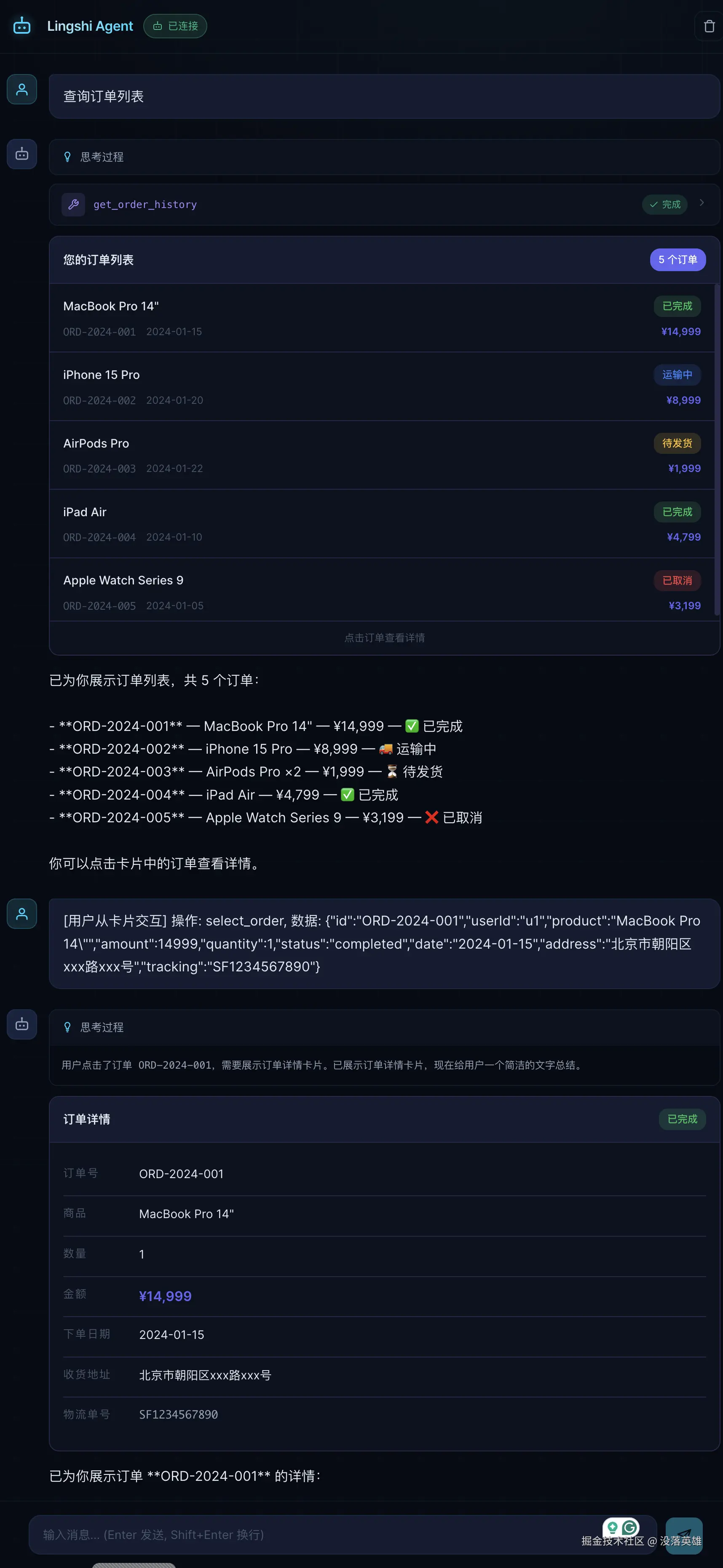
后续可以做什么
- 工具绑定卡片类型 --- 让工具自己决定渲染方式,消除卡片展示延迟
- show_ui_card 引用模式 --- data 传引用而非完整 JSON,节省 Token
- 更多卡片类型 --- 商品列表、用户画像、数据图表、确认对话框
- 引入 Vega-Lite --- 让 Agent 能渲染图表类可视化
- A2UI 渲染器 --- 当需要跨平台或复杂表单时引入
从纯文本到交互式卡片,Agent 的表达能力迈出了一大步。工具不只是让 Agent 有了"手",还让它有了"脸"------能画、能展示、能跟你互动。