前言
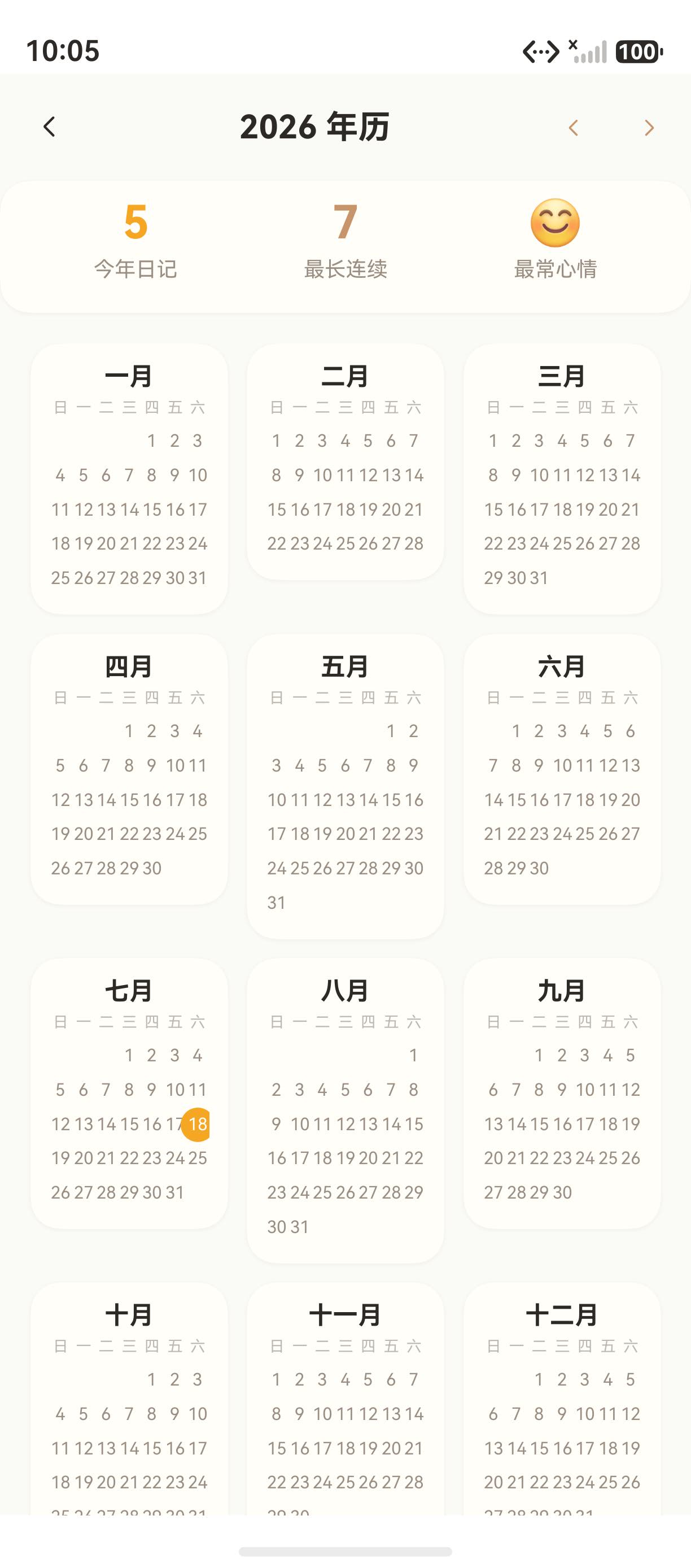
"海风日记"的年视图页面展示了全年的日历概览,使用 Grid 3 列布局展示 12 个月微型日历,每个微型日历包含月份标题、星期行和日期网格。
本文将从 CalendarYearPage.ets 源码出发,深入讲解年视图的实现。
一、年视图布局
1.1 整体结构
typescript
Scroll() {
  Grid() {
    ForEach(this.createIndexArray(12), (monthIndex: number) => {
      GridItem() {
        this.miniCalendar(monthIndex)  // 12 个微型日历
      }
    })
  }
  .columnsTemplate('1fr 1fr 1fr')  // 3 列
  .columnsGap(10).rowsGap(10)
}
1.2 微型日历构建器
typescript
@Builder
miniCalendar(monthIndex: number) {
  Column({ space: 4 }) {
    // 月份标题
    Text(this.months[monthIndex])
      .fontSize(13).fontColor(COLOR_TEXT_MAIN).fontWeight(FontWeight.Bold)

    // 星期行
    Row() {
      ForEach(['日','一','二','三','四','五','六'], (d: string) => {
        Text(d).fontSize(8).fontColor(COLOR_TEXT_HINT)
      })
    }

    // 日期网格
    Grid() {
      // 空白偏移
      ForEach(this.createIndexArray(new Date(monthIndex).getDay()), (i) => {
        GridItem() { Column().width('100%').height(18) }
      })
      // 日期
      ForEach(this.createDayArray(new Date(monthIndex + 1, 0).getDate()), (day) => {
        GridItem() {
          Stack() {
            if (isToday) { Circle().width(18).height(18).fill(COLOR_PRIMARY) }
            Text(day.toString()).fontSize(9)
          }
        }
      })
    }
    .columnsTemplate('1fr 1fr 1fr 1fr 1fr 1fr 1fr')
  }
  .padding(10).backgroundColor(COLOR_CARD_BG)
  .borderRadius(CARD_RADIUS)
  .shadow({ radius: 8, color: 'rgba(160,120,60,0.08)', offsetY: 2 })
}
二、微型日历的尺寸
| 元素 | 尺寸 | 说明 |
|---|---|---|
| 月份标题 | 13vp | 加粗 |
| 星期文字 | 8vp | 极小字号 |
| 日期数字 | 9vp | 小字号 |
| 行高 | 18vp | 紧凑 |
| 今日圆点 | 18vp | 橙色 |
三、年份导航
typescript
Row({ space: 4 }) {
  Button() {
    SymbolGlyph($r('sys.symbol.chevron_left')).fontSize(16).fontColor([COLOR_AMBER])
  }
  .onClick(() => { this.curYear -= 1 })

  Button() {
    SymbolGlyph($r('sys.symbol.chevron_right')).fontSize(16).fontColor([COLOR_AMBER])
  }
  .onClick(() => { this.curYear += 1 })
}
四、常见问题
4.1 微型日历显示不全
问题:微型日历中的日期数字显示不全。
原因:Grid 单元格太小,无法容纳所有日期。
解决方案:减小字号(9vp)和行高(18vp)。
总结
本文通过"海风日记"的年视图,深入讲解了微型日历网格的实现:
- 3 列 Grid:12 个月按 3×4 排列
- 微型日历 Builder:月份标题 + 星期行 + 日期网格
- 紧凑布局:小字号、短线高
- 年份导航:左右箭头切换年份
下一篇文章将深入讲解 年统计与最长连续天数,敬请期待。
如果这篇文章对你有帮助,欢迎点赞👍、收藏⭐、关注🔔,你的支持是我持续创作的动力!
相关资源: