1.示例:在子线程中创建QWidget
TestThread.h
#ifndef TESTTHREAD_H
#define TESTTHREAD_H

#include <QObject>
#include <QThread>

class TestThread : public QThread
{
    Q_OBJECT

protected:
    void run();
public:
    explicit TestThread(QObject *parent = nullptr);
};

#endif // TESTTHREAD_H
TestThread.cpp
#include "TestThread.h"
#include <QWidget>

TestThread::TestThread(QObject *parent)
    : QThread{parent}
{}
void TestThread::run()
{
    QWidget w;
    w.show();
    exec();
}
Widget.h
#ifndef WIDGET_H
#define WIDGET_H

#include <QWidget>

class Widget : public QWidget
{
    Q_OBJECT

public:
    explicit Widget(QWidget *parent = nullptr);
    ~Widget() override;
};
#endif // WIDGET_H
Widget.cpp
#include "Widget.h"
#include "TestThread.h"

Widget::Widget(QWidget *parent)
    : QWidget(parent)
{
    TestThread* ptt = new TestThread();
    ptt->start();
}

Widget::~Widget() = default;
main.cpp
#include "Widget.h"

#include <QApplication>

int main(int argc, char *argv[])
{
    QApplication a(argc, argv);
    Widget w;
    w.show();
    return QCoreApplication::exec();
}
运行结果会报错,原因是所有界面组件的操作都只能在主线程中完成,因此,主线程也叫做UI线程
2.子线程如何对界面组件进行更新?
解决方案------信号与槽
- 在子线程类中定义界面组件的更新信号(updateUI)
- 在主窗口类中定义更新界面组件的槽函数(setInfo)
- 使用异步方式连接更新信号到槽函数(updateUI------>setInfo)
- 子线程通过发射信号的方式更新界面组件
- 所有的界面组件对象只能依附于主线程
UpdateThread.h
#ifndef UPDATETHREAD_H
#define UPDATETHREAD_H

#include <QThread>

class UpdateThread : public QThread
{
    Q_OBJECT

protected:
    void run();
public:
    explicit UpdateThread(QObject *parent = nullptr);

signals:
    void updateUI(QString text);
};

#endif // UPDATETHREAD_H
UpdateThread.cpp
#include "UpdateThread.h"

UpdateThread::UpdateThread(QObject *parent)
    : QThread{parent}
{}

void UpdateThread::run()
{
    emit updateUI("begin");

    for(int i=0; i<10; i++)
    {
        emit updateUI(QString::number(i));
        sleep(1);
    }
    emit updateUI("End");
}
Widget.h
#ifndef WIDGET_H
#define WIDGET_H

#include <QWidget>
#include "UpdateThread.h"
#include <QPlainTextEdit>

class Widget : public QWidget
{
    Q_OBJECT
    UpdateThread m_thread;
    QPlainTextEdit textEdit;

protected slots:
    void appendText(QString text);

public:
    explicit Widget(QWidget *parent = nullptr);
    ~Widget() override;
};
#endif // WIDGET_H
Widget.cpp
#include "Widget.h"
#include <QObject>

Widget::Widget(QWidget *parent)
    : QWidget(parent)
{
    textEdit.setParent(this);
    textEdit.move(20, 20);
    textEdit.resize(200, 150);
    textEdit.setReadOnly(true);
    connect(&m_thread, SIGNAL(updateUI(QString)), this, SLOT(appendText(QString)));
    m_thread.start();
}
void Widget::appendText(QString text)
{
    textEdit.appendPlainText(text);
}
Widget::~Widget() = default;
main.cpp
#include "Widget.h"

#include <QApplication>

int main(int argc, char *argv[])
{
    QApplication a(argc, argv);
    Widget w;
    w.show();
    return QCoreApplication::exec();
}
运行结果:
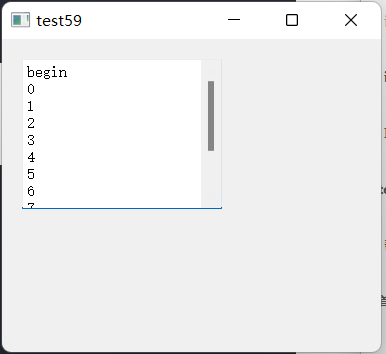
本质分析:子线程发射信号通知主线程界面更新请求;主线程根据具体信号以及信号参数对界面组件进行修改
3.是否有其他间接的方式可以让子线程更新界面组件的状态------发送自定义事件类
- 自定义事件类用于描述界面更新细节
- 在主窗口类中重写事件处理函数event
- 使用postEvent函数异步发送自定义事件类对象
- 子线程指定接受消息的对象为主窗口对象
- 在event事件处理函数更新界面状态
StringEvent.h
#ifndef STRINGEVENT_H
#define STRINGEVENT_H

#include <QEvent>
#include <QString>

class StringEvent : public QEvent
{
    QString m_data;
public:
    const static Type TYPE = static_cast<Type>(QEvent::User + 0xFF);
    explicit StringEvent(QString data = "");
    QString data();
};

#endif // STRINGEVENT_H
StringEvent.cpp
#include "StringEvent.h"


StringEvent::StringEvent(QString data) : QEvent(TYPE)
{
    m_data = data;
}
QString StringEvent::data()
{
    return m_data;
}
UpdateThread.h
#ifndef UPDATETHREAD_H
#define UPDATETHREAD_H

#include <QThread>

class UpdateThread : public QThread
{
    Q_OBJECT

protected:
    void run();
public:
    explicit UpdateThread(QObject *parent = nullptr);
};

#endif // UPDATETHREAD_H
UpdateThread.cpp
#include "UpdateThread.h"
#include <QApplication>
#include "StringEvent.h"

UpdateThread::UpdateThread(QObject *parent)
    : QThread{parent}
{}

void UpdateThread::run()
{

    QApplication::postEvent(parent(), new StringEvent("Begin"));
    for(int i=0; i<10; i++)
    {
        QApplication::postEvent(parent(), new StringEvent(QString::number(i)));
        sleep(1);
    }
    QApplication::postEvent(parent(), new StringEvent("End"));
}
main.cpp
#include "Widget.h"

#include <QApplication>

int main(int argc, char *argv[])
{
    QApplication a(argc, argv);
    Widget w;
    w.show();
    return QCoreApplication::exec();
}
运行结果: