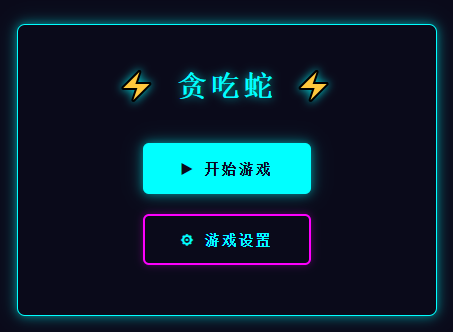
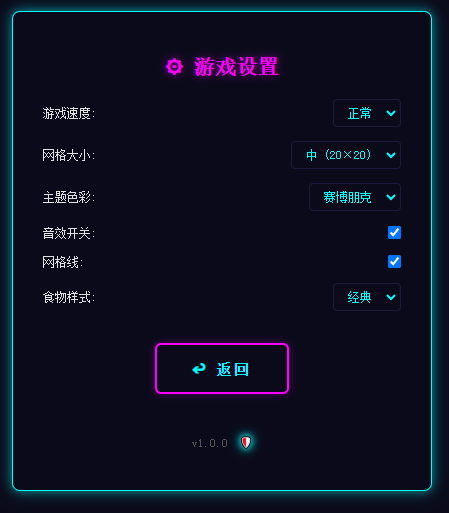
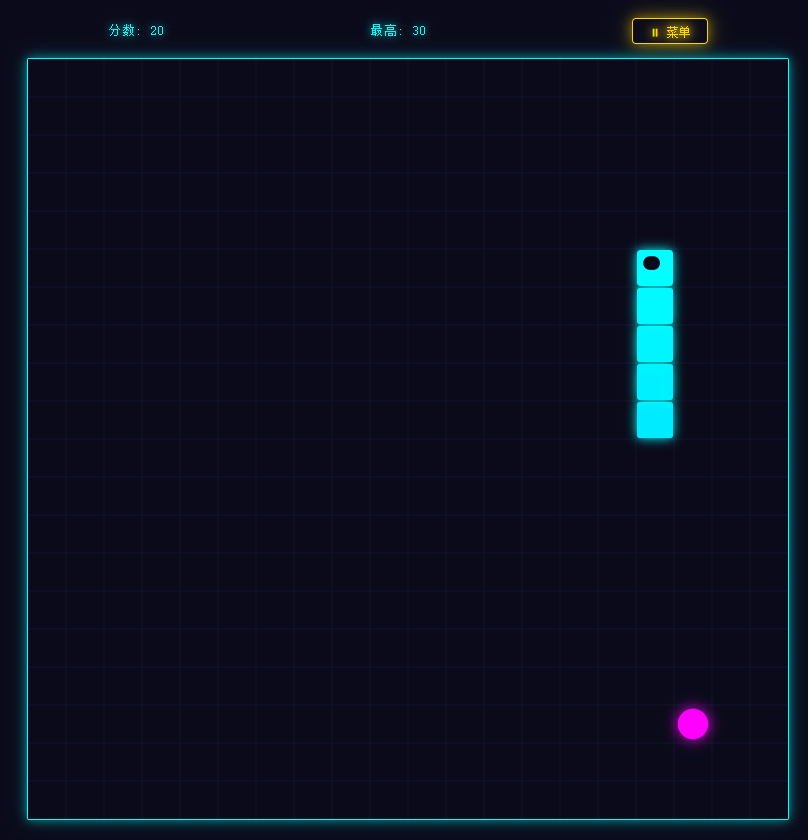
在本地部署了Qwen3.6-27B-MTP模型,然后结合WorkBuddy,制作了一个贪吃蛇游戏试下效果。看起来还不错。纯html文件,没有使用任何图片元素。浏览器打开直接可以玩。游戏截图如下:
贪吃蛇游戏 🐍
一款赛博朋克风格的贪吃蛇游戏,使用纯 HTML、CSS 和 JavaScript 打造。无需安装任何依赖,在浏览器中打开即可畅玩!
游戏特色
- 赛博朋克霓虹风格 --- 深色背景搭配发光青色与紫色,科技感拉满
- 响应式游戏画面 --- 游戏区域自动适应窗口大小
- 丰富的设置项 --- 速度、网格大小、音效、网格线等自由切换
- 隐藏无敌模式 --- 解锁穿墙不死的秘密玩法
- 粒子特效 --- 吃食物时炸裂的霓虹粒子效果
- 移动端支持 --- 触摸滑动 + 虚拟方向键,随时随地开玩
- 最高分记录 --- 自动保存你的最好成绩
如何开始
双击项目文件夹中的 index.html 文件,用浏览器打开即可开始游戏。
操作指南
键盘控制
|---------|---------------|
| 操作 | 按键 |
| 上移 | ↑ 方向键 或 W |
| 下移 | ↓ 方向键 或 S |
| 左移 | ← 方向键 或 A |
| 右移 | → 方向键 或 D |
| 暂停 / 继续 | 空格键 或 Esc |
手机操作
- 滑动屏幕 --- 在画面上滑动即可改变蛇的方向
- 虚拟方向键 --- 屏幕底部有方向按钮,点击控制
游戏设置
游戏过程中点击右上角的 菜单 按钮,可打开设置面板:
- 游戏速度 --- 慢 / 正常 / 快 / 极快,四种速度任你选
- 网格大小 --- 15×15(大格子)/ 20×20(适中)/ 30×30(小格子)
- 音效开关 --- 开启或关闭游戏音效
- 网格线 --- 显示或隐藏背景网格
- 食物样式 --- 圆形 / 方形 / 菱形,切换食物外观
无敌模式 🔓
想要不死蛇?来试试隐藏的无敌模式!
解锁方法
- 打开 设置面板
- 在设置面板底部找到 版本号 (
v1.0.0)
- 连续点击版本号 7 次
- 看到版本号旁边出现 盾牌图标 🛡️,说明无敌模式已激活!
- 进入游戏后,右上角的 菜单按钮会变成金色,表示无敌模式生效中
无敌效果
开启后,蛇可以:
- 穿墙 --- 撞到墙壁会从另一侧出来,不会死亡
- 穿身 --- 碰到自己的身体也不会死亡
最高分
- 最高分会自动保存在浏览器中
- 当你的分数超过历史最高时,会自动更新
- 只要不清除浏览器缓存,成绩会一直保留
技术支持
浏览器兼容性
推荐使用以下浏览器:
- ✅ Chrome / Edge(推荐)
- ✅ Firefox
- ✅ Safari
- ✅ Opera
技术实现
- 单文件应用 --- 所有代码在
index.html中,无需额外文件
- Canvas 2D --- 霓虹发光效果,丝滑渲染
- Web Audio API --- 音效实时合成,无需音频文件
- Local Storage --- 自动保存最高分和设置
常见问题
Q:游戏画面闪烁怎么办? A:请确保使用较新版本的浏览器。如果仍然闪烁,尝试关闭硬件加速。
Q:为什么最高分重置了? A:清除浏览器缓存或 Local Storage 会导致最高分丢失。建议不要清除浏览器数据。
Q:手机上怎么操作? A:在画面上滑动即可改变方向,或使用屏幕底部的虚拟方向键。
Q:无敌模式怎么关闭? A:无敌模式在当前浏览器会话中保持激活。刷新页面或关闭浏览器后会自动关闭。
祝游戏愉快!🎮
原始游戏代码就是一个HTML,也提供出来
html
<!DOCTYPE html>
<html lang="zh-CN">
<head>
<meta charset="UTF-8" />
<meta name="viewport" content="width=device-width, initial-scale=1.0, user-scalable=no" />
<title>贪吃蛇</title>
<style>
/* ========== Reset & Base ========== */
*, *::before, *::after { box-sizing: border-box; margin: 0; padding: 0; }
:root {
/* 赛博朋克 (默认) */
--bg: #0a0a1a;
--primary: #00ffff;
--secondary: #ff00ff;
--grid-line: #1a1a3a;
--text: #e0e0e0;
--snake-head: #00ffff;
--snake-body: #00ccff;
--food-color: #ff00ff;
--panel-bg: rgba(10, 10, 26, 0.95);
--border-glow: 0 0 10px rgba(0, 255, 255, 0.5), 0 0 20px rgba(0, 255, 255, 0.2);
--text-glow: 0 0 10px rgba(0, 255, 255, 0.8);
}
body {
background: var(--bg);
color: var(--text);
font-family: monospace;
min-height: 100vh;
display: flex;
flex-direction: column;
align-items: center;
justify-content: center;
overflow: hidden;
-webkit-user-select: none;
user-select: none;
}
/* ========== 顶部装饰条 ========== */
body::before {
content: '';
position: fixed;
top: 0;
left: 0;
width: 100%;
height: 3px;
background: linear-gradient(90deg, var(--primary), var(--secondary), var(--primary));
z-index: 999;
pointer-events: none;
}
/* ========== 通用面板 ========== */
.screen {
display: none;
flex-direction: column;
align-items: center;
justify-content: center;
width: 100%;
height: 100vh;
padding: 20px;
}
.screen.active { display: flex; }
.panel {
background: var(--panel-bg);
border: 1px solid var(--primary);
box-shadow: var(--border-glow);
border-radius: 8px;
padding: 40px 30px;
text-align: center;
max-width: 420px;
width: 90%;
}
.panel h1 {
font-size: 2.2em;
color: var(--primary);
text-shadow: var(--text-glow);
margin-bottom: 30px;
letter-spacing: 4px;
}
.panel h2 {
font-size: 1.6em;
color: var(--secondary);
text-shadow: 0 0 10px rgba(255, 0, 255, 0.6);
margin-bottom: 20px;
}
.panel .score-display {
font-size: 1.4em;
margin-bottom: 24px;
color: var(--primary);
}
/* ========== 按钮 ========== */
.btn {
display: inline-block;
padding: 14px 36px;
margin: 10px;
font-family: monospace;
font-size: 1.1em;
font-weight: bold;
color: var(--bg);
background: var(--primary);
border: 2px solid var(--primary);
border-radius: 6px;
cursor: pointer;
text-shadow: none;
box-shadow: var(--border-glow);
transition: all 0.2s ease;
letter-spacing: 2px;
}
.btn:hover {
background: transparent;
color: var(--primary);
box-shadow: 0 0 20px rgba(0, 255, 255, 0.7);
}
.btn-secondary {
background: transparent;
color: var(--primary);
border-color: var(--secondary);
box-shadow: 0 0 8px rgba(255, 0, 255, 0.3);
}
.btn-secondary:hover {
background: var(--secondary);
color: var(--bg);
}
/* ========== 游戏界面 ========== */
#game-screen {
gap: 8px;
}
#game-header {
display: flex;
justify-content: space-between;
align-items: center;
width: min(90vw, calc(90vh - 130px));
max-width: 600px;
padding: 6px 0;
font-size: 1em;
}
#game-header .score-info {
color: var(--primary);
text-shadow: var(--text-glow);
}
#game-header .pause-btn {
background: transparent;
color: var(--secondary);
border: 1px solid var(--secondary);
padding: 4px 16px;
font-family: monospace;
cursor: pointer;
border-radius: 4px;
font-size: 0.9em;
transition: all 0.3s ease;
}
#game-header .pause-btn.god-mode {
color: #ffd700;
border-color: #ffd700;
text-shadow: 0 0 8px #ffd700, 0 0 16px #ffd700;
box-shadow: 0 0 12px rgba(255, 215, 0, 0.5), 0 0 24px rgba(255, 215, 0, 0.3);
}
#game-canvas {
border: 1px solid var(--primary);
box-shadow: var(--border-glow);
display: block;
border-radius: 2px;
}
/* ========== 暂停弹出层 ========== */
#pause-overlay {
display: none;
position: fixed;
top: 0;
left: 0;
width: 100%;
height: 100%;
background: rgba(10, 10, 26, 0.85);
z-index: 500;
flex-direction: column;
align-items: center;
justify-content: center;
}
#pause-overlay.active { display: flex; }
.pause-panel {
background: rgba(10, 10, 26, 0.97);
border: 1px solid var(--secondary);
box-shadow: 0 0 15px rgba(255, 0, 255, 0.4), 0 0 30px rgba(255, 0, 255, 0.15);
border-radius: 8px;
padding: 40px 50px;
text-align: center;
animation: pauseSlideIn 0.2s ease-out;
}
.pause-panel h2 {
margin-bottom: 28px;
}
.pause-panel .btn {
display: block;
margin: 12px auto;
width: 220px;
}
@keyframes pauseSlideIn {
from { transform: scale(0.85); opacity: 0; }
to { transform: scale(1); opacity: 1; }
}
/* ========== 设置界面 ========== */
.settings-panel {
text-align: left;
max-width: 420px;
width: 90%;
}
.settings-panel h2 {
text-align: center;
}
.setting-row {
display: flex;
align-items: center;
justify-content: space-between;
margin: 14px 0;
font-size: 0.95em;
}
.setting-row label {
color: var(--text);
min-width: 90px;
}
.setting-row select,
.setting-row input[type="checkbox"] {
font-family: monospace;
background: var(--bg);
color: var(--primary);
border: 1px solid var(--grid-line);
padding: 6px 10px;
border-radius: 4px;
font-size: 0.9em;
}
.setting-row select:focus { border-color: var(--primary); outline: none; }
.version-text {
text-align: center;
margin-top: 30px;
font-size: 0.85em;
color: #555;
cursor: pointer;
user-select: none;
}
.version-text:hover { color: #777; }
.shield-icon {
display: inline-block;
margin-left: 6px;
color: var(--primary);
text-shadow: 0 0 6px var(--primary), 0 0 12px var(--primary);
}
/* ========== 虚拟方向键 ========== */
#virtual-dpad {
display: none;
grid-template-areas:
". up ."
"left down right";
grid-template-columns: repeat(3, 64px);
grid-template-rows: repeat(2, 64px);
gap: 4px;
margin-top: 10px;
}
#virtual-dpad .dpad-btn {
background: rgba(0, 255, 255, 0.1);
color: var(--primary);
border: 1px solid var(--primary);
border-radius: 8px;
font-size: 1.5em;
display: flex;
align-items: center;
justify-content: center;
cursor: pointer;
-webkit-tap-highlight-color: transparent;
}
#virtual-dpad .dpad-btn:active {
background: rgba(0, 255, 255, 0.3);
}
#virtual-dpad .up { grid-area: up; }
#virtual-dpad .down { grid-area: down; }
#virtual-dpad .left { grid-area: left; }
#virtual-dpad .right { grid-area: right; }
@media (max-width: 768px) {
#virtual-dpad { display: grid; }
}
</style>
</head>
<body>
<!-- ==================== 开始界面 ==================== -->
<div id="start-screen" class="screen active">
<div class="panel">
<h1>⚡ 贪吃蛇 ⚡</h1>
<button class="btn" id="btn-start">▶ 开始游戏</button><br>
<button class="btn btn-secondary" id="btn-settings">⚙ 游戏设置</button>
</div>
</div>
<!-- ==================== 游戏界面 ==================== -->
<div id="game-screen" class="screen">
<div id="game-header">
<span class="score-info" id="score-display">分数: 0</span>
<span class="score-info" id="best-display">最高: 0</span>
<button class="pause-btn" id="btn-pause">🟢 菜单</button>
</div>
<canvas id="game-canvas"></canvas>
<div id="virtual-dpad">
<div class="dpad-btn up" data-dir="up">▲</div>
<div class="dpad-btn left" data-dir="left">◀</div>
<div class="dpad-btn down" data-dir="down">▼</div>
<div class="dpad-btn right" data-dir="right">▶</div>
</div>
</div>
<!-- ==================== 暂停弹出层 ==================== -->
<div id="pause-overlay">
<div class="pause-panel">
<h2>⏸ 已暂停</h2>
<button class="btn" id="btn-resume">▶ 继续游戏</button>
<button class="btn btn-secondary" id="btn-pause-menu">↩ 返回菜单</button>
</div>
</div>
<!-- ==================== 游戏结束界面 ==================== -->
<div id="gameover-screen" class="screen">
<div class="panel">
<h2>❌ 游戏结束</h2>
<div class="score-display" id="final-score">最终分数: 0</div>
<button class="btn" id="btn-restart">↻ 再来一局</button><br>
<button class="btn btn-secondary" id="btn-menu">↩ 返回菜单</button>
</div>
</div>
<!-- ==================== 设置界面 ==================== -->
<div id="settings-screen" class="screen">
<div class="panel settings-panel">
<h2>⚙ 游戏设置</h2>
<div class="setting-row">
<label>游戏速度:</label>
<select id="set-speed">
<option value="200">慢</option>
<option value="150" selected>正常</option>
<option value="100">快</option>
<option value="60">极快</option>
</select>
</div>
<div class="setting-row">
<label>网格大小:</label>
<select id="set-grid">
<option value="15">小 (15×15)</option>
<option value="20" selected>中 (20×20)</option>
<option value="30">大 (30×30)</option>
</select>
</div>
<div class="setting-row">
<label>主题色彩:</label>
<select id="set-theme">
<option value="cyberpunk" selected>赛博朋克</option>
<option value="classic">经典蓝绿</option>
<option value="neon">霓虹粉紫</option>
</select>
</div>
<div class="setting-row">
<label>音效开关:</label>
<input type="checkbox" id="set-sound" checked />
</div>
<div class="setting-row">
<label>网格线:</label>
<input type="checkbox" id="set-gridline" checked />
</div>
<div class="setting-row">
<label>食物样式:</label>
<select id="set-food">
<option value="classic" selected>经典</option>
<option value="blink">闪烁</option>
<option value="pulse">脉冲</option>
</select>
</div>
<div style="text-align:center; margin-top: 22px;">
<button class="btn btn-secondary" id="btn-settings-back">↩ 返回</button>
</div>
<div class="version-text" id="version-text">v1.0.0</div>
</div>
</div>
<script>
// ====================================================================
// 1. 配置常量
// ====================================================================
const THEMES = {
cyberpunk: {
bg: '#0a0a1a',
primary: '#00ffff',
secondary: '#ff00ff',
gridLine: '#1a1a3a',
text: '#e0e0e0',
snakeHead: '#00ffff',
snakeBody: '#00ccff',
food: '#ff00ff'
},
classic: {
bg: '#111',
primary: '#0f0',
secondary: '#ff0',
gridLine: '#1a1a1a',
text: '#e0e0e0',
snakeHead: '#0f0',
snakeBody: '#0a0',
food: '#f00'
},
neon: {
bg: '#1a0a1a',
primary: '#ff69b4',
secondary: '#9b59b6',
gridLine: '#2a1a2a',
text: '#e0e0e0',
snakeHead: '#ff69b4',
snakeBody: '#d44d9a',
food: '#9b59b6'
}
};
const SPEED_MAP = { '慢': 200, '正常': 150, '快': 100, '极快': 60 };
const GRID_MAP = { '小': 15, '中': 20, '大': 30 };
// ====================================================================
// 2. 游戏状态
// ====================================================================
const CONFIG = {
speed: 150,
gridSize: 20,
theme: 'cyberpunk',
sound: true,
gridLine: true,
foodStyle: 'classic',
invincible: false
};
let state = {
screen: 'start', // start | game | gameover | settings
snake: [],
direction: { x: 1, y: 0 },
nextDirection: { x: 1, y: 0 },
food: { x: 0, y: 0 },
score: 0,
bestScore: 0,
paused: false,
isPlaying: false,
cellSize: 20,
canvasSize: 400,
particles: [],
animFrame: 0
};
// ====================================================================
// 3. 工具函数
// ====================================================================
// --- 3.1 音效生成 (Web Audio API) ---
let audioCtx = null;
function getAudioContext() {
if (!audioCtx) {
try { audioCtx = new (window.AudioContext || window.webkitAudioContext)(); } catch (_) { audioCtx = null; }
}
return audioCtx;
}
function playSound(type) {
if (!CONFIG.sound) return;
const ctx = getAudioContext();
if (!ctx) return;
const osc = ctx.createOscillator();
const gain = ctx.createGain();
osc.connect(gain);
gain.connect(ctx.destination);
switch (type) {
case 'eat':
osc.frequency.setValueAtTime(800, ctx.currentTime);
gain.gain.setValueAtTime(0.3, ctx.currentTime);
gain.gain.exponentialRampToValueAtTime(0.001, ctx.currentTime + 0.1);
osc.start(ctx.currentTime);
osc.stop(ctx.currentTime + 0.1);
break;
case 'gameover':
osc.type = 'sawtooth';
osc.frequency.setValueAtTime(400, ctx.currentTime);
osc.frequency.linearRampToValueAtTime(200, ctx.currentTime + 0.3);
gain.gain.setValueAtTime(0.2, ctx.currentTime);
gain.gain.exponentialRampToValueAtTime(0.001, ctx.currentTime + 0.3);
osc.start(ctx.currentTime);
osc.stop(ctx.currentTime + 0.3);
break;
case 'pause':
osc.frequency.setValueAtTime(600, ctx.currentTime);
gain.gain.setValueAtTime(0.2, ctx.currentTime);
gain.gain.exponentialRampToValueAtTime(0.001, ctx.currentTime + 0.08);
osc.start(ctx.currentTime);
osc.stop(ctx.currentTime + 0.08);
break;
}
}
// --- 3.2 粒子系统 ---
function spawnParticles(x, y) {
const colors = [THEMES[CONFIG.theme].primary, THEMES[CONFIG.theme].secondary, '#ffffff'];
for (let i = 0; i < 12; i++) {
const angle = (Math.PI * 2 * i) / 12 + (Math.random() - 0.5) * 0.5;
const speed = 2 + Math.random() * 3;
state.particles.push({
x: x,
y: y,
vx: Math.cos(angle) * speed,
vy: Math.sin(angle) * speed,
size: 2 + Math.random() * 2,
color: colors[Math.floor(Math.random() * colors.length)],
life: 30,
maxLife: 30
});
}
}
/**
* 更新粒子状态,使用 filter 替代 splice 进行清理
* 微优化:减少数组操作的复杂度
*/
function updateParticles() {
for (const p of state.particles) {
p.x += p.vx;
p.y += p.vy;
p.life--;
}
state.particles = state.particles.filter(p => p.life > 0);
}
// --- 3.3 Canvas 渲染辅助 ---
const canvas = document.getElementById('game-canvas');
const ctx = canvas.getContext('2d');
function calcCanvasSize() {
const availableWidth = window.innerWidth - 40;
const availableHeight = window.innerHeight - 160;
state.cellSize = Math.floor(Math.min(availableWidth, availableHeight) / CONFIG.gridSize);
state.cellSize = Math.max(state.cellSize, 8);
state.canvasSize = state.cellSize * CONFIG.gridSize;
canvas.width = state.canvasSize;
canvas.height = state.canvasSize;
}
// ====================================================================
// 4. 游戏逻辑
// ====================================================================
// --- 4.1 初始化 ---
function initGame() {
const mid = Math.floor(CONFIG.gridSize / 2);
state.snake = [
{ x: mid, y: mid },
{ x: mid - 1, y: mid },
{ x: mid - 2, y: mid }
];
state.direction = { x: 1, y: 0 };
state.nextDirection = { x: 1, y: 0 };
state.score = 0;
state.paused = false;
state.isPlaying = true;
state.particles = [];
state.animFrame = 0;
// 同步最高分:取 localStorage 和当前会话的最大值
try {
const stored = localStorage.getItem('snake_best_score');
if (stored) {
const parsed = parseInt(stored, 10);
if (!isNaN(parsed) && parsed > state.bestScore) {
state.bestScore = parsed;
}
}
} catch (_) { /* ignore */ }
spawnFood();
updateScoreDisplay();
document.getElementById('btn-pause').textContent = '\u23F8 菜单';
updatePauseButtonGodMode();
}
function spawnFood() {
let pos;
do {
pos = {
x: Math.floor(Math.random() * CONFIG.gridSize),
y: Math.floor(Math.random() * CONFIG.gridSize)
};
} while (state.snake.some(s => s.x === pos.x && s.y === pos.y));
state.food = pos;
}
// --- 4.2 更新 ---
function update() {
state.animFrame++;
state.direction = { ...state.nextDirection };
const head = state.snake[0];
const newHead = {
x: head.x + state.direction.x,
y: head.y + state.direction.y
};
// 穿墙 / 撞墙检测
if (newHead.x < 0 || newHead.x >= CONFIG.gridSize || newHead.y < 0 || newHead.y >= CONFIG.gridSize) {
if (CONFIG.invincible) {
// 穿墙
if (newHead.x < 0) newHead.x = CONFIG.gridSize - 1;
if (newHead.x >= CONFIG.gridSize) newHead.x = 0;
if (newHead.y < 0) newHead.y = CONFIG.gridSize - 1;
if (newHead.y >= CONFIG.gridSize) newHead.y = 0;
} else {
gameOver();
return;
}
}
// 撞自己检测
if (!CONFIG.invincible && state.snake.some(s => s.x === newHead.x && s.y === newHead.y)) {
gameOver();
return;
}
state.snake.unshift(newHead);
// 吃食物检测
if (newHead.x === state.food.x && newHead.y === state.food.y) {
state.score += 10;
updateScoreDisplay();
playSound('eat');
// 粒子特效
const px = state.food.x * state.cellSize + state.cellSize / 2;
const py = state.food.y * state.cellSize + state.cellSize / 2;
spawnParticles(px, py);
spawnFood();
} else {
state.snake.pop();
}
updateParticles();
}
// --- 4.3 渲染 ---
function render() {
const cs = state.cellSize;
const t = THEMES[CONFIG.theme];
// 清空
ctx.fillStyle = t.bg;
ctx.fillRect(0, 0, state.canvasSize, state.canvasSize);
// 网格线
if (CONFIG.gridLine) {
ctx.strokeStyle = t.gridLine;
ctx.lineWidth = 0.5;
for (let i = 0; i <= CONFIG.gridSize; i++) {
ctx.beginPath();
ctx.moveTo(i * cs, 0);
ctx.lineTo(i * cs, state.canvasSize);
ctx.stroke();
ctx.beginPath();
ctx.moveTo(0, i * cs);
ctx.lineTo(state.canvasSize, i * cs);
ctx.stroke();
}
}
// 蛇身 (渐变) --- 微优化:用一个 save/restore 块集中设置 shadowBlur
// 增强发光效果:外层大光晕 + 内层小光晕,让蛇身整体亮起来
ctx.save();
const bodyLen = state.snake.length;
for (let i = bodyLen - 1; i >= 1; i--) {
const seg = state.snake[i];
const ratio = 1 - (i / bodyLen) * 0.5;
// 从 snakeHead -> snakeBody 渐变
const r = Math.round(hexR(t.snakeHead) * ratio + hexR(t.snakeBody) * (1 - ratio));
const g = Math.round(hexG(t.snakeHead) * ratio + hexG(t.snakeBody) * (1 - ratio));
const b = Math.round(hexB(t.snakeHead) * ratio + hexB(t.snakeBody) * (1 - ratio));
ctx.fillStyle = `rgb(${r},${g},${b})`;
ctx.shadowColor = t.snakeHead;
ctx.shadowBlur = 12;
roundRect(ctx, seg.x * cs + 1, seg.y * cs + 1, cs - 2, cs - 2, 3);
}
ctx.restore();
// 蛇头 (带眼睛)
const head = state.snake[0];
ctx.fillStyle = t.snakeHead;
ctx.shadowColor = t.snakeHead;
ctx.shadowBlur = 12;
roundRect(ctx, head.x * cs + 1, head.y * cs + 1, cs - 2, cs - 2, 4);
ctx.shadowBlur = 0;
// 眼睛
ctx.fillStyle = t.bg;
const eyeSize = Math.max(2, cs * 0.18);
const eyeOffset = cs * 0.28;
let eye1x, eye1y, eye2x, eye2y;
if (state.direction.x === 1) { // 右
eye1x = head.x * cs + cs - eyeOffset - eyeSize; eye1y = head.y * cs + eyeOffset;
eye2x = head.x * cs + cs - eyeOffset - eyeSize; eye2y = head.y * cs + cs - eyeOffset - eyeSize * 2;
} else if (state.direction.x === -1) { // 左
eye1x = head.x * cs + eyeOffset; eye1y = head.y * cs + eyeOffset;
eye2x = head.x * cs + eyeOffset; eye2y = head.y * cs + cs - eyeOffset - eyeSize * 2;
} else if (state.direction.y === -1) { // 上
eye1x = head.x * cs + eyeOffset; eye1y = head.y * cs + eyeOffset;
eye2x = head.x * cs + cs - eyeOffset - eyeSize * 2; eye2y = head.y * cs + eyeOffset;
} else { // 下
eye1x = head.x * cs + eyeOffset; eye1y = head.y * cs + cs - eyeOffset - eyeSize;
eye2x = head.x * cs + cs - eyeOffset - eyeSize * 2; eye2y = head.y * cs + cs - eyeOffset - eyeSize;
}
ctx.beginPath();
ctx.arc(eye1x + eyeSize / 2, eye1y + eyeSize / 2, eyeSize, 0, Math.PI * 2);
ctx.fill();
ctx.beginPath();
ctx.arc(eye2x + eyeSize / 2, eye2y + eyeSize / 2, eyeSize, 0, Math.PI * 2);
ctx.fill();
// 食物
drawFood();
}
function drawFood() {
const cs = state.cellSize;
const fx = state.food.x * cs + cs / 2;
const fy = state.food.y * cs + cs / 2;
const r = cs * 0.4;
const t = THEMES[CONFIG.theme];
let alpha = 1;
let radius = r;
if (CONFIG.foodStyle === 'blink') {
alpha = (state.animFrame % 10 < 5) ? 1 : 0.3;
} else if (CONFIG.foodStyle === 'pulse') {
radius = r + Math.sin(state.animFrame * 0.3) * r * 0.3;
}
ctx.save();
ctx.globalAlpha = alpha;
ctx.shadowColor = t.food;
ctx.shadowBlur = 15;
ctx.fillStyle = t.food;
ctx.beginPath();
ctx.arc(fx, fy, radius, 0, Math.PI * 2);
ctx.fill();
ctx.shadowBlur = 0;
ctx.restore();
}
function drawParticles() {
for (const p of state.particles) {
const alpha = p.life / p.maxLife;
ctx.save();
ctx.globalAlpha = alpha;
ctx.fillStyle = p.color;
ctx.shadowColor = p.color;
ctx.shadowBlur = 4;
ctx.beginPath();
ctx.arc(p.x, p.y, p.size, 0, Math.PI * 2);
ctx.fill();
ctx.restore();
}
}
// --- 4.4 游戏循环 ---
let gameTimer = null;
function gameLoop() {
if (state.isPlaying && !state.paused) {
update();
render();
drawParticles();
}
// 暂停时不调用 render(),保持最后一帧画面
// 使用纯 setTimeout 调度,避免嵌套 rAF 导致的闪烁
gameTimer = setTimeout(gameLoop, CONFIG.speed);
}
function startGameLoop() {
if (gameTimer) clearTimeout(gameTimer);
gameLoop();
}
function stopGameLoop() {
if (gameTimer) { clearTimeout(gameTimer); gameTimer = null; }
}
// --- 4.5 游戏结束 ---
function gameOver() {
state.isPlaying = false;
stopGameLoop();
playSound('gameover');
// 更新最高分
if (state.score > state.bestScore) {
state.bestScore = state.score;
localStorage.setItem('snake_best_score', String(state.bestScore));
}
document.getElementById('final-score').textContent = `最终分数: ${state.score}`;
switchScreen('gameover');
}
// ====================================================================
// 5. UI 控制
// ====================================================================
function switchScreen(name) {
state.screen = name;
document.querySelectorAll('.screen').forEach(s => s.classList.remove('active'));
const target = document.getElementById(name + '-screen');
if (target) target.classList.add('active');
if (name === 'game') {
calcCanvasSize();
}
}
function updateScoreDisplay() {
// 确保最高分 >= 当前分数(会话内真实记录)
if (state.score > state.bestScore) {
state.bestScore = state.score;
}
document.getElementById('score-display').textContent = `分数: ${state.score}`;
document.getElementById('best-display').textContent = `最高: ${state.bestScore}`;
}
function updatePauseButtonGodMode() {
const btn = document.getElementById('btn-pause');
if (CONFIG.invincible) {
btn.classList.add('god-mode');
} else {
btn.classList.remove('god-mode');
}
}
function updateVersionShield() {
const verEl = document.getElementById('version-text');
if (CONFIG.invincible) {
verEl.innerHTML = 'v1.0.0 <span class="shield-icon">🛡️</span>';
} else {
verEl.textContent = 'v1.0.0';
}
}
// --- 5.1 暂停弹出层控制 ---
function showPauseOverlay() {
document.getElementById('pause-overlay').classList.add('active');
}
function hidePauseOverlay() {
document.getElementById('pause-overlay').classList.remove('active');
}
// --- 5.2 事件绑定 ---
document.getElementById('btn-start').addEventListener('click', () => {
// 恢复 AudioContext (浏览器策略)
getAudioContext();
initGame();
switchScreen('game');
startGameLoop();
});
document.getElementById('btn-settings').addEventListener('click', () => {
switchScreen('settings');
loadSettings();
});
document.getElementById('btn-restart').addEventListener('click', () => {
initGame();
switchScreen('game');
startGameLoop();
});
document.getElementById('btn-menu').addEventListener('click', () => {
stopGameLoop();
state.isPlaying = false;
document.getElementById('btn-pause').textContent = '\u23F8 菜单';
switchScreen('start');
});
// 顶部"菜单"按钮 → 弹出暂停层
document.getElementById('btn-pause').addEventListener('click', () => {
if (!state.isPlaying) return;
if (state.paused) {
// 已经在暂停状态,不做重复操作
return;
}
doPause();
});
// 暂停弹出层 - 继续游戏
document.getElementById('btn-resume').addEventListener('click', () => {
doResume();
});
// 暂停弹出层 - 返回菜单
document.getElementById('btn-pause-menu').addEventListener('click', () => {
hidePauseOverlay();
stopGameLoop();
state.isPlaying = false;
state.paused = false;
document.getElementById('btn-pause').textContent = '\u23F8 菜单';
switchScreen('start');
});
document.getElementById('btn-settings-back').addEventListener('click', () => {
saveSettings();
switchScreen('start');
});
/**
* 执行暂停:设置 paused 状态 + 显示弹出层
*/
function doPause() {
state.paused = true;
playSound('pause');
showPauseOverlay();
}
/**
* 执行恢复:清除 paused 状态 + 隐藏弹出层
*/
function doResume() {
state.paused = false;
hidePauseOverlay();
}
/**
* 切换暂停(用于 ESC 快捷键)
*/
function togglePause() {
if (!state.isPlaying) return;
if (state.paused) {
doResume();
} else {
doPause();
}
}
// --- 5.3 键盘事件 ---
document.addEventListener('keydown', (e) => {
const key = e.key;
if (state.screen === 'game') {
// ESC 键触发暂停/恢复
if (key === 'Escape') {
e.preventDefault();
togglePause();
return;
}
// 空格键暂停(保留兼容)
if (key === ' ') {
e.preventDefault();
togglePause();
return;
}
// 暂停时屏蔽方向键输入
if (state.paused || !state.isPlaying) return;
// 方向控制
switch (key) {
case 'ArrowUp': case 'w': case 'W':
if (state.direction.y !== 1) state.nextDirection = { x: 0, y: -1 };
e.preventDefault();
break;
case 'ArrowDown': case 's': case 'S':
if (state.direction.y !== -1) state.nextDirection = { x: 0, y: 1 };
e.preventDefault();
break;
case 'ArrowLeft': case 'a': case 'A':
if (state.direction.x !== 1) state.nextDirection = { x: -1, y: 0 };
e.preventDefault();
break;
case 'ArrowRight': case 'd': case 'D':
if (state.direction.x !== -1) state.nextDirection = { x: 1, y: 0 };
e.preventDefault();
break;
}
}
});
// --- 5.4 虚拟方向键 ---
document.querySelectorAll('#virtual-dpad .dpad-btn').forEach(btn => {
btn.addEventListener('touchstart', (e) => {
e.preventDefault();
const dir = btn.dataset.dir;
if (state.paused || !state.isPlaying) return;
switch (dir) {
case 'up':
if (state.direction.y !== 1) state.nextDirection = { x: 0, y: -1 };
break;
case 'down':
if (state.direction.y !== -1) state.nextDirection = { x: 0, y: 1 };
break;
case 'left':
if (state.direction.x !== 1) state.nextDirection = { x: -1, y: 0 };
break;
case 'right':
if (state.direction.x !== -1) state.nextDirection = { x: 1, y: 0 };
break;
}
});
btn.addEventListener('click', () => {
const dir = btn.dataset.dir;
if (state.paused || !state.isPlaying) return;
switch (dir) {
case 'up':
if (state.direction.y !== 1) state.nextDirection = { x: 0, y: -1 };
break;
case 'down':
if (state.direction.y !== -1) state.nextDirection = { x: 0, y: 1 };
break;
case 'left':
if (state.direction.x !== 1) state.nextDirection = { x: -1, y: 0 };
break;
case 'right':
if (state.direction.x !== -1) state.nextDirection = { x: 1, y: 0 };
break;
}
});
});
// --- 5.5 触摸事件 (滑动 + 双击) ---
let touchStartX = 0, touchStartY = 0, touchStartTime = 0;
canvas.addEventListener('touchstart', (e) => {
const touch = e.touches[0];
touchStartX = touch.clientX;
touchStartY = touch.clientY;
touchStartTime = Date.now();
}, { passive: true });
canvas.addEventListener('touchend', (e) => {
const touch = e.changedTouches[0];
const dx = touch.clientX - touchStartX;
const dy = touch.clientY - touchStartY;
const dt = Date.now() - touchStartTime;
// 双击检测 (暂停)
if (dt < 300 && Math.abs(dx) < 10 && Math.abs(dy) < 10) {
// 判断是否双击
if (canvas._lastTap && Date.now() - canvas._lastTap < 350) {
canvas._lastTap = 0;
if (state.isPlaying) togglePause();
return;
}
canvas._lastTap = Date.now();
}
// 滑动检测
const absDx = Math.abs(dx);
const absDy = Math.abs(dy);
if (Math.max(absDx, absDy) < 20) return; // 太短不算滑动
if (absDx > absDy) {
// 水平
if (dx > 0 && state.direction.x !== -1) state.nextDirection = { x: 1, y: 0 };
else if (dx < 0 && state.direction.x !== 1) state.nextDirection = { x: -1, y: 0 };
} else {
// 垂直
if (dy > 0 && state.direction.y !== -1) state.nextDirection = { x: 0, y: 1 };
else if (dy < 0 && state.direction.y !== 1) state.nextDirection = { x: 0, y: -1 };
}
}, { passive: true });
// --- 5.6 窗口 resize (P0 性能优化:100ms 防抖) ---
let resizeTimer = null;
window.addEventListener('resize', () => {
if (state.screen !== 'game') return;
// 清除之前的定时器
if (resizeTimer) clearTimeout(resizeTimer);
// 100ms 防抖
resizeTimer = setTimeout(() => {
calcCanvasSize();
if (state.isPlaying) {
render();
drawParticles();
}
resizeTimer = null;
}, 100);
});
// ====================================================================
// 6. 设置面板
// ====================================================================
function loadSettings() {
const saved = localStorage.getItem('snake_settings');
if (saved) {
try {
const s = JSON.parse(saved);
if (s.speed) document.getElementById('set-speed').value = String(s.speed);
if (s.gridSize) document.getElementById('set-grid').value = String(s.gridSize);
if (s.theme) document.getElementById('set-theme').value = s.theme;
if (typeof s.sound === 'boolean') document.getElementById('set-sound').checked = s.sound;
if (typeof s.gridLine === 'boolean') document.getElementById('set-gridline').checked = s.gridLine;
if (s.foodStyle) document.getElementById('set-food').value = s.foodStyle;
} catch (_) { /* ignore */ }
}
// 更新版本号旁的盾牌图标(根据当前无敌状态)
updateVersionShield();
}
function saveSettings() {
const speed = parseInt(document.getElementById('set-speed').value, 10);
const gridSize = parseInt(document.getElementById('set-grid').value, 10);
const theme = document.getElementById('set-theme').value;
const sound = document.getElementById('set-sound').checked;
const gridLine = document.getElementById('set-gridline').checked;
const foodStyle = document.getElementById('set-food').value;
CONFIG.speed = speed;
CONFIG.gridSize = gridSize;
CONFIG.theme = theme;
CONFIG.sound = sound;
CONFIG.gridLine = gridLine;
CONFIG.foodStyle = foodStyle;
// 应用主题
applyTheme();
// 持久化
localStorage.setItem('snake_settings', JSON.stringify({
speed, gridSize, theme, sound, gridLine, foodStyle
}));
}
function applyTheme() {
const t = THEMES[CONFIG.theme];
const root = document.documentElement.style;
root.setProperty('--bg', t.bg);
root.setProperty('--primary', t.primary);
root.setProperty('--secondary', t.secondary);
root.setProperty('--grid-line', t.gridLine);
root.setProperty('--text', t.text);
root.setProperty('--snake-head', t.snakeHead);
root.setProperty('--snake-body', t.snakeBody);
root.setProperty('--food-color', t.food);
root.setProperty('--panel-bg', t.bg);
root.setProperty('--border-glow', `0 0 10px ${t.primary}80, 0 0 20px ${t.primary}33`);
root.setProperty('--text-glow', `0 0 10px ${t.primary}cc`);
document.body.style.background = t.bg;
}
// ====================================================================
// 7. 隐藏无敌模式
// ====================================================================
let versionClickCount = 0;
let versionClickStart = 0;
let versionClickTimer = null;
document.getElementById('version-text').addEventListener('click', () => {
const now = Date.now();
if (!versionClickStart || (now - versionClickStart) > 3000) {
versionClickStart = now;
versionClickCount = 1;
} else {
versionClickCount++;
}
if (versionClickTimer) clearTimeout(versionClickTimer);
versionClickTimer = setTimeout(() => {
versionClickCount = 0;
versionClickStart = 0;
}, 3000);
if (versionClickCount >= 7 && !CONFIG.invincible) {
CONFIG.invincible = true;
console.log('无敌模式已激活');
versionClickCount = 0;
versionClickStart = 0;
const verEl = document.getElementById('version-text');
verEl.innerHTML = 'v1.0.0 <span class="shield-icon">🛡️</span>';
updatePauseButtonGodMode();
}
});
// ====================================================================
// 8. 数据持久化 - 最高分加载
// ====================================================================
function loadBestScore() {
try {
const val = localStorage.getItem('snake_best_score');
if (val) state.bestScore = parseInt(val, 10);
} catch (_) { /* ignore */ }
}
// ====================================================================
// 9. 辅助函数
// ====================================================================
function hexR(hex) { return parseInt(hex.slice(1, 3), 16); }
function hexG(hex) { return parseInt(hex.slice(3, 5), 16); }
function hexB(hex) { return parseInt(hex.slice(5, 7), 16); }
function roundRect(ctx, x, y, w, h, r) {
ctx.beginPath();
ctx.moveTo(x + r, y);
ctx.lineTo(x + w - r, y);
ctx.quadraticCurveTo(x + w, y, x + w, y + r);
ctx.lineTo(x + w, y + h - r);
ctx.quadraticCurveTo(x + w, y + h, x + w - r, y + h);
ctx.lineTo(x + r, y + h);
ctx.quadraticCurveTo(x, y + h, x, y + h - r);
ctx.lineTo(x, y + r);
ctx.quadraticCurveTo(x, y, x + r, y);
ctx.closePath();
ctx.fill();
}
// ====================================================================
// 10. 启动
// ====================================================================
(function init() {
loadBestScore();
loadSettings();
applyTheme();
updateScoreDisplay();
})();
</script>
</body>
</html>