文章目录
- 前言
-
- [1. 初始组合:UI 的诞生](#1. 初始组合:UI 的诞生)
-
- [1.1 执行过程](#1.1 执行过程)
- [1.2 初始组合流程图](#1.2 初始组合流程图)
- [2. 重组:响应式变化的引擎](#2. 重组:响应式变化的引擎)
-
- [2.1 重组的触发机制](#2.1 重组的触发机制)
- [2.2 重组的架构流程](#2.2 重组的架构流程)
- [2.3 重组的"智能"与"局部性"](#2.3 重组的“智能”与“局部性”)
- [3. 深入重组的核心:稳定性与记忆化](#3. 深入重组的核心:稳定性与记忆化)
-
- [3.1 重组如何复用数据?](#3.1 重组如何复用数据?)
- [3.2 稳定性](#3.2 稳定性)
- [3.3 记忆化](#3.3 记忆化)
- [4. 总结与最佳实践](#4. 总结与最佳实践)
前言
Jetpack Compose 作为 Android 的声明式 UI 工具包,其核心优势在于能够通过数据变化自动驱动 UI 更新。要真正掌握 Compose,仅仅学会编写 @Composable 函数是不够的,我们必须深入理解其背后的"智能重组"机制。
本文将深入剖析 初始组合 与 重组 的生命周期,探讨其内部架构、优化策略以及"记忆化"的原理。
1. 初始组合:UI 的诞生
当你的 Activity 首次调用一个 @Composable 函数时,Compose 运行时会执行"初始组合"。这是构建 UI 树的第一步。
1.1 执行过程
在初始组合期间,Compose 运行时会做以下三件事:
- 执行 :运行
@Composable函数中的代码。 - 记录:将函数调用的描述(即 UI 结构)记录下来。
- 生成 :基于这些记录,生成对应的 Composition(组合对象) 和 LayoutNode(布局节点) 树。
关键概念: Composition 不仅仅是一个对象,它是管理 UI 状态和结构的"智能容器"。它将代码逻辑(描述 UI)与实际的视图树绑定在一起。
1.2 初始组合流程图
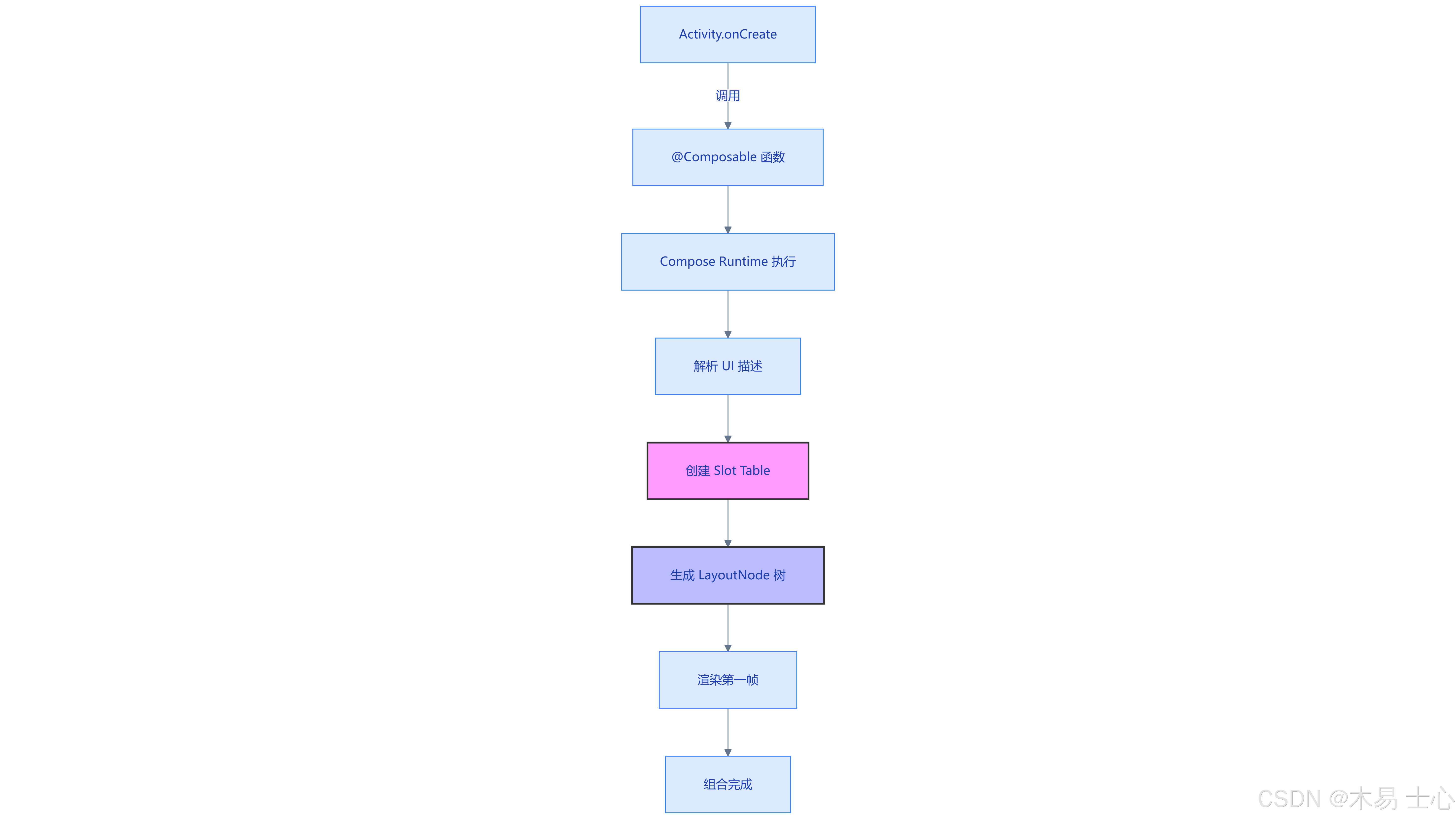
注:Slot Table 是 Compose 内部用于高效存储组合信息的核心数据结构,它像是一个动态数组,记录了当前屏幕上所有 Composable 的状态和引用。
2. 重组:响应式变化的引擎
重组是指在数据发生变化时,Composable 函数再次被重新执行的过程。这是声明式 UI 的核心------"状态改变触发重组,重组更新 UI"。
2.1 重组的触发机制
重组不是自动发生的,它由 State 触发。当你读取一个 State<T> 对象(如 mutableStateOf)的值时,该 Composable 会隐式地订阅这个 State。
- 当 State 的
.value发生变化时。 - Compose 运行时检测到该 State 被哪个 Composable 订阅了。
- 运行时将该 Composable 标记为 Invalid(无效)。
- 在下一帧绘制前,调度并重新执行这些无效的 Composable。
2.2 重组的架构流程
下图展示了从状态改变到 UI 刷新的完整数据流:
LayoutNode / Android View Composable Function Compose Composer MutableState ViewModel/Logic 用户交互/事件 LayoutNode / Android View Composable Function Compose Composer MutableState ViewModel/Logic 用户交互/事件 #mermaid-svg-6NKGfJR5oR8PHSak{font-family:"trebuchet ms",verdana,arial,sans-serif;font-size:16px;fill:#333;}@keyframes edge-animation-frame{from{stroke-dashoffset:0;}}@keyframes dash{to{stroke-dashoffset:0;}}#mermaid-svg-6NKGfJR5oR8PHSak .edge-animation-slow{stroke-dasharray:9,5!important;stroke-dashoffset:900;animation:dash 50s linear infinite;stroke-linecap:round;}#mermaid-svg-6NKGfJR5oR8PHSak .edge-animation-fast{stroke-dasharray:9,5!important;stroke-dashoffset:900;animation:dash 20s linear infinite;stroke-linecap:round;}#mermaid-svg-6NKGfJR5oR8PHSak .error-icon{fill:#552222;}#mermaid-svg-6NKGfJR5oR8PHSak .error-text{fill:#552222;stroke:#552222;}#mermaid-svg-6NKGfJR5oR8PHSak .edge-thickness-normal{stroke-width:1px;}#mermaid-svg-6NKGfJR5oR8PHSak .edge-thickness-thick{stroke-width:3.5px;}#mermaid-svg-6NKGfJR5oR8PHSak .edge-pattern-solid{stroke-dasharray:0;}#mermaid-svg-6NKGfJR5oR8PHSak .edge-thickness-invisible{stroke-width:0;fill:none;}#mermaid-svg-6NKGfJR5oR8PHSak .edge-pattern-dashed{stroke-dasharray:3;}#mermaid-svg-6NKGfJR5oR8PHSak .edge-pattern-dotted{stroke-dasharray:2;}#mermaid-svg-6NKGfJR5oR8PHSak .marker{fill:#333333;stroke:#333333;}#mermaid-svg-6NKGfJR5oR8PHSak .marker.cross{stroke:#333333;}#mermaid-svg-6NKGfJR5oR8PHSak svg{font-family:"trebuchet ms",verdana,arial,sans-serif;font-size:16px;}#mermaid-svg-6NKGfJR5oR8PHSak p{margin:0;}#mermaid-svg-6NKGfJR5oR8PHSak .actor{stroke:hsl(259.6261682243, 59.7765363128%, 87.9019607843%);fill:#ECECFF;}#mermaid-svg-6NKGfJR5oR8PHSak text.actor>tspan{fill:black;stroke:none;}#mermaid-svg-6NKGfJR5oR8PHSak .actor-line{stroke:hsl(259.6261682243, 59.7765363128%, 87.9019607843%);}#mermaid-svg-6NKGfJR5oR8PHSak .innerArc{stroke-width:1.5;stroke-dasharray:none;}#mermaid-svg-6NKGfJR5oR8PHSak .messageLine0{stroke-width:1.5;stroke-dasharray:none;stroke:#333;}#mermaid-svg-6NKGfJR5oR8PHSak .messageLine1{stroke-width:1.5;stroke-dasharray:2,2;stroke:#333;}#mermaid-svg-6NKGfJR5oR8PHSak #arrowhead path{fill:#333;stroke:#333;}#mermaid-svg-6NKGfJR5oR8PHSak .sequenceNumber{fill:white;}#mermaid-svg-6NKGfJR5oR8PHSak #sequencenumber{fill:#333;}#mermaid-svg-6NKGfJR5oR8PHSak #crosshead path{fill:#333;stroke:#333;}#mermaid-svg-6NKGfJR5oR8PHSak .messageText{fill:#333;stroke:none;}#mermaid-svg-6NKGfJR5oR8PHSak .labelBox{stroke:hsl(259.6261682243, 59.7765363128%, 87.9019607843%);fill:#ECECFF;}#mermaid-svg-6NKGfJR5oR8PHSak .labelText,#mermaid-svg-6NKGfJR5oR8PHSak .labelText>tspan{fill:black;stroke:none;}#mermaid-svg-6NKGfJR5oR8PHSak .loopText,#mermaid-svg-6NKGfJR5oR8PHSak .loopText>tspan{fill:black;stroke:none;}#mermaid-svg-6NKGfJR5oR8PHSak .loopLine{stroke-width:2px;stroke-dasharray:2,2;stroke:hsl(259.6261682243, 59.7765363128%, 87.9019607843%);fill:hsl(259.6261682243, 59.7765363128%, 87.9019607843%);}#mermaid-svg-6NKGfJR5oR8PHSak .note{stroke:#aaaa33;fill:#fff5ad;}#mermaid-svg-6NKGfJR5oR8PHSak .noteText,#mermaid-svg-6NKGfJR5oR8PHSak .noteText>tspan{fill:black;stroke:none;}#mermaid-svg-6NKGfJR5oR8PHSak .activation0{fill:#f4f4f4;stroke:#666;}#mermaid-svg-6NKGfJR5oR8PHSak .activation1{fill:#f4f4f4;stroke:#666;}#mermaid-svg-6NKGfJR5oR8PHSak .activation2{fill:#f4f4f4;stroke:#666;}#mermaid-svg-6NKGfJR5oR8PHSak .actorPopupMenu{position:absolute;}#mermaid-svg-6NKGfJR5oR8PHSak .actorPopupMenuPanel{position:absolute;fill:#ECECFF;box-shadow:0px 8px 16px 0px rgba(0,0,0,0.2);filter:drop-shadow(3px 5px 2px rgb(0 0 0 / 0.4));}#mermaid-svg-6NKGfJR5oR8PHSak .actor-man line{stroke:hsl(259.6261682243, 59.7765363128%, 87.9019607843%);fill:#ECECFF;}#mermaid-svg-6NKGfJR5oR8PHSak .actor-man circle,#mermaid-svg-6NKGfJR5oR8PHSak line{stroke:hsl(259.6261682243, 59.7765363128%, 87.9019607843%);fill:#ECECFF;stroke-width:2px;}#mermaid-svg-6NKGfJR5oR8PHSak :root{--mermaid-font-family:"trebuchet ms",verdana,arial,sans-serif;} 下一帧 触发事件 (点击等) 更新 State.value 通知状态变更 (Snapshot) 确定订阅该 State 的范围 标记 Invalid (失效) 执行重组 (Re-execute) 生成新的参数/描述 更新 LayoutNode 属性 测量 与 布局 绘制新画面
2.3 重组的"智能"与"局部性"
很多人担心重组会导致性能问题,认为每次状态变化都会重绘整个屏幕。实际上,Compose 的设计极其强调局部重组。
- 原理 :Compose 只会重组那些参数发生了变化 并且读取了变化 State 的 Composable。
- 范围控制 :如果父组件重组,但子组件的参数未变,且子组件没有内部状态变化,Compose 可以跳过子组件的重组。
局部重组示意图
#mermaid-svg-IECphGTvqGRhNBiD{font-family:"trebuchet ms",verdana,arial,sans-serif;font-size:16px;fill:#333;}@keyframes edge-animation-frame{from{stroke-dashoffset:0;}}@keyframes dash{to{stroke-dashoffset:0;}}#mermaid-svg-IECphGTvqGRhNBiD .edge-animation-slow{stroke-dasharray:9,5!important;stroke-dashoffset:900;animation:dash 50s linear infinite;stroke-linecap:round;}#mermaid-svg-IECphGTvqGRhNBiD .edge-animation-fast{stroke-dasharray:9,5!important;stroke-dashoffset:900;animation:dash 20s linear infinite;stroke-linecap:round;}#mermaid-svg-IECphGTvqGRhNBiD .error-icon{fill:#552222;}#mermaid-svg-IECphGTvqGRhNBiD .error-text{fill:#552222;stroke:#552222;}#mermaid-svg-IECphGTvqGRhNBiD .edge-thickness-normal{stroke-width:1px;}#mermaid-svg-IECphGTvqGRhNBiD .edge-thickness-thick{stroke-width:3.5px;}#mermaid-svg-IECphGTvqGRhNBiD .edge-pattern-solid{stroke-dasharray:0;}#mermaid-svg-IECphGTvqGRhNBiD .edge-thickness-invisible{stroke-width:0;fill:none;}#mermaid-svg-IECphGTvqGRhNBiD .edge-pattern-dashed{stroke-dasharray:3;}#mermaid-svg-IECphGTvqGRhNBiD .edge-pattern-dotted{stroke-dasharray:2;}#mermaid-svg-IECphGTvqGRhNBiD .marker{fill:#333333;stroke:#333333;}#mermaid-svg-IECphGTvqGRhNBiD .marker.cross{stroke:#333333;}#mermaid-svg-IECphGTvqGRhNBiD svg{font-family:"trebuchet ms",verdana,arial,sans-serif;font-size:16px;}#mermaid-svg-IECphGTvqGRhNBiD p{margin:0;}#mermaid-svg-IECphGTvqGRhNBiD .label{font-family:"trebuchet ms",verdana,arial,sans-serif;color:#333;}#mermaid-svg-IECphGTvqGRhNBiD .cluster-label text{fill:#333;}#mermaid-svg-IECphGTvqGRhNBiD .cluster-label span{color:#333;}#mermaid-svg-IECphGTvqGRhNBiD .cluster-label span p{background-color:transparent;}#mermaid-svg-IECphGTvqGRhNBiD .label text,#mermaid-svg-IECphGTvqGRhNBiD span{fill:#333;color:#333;}#mermaid-svg-IECphGTvqGRhNBiD .node rect,#mermaid-svg-IECphGTvqGRhNBiD .node circle,#mermaid-svg-IECphGTvqGRhNBiD .node ellipse,#mermaid-svg-IECphGTvqGRhNBiD .node polygon,#mermaid-svg-IECphGTvqGRhNBiD .node path{fill:#ECECFF;stroke:#9370DB;stroke-width:1px;}#mermaid-svg-IECphGTvqGRhNBiD .rough-node .label text,#mermaid-svg-IECphGTvqGRhNBiD .node .label text,#mermaid-svg-IECphGTvqGRhNBiD .image-shape .label,#mermaid-svg-IECphGTvqGRhNBiD .icon-shape .label{text-anchor:middle;}#mermaid-svg-IECphGTvqGRhNBiD .node .katex path{fill:#000;stroke:#000;stroke-width:1px;}#mermaid-svg-IECphGTvqGRhNBiD .rough-node .label,#mermaid-svg-IECphGTvqGRhNBiD .node .label,#mermaid-svg-IECphGTvqGRhNBiD .image-shape .label,#mermaid-svg-IECphGTvqGRhNBiD .icon-shape .label{text-align:center;}#mermaid-svg-IECphGTvqGRhNBiD .node.clickable{cursor:pointer;}#mermaid-svg-IECphGTvqGRhNBiD .root .anchor path{fill:#333333!important;stroke-width:0;stroke:#333333;}#mermaid-svg-IECphGTvqGRhNBiD .arrowheadPath{fill:#333333;}#mermaid-svg-IECphGTvqGRhNBiD .edgePath .path{stroke:#333333;stroke-width:2.0px;}#mermaid-svg-IECphGTvqGRhNBiD .flowchart-link{stroke:#333333;fill:none;}#mermaid-svg-IECphGTvqGRhNBiD .edgeLabel{background-color:rgba(232,232,232, 0.8);text-align:center;}#mermaid-svg-IECphGTvqGRhNBiD .edgeLabel p{background-color:rgba(232,232,232, 0.8);}#mermaid-svg-IECphGTvqGRhNBiD .edgeLabel rect{opacity:0.5;background-color:rgba(232,232,232, 0.8);fill:rgba(232,232,232, 0.8);}#mermaid-svg-IECphGTvqGRhNBiD .labelBkg{background-color:rgba(232, 232, 232, 0.5);}#mermaid-svg-IECphGTvqGRhNBiD .cluster rect{fill:#ffffde;stroke:#aaaa33;stroke-width:1px;}#mermaid-svg-IECphGTvqGRhNBiD .cluster text{fill:#333;}#mermaid-svg-IECphGTvqGRhNBiD .cluster span{color:#333;}#mermaid-svg-IECphGTvqGRhNBiD div.mermaidTooltip{position:absolute;text-align:center;max-width:200px;padding:2px;font-family:"trebuchet ms",verdana,arial,sans-serif;font-size:12px;background:hsl(80, 100%, 96.2745098039%);border:1px solid #aaaa33;border-radius:2px;pointer-events:none;z-index:100;}#mermaid-svg-IECphGTvqGRhNBiD .flowchartTitleText{text-anchor:middle;font-size:18px;fill:#333;}#mermaid-svg-IECphGTvqGRhNBiD rect.text{fill:none;stroke-width:0;}#mermaid-svg-IECphGTvqGRhNBiD .icon-shape,#mermaid-svg-IECphGTvqGRhNBiD .image-shape{background-color:rgba(232,232,232, 0.8);text-align:center;}#mermaid-svg-IECphGTvqGRhNBiD .icon-shape p,#mermaid-svg-IECphGTvqGRhNBiD .image-shape p{background-color:rgba(232,232,232, 0.8);padding:2px;}#mermaid-svg-IECphGTvqGRhNBiD .icon-shape .label rect,#mermaid-svg-IECphGTvqGRhNBiD .image-shape .label rect{opacity:0.5;background-color:rgba(232,232,232, 0.8);fill:rgba(232,232,232, 0.8);}#mermaid-svg-IECphGTvqGRhNBiD .label-icon{display:inline-block;height:1em;overflow:visible;vertical-align:-0.125em;}#mermaid-svg-IECphGTvqGRhNBiD .node .label-icon path{fill:currentColor;stroke:revert;stroke-width:revert;}#mermaid-svg-IECphGTvqGRhNBiD :root{--mermaid-font-family:"trebuchet ms",verdana,arial,sans-serif;} 未重组 (Skipped)
本次重组范围
Root Column
Header Text
LazyList
Footer Button
图解:假设只有 LazyList 的数据源发生了变化,重组将仅发生在 C 节点,Header 和 Footer 会被完全跳过。
3. 深入重组的核心:稳定性与记忆化
为了实现高效的重组,Compose 引入了"智能重启"和"记忆化"机制。这背后的技术基石是 Composition 中的 Slot Table 和 参数比较。
3.1 重组如何复用数据?
当 Composable 重组时,它不是创建一个全新的对象,而是更新现有的 Composition。
- 位置记忆 :Compose 不依赖对象的引用(如旧 View 的 id),而是依赖代码调用的顺序 (Index)。这就是为什么不能在
if语句或循环中随意改变 Composable 的调用顺序,否则会被视为不同的 UI 元素。 - 智能跳过 :在重组开始前,Compose 会比较传入当前 Composable 的新旧参数。如果所有参数都未发生变化 ,该 Composable 的执行会被完全跳过。
3.2 稳定性
"参数未发生变化"是怎么判断的?这就涉及到了稳定性。
- 已知稳定类型:基本类型、String、以及所有属性都是 val 且为稳定类型的 Kotlin 类。
- 推断稳定类型:Compose 编译器会分析类。如果一个类不可变,Compose 会认为它是稳定的。
- 不稳定类型 :如果类包含 var 或者是普通的 ArrayList 等,Compose 会认为它随时可能变。
深度影响 :
如果传递给子组件的参数是稳定 的,Compose 会进行一次"等于(==)"检查。如果相等,则跳过子组件重组。
如果参数是不稳定的,Compose 默认会认为它变了,从而强制子组件重组(即使内容实际上没变)。
3.3 记忆化
为了在重组中保持数据的一致性,Compose 提供了 remember API。
- 工作原理 :
remember将对象存储在 Composition 的 Slot Table 中。 - 重组期间 :当函数重新执行时,
remember会检查 Slot Table 中是否已经存在该值。如果存在,则返回缓存值,而不是重新初始化。
记忆化流程图
#mermaid-svg-JXJohMJ3Xr7oeclF{font-family:"trebuchet ms",verdana,arial,sans-serif;font-size:16px;fill:#333;}@keyframes edge-animation-frame{from{stroke-dashoffset:0;}}@keyframes dash{to{stroke-dashoffset:0;}}#mermaid-svg-JXJohMJ3Xr7oeclF .edge-animation-slow{stroke-dasharray:9,5!important;stroke-dashoffset:900;animation:dash 50s linear infinite;stroke-linecap:round;}#mermaid-svg-JXJohMJ3Xr7oeclF .edge-animation-fast{stroke-dasharray:9,5!important;stroke-dashoffset:900;animation:dash 20s linear infinite;stroke-linecap:round;}#mermaid-svg-JXJohMJ3Xr7oeclF .error-icon{fill:#552222;}#mermaid-svg-JXJohMJ3Xr7oeclF .error-text{fill:#552222;stroke:#552222;}#mermaid-svg-JXJohMJ3Xr7oeclF .edge-thickness-normal{stroke-width:1px;}#mermaid-svg-JXJohMJ3Xr7oeclF .edge-thickness-thick{stroke-width:3.5px;}#mermaid-svg-JXJohMJ3Xr7oeclF .edge-pattern-solid{stroke-dasharray:0;}#mermaid-svg-JXJohMJ3Xr7oeclF .edge-thickness-invisible{stroke-width:0;fill:none;}#mermaid-svg-JXJohMJ3Xr7oeclF .edge-pattern-dashed{stroke-dasharray:3;}#mermaid-svg-JXJohMJ3Xr7oeclF .edge-pattern-dotted{stroke-dasharray:2;}#mermaid-svg-JXJohMJ3Xr7oeclF .marker{fill:#333333;stroke:#333333;}#mermaid-svg-JXJohMJ3Xr7oeclF .marker.cross{stroke:#333333;}#mermaid-svg-JXJohMJ3Xr7oeclF svg{font-family:"trebuchet ms",verdana,arial,sans-serif;font-size:16px;}#mermaid-svg-JXJohMJ3Xr7oeclF p{margin:0;}#mermaid-svg-JXJohMJ3Xr7oeclF .label{font-family:"trebuchet ms",verdana,arial,sans-serif;color:#333;}#mermaid-svg-JXJohMJ3Xr7oeclF .cluster-label text{fill:#333;}#mermaid-svg-JXJohMJ3Xr7oeclF .cluster-label span{color:#333;}#mermaid-svg-JXJohMJ3Xr7oeclF .cluster-label span p{background-color:transparent;}#mermaid-svg-JXJohMJ3Xr7oeclF .label text,#mermaid-svg-JXJohMJ3Xr7oeclF span{fill:#333;color:#333;}#mermaid-svg-JXJohMJ3Xr7oeclF .node rect,#mermaid-svg-JXJohMJ3Xr7oeclF .node circle,#mermaid-svg-JXJohMJ3Xr7oeclF .node ellipse,#mermaid-svg-JXJohMJ3Xr7oeclF .node polygon,#mermaid-svg-JXJohMJ3Xr7oeclF .node path{fill:#ECECFF;stroke:#9370DB;stroke-width:1px;}#mermaid-svg-JXJohMJ3Xr7oeclF .rough-node .label text,#mermaid-svg-JXJohMJ3Xr7oeclF .node .label text,#mermaid-svg-JXJohMJ3Xr7oeclF .image-shape .label,#mermaid-svg-JXJohMJ3Xr7oeclF .icon-shape .label{text-anchor:middle;}#mermaid-svg-JXJohMJ3Xr7oeclF .node .katex path{fill:#000;stroke:#000;stroke-width:1px;}#mermaid-svg-JXJohMJ3Xr7oeclF .rough-node .label,#mermaid-svg-JXJohMJ3Xr7oeclF .node .label,#mermaid-svg-JXJohMJ3Xr7oeclF .image-shape .label,#mermaid-svg-JXJohMJ3Xr7oeclF .icon-shape .label{text-align:center;}#mermaid-svg-JXJohMJ3Xr7oeclF .node.clickable{cursor:pointer;}#mermaid-svg-JXJohMJ3Xr7oeclF .root .anchor path{fill:#333333!important;stroke-width:0;stroke:#333333;}#mermaid-svg-JXJohMJ3Xr7oeclF .arrowheadPath{fill:#333333;}#mermaid-svg-JXJohMJ3Xr7oeclF .edgePath .path{stroke:#333333;stroke-width:2.0px;}#mermaid-svg-JXJohMJ3Xr7oeclF .flowchart-link{stroke:#333333;fill:none;}#mermaid-svg-JXJohMJ3Xr7oeclF .edgeLabel{background-color:rgba(232,232,232, 0.8);text-align:center;}#mermaid-svg-JXJohMJ3Xr7oeclF .edgeLabel p{background-color:rgba(232,232,232, 0.8);}#mermaid-svg-JXJohMJ3Xr7oeclF .edgeLabel rect{opacity:0.5;background-color:rgba(232,232,232, 0.8);fill:rgba(232,232,232, 0.8);}#mermaid-svg-JXJohMJ3Xr7oeclF .labelBkg{background-color:rgba(232, 232, 232, 0.5);}#mermaid-svg-JXJohMJ3Xr7oeclF .cluster rect{fill:#ffffde;stroke:#aaaa33;stroke-width:1px;}#mermaid-svg-JXJohMJ3Xr7oeclF .cluster text{fill:#333;}#mermaid-svg-JXJohMJ3Xr7oeclF .cluster span{color:#333;}#mermaid-svg-JXJohMJ3Xr7oeclF div.mermaidTooltip{position:absolute;text-align:center;max-width:200px;padding:2px;font-family:"trebuchet ms",verdana,arial,sans-serif;font-size:12px;background:hsl(80, 100%, 96.2745098039%);border:1px solid #aaaa33;border-radius:2px;pointer-events:none;z-index:100;}#mermaid-svg-JXJohMJ3Xr7oeclF .flowchartTitleText{text-anchor:middle;font-size:18px;fill:#333;}#mermaid-svg-JXJohMJ3Xr7oeclF rect.text{fill:none;stroke-width:0;}#mermaid-svg-JXJohMJ3Xr7oeclF .icon-shape,#mermaid-svg-JXJohMJ3Xr7oeclF .image-shape{background-color:rgba(232,232,232, 0.8);text-align:center;}#mermaid-svg-JXJohMJ3Xr7oeclF .icon-shape p,#mermaid-svg-JXJohMJ3Xr7oeclF .image-shape p{background-color:rgba(232,232,232, 0.8);padding:2px;}#mermaid-svg-JXJohMJ3Xr7oeclF .icon-shape .label rect,#mermaid-svg-JXJohMJ3Xr7oeclF .image-shape .label rect{opacity:0.5;background-color:rgba(232,232,232, 0.8);fill:rgba(232,232,232, 0.8);}#mermaid-svg-JXJohMJ3Xr7oeclF .label-icon{display:inline-block;height:1em;overflow:visible;vertical-align:-0.125em;}#mermaid-svg-JXJohMJ3Xr7oeclF .node .label-icon path{fill:currentColor;stroke:revert;stroke-width:revert;}#mermaid-svg-JXJohMJ3Xr7oeclF :root{--mermaid-font-family:"trebuchet ms",verdana,arial,sans-serif;} 检查 Slot Table
是
否
开始重组 Composable
执行到 remember 代码块
值是否存在且 key 未变?
返回缓存的实例
执行初始化代码块
将新实例存入 Slot Table
继续执行后续 UI 代码
4. 总结与最佳实践
理解初始组合和重组的深层机制,能帮助我们编写出更高性能的 Compose 代码。
- 重组是乐观的 :Compose 假设重组很快,因此可能会在中间状态(如动画帧)多次调用同一函数。你的 Composable 函数必须是无副作用 的,不能在里面直接启动数据库操作或网络请求,应使用
SideEffect或LaunchedEffect。 - 保持函数幂等性:无论重组多少次,只要参数相同,UI 应该表现一致。不要依赖函数执行的"次数"来改变逻辑。
- 善用稳定性和 @Immutable :对于传递给子组件的数据模型,尽量使用
val或@Immutable注解,帮助编译器推断稳定性,从而最大化"智能跳过"的收益,减少不必要的重绘。 - Key 的妙用 :在列表或动态 UI 中,使用
key()修饰符。这告诉 Compose:"即使位置变了,只要 key 一样,这就是同一个东西",帮助 Compose 在重组时正确地保留状态(如滚动位置或输入框内容)。
通过掌握这些底层原理,你将不再只是在"写界面",而是在"编排数据与视图的高效流转"。