HarmonyOS ArkTS 实战:从零实现一个校园宿舍电费查询与分摊应用
HarmonyOS ArkTS 实战:从零实现一个校园宿舍电费查询与分摊应用
本文将带你使用 HarmonyOS + ArkTS 从零搭建一个功能完整的校园宿舍电费查询与分摊应用,涵盖余额查询、在线充值、用电统计、室友分摊、缴费记录等核心模块,附完整可运行代码。
目录
-
一、项目背景与效果预览
-
二、技术栈与环境准备
-
三、项目结构设计
-
四、数据模型设计
-
4.1 电费账单模型
-
4.2 室友模型
-
4.3 充值记录模型
-
4.4 用电记录模型
-
4.5 设计思路
-
-
五、页面布局与 UI 实现
-
5.1 整体布局架构
-
5.2 顶部余额面板
-
5.3 用电统计面板
-
5.4 室友分摊列表
-
5.5 用电趋势图
-
5.6 缴费记录列表
-
5.7 充值弹窗
-
5.8 低电量提醒
-
5.9 每人明细面板
-
-
六、核心功能实现详解
-
6.1 室友分摊计算
-
6.2 在线充值电费
-
6.3 低电量提醒机制
-
6.4 用电统计与趋势
-
6.5 缴费提醒功能
-
6.6 公摊电费计算
-
-
七、样式与交互动效
-
7.1 主题色系统
-
7.2 状态颜色体系
-
7.3 交互动效
-
-
八、完整代码结构
-
九、运行与调试
-
十、技术要点总结
-
十一、扩展方向
一、项目背景与效果预览
宿舍电费谁交?怎么分摊?余额还剩多少?什么时候该充电费?
这些问题困扰着每一个住宿舍的大学生。校园宿舍电费查询与分摊应用,完美解决这些痛点------实时查询电费余额、在线充值、自动计算室友分摊、低电量提醒、用电趋势分析,让电费管理变得简单透明。
本项目使用 HarmonyOS ArkTS 开发一个完整的宿舍电费管理应用,包含余额查询、在线充值、用电统计、室友分摊、缴费记录等全流程功能。
核心功能一览
| 功能模块 | 说明 |
|---|---|
| ⚡ 电费余额查询 | 实时查看宿舍电费余额 |
| 💰 在线充电费 | 一键充值,支持多种金额 |
| 📊 用电记录 | 每日/每月用电明细 |
| 👥 室友分摊计算 | 自动计算每人应付金额 |
| 🔔 低电量提醒 | 余额不足时自动提醒 |
| 📋 缴费记录 | 所有充值记录一目了然 |
| 📈 用电统计 | 本月用电、本月电费统计 |
| 🏠 公摊电费 | 公共区域电费分摊 |
| 📝 每人明细 | 每人的缴费和分摊明细 |
| ⏰ 缴费提醒 | 提醒室友及时缴费 |
运行效果
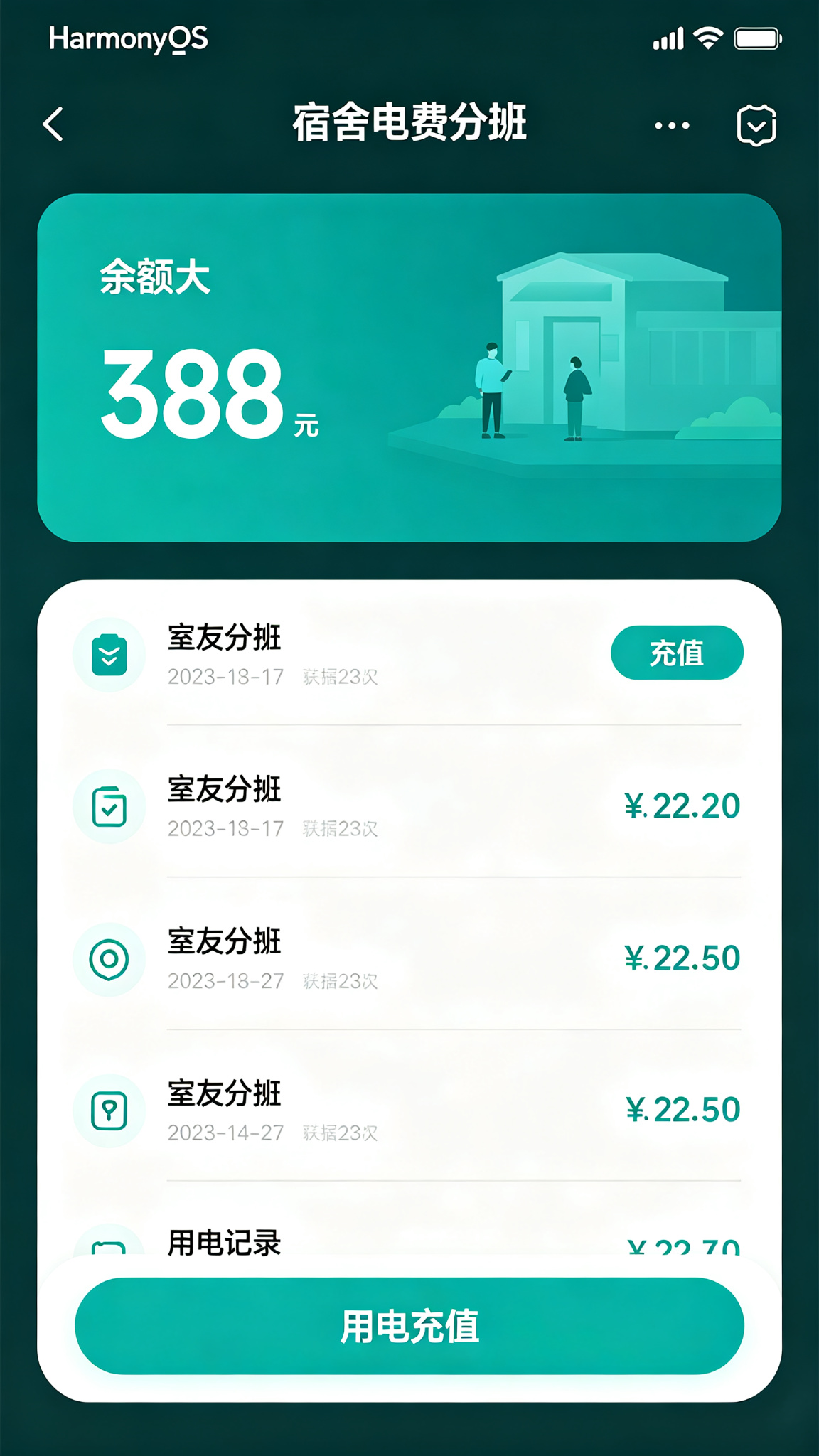
应用整体采用深青绿色(#0F766E)为主色调,传递"能源、节约、电力"的感觉。顶部为余额大字展示(深青绿色),低电量时红色提醒。中部为用电统计面板、室友分摊列表(每人应付/已付状态,已付绿色对勾,未付橙色提醒)、用电趋势图。底部为缴费记录和功能按钮。
二、技术栈与环境准备
开发环境
| 项目 | 版本要求 | 说明 |
|---|---|---|
| DevEco Studio | 5.0+ | HarmonyOS 官方 IDE |
| HarmonyOS SDK | API 24+ | 基于 ArkTS 声明式开发范式 |
| 运行设备 | HarmonyOS 4.0+ | 手机 / 平板均可 |
项目亮点
本项目是一个完整的宿舍电费管理系统,包含:
-
实时余额查询:模拟真实电费余额展示
-
智能分摊计算:自动计算每人应付金额,支持公摊
-
用电趋势分析:可视化展示用电趋势
-
低电量预警:余额不足时自动提醒
-
缴费追踪:谁交了谁没交,一目了然
-
数据可视化:用电趋势图、统计面板
三、项目结构设计
Plaintext
entry/src/main/
├── ets/
│   ├── pages/
│   │   └── Index.ets              # 主页面(单页应用)
│   ├── model/
│   │   ├── ElectricityBill.ets    # 电费账单数据模型
│   │   ├── Roommate.ets           # 室友数据模型
│   │   ├── RechargeRecord.ets     # 充值记录数据模型
│   │   └── UsageRecord.ets        # 用电记录数据模型
│   ├── components/
│   │   ├── BalancePanel.ets       # 余额面板
│   │   ├── StatsPanel.ets         # 统计面板
│   │   ├── RoommateList.ets       # 室友分摊列表
│   │   ├── UsageChart.ets         # 用电趋势图
│   │   ├── RechargeList.ets       # 缴费记录列表
│   │   ├── RechargeDialog.ets     # 充值弹窗
│   │   ├── LowBatteryAlert.ets    # 低电量提醒
│   │   └── DetailPanel.ets        # 每人明细面板
│   └── utils/
│       ├── MockData.ets           # 模拟数据
│       └── Calculator.ets         # 分摊计算工具
├── resources/
│   ├── base/
│   │   ├── element/               # 颜色、尺寸等资源
│   │   └── media/                 # 图片资源
│   └── rawfile/                   # 其他资源
└── module.json5                   # 模块配置
💡 架构说明 :本项目采用单页面 + 组件化架构。主页面负责状态管理和业务逻辑,各功能模块拆分为独立组件。分摊计算逻辑抽离到工具函数中,保持代码清晰。
四、数据模型设计
4.1 电费账单模型
电费账单是核心实体,记录了一个周期内的用电和费用情况。
TypeScript
/**
 * 电费账单数据结构
 */
interface ElectricityBill {
  id: number;                    // 账单 ID
  dormitory: string;             // 宿舍号
  month: string;                 // 账单月份(如:2024-07)
  totalUsage: number;            // 总用电量(度)
  totalAmount: number;           // 总电费(元)
  publicUsage: number;           // 公摊用电量(度)
  publicAmount: number;          // 公摊电费(元)
  personalUsage: number;         // 个人用电量(度)
  personalAmount: number;        // 个人电费(元)
  pricePerUnit: number;          // 电价(元/度)
  balance: number;               // 当前余额
  lastReading: number;           // 上次读数
  currentReading: number;        // 当前读数
  billingDate: string;           // 出账日期
  dueDate: string;               // 缴费截止日期
  status: BillStatus;            // 账单状态
  roommateCount: number;         // 室友人数
  paidCount: number;             // 已缴费人数
}

/**
 * 账单状态
 * unpaid:    未缴费
 * partial:   部分缴费
 * paid:      已全部缴费
 * overdue:   已逾期
 */
type BillStatus = 'unpaid' | 'partial' | 'paid' | 'overdue';
4.2 室友模型
TypeScript
/**
 * 室友数据结构
 */
interface Roommate {
  id: number;           // 室友 ID
  name: string;         // 姓名
  avatar: string;       // 头像
  studentId: string;    // 学号
  bedNumber: string;    // 床位号
  phone: string;        // 联系电话
  shareAmount: number;  // 本月应分摊金额
  paidAmount: number;   // 本月已缴金额
  isPaid: boolean;      // 是否已缴清
  paidDate: string;     // 缴费日期
  totalPaid: number;    // 累计缴费
  isAdmin: boolean;     // 是否为宿舍长(管理员)
}
4.3 充值记录模型
TypeScript
/**
 * 充值记录数据结构
 */
interface RechargeRecord {
  id: number;               // 记录 ID
  amount: number;           // 充值金额
  payerId: number;          // 缴费人 ID
  payerName: string;        // 缴费人姓名
  method: RechargeMethod;   // 充值方式
  status: RechargeStatus;   // 充值状态
  createTime: string;       // 充值时间
  confirmTime: string;      // 到账时间
  orderNo: string;          // 订单号
  remark: string;           // 备注
}

/**
 * 充值方式
 */
type RechargeMethod = 'wechat' | 'alipay' | 'balance' | 'cash';

/**
 * 充值状态
 * pending:   处理中
 * success:   成功
 * failed:    失败
 */
type RechargeStatus = 'pending' | 'success' | 'failed';
4.4 用电记录模型
TypeScript
/**
 * 每日用电记录
 */
interface DailyUsage {
  date: string;         // 日期
  usage: number;        // 用电量(度)
  amount: number;       // 电费(元)
  temperature: number;  // 当日气温(影响用电的因素)
  isWeekend: boolean;   // 是否周末
}

/**
 * 每月用电统计
 */
interface MonthlyUsage {
  month: string;        // 月份
  totalUsage: number;   // 总用电量
  totalAmount: number;  // 总电费
  avgDailyUsage: number;// 日均用电
  days: number;         // 天数
  trend: 'up' | 'down' | 'flat'; // 趋势
}
4.5 设计思路
| 设计决策 | 理由 |
|---|---|
| 分离个人和公摊电费 | 真实宿舍电费结构,计算更准确 |
| 室友独立缴费状态 | 每人独立追踪,谁交了谁没交一目了然 |
| 每日用电记录 | 支持趋势分析和异常检测 |
| 多种充值方式 | 模拟真实支付场景 |
| 宿舍长角色 | 支持管理功能,如催缴、修改分摊 |
五、页面布局与 UI 实现
5.1 整体布局架构
页面采用顶部余额面板 + 统计卡片 + 室友分摊 + 用电趋势 + 缴费记录的布局:
Plaintext
┌─────────────────────────┐
│  ⚡ 电费余额:¥128.50    │  ← BalancePanel
│  (低电量时红色提醒)     │
├─────────────────────────┤
│  本月用电 | 本月电费      │  ← StatsPanel(2x2 网格)
│  待收分摊 | 室友人数      │
├─────────────────────────┤
│  👥 室友分摊              │
│  ┌─────────────────┐    │
│  │ ✅ 张三 已付 ¥32 │    │  ← RoommateList
│  │ ⏳ 李四 未付 ¥32 │    │
│  │ ⏳ 王五 未付 ¥32 │    │
│  └─────────────────┘    │
├─────────────────────────┤
│  📈 用电趋势              │  ← UsageChart(柱状图)
│  ▁▂▃▅▆▇█                │
├─────────────────────────┤
│  📋 缴费记录              │  ← RechargeList
│  张三 ¥100  07-01        │
│  李四 ¥50   07-05        │
├─────────────────────────┤
│  💰 充值  |  📊 明细      │  ← 底部操作栏
└─────────────────────────┘
核心布局骨架:
TypeScript
@Entry
@Component
struct Index {
  @State currentTab: number = 0; // 0:首页 1:记录 2:明细 3:我的

  build() {
    Column() {
      // 顶部余额面板
      BalancePanel({
        balance: this.balance,
        dormitory: this.dormitory,
        lowBattery: this.isLowBattery(),
        onRecharge: () => this.showRechargeDialog = true
      })

      // 内容区域(可滚动)
      Scroll() {
        Column() {
          if (this.currentTab === 0) {
            // 统计面板
            StatsPanel({ stats: this.usageStats })

            // 室友分摊列表
            RoommateList({
              roommates: this.roommates,
              totalShare: this.monthlyBill.totalAmount,
              onRemind: (roommate) => this.remindRoommate(roommate)
            })

            // 用电趋势图
            UsageChart({ data: this.weeklyUsage })

            // 快捷操作
            this.QuickActions()
          } else if (this.currentTab === 1) {
            // 缴费记录
            RechargeList({ records: this.rechargeRecords })
          } else if (this.currentTab === 2) {
            // 每人明细
            DetailPanel({ roommates: this.roommates })
          } else {
            // 我的
            this.ProfilePage()
          }
        }
        .width('100%')
      }
      .layoutWeight(1)

      // 底部 Tab 栏
      BottomTabBar({
        currentTab: this.currentTab,
        onTabChange: (index) => this.currentTab = index
      })
    }
    .width('100%')
    .height('100%')
    .backgroundColor('#F0FDFA')
  }
}
5.2 顶部余额面板
余额是最核心的信息,用大字展示在顶部。
TypeScript
@Component
struct BalancePanel {
  @Prop balance: number;
  @Prop dormitory: string;
  @Prop lowBattery: boolean;
  onRecharge: () => void;

  build() {
    Column() {
      // 宿舍信息
      Row() {
        Text('🏠 ' + this.dormitory)
          .fontSize(14)
          .fontColor('#FFFFFF')
          .opacity(0.9)

        Blank()

        Text('电费余额')
          .fontSize(13)
          .fontColor('#FFFFFF')
          .opacity(0.8)
      }
      .width('100%')

      // 余额大字
      Row() {
        Text('¥')
          .fontSize(24)
          .fontColor('#FFFFFF')
          .fontWeight(FontWeight.Bold)
          .margin({ top: 8 })

        Text(this.balance.toFixed(2))
          .fontSize(48)
          .fontColor('#FFFFFF')
          .fontWeight(FontWeight.Bold)
          .margin({ left: 4 })
      }
      .width('100%')
      .margin({ top: 8 })

      // 低电量提醒
      if (this.lowBattery) {
        Row() {
          Text('⚠️')
            .fontSize(14)
          Text('余额不足,请及时充值')
            .fontSize(12)
            .fontColor('#FECACA')
            .margin({ left: 4 })
        }
        .width('100%')
        .padding({ top: 8, bottom: 8, left: 12, right: 12 })
        .backgroundColor('rgba(239, 68, 68, 0.3)')
        .borderRadius(8)
        .margin({ top: 12 })
      }

      // 充值按钮
      Button('立即充值')
        .width('100%')
        .height(44)
        .margin({ top: 16 })
        .borderRadius(22)
        .backgroundColor('#FFFFFF')
        .fontColor('#0F766E')
        .fontSize(15)
        .fontWeight(FontWeight.Bold)
        .onClick(() => {
          this.onRecharge();
        })
    }
    .width('100%')
    .padding(20)
    .backgroundColor(this.lowBattery ? '#DC2626' : '#0F766E')
    .borderRadius({ bottomLeft: 20, bottomRight: 20 })
  }
}设计要点:
-
大字余额:48px 大字体,一眼看清余额
-
低电量变色:余额不足时背景变红,视觉冲击强
-
充值按钮:白色按钮在深色背景上非常醒目
-
宿舍信息:顶部显示宿舍号,确认当前宿舍
5.3 用电统计面板
展示本月用电相关的统计数据。
TypeScript
@Component
struct StatsPanel {
  @Prop stats: UsageStats;

  build() {
    Grid() {
      GridItem() {
        this.StatCard(
          '本月用电',
          this.stats.monthlyUsage + '度',
          '⚡',
          '#0F766E'
        )
      }
      GridItem() {
        this.StatCard(
          '本月电费',
          '¥' + this.stats.monthlyAmount.toFixed(1),
          '💰',
          '#0891B2'
        )
      }
      GridItem() {
        this.StatCard(
          '待收分摊',
          '¥' + this.stats.pendingShare.toFixed(1),
          '⏳',
          '#F59E0B'
        )
      }
      GridItem() {
        this.StatCard(
          '室友人数',
          this.stats.roommateCount + '人',
          '👥',
          '#8B5CF6'
        )
      }
    }
    .columnsTemplate('1fr 1fr')
    .rowsGap(12)
    .columnsGap(12)
    .padding(16)
  }

  @Builder
  StatCard(label: string, value: string, icon: string, color: string) {
    Column() {
      Row() {
        Text(icon)
          .fontSize(20)
        Blank()
        Text(value)
          .fontSize(18)
          .fontWeight(FontWeight.Bold)
          .fontColor(color)
      }
      .width('100%')

      Text(label)
        .fontSize(12)
        .fontColor('#666666')
        .width('100%')
        .margin({ top: 8 })
    }
    .width('100%')
    .padding(14)
    .backgroundColor('#FFFFFF')
    .borderRadius(12)
  }
}

interface UsageStats {
  monthlyUsage: number;     // 本月用电量(度)
  monthlyAmount: number;    // 本月电费(元)
  pendingShare: number;     // 待收分摊(元)
  roommateCount: number;    // 室友人数
}
5.4 室友分摊列表
展示每位室友的分摊和缴费状态,这是应用的核心功能。
TypeScript
@Component
struct RoommateList {
  @State roommates: Roommate[] = [];
  @Prop totalShare: number;
  onRemind: (roommate: Roommate) => void;

  private get perPersonAmount(): number {
    return this.roommates.length > 0
      ? this.totalShare / this.roommates.length
      : 0;
  }

  private get paidCount(): number {
    return this.roommates.filter(r => r.isPaid).length;
  }

  build() {
    Column() {
      // 标题
      Row() {
        Text('👥 室友分摊')
          .fontSize(16)
          .fontWeight(FontWeight.Bold)
          .fontColor('#333333')
          .layoutWeight(1)

        Text(this.paidCount + '/' + this.roommates.length + ' 已缴')
          .fontSize(12)
          .fontColor('#666666')
      }
      .width('100%')
      .padding({ left: 16, right: 16, top: 16, bottom: 12 })

      // 进度条
      Progress({
        value: this.paidCount,
        total: this.roommates.length,
        type: ProgressType.Linear
      })
        .width('100%')
        .height(6)
        .color('#10B981')
        .backgroundColor('#E5E7EB')
        .padding({ left: 16, right: 16 })

      // 室友列表
      Column() {
        ForEach(this.roommates, (roommate: Roommate) => {
          this.RoommateItem(roommate)
        }, (roommate: Roommate) => roommate.id.toString())
      }
      .width('100%')
      .padding(16)
    }
    .width('100%')
    .backgroundColor('#FFFFFF')
    .borderRadius(12)
    .margin({ left: 16, right: 16, bottom: 12 })
  }

  @Builder
  RoommateItem(roommate: Roommate) {
    Row() {
      // 头像
      Stack() {
        Circle({ width: 44, height: 44 })
          .fill('#CCFBF1')
        Text(roommate.name.charAt(0))
          .fontSize(18)
          .fontColor('#0F766E')
          .fontWeight(FontWeight.Bold)
      }

      // 信息
      Column() {
        Row() {
          Text(roommate.name)
            .fontSize(15)
            .fontColor('#333333')
            .fontWeight(FontWeight.Medium)

          if (roommate.isAdmin) {
            Text(' 宿舍长')
              .fontSize(10)
              .fontColor('#0F766E')
              .backgroundColor('#CCFBF1')
              .padding({ left: 6, right: 6, top: 1, bottom: 1 })
              .borderRadius(4)
              .margin({ left: 6 })
          }

          Blank()

          // 状态标签
          if (roommate.isPaid) {
            Row() {
              Text('✅')
                .fontSize(12)
              Text('已付')
                .fontSize(12)
                .fontColor('#10B981')
                .fontWeight(FontWeight.Medium)
                .margin({ left: 2 })
            }
          } else {
            Row() {
              Text('⏳')
                .fontSize(12)
              Text('未付')
                .fontSize(12)
                .fontColor('#F59E0B')
                .fontWeight(FontWeight.Medium)
                .margin({ left: 2 })
            }
          }
        }
        .width('100%')

        Row() {
          Text(roommate.bedNumber + ' · 学号 ' + roommate.studentId)
            .fontSize(12)
            .fontColor('#999999')

          Blank()

          Text('应付 ¥' + this.perPersonAmount.toFixed(1))
            .fontSize(13)
            .fontColor('#333333')
            .fontWeight(FontWeight.Medium)
        }
        .width('100%')
        .margin({ top: 4 })

        // 已付金额和日期
        if (roommate.isPaid && roommate.paidDate) {
          Text('已付 ¥' + roommate.paidAmount.toFixed(1) + ' · ' + roommate.paidDate)
            .fontSize(11)
            .fontColor('#10B981')
            .width('100%')
            .margin({ top: 2 })
        }

        // 催缴按钮(未付时显示)
        if (!roommate.isPaid) {
          Button('催缴')
            .width(56)
            .height(26)
            .borderRadius(13)
            .backgroundColor('#FEF3C7')
            .fontColor('#D97706')
            .fontSize(12)
            .margin({ top: 8 })
            .onClick(() => {
              this.onRemind(roommate);
            })
        }
      }
      .layoutWeight(1)
      .margin({ left: 12 })
      .alignItems(HorizontalAlign.Start)
    }
    .width('100%')
    .padding({ top: 10, bottom: 10 })

    Divider()
      .color('#F0F0F0')
      .margin({ left: 56 })
  }
}设计要点:
-
进度条:直观展示缴费进度
-
状态标签:已付绿色对勾,未付橙色沙漏
-
宿舍长标识:特殊标识,区分管理员
-
催缴按钮:未付时显示催缴按钮
-
床位+学号:完整身份信息
5.5 用电趋势图
用柱状图展示最近一周的用电趋势。
TypeScript
@Component
struct UsageChart {
  @Prop data: DailyUsage[];

  private get maxUsage(): number {
    return Math.max(...this.data.map(d => d.usage), 1);
  }

  build() {
    Column() {
      Row() {
        Text('📈 用电趋势')
          .fontSize(16)
          .fontWeight(FontWeight.Bold)
          .fontColor('#333333')
          .layoutWeight(1)

        Text('近7天')
          .fontSize(12)
          .fontColor('#999999')
      }
      .width('100%')
      .padding({ left: 16, right: 16, top: 16, bottom: 16 })

      // 柱状图
      Row() {
        ForEach(this.data, (item: DailyUsage, index: number) => {
          this.BarItem(item, index)
        }, (item: DailyUsage) => item.date)
      }
      .width('100%')
      .height(120)
      .padding({ left: 16, right: 16, bottom: 8 })
      .alignItems(VerticalAlign.Bottom)

      // X 轴标签
      Row() {
        ForEach(this.data, (item: DailyUsage) => {
          Text(this.formatDay(item.date))
            .fontSize(10)
            .fontColor('#999999')
            .layoutWeight(1)
            .textAlign(TextAlign.Center)
        }, (item: DailyUsage) => item.date)
      }
      .width('100%')
      .padding({ left: 16, right: 16, bottom: 16 })
    }
    .width('100%')
    .backgroundColor('#FFFFFF')
    .borderRadius(12)
    .margin({ left: 16, right: 16, bottom: 12 })
  }

  @Builder
  BarItem(item: DailyUsage, index: number) {
    Column() {
      // 数值标签
      Text(item.usage.toFixed(0))
        .fontSize(10)
        .fontColor('#0F766E')
        .fontWeight(FontWeight.Medium)
        .margin({ bottom: 4 })

      // 柱子
      Column()
        .width('70%')
        .height(this.getBarHeight(item.usage))
        .backgroundColor(this.isToday(index) ? '#0F766E' : '#99F6E4')
        .borderRadius({ topLeft: 4, topRight: 4 })
    }
    .layoutWeight(1)
    .alignItems(HorizontalAlign.Center)
    .justifyContent(FlexAlign.End)
  }

  private getBarHeight(usage: number): number {
    const maxHeight = 80;
    return (usage / this.maxUsage) * maxHeight;
  }

  private isToday(index: number): boolean {
    return index === this.data.length - 1;
  }

  private formatDay(dateStr: string): string {
    const date = new Date(dateStr);
    const days = ['日', '一', '二', '三', '四', '五', '六'];
    return '周' + days[date.getDay()];
  }
}
5.6 缴费记录列表
展示所有的充值缴费记录。
TypeScript
@Component
struct RechargeList {
  @State records: RechargeRecord[] = [];

  build() {
    Column() {
      Text('📋 缴费记录')
        .fontSize(16)
        .fontWeight(FontWeight.Bold)
        .fontColor('#333333')
        .width('100%')
        .padding({ left: 16, right: 16, top: 16, bottom: 12 })

      List({ space: 0 }) {
        ForEach(this.records, (record: RechargeRecord) => {
          ListItem() {
            this.RecordItem(record)
          }
        }, (record: RechargeRecord) => record.id.toString())

        if (this.records.length === 0) {
          ListItem() {
            Column() {
              Text('📭')
                .fontSize(40)
              Text('暂无缴费记录')
                .fontSize(14)
                .fontColor('#999999')
                .margin({ top: 12 })
            }
            .width('100%')
            .padding(40)
            .alignItems(HorizontalAlign.Center)
          }
        }
      }
      .width('100%')
    }
    .width('100%')
    .backgroundColor('#FFFFFF')
    .borderRadius(12)
    .margin({ left: 16, right: 16, bottom: 12 })
  }

  @Builder
  RecordItem(record: RechargeRecord) {
    Row() {
      // 图标
      Stack() {
        Circle({ width: 40, height: 40 })
          .fill(this.getMethodBg(record.method))
        Text(this.getMethodIcon(record.method))
          .fontSize(18)
      }

      // 信息
      Column() {
        Row() {
          Text(record.payerName + ' 充值')
            .fontSize(14)
            .fontColor('#333333')
            .fontWeight(FontWeight.Medium)
            .layoutWeight(1)

          Text('+¥' + record.amount.toFixed(2))
            .fontSize(15)
            .fontColor('#10B981')
            .fontWeight(FontWeight.Bold)
        }
        .width('100%')

        Row() {
          Text(this.getMethodText(record.method))
            .fontSize(12)
            .fontColor('#999999')

          Text(' · ' + record.createTime)
            .fontSize(12)
            .fontColor('#999999')

          Blank()

          // 状态
          Text(this.getStatusText(record.status))
            .fontSize(11)
            .fontColor(this.getStatusColor(record.status))
        }
        .width('100%')
        .margin({ top: 4 })
      }
      .layoutWeight(1)
      .margin({ left: 12 })
      .alignItems(HorizontalAlign.Start)
    }
    .width('100%')
    .padding({ left: 16, right: 16, top: 12, bottom: 12 })

    Divider()
      .color('#F0F0F0')
      .margin({ left: 68 })
  }

  private getMethodIcon(method: RechargeMethod): string {
    const icons: Record<RechargeMethod, string> = {
      wechat: '💚',
      alipay: '💙',
      balance: '💰',
      cash: '💵'
    };
    return icons[method] || '💰';
  }

  private getMethodBg(method: RechargeMethod): string {
    const bgs: Record<RechargeMethod, string> = {
      wechat: '#DCFCE7',
      alipay: '#DBEAFE',
      balance: '#FEF3C7',
      cash: '#FCE7F3'
    };
    return bgs[method] || '#F3F4F6';
  }

  private getMethodText(method: RechargeMethod): string {
    const texts: Record<RechargeMethod, string> = {
      wechat: '微信支付',
      alipay: '支付宝',
      balance: '余额',
      cash: '现金'
    };
    return texts[method] || '未知';
  }

  private getStatusText(status: RechargeStatus): string {
    const texts: Record<RechargeStatus, string> = {
      pending: '处理中',
      success: '已到账',
      failed: '失败'
    };
    return texts[status] || '未知';
  }

  private getStatusColor(status: RechargeStatus): string {
    const colors: Record<RechargeStatus, string> = {
      pending: '#F59E0B',
      success: '#10B981',
      failed: '#EF4444'
    };
    return colors[status] || '#9CA3AF';
  }
}
5.7 充值弹窗
在线充值电费的弹窗。
TypeScript
@CustomDialog
struct RechargeDialog {
  controller: CustomDialogController;
  onRecharge: (amount: number, method: RechargeMethod) => void;

  @State selectedAmount: number = 50;
  @State customAmount: string = '';
  @State selectedMethod: RechargeMethod = 'wechat';

  private quickAmounts: number[] = [20, 50, 100, 200, 500];

  build() {
    Column() {
      Text('充值电费')
        .fontSize(18)
        .fontWeight(FontWeight.Bold)
        .fontColor('#333333')
        .margin({ bottom: 20 })

      // 快捷金额
      Text('选择金额')
        .fontSize(14)
        .fontColor('#666666')
        .alignSelf(ItemAlign.Start)
        .margin({ bottom: 10 })

      Grid() {
        ForEach(this.quickAmounts, (amount: number) => {
          GridItem() {
            this.AmountButton(amount)
          }
        }, (amount: number) => amount.toString())
      }
      .columnsTemplate('1fr 1fr 1fr')
      .rowsGap(10)
      .columnsGap(10)
      .width('100%')

      // 自定义金额
      TextInput({ placeholder: '自定义金额' })
        .width('100%')
        .height(44)
        .backgroundColor('#F5F5F5')
        .borderRadius(8)
        .padding({ left: 12, right: 12 })
        .fontSize(14)
        .type(InputType.Number)
        .margin({ top: 12 })
        .onChange((v: string) => {
          this.customAmount = v;
          this.selectedAmount = parseFloat(v) || 0;
        })

      // 充值方式
      Text('充值方式')
        .fontSize(14)
        .fontColor('#666666')
        .alignSelf(ItemAlign.Start)
        .margin({ top: 20, bottom: 10 })

      Column() {
        this.MethodOption('wechat', '微信支付', '💚')
        Divider().color('#F0F0F0')
        this.MethodOption('alipay', '支付宝', '💙')
        Divider().color('#F0F0F0')
        this.MethodOption('balance', '余额支付', '💰')
      }
      .width('100%')
      .backgroundColor('#FAFAFA')
      .borderRadius(8)
      .padding(12)

      // 充值提示
      Row() {
        Text('💡')
          .fontSize(12)
        Text('充值金额将实时到账,可在缴费记录中查看')
          .fontSize(11)
          .fontColor('#999999')
          .margin({ left: 4 })
      }
      .width('100%')
      .margin({ top: 16 })

      // 确认充值按钮
      Button('确认充值 ¥' + this.selectedAmount.toFixed(2))
        .width('100%')
        .height(48)
        .margin({ top: 20 })
        .borderRadius(24)
        .backgroundColor('#0F766E')
        .fontColor('#FFFFFF')
        .fontSize(16)
        .fontWeight(FontWeight.Bold)
        .enabled(this.selectedAmount > 0)
        .opacity(this.selectedAmount > 0 ? 1 : 0.5)
        .onClick(() => {
          this.onRecharge(this.selectedAmount, this.selectedMethod);
          this.controller.close();
        })
    }
    .width('100%')
    .padding(24)
  }

  @Builder
  AmountButton(amount: number) {
    Column() {
      Text('¥' + amount)
        .fontSize(16)
        .fontWeight(FontWeight.Bold)
        .fontColor(this.selectedAmount === amount ? '#FFFFFF' : '#333333')
    }
    .width('100%')
    .height(48)
    .justifyContent(FlexAlign.Center)
    .backgroundColor(this.selectedAmount === amount ? '#0F766E' : '#F5F5F5')
    .borderRadius(8)
    .border({
      width: this.selectedAmount === amount ? 2 : 0,
      color: '#0F766E'
    })
    .onClick(() => {
      this.selectedAmount = amount;
      this.customAmount = '';
    })
  }

  @Builder
  MethodOption(method: RechargeMethod, label: string, icon: string) {
    Row() {
      Text(icon)
        .fontSize(20)

      Text(label)
        .fontSize(14)
        .fontColor('#333333')
        .margin({ left: 10 })
        .layoutWeight(1)

      if (this.selectedMethod === method) {
        Text('✓')
          .fontSize(16)
          .fontColor('#0F766E')
          .fontWeight(FontWeight.Bold)
      }
    }
    .width('100%')
    .padding({ top: 10, bottom: 10 })
    .onClick(() => {
      this.selectedMethod = method;
    })
  }
}
5.8 低电量提醒
低电量时的提醒组件。
TypeScript
@Component
struct LowBatteryAlert {
  @Prop balance: number;
  @Prop threshold: number;
  onDismiss: () => void;

  private get estimatedDays(): number {
    // 估算还能用几天(假设每天用5度电,每度0.6元)
    const dailyCost = 5 * 0.6;
    return Math.floor(this.balance / dailyCost);
  }

  build() {
    if (this.balance > this.threshold) {
      Column() {}
    } else {
      Row() {
        Text('⚠️')
          .fontSize(20)

        Column() {
          Text('低电量提醒')
            .fontSize(14)
            .fontColor('#FFFFFF')
            .fontWeight(FontWeight.Bold)

          Text('余额不足,预计还能用 ' + this.estimatedDays + ' 天')
            .fontSize(12)
            .fontColor('#FECACA')
            .margin({ top: 2 })
        }
        .layoutWeight(1)
        .margin({ left: 10 })
        .alignItems(HorizontalAlign.Start)

        Button('去充值')
          .width(72)
          .height(32)
          .borderRadius(16)
          .backgroundColor('#FFFFFF')
          .fontColor('#DC2626')
          .fontSize(13)
          .fontWeight(FontWeight.Bold)
          .onClick(() => {
            this.onDismiss();
          })
      }
      .width('100%')
      .padding(14)
      .backgroundColor('#DC2626')
      .borderRadius(12)
      .margin({ left: 16, right: 16, bottom: 12 })
    }
  }
}
5.9 每人明细面板
展示每位室友的详细缴费和分摊情况。
TypeScript
@Component
struct DetailPanel {
  @State roommates: Roommate[] = [];

  build() {
    Column() {
      // 汇总
      Row() {
        Column() {
          Text('总缴费')
            .fontSize(12)
            .fontColor('#666666')
          Text('¥' + this.getTotalPaid().toFixed(2))
            .fontSize(20)
            .fontColor('#0F766E')
            .fontWeight(FontWeight.Bold)
            .margin({ top: 4 })
        }
        .layoutWeight(1)
        .alignItems(HorizontalAlign.Center)

        Column() {
          Text('待收')
            .fontSize(12)
            .fontColor('#666666')
          Text('¥' + this.getPending().toFixed(2))
            .fontSize(20)
            .fontColor('#F59E0B')
            .fontWeight(FontWeight.Bold)
            .margin({ top: 4 })
        }
        .layoutWeight(1)
        .alignItems(HorizontalAlign.Center)
      }
      .width('100%')
      .padding(16)
      .backgroundColor('#FFFFFF')
      .borderRadius(12)
      .margin({ left: 16, right: 16, bottom: 12 })

      // 每人明细列表
      Text('每人明细')
        .fontSize(16)
        .fontWeight(FontWeight.Bold)
        .fontColor('#333333')
        .width('100%')
        .padding({ left: 16, right: 16, bottom: 12 })

      Column() {
        ForEach(this.roommates, (roommate: Roommate) => {
          this.DetailItem(roommate)
        }, (roommate: Roommate) => roommate.id.toString())
      }
      .width('100%')
      .backgroundColor('#FFFFFF')
      .borderRadius(12)
      .margin({ left: 16, right: 16, bottom: 12 })
    }
    .width('100%')
  }

  @Builder
  DetailItem(roommate: Roommate) {
    Column() {
      Row() {
        // 头像 + 姓名
        Row() {
          Stack() {
            Circle({ width: 36, height: 36 })
              .fill('#CCFBF1')
            Text(roommate.name.charAt(0))
              .fontSize(16)
              .fontColor('#0F766E')
              .fontWeight(FontWeight.Bold)
          }

          Column() {
            Text(roommate.name)
              .fontSize(14)
              .fontColor('#333333')
              .fontWeight(FontWeight.Medium)
            Text(roommate.bedNumber)
              .fontSize(11)
              .fontColor('#999999')
              .margin({ top: 2 })
          }
          .margin({ left: 10 })
          .alignItems(HorizontalAlign.Start)
        }
        .layoutWeight(1)

        // 状态
        Text(roommate.isPaid ? '已缴清' : '未缴清')
          .fontSize(12)
          .fontColor(roommate.isPaid ? '#10B981' : '#F59E0B')
          .backgroundColor(roommate.isPaid ? '#D1FAE5' : '#FEF3C7')
          .padding({ left: 8, right: 8, top: 4, bottom: 4 })
          .borderRadius(10)
      }
      .width('100%')

      // 明细行
      Row() {
        Column() {
          Text('应付')
            .fontSize(11)
            .fontColor('#999999')
          Text('¥' + roommate.shareAmount.toFixed(2))
            .fontSize(14)
            .fontColor('#333333')
            .fontWeight(FontWeight.Medium)
            .margin({ top: 2 })
        }
        .layoutWeight(1)
        .alignItems(HorizontalAlign.Center)

        Column() {
          Text('已付')
            .fontSize(11)
            .fontColor('#999999')
          Text('¥' + roommate.paidAmount.toFixed(2))
            .fontSize(14)
            .fontColor('#10B981')
            .fontWeight(FontWeight.Medium)
            .margin({ top: 2 })
        }
        .layoutWeight(1)
        .alignItems(HorizontalAlign.Center)

        Column() {
          Text('欠付')
            .fontSize(11)
            .fontColor('#999999')
          Text('¥' + Math.max(0, roommate.shareAmount - roommate.paidAmount).toFixed(2))
            .fontSize(14)
            .fontColor('#EF4444')
            .fontWeight(FontWeight.Medium)
            .margin({ top: 2 })
        }
        .layoutWeight(1)
        .alignItems(HorizontalAlign.Center)
      }
      .width('100%')
      .margin({ top: 12 })
    }
    .width('100%')
    .padding(14)

    Divider()
      .color('#F0F0F0')
      .margin({ left: 14, right: 14 })
  }

  private getTotalPaid(): number {
    return this.roommates.reduce((sum, r) => sum + r.paidAmount, 0);
  }

  private getPending(): number {
    return this.roommates.reduce((sum, r) => sum + Math.max(0, r.shareAmount - r.paidAmount), 0);
  }
}
六、核心功能实现详解
6.1 室友分摊计算
分摊计算是应用的核心功能,自动计算每人应付金额。
TypeScript
/**
 * 计算每人分摊金额
 * 支持平均分、按用量分、按比例分等多种方式
 */
private calculateShare(): void {
  if (this.roommates.length === 0) return;

  const totalAmount = this.monthlyBill.totalAmount;
  const perPerson = totalAmount / this.roommates.length;

  // 平均分(默认方式)
  this.roommates = this.roommates.map(roommate => ({
    ...roommate,
    shareAmount: this.roundToTwo(perPerson),
    isPaid: roommate.paidAmount >= perPerson
  }));

  // 更新统计
  this.usageStats.pendingShare = this.roommates
    .filter(r => !r.isPaid)
    .reduce((sum, r) => sum + (r.shareAmount - r.paidAmount), 0);
}

/**
 * 按用电量分摊(更精确的方式)
 * 每个人的用电量不同,按比例分摊
 */
private calculateShareByUsage(): void {
  const totalUsage = this.monthlyBill.totalUsage;
  const totalAmount = this.monthlyBill.totalAmount;

  if (totalUsage === 0) return;

  this.roommates = this.roommates.map(roommate => {
    // 假设每人用电量(实际应从电表获取)
    const personalUsage = this.getPersonalUsage(roommate.id);
    const shareAmount = (personalUsage / totalUsage) * totalAmount;

    return {
      ...roommate,
      shareAmount: this.roundToTwo(shareAmount),
      isPaid: roommate.paidAmount >= shareAmount
    };
  });
}

/**
 * 计算公摊电费分摊
 * 公共区域(走廊、卫生间等)的电费平均分摊
 */
private calculatePublicShare(): number {
  const publicAmount = this.monthlyBill.publicAmount;
  return this.roommates.length > 0
    ? this.roundToTwo(publicAmount / this.roommates.length)
    : 0;
}

/**
 * 四舍五入保留两位小数
 */
private roundToTwo(num: number): number {
  return Math.round(num * 100) / 100;
}分摊计算要点:
-
平均分:最简单的方式,每人分摊相同金额
-
按用量分:更精确,每人按实际用电量分摊
-
公摊电费:公共区域单独计算,平均分摊
-
精度处理:金额保留两位小数,避免浮点误差
6.2 在线充值电费
用户充值电费的完整流程。
TypeScript
/**
 * 充值电费
 */
private recharge(amount: number, method: RechargeMethod): boolean {
  // 1. 校验金额
  if (amount <= 0) {
    console.warn('充值金额必须大于0');
    return false;
  }

  // 2. 创建充值记录
  const record: RechargeRecord = {
    id: this.nextRecordId,
    amount,
    payerId: this.currentUserId,
    payerName: this.getCurrentUserName(),
    method,
    status: 'pending',
    createTime: this.formatDateTime(new Date()),
    confirmTime: '',
    orderNo: this.generateOrderNo(),
    remark: ''
  };

  // 3. 加入记录列表
  this.rechargeRecords = [record, ...this.rechargeRecords];
  this.nextRecordId++;

  // 4. 模拟支付处理(1秒后到账)
  setTimeout(() => {
    this.processRecharge(record.id);
  }, 1000);

  return true;
}

/**
 * 处理充值到账
 */
private processRecharge(recordId: number): void {
  const record = this.rechargeRecords.find(r => r.id === recordId);
  if (!record) return;

  // 更新记录状态
  this.rechargeRecords = this.rechargeRecords.map(r =>
    r.id === recordId
      ? {
          ...r,
          status: 'success' as RechargeStatus,
          confirmTime: this.formatDateTime(new Date())
        }
      : r
  );

  // 更新余额
  this.balance += record.amount;

  // 更新室友缴费记录
  this.roommates = this.roommates.map(roommate => {
    if (roommate.id === record.payerId) {
      const newPaidAmount = roommate.paidAmount + record.amount;
      return {
        ...roommate,
        paidAmount: newPaidAmount,
        isPaid: newPaidAmount >= roommate.shareAmount,
        paidDate: this.formatDate(new Date())
      };
    }
    return roommate;
  });

  // 重新计算分摊状态
  this.calculateShare();
}

/**
 * 生成订单号
 */
private generateOrderNo(): string {
  const now = new Date();
  const timestamp = now.getFullYear().toString()
    + (now.getMonth() + 1).toString().padStart(2, '0')
    + now.getDate().toString().padStart(2, '0')
    + now.getHours().toString().padStart(2, '0')
    + now.getMinutes().toString().padStart(2, '0')
    + now.getSeconds().toString().padStart(2, '0');
  const random = Math.floor(Math.random() * 10000).toString().padStart(4, '0');
  return 'DZ' + timestamp + random;
}
6.3 低电量提醒机制
余额不足时自动提醒用户。
TypeScript
/**
 * 检查是否低电量
 */
private isLowBattery(): boolean {
  return this.balance < this.lowBatteryThreshold;
}

/**
 * 检查是否需要提醒
 * 每天检查一次,余额低于阈值时提醒
 */
private checkLowBatteryReminder(): void {
  if (!this.isLowBattery()) return;

  // 检查今天是否已经提醒过
  const today = this.formatDate(new Date());
  if (this.lastReminderDate === today) return;

  // 显示提醒
  this.showLowBatteryAlert = true;
  this.lastReminderDate = today;

  // 估算剩余天数
  const estimatedDays = this.estimateRemainingDays();
  console.log(`低电量提醒:余额¥${this.balance.toFixed(2)},预计还能用${estimatedDays}天`);
}

/**
 * 估算剩余可用天数
 * 基于近期日均用电量估算
 */
private estimateRemainingDays(): number {
  if (this.dailyUsage.length === 0) return 0;

  // 计算最近7天日均用电
  const recentUsage = this.dailyUsage.slice(-7);
  const avgDailyUsage = recentUsage.reduce((sum, d) => sum + d.usage, 0) / recentUsage.length;

  // 日均电费
  const avgDailyCost = avgDailyUsage * this.pricePerUnit;

  if (avgDailyCost === 0) return 0;

  return Math.floor(this.balance / avgDailyCost);
}

/**
 * 设置低电量阈值
 */
private setLowBatteryThreshold(amount: number): void {
  if (amount < 0) return;
  this.lowBatteryThreshold = amount;
}
6.4 用电统计与趋势
统计用电数据,生成趋势分析。
TypeScript
/**
 * 计算本月用电统计
 */
private calculateMonthlyStats(): MonthlyUsage {
  const currentMonth = this.getCurrentMonth();
  const monthlyRecords = this.dailyUsage.filter(d => d.date.startsWith(currentMonth));

  const totalUsage = monthlyRecords.reduce((sum, d) => sum + d.usage, 0);
  const totalAmount = monthlyRecords.reduce((sum, d) => sum + d.amount, 0);
  const days = monthlyRecords.length;
  const avgDailyUsage = days > 0 ? totalUsage / days : 0;

  // 计算趋势(与上月对比)
  const trend = this.calculateTrend();

  return {
    month: currentMonth,
    totalUsage: this.roundToTwo(totalUsage),
    totalAmount: this.roundToTwo(totalAmount),
    avgDailyUsage: this.roundToTwo(avgDailyUsage),
    days,
    trend
  };
}

/**
 * 计算用电趋势
 * 比较本月和上月的日均用电量
 */
private calculateTrend(): 'up' | 'down' | 'flat' {
  const thisMonthAvg = this.getMonthAvgUsage(this.getCurrentMonth());
  const lastMonthAvg = this.getMonthAvgUsage(this.getLastMonth());

  if (lastMonthAvg === 0) return 'flat';

  const changeRate = (thisMonthAvg - lastMonthAvg) / lastMonthAvg;

  if (changeRate > 0.1) return 'up';
  if (changeRate < -0.1) return 'down';
  return 'flat';
}

/**
 * 获取某月日均用电量
 */
private getMonthAvgUsage(month: string): number {
  const records = this.dailyUsage.filter(d => d.date.startsWith(month));
  if (records.length === 0) return 0;
  return records.reduce((sum, d) => sum + d.usage, 0) / records.length;
}

/**
 * 获取用电最高的一天
 */
private getPeakUsageDay(): DailyUsage | null {
  if (this.dailyUsage.length === 0) return null;
  return this.dailyUsage.reduce((max, d) => d.usage > max.usage ? d : max);
}

/**
 * 分析用电异常
 * 某天用电量显著高于平均值时标记为异常
 */
private detectAnomalies(): DailyUsage[] {
  if (this.dailyUsage.length < 7) return [];

  const avgUsage = this.dailyUsage.reduce((sum, d) => sum + d.usage, 0) / this.dailyUsage.length;
  const threshold = avgUsage * 1.5; // 超过平均值50%视为异常

  return this.dailyUsage.filter(d => d.usage > threshold);
}
6.5 缴费提醒功能
提醒未缴费的室友及时缴费。
TypeScript
/**
 * 催缴提醒
 */
private remindRoommate(roommate: Roommate): void {
  if (roommate.isPaid) return;

  // 记录催缴时间
  const today = this.formatDate(new Date());

  // 检查今天是否已经催过
  const lastRemind = this.remindHistory.get(roommate.id);
  if (lastRemind === today) {
    console.log('今天已经提醒过了');
    return;
  }

  // 记录催缴
  this.remindHistory.set(roommate.id, today);

  // 模拟发送提醒
  console.log(`已向 ${roommate.name} 发送缴费提醒`);

  // 更新催缴次数
  this.roommates = this.roommates.map(r =>
    r.id === roommate.id
      ? { ...r, remindCount: (r.remindCount || 0) + 1 }
      : r
  );
}

/**
 * 一键催缴所有未缴费的室友
 */
private remindAllUnpaid(): void {
  const unpaidRoommates = this.roommates.filter(r => !r.isPaid);

  unpaidRoommates.forEach(roommate => {
    this.remindRoommate(roommate);
  });

  console.log(`已向 ${unpaidRoommates.length} 位室友发送催缴提醒`);
}
6.6 公摊电费计算
公共区域电费的分摊计算。
TypeScript
/**
 * 计算公摊电费
 * 公共区域包括:走廊、卫生间、厨房、客厅等
 */
private calculatePublicElectricity(): PublicElectricityResult {
  const publicUsage = this.monthlyBill.publicUsage;
  const publicAmount = this.monthlyBill.publicAmount;
  const roommateCount = this.roommates.length;

  if (roommateCount === 0) {
    return {
      perPersonUsage: 0,
      perPersonAmount: 0,
      totalUsage: publicUsage,
      totalAmount: publicAmount
    };
  }

  return {
    perPersonUsage: this.roundToTwo(publicUsage / roommateCount),
    perPersonAmount: this.roundToTwo(publicAmount / roommateCount),
    totalUsage: publicUsage,
    totalAmount: publicAmount
  };
}

/**
 * 生成详细的电费账单
 * 包含个人用电、公摊用电、总费用
 */
private generateDetailedBill(): DetailedBill {
  const publicResult = this.calculatePublicElectricity();

  return {
    month: this.monthlyBill.month,
    personalUsage: this.monthlyBill.personalUsage,
    personalAmount: this.monthlyBill.personalAmount,
    publicUsage: publicResult.totalUsage,
    publicAmount: publicResult.totalAmount,
    totalUsage: this.monthlyBill.totalUsage,
    totalAmount: this.monthlyBill.totalAmount,
    perPersonPersonal: this.roundToTwo(this.monthlyBill.personalAmount / this.roommates.length),
    perPersonPublic: publicResult.perPersonAmount,
    perPersonTotal: this.roundToTwo(publicResult.perPersonAmount + this.monthlyBill.personalAmount / this.roommates.length)
  };
}

interface PublicElectricityResult {
  perPersonUsage: number;
  perPersonAmount: number;
  totalUsage: number;
  totalAmount: number;
}

interface DetailedBill {
  month: string;
  personalUsage: number;
  personalAmount: number;
  publicUsage: number;
  publicAmount: number;
  totalUsage: number;
  totalAmount: number;
  perPersonPersonal: number;
  perPersonPublic: number;
  perPersonTotal: number;
}
七、样式与交互动效
7.1 主题色系统
应用采用深青绿色为主色调,传递"能源、节约、电力"的感觉:
| 用途 | 色值 | 说明 |
|---|---|---|
| 主色 | #0F766E |
深青绿色,按钮、余额、重点元素 |
| 主色深 | #0D5D56 |
深青绿,渐变、按下状态 |
| 主色浅 | #14B8A6 |
亮青绿,强调、进度条 |
| 主色极浅 | #CCFBF1 |
极浅青绿,背景、卡片 |
| 背景色 | #F0FDFA |
页面背景(浅青绿) |
| 卡片背景 | #FFFFFF |
卡片、输入框 |
| 文字主色 | #333333 |
正文 |
| 文字次色 | #666666 |
辅助信息 |
| 文字弱色 | #999999 |
次要信息 |
| 成功色 | #10B981 |
已缴费、到账成功 |
| 警告色 | #F59E0B |
未缴费、待处理 |
| 危险色 | #EF4444 |
低电量、欠费 |
7.2 状态颜色体系
| 状态 | 颜色 | 语义 |
|---|---|---|
| 已缴清 | 🟢 绿色 #10B981 |
室友已缴清费用 |
| 未缴清 | 🟠 橙色 #F59E0B |
室友还未缴费 |
| 已到账 | 🟢 绿色 #10B981 |
充值已到账 |
| 处理中 | 🟡 黄色 #F59E0B |
充值处理中 |
| 失败 | 🔴 红色 #EF4444 |
充值失败 |
| 低电量 | 🔴 红色 #DC2626 |
余额不足 |
| 正常 | 🟢 绿色 #0F766E |
余额充足 |
7.3 交互动效
TypeScript
// 充值成功动画
private animateRechargeSuccess(): void {
  animateTo({
    duration: 500,
    curve: Curve.EaseOut,
    onFinish: () => {
      animateTo({
        duration: 300,
        curve: Curve.EaseIn
      }, () => {
        this.successScale = 1;
        this.successOpacity = 0;
      });
    }
  }, () => {
    this.successScale = 1.2;
    this.successOpacity = 1;
  });
}

// 余额数字滚动动画
private animateBalance(): void {
  animateTo({
    duration: 800,
    curve: Curve.EaseInOut
  }, () => {
    this.displayBalance = this.balance;
  });
}

// 低电量提醒抖动
private animateLowBattery(): void {
  animateTo({
    duration: 100,
    curve: Curve.Sharp,
    iterations: 3,
    playMode: PlayMode.Alternate
  }, () => {
    this.alertTranslateX = 5;
  });
}
八、完整代码结构
由于篇幅限制,以上展示了核心组件和逻辑。完整的
Index.ets文件包含所有组件定义、状态管理、业务逻辑和模拟数据,可直接在 DevEco Studio 中运行。
TypeScript
// Index.ets 完整结构概览

@Entry
@Component
struct Index {
  // ===== 状态定义 =====
  @State balance: number = 128.5;
  @State dormitory: string = '3号楼 301室';
  @State monthlyBill: ElectricityBill = { ... };
  @State roommates: Roommate[] = [];
  @State rechargeRecords: RechargeRecord[] = [];
  @State dailyUsage: DailyUsage[] = [];
  @State usageStats: UsageStats = { ... };
  @State currentTab: number = 0;
  @State showRechargeDialog: boolean = false;
  @State lowBatteryThreshold: number = 50;
  // ... 更多状态

  // ===== 生命周期 =====
  aboutToAppear() {
    this.initMockData();
    this.calculateShare();
    this.checkLowBatteryReminder();
  }

  // ===== 业务方法 =====
  private calculateShare() { ... }
  private recharge(...) { ... }
  private processRecharge(...) { ... }
  private isLowBattery() { ... }
  private checkLowBatteryReminder() { ... }
  private estimateRemainingDays() { ... }
  private calculateMonthlyStats() { ... }
  private remindRoommate(...) { ... }
  private calculatePublicElectricity() { ... }
  // ... 更多方法

  // ===== 页面构建 =====
  build() {
    Column() {
      BalancePanel({ ... })
      Scroll() { /* 内容 */ }
      BottomTabBar({ ... })
    }
  }
}

// ===== 子组件 =====
@Component struct BalancePanel { ... }
@Component struct StatsPanel { ... }
@Component struct RoommateList { ... }
@Component struct UsageChart { ... }
@Component struct RechargeList { ... }
@Component struct LowBatteryAlert { ... }
@Component struct DetailPanel { ... }
@Component struct BottomTabBar { ... }
@CustomDialog struct RechargeDialog { ... }

// ===== 接口与类型 =====
interface ElectricityBill { ... }
interface Roommate { ... }
interface RechargeRecord { ... }
interface DailyUsage { ... }
interface MonthlyUsage { ... }
interface UsageStats { ... }
interface PublicElectricityResult { ... }
interface DetailedBill { ... }
type BillStatus = ...;
type RechargeMethod = ...;
type RechargeStatus = ...;
九、运行与调试
9.1 运行步骤
-
打开 DevEco Studio,新建 HarmonyOS 项目(Empty Ability 模板)
-
将
entry/src/main/ets/pages/Index.ets替换为完整代码 -
在
resources/base/media中添加图标资源 -
连接 HarmonyOS 设备或启动模拟器
-
点击运行按钮 ▶️
9.2 常见问题
Q: 分摊金额计算不对?
- A: 注意浮点数精度问题,使用
Math.round(num * 100) / 100保留两位小数。如果每人分摊加起来不等于总额,需要处理尾差。
Q: 柱状图高度不对?
- A: 确保最大值计算正确,柱子高度 = (当前值 / 最大值) × 最大高度。数据为空时要做兜底处理。
Q: 充值后余额不更新?
- A:
@State装饰的基本类型(number/string/boolean)直接赋值即可触发更新。确保充值逻辑中正确修改了 balance。
Q: 室友列表不刷新?
- A:
@State装饰的数组需要整体替换。使用map、filter、展开运算符等方式返回新数组。
Q: 低电量提醒不显示?
- A: 检查阈值设置和余额比较逻辑。确保
isLowBattery()方法返回正确的布尔值。
9.3 调试技巧
-
分摊计算:打印每人分摊金额和总额,验证计算正确性
-
充值流程:跟踪充值记录的状态变化(pending → success)
-
用电趋势:检查数据格式和柱状图高度计算
-
低电量提醒:手动修改余额测试提醒触发逻辑
十、技术要点总结
通过本项目,你将掌握以下 ArkTS 核心技能:
| 技术点 | 应用场景 | 重要程度 |
|---|---|---|
@State 状态管理 |
余额、室友、缴费记录 | ⭐⭐⭐⭐⭐ |
@Component 自定义组件 |
模块化 UI 开发 | ⭐⭐⭐⭐⭐ |
@Prop 父子组件通信 |
组件间数据传递 | ⭐⭐⭐⭐⭐ |
@CustomDialog 自定义弹窗 |
充值弹窗 | ⭐⭐⭐⭐ |
@Builder 构建函数 |
UI 片段复用 | ⭐⭐⭐⭐ |
Grid 网格布局 |
统计面板、快捷金额 | ⭐⭐⭐⭐ |
List + ForEach 列表 |
缴费记录、室友列表 | ⭐⭐⭐⭐⭐ |
Progress 进度条 |
缴费进度展示 | ⭐⭐⭐ |
| 数据可视化 | 用电趋势柱状图 | ⭐⭐⭐⭐ |
| 计算逻辑 | 分摊计算、统计分析 | ⭐⭐⭐⭐⭐ |
业务知识收获
除了技术技能,本项目还涵盖了丰富的业务知识:
-
电费管理:电费账单结构、公摊计算
-
分摊逻辑:平均分、按用量分、公摊分摊
-
充值流程:支付、到账、记录
-
用电分析:趋势分析、异常检测
-
催缴机制:提醒策略、防骚扰
十一、扩展方向
本项目作为学习示例,还有大量可以扩展和深化的方向:
功能扩展
-
智能分摊:按每人实际用电量精确分摊
-
电费预测:基于历史数据预测下月电费
-
用电排行:宿舍之间用电量排名对比
-
节能建议:根据用电习惯给出节能建议
-
账单导出:导出 PDF 格式的电费账单
-
多宿舍管理:一个人管理多个宿舍
-
电费闹钟:设置每月固定日期提醒缴费
-
用电日历:日历视图展示每日用电
-
峰谷电价:支持峰谷分时电价计算
-
设备统计:统计各电器的用电量
技术优化
-
数据持久化:本地存储电费数据
-
云端同步:多设备数据同步
-
推送通知:低电量、缴费提醒推送
-
图表库:接入专业图表库
-
性能优化:大数据量列表虚拟化
-
深色模式:适配系统深色模式
-
国际化:支持多语言
-
无障碍:支持屏幕阅读器
架构升级
-
MVVM 架构:引入 ViewModel 层
-
Repository 模式:数据层抽象
-
状态管理:引入全局状态管理
-
单元测试:为计算逻辑编写测试
-
组件库:抽离通用 UI 组件
后端对接
-
电表系统:对接真实电表数据
-
支付系统:对接微信/支付宝支付
-
用户系统:学号登录、身份验证
-
宿舍系统:宿舍信息、室友管理
-
数据分析:用电大数据分析和可视化
运行效果