安装
组件介绍
常用组件介绍:
- copilot-instructions: AI 应遵守的项目规范,是总纲、长期规则;
- Agent: 是把大模型的推理能力和本地操作能力连接起来的执行框架。完成 "观察 → 决策 → 操作 → 验证 → 修正" 的任务闭环;
- prompt: 固定工作流,类似 Skill;
- MCP(Model Context Protocol): 提供与外部服务的交互。没有MCP, AI 是一个会修代码的开发者,但只能看本地的项目; 有了MCP,AI 是一个开发者,同时有 GitHub、数据库、Jira、云平台权限等服务。
markdown
copilot-instructions.md
        |
        | 告诉 AI:
        | "你应该怎么工作"
        v

Agent
        |
        | 执行任务
        v

prompt
        |
        | 告诉 Agent:
        | "这次具体做什么"
        v

MCP
        |
        | 提供额外能力
        v

外部系统(GitHub/DB/邮箱/Jira)
组件关系可以这样理解:
scss
                 MCP
                  |
                  |
外部世界  <--------+


                  |
                  v

              Agent(角色型)
                  |
                  |
       +----------+----------+
       |
       |
   Prompt(流程型) / Instructions
Prompt
prompts 可以理解为可手动触发的 Copilot 任务模板 。这里以开发一个代码检查的 prompt 为例,文件目录位于 .github/prompts/rust-quality.prompt.md。
markdown
---
agent: agent
description: Run Rust formatting and clippy checks for this workspace
---

# Rust Code Quality Check

## Purpose

Check Rust code quality using the project's existing Rust configuration and official tools.

## Toolchain

Before running any Rust command:

1. Check for:
   - `rust-toolchain.toml`
   - `rust-toolchain`

2. Use the configured Rust toolchain.
3. Do not upgrade the Rust version automatically.

## Formatting

Before running formatting checks:

1. Check for:
   - `.rustfmt.toml`
   - `rustfmt.toml`

2. If a rustfmt configuration file exists, respect its settings.

Run:

```bash
cargo fmt --all -- --check
```

If formatting issues are found:

- Report affected files.
- Include the rustfmt output.
- Run:

```bash
cargo fmt --all
```

After formatting, re-run:

```bash
cargo fmt --all -- --check
```

## Clippy

Run:

```bash
cargo clippy --all-targets --all-features --workspace --no-deps -- -D warnings
```

Check for:

- Rust lint warnings
- Common Rust mistakes
- Non-idiomatic Rust code
- Unnecessary allocations
- Unnecessary clones
- Unused code

Treat all warnings as errors.

## Clippy Fix

Do not automatically modify Rust source code using clippy.

Only when explicitly requested:

Run:

```bash
cargo clippy --all-targets --all-features --workspace --no-deps --fix --allow-dirty --allow-staged
```

After applying fixes:

1. Review all changes.
2. Run clippy again.
3. Report remaining issues.

## Workspace

For Cargo workspace projects:

1. Locate the workspace root `Cargo.toml`.
2. Run checks from the workspace root.
3. Include all workspace members.

## Output

Report:

### Configuration

- Rust toolchain version
- rustfmt configuration file
- workspace root

### Formatting Result

PASS or FAIL

### Clippy Result

PASS or FAIL

### Summary

Provide detected issues, applied fixes, and remaining problems.
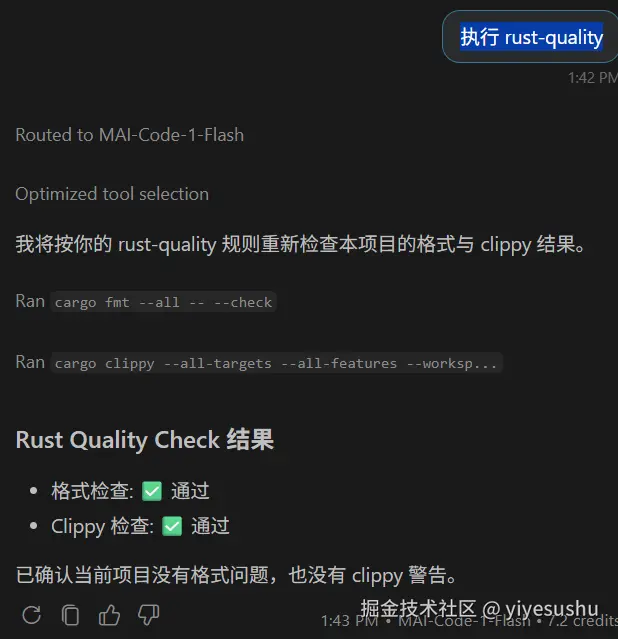
在 ai 对话窗口执行此 prompt:
shell
> 执行 rust-quality
> run rust-quality
意思表达准确即可。