鸿蒙多功能工具箱开发实战(十二)-二十四节气与黄历数据展示
前言
二十四节气是中国传统历法的重要组成部分,黄历则包含宜忌、冲煞等信息。本文将讲解节气计算和黄历数据展示的实现。
一、二十四节气计算
1.1 节气算法
typescript
export class SolarTerms {
  // 节气名称
  private static TERMS = [
    '小寒', '大寒', '立春', '雨水', '惊蛰', '春分',
    '清明', '谷雨', '立夏', '小满', '芒种', '夏至',
    '小暑', '大暑', '立秋', '处暑', '白露', '秋分',
    '寒露', '霜降', '立冬', '小雪', '大雪', '冬至'
  ]

  // 节气计算常数
  private static TERM_INFO = [
    0, 21208, 42467, 63836, 85337, 107014,
    128867, 150921, 173149, 195551, 218072, 240693,
    263343, 285989, 308563, 331033, 353350, 375494,
    397447, 419210, 440795, 462224, 483532, 504758
  ]

  /**
   * 获取某年的节气日期
   */
  static getTermDate(year: number, termIndex: number): Date {
    const baseDate = new Date(1900, 0, 6, 2, 5)  // 1900年1月6日02:05
    const offset = this.TERM_INFO[termIndex] * 60000  // 毫秒
    const termDate = new Date(baseDate.getTime() + offset)

    // 按年份调整
    const yearOffset = (year - 1900) * 365.2422 * 24 * 60 * 60 * 1000
    return new Date(baseDate.getTime() + yearOffset + offset)
  }

  /**
   * 获取当前节气
   */
  static getCurrentTerm(date: Date): { name: string, date: Date, next: { name: string, date: Date } } {
    const year = date.getFullYear()

    for (let i = 0; i < 24; i++) {
      const termDate = this.getTermDate(year, i)
      const nextTermDate = this.getTermDate(year, (i + 1) % 24)

      if (date >= termDate && date < nextTermDate) {
        return {
          name: this.TERMS[i],
          date: termDate,
          next: {
            name: this.TERMS[(i + 1) % 24],
            date: nextTermDate
          }
        }
      }
    }

    return null
  }
}
二、黄历数据
2.1 黄历信息结构
typescript
export interface HuangLiInfo {
  // 基本信息
  yearGanZhi: string      // 年干支
  monthGanZhi: string     // 月干支
  dayGanZhi: string       // 日干支
  shengxiao: string       // 生肖

  // 宜忌
  yi: string[]            // 宜
  ji: string[]            // 忌

  // 冲煞
  chong: string           // 冲
  sha: string             // 煞

  // 五行
  wuxing: string          // 五行

  // 值神
  zhishen: string         // 值神

  // 胎神
  taishen: string         // 胎神

  // 彭祖百忌
  pengzu: string          // 彭祖百忌
}
2.2 黄历计算
typescript
export class HuangLiCalculator {
  // 宜事列表
  private static YI_LIST = [
    '祭祀', '祈福', '求嗣', '开光', '出行', '解除',
    '纳采', '冠笄', '嫁娶', '纳婿', '安床', '移徙',
    '修造', '动土', '竖柱', '上梁', '纳畜', '入宅'
  ]

  // 忌事列表
  private static JI_LIST = [
    '安葬', '破土', '启攒', '开仓', '出货财', '纳财',
    '伐木', '作梁', '作灶', '掘井', '造桥', '盖屋'
  ]

  /**
   * 计算黄历信息
   */
  static calculate(year: number, month: number, day: number): HuangLiInfo {
    // 计算日干支
    const dayGanZhi = this.getDayGanZhi(year, month, day)

    // 计算月干支
    const monthGanZhi = this.getMonthGanZhi(year, month)

    // 计算年干支
    const yearGanZhi = this.getYearGanZhi(year)

    // 计算冲煞
    const chong = this.getChong(dayGanZhi)
    const sha = this.getSha(dayGanZhi)

    // 计算宜忌(简化版,实际需要更复杂的算法)
    const yi = this.calculateYi(day, month)
    const ji = this.calculateJi(day, month)

    return {
      yearGanZhi,
      monthGanZhi,
      dayGanZhi,
      shengxiao: this.getShengxiao(year),
      yi,
      ji,
      chong,
      sha,
      wuxing: this.getWuxing(dayGanZhi),
      zhishen: this.getZhiShen(day),
      taishen: this.getTaiShen(day),
      pengzu: this.getPengZu(dayGanZhi)
    }
  }

  private static getDayGanZhi(year: number, month: number, day: number): string {
    const baseDate = new Date(1900, 0, 1)
    const targetDate = new Date(year, month - 1, day)
    const offset = Math.floor((targetDate.getTime() - baseDate.getTime()) / 86400000)

    const ganIndex = (offset + 10) % 10
    const zhiIndex = (offset + 12) % 12

    return this.TIANGAN[ganIndex] + this.DIZHI[zhiIndex]
  }

  private static calculateYi(day: number, month: number): string[] {
    // 简化版:根据日期返回宜事
    const yiCount = (day + month) % 8 + 3
    return this.YI_LIST.slice(0, yiCount)
  }

  private static calculateJi(day: number, month: number): string[] {
    // 简化版:根据日期返回忌事
    const jiCount = (day + month) % 5 + 2
    return this.JI_LIST.slice(0, jiCount)
  }
}
三、界面实现
typescript
@Entry
@Component
struct HuangLiPage {
  @State selectedDate: Date = new Date()
  @State huangLiInfo: HuangLiInfo = null

  build() {
    Column() {
      NavBar({ title: '黄历查询' })

      // 日期选择
      DatePicker({
        selected: this.selectedDate,
        onChange: (value) => {
          this.selectedDate = new Date(value.year, value.month, value.day)
          this.loadHuangLi()
        }
      })

      if (this.huangLiInfo) {
        // 黄历信息展示
        Scroll() {
          Column() {
            // 干支信息
            this.GanZhiSection()

            // 宜忌
            this.YiJiSection()

            // 冲煞五行
            this.ChongShaSection()
          }
        }
      }
    }
  }

  @Builder
  GanZhiSection() {
    Column() {
      Text('干支纪年')
        .fontSize(16)
        .fontWeight(FontWeight.Bold)

      Row() {
        Text(`年: ${this.huangLiInfo.yearGanZhi}`)
        Text(`月: ${this.huangLiInfo.monthGanZhi}`)
        Text(`日: ${this.huangLiInfo.dayGanZhi}`)
      }
    }
  }

  @Builder
  YiJiSection() {
    Column() {
      // 宜
      Row() {
        Text('宜')
          .fontColor('#27AE60')
          .width(40)

        Text(this.huangLiInfo.yi.join(' '))
          .layoutWeight(1)
      }

      // 忌
      Row() {
        Text('忌')
          .fontColor('#E74C3C')
          .width(40)

        Text(this.huangLiInfo.ji.join(' '))
          .layoutWeight(1)
      }
    }
  }

  private loadHuangLi() {
    this.huangLiInfo = HuangLiCalculator.calculate(
      this.selectedDate.getFullYear(),
      this.selectedDate.getMonth() + 1,
      this.selectedDate.getDate()
    )
  }
}
四、节气算法详解
4.1 节气计算流程图
#mermaid-svg-zzzYYDg8JeKqna3Q{font-family:"trebuchet ms",verdana,arial,sans-serif;font-size:16px;fill:#333;}@keyframes edge-animation-frame{from{stroke-dashoffset:0;}}@keyframes dash{to{stroke-dashoffset:0;}}#mermaid-svg-zzzYYDg8JeKqna3Q .edge-animation-slow{stroke-dasharray:9,5!important;stroke-dashoffset:900;animation:dash 50s linear infinite;stroke-linecap:round;}#mermaid-svg-zzzYYDg8JeKqna3Q .edge-animation-fast{stroke-dasharray:9,5!important;stroke-dashoffset:900;animation:dash 20s linear infinite;stroke-linecap:round;}#mermaid-svg-zzzYYDg8JeKqna3Q .error-icon{fill:#552222;}#mermaid-svg-zzzYYDg8JeKqna3Q .error-text{fill:#552222;stroke:#552222;}#mermaid-svg-zzzYYDg8JeKqna3Q .edge-thickness-normal{stroke-width:1px;}#mermaid-svg-zzzYYDg8JeKqna3Q .edge-thickness-thick{stroke-width:3.5px;}#mermaid-svg-zzzYYDg8JeKqna3Q .edge-pattern-solid{stroke-dasharray:0;}#mermaid-svg-zzzYYDg8JeKqna3Q .edge-thickness-invisible{stroke-width:0;fill:none;}#mermaid-svg-zzzYYDg8JeKqna3Q .edge-pattern-dashed{stroke-dasharray:3;}#mermaid-svg-zzzYYDg8JeKqna3Q .edge-pattern-dotted{stroke-dasharray:2;}#mermaid-svg-zzzYYDg8JeKqna3Q .marker{fill:#333333;stroke:#333333;}#mermaid-svg-zzzYYDg8JeKqna3Q .marker.cross{stroke:#333333;}#mermaid-svg-zzzYYDg8JeKqna3Q svg{font-family:"trebuchet ms",verdana,arial,sans-serif;font-size:16px;}#mermaid-svg-zzzYYDg8JeKqna3Q p{margin:0;}#mermaid-svg-zzzYYDg8JeKqna3Q .label{font-family:"trebuchet ms",verdana,arial,sans-serif;color:#333;}#mermaid-svg-zzzYYDg8JeKqna3Q .cluster-label text{fill:#333;}#mermaid-svg-zzzYYDg8JeKqna3Q .cluster-label span{color:#333;}#mermaid-svg-zzzYYDg8JeKqna3Q .cluster-label span p{background-color:transparent;}#mermaid-svg-zzzYYDg8JeKqna3Q .label text,#mermaid-svg-zzzYYDg8JeKqna3Q span{fill:#333;color:#333;}#mermaid-svg-zzzYYDg8JeKqna3Q .node rect,#mermaid-svg-zzzYYDg8JeKqna3Q .node circle,#mermaid-svg-zzzYYDg8JeKqna3Q .node ellipse,#mermaid-svg-zzzYYDg8JeKqna3Q .node polygon,#mermaid-svg-zzzYYDg8JeKqna3Q .node path{fill:#ECECFF;stroke:#9370DB;stroke-width:1px;}#mermaid-svg-zzzYYDg8JeKqna3Q .rough-node .label text,#mermaid-svg-zzzYYDg8JeKqna3Q .node .label text,#mermaid-svg-zzzYYDg8JeKqna3Q .image-shape .label,#mermaid-svg-zzzYYDg8JeKqna3Q .icon-shape .label{text-anchor:middle;}#mermaid-svg-zzzYYDg8JeKqna3Q .node .katex path{fill:#000;stroke:#000;stroke-width:1px;}#mermaid-svg-zzzYYDg8JeKqna3Q .rough-node .label,#mermaid-svg-zzzYYDg8JeKqna3Q .node .label,#mermaid-svg-zzzYYDg8JeKqna3Q .image-shape .label,#mermaid-svg-zzzYYDg8JeKqna3Q .icon-shape .label{text-align:center;}#mermaid-svg-zzzYYDg8JeKqna3Q .node.clickable{cursor:pointer;}#mermaid-svg-zzzYYDg8JeKqna3Q .root .anchor path{fill:#333333!important;stroke-width:0;stroke:#333333;}#mermaid-svg-zzzYYDg8JeKqna3Q .arrowheadPath{fill:#333333;}#mermaid-svg-zzzYYDg8JeKqna3Q .edgePath .path{stroke:#333333;stroke-width:2.0px;}#mermaid-svg-zzzYYDg8JeKqna3Q .flowchart-link{stroke:#333333;fill:none;}#mermaid-svg-zzzYYDg8JeKqna3Q .edgeLabel{background-color:rgba(232,232,232, 0.8);text-align:center;}#mermaid-svg-zzzYYDg8JeKqna3Q .edgeLabel p{background-color:rgba(232,232,232, 0.8);}#mermaid-svg-zzzYYDg8JeKqna3Q .edgeLabel rect{opacity:0.5;background-color:rgba(232,232,232, 0.8);fill:rgba(232,232,232, 0.8);}#mermaid-svg-zzzYYDg8JeKqna3Q .labelBkg{background-color:rgba(232, 232, 232, 0.5);}#mermaid-svg-zzzYYDg8JeKqna3Q .cluster rect{fill:#ffffde;stroke:#aaaa33;stroke-width:1px;}#mermaid-svg-zzzYYDg8JeKqna3Q .cluster text{fill:#333;}#mermaid-svg-zzzYYDg8JeKqna3Q .cluster span{color:#333;}#mermaid-svg-zzzYYDg8JeKqna3Q div.mermaidTooltip{position:absolute;text-align:center;max-width:200px;padding:2px;font-family:"trebuchet ms",verdana,arial,sans-serif;font-size:12px;background:hsl(80, 100%, 96.2745098039%);border:1px solid #aaaa33;border-radius:2px;pointer-events:none;z-index:100;}#mermaid-svg-zzzYYDg8JeKqna3Q .flowchartTitleText{text-anchor:middle;font-size:18px;fill:#333;}#mermaid-svg-zzzYYDg8JeKqna3Q rect.text{fill:none;stroke-width:0;}#mermaid-svg-zzzYYDg8JeKqna3Q .icon-shape,#mermaid-svg-zzzYYDg8JeKqna3Q .image-shape{background-color:rgba(232,232,232, 0.8);text-align:center;}#mermaid-svg-zzzYYDg8JeKqna3Q .icon-shape p,#mermaid-svg-zzzYYDg8JeKqna3Q .image-shape p{background-color:rgba(232,232,232, 0.8);padding:2px;}#mermaid-svg-zzzYYDg8JeKqna3Q .icon-shape .label rect,#mermaid-svg-zzzYYDg8JeKqna3Q .image-shape .label rect{opacity:0.5;background-color:rgba(232,232,232, 0.8);fill:rgba(232,232,232, 0.8);}#mermaid-svg-zzzYYDg8JeKqna3Q .label-icon{display:inline-block;height:1em;overflow:visible;vertical-align:-0.125em;}#mermaid-svg-zzzYYDg8JeKqna3Q .node .label-icon path{fill:currentColor;stroke:revert;stroke-width:revert;}#mermaid-svg-zzzYYDg8JeKqna3Q :root{--mermaid-font-family:"trebuchet ms",verdana,arial,sans-serif;} 是
否
是
否
输入年份
计算春分点基准
遍历24个节气
计算每个节气日期
是否在当前年?
添加到结果列表
跳过
还有更多节气?
返回节气列表
4.2 节气数据精度优化
typescript
// 使用高精度算法计算节气时刻
class SolarTermPrecise {
  // 简化儒略日计算
  private static toJD(year: number, month: number, day: number): number {
    if (month <= 2) {
      year -= 1
      month += 12
    }
    const A = Math.floor(year / 100)
    const B = 2 - A + Math.floor(A / 4)
    return Math.floor(365.25 * (year + 4716)) +
           Math.floor(30.6001 * (month + 1)) +
           day + B - 1524.5
  }

  // 计算太阳黄经
  private static sunLongitude(jd: number): number {
    const T = (jd - 2451545) / 36525
    const L0 = 280.46646 + 36000.76983 * T + 0.0003032 * T * T
    // 简化计算,实际需要更多项
    return L0 % 360
  }
}
五、黄历宜忌算法
5.1 宜忌规则引擎
typescript
// 黄历规则定义
interface HuangLiRule {
  name: string           // 规则名称
  condition: (date: DateInfo) => boolean  // 条件
  yi?: string[]          // 宜的事项
  ji?: string[]          // 忌的事项
}

// 规则库
const HUANG_LI_RULES: HuangLiRule[] = [
  {
    name: '建日',
    condition: (date) => date.zhi === '建',
    yi: ['出行', '上任', '会友'],
    ji: ['动土', '开仓']
  },
  {
    name: '除日',
    condition: (date) => date.zhi === '除',
    yi: ['沐浴', '求医', '治病'],
    ji: ['嫁娶', '出行']
  },
  // 更多规则...
]

// 应用规则
function applyRules(dateInfo: DateInfo): { yi: string[], ji: string[] } {
  const yi: string[] = []
  const ji: string[] = []

  for (const rule of HUANG_LI_RULES) {
    if (rule.condition(dateInfo)) {
      if (rule.yi) yi.push(...rule.yi)
      if (rule.ji) ji.push(...rule.ji)
    }
  }

  return { yi: [...new Set(yi)], ji: [...new Set(ji)] }
}
5.2 彭祖百忌
typescript
// 彭祖百忌表
const PENG_ZU_JI: Record<string, string> = {
  '甲不开仓财物耗散': '甲日不宜开仓',
  '乙不栽植千株不长': '乙日不宜栽植',
  '丙不修灶必见灾殃': '丙日不宜修灶',
  // ... 更多条目
}

function getPengZuJi(gan: string, zhi: string): string[] {
  const result: string[] = []

  // 天干忌
  const ganJi = PENG_ZU_JI[`${gan}不`]
  if (ganJi) result.push(ganJi)

  // 地支忌
  const zhiJi = PENG_ZU_JI[`${zhi}不`]
  if (zhiJi) result.push(zhiJi)

  return result
}
六、界面优化
6.1 节气动画效果
typescript
@Component
struct SolarTermAnimation {
  @Prop term: SolarTerm
  @State scale: number = 1

  build() {
    Column() {
      Text(this.term.name)
        .fontSize(24)
        .fontWeight(FontWeight.Bold)
        .scale({ x: this.scale, y: this.scale })
        .animation({
          duration: 1000,
          curve: Curve.EaseInOut,
          iterations: -1
        })

      Text(this.term.date)
        .fontSize(14)
        .fontColor('#666666')
    }
    .onAppear(() => {
      this.scale = 1.1
    })
  }
}
6.2 黄历卡片设计
typescript
@Component
struct HuangLiCard {
  @Prop info: HuangLiInfo

  build() {
    Column() {
      // 日期头部
      this.Header()

      // 宜忌内容
      this.Content()

      // 底部信息
      this.Footer()
    }
    .padding(16)
    .borderRadius(12)
    .backgroundColor('#FFFFFF')
    .shadow({ radius: 8, color: '#1A000000' })
  }

  @Builder
  Header() {
    Row() {
      Column() {
        Text(`${this.info.month}月${this.info.day}日`)
          .fontSize(18)
        Text(this.info.ganZhi)
          .fontSize(12)
          .fontColor('#666666')
      }

      Blank()

      Text(this.info.zodiac)
        .fontSize(14)
        .fontColor('#E74C3C')
    }
    .width('100%')
  }

  @Builder
  Content() {
    Row() {
      // 宜
      Column() {
        Text('宜')
          .fontColor('#27AE60')
          .fontSize(16)

        ForEach(this.info.yi.slice(0, 5), (item: string) => {
          Text(item)
            .fontSize(12)
        })
      }
      .layoutWeight(1)

      Divider().vertical(true).height(80)

      // 忌
      Column() {
        Text('忌')
          .fontColor('#E74C3C')
          .fontSize(16)

        ForEach(this.info.ji.slice(0, 5), (item: string) => {
          Text(item)
            .fontSize(12)
        })
      }
      .layoutWeight(1)
    }
    .width('100%')
    .margin({ top: 16 })
  }
}
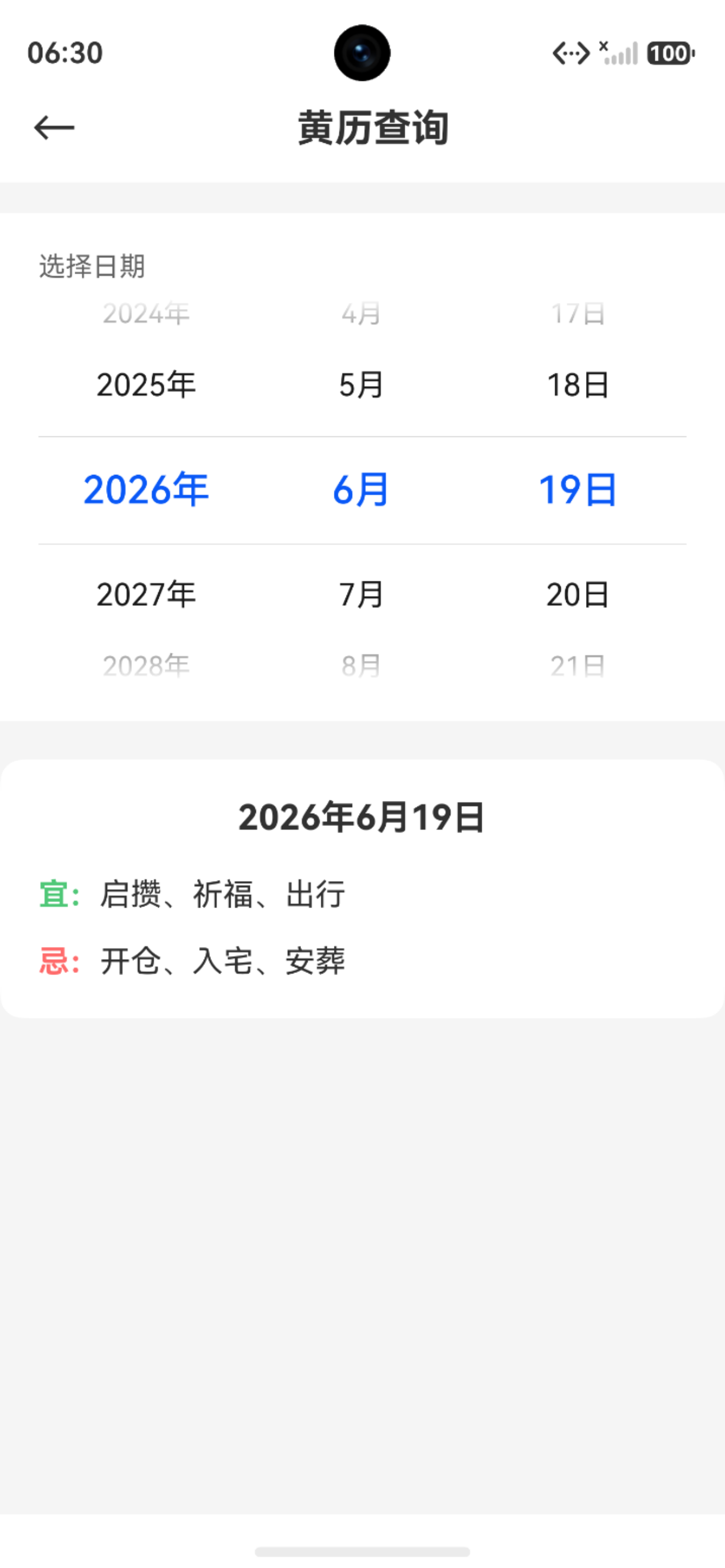
图 1 黄历查询界面展示
七、数据缓存策略
typescript
// 节气数据缓存
class SolarTermCache {
  private static cache: Map<number, SolarTerm[]> = new Map()

  static getTerms(year: number): SolarTerm[] {
    if (this.cache.has(year)) {
      return this.cache.get(year)!
    }

    const terms = SolarTermCalculator.calculate(year)
    this.cache.set(year, terms)
    return terms
  }

  // 预加载相邻年份
  static preload(year: number) {
    this.getTerms(year - 1)
    this.getTerms(year)
    this.getTerms(year + 1)
  }
}
八、单元测试
typescript
describe('SolarTermCalculator', () => {
  it('should calculate Spring Equinox correctly', () => {
    const terms = SolarTermCalculator.calculate(2024)
    const springEquinox = terms.find(t => t.name === '春分')
    expect(springEquinox?.date).toBe('2024-03-20')
  })

  it('should have 24 terms per year', () => {
    const terms = SolarTermCalculator.calculate(2024)
    expect(terms.length).toBe(24)
  })
})

describe('HuangLiCalculator', () => {
  it('should calculate Yi and Ji', () => {
    const result = HuangLiCalculator.calculate(2024, 1, 1)
    expect(result.yi.length).toBeGreaterThan(0)
    expect(result.ji.length).toBeGreaterThan(0)
  })
})
九、小结
本文详细讲解了节气和黄历功能:
- ✅ 二十四节气计算算法
- ✅ 黄历信息结构设计
- ✅ 干支计算原理
- ✅ 宜忌推算规则
- ✅ 界面展示优化
- ✅ 数据缓存策略
- ✅ 单元测试设计
9.1 关键要点
- 节气计算基于太阳黄经
- 黄历宜忌使用规则引擎
- 界面设计注重信息层次
- 缓存提升性能体验
系列文章导航 :
下期预告:鸿蒙多功能工具箱开发实战(十三)-单位换算工具开发