目录
[实例1-布局Grid分3行3列(高度 宽度)](#实例1-布局Grid分3行3列(高度 宽度))
实例2-指定行列放置控件
实例
实例1-布局Grid分3行3列(高度 宽度)
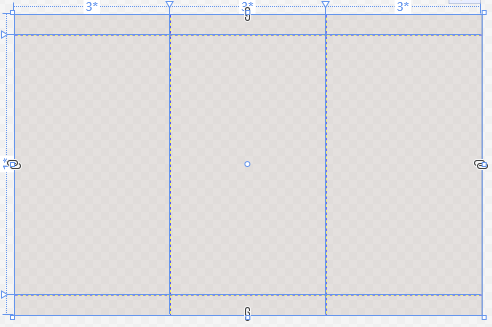
html
  <Grid ShowGridLines="True">

      <!--Grid添加-3列-->
      <Grid.ColumnDefinitions>
          <!--第1列-->
          <ColumnDefinition Width="1*"></ColumnDefinition>
          <!--第2列  2*是第1列2倍-->
          <ColumnDefinition Width="2*"></ColumnDefinition>
          <!--第3列  3*是第1列3倍-->
          <ColumnDefinition Width="3*"></ColumnDefinition>
      </Grid.ColumnDefinitions>

      <!--Grid添加-3行-->
      <Grid.RowDefinitions>

          <!--第1行-->
          <RowDefinition Height="30"></RowDefinition>
          <!--第2行    默认高度为占去剩余所有空间-->
          <RowDefinition></RowDefinition>
          <!--第3行-->
          <RowDefinition Height="30"></RowDefinition>

      </Grid.RowDefinitions>

</Grid>实例2-指定行列放置控件
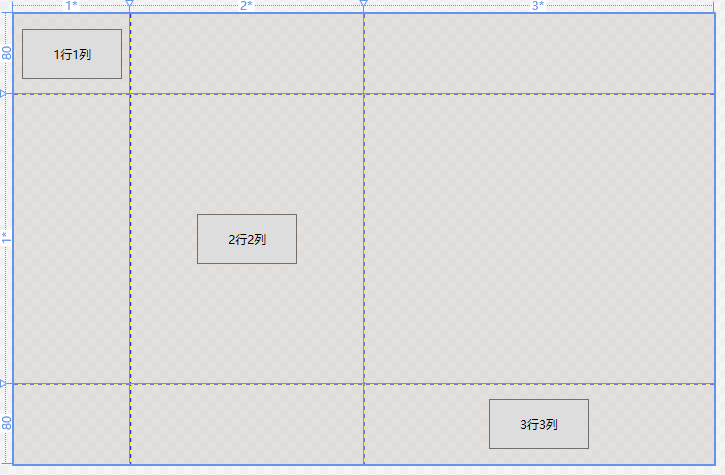
html
    <Grid ShowGridLines="True">

        <!--Grid添加-3列-->
        <Grid.ColumnDefinitions>
            <ColumnDefinition Width="1*"></ColumnDefinition>
            <ColumnDefinition Width="2*"></ColumnDefinition>
            <ColumnDefinition Width="3*"></ColumnDefinition>
        </Grid.ColumnDefinitions>
        <!--Grid添加-3行-->
        <Grid.RowDefinitions>
            <RowDefinition Height="80"></RowDefinition>
            <RowDefinition></RowDefinition>
            <RowDefinition Height="80"></RowDefinition>
        </Grid.RowDefinitions>

        <Button Width="100" Height="50" Grid.Row="0" Grid.Column="0" Content="1行1列" ></Button>
        <Button Width="100" Height="50" Grid.Row="1" Grid.Column="1" Content="2行2列" ></Button>
        <Button Width="100" Height="50" Grid.Row="2" Grid.Column="2" Content="3行3列" ></Button>

    </Grid>
将持续更新