一、项目背景与需求分析
在企业法务工作中,合同审核是一项高频且耗时的工作。传统的人工比对方式存在效率低、易遗漏等问题。本文将带领大家使用 Python + Streamlit + 智谱AI,搭建一个智能合同比对系统,实现合同模板与业务合同的自动化比对。
核心功能
-
✅ 支持 DOCX、TXT、PDF 格式合同文件
-
✅ 调用 AI 大模型智能识别条款差异
-
✅ 可视化展示比对结果(统计概览、高风险提醒、详细差异)
-
✅ 无需翻墙,使用国产免费 AI 模型
技术栈
二、环境准备
2.1 安装 Python
-
下载
python-3.11.9-amd64.exe -
安装时务必勾选 "Add Python to PATH"
-
验证安装:cmd
python --version
显示 Python 3.11.9 即为成功
2.2 创建项目目录
在桌面创建项目文件夹
mkdir C:\Users\你的用户名\Desktop\contract_compare
cd C:\Users\你的用户名\Desktop\contract_compare
2.3 安装依赖包
pip install streamlit openai python-docx pdfplumber -i https://pypi.tuna.tsinghua.edu.cn/simple验证安装:
python -c "import streamlit; print('OK')"三、获取智谱AI API Key(免费)
智谱 AI 提供永久免费的 GLM-4-Flash 模型,非常适合个人项目使用。
3.1 注册账号
-
手机号注册或微信扫码登录
-
完成实名认证(身份证+人脸识别,约2分钟)
3.2 创建 API Key
-
进入控制台 → API Keys
-
点击「新建 API Key」
-
命名如
contract-compare -
立即复制生成的app-key 字符串并保存
⚠️ 注意:API Key 只在创建时显示一次,关闭后就看不到了
四、编写核心代码
4.1 项目文件结构
contract_compare/
├── run_zhipu.py          # 主程序(唯一需要运行的文件)
├── 合同模板.txt           # 测试用模板合同
└── 业务合同.txt           # 测试用业务合同
4.2 完整代码实现
创建 run_zhipu.py,复制以下代码
python
import streamlit as st
import tempfile
import os
import json
import re
from openai import OpenAI

# ===== 文件解析库 =====
try:
    import docx
    HAS_DOCX = True
except:
    HAS_DOCX = False

try:
    import pdfplumber
    HAS_PDF = True
except:
    HAS_PDF = False

# ===== 页面配置 =====
st.set_page_config(page_title="AI合同比对系统", page_icon="📄", layout="wide")

# ===== 自定义CSS样式 =====
st.markdown("""
<style>
.main-title {
    font-size: 36px; font-weight: bold; color: #1a237e; text-align: center; padding: 20px;
    background: linear-gradient(135deg, #667eea 0%, #764ba2 100%); color: white; border-radius: 10px;
    margin-bottom: 30px;
}
.metric-card {
    background: white; padding: 20px; border-radius: 10px; box-shadow: 0 4px 6px rgba(0,0,0,0.1);
    text-align: center; transition: transform 0.3s;
}
.metric-card:hover { transform: translateY(-5px); }
.risk-high {
    background: linear-gradient(135deg, #ff6b6b, #ee5a24); color: white; padding: 15px;
    border-radius: 10px; margin: 10px 0;
}
.tag-consistent { background: #c8e6c9; color: #2e7d32; padding: 4px 12px; border-radius: 20px;
                  font-size: 12px; font-weight: bold; }
.tag-modified { background: #fff3e0; color: #ef6c00; padding: 4px 12px; border-radius: 20px;
                font-size: 12px; font-weight: bold; }
.tag-missing { background: #ffcdd2; color: #c62828; padding: 4px 12px; border-radius: 20px;
               font-size: 12px; font-weight: bold; }
.tag-added { background: #bbdefb; color: #1565c0; padding: 4px 12px; border-radius: 20px;
             font-size: 12px; font-weight: bold; }
.diff-box { background: #f5f5f5; padding: 15px; border-radius: 8px; margin: 10px 0;
            border-left: 4px solid #1976d2; }
.diff-template { background: #e3f2fd; padding: 10px; border-radius: 5px; margin: 5px 0; }
.diff-business { background: #fff3e0; padding: 10px; border-radius: 5px; margin: 5px 0; }
</style>
""", unsafe_allow_html=True)

# ===== 页面标题 =====
st.markdown('<div class="main-title">📄 AI智能合同比对系统</div>', unsafe_allow_html=True)

# ===== 侧边栏 =====
with st.sidebar:
    st.markdown("### ⚙️ 配置")

    api_key = st.text_input("智谱 API Key", type="password", placeholder="sk-...",
                           help="在 https://open.bigmodel.cn 获取")

    model_options = ["glm-4.7-flash", "glm-4-flash"]
    model_name = st.selectbox("选择模型", model_options, index=0,
                             help="glm-4.7-flash 最新免费版")

    st.markdown("---")
    st.markdown("### 📤 上传文件")

    template_file = st.file_uploader("📋 合同模板", type=['docx', 'txt', 'pdf'])
    business_file = st.file_uploader("📑 业务合同", type=['docx', 'txt', 'pdf'])

    compare_btn = st.button("🚀 开始AI比对", type="primary", use_container_width=True,
                           disabled=not (template_file and business_file))

    st.markdown("---")
    st.markdown("### 💡 使用说明")
    st.info("""
    1. 获取智谱 API Key(免费)
    2. 上传合同模板和业务合同
    3. 点击"开始AI比对"
    支持格式:.docx、.txt、.pdf
    不填 API Key 将显示示例数据
    """)

# ===== 辅助函数 =====
def read_file(file_path):
    """读取文件内容"""
    ext = os.path.splitext(file_path)[1].lower()

    if ext == '.docx':
        if not HAS_DOCX:
            st.error("请安装 python-docx:pip install python-docx")
            return ""
        doc = docx.Document(file_path)
        return '\n'.join([p.text for p in doc.paragraphs if p.text.strip()])

    elif ext == '.txt':
        with open(file_path, 'r', encoding='utf-8') as f:
            return f.read()

    elif ext == '.pdf':
        if not HAS_PDF:
            st.error("请安装 pdfplumber:pip install pdfplumber")
            return ""
        with pdfplumber.open(file_path) as pdf:
            texts = [page.extract_text() for page in pdf.pages if page.extract_text()]
            return '\n'.join(texts)

    return ""

def get_tag_html(diff_type):
    """获取差异类型的HTML标签"""
    tags = {
        "完全一致": '<span class="tag-consistent">✓ 完全一致</span>',
        "内容修改": '<span class="tag-modified">✎ 内容修改</span>',
        "模板有但业务缺失": '<span class="tag-missing">✗ 业务缺失</span>',
        "业务新增": '<span class="tag-added">+ 业务新增</span>'
    }
    return tags.get(diff_type, diff_type)

def get_mock_result():
    """返回模拟比对结果"""
    return {
        "total_clauses": 6,
        "consistent_count": 2,
        "modified_count": 2,
        "missing_count": 1,
        "added_count": 1,
        "high_risk_items": [
            "⚠️ 合同金额从100万增加到120万,增幅20%",
            "⚠️ 付款期限从30天延长到60天",
            "⚠️ 违约责任条款在业务合同中缺失"
        ],
        "details": [
            {
                "clause_name": "合同主体",
                "template_content": "乙方:上海贸易有限公司",
                "business_content": "乙方:深圳创新有限公司",
                "difference_type": "内容修改",
                "description": "乙方公司名称变更"
            },
            {
                "clause_name": "合同金额",
                "template_content": "¥1,000,000",
                "business_content": "¥1,200,000",
                "difference_type": "内容修改",
                "description": "金额从100万增加至120万"
            },
            {
                "clause_name": "付款方式",
                "template_content": "30日内支付",
                "business_content": "60日内支付",
                "difference_type": "内容修改",
                "description": "付款期限从30天延长至60天"
            },
            {
                "clause_name": "履行期限",
                "template_content": "2024年1月至12月",
                "business_content": "2024年1月至12月",
                "difference_type": "完全一致",
                "description": "履行期限一致"
            },
            {
                "clause_name": "违约责任",
                "template_content": "违约金20%",
                "business_content": "",
                "difference_type": "模板有但业务缺失",
                "description": "业务合同缺失违约责任条款"
            },
            {
                "clause_name": "知识产权",
                "template_content": "",
                "business_content": "知识产权归乙方",
                "difference_type": "业务新增",
                "description": "业务合同新增知识产权条款"
            }
        ]
    }

def call_zhipu(template_text, business_text, api_key, model="glm-4.7-flash"):
    """调用智谱 API 进行合同比对"""
    client = OpenAI(api_key=api_key, base_url="https://open.bigmodel.cn/api/paas/v4")

    prompt = f"""你是一个专业的合同审查专家。请仔细比对以下两份合同,找出所有差异。

合同模板:
{template_text[:6000]}

业务合同:
{business_text[:6000]}

请严格按照以下JSON格式输出比对结果:
{{
    "total_clauses": 总数,
    "consistent_count": 一致数,
    "modified_count": 修改数,
    "missing_count": 缺失数,
    "added_count": 新增数,
    "high_risk_items": ["高风险项"],
    "details": [
        {{
            "clause_name": "条款名",
            "template_content": "模板原文",
            "business_content": "业务原文",
            "difference_type": "完全一致/内容修改/模板有但业务缺失/业务新增",
            "description": "差异描述"
        }}
    ]
}}"""

    try:
        response = client.chat.completions.create(
            model=model,
            messages=[{"role": "user", "content": prompt}],
            temperature=0.1,
            max_tokens=4096
        )

        content = response.choices[0].message.content
        json_match = re.search(r'\{.*\}', content, re.DOTALL)
        if json_match:
            return json.loads(json_match.group())
        return json.loads(content)
    except Exception as e:
        st.error(f"API调用失败:{str(e)}")
        return None

# ===== 主逻辑 =====
if compare_btn:
    with st.spinner("🤖 AI正在智能比对合同,请稍候..."):
        # 保存上传的文件
        with tempfile.NamedTemporaryFile(delete=False,
                suffix=f".{template_file.name.split('.')[-1]}") as t:
            t.write(template_file.getvalue())
            template_path = t.name

        with tempfile.NamedTemporaryFile(delete=False,
                suffix=f".{business_file.name.split('.')[-1]}") as b:
            b.write(business_file.getvalue())
            business_path = b.name

        try:
            template_text = read_file(template_path)
            business_text = read_file(business_path)

            if api_key:
                result = call_zhipu(template_text, business_text, api_key, model_name)
                if result is None:
                    result = get_mock_result()
            else:
                result = get_mock_result()
                st.info("💡 未填写API Key,显示示例数据")

            # 显示统计概览
            st.markdown("### 📊 比对概览")
            cols = st.columns(5)
            metrics = [
                ("总条款数", result['total_clauses'], "#1976d2"),
                ("完全一致", result['consistent_count'], "#2e7d32"),
                ("内容修改", result['modified_count'], "#ef6c00"),
                ("业务缺失", result['missing_count'], "#c62828"),
                ("业务新增", result['added_count'], "#1565c0")
            ]
            for col, (label, value, color) in zip(cols, metrics):
                with col:
                    st.markdown(f"""
                    <div class="metric-card">
                        <div style="font-size:36px;font-weight:bold;color:{color};">{value}</div>
                        <div style="color:#666;">{label}</div>
                    </div>
                    """, unsafe_allow_html=True)

            # 显示高风险项
            if result.get('high_risk_items'):
                st.markdown("### 🚨 高风险项提醒")
                for item in result['high_risk_items']:
                    st.markdown(f'<div class="risk-high">{item}</div>', unsafe_allow_html=True)

            # 显示详细比对结果
            st.markdown("### 📝 详细比对结果")
            for i, detail in enumerate(result['details']):
                expanded = detail['difference_type'] != "完全一致"
                with st.expander(f"{detail['clause_name']} {get_tag_html(detail['difference_type'])}",
                               expanded=expanded):
                    col1, col2 = st.columns(2)
                    with col1:
                        st.markdown("**📋 模板原文:**")
                        if detail['template_content']:
                            st.markdown(f'<div class="diff-template">{detail["template_content"]}</div>',
                                      unsafe_allow_html=True)
                        else:
                            st.markdown("*(无)*")
                    with col2:
                        st.markdown("**📑 业务合同:**")
                        if detail['business_content']:
                            st.markdown(f'<div class="diff-business">{detail["business_content"]}</div>',
                                      unsafe_allow_html=True)
                        else:
                            st.markdown("*(无)*")
                    st.markdown(f'<div class="diff-box">💬 {detail["description"]}</div>',
                              unsafe_allow_html=True)

        except Exception as e:
            st.error(f"❌ 错误:{str(e)}")
        finally:
            try:
                os.unlink(template_path)
                os.unlink(business_path)
            except:
                pass

else:
    # 欢迎界面
    st.markdown("""
    <div style="text-align:center;padding:80px 20px;">
        <div style="font-size:64px;margin-bottom:20px;">🤖</div>
        <h2>欢迎使用AI合同比对系统</h2>
        <p style="color:#666;font-size:18px;">请先在左侧上传合同文件,然后点击"开始AI比对"</p>
    </div>
    """, unsafe_allow_html=True)
五、准备测试数据
创建两个测试文件:
合同模板.txt
采购合同

甲方:北京科技有限公司
乙方:上海贸易有限公司

第一条 合同金额
合同总金额为人民币壹佰万元整(¥1,000,000)

第二条 付款方式
合同签订后30日内支付全款

第三条 履行期限
2024年1月1日至2024年12月31日

第四条 违约责任
违约方支付合同总金额20%的违约金

第五条 争议解决
提交北京仲裁委员会仲裁
业务合同.txt
采购合同

甲方:北京科技有限公司
乙方:深圳创新有限公司

第一条 合同金额
合同总金额为人民币壹佰贰拾万元整(¥1,200,000)

第二条 付款方式
合同签订后60日内支付全款

第三条 履行期限
2024年1月1日至2024年12月31日

第五条 争议解决
提交深圳仲裁委员会仲裁

第六条 知识产权
本项目知识产权归乙方所有
六、运行系统
6.1 启动程序
在项目目录下运行:
streamlit run run_zhipu.py --server.port 88886.2 访问界面
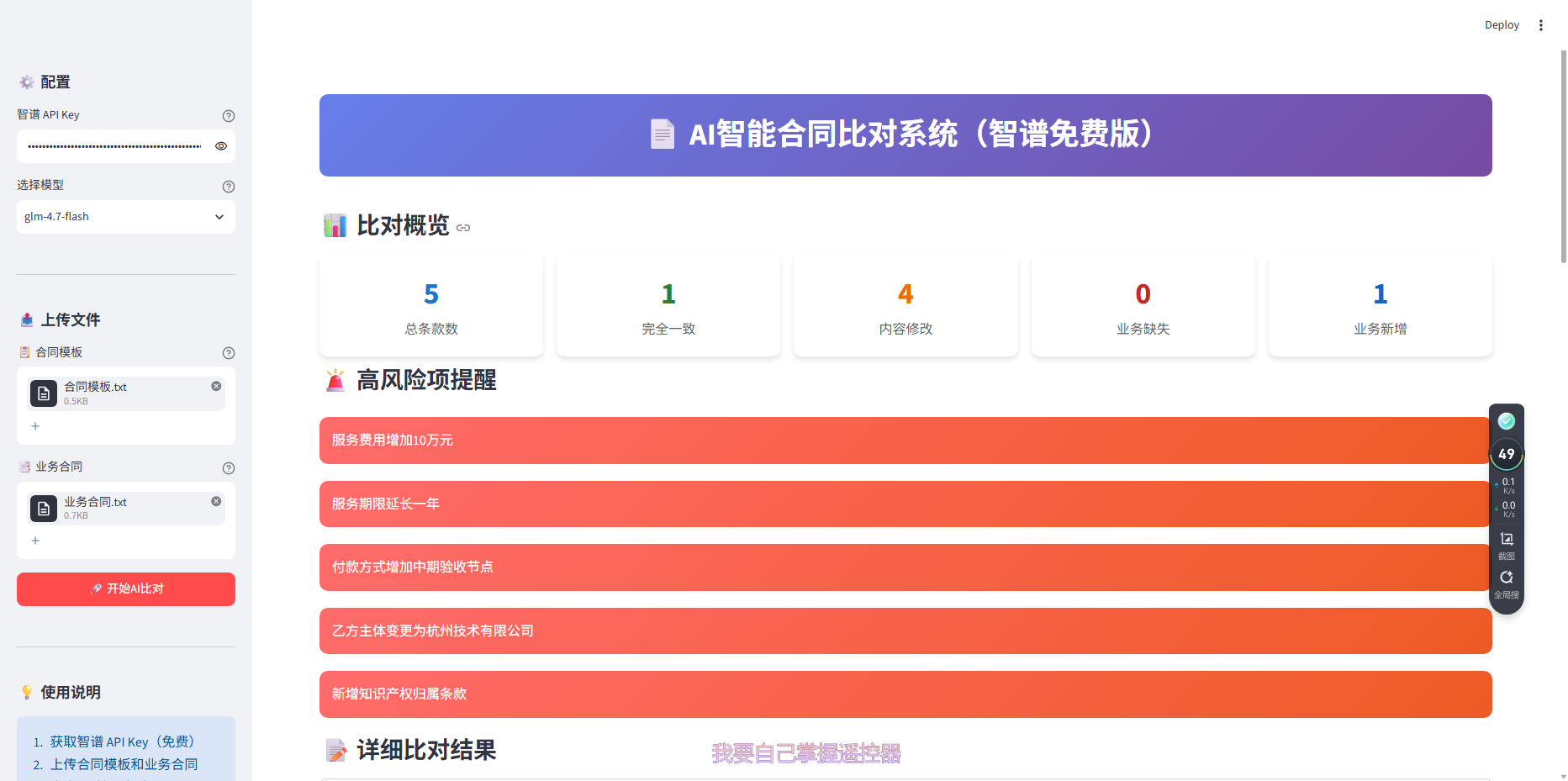
浏览器自动打开 http://localhost:8888,你将看到:
https://via.placeholder.com/800x400?text=AI合同比对系统首页
6.3 使用步骤
-
左侧边栏输入智谱 API Key
-
选择模型
glm-4.7-flash -
上传「合同模板.txt」和「业务合同.txt」
-
点击「开始AI比对」
6.4 查看结果
系统会展示:
-
统计概览:总条款数、一致数、修改数、缺失数、新增数
-
高风险提醒:红色醒目提示重大变更
-
详细比对 :每个条款的原文对照和AI分析
七、系统架构解析
7.1 工作流程
用户上传文件 → 文件解析 → AI模型比对 → 结果解析 → 可视化展示
     ↓            ↓            ↓            ↓            ↓
  Streamlit   python-docx   智谱API      JSON解析    HTML/CSS
              pdfplumber    glm-4-flash
7.2 核心设计理念
-
纯AI驱动:不写复杂的文本比对算法,全部交给大模型理解语义
-
结构化输出:要求AI输出固定JSON格式,便于程序解析
-
容错机制:API调用失败时自动切换到模拟数据
-
免费优先:使用国产免费模型,降低使用门槛
7.3 关键技术点
| 技术点 | 说明 |
|---|---|
| Prompt工程 | 精心设计的提示词,确保AI输出结构化JSON |
| 流式UI | Streamlit自动处理前后端交互 |
| 文件处理 | 支持三种主流文档格式 |
| 临时文件 | 使用tempfile自动清理上传文件 |
八、常见问题解答
Q1:运行报错"No module named 'streamlit'"
pip install streamlit -i https://pypi.tuna.tsinghua.edu.cn/simpleQ2:API调用返回401错误
-
检查API Key是否正确
-
确认已完成实名认证
-
检查账户余额
Q3:上传文件后没有反应
-
检查文件格式(仅支持docx/txt/pdf)
-
文件不要超过6000字
-
刷新页面重试
Q4:如何更换端口
streamlit run run_zhipu.py --server.port 8080Q5:如何停止程序
在命令提示符中按 Ctrl+C
九、进阶优化方向
9.1 功能增强
-
添加合同版本对比历史记录
-
支持批量比对多份合同
-
导出比对报告为PDF/Excel
-
添加关键词搜索功能
9.2 性能优化
-
使用缓存减少重复API调用
-
支持长文档分段处理
-
添加并发处理能力
9.3 用户体验
-
添加拖拽上传功能
-
支持暗色主题
-
添加进度条显示
-
优化移动端适配
十、总结
本文从零开始,带领大家搭建了一个完整的AI合同比对系统。整个过程涉及:
-
环境搭建:Python安装、依赖管理
-
API接入:智谱AI免费模型的使用
-
核心开发:Streamlit界面、文件解析、AI调用
-
测试验证:准备测试数据、运行调试
这个系统虽然简单,但涵盖了AI应用开发的完整流程,可以作为学习AI编程的入门项目。最重要的是,它使用了国产免费模型,没有任何使用门槛,每个人都可以轻松上手。
项目源码
完整代码已整理完毕,直接复制文中代码即可运行。
下一步行动
-
尝试修改Prompt,优化比对效果
-
添加更多文件格式支持
-
部署到云端供团队使用
日期:2026年7月
技术栈:Python 3.11 + Streamlit + 智谱 GLM-4-Flash
如果你在搭建过程中遇到任何问题,欢迎留言交流!
| 组件 | 用途 |
|---|---|
| Python 3.11 | 编程语言 |
| Streamlit | Web 界面框架 |
| OpenAI SDK | AI 模型调用(兼容智谱API) |
| python-docx | Word 文件解析 |
| pdfplumber | PDF 文件解析 |
| 智谱 GLM-4-Flash | 免费 AI 模型 |