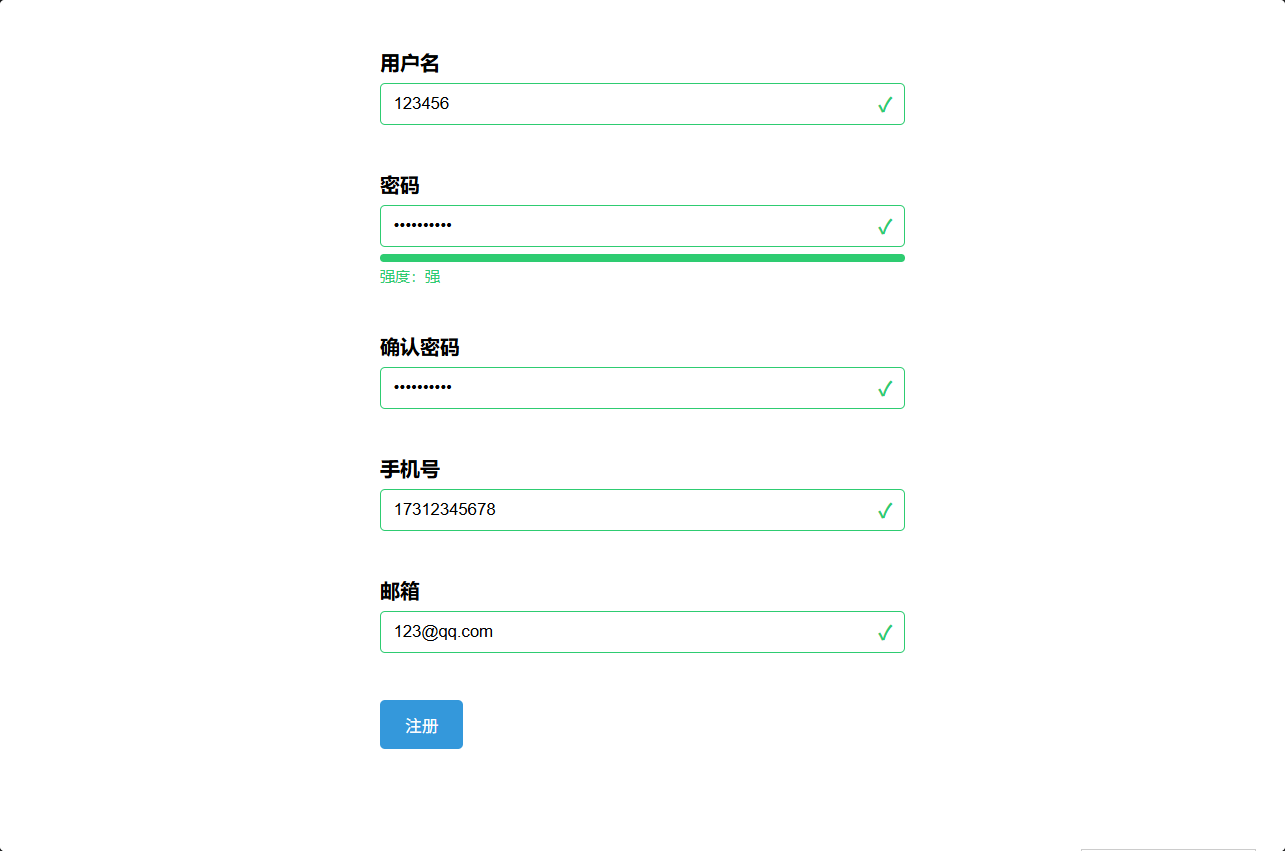
<!DOCTYPE html>
<html lang="zh-CN">

<head>
    <meta charset="UTF-8">
    <meta name="viewport" content="width=device-width, initial-scale=1.0">
    <title>正则驱动实时表单验证</title>
    <link rel="stylesheet" href="./static/css/正则驱动实时表单验证.css">
</head>

<body>
    <form id="regForm" onsubmit="return false">
        <div class="form-group">
            <label for="username">用户名</label>
            <div class="input-wrap">
                <input type="text" id="username" placeholder="3-16位字母/数字/下划线">
                <span class="icon" id="usernameIcon"></span>
            </div>
            <span class="error-msg" id="usernameErr"></span>
        </div>

        <div class="form-group">
            <label for="password">密码</label>
            <div class="input-wrap">
                <input type="password" id="password" placeholder="8-20位,含大/小/数/特殊字符">
                <span class="icon" id="passwordIcon"></span>
            </div>
            <div class="strength">
                <div class="strength-bar"><span id="strengthFill"></span></div>
                <span id="strengthText"></span>
            </div>
            <span class="error-msg" id="passwordErr"></span>
        </div>

        <div class="form-group">
            <label for="confirm">确认密码</label>
            <div class="input-wrap">
                <input type="password" id="confirm" placeholder="再次输入密码">
                <span class="icon" id="confirmIcon"></span>
            </div>
            <span class="error-msg" id="confirmErr"></span>
        </div>

        <div class="form-group">
            <label for="phone">手机号</label>
            <div class="input-wrap">
                <input type="text" id="phone" placeholder="11位手机号">
                <span class="icon" id="phoneIcon"></span>
            </div>
            <span class="error-msg" id="phoneErr"></span>
        </div>

        <div class="form-group">
            <label for="email">邮箱</label>
            <div class="input-wrap">
                <input type="text" id="email" placeholder="包含@且@后至少一个字符">
                <span class="icon" id="emailIcon"></span>
            </div>
            <span class="error-msg" id="emailErr"></span>
        </div>

        <button id="submitBtn" disabled>注册</button>
    </form>

    <script>
        // 各字段状态,用于提交按钮联动
        const state = { username: false, password: false, confirm: false, phone: false, email: false };

        // 设置单个字段的通过/失败展示(动态改 class + 插入提示)
        function setResult(field, ok, msg) {
            const input = document.getElementById(field);
            const icon = document.getElementById(field + 'Icon');
            const err = document.getElementById(field + 'Err');
            state[field] = ok;
            input.classList.toggle('valid', ok);
            input.classList.toggle('invalid', !ok);
            icon.textContent = ok ? '✓' : '✗';
            icon.classList.toggle('valid', ok);
            icon.classList.toggle('invalid', !ok);
            err.textContent = ok ? '' : msg;
            checkAll();
        }

        // 全部通过才启用提交按钮
        function checkAll() {
            const allOk = Object.values(state).every(Boolean);
            document.getElementById('submitBtn').disabled = !allOk;
        }

        // 正则定义
        const reUser = /^[a-zA-Z0-9_]{3,16}$/;
        const rePhone = /^1[3-9]\d{9}$/;
        const reEmail = /^[^@\s]+@[^@\s]+$/;

        // 密码四条小规则(用于强度判定)
        const pwRules = [
            /[a-z]/,      // 小写
            /[A-Z]/,      // 大写
            /\d/,         // 数字
            /[^a-zA-Z0-9]/,    // 特殊字符
        ];

        function validatePassword(val) {
            const lenOk = val.length >= 8 && val.length <= 20;
            const allKinds = pwRules.every(r => r.test(val));
            return lenOk && allKinds;
        }

        // 强度条:按命中种类数 + 长度判定 弱/中/强
        function updateStrength(val) {
            const fill = document.getElementById('strengthFill');
            const text = document.getElementById('strengthText');
            if (!val) { fill.style.width = '0'; text.textContent = ''; return; }
            const score = pwRules.filter(r => r.test(val)).length;
            const lenOk = val.length >= 8 && val.length <= 20;
            let level = '弱', color = '#e74c3c', pct = '33%';
            if (score >= 4 && lenOk) { level = '强'; color = '#2ecc71'; pct = '100%'; }
            else if (score >= 3) { level = '中'; color = '#f39c12'; pct = '66%'; }
            fill.style.width = pct;
            fill.style.background = color;
            text.textContent = '强度:' + level;
            text.style.color = color;
        }

        // 绑定事件
        const $ = id => document.getElementById(id);

        $('username').addEventListener('blur', e => {
            const v = e.target.value.trim();
            setResult('username', reUser.test(v), '用户名需3-16位字母/数字/下划线');
        });

        $('password').addEventListener('input', e => {
            const v = e.target.value;
            updateStrength(v);                       // 实时强度条
            setResult('password', validatePassword(v), '密码需8-20位且含大/小/数/特殊字符');
        });
        $('password').addEventListener('blur', e => {
            const v = e.target.value;
            setResult('password', validatePassword(v), '密码需8-20位且含大/小/数/特殊字符');
            validateConfirm($('confirm').value);     // 密码失焦联动验证确认密码
        });

        function validateConfirm(v) {
            const pw = $('password').value;
            setResult('confirm', v !== '' && v === pw, '两次输入的密码不一致');
        }
        $('confirm').addEventListener('input', e => validateConfirm(e.target.value));

        $('phone').addEventListener('blur', e => {
            const v = e.target.value.trim();
            setResult('phone', rePhone.test(v), '请输入正确的11位手机号');
        });

        $('email').addEventListener('blur', e => {
            const v = e.target.value.trim();
            setResult('email', reEmail.test(v), '邮箱格式不正确(需含@且@后至少一个字符)');
        });
    </script>
</body>

</html>