💡 React 父子组件通信:一个进度条教会我的 5 件事
摘要 :
useState管状态,props传属性,回调函数通知父组件------这三板斧搞定了 90% 的组件通信。本文用一个真实的模型下载进度条,从入门到进阶讲透 React 组件通信。
📚 系列文章导航
📌 前言
在写 DeepSeek-R1 WebGPU Demo 的模型下载功能时,我遇到了一个经典问题:
数据在父组件
App里(下载进度、文件名、总大小),UI 在子组件Progress里(进度条)。
怎么把数据从父组件传到子组件?子组件完成下载后怎么通知父组件?
这就是 React 父子组件通信的核心问题。我用一个进度条组件总结了 5 件事,分享给你。
图片
🎯 本文适合谁
- 刚接触 React 组件化开发的新手
- 分不清
state和props的同学 - 想理解 React 单向数据流的开发者
- 面试中被问到「组件通信」的人
📚 第一件事:State 是你的钱包,Props 是别人给的红包
先看完整的父子组件代码:
父组件 App.tsx
tsx
import Progress from './components/Progress';

function App() {
  // ✅ 父组件定义数据状态(State)
  const [progressItems, setProgressItems] = useState([]);
  const [status, setStatus] = useState(null);
  const [loadingMessage, setLoadingMessage] = useState("开始加载");

  return (
    <div>
      {status === "loading" && (
        <div>
          <p>{loadingMessage}</p>
          {/* ✅ 通过 props 把数据传给子组件 */}
          {progressItems.map(({ text, percentage, total }, i) => (
            <Progress
              key={i}
              text={text}           // 属性1:文件名
              percentage={percentage} // 属性2:百分比
              total={total}          // 属性3:总大小
            />
          ))}
        </div>
      )}
    </div>
  );
}
子组件 Progress.tsx
tsx
function formatBytes(size) {
  // 计算应该用哪个单位(0=B, 1=kB, 2=MB...)
  const i = size == 0 ? 0 : Math.floor(Math.log(size) / Math.log(1024));
  return +(size / Math.pow(1024, i)).toFixed(2) * 1 +
    ["B", "kB", "MB", "GB", "TB"][i];
}

// ✅ 子组件通过函数参数接收 props
const Progress = ({ text, percentage, total }) => {
  // 空值赋值运算符:如果 percentage 是 null/undefined,设为 0
  percentage ??= 0;

  return (
    <div className="w-full bg-gray-100 rounded-lg overflow-hidden">
      <div
        style={{ width: `${percentage}%` }}
        className="bg-blue-400 whitespace-nowrap px-1 text-sm"
      >
        {text}
        {percentage.toFixed(2)}%
        {isNaN(total) ? "" : `of ${formatBytes(total)}`}
      </div>
    </div>
  );
};
State vs Props 一张表搞懂
| 特性 | State(状态) | Props(属性) |
|---|---|---|
| 定义位置 | 组件内部 useState() |
函数参数 { text, percentage } |
| 能否修改 | ✅ 用 setXxx 修改 |
❌ 只读,不能修改 |
| 数据流向 | 组件自己的数据 | 从父组件流向子组件 |
| 类比 | 你的钱包 | 别人给你的红包 |
一句话:State 是组件「自己管的数据」,Props 是「别人给的数据」。
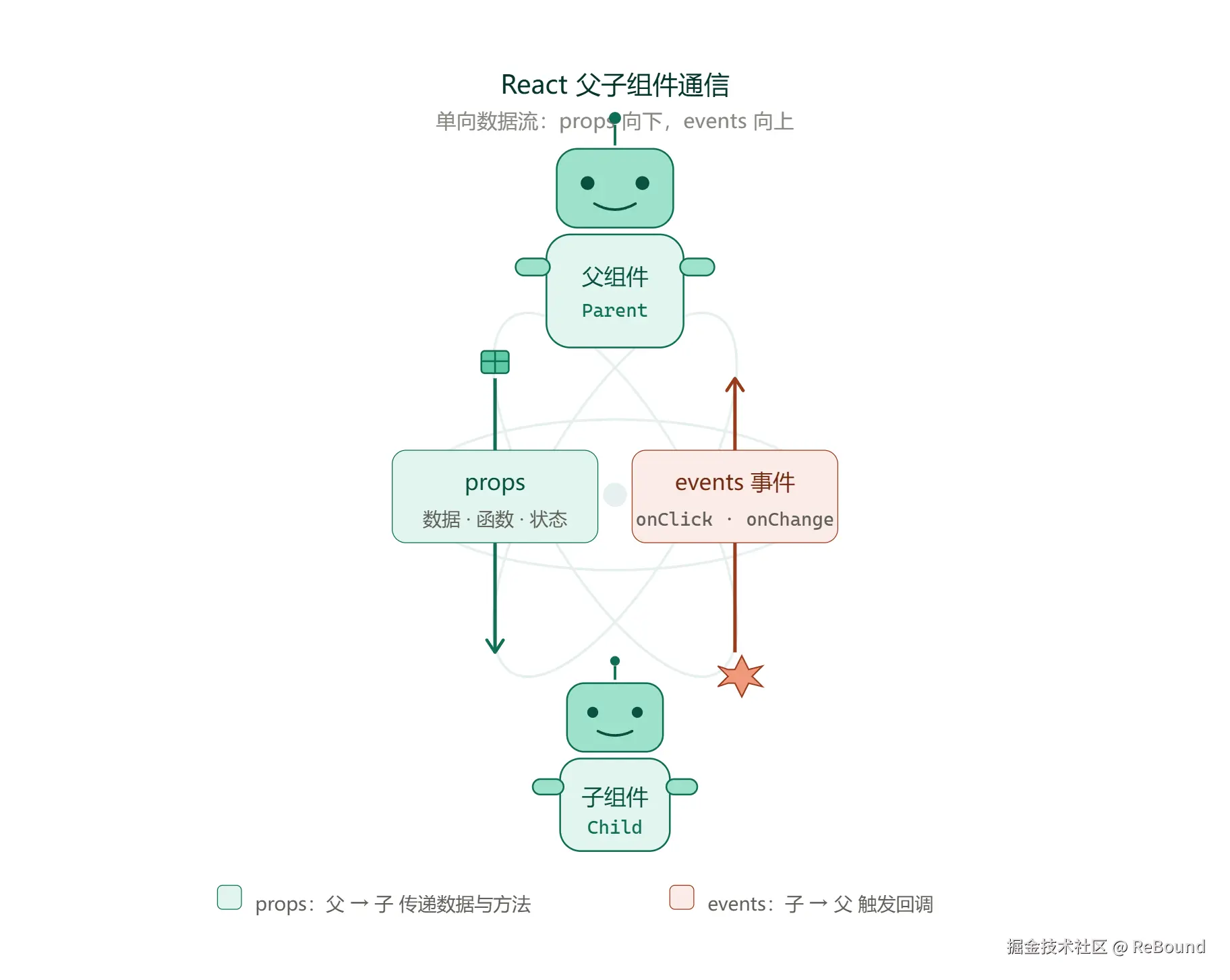
📚 第二件事:数据只能从上往下流(单向数据流)
vbnet
父组件 App
  ├── state: progressItems, status, error...
  │
  ├── props ──→ 子组件 Progress ①
  │               └── text, percentage, total(只读)
  │
  └── props ──→ 子组件 Progress ②
                  └── text, percentage, total(只读)
为什么是单向的? 因为 React 要保证数据流的可预测性。如果你能从任意位置修改任意组件的状态,代码就会变得难以维护和调试。
📚 第三件事:子组件怎么通知父组件?(回调函数模式)
子组件不能直接修改父组件的 state,但可以通过 回调函数 通知父组件:
完整示例:进度完成时通知父组件
tsx
// 父组件:定义回调函数,传给子组件
function App() {
  const [progressItems, setProgressItems] = useState([]);
  const [completedCount, setCompletedCount] = useState(0);

  // ✅ 回调函数:子组件完成时调用
  const handleComplete = (fileName) => {
    setCompletedCount(prev => prev + 1);
    console.log(`${fileName} 下载完成!`);
  };

  return (
    <div>
      <p>已完成 {completedCount} 个文件</p>
      {progressItems.map(({ text, percentage, total }, i) => (
        <Progress
          key={i}
          text={text}
          percentage={percentage}
          total={total}
          onComplete={() => handleComplete(text)}  // ✅ 传入回调
        />
      ))}
    </div>
  );
}
tsx
// 子组件:进度达到 100% 时调用回调
const Progress = ({ text, percentage = 0, total, onComplete }) => {
  // ✅ 进度完成时通知父组件
  if (percentage >= 100) {
    onComplete();
  }

  return (
    <div>
      <div style={{ width: `${percentage}%` }}>
        {text} {percentage.toFixed(2)}%
      </div>
    </div>
  );
};数据流方向:
父组件 ──props──→ 子组件(数据往下流)
父组件 ←─callback─ 子组件(事件往上传)
这就是 React 的 "数据向下,事件向上" 模式。
📚 第四件事:Props Drilling 的痛与解(Context 初探)
当组件层级变深时,会出现 Props Drilling(属性穿透)问题:
markdown
App → Layout → Sidebar → FileList → Progress
       ↑ 需要 theme,但中间两层完全不用
tsx
// ❌ Props Drilling:中间组件被迫传递不需要的数据
const Layout = ({ theme }) => <Sidebar theme={theme} />;
const Sidebar = ({ theme }) => <FileList theme={theme} />;
const FileList = ({ theme }) => <Progress theme={theme} />;
解决方案:Context
tsx
import { createContext, useContext } from 'react';

// ✅ 1. 创建 Context
const ThemeContext = createContext('light');

// ✅ 2. 在顶层提供值
function App() {
  return (
    <ThemeContext.Provider value="dark">
      <Layout />
    </ThemeContext.Provider>
  );
}

// ✅ 3. 在任意深层组件直接消费
const Progress = ({ text, percentage }) => {
  const theme = useContext(ThemeContext);  // 直接拿到 'dark'
  return (
    <div className={theme === 'dark' ? 'bg-gray-800' : 'bg-gray-100'}>
      {text} {percentage}%
    </div>
  );
};
什么时候用什么?
| 方案 | 适用场景 | 复杂度 |
|---|---|---|
| Props | 1-2 层父子通信 | ⭐ |
| 回调函数 | 子组件通知父组件 | ⭐⭐ |
| Context | 跨多层传递(主题、语言、用户信息) | ⭐⭐⭐ |
| 状态管理库 | 全局复杂状态(Redux、Zustand) | ⭐⭐⭐⭐ |
📚 第五件事:key 不是摆设,它决定性能
tsx
{progressItems.map(({ text, percentage, total }, i) => (
  <Progress key={i} text={text} percentage={percentage} total={total} />
))}
key 是 React 识别列表元素的唯一标识:
| 场景 | 不加 key | 加 key |
|---|---|---|
| 列表更新 | 可能重新渲染所有项 | 只更新变化的项 |
| 性能 | 差 | 好 |
| 状态保持 | 可能丢失 | 正确保留 |
⚠️ 用
index作为key在列表不会重排的场景下够用,但如果列表会增删、排序,应该用唯一 ID。
📝 Props 的类型约束(TypeScript 进阶)
给 Progress 组件加上类型约束,让 props 更安全:
tsx
interface ProgressProps {
  text: string;
  percentage?: number;  // ? 表示可选
  total: number;
  onComplete?: () => void;  // 可选的回调函数
}

const Progress = ({ text, percentage = 0, total, onComplete }: ProgressProps) => {
  return (
    <div>
      {text} {percentage.toFixed(2)}%
      {isNaN(total) ? "" : `of ${formatBytes(total)}`}
    </div>
  );
};
🧪 面试高频考点
考点 1:State 和 Props 的区别?
State 是组件内部的可变数据,用
useState定义;Props 是父组件传入的只读数据,通过函数参数接收。
考点 2:React 的数据流是怎样的?
单向数据流:数据从父组件通过 props 流向子组件,子组件通过回调函数通知父组件。
考点 3:什么是 Props Drilling?怎么解决?
Props Drilling 是指数据需要通过多层中间组件传递。解决方案:Context API、状态管理库(Redux、Zustand)、组件组合模式。
考点 4:key 的作用是什么?为什么不能用 index?
key 帮助 React 识别哪些元素变化了,从而只更新变化的项。用 index 作为 key 在列表重排时会导致状态错乱。
💡 我的看法
在 DeepSeek-R1 WebGPU 这个项目中,进度条组件的数据其实只有一层传递,用 props 完全够用。不要为了用 Context 而用 Context。
我的选择逻辑:
- 1-2 层传递 → props
- 子组件需要通知父组件 → 回调函数
- 3 层以上或全局数据 → Context 或状态管理
简单就是最好的。React 的设计哲学也是如此------先用最简单的方案,等复杂度上来了再升级。
💡 重点总结
| 件事 | 核心要点 |
|---|---|
| 第 1 件 | State 是自己的数据,Props 是别人给的数据 |
| 第 2 件 | 单向数据流:数据向下,事件向上 |
| 第 3 件 | 回调函数让子组件通知父组件 |
| 第 4 件 | Props Drilling 用 Context 解决 |
| 第 5 件 | key 是性能优化的关键 |
🔗 参考资料
💬 交流讨论
你在实际项目中是怎么管理组件通信的?有没有遇到 Props Drilling 的坑?你在面试中被问到过哪些组件通信的问题?欢迎评论区分享你的经验!
觉得有用?点个赞👍收藏⭐关注👆,下一篇深入讲解 ??、??= 和 isNaN 的妙用!
📚 系列文章导航