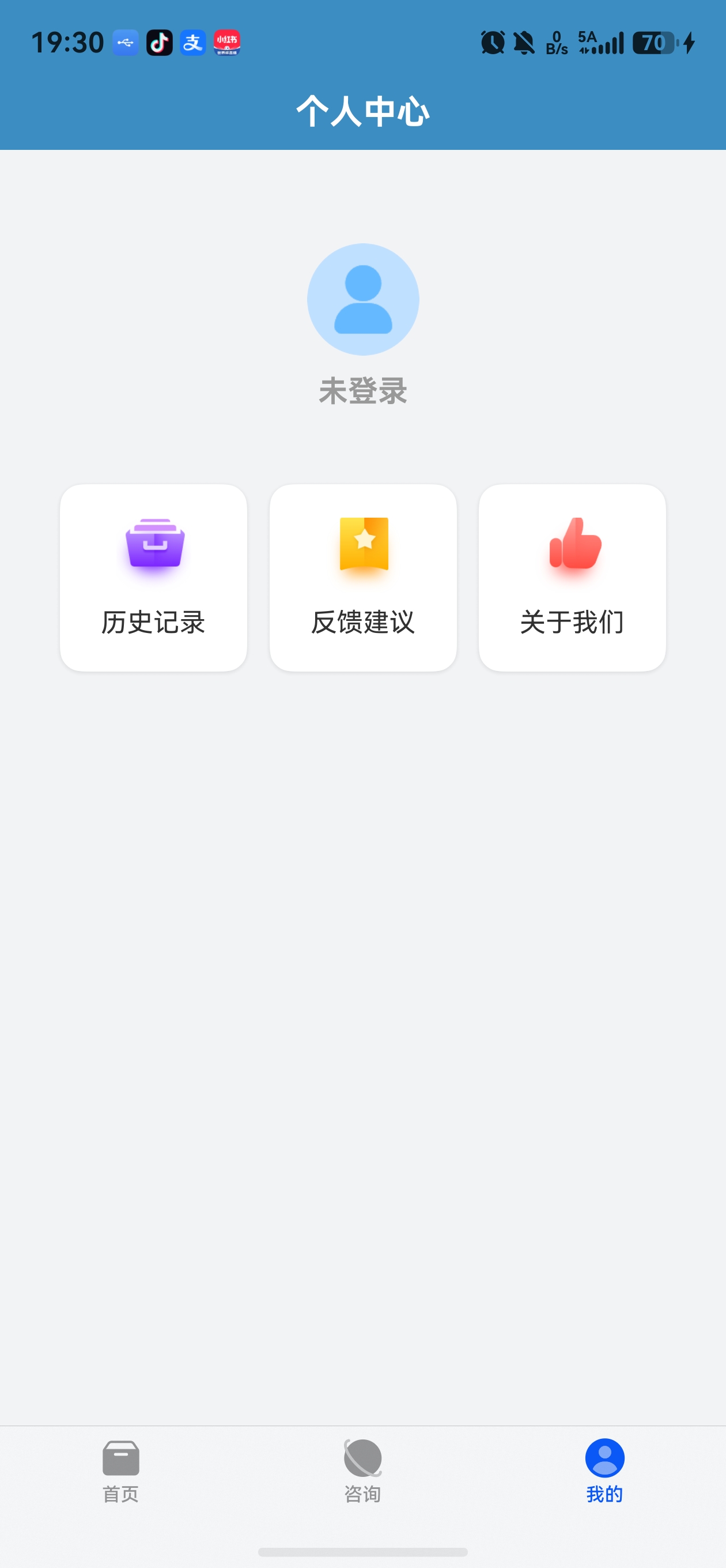
一、个人中心页面概览
个人中心(MineView)提供用户信息展示、登录/登出、功能入口(历史记录、反馈建议、关于我们)和版本信息展示。
typescript
@Component
export struct MineView {
  @State private isLoggedIn: boolean = false;
  @State private userName: string = '点我登录';
  @State private avatar: Resource | string = $r('app.media.ic_head');
  @State versionName: string = 'V1.0.1';
  private pageContext: PageContext = AppStorage.get('pageContext') as PageContext;

  async aboutToAppear(): Promise<void> {
    this.updateLoginState()
    this.versionName = await getAppVersion()
  }

  build() {
    Column() {
      this.buildTopBar();
      Column() {
        this.buildUserInfo();
        this.buildSecondRow();
        Blank().layoutWeight(1)
        this.buildVersionInfo();
      }
      .width('100%')
    }
    .width('100%')
    .height('100%')
    .backgroundColor($r('app.color.color_background'))
  }
}
二、华为一键登录集成
2.1 BackupManagerService 初始化
MeCharts 使用 backup_air 三方库集成华为云服务,包括一键登录和数据备份:
typescript
export default class BackupManagerService {
  private static instance: BackupManagerService;
  private isInitialized: boolean = false;
  private isLoggedIn: boolean = false;

  public static getInstance(): BackupManagerService {
    if (!BackupManagerService.instance) {
      BackupManagerService.instance = new BackupManagerService();
    }
    return BackupManagerService.instance;
  }

  public async initializeBackupManager(): Promise<void> {
    try {
      const backupManager = BackupManager.getInstance();
      let store = (await DbUtil.getInstance(getContext().getApplicationContext())).store;

      if (!store) {
        throw new Error('未初始化数据库');
      }

      backupManager.init({
        onCompleteBackup: () => {
          console.log('自定义回调- 备份完成');
        },
        onCompleteRestore: () => {
          console.log('自定义回调- 恢复完成');
        },
        updateDbVersion: (cloudDbVersion) => {
          console.log("自定义回调- 更新数据库版本 云端数据库版本" + cloudDbVersion);
        },
        cloudDir: `testUser`,
        cloudDbName: 'Partner.db',
        storeConfig: DbUtil.STORE_CONFIG,
        backupDirs: [new BackupDir("testDir", "testCloud.zip")],
        cloudStorageType: 'sdk',
        bucketName: "partner-xhmds",
        productId: '461323198430551180',
        client_id: '1788670196915914048',
        client_secret: '***',
        oauth_client_id: "6917585955626292994",
        oauth_client_secret: '***',
      }, store);

      this.isInitialized = true;
      this.isLoggedIn = true;
    } catch (error) {
      this.isInitialized = false;
      this.isLoggedIn = false;
    }
  }
}
初始化参数说明:
| 参数 | 说明 |
|---|---|
onCompleteBackup |
备份完成回调 |
onCompleteRestore |
恢复完成回调 |
updateDbVersion |
云端数据库版本变更回调 |
cloudDir |
云存储用户目录 |
cloudDbName |
云端数据库名称 |
cloudStorageType |
sdk 需登录,http 不需登录 |
bucketName |
存储桶名称 |
productId |
AGC 项目 ID |
2.2 登录流程
typescript
login() {
  const backupManager = BackupManager.getInstance();
  if (!BackupManagerService.getInstance().isBackupManagerInitialized()) {
    promptAction.showToast({ message: '等待初始化完成' });
    return;
  }
  this.isLoggedIn = UserInfoManager.isLoggedIn();
  if (this.isLoggedIn) {
    return    // 已登录,不重复登录
  }
  try {
    backupManager.login();
    setTimeout(() => {
      this.updateLoginState();
      if (this.isLoggedIn) {
        // 登录成功
      } else {
        promptAction.showToast({ message: '登录失败' });
      }
    }, 1000);
  } catch (error) {
    promptAction.showToast({ message: '登录失败' });
  }
}
backupManager.login() 调用华为一键登录服务,无需用户输入账号密码即可完成认证。
2.3 登录状态管理
typescript
private updateLoginState() {
  this.isLoggedIn = UserInfoManager.isLoggedIn();
  if (this.isLoggedIn) {
    const userInfoData = UserInfoManager.getUserInfo();
    this.userInfo = `${userInfoData?.nickName || '未设置'}`;
    this.avatar = userInfoData?.avatarUri || $r('app.media.ic_head')
  } else {
    this.userInfo = '未登录';
    this.avatar = $r('app.media.ic_head')
  }
}
2.4 登出功能
typescript
@Builder
buildRightContent() {
  Image($r('app.media.ic_logout'))
    .width(24).height(24)
    .onClick(() => {
      UserInfoManager.clearUserInfo()
      this.updateLoginState()
    })
    .visibility(this.isLoggedIn ? Visibility.Visible : Visibility.None)
}
登出按钮只在已登录状态显示,点击后清除用户信息并刷新 UI。
三、用户信息展示
3.1 用户头像与昵称
typescript
@Builder
buildUserInfo() {
  Column() {
    Image(this.avatar)
      .width(60).height(60)
      .borderRadius(40)

    Row() {
      Text(this.userInfo)
        .fontSize(16)
        .fontWeight(FontWeight.Bold)
        .fontColor(this.isLoggedIn ? '#333333' : '#999999')
    }
    .margin({ top: 10 })
  }
  .width('100%')
  .padding(20)
  .margin({ top: 30 })
  .onClick(() => {
    if (!this.isLoggedIn) {
      this.login()
    }
  })
}
未登录时显示默认头像和灰色文字"未登录",点击触发登录;已登录时显示用户头像和昵称。
四、功能卡片入口
4.1 通用卡片组件
typescript
@Builder
buildCard(icon: Resource, title: string, onClick: () => void) {
  Column() {
    Image(icon).width(40).height(40)
    Text(title).fontSize(14).margin({ top: 8 })
  }
  .width(100).height(100)
  .justifyContent(FlexAlign.Center)
  .backgroundColor($r('app.color.color_card'))
  .borderRadius(12)
  .shadow({
    radius: 8,
    color: '#1a000000',
    offsetX: 0,
    offsetY: 2
  })
  .onClick(onClick)
}
4.2 功能入口布局
typescript
@Builder
buildSecondRow() {
  Row() {
    this.buildCard($r("app.media.ic_record"), '历史记录', () => {
      this.pageContext.openPage({
        routerName: 'RecordPage',
      }, true);
    });

    this.buildCard($r('app.media.ic_feedback'), '反馈建议', () => {
      this.pageContext.openPage({
        param: {
          title: '反馈建议',
          url: 'https://ncn1rpfvd5vb.feishu.cn/share/base/form/shrcn0YEc3umGFsTAcZimonouTC',
        } as ResultParams,
        routerName: 'WebPage',
      }, true);
    });

    this.buildCard($r('app.media.ic_praise'), '关于我们', () => {
      this.pageContext.openPage({
        routerName: 'AboutPage',
      }, true);
    });
  }
  .width('100%')
  .justifyContent(FlexAlign.SpaceEvenly)
  .margin({ top: 20 })
  .padding({ left: 20, right: 20 })
}
三个功能入口采用 SpaceEvenly 均匀排列,视觉上简洁对称。
五、版本信息获取
5.1 动态获取应用版本
typescript
async function getAppVersion(): Promise<string> {
  try {
    const bundleInfo = await bundleManager.getBundleInfoForSelf(
      bundleManager.BundleFlag.GET_BUNDLE_INFO_DEFAULT
    );
    return bundleInfo.versionName
  } catch (err) {
    console.error('getBundleInfoForSelf failed:', JSON.stringify(err));
    return '1.0.1'
  }
}
bundleManager.getBundleInfoForSelf() 可获取当前应用的包信息,包括版本名、版本号等。无需声明额外权限。
5.2 版本信息展示
typescript
@Builder
buildVersionInfo() {
  Text(`当前版本 ${this.versionName}`)
    .fontSize(12)
    .fontColor('#999999')
    .width('100%')
    .textAlign(TextAlign.Center)
    .margin({ top: 60, bottom: 20 })
}
六、关于页面
6.1 AboutPage 实现
typescript
@Component
struct AboutPage {
  private pageContext: PageContext = AppStorage.get('pageContext') as PageContext;

  build() {
    NavDestination() {
      Column({ space: 10 }) {
        this.buildTopBar()

        Column({ space: 10 }) {
          Image($r('app.media.app_icon')).width(60).height(60).margin({ top: 20 })
          Text('柚兔自测量表').fontSize(18).margin({ top: 10, bottom: 40 })

          SettingItem({ name: '用户协议' }).onClick(() => {
            this.pageContext.openPage({
              param: { title: '用户协议', url: UrlConstants.URL_USER } as ResultParams,
              routerName: 'WebPage',
            }, true);
          }).width('100%')

          SettingItem({ name: '隐私政策' }).onClick(() => {
            this.pageContext.openPage({
              param: { title: '隐私政策', url: UrlConstants.URL_PRIVACY } as ResultParams,
              routerName: 'WebPage',
            }, true);
          }).width('100%')

          this.buildRow('作者微信', 'gy09312')

          Blank().layoutWeight(1)

          Text('如果您想添加某些功能或者有什么意见建议都可以通过以上途径联系到我,感谢您的反馈!')
            .fontSize(12).fontColor($r('app.color.color_text'))
            .padding(15)
          Text('鲁ICP备2024092126号-6A')
            .fontSize(12).fontColor($r('app.color.color_text'))
            .padding(15)
        }
        .width('100%')
        .layoutWeight(1)
      }
    }
  }
}
6.2 SettingItem 通用设置项组件
typescript
@Component
export struct SettingItem {
  @Prop name: string
  @Prop content?: string

  build() {
    Row({ space: 7 }) {
      Text(this.name).fontWeight(FontWeight.Medium)
      Blank().layoutWeight(1)
      if (this.content) {
        Text(this.content).fontSize(12)
      }
      Image($r('app.media.ic_enter')).width(14)
    }
    .width('100%')
    .justifyContent(FlexAlign.SpaceBetween)
    .padding({ left: 12, right: 12 })
  }
}
SettingItem 是一个简洁的设置项组件:左侧名称、右侧可选内容+箭头,支持 @Prop 数据传递。
七、Web 页面容器
用户协议、隐私政策和反馈建议都通过 WebPage 加载网页内容:
typescript
@Component
struct WebPage {
  controller: webview.WebviewController = new webview.WebviewController();
  @State url: string = ''
  @State title: string = ''
  @State isLoading: boolean = true

  build() {
    NavDestination() {
      Column() {
        TopBar({
          title: this.title,
          onBack: () => { this.pageContext.popPage(true) }
        })

        Stack() {
          Web({ src: this.url, controller: this.controller })
            .layoutWeight(1)
            .onPageEnd(() => {
              this.isLoading = false
            })
          LoadingProgress()
            .width(40).height(40)
            .visibility(this.isLoading ? Visibility.Visible : Visibility.None)
        }.layoutWeight(1)
      }
    }
    .onReady((ctx: NavDestinationContext) => {
      const params = ctx.pathInfo.param as ResultParams;
      this.url = params.url as string
      this.title = params.title as string
    })
  }
}
关键点:
webview.WebviewController控制 Web 组件onPageEnd回调在页面加载完成后触发,关闭 loadingStack叠加 Web 和 LoadingProgress,实现加载指示器效果
八、emitter 事件驱动的跨页面通信
AI 咨询页面检测到未登录时,通过 emitter 通知主页切换到"我的"Tab:
typescript
// ConsultView 中发送事件
if (!UserInfoManager.isLoggedIn()) {
  ToastUtil.showToast('请先登录...')
  let eventData: emitter.EventData = {
    data: { "content": "content" }
  };
  emitter.emit(CommonConstants.EVENT_ID, eventData);
}

// Index 中监听事件
aboutToAppear(): void {
  let callback: Callback<emitter.EventData> = (eventData: emitter.EventData) => {
    this.tabController.changeIndex(2)  // 切换到"我的"Tab
  };
  emitter.on(CommonConstants.EVENT_ID, callback);
}

aboutToDisappear(): void {
  emitter.off(CommonConstants.EVENT_ID);  // 移除监听
}
emitter 是 HarmonyOS 提供的进程内事件通知机制,适合跨组件/跨页面的松耦合通信。
九、小结
本篇讲解了个人中心的完整实现,包括华为一键登录集成、用户状态管理、功能入口布局和 Web 容器页面。通过 backup_air 三方库,MeCharts 轻松集成了华为云服务的登录与备份能力。下一篇将深入响应式布局与断点系统。