#一、坐标系
- WPF 的 3D 坐标系原点通常位于对象中心,X 轴向右,Y 轴向上,Z 轴朝向观察者(右手定则)。
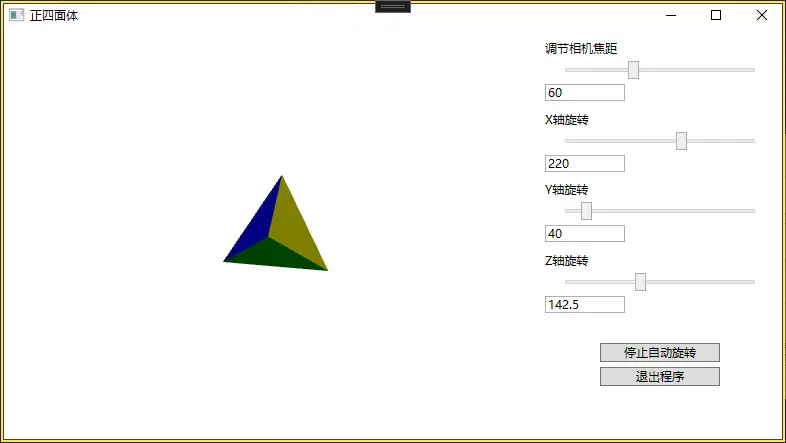
正四面体旋转以原点为中心,绕Z 轴自动旋转。
#二、正四面体的坐标
- 问题:是否存在所有四个顶点均为整数的正四面体?
是的。实际上,存在"整数正四面体"(也称为Heronian四面体)。
取四个顶点为:(0,0,0),(1,1,0),(1,0,1),(0,1,1) ,可以验证所有六条棱长均为 2\sqrt{2}2 ,所以这是一个棱长为 2\sqrt{2}2 的正四面体,且四个顶点全是整数。
#三、功能
-
在右侧控制面板中,每个轴对应的 Slider 后面都增加了一个 TextBox,绑定到对应滑块的 Value 属性。
-
在右侧面板的 StackPanel 底部增加两个按钮:一个用于切换自动旋转的启动/停止,另一个用于退出程序。
自动旋转通过定时器使Z轴 每帧旋转角度增加0.5。
#四、MainWindow.xaml
<Window x:Class="WpfA_Tetrahedron.MainWindow"
        xmlns="http://schemas.microsoft.com/winfx/2006/xaml/presentation"
        xmlns:x="http://schemas.microsoft.com/winfx/2006/xaml"
        xmlns:d="http://schemas.microsoft.com/expression/blend/2008"
        xmlns:mc="http://schemas.openxmlformats.org/markup-compatibility/2006"
        xmlns:local="clr-namespace:WpfA_Tetrahedron"
        mc:Ignorable="d"
        Title="正四面体" Height="450" Width="800">
    <Grid>
        <Grid.ColumnDefinitions>
            <ColumnDefinition Width="*"/>
            <ColumnDefinition Width="250"/>
        </Grid.ColumnDefinitions>

        <!-- 右侧控制面板 -->
        <StackPanel Grid.Column="1" Margin="10">
            <!-- 焦距控制 -->
            <TextBlock Text="调节相机焦距" Margin="0,0,0,5"/>
            <Slider x:Name="viewAngle" Width="200" Value="60" Minimum="10" Maximum="150" />
            <TextBox Text="{Binding ElementName=viewAngle, Path=Value, UpdateSourceTrigger=PropertyChanged, Mode=TwoWay}"
                     Width="80" Margin="0,5,0,10" HorizontalAlignment="Left"/>

            <!-- X轴旋转 -->
            <TextBlock Text="X轴旋转" Margin="0,0,0,5"/>
            <Slider x:Name="rotateX" Width="200" Value="220" Minimum="0" Maximum="360" />
            <TextBox Text="{Binding ElementName=rotateX, Path=Value, UpdateSourceTrigger=PropertyChanged, Mode=TwoWay}"
                     Width="80" Margin="0,5,0,10" HorizontalAlignment="Left"/>

            <!-- Y轴旋转 -->
            <TextBlock Text="Y轴旋转" Margin="0,0,0,5"/>
            <Slider x:Name="rotateY" Width="200" Value="40" Minimum="0" Maximum="360" />
            <TextBox Text="{Binding ElementName=rotateY, Path=Value, UpdateSourceTrigger=PropertyChanged, Mode=TwoWay}"
                     Width="80" Margin="0,5,0,10" HorizontalAlignment="Left"/>

            <!-- Z轴旋转 -->
            <TextBlock Text="Z轴旋转" Margin="0,0,0,5"/>
            <Slider x:Name="rotateZ" Width="200" Value="0" Minimum="0" Maximum="360" />
            <TextBox Text="{Binding ElementName=rotateZ, Path=Value, UpdateSourceTrigger=PropertyChanged, Mode=TwoWay}"
                     Width="80" Margin="0,5,0,10" HorizontalAlignment="Left"/>

            <!-- 按钮 -->
            <Button x:Name="btnAutoRotate" Content="启动自动旋转" Width="120" Margin="0,20,0,5" Click="BtnAutoRotate_Click"/>
            <Button x:Name="btnExit" Content="退出程序" Width="120" Click="BtnExit_Click"/>
        </StackPanel>

        <!-- 3D 视口(保持不变) -->
        <Viewport3D Grid.Column="0">
            <Viewport3D.Camera>
                <PerspectiveCamera Position="0,0,50" LookDirection="0,0,-1"
                                   FieldOfView="{Binding Value, ElementName=viewAngle}"
                                   UpDirection="0,1,0"/>
            </Viewport3D.Camera>

            <ModelVisual3D>
                <ModelVisual3D.Content>
                    <Model3DGroup>
                        <AmbientLight Color="Gray"/>
                        <DirectionalLight Color="Gray" Direction="-1,-1,-1"/>

                        <!-- 四个三角面 -->
                        <GeometryModel3D>
                            <GeometryModel3D.Geometry>
                                <MeshGeometry3D Positions="0,0,0    10,10,0  10,0,10"
                                                 TriangleIndices="0,1,2"/>
                            </GeometryModel3D.Geometry>
                            <GeometryModel3D.Material>
                                <DiffuseMaterial Brush="Blue"/>
                            </GeometryModel3D.Material>
                        </GeometryModel3D>

                        <GeometryModel3D>
                            <GeometryModel3D.Geometry>
                                <MeshGeometry3D Positions="0,0,0    10,10,0   0,10,10"
                                                 TriangleIndices="0,1,2"/>
                            </GeometryModel3D.Geometry>
                            <GeometryModel3D.Material>
                                <DiffuseMaterial Brush="Red"/>
                            </GeometryModel3D.Material>
                        </GeometryModel3D>

                        <GeometryModel3D>
                            <GeometryModel3D.Geometry>
                                <MeshGeometry3D Positions="0,0,0   10,0,10  0,10,10"
                                                 TriangleIndices="0,1,2"/>
                            </GeometryModel3D.Geometry>
                            <GeometryModel3D.Material>
                                <DiffuseMaterial Brush="Green"/>
                            </GeometryModel3D.Material>
                        </GeometryModel3D>

                        <GeometryModel3D>
                            <GeometryModel3D.Geometry>
                                <MeshGeometry3D Positions="10,0,10  0,10,10  10,10,0"
                                                 TriangleIndices="0,1,2"/>
                            </GeometryModel3D.Geometry>
                            <GeometryModel3D.Material>
                                <DiffuseMaterial Brush="Yellow"/>
                            </GeometryModel3D.Material>
                        </GeometryModel3D>
                    </Model3DGroup>
                </ModelVisual3D.Content>

                <!-- 整体旋转变换 -->
                <ModelVisual3D.Transform>
                    <Transform3DGroup>
                        <RotateTransform3D>
                            <RotateTransform3D.Rotation>
                                <AxisAngleRotation3D Axis="1,0,0" Angle="{Binding Value, ElementName=rotateX}"/>
                            </RotateTransform3D.Rotation>
                        </RotateTransform3D>
                        <RotateTransform3D>
                            <RotateTransform3D.Rotation>
                                <AxisAngleRotation3D Axis="0,1,0" Angle="{Binding Value, ElementName=rotateY}"/>
                            </RotateTransform3D.Rotation>
                        </RotateTransform3D>
                        <RotateTransform3D>
                            <RotateTransform3D.Rotation>
                                <AxisAngleRotation3D Axis="0,0,1" Angle="{Binding Value, ElementName=rotateZ}"/>
                            </RotateTransform3D.Rotation>
                        </RotateTransform3D>
                    </Transform3DGroup>
                </ModelVisual3D.Transform>
            </ModelVisual3D>
        </Viewport3D>
    </Grid>
</Window>
#五、MainWindow.xaml.cs
using System;
using System.Windows;
using System.Windows.Threading;

namespace WpfA_Tetrahedron
{
    public partial class MainWindow : Window
    {
        private DispatcherTimer _rotationTimer;
        private const double RotationStep = 0.5;   // 每帧旋转角度增量

        public MainWindow()
        {
            InitializeComponent();

            // 初始化定时器
            _rotationTimer = new DispatcherTimer
            {
                Interval = TimeSpan.FromMilliseconds(30) // 约 33 帧/秒
            };
            _rotationTimer.Tick += RotationTimer_Tick;
        }

        // 自动旋转按钮点击事件
        private void BtnAutoRotate_Click(object sender, RoutedEventArgs e)
        {
            if (_rotationTimer.IsEnabled)
            {
                // 停止旋转
                _rotationTimer.Stop();
                btnAutoRotate.Content = "启动自动旋转";
            }
            else
            {
                // 启动旋转
                _rotationTimer.Start();
                btnAutoRotate.Content = "停止自动旋转";
            }
        }

        // 定时器 Tick:累加 Z 轴角度
        private void RotationTimer_Tick(object sender, EventArgs e)
        {
            double newValue = rotateZ.Value + RotationStep;
            if (newValue >= 360)
                newValue -= 360;   // 保持在 [0,360)
            rotateZ.Value = newValue;
        }

        // 退出按钮点击事件
        private void BtnExit_Click(object sender, RoutedEventArgs e)
        {
            Application.Current.Shutdown();
        }
    }
}
#六、源码下载
https://download.csdn.net/download/dalong10/93193444