《RocketMQ 官网》阅读笔记 RocketMQ 普通消息 延时消息 顺序消息 事务消息
1 普通消息
适用场景
普通消息通常用于微服务解耦、 数据集成和事件驱动场景。这些场景大多对消息处理的时效性或顺序性要求较低,主要关注可靠的消息传输通道。
场景 1:微服务异步解耦
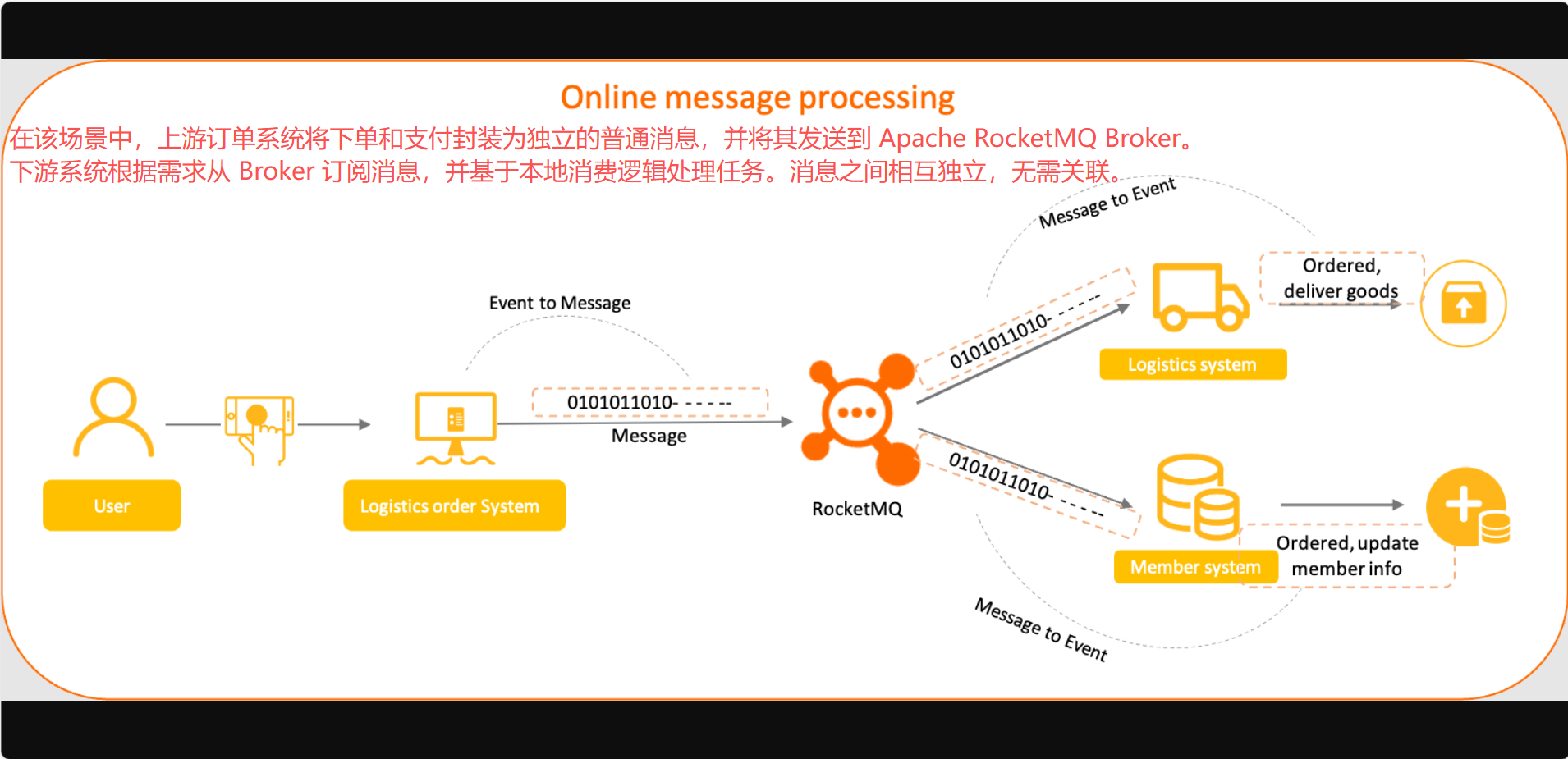
场景 2:数据集成传输
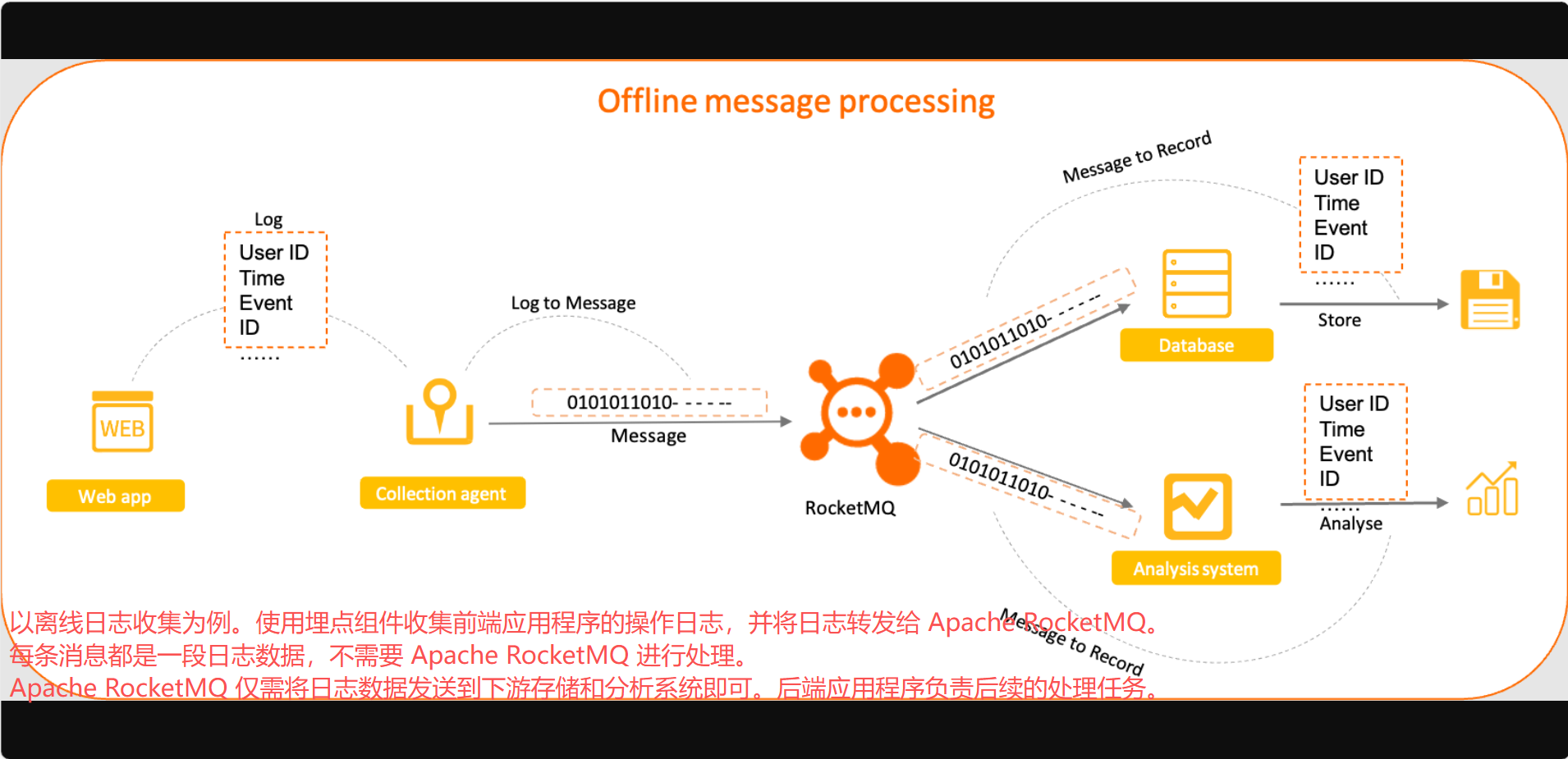
工作原理
普通消息定义
普通消息是 Apache RocketMQ 中的基础功能消息。普通消息支持生产者与 消费者之间的异步解耦和通信。
普通消息的生命周期

- 初始化:生产者构建并初始化消息,准备发送至 Broker。
- 就绪(Ready):消息已发送至 Broker,对消费者可见并可消费。
- 处理中(Inflight):消息被消费者获取,并按照本地业务逻辑进行处理。
在此期间,Broker 等待消费者提交结果。若超时未收到反馈,Apache RocketMQ 会对该消息进行重试。详情请参考消费重试。 - 确认(Acked):消费者完成消费并提交结果,Broker 标记消息消费状态。
默认情况下,Apache RocketMQ 保留所有消息。消费确认后仅进行逻辑标记,不会立即物理删除。因此,在消息过期或空间不足被清理前,消费者可以回溯消费。 - 删除:当消息过期或存储空间不足时,Apache RocketMQ 会按滚动方式删除最早的物理文件。详情请参考消息存储与清理。
使用限制
普通消息仅支持 MessageType 为 Normal 的主题(Topic)。
示例
创建主题(Topic)
在 Apache RocketMQ 5.0 中,建议使用 mqadmin 工具创建主题。注意,需要添加消息类型作为属性参数。以下是示例:
bash
sh mqadmin updateTopic -n <nameserver_address> -t <topic_name> -c <cluster_name> -a +message.type=NORMAL发送消息
您可以设置索引键(Index Key)和过滤标签(Tag)来过滤或搜索普通消息。以下示例代码展示了如何在 Java 中发送和接收普通消息:
java
// Send a normal message.
  MessageBuilder messageBuilder = new MessageBuilder();
  Message message = messageBuilder.setTopic("topic")
  // Specify the message index key so that you can accurately search for the message by using a keyword.
  .setKeys("messageKey")
  // Specify the message tag so that the consumer can filter the message based on the specified tag.
  .setTag("messageTag")
  // Message body.
  .setBody("messageBody".getBytes())
  .build();
  try {
    // Send the message. You need to pay attention to the sending result and capture exceptions such as failures.
    SendReceipt sendReceipt = producer.send(message);
    System.out.println(sendReceipt.getMessageId());
  } catch (ClientException e) {
      e.printStackTrace();
  }
  // Consumption example 1: When you consume a normal message as a push consumer, you need only to process the message in the message listener.
  MessageListener messageListener = new MessageListener() {
      @Override
      public ConsumeResult consume(MessageView messageView) {
          System.out.println(messageView);
          // Return the status based on the consumption result.
          return ConsumeResult.SUCCESS;
      }
  };
  // Consumption example 2: When you consume a normal message as a simple consumer, you must obtain and consume the message, and submit the consumption result.
  List<MessageView> messageViewList = null;
  try {
      messageViewList = simpleConsumer.receive(10, Duration.ofSeconds(30));
      messageViewList.forEach(messageView -> {
          System.out.println(messageView);
          // After consumption is complete, you must invoke ACK to submit the consumption result.
          try {
              simpleConsumer.ack(messageView);
          } catch (ClientException e) {
              e.printStackTrace();
          }
      });
      } catch (ClientException e) {
      // If the pull fails due to system traffic throttling or other reasons, you must re-initiate the request to obtain the message.
      e.printStackTrace();
  }
使用说明
设置全局唯一的索引键,以便于故障排查
您可以在 Apache RocketMQ 中设置自定义索引键(即 Message Key)。在查询和追踪消息时,索引键可以帮助您高效、准确地找到这些消息。
因此,我们建议您在发送消息时,使用业务的唯一信息(例如订单 ID 和用户 ID)作为索引。这将有助于您日后快速查找消息。
2 延时消息
适用场景
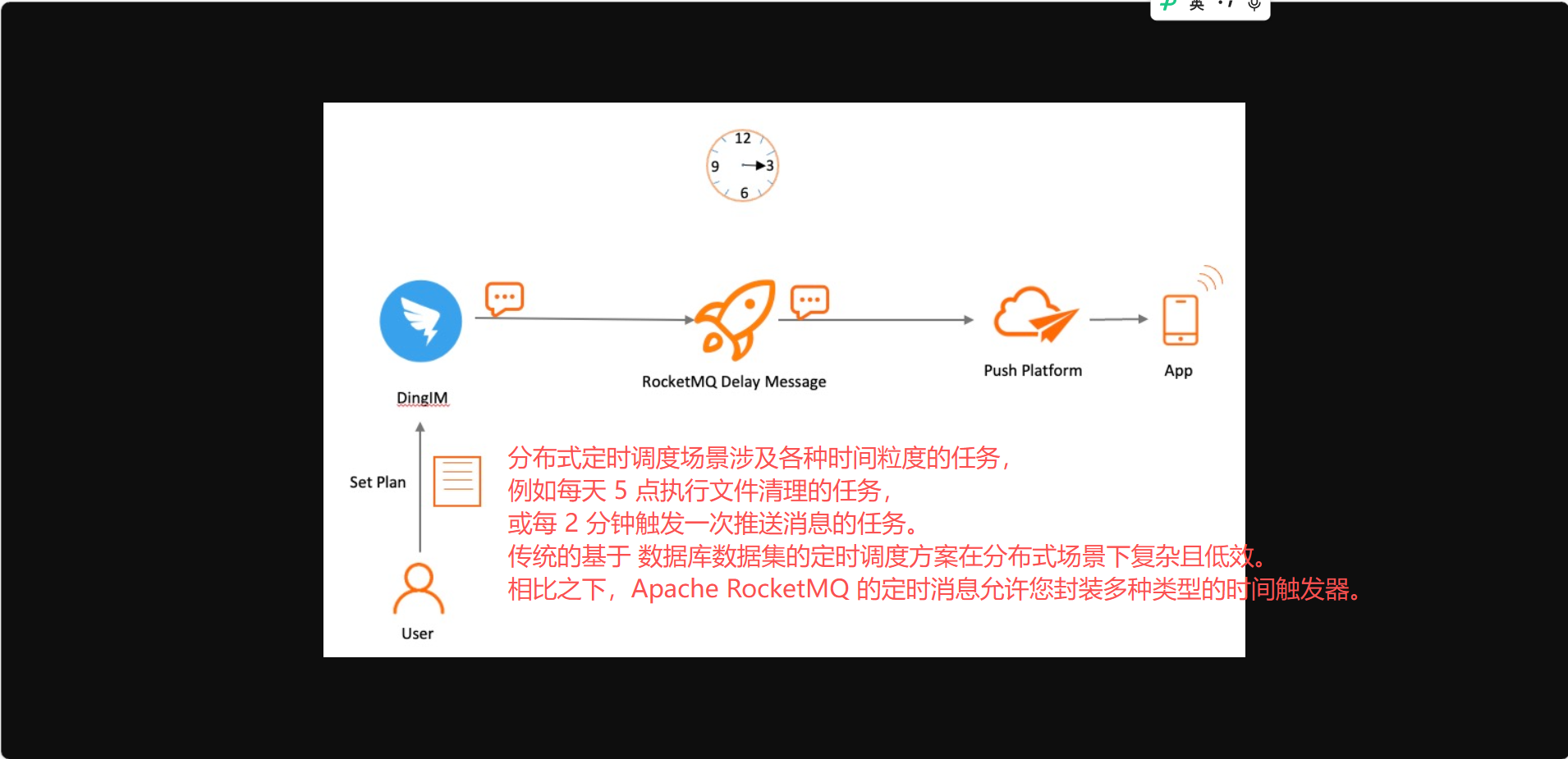
在分布式定时调度和任务超时处理等场景中,需要精确且可靠的基于时间的事件触发。Apache RocketMQ 提供的定时消息功能,可以简化定时调度任务的开发,实现高性能、可扩展、可靠的定时触发。
场景一:分布式定时调度
场景二:任务超时处理
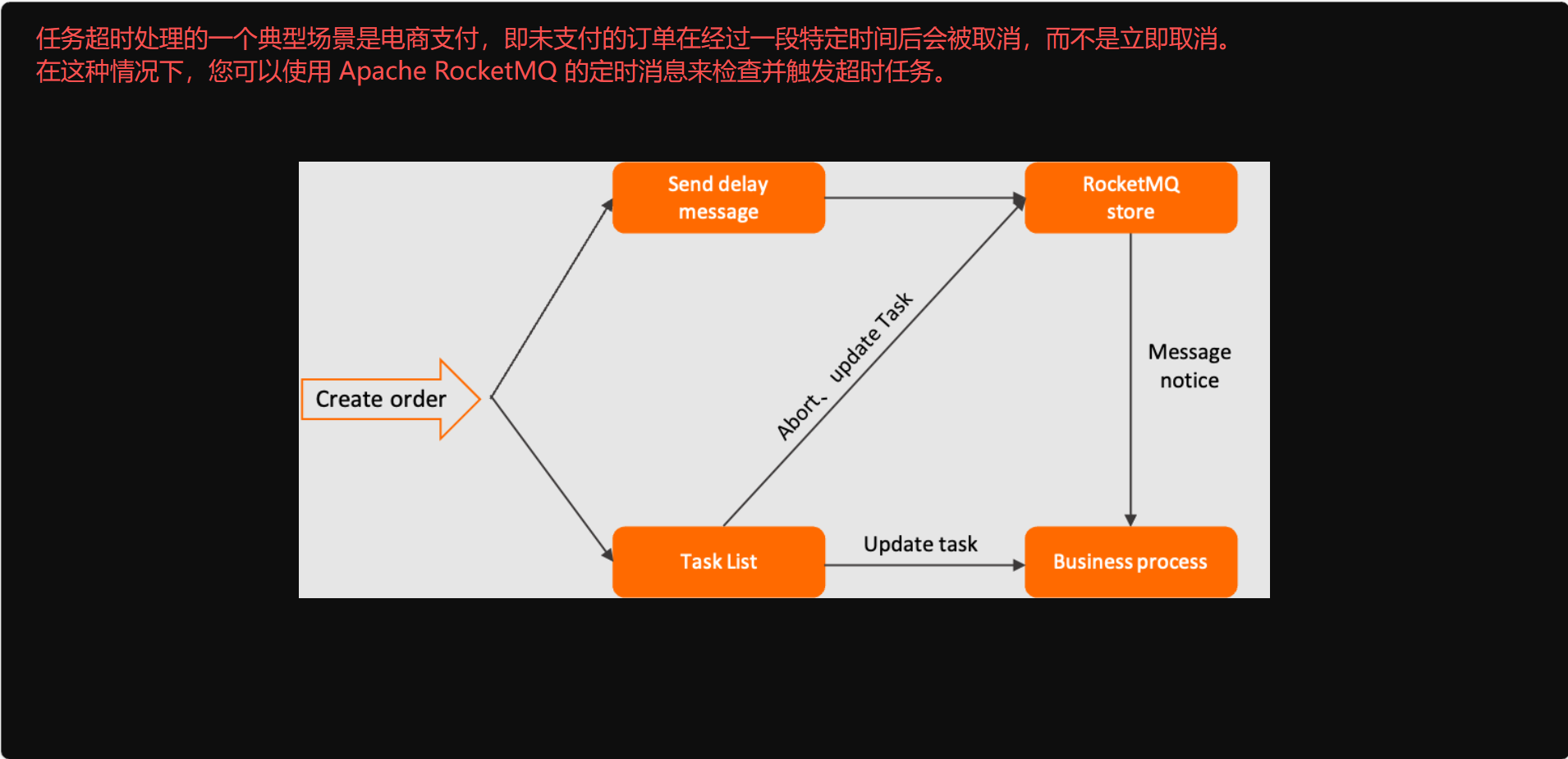
基于定时消息的任务超时处理具有以下优势:
- 多种时间粒度且开发简便:Apache RocketMQ 的定时消息不受固定时间增量的限制。您可以按任意时间粒度触发任务,且无需去重。
- 高性能和可扩展性:Apache RocketMQ 的定时消息具有高并发和可扩展性。这优于传统的数据库扫描方法,因为数据库扫描实现复杂,且频繁的 API 调用扫描可能会导致性能瓶颈。
工作原理
定时消息定义
定时消息是 Apache RocketMQ 中的一种高级特性消息。定时消息允许消费者在消息发送到服务端后,仅在指定的时间点或经过指定的时间段后才能消费。您可以使用定时消息在分布式场景中实现延迟调度和触发。
时间设置规则
- Apache RocketMQ 中定时消息的定时或延时 时间以时间戳表示,而非时间周期。
- 定时时间为毫秒级的 Unix 时间戳。您必须将消息投递的计划时间转换为毫秒级的 Unix 时间戳。您可以使用 Unix 时间戳转换器将时间转换为毫秒级 Unix 时间戳。
- 定时时间必须在允许的时间范围内。如果定时时间超出该范围,定时设置将不会生效,消息会立即在服务端被投递。
- 默认情况下,定时消息的最大定时时长为 24 小时。该默认值不可更改。
- 定时时间必须晚于当前时间。如果定时时间设置为早于当前时间,定时设置将不会生效,消息会立即在服务端被投递。
以下是两个时间设置示例:
- 定时消息:如果当前时间为 2022-06-09 17:30:00,您希望在 2022-06-09 19:20:00 投递消息,则定时时间的毫秒级 Unix 时间戳为 1654773600000。
- 延时消息:如果当前时间为 2022-06-09 17:30:00,您希望在 1 小时后投递消息,则消息投递时间为 2022-06-09 18:30:00,对应的毫秒级 Unix 时间戳为 1654770600000。
定时消息生命周期

- 初始化:消息由生产者构建并初始化,准备发送到服务端。
- 定时:消息发送到服务端后,存储在基于时间的存储系统中,直到指定的投递时间。此时不会立即为该消息创建索引。
- 就绪:在指定时间点,消息被写入常规存储引擎,此时消息对消费者可见,并等待消费者消费。
- 处理中(Inflight):消息被消费者获取,并按照本地业务逻辑进行处理。
在此期间,Broker 等待消费者提交结果。若超时未收到反馈,Apache RocketMQ 会对该消息进行重试。 - 确认(Acked):消费者完成消费并提交结果,Broker 标记消息消费状态。
默认情况下,Apache RocketMQ 保留所有消息。消费确认后仅进行逻辑标记,不会立即物理删除。因此,在消息过期或空间不足被清理前,消费者可以回溯消费。 - 删除:当消息过期或存储空间不足时,Apache RocketMQ 会按滚动方式删除最早的物理文件。
使用限制
消息类型一致性
定时消息只能发送到 MessageType 为 Delay 的主题(Topic)中。
时间粒度
Apache RocketMQ 定时消息的时间粒度精确到毫秒。默认粒度值为 1000 毫秒。
Apache RocketMQ 定时消息的状态可以持久化存储。如果消息系统发生故障并重启,消息仍会根据指定的投递时间进行投递。然而,如果存储系统发生异常或重启,定时消息的投递可能会出现延迟。
示例
创建主题(Topic)
在 Apache RocketMQ 5.0 中,建议使用 mqadmin 工具创建主题。注意,需要添加消息类型作为属性参数。以下是示例:
bash
sh mqadmin updateTopic -n <nameserver_address> -t <topic_name> -c <cluster_name> -a +message.type=Delay发送消息
与普通消息不同,定时消息必须为它们指定一个投递时间戳。
创建 DELAY 主题
bash
/bin/mqadmin updateTopic -c DefaultCluster -t DelayTopic -n 127.0.0.1:9876 -a +message.type=DELAY- c 集群名称
- t 主题名称
- n nameserver 地址
- a 额外属性,我们添加一个 message.type 属性,并将值设为 DELAY,以支持发送 DELAY 消息。
以下代码提供了发送和消费定时消息的 Java 示例:
java
// Send delay messages.
        MessageBuilder messageBuilder = null;
        // Specify a millisecond-level Unix timestamp. In this example, the specified timestamp indicates that the message will be delivered in 10 minutes from the current time.
        Long deliverTimeStamp = System.currentTimeMillis() + 10L * 60 * 1000;
        Message message = messageBuilder.setTopic("topic")
                // Specify the message index key. The system uses the key to locate the message.
                .setKeys("messageKey")
                // Specify the message tag. The consumer can use the tag to filter messages.
                .setTag("messageTag")
                .setDeliveryTimestamp(deliverTimeStamp)
                // Configure the message body.
                .setBody("messageBody".getBytes())
                .build();
        try {
            // Send the messages. Focus on the result of message sending and exceptions such as failures.
            SendReceipt sendReceipt = producer.send(message);
            System.out.println(sendReceipt.getMessageId());
        } catch (ClientException e) {
            e.printStackTrace();
        }
        // Consumption example 1: If a scheduled message is consumed by a push consumer, the consumer needs to process the message only in the message listener.
        MessageListener messageListener = new MessageListener() {
            @Override
            public ConsumeResult consume(MessageView messageView) {
                System.out.println(messageView.getDeliveryTimestamp());
                // Return the status based on the consumption result.
                return ConsumeResult.SUCCESS;
            }
        };
        // Consumption example 2: If a scheduled message is consumed by a simple consumer, the consumer must obtain the message for consumption and submit the consumption result.
        List<MessageView> messageViewList = null;
        try {
            messageViewList = simpleConsumer.receive(10, Duration.ofSeconds(30));
            messageViewList.forEach(messageView -> {
                System.out.println(messageView);
                // After consumption is complete, the consumer must invoke ACK to submit the consumption result.
                try {
                    simpleConsumer.ack(messageView);
                } catch (ClientException e) {
                    e.printStackTrace();
                }
            });
        } catch (ClientException e) {
            // If the pull fails due to system traffic throttling or other reasons, you must re-initiate the request to obtain the message.
            e.printStackTrace();
        }
    }
使用说明
我们建议您不要为大量消息设置相同的投递时间
定时消息在被投递给消费者之前,会存储在基于时间的存储系统中。如果您为大量定时消息指定了相同的投递时间,系统必须在到达该时间点时同时处理这些消息。这会使系统负载过重,并导致消息投递出现延迟。
3 顺序消息
适用场景
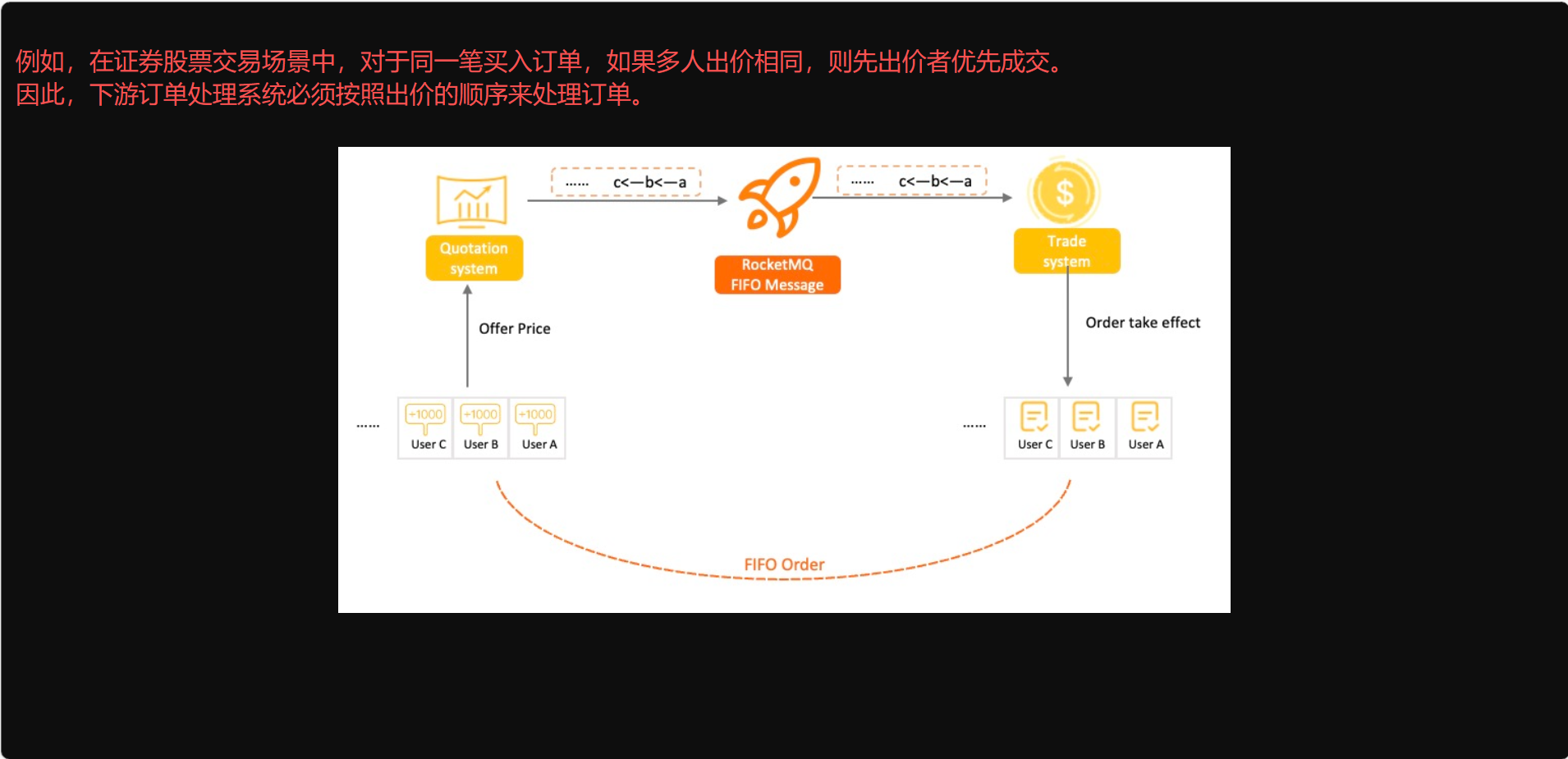
在有序事件处理、交易撮合、 数据实时增量同步等场景下,异构系统间需要保持强一致性,要求上游应用在事件发生变更时,能按顺序将消息投递给下游应用。Apache RocketMQ 提供的顺序消息可以帮助您实现消息的顺序传输。
场景一:交易撮合
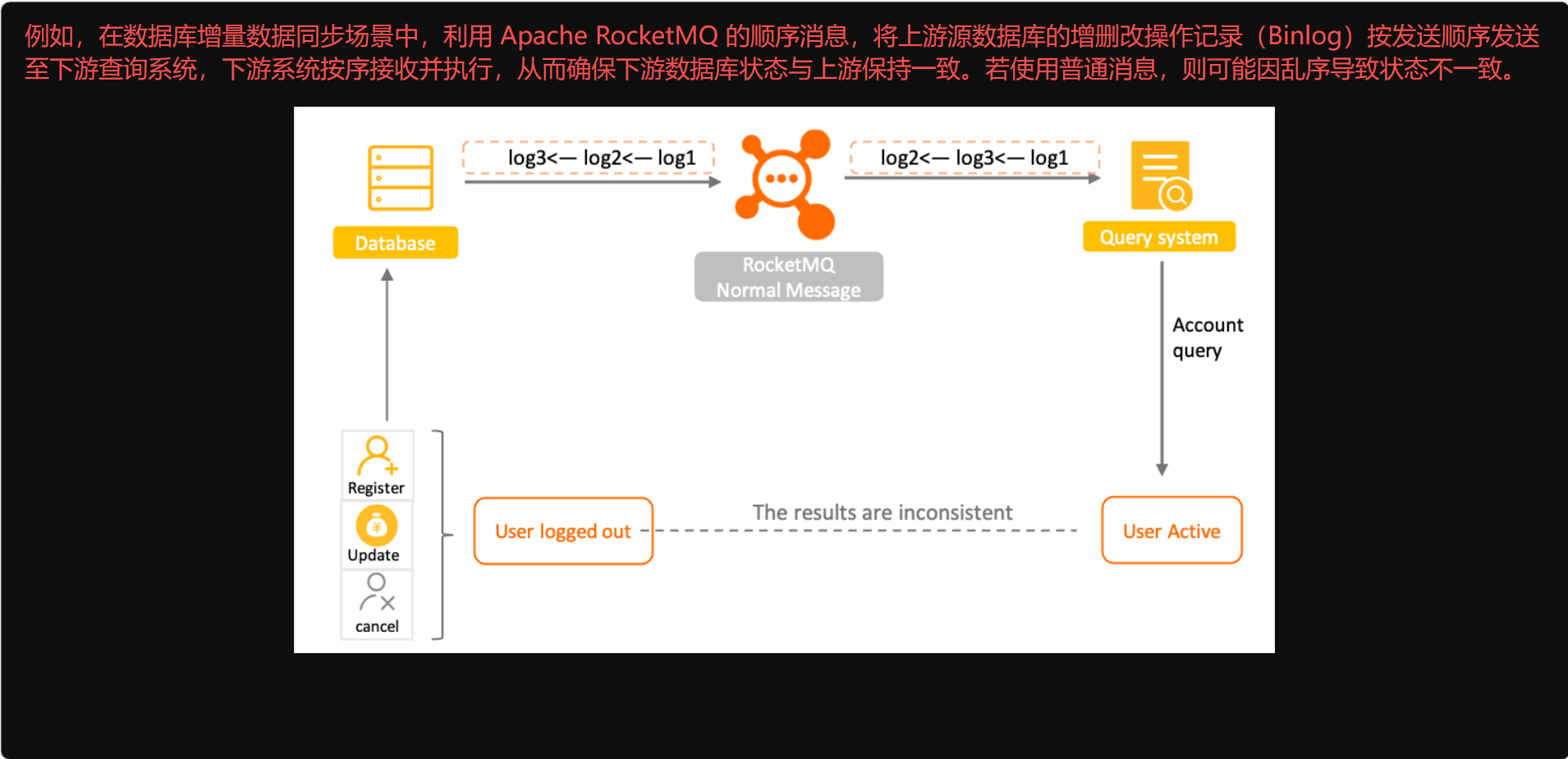
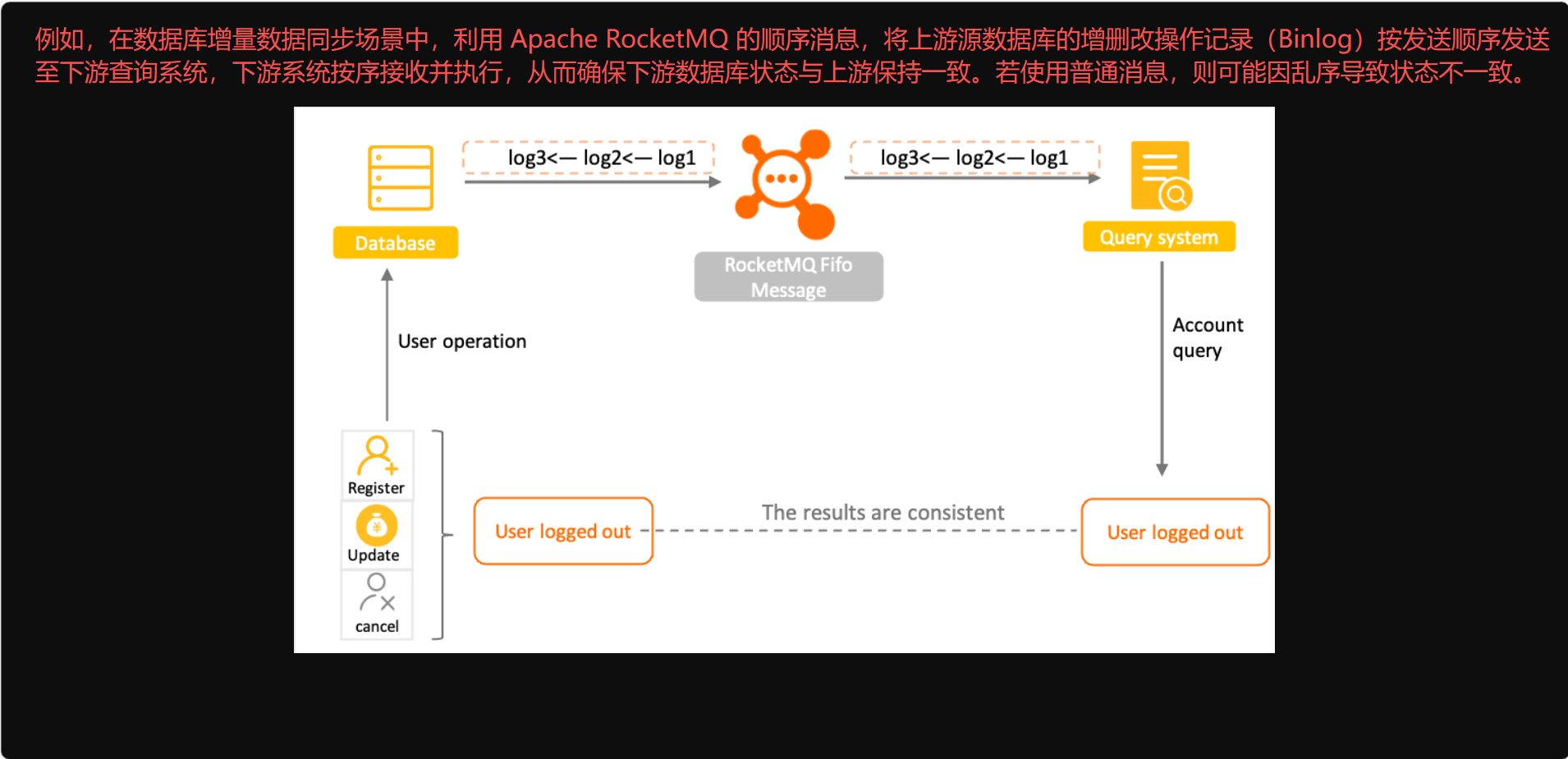
场景二:数据实时增量同步
普通消息
顺序消息
工作原理
顺序消息定义
顺序消息是 Apache RocketMQ 提供的一种高级消息类型,支持消费者按照消息发送的顺序获取消息,从而实现业务场景中的顺序处理。
顺序消息的核心特征是:发送顺序、存储顺序、消费顺序的一致性。
Apache RocketMQ 通过"消息组(Message Group)"来保证消息的顺序性。您必须为顺序消息配置消息组,同一消息组内的消息遵循先进先出(FIFO)原则。不同消息组之间、或者没有配置消息组的消息之间,不保证顺序性。
基于消息组的排序能力,您可以根据业务逻辑自定义排序粒度,既能实现业务系统的部分顺序性,又能最大限度地保证系统的并发度和吞吐量。
消息顺序性
Apache RocketMQ 中的消息顺序性分为:生产顺序和消费顺序。
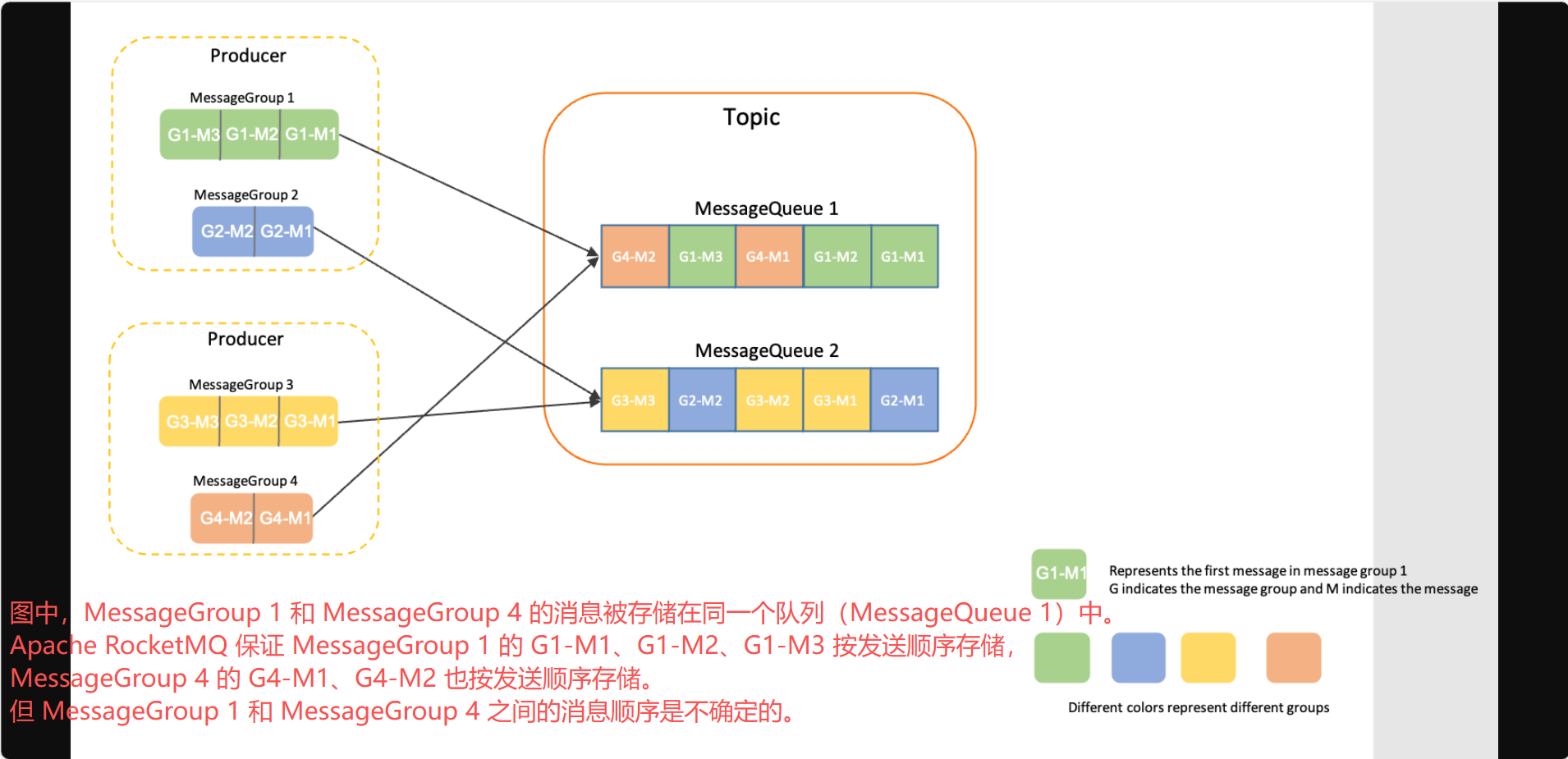
- 生产顺序:Apache RocketMQ 通过生产者与服务端之间的协议,确保消息从生产者发送到服务端是串行的,且按照发送顺序进行存储和持久化。要确保生产顺序,需满足以下条件:
- 单生产者:生产顺序仅适用于单个生产者。对于不同系统中的不同生产者,即使配置了相同的消息组,Apache RocketMQ 也无法确定其发送顺序。
- 串行发送:Apache RocketMQ 生产者支持多线程安全访问,但如果生产者使用多线程并发发送消息,Apache RocketMQ 无法确定来自不同线程的消息顺序。
在满足上述条件下,同一消息组的消息会按发送顺序存储在同一个队列中。下图展示了 Apache RocketMQ 的顺序存储逻辑。
- 消费顺序:Apache RocketMQ 通过 消费者与服务端之间的协议,确保消息被消费的顺序与存储顺序一致。要确保消费顺序,需满足以下条件:
- 投递顺序:Apache RocketMQ 通过客户端 SDK 和服务端通信协议,保证消息按服务端存储顺序进行投递。消费应用必须遵循"接收-处理-回复"的逻辑,避免因异步处理导致乱序。
投递顺序:Apache RocketMQ 通过客户端 SDK 和服务端通信协议,保证消息按服务端存储顺序进行投递。消费应用必须遵循"接收-处理-回复"的逻辑,避免因异步处理导致乱序。
在使用 SimpleConsumer 进行消费时,消费者可能一次拉取多条消息,业务应用需自行保证消费顺序。更多信息,请参考消费类型。 - 重试限制:Apache RocketMQ 对顺序消息的重试次数有限制。当消息达到最大重试次数仍未成功时,将不再重试,以防止单个消息阻塞整个队列的消费。
- 投递顺序:Apache RocketMQ 通过客户端 SDK 和服务端通信协议,保证消息按服务端存储顺序进行投递。消费应用必须遵循"接收-处理-回复"的逻辑,避免因异步处理导致乱序。
在对消费顺序有严格要求的场景中,建议合理设置重试次数,以防因反复重试导致乱序。
生产顺序与消费顺序的组合
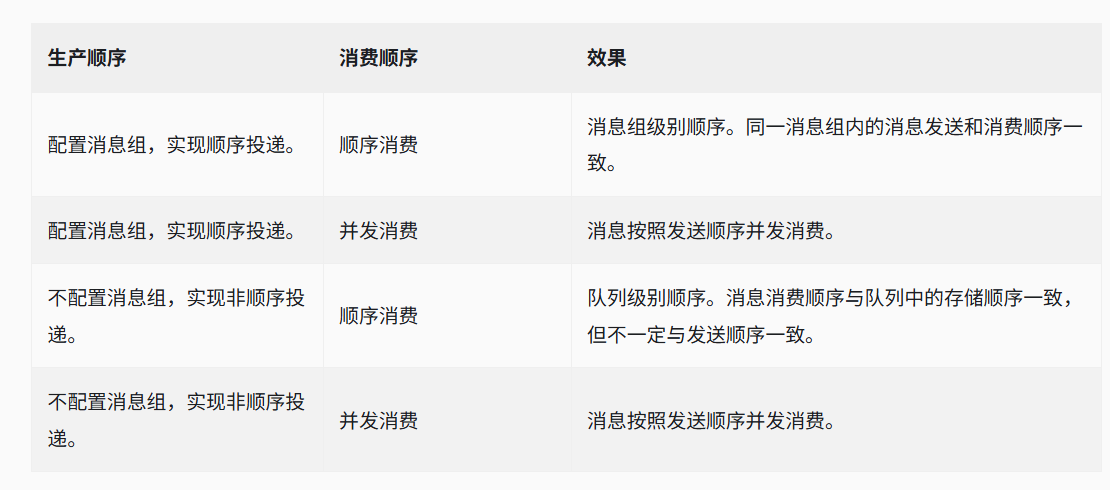
若要实现端到端的 FIFO,则必须同时满足生产顺序和消费顺序。在大多数业务场景下,生产者可能对应多个消费者,并非所有消费者都需要严格的顺序消费。您可以根据需求组合配置。例如,发送顺序消息,但使用非顺序并发消费以提升吞吐量。下表展示了不同组合的效果:
顺序消息的生命周期

- 初始化:生产者构建并初始化消息,准备发送至 Broker。
- 就绪(Ready):消息已发送至 Broker,对 消费者可见并可消费。
- 处理中(Inflight):消息被消费者获取,并按照本地业务逻辑进行处理。
在此期间,Broker 等待消费者提交结果。若超时未收到反馈,Apache RocketMQ 会对该消息进行重试。详情请参考消费重试。 - 确认(Acked):消费者完成消费并提交结果,Broker 标记消息消费状态。
默认情况下,Apache RocketMQ 保留所有消息。消费确认后仅进行逻辑标记,不会立即物理删除。因此,在消息过期或空间不足被清理前,消费者可以回溯消费。 - 删除:当消息过期或存储空间不足时,Apache RocketMQ 会按滚动方式删除最早的物理文件。详情请参考消息存储与清理。
注意:
- 消费失败或超时将触发服务端重试逻辑。若消息触发重试,其原生命周期结束,重试后的消息会被视为一条全新的消息(具有新的消息 ID)。
- 对于顺序消息,若某条消息触发重试,则该消息之后的其他消息必须等待该消息处理完成才能继续消费。
使用限制
顺序消息仅支持 MessageType 为 FIFO 的主题(Topic)。
示例
创建主题(Topic)
在 Apache RocketMQ 5.0 中,建议使用 mqadmin 工具创建主题。注意,需要添加消息类型作为属性参数。以下是示例:
bash
sh mqadmin updateTopic -n <nameserver_address> -t <topic_name> -c <cluster_name> -a +message.type=FIFO创建订阅组(subscriptionGroup)
建议使用 mqadmin 工具创建。注意,-o 选项必须设置为 true。以下是示例:
bash
sh mqadmin updateSubGroup -c <cluster_name> -g <consumer_group_name> -n <nameserver_address> -o true发送消息
与普通消息相比,顺序消息必须配置消息组。建议根据业务需求配置细粒度的消息组,以便实现负载解耦和并发扩展。
创建 FIFO 主题
bash
./bin/mqadmin updateTopic -c DefaultCluster -t FIFOTopic -o true -n 127.0.0.1:9876 -a +message.type=FIFO- -c 集群名称
- -t 主题名称
- -n nameserver 地址
- -o 创建顺序主题的标志
创建 FIFO 订阅组
bash
./bin/mqadmin updateSubGroup -c DefaultCluster -g FIFOGroup -n 127.0.0.1:9876 -o true- -c 集群名称
- -g 订阅组名称
- -n nameserver 地址
- -o 创建顺序订阅组的标志
以下 Java 示例代码展示了如何发送和接收顺序消息:
java
        // Send ordered messages.
        MessageBuilder messageBuilder = null;
        Message message = messageBuilder.setTopic("topic")
                // Specify the message index key. The system uses the key to locate the message.
                .setKeys("messageKey")
                // Specify the message tag. The consumer can use the tag to filter the message.
                .setTag("messageTag")
                // Configure a message group for the ordered messages. We recommend that you do not include a large number of messages in the group.
                .setMessageGroup("fifoGroup001")
                // Configure the message body.
                .setBody("messageBody".getBytes())
                .build();
        try {
            // Send the messages. Focus on the result of message sending and exceptions such as failures.
            SendReceipt sendReceipt = producer.send(message);
            System.out.println(sendReceipt.getMessageId());
        } catch (ClientException e) {
            e.printStackTrace();
        }
        // Make sure that ordered delivery is applied to the consumer group. Otherwise, the messages are delivered concurrently and in no particular order.
        // Consumption example 1: If the consumer type is PushConsumer, the consumer needs to only process the message in the message listener.
        MessageListener messageListener = new MessageListener() {
            @Override
            public ConsumeResult consume(MessageView messageView) {
                System.out.println(messageView);
                // Return the status based on the consumption result.
                return ConsumeResult.SUCCESS;
            }
        };
        // Consumption example 2: If the consumer type is SimpleConsumer, the consumer must actively obtain the message for consumption and submit the consumption result.
        // If the consumption of a message in the message group has not finished, the next message in the message group cannot be retrieved if you call the Receive function.
        List<MessageView> messageViewList = null;
        try {
            messageViewList = simpleConsumer.receive(10, Duration.ofSeconds(30));
            messageViewList.forEach(messageView -> {
                System.out.println(messageView);
                // After consumption is complete, the consumer must invoke ACK to submit the consumption result.
                try {
                    simpleConsumer.ack(messageView);
                } catch (ClientException e) {
                    e.printStackTrace();
                }
            });
        } catch (ClientException e) {
            // If the pull fails due to system traffic throttling or other reasons, the consumer must re-initiate the request to obtain the message.
            e.printStackTrace();
        }
使用说明
使用串行消费以避免乱序。
建议采用单条串行消费,而非批量消费。批量消费可能导致处理过程中的乱序。
例如,按 1-2-3-4 顺序发送,批量消费顺序为 1-2, 3-2, 3-4。如果消息 3 处理失败,系统可能会反复重试消息 2,导致乱序。
避免单个消息组包含海量消息。
Apache RocketMQ 保证同一消息组的消息存储在同一队列中。过大的消息组会导致队列负载过高,影响性能并阻碍扩展。配置消息组时,可以使用 Order ID 或 User ID 作为序列化条件。
建议在业务层面按消息组拆分消息。例如,使用订单 ID 或用户 ID 作为消息组关键字,仅确保同一用户的消息有序,而无需保证不同用户之间的顺序。
4 事务消息
适用场景
分布式事务
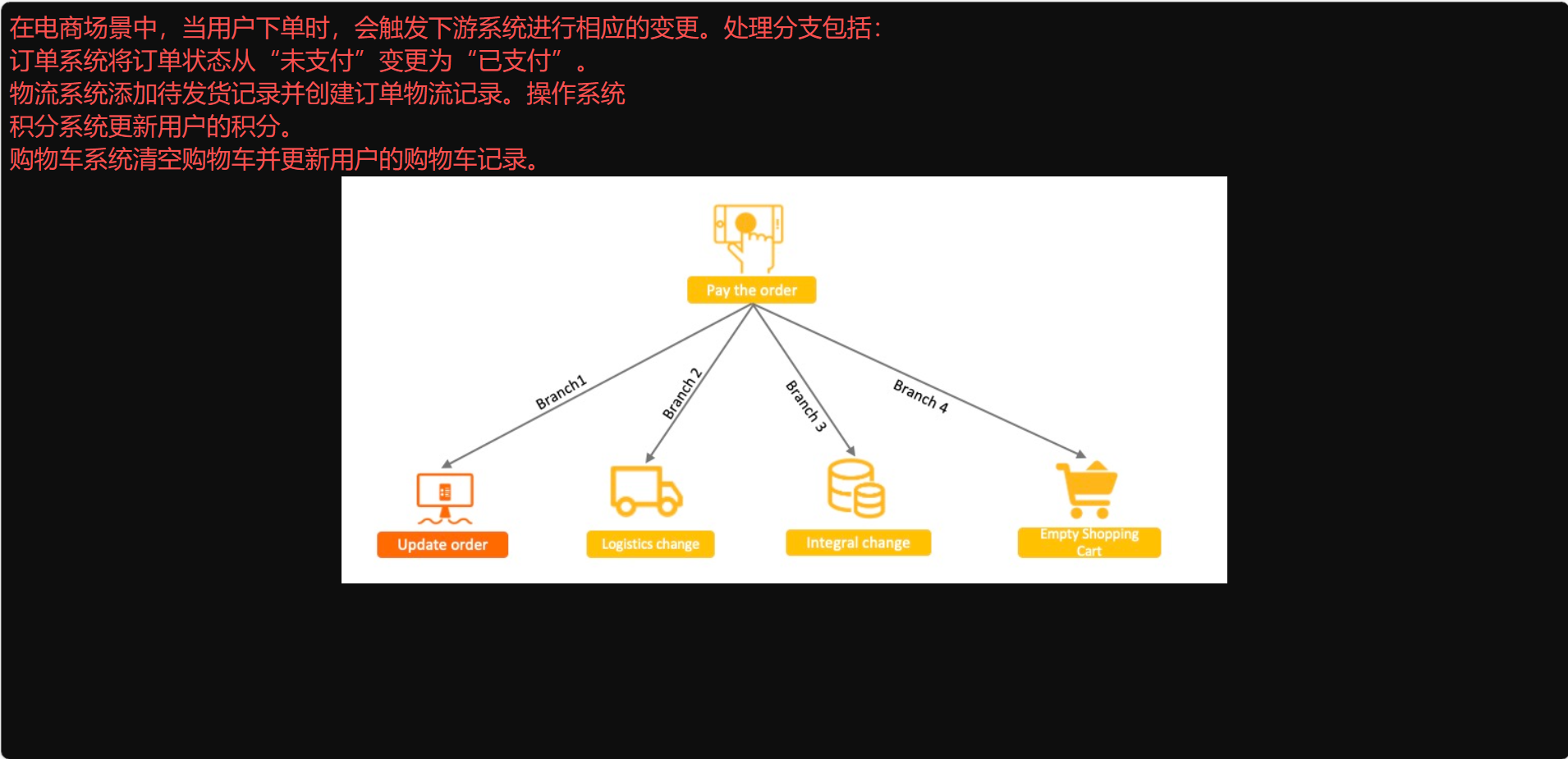
在分布式系统中执行核心业务逻辑时,通常需要同时调用多个下游业务来处理相关逻辑。因此,确保核心业务与下游业务之间执行结果的一致性是分布式事务需要解决的最大挑战。
传统的基于 XA 的方案:性能较差
确保分支间结果一致性的典型方法是使用基于 XA(eXtended Architecture)协议的分布式事务系统。该系统将四个调用分支封装为一个包含四个独立事务分支的大事务。虽然此解决方案可以确保结果的一致性,但需要锁定大量资源才能实现。锁定的资源数量随着分支数量的增加而增加,导致系统并发度降低。随着下游分支的增加,系统性能会下降。
基于普通消息的方案:结果一致性较差
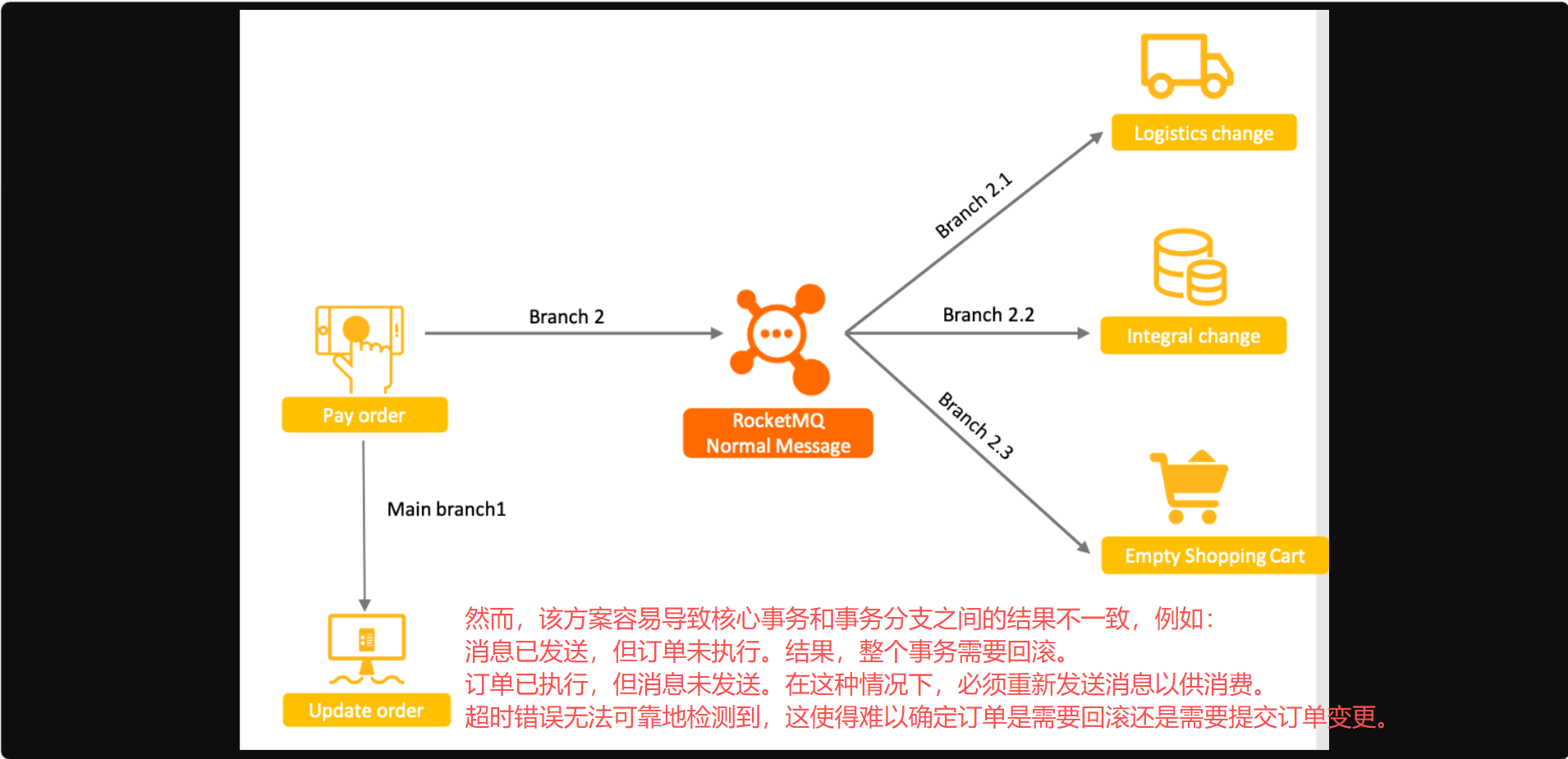
一种基于 XA 方案的简化方案是将订单系统的变更视为本地事务,将下游系统的变更视为下游任务。事务分支被视为带有附加订单表事务的普通消息。该方案通过异步处理消息来缩短处理生命周期,并提高了系统并发度。
基于 Apache RocketMQ 分布式事务消息的方案:彻底的一致性
上述方案无法保证一致性的原因是,普通消息不具备独立 数据库事务的提交、回滚和统一协调能力。
Apache RocketMQ 的事务消息特性在普通消息方案的基础上支持两阶段提交。该特性结合了两阶段提交和本地事务,以实现提交结果的全局一致性。
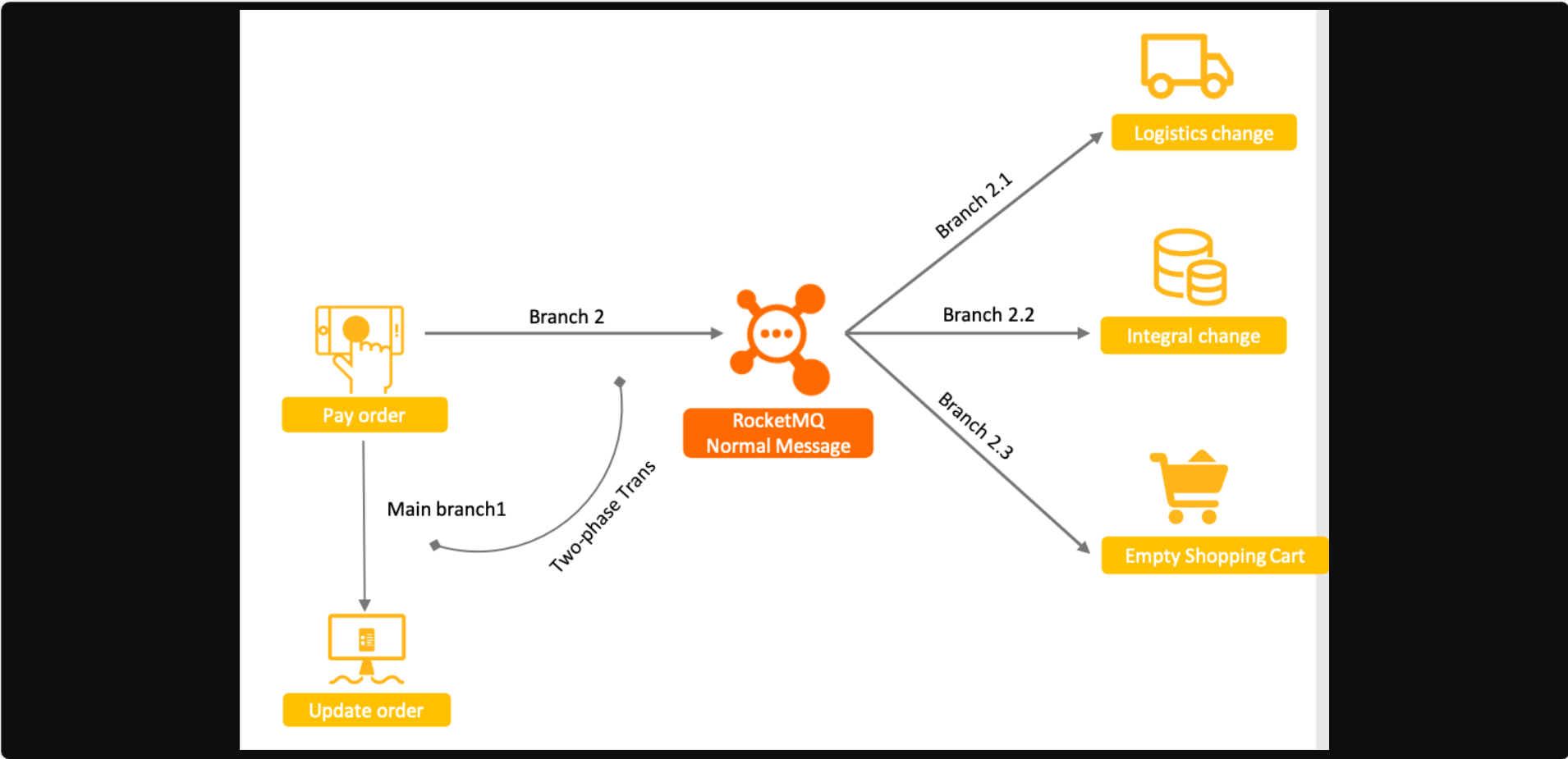
Apache RocketMQ 的事务消息方案功能强大、可扩展且易于开发。有关事务消息工作机制和流程的更多信息,请参阅"工作机制"。
工作原理
定义
事务消息是 Apache RocketMQ 提供的一种高级消息类型,旨在确保消息生产与本地事务之间的最终一致性。
处理流程
下图显示了事务消息的交互过程。
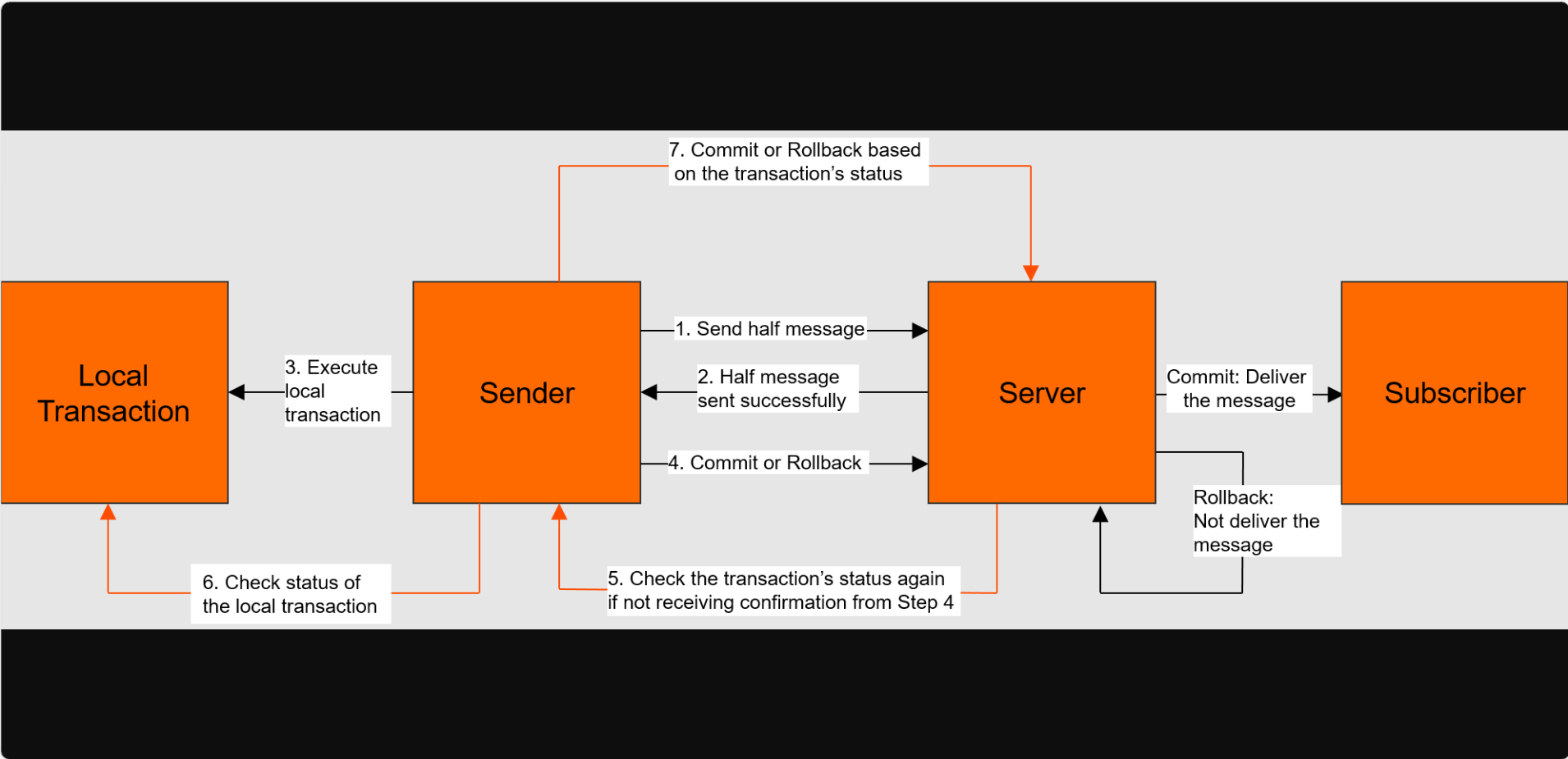
1.生产者向 Apache RocketMQ Broker 发送消息。
2.Apache RocketMQ Broker 保存消息并将其标记为不可投递。处于此状态的消息称为"半消息"。随后,Broker 向生产者返回确认消息(ACK)。
3.生产者执行本地事务。
4.生产者向 Broker 发送第二个 ACK,以提交本地事务的执行结果。执行结果可以是 Commit(提交)或 Rollback(回滚)。
- 如果 Broker 接收到的消息状态为 Commit,则 Broker 将半消息标记为可投递,并将消息投递给消费者。
- 如果 Broker 接收到的消息状态为 Rollback,则 Broker 将回滚事务,并且不会将半消息投递给消费者。
5.如果网络断开或生产者应用程序重启,导致 Broker 未收到第二个 ACK,或者半消息的状态为 Unknown,则 Broker 会等待一段时间,并向生产者集群中的某个生产者发送请求,查询半消息的状态。
6.生产者收到请求后,检查与该半消息对应的本地事务的执行结果。
7.生产者根据本地事务的执行结果向 Apache RocketMQ Broker 发送另一个 ACK。然后,Broker 按照步骤 4 处理该半消息。
事务消息的生命周期
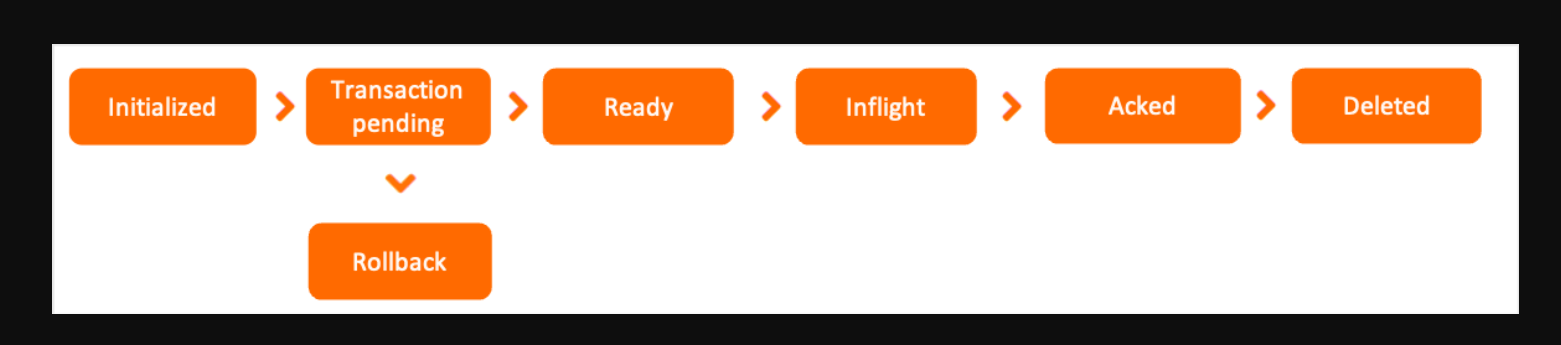
- 初始化:生产者构建并初始化消息,准备发送至 Broker。
- 事务待处理(Transaction pending):半消息被发送到 Broker。但是,它不会立即写入磁盘进行永久存储。相反,它存储在事务存储系统中。在系统验证本地事务的第二阶段成功之前,该消息不会被提交。在此期间,下游消费者无法看到该消息。
- 回滚(Rollback):在第二阶段,如果事务的执行结果为回滚,则 Broker 会回滚半消息并终止工作流程。
- 就绪(Ready):消息已发送至 Broker,对消费者可见并可消费。
- 处理中(Inflight):消息被消费者获取,并按照本地业务逻辑进行处理。
在此期间,Broker 等待消费者提交结果。若超时未收到反馈,Apache RocketMQ 会对该消息进行重试。详情请参考消费重试。 - 确认(Acked):消费者完成消费并提交结果,Broker 标记消息消费状态。
默认情况下,Apache RocketMQ 保留所有消息。消费确认后仅进行逻辑标记,不会立即物理删除。因此,在消息过期或空间不足被清理前,消费者可以回溯消费。 - 删除:当消息过期或存储空间不足时,Apache RocketMQ 会按滚动方式删除最早的物理文件。详情请参考消息存储与清理。
使用限制
消息类型一致性
事务消息只能用于 MessageType 为 Transaction 的主题(Topic)。
以事务为中心的消费
Apache RocketMQ 的事务消息特性保证了本地核心事务与下游分支之间可以处理同一个事务。但是,它无法保证消息消费结果与上游执行结果之间的一致性。因此,下游业务必须确保消息得到正确处理。我们建议消费者正确使用消费重试,以确保在发生故障时消息能够被正确处理。
中间状态可见性
Apache RocketMQ 的事务消息特性仅保证最终一致性,这意味着在消息投递给消费者之前,上游事务与下游分支之间的状态不保证一致。因此,事务消息仅适用于接受异步执行的事务场景。
事务超时机制
Apache RocketMQ 为事务消息实现了超时机制。在收到半消息后,如果 Broker 在一段时间后无法确定是提交还是回滚事务,则默认回滚该消息。
示例
创建主题(Topic)
在 Apache RocketMQ 5.0 中,建议使用 mqadmin 工具创建主题。注意,需要添加消息类型作为属性参数。以下是示例:
bash
sh mqadmin updateTopic -n <nameserver_address> -t <topic_name> -c <cluster_name> -a +message.type=Transaction发送消息
发送事务消息与发送普通消息在以下方面有所不同:
- 在发送事务消息之前,必须启用事务检查器并将其与本地事务执行相关联。
- 创建生产者时,必须设置事务检查器并绑定要发送消息的主题列表。这些操作使客户端内置的事务检查器能够在发生异常时恢复主题。
创建 TRANSACTION 主题
NORMAL 主题不支持投递 TRANSACTION 消息,如果您向 NORMAL 主题发送 TRANSACTION 消息,将会报错。
bash
./bin/mqadmin updatetopic -n localhost:9876 -t TestTopic -c DefaultCluster -a +message.type=TRANSACTION- -c 集群名称
- -t 主题名称
- -n nameserver 地址
- -a 额外属性:我们添加了一个值为 TRANSACTION 的 message.type 属性,以支持投递 TRANSACTION 消息。
以下示例以 Java 为例,展示了如何发送事务消息:
java
    // The demo is used to simulate the order table query service to check whether the order transaction is submitted.
    private static boolean checkOrderById(String orderId) {
        return true;
    }
    // The demo is used to simulate the execution result of a local transaction.
    private static boolean doLocalTransaction() {
        return true;
    }
    public static void main(String[] args) throws ClientException {
        ClientServiceProvider provider = new ClientServiceProvider();
        MessageBuilder messageBuilder = new MessageBuilder();
        // Build a transaction producer: The transactional message requires the producer to build a transaction checker to check the intermediate status of an exceptional half message.
        Producer producer = provider.newProducerBuilder()
                .setTransactionChecker(messageView -> {
                    /**
                     * The transaction checker checks whether the local transaction is correctly committed or rolled back based on the business ID, for example, an order ID.
                     * If this order is found in the order table, the order insertion action is committed correctly by the local transaction. If no order is found in the order table, the local transaction has been rolled back.
                     */
                    final String orderId = messageView.getProperties().get("OrderId");
                    if (Strings.isNullOrEmpty(orderId)) {
                        // Message error. Rollback is returned.
                        return TransactionResolution.ROLLBACK;
                    }
                    return checkOrderById(orderId) ? TransactionResolution.COMMIT : TransactionResolution.ROLLBACK;
                })
                .build();
        // Create a transaction branch.
        final Transaction transaction;
        try {
            transaction = producer.beginTransaction();
        } catch (ClientException e) {
            e.printStackTrace();
            // If the transaction branch fails to be created, the transaction is terminated.
            return;
        }
        Message message = messageBuilder.setTopic("topic")
                // Specify the message index key so that the system can use a keyword to accurately locate the message.
                .setKeys("messageKey")
                // Specify the message tag so that consumers can use the tag to filter the message.
                .setTag("messageTag")
                // For transactional messages, a unique ID associated with the local transaction is created to verify the query of the local transaction status.
                .addProperty("OrderId", "xxx")
                // Message body.
                .setBody("messageBody".getBytes())
                .build();
        // Send a half message.
        final SendReceipt sendReceipt;
        try {
            sendReceipt = producer.send(message, transaction);
        } catch (ClientException e) {
            // If the half message fails to be sent, the transaction can be terminated and the message is rolled back.
            return;
        }
        /**
         * Execute the local transaction and check the execution result.
         * 1. If the result is Commit, deliver the message.
         * 2. If the result is Rollback, roll back the message.
         * 3. If an unknown exception occurs, no action is performed until a response is obtained from a half message status query.
         *
         */
        boolean localTransactionOk = doLocalTransaction();
        if (localTransactionOk) {
            try {
                transaction.commit();
            } catch (ClientException e) {
                // You can determine whether to retry the message based on your business requirements. If you do not want to retry the message, you can use the half message status query to submit the transaction status.
                e.printStackTrace();
            }
        } else {
            try {
                transaction.rollback();
            } catch (ClientException e) {
                // We recommend that you record the exception information. This enables you to submit the transaction status based on the half message status query in the event of a rollback exception. Otherwise, you have to retry the message.
                e.printStackTrace();
            }
        }
    }
使用说明
避免大量半消息超时。
Apache RocketMQ 允许您在事务提交过程中发生异常时检查事务,以确保事务一致性。但是,生产者应尽量避免本地事务返回未知结果。大量的事务检查会导致系统性能下降并延迟事务处理。
正确处理正在进行中的事务。
在半消息状态查询期间,对于正在进行中的事务,不要返回 Rollback 或 Commit。相反,应保持事务的 Unknown 状态。
通常,事务处于进行中状态的原因是事务执行缓慢且查询频繁。建议采用以下两种解决方案:
- 将第一次查询的间隔设置为较大的值。但是,这可能会导致依赖查询结果的消息出现较大的延迟。
- 使程序能够正确识别正在进行中的事务。