太难了太难了,踩了一堆坑,AS重装了几遍,gradle缓存来回清空了几次,捣鼓了一整天才把最小Hilt Demo搭建起来。真TM不应该依赖AI,早点查阅官方文档: 使用Hilt实现依赖项注入
依赖引入
hilt使用必须在Android项目至少应用两个插件:
com.google.dagger.hilt.androidcom.google.devtools.ksp(旧版为kapt,官方已不再推荐)
至少这两个依赖库:
com.google.dagger:hilt-androidcom.google.dagger:hilt-android-compiler(给ksp插件专用)
在project/build.gradle.kts引入:
kotlin
plugins {
    alias(libs.plugins.android.application) apply false
    alias(libs.plugins.kotlin.android) apply false

    alias(libs.plugins.hilt.android) apply false //插件1:com.google.dagger.hilt.android 2.57
    alias(libs.plugins.ksp) apply false //插件2:com.google.devtools.ksp 2.0.21-1.0.28
}在app/build.gradle.kts引入:
kotlin
plugins {
    alias(libs.plugins.android.application)
    alias(libs.plugins.kotlin.android)

    alias(libs.plugins.hilt.android)  //插件1:com.google.dagger.hilt.android 2.57
    alias(libs.plugins.ksp)  //插件2:com.google.devtools.ksp 2.0.21-1.0.28
}

...
dependences{
    implementation(libs.hilt.android) //依赖库1
    ksp(libs.hilt.android.compiler) //依赖库2:引入Hilt专属KSP注解处理器,编译时自动生成依赖注入所需的辅助类,是Hilt能正常工作的必备配置。

}不同的kotlin版本对Hilt、ksp有着严格的兼容性要求,此处大坑,对不上会有各种各样奇奇怪怪报错,sync之后跑一遍app确保正确配置完成。
kotlin
[versions]
agp = "8.9.3"
kotlin = "2.0.21"
# 插件版本
ksp = "2.0.21-1.0.28"
hilt = "2.57"
# 依赖库 库1和库2严格保持版本一致
hiltAndroid = "2.57"

[libraries]
hilt-android = { module = "com.google.dagger:hilt-android", version.ref = "hiltAndroid" }
hilt-android-compiler = { module = "com.google.dagger:hilt-android-compiler", version.ref = "hiltAndroid" }

[plugins]
hilt-android = { id = "com.google.dagger.hilt.android", version.ref = "hilt" }
ksp = { id = "com.google.devtools.ksp", version.ref = "ksp" }亲测,这个搭配没有兼容性问题。旧版AndroidStudio可以参考下,我的是Android Studio Meerkat 2024.3.1。
概念
组件 Component
Module声明的@InstallIn括号里面的就是对应所属Component,,不同的Module可以安装绑定到同一Component,多对一。不同的@Provides都有默认的作用域,但不可以给注入对象规定和容器不同的作用域。
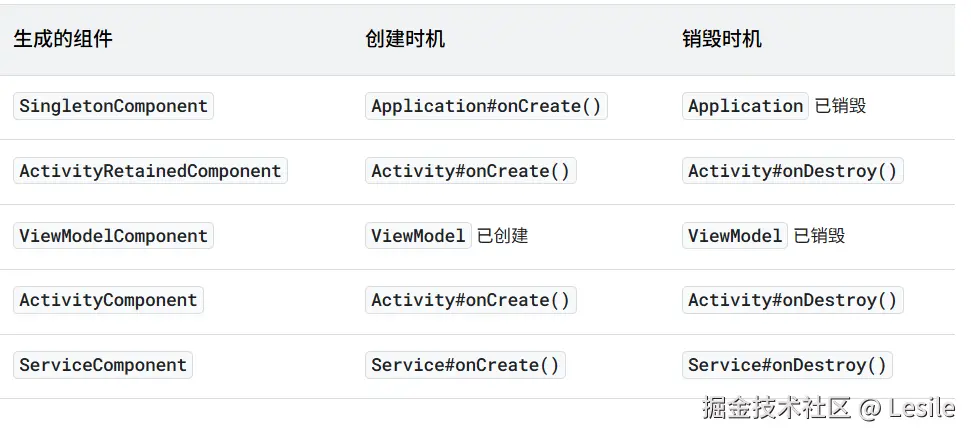
对比比较像的这三个:
| 组件 | 作用域注解 | 生命周期范围 |
|---|---|---|
| SingletonComponent | @Singleton | 整个 App 进程,App 彻底被杀才销毁 |
| ActivityRetainedComponent | @ActivityRetainedScoped | 依附 Activity,屏幕旋转不销毁,Activity finish 才销毁 |
| ActivityComponent | @ActivityScoped | 依附 Activity,屏幕旋转重建时直接销毁重建 |
层级关系: SingletonComponent(父) → ActivityRetainedComponent → ActivityComponent
- 子组件可以拿到父组件的实例(
Activity里可以注入全局Singleton的OkHttp); - 父组件绝对拿不到子组件的实例(全局
Singleton不能注入Activity级别的Service,编译报错)。
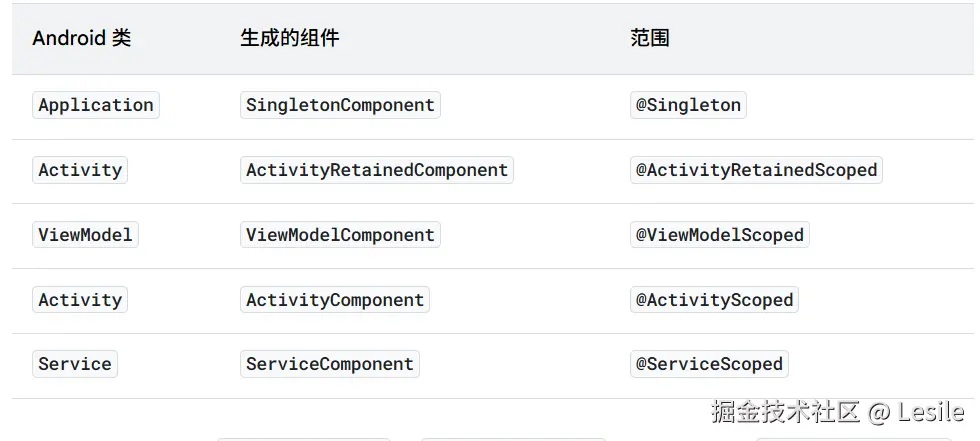
组件作用域 Scope
Scope作用于@Provides函数,在不同的Component中只能用固定的Scope注解。Scope注解必须和当前Module所属的Component层级匹配,不能跨上/下层组件Scope。
| Module 安装位置(InstallIn) | @Provides函数允许使用的Scope |
|---|---|
| SingletonComponent | 仅 @Singleton |
| ActivityRetainedComponent | 仅 @ActivityRetainedScoped |
| ActivityComponent | 仅 @ActivityScoped |
| FragmentComponent | 仅 @FragmentScoped |
注意,如果不在@Provides函数加上Component对应的注解,会在每次依赖注入时创建新的对象注入。一个@Provides只能加一个Scope注解,不能叠加。
每个注解对应的作用域
基本使用
Hilt使用整体分为四部分:
- Hilt Application类 :标记(
@HiltAndroidApp) - 被注入类/接口 :需要被容器注入的对象类型。(
@Inject@Binds) - 入口点 :不负责创建、但需要使用被注入类的地方,常见为Activity。(
@AndroidEntryPoint/@Inject) - Module容器 (可选):提供注入对象的方法,负责对象的创建及管理。(
@Module@InstallIn@Provides)
特别注意以上注解的包,特别是@Inject指javax库里的,其他都是dagger,导错包就太难受了:
kotlin
import dagger.hilt.android.HiltAndroidApp
import dagger.hilt.android.AndroidEntryPoint
import javax.inject.Inject
import dagger.Binds
import dagger.Module
import dagger.Provides
import dagger.hilt.InstallIn
import dagger.hilt.android.components.ActivityRetainedComponent
无注解构造函数注入
kotlin
无注解构造函数注入是最简单的应用方式,不需要要用`Module`管理被注入对象。

```kotlin
class DemoService @Inject constructor(private val demo: Demo) {

    fun getString(): String {
        return "我是DemoService"
    }
}

class Demo @Inject constructor() {}

@AndroidEntryPoint
class MainActivity : AppCompatActivity() {

    @Inject
    lateinit var service: DemoService

    private lateinit var textView: TextView

    override fun onCreate(savedInstanceState: Bundle?) {
        super.onCreate(savedInstanceState)
        enableEdgeToEdge()
        setContentView(R.layout.activity_main)
        textView = findViewById(R.id.hello_tv)
        ViewCompat.setOnApplyWindowInsetsListener(findViewById(R.id.main)) { v, insets ->
            val systemBars = insets.getInsets(WindowInsetsCompat.Type.systemBars())
            v.setPadding(systemBars.left, systemBars.top, systemBars.right, systemBars.bottom)
            insets
        }
        textView.text = service.getString()
    }
}DemoService被注入,它的构造函数及其被依赖的参数对象类型Demo的构造函数也必须被@Inject注解修饰,Hilt才能够正常注入使用。
- 如果被注入对象是一个接口对象呢?总不能叫Hilt自己写一个实现类提供给你吧。
- 如果被注入对象属于第三方库的类呢?给他的构造函数改写?但是不允许修改构造函数,该怎么实现注入呢?
@Binds 接口实例注入
接口实例注入必须要使用Module,入口点使用方法跟无注解构造函数注入方式一样,无特别要求。
kotlin
@Module
@InstallIn(ActivityRetainedComponent::class)
abstract class AppModule {
    @Binds
    abstract fun bindService(service: DemoServiceImpl): DemoService
}

interface DemoService {
    fun getString(): String
}

class DemoServiceImpl @Inject constructor() :DemoService {
    override fun getString(): String {
        return "I am DemoServiceImpl"
    }
}

@AndroidEntryPoint
class MainActivity : AppCompatActivity() {
    @Inject
    lateinit var service: DemoService
    private lateinit var textView: TextView
    override fun onCreate(savedInstanceState: Bundle?) {
        super.onCreate(savedInstanceState)
        enableEdgeToEdge()
        setContentView(R.layout.activity_main)
        textView = findViewById(R.id.hello_tv)
        ViewCompat.setOnApplyWindowInsetsListener(findViewById(R.id.main)) { v, insets ->
            val systemBars = insets.getInsets(WindowInsetsCompat.Type.systemBars())
            v.setPadding(systemBars.left, systemBars.top, systemBars.right, systemBars.bottom)
            insets
        }
        textView.text = service.getString()
    }
}
@Provider 第三方实例注入
@Provider就是专门用于解决第三方库的类对象无法通过改造构造函数,实现依赖注入的解决方案。使用思路和@Binds一样,只要你明确声明如何提供该类对象即可。
Application
kotlin
@HiltAndroidApp
class MyApp: Application() {
    override fun onCreate() {
        super.onCreate()
    }
}
Module容器
kotlin
@Module
@InstallIn(ActivityRetainedComponent::class)
class AppModule {
    @Provides
    fun providerService():DemoService {
        return DemoService()
    }
}
被注入类
kotlin
import javax.inject.Inject
class DemoService {
    fun getString(): String {
        return "我是DemoService"
    }
}
Activity
kotlin
@AndroidEntryPoint
class MainActivity : AppCompatActivity() {
    @Inject
    lateinit var service: DemoService
    private lateinit var textView: TextView
    override fun onCreate(savedInstanceState: Bundle?) {
        super.onCreate(savedInstanceState)
        enableEdgeToEdge()
        setContentView(R.layout.activity_main)
        textView = findViewById(R.id.hello_tv)
        ViewCompat.setOnApplyWindowInsetsListener(findViewById(R.id.main)) { v, insets ->
            val systemBars = insets.getInsets(WindowInsetsCompat.Type.systemBars())
            v.setPadding(systemBars.left, systemBars.top, systemBars.right, systemBars.bottom)
            insets
        }
        textView.text = service.getString()
    }
}在这里Activity虽然有service这个成员,但是并没有手动给实例化,却可以直接调用他的成员函数service.getString(),如果不是做了依赖注入,这个时候一定会报空指针FC了,甚至编译都可能不会通过。Activity把依赖对象外包了给Module管理,减轻了耦合。 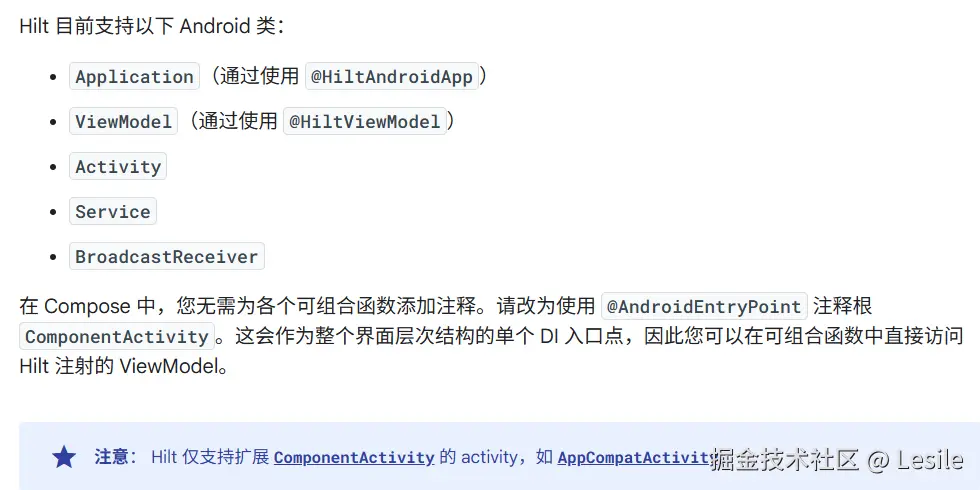 注意:
注意: 由 Hilt 注入的字段不能为私有字段。尝试使用 Hilt 注入私有字段会导致编译错误。确实如此。 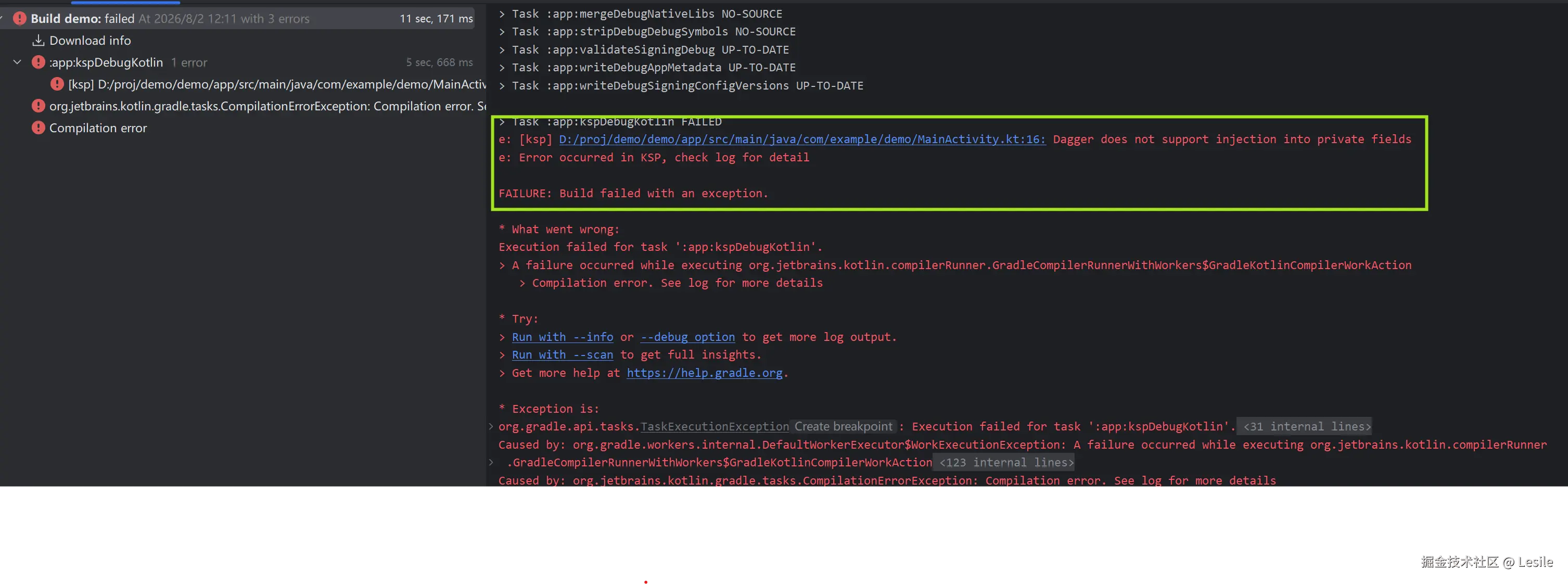
另外,Hilt不允许同一个Module既用@Provider也用@Binds分别提供接口对象、类对象,会报错:
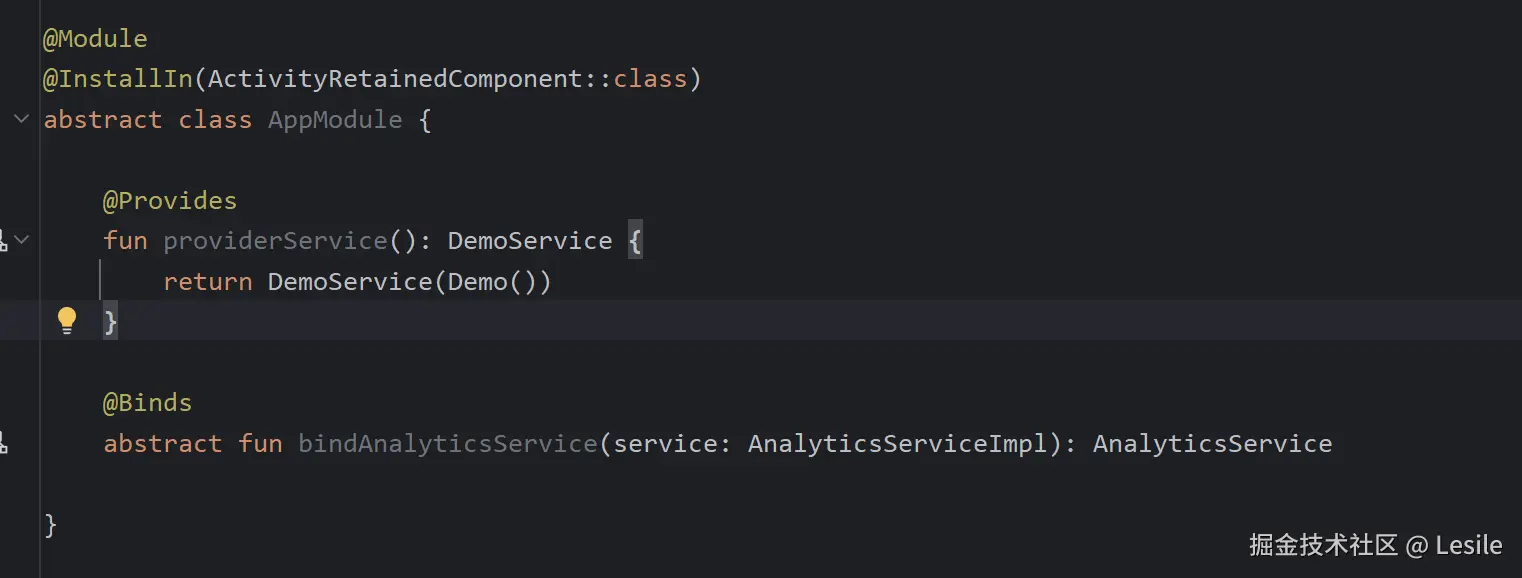
[ksp] ...AppModule.kt:13: A @Module may not contain both non-static and abstract binding methods
该类被声明为abstract就是因为注入接口对象必须使用抽象方法,但是Hilt的Mododule非静态方法和抽象方法不能共存,虽然语法层面抽象类可以拥有非抽象方法,语法静态检查能通过但是编译会出问题。一般实际场景都要将普通类注入和接口注入分离成不同的Module使用。
@Provider属于手动控制提供对象,只要在函数体内创建了对对象返回,被注入类这时不再需要自动构造注入@Inject constructor()。
单类多绑定
很多场景下,我们需要一个类多实例注入,这个时候多绑定注解@Qualifier就派上用场了。
核心用法 :先定义多个注解分别对应不同实例,再用该注解标记不同的@Provides函数,使用的时候也是用该注解标记不同的对象。
kotlin
@Qualifier
@Retention(AnnotationRetention.BINARY)
annotation class DemoA

@Qualifier
@Retention(AnnotationRetention.BINARY)
annotation class DemoB

@Module
@InstallIn(ActivityRetainedComponent::class)
class AppModule {
    @DemoA
    @Provides
    fun providerServiceA():DemoService {
        return DemoService("DemoServiceA")
    }
    @DemoB
    @Provides
    fun providerServiceB():DemoService {
        return DemoService("DemoServiceB")
    }
}

class DemoService (private val name:String) {
    fun getString(): String {
        return "我是 $name"
    }
}
kotlin
@AndroidEntryPoint
class MainActivity : AppCompatActivity() {

    @DemoA
    @Inject
    lateinit var service1: DemoService
    @DemoB
    @Inject
    lateinit var service2: DemoService

    private lateinit var textViewA: TextView
    private lateinit var textViewB: TextView

    override fun onCreate(savedInstanceState: Bundle?) {
        super.onCreate(savedInstanceState)
        enableEdgeToEdge()
        setContentView(R.layout.activity_main)
        textViewA = findViewById(R.id.helloA_tv)
        textViewB = findViewById(R.id.helloB_tv)
        ViewCompat.setOnApplyWindowInsetsListener(findViewById(R.id.main)) { v, insets ->
            val systemBars = insets.getInsets(WindowInsetsCompat.Type.systemBars())
            v.setPadding(systemBars.left, systemBars.top, systemBars.right, systemBars.bottom)
            insets
        }
        textViewA.text = service1.getString()
        textViewB.text = service2.getString()
    }
}
多绑定注解标记函数参数
假如同样需要靠依赖注入的Client类实例,它的参数有DemoService类,但是不同的Client需要不同的DemoService实例来构建,这个时候自定义注解依然可以使用在函数参数上。
kotlin
@Qualifier
@Retention(AnnotationRetention.BINARY)
annotation class DemoA

@Qualifier
@Retention(AnnotationRetention.BINARY)
annotation class DemoB

@Module
@InstallIn(ActivityRetainedComponent::class)
class AppModule {
    @DemoA
    @Provides
    fun providerServiceA():DemoService {
        return DemoService("DemoServiceA")
    }
    @DemoB
    @Provides
    fun providerServiceB():DemoService {
        return DemoService("DemoServiceB")
    }
    @Provides
    fun providerClient(@DemoA service: DemoService): Client {
        return Client(service)
    }
}

class Client(private val demo:DemoService){
    fun getString(): String {
        return "Client:"+demo.getString()
    }
}
预定义限定符
假如需要被依赖注入的AnalyticsAdapter对象,它本身需要一个Context作为构造函数参数,在@Provides函数里面需要构造这么一个对象返回那怎么把项目上下文给过去呢?
预定义的上下文注解:
@ApplicationContext:Application上下文。@ActivityContext:Activity上下文。
kotlin
class AnalyticsAdapter @Inject constructor(
    @ActivityContext private val context: Context,
    private val service: AnalyticsService
) { ... }
Scope 使用
kotlin
//Application级别单例
@Module
@InstallIn(SingletonComponent::class)
class AppModule {
    @Singleton
    @Provides
    fun providerService():DemoService {
        return DemoService("DemoServiceSingleton:")
    }
}


//ActivityRetain级别单例 旋转屏幕不会丢失
@Module
@InstallIn(ActivityRetainedComponent::class)
class ActivityModule {
    @ActivityRetainedScoped
    @Provides
    fun providerService():DemoService {
        return DemoService("DemoServiceActivityRetainedScoped:")
    }
}

//Activity级别单例 旋转屏幕会丢失
@Module
@InstallIn(ActivityComponent::class)
class ActivityModule {
    @ActivityScoped
    @Provides
    fun providerService():DemoService {
        return DemoService("DemoServiceActivityRetainedScoped:")
    }
}

class DemoService (private val name:String) {
    fun getString(): String {
        return "$name=${hashCode()}"
    }
}MainActivity使用依赖注入demoService,打印hashcode,就算在同一个MainActivity中,会发现Activity策略hascode在旋转屏幕时会变化、ActivityRetained策略就不会。
另外写一个SecondActivity由MainActivity启动的话,会发现前后Singleton策略测试结果hashCode保持一致,而ActivityRetained策略的hashCode在不同的Activity跳转时会变化。
旋转屏幕时ActivityRetainedComponent比较ActivityComponent,类似加了一个ViewModel临时缓存页面数据;SingletonComponent相比ActivityRetainedComponent,就是全局单例的形式。当然,如果SingletonComponent中删掉@Singleton,那么前后两个页面就会创建不同实例,就会和ActivityRetainedComponent行为一致了。