一、Props 是什么?
想象一下,你正在组装一个乐高机器人。机器人的头部、手臂、腿部都是独立的组件。为了让手臂知道它应该连接在身体的哪个位置,你需要给它一个"连接点"的指令。在 Vue3 中,Props 就是这个"指令",它是父组件向子组件传递数据的一种方式。
简单来说:Props 是组件的自定义属性,父组件通过它来给子组件"喂"数据。
二、Props 的核心作用
Props 主要解决组件间的通信问题,具体作用如下:
- 数据传递:父组件可以把数据(字符串、数字、数组、对象等)传递给子组件。
- 配置组件:通过传递不同的 Props 值,可以让同一个子组件呈现不同的状态或行为,实现复用。
- 单向数据流:数据只能从父组件流向子组件,这保证了数据变化的可预测性,便于调试。
- 类型检查 :Vue3 的 Composition API 和 `
<script setup>` 语法支持对 Props 进行类型定义,提升代码健壮性。
三、Props 的属性(Props 选项)
在 Vue3 中,定义 Props 时可以配置多种属性来约束和描述数据。以下是常用的 Props 属性:
- type :指定 Prop 的数据类型,如
String、Number、Boolean、Array、Object、Date、Function、Symbol,或自定义构造函数。 - required:布尔值,表示该 Prop 是否为必传项。
- default:指定 Prop 的默认值。可以是固定值,也可以是一个返回默认值的函数。
- validator:自定义验证函数,用于校验传入的 Prop 值是否有效。
四、如何接受和使用 Props(代码案例)
1. 使用 `<script setup>` 语法(推荐)
这是 Vue3 组合式 API 中最简洁的写法。
提示:带有define开头的都是宏声明属性,不需要引入
html
<!-- 子组件 ChildComponent.vue -->
<template>
  <div>
    <h3>子组件</h3>
    <p>接收到的标题:{{ title }}</p>
    <p>接收到的数量:{{ count }}</p>
    <p>用户信息:{{ user.name }} ({{ user.age }}岁)</p>
    <ul>
      <li v-for="item in items" :key="item">{{ item }}</li>
    </ul>
  </div>
</template>

<script setup>
// 使用 defineProps 宏来声明 Props
const props = defineProps({
  // 类型 + 必填
  title: {
    type: String,
    required: true
  },
  // 类型 + 默认值
  count: {
    type: Number,
    default: 0
  },
  // 对象类型 + 默认值函数
  user: {
    type: Object,
    default: () => ({ name: '匿名', age: 18 })
  },
  // 数组类型
  items: {
    type: Array,
    default: () => []
  },
  // 自定义验证器
  score: {
    type: Number,
    validator: (value) => {
      return value >= 0 && value <= 100;
    }
  }
});

// 在模板或逻辑中直接使用 props.title, props.count 等
console.log(props.title);
</script>
html
<!-- 父组件 ParentComponent.vue -->
<template>
  <div>
    <h2>父组件</h2>
    <ChildComponent
      title="用户列表"
      :count="userCount"
      :user="currentUser"
      :items="todoList"
      :score="85"
    />
  </div>
</template>

<script setup>
import { ref } from 'vue';
import ChildComponent from './ChildComponent.vue';

const userCount = ref(5);
const currentUser = ref({ name: '张三', age: 25 });
const todoList = ref(['学习 Vue', '写代码', '阅读文档']);
</script>
补充:数组形式的 defineProps
除了使用对象形式 定义 Props 外,defineProps 也支持简单的数组形式。
defineProps 是有返回值的
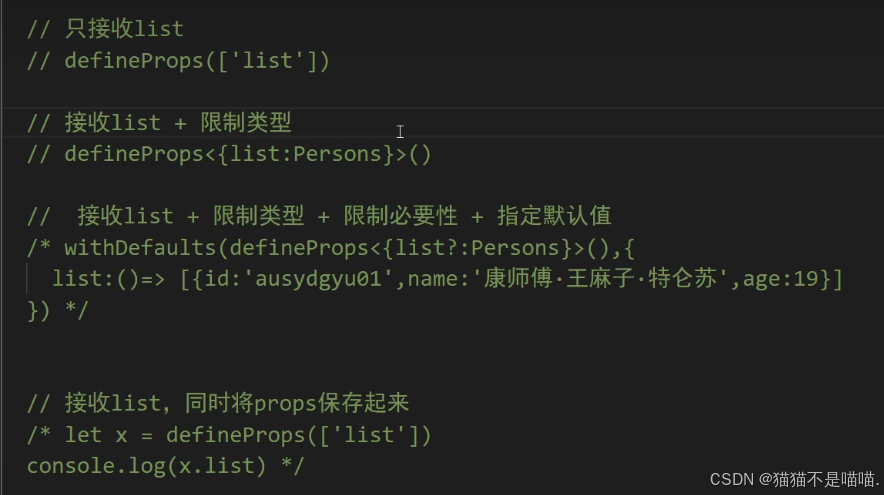
javascript
<script setup>
// 数组形式:仅声明属性名,所有属性类型默认为任意类型
const props = defineProps(['title', 'count', 'user']);

// 在模板中可以直接使用
console.log(props.title); // 来自父组件传递的值
console.log(props.count);
</script>- 推荐做法: 在正式项目中,为了更好的代码健壮性和开发体验,建议使用对象形式(如上方示例)或 TypeScript 泛型形式来定义 Props,以便获得完整的类型检查和 IDE 提示。
2. 使用 TypeScript 与类型标注
结合 TypeScript 可以获得更完善的类型提示和检查。
typescript
<!-- 子组件 ChildComponent.vue -->
<template>
  <!-- 同上 -->
</template>

<script setup lang="ts">
interface User {
  name: string;
  age: number;
}

// 使用接口定义 Props 类型
interface Props {
  title: string;
  count?: number; // 可选
  user: User;
  items: string[];
  score?: number;
}

// 使用泛型 defineProps
const props = defineProps<Props>();

// 或者提供默认值(需要 withDefaults 辅助函数)
const propsWithDefaults = withDefaults(defineProps<Props>(), {
  count: 0,
  user: () => ({ name: '匿名', age: 18 }),
  items: () => [],
});
</script>
3. 使用选项式 API
这是 Vue2 风格的写法,在 Vue3 中仍然兼容。
javascript
<!-- 子组件 ChildComponent.vue -->
<template>
  <!-- 同上 -->
</template>

<script>
export default {
  name: 'ChildComponent',
  // 在 props 选项中声明
  props: {
    title: {
      type: String,
      required: true
    },
    count: {
      type: Number,
      default: 0
    },
    user: {
      type: Object,
      default: () => ({ name: '匿名', age: 18 })
    },
    items: {
      type: Array,
      default: () => []
    },
    score: {
      type: Number,
      validator: function(value) {
        return value >= 0 && value <= 100;
      }
    }
  },
  setup(props) {
    // 在 setup 函数中访问 props
    console.log(props.title);
    return {};
  }
}
</script>
五、使用 Props 的注意事项
- 单向数据流 :不要在子组件内部直接修改 Props(Vue 会警告)。如果需要修改,应该在子组件内定义一个新的响应式数据(如使用
ref或computed)来接收 Prop 的初始值。 - Prop 命名 :在 JavaScript 中使用 camelCase(如
userName),在模板中建议使用 kebab-case(如user-name)。 - 动态与静态传递 :使用
:绑定是动态传递(响应式),不使用:是静态字符串传递。 - 复杂对象默认值 :对象或数组的
default必须是一个工厂函数返回新对象,避免多个组件实例共享同一引用。